
Insight Blog
Agility’s perspectives on transforming the employee's experience throughout remote transformation using connected enterprise tools.
37 minutes reading time
(7381 words)
Best AI Video Generators in 2026: Which Ones Are Worth Paying For?

Best AI Video Generators in 2026: Which Ones Are Worth Paying For?
Compare the best AI video generators in 2026. Discover the top AI video creation tools for marketing, business, and creators based on quality, features, pricing, and value.
Best AI Video Generators in 2026: Which Ones Are Worth Paying For?

Over the past year, AI video generation has evolved from producing short, experimental clips into creating realistic, high-quality videos complete with synchronized audio, natural camera movement, and consistent characters.
However, not every Best AI video generator delivers the same results.
Some excel at cinematic storytelling, while others are better suited for marketing videos, social media content, product demonstrations, or employee training.
Choosing the wrong platform can lead to wasted subscriptions, poor-quality output, and hours spent recreating videos that never meet expectations.
In this guide, we've tested today's leading AI video generators using identical prompts, image-to-video and text-to-video workflows, multiple render attempts, editing tools, export quality, and commercial usability.
You'll discover which platforms consistently produce the most realistic videos, which offer the best value for money, and which are best suited for businesses, content creators, and marketers.
Whether you're looking for an AI video generator with audio, a text-to-video AI tool, or the best AI video software for professional content creation, this comparison will help you make an informed decision.
With the AI video market projected to exceed $14.8 billion by 2030, driven by rapid adoption across marketing, education, and enterprise communications, choosing the right platform today could give you a significant competitive advantage.
$14.8B
Projected Market by 2030
The global AI video generation market is projected to exceed $14.8 billion by 2030, driven by growing adoption across marketing, education, enterprise communications, and content creation. Businesses investing in the right AI video platform today are better positioned to reduce production costs, accelerate content creation, and gain a competitive advantage.
Source: Grand View Research (AI Video Generator Market Forecast)
Rather than relying on feature lists or marketing claims, we've evaluated each tool using the same real-world scenarios so you can confidently select the solution that delivers the quality, workflow, and return on investment your projects demand.
By the end of this article, you'll know exactly which AI video generator is worth your budget, which tools to avoid for specific use cases, and how to choose the platform that best fits your content strategy before you invest your time or money.
Key Takeaways
- The best AI video generators can now produce realistic videos with natural camera movement, synchronized audio, and high-quality visuals in just a few minutes, making them suitable for business, marketing, and creative projects.
- Choosing the right AI video platform depends on your specific needs, whether that's cinematic storytelling, social media content, product demonstrations, employee training, or advanced editing workflows.
- When comparing AI video creation tools, look beyond features and evaluate prompt accuracy, visual consistency, editing capabilities, rendering speed, commercial licensing, and overall value for money.
- Platforms such as Google Veo 3.1, Getimg.ai, Runway, Kling 3.0, Seedance 2, Gemini Omni, Luma Ray3, and PixVerse 5.5 each excel in different areas, so no single solution is best for every workflow.
- As AI video technology continues to evolve, businesses adopting these tools today can reduce production costs, create content faster, and scale video creation without relying solely on traditional production teams.
Choosing the Right AI Video Generator Isn't as Easy as It Looks
Choosing the Right AI Video Generator Isn't as Easy as It Looks
The number of AI video generators has exploded over the last year, making it harder than ever to know which platform is genuinely worth your investment.
While many tools promise realistic videos, fast rendering, and cinematic quality, the actual results can vary significantly depending on the model, prompt accuracy, editing capabilities, and whether features like native audio or commercial licensing are included.
Another challenge is that many platforms are built for different audiences.
Some excel at creating short social media clips, while others are designed for marketing campaigns, product demonstrations, training videos, or creative filmmaking. Pricing models, credit systems, and video quality also differ widely, making comparisons difficult.
That's why we've tested each AI video generator using consistent criteria, so you can quickly identify which platform delivers the best results for your specific needs without wasting time or money on the wrong tool.
Ask AI to Compare AI Video Generators
Use these AI tools to compare the AI video generators featured in this guide, find the best AI video generator for your workflow, compare video quality, pricing, editing capabilities, native audio support, and discover which platform is best for marketing, business, filmmaking, or social media content creation.


How We Tested the Best AI Video Generators for Business, Marketing, and Content Creation
To identify the best AI video generator for different use cases, we tested every platform using the same evaluation process rather than relying on marketing claims or feature lists.
Each AI video generator was assessed using identical text prompts and image-to-video scenarios to ensure a fair comparison across all tools.
Our testing focused on the areas that matter most to businesses, marketers, and content creators, including video realism, prompt accuracy, character and motion consistency, camera movement, native audio generation, rendering speed, editing flexibility, pricing, commercial licensing, and overall ease of use.
We also evaluated how well each platform handled longer scenes, multiple generations of the same prompt, and whether the final output was suitable for professional use.
The comparison below provides an objective overview of each platform's strengths and weaknesses, helping you choose the best AI video generator for marketing, social media, training videos, or business content based on your specific requirements rather than hype.
Our Pick: Best AI Video Generators at a Glance Compared
The table below provides a quick side-by-side comparison of the best AI video generators that we picked available today.
We've highlighted what each platform does best, whether it supports native audio generation, and its overall rating based on our hands-on testing.
If you're short on time, this overview will help you quickly narrow down the right AI video generator before diving into the detailed reviews of each tool.
| Tool | Best For | Audio | Overall Rating |
| Getimg.ai | Access to multiple premium video models | Model Dependent | ⭐⭐⭐⭐⭐ |
| Google Veo 3.1 | Most realistic videos | ✅ | ⭐⭐⭐⭐⭐ |
| Seedance 2 | Cinematic storytelling | ✅ | ⭐⭐⭐⭐½ |
| Kling 3.0 | Affordable professional videos | ✅ | ⭐⭐⭐⭐½ |
| Gemini Omni | Editing and multi-shot workflows | ✅ | ⭐⭐⭐⭐ |
| Runway | Creative production workflows | ❌ | ⭐⭐⭐⭐ |
| Luma Ray3 | Artistic visuals | ❌ | ⭐⭐⭐⭐ |
| PixVerse 5.5 | Social media clips | ✅ | ⭐⭐⭐⭐ |
| Magic Hour | Image-to-Video Tool | ✅ | ⭐⭐⭐⭐⭐ |
#1. Getimg.ai: Best AI Video Generator for Accessing Multiple Premium Video Models
#1. Getimg.ai: Best AI Video Generator for Accessing Multiple Premium Video Models
⭐⭐⭐⭐⭐ 4.8/5
Pros
- Access leading AI video models from one subscription
- No need to manage multiple accounts
- Excellent value for businesses
- Supports both text-to-video and image-to-video
- Simple, beginner-friendly interface
Cons
- Audio support depends on the selected model
- Advanced editing features vary between models
Our Expert Take
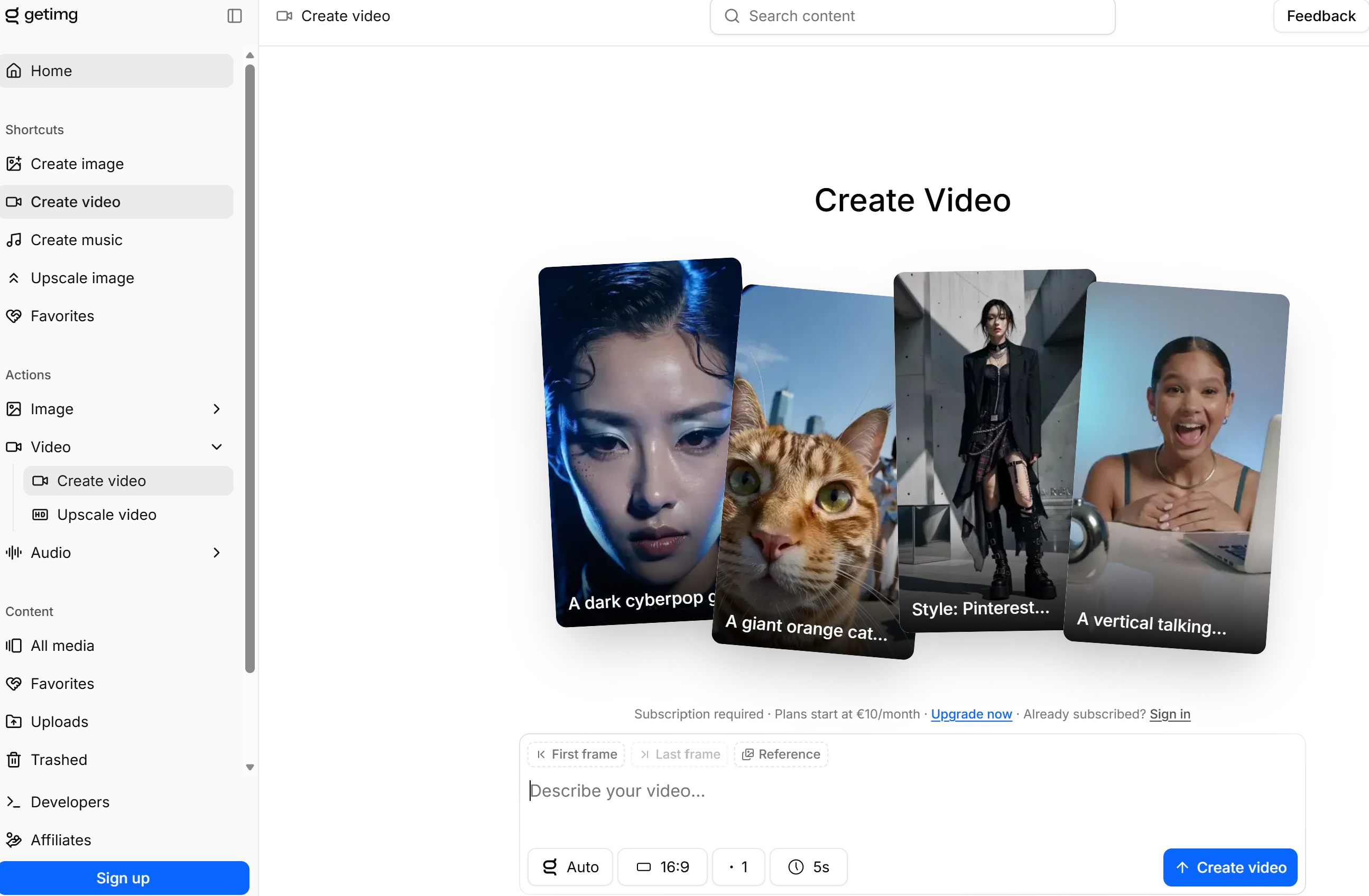
If your goal is to experiment with multiple AI video generators without paying for several subscriptions, Getimg.ai is one of the smartest choices available today. Instead of building its own video model, it gives users access to several of the industry's leading AI models through a single interface, making it ideal for comparing outputs and selecting the right tool for each project.
During our testing, Getimg.ai consistently produced high-quality results while making it easy to switch between different models depending on whether we wanted realistic business videos, cinematic scenes, or social media content. The platform is especially valuable for marketing teams, agencies, and creators who regularly test new AI technologies.
Although native audio depends on the model you select, Getimg.ai remains one of the best all-in-one platforms for businesses looking to future-proof their AI video workflow.
#2. Google Veo 3.1: Best AI Video Generator for Realistic Videos with Native Audio
⭐⭐⭐⭐⭐ 9.8/10
Pros- Produces exceptionally realistic, cinematic video quality
- Native audio generation with synchronized dialogue and ambient sound
- Excellent prompt understanding and scene consistency
- Natural human movement and facial expressions
- Ideal for marketing, storytelling, and commercial content
- Access is currently more limited than many competitors
- Premium pricing compared to entry-level AI video tools
- Longer rendering times for complex prompts
If your priority is creating the most realistic AI-generated videos available today, Google Veo 3.1 is currently the benchmark.
During our testing, it consistently produced videos with impressive lighting, believable physics, smooth camera movement, and remarkably natural human motion. Unlike many competing AI video generators, Veo 3.1 also generates synchronized audio, including dialogue, sound effects, and environmental ambience, resulting in videos that require far less post-production.
Where Veo really stands out is its understanding of complex prompts.
Whether generating cinematic landscapes, product advertisements, training content, or short narrative scenes, it maintained visual consistency and accurately followed detailed instructions. For businesses looking to create premium marketing videos, product demonstrations, or branded content, it's one of the strongest options currently available.
While access remains more restricted than platforms like Getimg.ai or Runway, the overall quality makes Google Veo 3.1 one of the best AI video generators for professionals who want realistic results with minimal editing.
#3. Seedance 2: Best AI Video Generator for Cinematic Storytelling and Professional Camera Movement
⭐⭐⭐⭐⭐ 9.5/10
Pros- Exceptional cinematic camera movement and scene composition
- Produces smooth, natural motion with realistic physics
- Native audio generation for immersive videos
- Strong prompt adherence, even with complex storytelling
- Excellent for short films, advertisements, and branded content
- Fewer editing tools than some competitors
- Can take longer to render highly detailed scenes
- Premium features may require a paid subscription
If your goal is to create videos that look as though they were shot by a professional filmmaker, Seedance 2 is one of the most impressive AI video generators available today.
During our testing, it consistently delivered fluid camera movements, cinematic lighting, and believable scene transitions that gave videos a polished, high-end appearance.
What sets Seedance 2 apart is its ability to understand storytelling. Rather than simply generating individual clips, it creates scenes with depth, perspective, and motion that feel intentional.
Native audio support is another major advantage, allowing dialogue, environmental sounds, and background ambience to be generated alongside the visuals, reducing the need for external editing tools.
While it may not offer as many workflow features as platforms like Runway, the quality of its visual output makes Seedance 2 an outstanding choice for marketers, creative agencies, filmmakers, and businesses looking to produce premium video content with minimal effort.
#4. Kling 3.0: Best AI Video Generator for Affordable, High-Quality Video Creation
⭐⭐⭐⭐⭐ 9.4/10
Pros- Excellent balance of quality and affordability
- Native audio support for more complete video generation
- Strong prompt accuracy with realistic character movement
- Good control over camera angles and scene composition
- Suitable for both beginners and experienced creators
- Rendering can slow during peak usage
- Advanced editing features are more limited than Runway
- Occasional inconsistencies in complex multi-character scenes
Kling 3.0 has quickly become one of the most popular AI video generators because it delivers an impressive combination of quality, control, and value. During our testing, it consistently produced realistic videos with smooth motion, believable character animations, and accurate prompt interpretation, all at a lower cost than many premium competitors.
One of Kling's biggest strengths is its flexibility. Whether creating marketing videos, product showcases, social media content, or promotional clips, it generates polished results without requiring extensive prompt engineering. Native audio support is another welcome addition, allowing creators to produce complete videos with synchronized sound directly from a single workflow.
While platforms like Google Veo 3.1 may produce slightly more cinematic results, Kling 3.0 offers one of the best price-to-performance ratios on the market.
For businesses, agencies, and creators looking for professional-quality AI videos without paying premium enterprise pricing, Kling 3.0 is an outstanding choice and comfortably earns its place among the best AI video generators in 2026.
#5. Gemini Omni: Best AI Video Platform for Multi-Scene Editing and AI-Powered Video Workflows
⭐⭐⭐⭐⭐ 9.3/10
Pros- Excellent multi-shot editing capabilities
- Generates and refines scenes without starting over
- Native audio support for complete productions
- Strong integration across Google's AI ecosystem
- Great for iterative content creation and revisions
- Some advanced features are still evolving
- Less cinematic than dedicated video generation models
- Can require multiple prompts for highly creative scenes
Unlike most AI video creation tools, Gemini Omni focuses less on generating a single perfect clip and more on helping creators build complete video projects through an intelligent editing workflow. Rather than regenerating an entire sequence every time you want to make a change,
Gemini Omni allows you to refine individual scenes, adjust camera angles, rewrite prompts, and improve continuity throughout a project.
During our evaluation, this approach made a noticeable difference when producing longer marketing videos, explainer content, and product demonstrations.
Instead of losing previous work, edits felt more like collaborating with an experienced video editor than starting from scratch. Native audio generation also helps streamline production by creating dialogue and environmental sounds alongside the visuals.
Although creators seeking highly cinematic outputs may still prefer dedicated generation models like Google Veo or Seedance, Gemini Omni shines as an AI-powered video editor for teams that expect to revise content frequently.
Marketing departments, corporate communications teams, and businesses producing training materials will appreciate its flexible workflow and time-saving editing capabilities.
#6.Runway: Best AI Filmmaking Tool for Advanced Camera Controls and Creative Video Production
⭐⭐⭐⭐⭐ 9.2/10
Pros- Industry-leading camera movement and motion controls
- Extensive creative editing and post-production tools
- Powerful image animation and video transformation features
- Supports professional production workflows
- Regularly introduces new AI-powered creative features
- Does not generate native audio
- Steeper learning curve for new users
- Premium features require higher-tier subscriptions
Runway has established itself as one of the most capable platforms for creators who want precise control over how their videos look and move.
Rather than focusing solely on prompt-based generation, Runway offers a comprehensive creative workspace where users can animate still images, direct virtual camera movements, remove objects, extend scenes, and enhance footage using AI-assisted editing tools.
During testing, Runway impressed us with its flexibility. The platform excels when projects require multiple revisions, visual effects, or custom camera paths that go beyond what most text-to-video platforms currently offer.
This makes it particularly valuable for filmmakers, designers, advertising agencies, and production teams looking to blend traditional editing techniques with AI-assisted workflows.
The biggest limitation is the lack of built-in audio generation, meaning you'll need to create or source sound separately.
However, if creative control, visual refinement, and professional editing are higher priorities than one-click video creation, Runway remains one of the most complete AI filmmaking platforms currently available.
#7.Luma Ray3: Best Generative Video Model for Artistic Visuals and Atmospheric Storytelling
⭐⭐⭐⭐☆ 9.0/10
Pros- Creates visually striking, cinematic scenes
- Excellent lighting, depth, and environmental effects
- Strong performance with fantasy, sci-fi, and concept visuals
- Generates smooth motion with natural camera transitions
- Ideal for creative storytelling and mood-driven content
- No built-in audio generation
- Less suited to corporate or instructional videos
- Character consistency can vary across longer sequences
If visual style matters more than technical precision, Luma Ray3 is one of the most impressive generative video models currently available.
Rather than focusing on business presentations or product demonstrations, Ray3 excels at producing atmospheric scenes with dramatic lighting, realistic depth, and cinematic composition that often feel closer to concept art than traditional AI-generated footage.
During our testing, the platform consistently produced visually engaging environments, making it particularly effective for promotional teasers, brand storytelling, entertainment projects, and creative advertising.
Landscapes, fantasy scenes, futuristic environments, and emotional visual sequences were among its strongest outputs, with smooth motion adding to the overall cinematic feel.
While businesses looking for training videos or polished corporate explainers may prefer more structured platforms, creative professionals will appreciate Ray3's ability to generate distinctive visuals that stand out from the increasingly similar content produced by many competing tools.
It is designed for creators who value artistic direction and visual atmosphere over extensive editing controls or enterprise workflows.
#8. PixVerse 5.5: Best AI Content Creator for Short-Form Videos and Social Media Campaigns
⭐⭐⭐⭐☆ 8.9/10
Pros- Optimised for TikTok, Instagram Reels, and YouTube Shorts
- Fast generation times for rapid content production
- Includes native audio support
- Beginner-friendly interface with ready-made templates
- Ideal for producing high volumes of social content
- Less control over advanced scene composition
- Best suited to shorter videos rather than long-form productions
- Limited editing tools compared to professional platforms
If your primary goal is publishing engaging content across social platforms, PixVerse 5.5 is one of the fastest and easiest solutions available. Instead of targeting filmmakers or production studios, PixVerse is designed for creators who need to generate eye-catching videos quickly without spending hours refining prompts or editing timelines.
Throughout our evaluation, PixVerse consistently produced short, engaging clips suitable for product promotions, trending videos, brand awareness campaigns, and social advertising.
Its streamlined workflow makes it particularly appealing for businesses managing multiple social channels, where speed often matters just as much as visual quality. Built-in audio support also helps reduce post-production work, allowing videos to be published sooner.
Although it lacks some of the advanced creative controls offered by enterprise-grade platforms, PixVerse delivers exactly what many businesses need: a reliable way to produce attention-grabbing short-form content at scale.
For organisations focused on audience engagement rather than cinematic storytelling, it's an efficient addition to any digital marketing toolkit.
9#/ Magic Hour: Best AI Image-to-Video Tool for Fast Photo Animation
⭐⭐⭐⭐⭐ 9.0/10
Pros
- Simple workflow for turning photos into videos
- Realistic motion and animation from static images
- Useful for social media, marketing, and product content
- Browser-based and beginner-friendly
- Includes additional AI creative tools such as face swap and lip sync
Cons
- Results can vary depending on the quality of the source image
- Advanced usage requires AI credits
- Less suited to detailed, professional timeline-based video editing
Our Expert Take
Magic Hour is a strong option for creators who want to turn static images into engaging video content without learning complicated editing software.
Its photo to video AI workflow focuses on making image animation accessible. Instead of manually creating keyframes or building camera movements from scratch, users can start with a still image and use AI to generate dynamic motion.
During use, Magic Hour is particularly useful for social media creators, marketers, ecommerce businesses, and agencies that need to produce multiple short-form videos from existing visual assets. A product photograph, portrait, illustration, or campaign image can become a more engaging video asset without requiring a traditional production workflow.
The platform also goes beyond image-to-video generation, offering tools for face swapping, lip synchronization, talking photos, and character replacement. This makes it useful when a project requires several different AI-powered video effects in one workflow.
The main limitation is that it is not intended to replace a full professional video editor. Users looking for detailed timeline editing, advanced compositing, or extensive post-production controls may still need dedicated editing software.
However, if your priority is quickly transforming static photos into engaging video content, Magic Hour is a practical and accessible AI video creation platform.
Important Considerations Before Using an AI Video Generation Platform
Modern AI video generation platforms can dramatically reduce the time it takes to produce marketing videos, training materials, and social media content.
However, they also introduce legal, ethical, and quality challenges that businesses and creators should understand before publishing AI-generated content.
One of the biggest concerns is the growing misuse of AI to create convincing deepfakes, misleading videos, or what many refer to as "AI slop"—low-quality content generated in large volumes with little human oversight.
Although most AI video creation tools include safeguards designed to prevent harmful or illegal content, these protections are not foolproof and can sometimes be bypassed. A deepfake video detector can provide an additional layer of verification when assessing whether a video has been manipulated or synthetically generated." after Although most AI video creation tools include safeguards designed to prevent harmful or illegal content, these protections are not foolproof and can sometimes be bypassed.
If you're using reference images, uploading photos of real people, or including recognisable brands, logos, or copyrighted material in your prompts, you should ensure you have the appropriate rights and permissions.
Failing to do so could expose you to copyright claims, trademark disputes, privacy issues, or restrictions on how your generated content can be used commercially.
Best Practices for Responsible AI Video Creation
To reduce legal and reputational risks when using generative AI video software, follow these practical guidelines:
- Obtain permission before using someone's image, voice, or likeness.
- Avoid incorporating copyrighted material, trademarks, or company logos unless you have permission.
- Verify that your chosen platform grants commercial usage rights for generated content.
- Review every generated video carefully before publishing to check for factual errors, visual inconsistencies, or unintended content.
- Be transparent when appropriate by disclosing that AI assisted in creating the content, particularly in commercial, educational, or public-facing projects.
Ultimately, AI should enhance your creative process—not replace responsible decision-making. If a video could mislead viewers, infringe on someone else's rights, or damage your brand's credibility, it's better to revise it or avoid publishing it altogether.
Factors to Consider Before Choosing an AI Video Generator
With so many AI video platforms now available, it's easy to focus on flashy features and overlook the capabilities that actually affect the quality of your videos.
Whether you're creating marketing campaigns, social media content, product demonstrations, or training materials, these are the most important factors to evaluate before choosing a platform.
- Prompt Accuracy - The quality of your videos starts with how well the platform understands your instructions. The best AI video generators should accurately interpret detailed prompts and consistently produce scenes that match your intended style, camera movement, characters, and setting. While writing clear prompts certainly helps, a capable model shouldn't require constant rewrites to achieve good results.
- Output Quality and Realism - Even today's most advanced AI models can occasionally produce visual errors, often referred to as AI hallucinations. These may include unnatural movements, distorted objects, inconsistent characters, or scenes that ignore basic physics. Although no platform is completely immune, the strongest video generation models minimise these issues and generate footage that looks natural, believable, and production-ready.
- Editing Flexibility - Generating a video is only the beginning. Being able to modify scenes, replace objects, extend clips, adjust camera angles, or refine individual shots without regenerating the entire video can save considerable time. Platforms with built-in editing capabilities generally provide a far more efficient workflow than those that rely solely on prompt regeneration.
- Creative Capabilities - Some AI tools are designed for quick social media clips, while others excel at cinematic storytelling, advertising, or visual concept development. If creativity is important to your workflow, look for a platform that supports different artistic styles, realistic camera movements, and the ability to build upon reference images or existing scenes.
- Generation Speed - Rendering times vary depending on the complexity of the scene and the underlying AI model. Most modern platforms generate videos within two to five minutes, although more advanced models may take longer to deliver higher-quality output. In many cases, waiting a little longer is worthwhile if the final video requires fewer revisions.
- Privacy, Licensing and Commercial Rights - Finally, don't overlook the platform's terms of service. Before uploading images, creating client work, or publishing AI-generated content, review how your prompts and assets are stored, whether they are used to improve future AI models, and what ownership rights you retain. Commercial licensing, data privacy, and usage policies differ between providers, making this one of the most important considerations for businesses and professional creators.
Which AI Video Generator Is Right for You?
After testing the leading AI video platforms, it became clear that there isn't a single solution that's perfect for every user. Some tools excel at creating photorealistic videos, while others prioritise editing flexibility, affordability, or short-form content.
The right choice ultimately depends on your goals, budget, and the type of videos you create most often.
Here's our recommendation based on common use cases.
Best Overall: Google Veo 3.1
If you're looking for the highest-quality AI-generated videos available today, Google Veo 3.1 is our top recommendation.
It delivers outstanding visual realism, natural motion, cinematic camera work, and native audio generation, making it suitable for everything from commercial marketing campaigns to product demonstrations and branded storytelling.
We recommend it for: Businesses, agencies, professional creators, and premium marketing content.
Best for Marketing Teams: Getimg.ai
Marketing teams often need flexibility more than anything else. Getimg.ai provides access to multiple leading video models from a single platform, making it easy to experiment with different styles without maintaining several subscriptions. It's an excellent choice for producing advertisements, product launches, promotional videos, and campaign assets.
Recommended for: Marketing departments, digital agencies, and growing businesses.
Best for Content Creators: Runway
For creators who enjoy refining their work, Runway offers one of the most complete AI-assisted production environments available.
Its advanced editing tools, camera controls, and visual effects make it ideal for YouTube creators, designers, filmmakers, and anyone who wants greater creative control throughout the production process.
We recommend it for: YouTubers, filmmakers, designers, and creative professionals.
Best for Small Businesses: Kling 3.0
Small businesses need a platform that's easy to use, produces reliable results, and doesn't require an enterprise budget.
Kling 3.0 delivers an excellent balance of quality, affordability, and ease of use, making it well suited to creating promotional videos, customer updates, and marketing content without a steep learning curve.
We recommend it for: Small businesses, startups, consultants, and local brands.
Best Value: Seedance 2
If your priority is producing cinematic-quality videos without paying the highest premium, Seedance 2 offers outstanding value.
It generates impressive visuals, smooth camera movement, and native audio while remaining competitively priced compared to several premium alternatives.
We recommend it for: Businesses seeking premium-quality output at a competitive price.
Best Enterprise Choice: Gemini Omni
Large organisations typically produce videos that require multiple reviews, revisions, and stakeholder approvals.
Gemini Omni stands out with its collaborative editing workflow, scene refinement capabilities, and seamless integration into Google's AI ecosystem, making it particularly attractive for enterprise content production.
We recommend it for: Large organisations, corporate communications, HR teams, and enterprise marketing.
Best for Social Media Videos: PixVerse 5.5
When speed matters more than long-form production, PixVerse 5.5 is the clear winner.
It generates engaging short-form videos quickly and is optimised for platforms such as TikTok, Instagram Reels, Facebook Reels, and YouTube Shorts. Its simple interface also makes it accessible to teams with little video editing experience.
We recommend it for: Social media managers, influencers, ecommerce brands, and content marketing teams.
Our Final Recommendation
If budget isn't a concern, Google Veo 3.1 currently delivers the most realistic AI-generated videos available.
However, there are excellent alternatives depending on your workflow.
Getimg.ai offers the greatest flexibility by providing access to multiple leading models, Runway is ideal for creators who need advanced editing tools, Kling 3.0 delivers exceptional value for small businesses, while PixVerse 5.5 remains one of the easiest ways to produce high-quality short-form social media content.
Rather than choosing the platform with the longest feature list, focus on the one that best matches the type of videos you create most often. That approach will deliver a better return on investment and a far more efficient content production workflow.
What Makes a Good AI Video Generator? Key Features to Look for Before You Choose
With dozens of new platforms launching every year, choosing the best AI video generator for business, marketing, or content creation is becoming increasingly difficult.
While many tools advertise similar capabilities, the quality of the output, editing experience, and commercial value can vary dramatically.
Whether you're producing marketing campaigns, employee training videos, product demonstrations, or social media content, here are the features that separate an average AI video platform from one that's worth paying for.
- Prompt Accuracy - A high-quality text-to-video AI generator should understand detailed prompts without requiring constant rewrites. The more accurately a platform interprets your instructions, the less time you'll spend refining prompts and regenerating videos. Strong prompt adherence is especially important when creating branded content or scenes with specific visual requirements.
- Character Consistency - Maintaining consistent characters across multiple scenes remains one of the biggest challenges in AI video generation. The best platforms preserve facial features, clothing, lighting, and expressions throughout a sequence, making them suitable for storytelling, product demonstrations, and corporate training videos.
- Camera Movement and Cinematic Control - Professional-looking videos rely on more than realistic visuals. Features such as smooth camera pans, tracking shots, zooms, depth of field, and cinematic transitions can dramatically improve the final result. If you want polished marketing videos or branded content, camera control is an important capability to evaluate.
- Native Audio Generation - Some platforms generate dialogue, ambient sound, music, and sound effects alongside the video, while others require separate audio production. Built-in audio generation reduces editing time and creates a more efficient workflow, particularly for promotional videos, explainers, and educational content.
- Editing Workflow - Creating a video rarely ends after the first generation. Look for platforms that allow you to edit individual scenes, replace objects, modify prompts, extend clips, or refine camera angles without recreating the entire project. Flexible editing tools can significantly reduce production time.
- Commercial Licensing - If you're creating videos for clients, advertising campaigns, or internal business communications, always check the platform's commercial licensing terms. Some providers place restrictions on how AI-generated content can be used, while others offer full commercial rights as part of their subscription.
- Rendering Speed - AI video rendering is computationally demanding, but faster isn't always better. Most leading platforms generate videos within a few minutes, although higher-quality models may require longer processing times. The ideal solution balances rendering speed with reliable, production-ready output.
- API and Workflow Integration - Businesses producing videos at scale should also consider whether the platform offers an API or workflow integrations. API access allows organisations to automate content creation, connect AI video generation with existing applications, and build custom production workflows that improve efficiency.
- Video Resolution and Export Quality - Not every platform produces the same export quality. Depending on your requirements, you may need support for Full HD, 4K, or higher resolutions. Higher-quality exports provide greater flexibility when repurposing content for websites, digital advertising, presentations, and large-format displays.
- Cost Per Generation - Finally, compare pricing beyond the monthly subscription. Some providers charge using credit systems, while others limit the number of videos you can generate each month. Understanding the true cost per AI-generated video will help you determine which platform offers the best long-term value for your budget and expected usage.
The best AI video generator for marketing teams, businesses, and professional creators isn't necessarily the one with the most features—it's the one that consistently produces high-quality videos, fits your workflow, and delivers reliable results at a price that makes sense.
By comparing these core capabilities, you'll be in a much stronger position to choose a platform that saves time, improves content quality, and supports your long-term video production goals.
AI Video Generation Has Changed Faster Than Most Businesses Realise
Just two years ago, most AI-generated videos were easy to spot.
Characters moved unnaturally, facial expressions looked robotic, videos lasted only a few seconds, and adding realistic voice or sound required multiple editing tools. Today, that landscape has changed dramatically.
The latest generation of AI video creation platforms can produce cinematic footage with natural camera movement, realistic lighting, synchronized dialogue, environmental sound effects, and longer, more coherent scenes. What once required an experienced production team can now be achieved in minutes using a well-crafted prompt.
One of the biggest improvements has been realism.
Modern models have made significant progress in character consistency, facial expressions, and object interactions, making AI-generated content suitable for marketing campaigns, training materials, product demonstrations, and social media content. Native lip-sync technology has also improved considerably, allowing dialogue to feel far more natural than earlier generations of AI tools.
Another major advancement is built-in audio generation.
Rather than relying on separate voice synthesis and sound design software, several leading platforms now generate dialogue, background ambience, music, and sound effects as part of the same workflow. This reduces editing time and allows creators to move from concept to finished video much faster.
Video length has also increased. Early AI systems typically generated clips lasting only a few seconds, forcing creators to stitch together multiple outputs manually.
Today's leading models can create longer, more consistent sequences with smoother transitions and improved continuity, making them practical for explainer videos, advertisements, and branded storytelling.
Rendering performance continues to improve as well. While generating high-quality video remains computationally intensive, many platforms now produce professional-looking results in just a few minutes.
Faster hardware, improved AI architectures, and cloud-based processing have significantly shortened production times compared to earlier models.
Perhaps the biggest change is cost. Producing professional video content traditionally required expensive cameras, actors, locations, editors, and post-production software.
Today, businesses can create high-quality promotional videos, internal communications, onboarding content, and social media campaigns at a fraction of the traditional production cost, making professional video accessible to organisations of almost any size.
What to Expect Over the Next 12–18 Months
The pace of innovation shows no signs of slowing. Over the next year, we expect AI video technology to become even more capable, with several trends likely to shape the market.
- More realistic human movement and facial expressions that are increasingly difficult to distinguish from live-action footage.
- Longer video generation with improved scene consistency and fewer visual artifacts.
- Better character persistence, allowing the same people and objects to remain consistent across entire productions.
- More advanced editing tools that let users modify individual scenes instead of regenerating complete videos.
- Higher-resolution outputs, including broader support for 4K and professional production formats.
- Improved integration with business workflows through APIs, automation platforms, and collaborative editing tools.
- Smarter prompt interpretation, reducing the need for repeated refinements and making AI video creation more accessible to non-technical users.
For businesses, marketers, and content creators, AI video is quickly evolving from an experimental technology into a practical production tool.
Organisations that begin adopting these platforms now will be well positioned to create more content, reduce production costs, and respond faster to changing customer demands as the technology continues to mature.
Frequently Asked Questions About AI Video Generators
What is the best AI video generator in 2026?
The best AI video generator depends on your specific requirements. If you want the most realistic video quality with native audio, Google Veo 3.1 currently leads the market.
For businesses looking to access multiple leading AI models from one platform, Getimg.ai offers excellent value.
If creative editing and production workflows are your priority, Runway remains one of the strongest choices.
Which AI video generator includes native audio?
Several leading platforms now generate audio alongside video.
Google Veo 3.1, Seedance 2, Kling 3.0, Gemini Omni, and PixVerse 5.5 all support native audio generation, helping reduce post-production work by creating dialogue, sound effects, and ambient audio within the same workflow.
Is Google Veo 3.1 better than Runway?
They serve different purposes. Google Veo 3.1 produces more realistic, cinematic videos with built-in audio generation, making it ideal for finished content.
Runway, however, offers far more creative editing tools, camera controls, and post-production features, making it a better choice for creators who want greater control over the editing process.
Which AI video generator offers the best value?
If you're looking for affordability without sacrificing quality, Kling 3.0 offers one of the best balances between cost and performance.
For users who want access to multiple premium AI models through a single subscription, Getimg.ai provides outstanding overall value.
Can AI-generated videos be used commercially?
Yes, most AI video platforms allow commercial use, but licensing terms vary between providers.
Before publishing client work, advertisements, or branded content, always review the platform's commercial usage policy to confirm what rights you retain and whether any restrictions apply.
What is the best AI video generator for YouTube creators?
For YouTube creators producing tutorials, reviews, or long-form content, Runway is an excellent choice because of its advanced editing tools and creative flexibility.
If your focus is highly realistic visuals with minimal editing, Google Veo 3.1 is another strong option.
Which AI video platform is best for marketing teams?
Marketing teams often benefit from flexibility and speed. Getimg.ai is an excellent choice because it provides access to multiple leading video models, while Google Veo 3.1 delivers premium-quality promotional videos.
For businesses creating short-form social campaigns, PixVerse 5.5 is also worth considering.
Can AI create realistic human videos?
Yes. The latest generation of AI video models can produce highly realistic human movement, facial expressions, lighting, and camera motion.
Platforms such as Google Veo 3.1, Seedance 2, and Kling 3.0 have significantly improved realism compared to earlier AI models, although occasional visual inconsistencies can still occur.
Will AI video generators replace professional video editors?
Not entirely. AI video generators are excellent for speeding up production, generating concepts, and creating marketing or social media content.
However, professional editors are still needed for complex storytelling, advanced visual effects, branding, colour grading, and high-end commercial productions. AI is best viewed as a productivity tool rather than a replacement for creative expertise.
Which AI video generator is easiest for beginners?
If you're new to AI video creation, PixVerse 5.5 and Kling 3.0 are among the easiest platforms to learn thanks to their simple interfaces and straightforward workflows.
If you want to experiment with several leading models without juggling multiple subscriptions, Getimg.ai is another beginner-friendly option.
How much does an AI video generator cost?
Pricing varies widely between providers.
Many platforms offer free plans with limited credits, while paid subscriptions typically range from around $10 to $100+ per month, depending on video quality, rendering limits, commercial licensing, and access to premium AI models.
Enterprise solutions may also provide custom pricing based on usage and API requirements.
Are AI video generators worth it for businesses?
For many organisations, yes.
AI video generators can significantly reduce production costs, shorten content creation times, and help teams produce marketing videos, employee training, product demonstrations, and internal communications more efficiently.
The key is selecting a platform that aligns with your workflow, quality expectations, and commercial requirements rather than simply choosing the one with the most features.
Final Thoughts: Which AI Video Generator Should You Choose?
The rapid evolution of AI video technology means there's no longer a single platform that's best for everyone.
Each solution we tested brings its own strengths, whether that's producing photorealistic footage, offering advanced editing tools, generating native audio, or simplifying the creation of short-form social media content.
If your priority is creating premium, cinematic videos with exceptional realism, Google Veo 3.1 currently sets the standard. Businesses and marketing teams looking for flexibility will benefit from Getimg.ai, which provides access to multiple leading AI models through a single subscription.
Creative professionals who want complete control over their projects should consider Runway, while Kling 3.0 delivers one of the strongest combinations of quality and affordability. If your focus is producing engaging social media content quickly, PixVerse 5.5 offers a streamlined workflow that's hard to beat.
Rather than choosing a platform based solely on feature lists or marketing claims, focus on how well it fits your everyday workflow. Consider factors such as video quality, prompt accuracy, editing capabilities, native audio support, rendering speed, commercial licensing, and the long-term cost of producing content at scale.
These practical considerations will have a far greater impact on your productivity than simply selecting the platform with the newest features.
As AI video generation continues to evolve, we can expect even greater realism, smarter editing capabilities, longer video sequences, and tighter integration with business tools and creative workflows.
Organisations that begin adopting these technologies today will be well positioned to produce more content, reduce production costs, and stay ahead as AI becomes an increasingly important part of modern video production.
Ultimately, the best AI video generator is the one that helps you create high-quality content faster while supporting your specific goals—whether that's growing your business, engaging customers, educating employees, or building your brand through compelling visual storytelling.
AI Summary
- The best AI video generators enable businesses, marketers, and creators to produce professional-quality videos using text prompts or reference images, dramatically reducing production time and costs compared to traditional video creation.
- Leading AI video platforms such as Google Veo 3.1, Getimg.ai, Seedance 2, Kling 3.0, Gemini Omni, Runway, Luma Ray3, and PixVerse 5.5 offer different strengths, including photorealistic video generation, cinematic storytelling, advanced editing workflows, native audio, and social media content creation.
- When comparing AI video generation tools, evaluate prompt accuracy, video realism, character consistency, camera controls, editing capabilities, rendering speed, commercial licensing, privacy policies, and overall value rather than simply comparing feature lists.
- Businesses are increasingly using AI-powered video creation for marketing campaigns, employee training, product demonstrations, customer support, internal communications, and social media content because it enables faster production with fewer resources.
- Modern generative AI video platforms now support native audio generation, realistic motion, longer video sequences, image-to-video workflows, and collaborative editing, making them practical solutions for both business and creative professionals.
- Selecting the right AI video generator helps organizations streamline content production, improve creative workflows, reduce video production costs, and scale high-quality video creation across multiple marketing and communication channels.
Most Popular Posts

Effective communication among team members is vital for the productivity and success of any organization. Surprisingly, 60% of companies lack a long-term internal communication strategy, which p...


Businesses thrive on communication for efficiency, productivity and accomplishment. When the right information is passed from the right designation in the organization, it promotes positivity an...

Categories
Blog
(3248)
Business Management
(399)
Employee Engagement
(237)
Digital Transformation
(224)
Growth
(151)
Intranets
(142)
Internal communications
(110)
Remote Work
(68)
Sales
(53)
Collaboration
(53)
Customer Experience
(33)
Culture
(30)
Project management
(30)
Knowledge Management
(29)
Leadership
(20)
Comparisons
(9)
News
(1)

Related Posts

Searching for "communal work spaces near me" but unsure which option will actually suit your growing business? By the end of this guide, you'll know how to compare offices to rent, spot extra costs and ask the right questions before committing....

Do you know what happens to your information after you share it with an AI assistant? That question sits at the heart of AI privacy—and it's easy to overlook when you're trying to finish a task. You paste in a customer email, upload a spr...

What would happen if your website moved successfully, but your customers and employees suddenly couldn't reach you by email? Email migration tools can help transfer your messages, but keeping business communication running takes more than copyi...

Does your team still message HR to ask where the holiday policy is? Employee self service should make everyday tasks easier, giving people a straightforward way to find answers, access documents and submit requests. But when policies are buried...

How quickly can a new partner go from signing an agreement to confidently working with your business? If the answer involves chasing documents, forwarding training links and answering the same questions repeatedly, your onboarding process may n...


Jill Romford
I am a digital nomad, lover of exploring new places and making friends.
I love to travel and I love the internet. I take pictures of my travels and share them on the internet using Instagram.
Traveler, entrepreneur, and community builder. I share my insights on digital marketing and social media while inspiring you to live your fullest life.
Ready to learn more? 👍
One platform to optimize, manage and track all of your teams. Your new digital workplace is a click away. 🚀
Free for 14 days, no credit card required.