
Insight Blog
Agility’s perspectives on transforming the employee's experience throughout remote transformation using connected enterprise tools.
30 minutes reading time
(5994 words)
Featured
HRMS Management in 2026: The Complete Guide HR Leaders Use to Avoid Costly People-Ops Mistakes

HRMS Management in 2026: The Complete Guide HR Leaders Use to Avoid Costly People-Ops Mistakes
HRMS management explained for 2026. Learn how modern HR teams use HRIS, HCM, and workforce software to scale without chaos.
HRMS Management in 2026: The Complete Guide HR Leaders Use to Avoid Costly People-Ops Mistakes

HR teams are drowning. Too many tools. Too many spreadsheets.
Too much manual work that shouldn't exist anymore.
In 2026, the problem isn't a lack of HR software — it's bad HRMS management. Most organisations have something in place, but it's fragmented, underused, and quietly slowing the business down.
Here's a hard truth: only 23% of employees worldwide feel engaged at work, according to Gallup. A big reason? Disconnected systems, clunky processes, and HR teams stuck doing admin instead of supporting people.
When your HR stack is messy, employees feel it first — slow onboarding, unclear policies, missed updates, and zero visibility into performance or growth.
That's where hrms management comes in.
A modern human resource management system isn't just a database for employee records anymore.
Done right, it becomes the operational backbone of HR — bringing people data, workflows, compliance, performance, and workforce planning into one place.
When paired with broader human capital management software, HR stops reacting and starts driving tangible business outcomes.
This guide cuts through the noise.
No vendor hype.
No buzzwords for the sake of it.
You'll learn what actually matters in HRMS management in 2026, what features are overrated, where most companies go wrong, and how to choose a system that scales without creating chaos later.
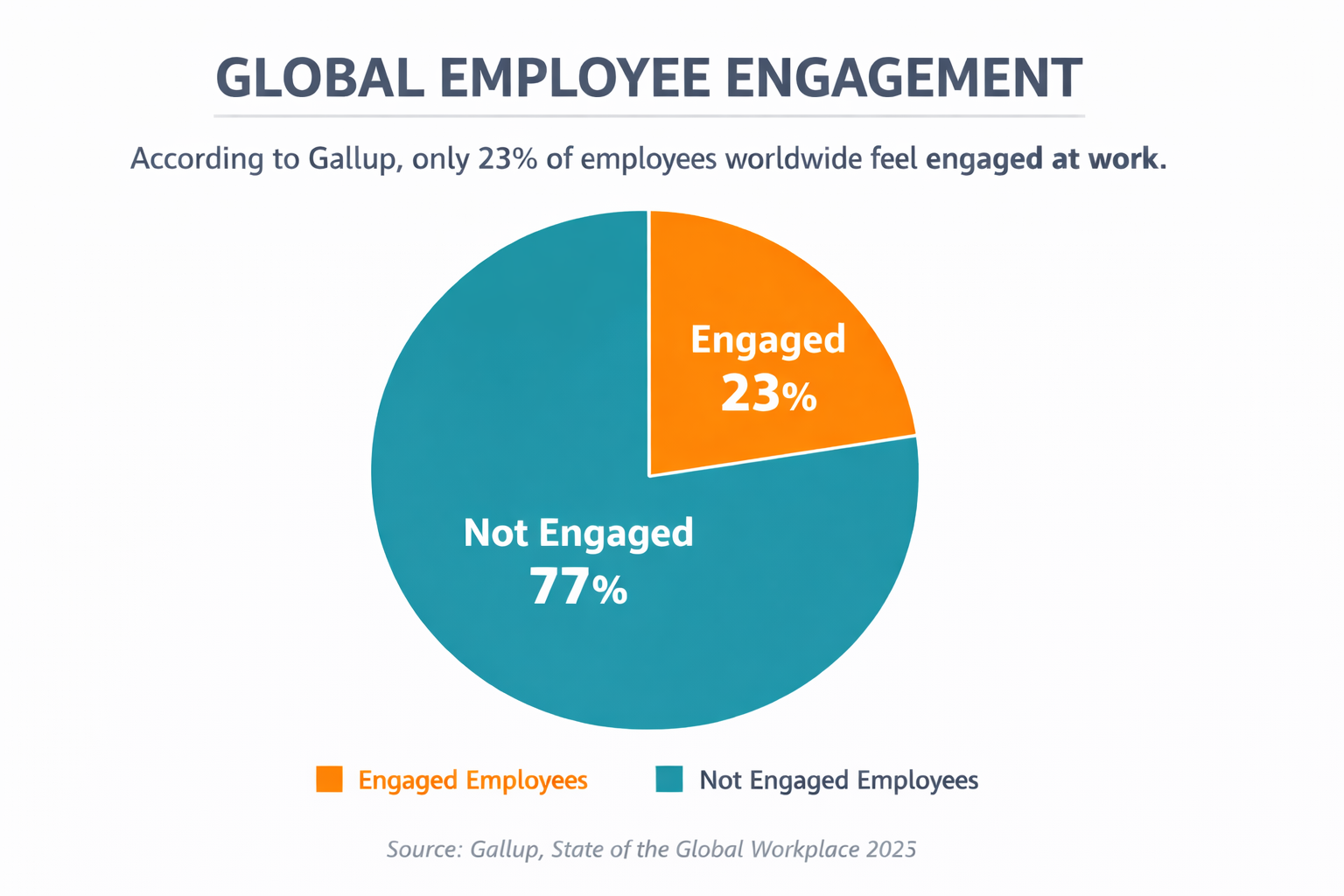
only 23% of employees worldwide feel engaged at work,
Key Takeaways You’ll Get From This Guide
- What HRMS management really means in 2026 (and what it doesn’t)
- The difference between HRMS, core HRIS, and human capital management software
- Which features genuinely improve productivity and employee experience
- Common mistakes that quietly break HR systems over time
- How to choose an HRMS that supports growth, not just HR admin
If your HR team feels busy but not effective, this article is for you.
What is a HRMS Management
HRMS management is how organisations run and control their people operations using a single, structured system rather than scattered tools and manual processes.
At its core, HRMS management is built on a human resource management system, also known as human capital management software.
Businesses use it to digitise, automate, and centralise core HR activities, including employee records, payroll, benefits administration, time and attendance, and compliance. Rather than information living in spreadsheets, emails, or paper files, everything sits in one system that stays accurate and up to date.
But HRMS management goes beyond basic admin.
A modern HRMS also supports the full employee lifecycle. This includes recruiting and hiring, onboarding new employees, managing performance and goals, supporting learning and development, handling compensation, and planning for future roles and succession.
When these processes are connected, HR teams gain visibility and control instead of constantly reacting to problems.
One of the most significant benefits of HRMS management is replacing labour-intensive, error-prone processes.
Manual spreadsheets and paper-based workflows don't scale. They create duplicate data, missed approvals, and untrustworthy reporting. By automating repetitive tasks, an HRMS reduces human error and removes busywork.
The result is simple but powerful: HR teams spend less time chasing data and fixing mistakes and more time on higher-value work, such as improving employee experience, supporting managers, and helping the business grow.
Related Guides You May Want to Read Next
This HRMS management guide is designed as a starting point. The articles below go deeper into specific areas that often require more detailed explanation.
- HRMS vs HRIS vs HCM: What’s the Difference?
- Why Most HRMS Rollouts Fail — And the HRM and Change Management Examples That Got It Right
- HR File Management Best Practices: Complete Guide on HR Document Management
- Benefits of Using HR Management Software
- What Are the Benefits of HRIS for Employees?
Each guide expands on a specific topic mentioned in this article and links back here as part of a complete HRMS knowledge hub.
The Difference Between HRMS, Core HRIS, and Human Capital Management Software

The Difference Between HRMS, Core HRIS, and Human Capital Management Software
These terms are often used interchangeably, but they are not the same.
Understanding the difference is critical, because choosing the wrong system at the wrong stage is one of the most common HR technology mistakes.
Core HRIS (Human Resource Information System)
A core HRIS is the foundation. It focuses on storing and maintaining accurate employee data and supporting compliance.
It answers the question: "Who works here, and what are the basics we need to manage them?"
Typical capabilities include:
- Employee records and personal details
- Job roles, departments, and reporting lines
- Contract and document storage
- Compliance tracking and audit history
- Basic reporting
Core HRIS systems are data-first. They are essential, but limited. On their own, they do not support performance, engagement, or workforce strategy.
HRMS (Human Resource Management System)
An HRMS builds on core HRIS and adds operational depth.
It answers the question: "How do we actively manage people day to day?"
In addition to HRIS features, HRMS typically includes:
- Leave and absence management
- Time and attendance tracking
- Performance reviews and goal tracking
- Manager approvals and workflows
- Payroll integrations
HRMS is where HR moves from record-keeping to execution. It supports managers and employees directly and reduces manual work across HR operations.
Key Differences at a Glance
- Core HRIS focuses on data accuracy and compliance
- HRMS focuses on managing people and processes
- HCM focuses on workforce strategy and future planning
- HRIS is foundational, HRMS is operational, HCM is strategic
- Most modern platforms combine elements of all three, but maturity and depth vary
Choosing the right system depends on where your organisation is today and where it needs to be next.
Human Capital Management (HCM) Software
Human capital management software sits at the strategic end of the spectrum.
It answers the question: "How do we plan, develop, and optimise our workforce for the future?"
HCM platforms usually include:
- Talent acquisition and recruiting
- Learning and development
- Skills and capability mapping
- Succession and workforce planning
- Advanced analytics and forecasting
HCM is designed for long-term workforce strategy, not just daily operations.
It is most valuable for larger or fast-scaling organisations.
What Modern HRMS Management Looks Like in 2026
In 2026, hrms management is no longer about maintaining records or ticking compliance boxes.
It's about running the workforce in a way that's connected, transparent, and built around how people actually work today.
HR teams are expected to support remote employees, frontline staff, and managers in real time — and legacy systems simply can't handle that level of complexity anymore.
A modern approach to hrms management brings everything into one shared environment.
Employee data is centralised, so HR, managers, and leadership are all working from the same source of truth. There's no confusion over which system is correct or where information lives. This is where employee workforce management software becomes essential, connecting people data with schedules, attendance, performance, and day-to-day workforce visibility.
What's shaping HRMS management most in 2026 is a clear shift toward human-centered governance.
As AI becomes embedded in HR platforms, organisations are putting guardrails in place to ensure technology supports people rather than controls them. HRMS platforms are being designed with transparency, accountability, and ethical decision-making in mind, especially when AI is used for insights, recommendations, or workforce planning.
Another major shift is structural.
Cross-functional models are replacing HR silos. HRMS management now serves not just HR, but finance, operations, compliance, and leadership teams. Systems are built to support collaboration across departments, breaking down isolated data and enabling shared decision-making around people, costs, and capacity.
Finally, HR's AI spending is accelerating, and that investment is reshaping expectations. HRMS platforms are no longer seen as cost centres but as strategic infrastructure.
Organisations are funding smarter systems because they want better visibility, better planning, and better employee experiences — not just administrative efficiency.
Modern hrms management in 2026 is shaped by centralised people data, human-centered AI governance, cross-functional collaboration, and rising investment in intelligent employee workforce management software
Emerging HRMS Features That Actually Deliver Better Insight
In 2026, the value of hrms management is no longer measured by how many features a system has, but by how clearly it helps organisations understand their workforce.
Basic functions like records, leave, and payroll are expected. What sets modern platforms apart are emerging, insight-driven features that turn workforce data into something leaders can actually use.
These new and upcoming capabilities focus on visibility, context, and decision support — not more admin screens.
More Insight with Workforce Intelligence Dashboards
This is where hrms management starts delivering real value instead of just storing information.
Traditional HR dashboards are backward-looking. They show what already happened last month or last quarter. In 2026, that's not good enough. Modern employee workforce management software is introducing workforce intelligence dashboards that focus on current state and near-future risk, not historical summaries.
These dashboards pull live data directly from the human resource management system and combine multiple signals into one view. Instead of HR exporting spreadsheets or building reports manually, leaders get a real-time snapshot of the workforce as it exists right now.
What makes these dashboards genuinely insightful is the type of questions they answer fro leaders:
- How many people do we actually have available today, not just employed on paper
- Which teams are stretched beyond capacity and which are underutilised
- Where turnover risk is rising based on patterns, not gut feeling
- Which roles or skills are becoming single points of failure
- How workforce changes impact delivery, compliance, and costs in real time
Emerging workforce intelligence dashboards don't just show headcount numbers.
They connect attendance, role coverage, performance trends, and engagement signals into one context-aware view.
This allows HR and leadership to see why something is happening, not just that it happened.
Predictive Workforce Planning for a Competitive Advantage
This is where workforce planning stops being guesswork and starts becoming strategic.
Modern organisations are moving beyond static headcount plans and adopting workforce forecasting methods that look at patterns, probabilities, and future scenarios. Instead of asking "What happened last year?", leaders are asking "What's likely to happen next — and are we ready for it?"
What's changed is the rise of strategic workforce planning AI.
These systems analyse multiple signals at once, including attrition trends, hiring velocity, skills availability, project demand, and organisational growth plans. The goal isn't to predict the future perfectly, but to surface realistic outcomes early enough to act.
The most useful predictive workforce planning examples focus on practical insight, not theory.
For example:
- Identifying roles that are likely to face shortages within the next 6–12 months
- Flagging teams where planned growth will outpace hiring capacity
- Highlighting skills that are becoming scarce internally and expensive externally
- Showing how resignations in key roles could cascade into delivery or compliance risks
What makes these insights valuable is timing. Instead of discovering gaps when projects are delayed or teams are burned out, leaders see pressure building in advance.
That allows organisations to adjust hiring plans, retraining efforts, succession planning, or workload distribution before problems surface.
Another important shift is scenario planning.
Emerging platforms allow leaders to test "what-if" situations — such as expansion into new markets, budget cuts, or rapid scaling — and see how those decisions affect workforce demand. This turns workforce planning into an ongoing strategic conversation rather than a once-a-year spreadsheet exercise.
In short, predictive workforce planning replaces reactive staffing decisions with informed foresight. It gives organisations the confidence to grow, change, and adapt without being blindsided by people-related risks.
Predictive workforce planning uses advanced workforce forecasting methods and strategic workforce planning AI to surface future talent gaps, capacity risks, and hiring pressure early enough for leaders to act with confidence
Skills Mapping - Making Workforce Capability Visible and Usable
This is one of the most practical shifts happening right now, and it's quietly changing how organisations understand their people.
Traditional workforce planning relied on job titles.
That approach breaks down fast because titles don't show what people can actually do. Modern skill mapping flips the model by focusing on real capabilities, not labels. Instead of guessing where talent exists, organisations can finally see it.
The skills mapping process starts by identifying the skills that matter to the business today and in the near future. These might include technical skills, certifications, leadership capabilities, compliance knowledge, or role-specific competencies. Employees are then mapped against these skills using verified data such as qualifications, completed training, project experience, and manager validation.
What makes this powerful is structure. A well-designed skills mapping template ensures skills are captured consistently across teams. Without this, skill data becomes subjective and unreliable.
Templates define skill levels, proficiency indicators, and relevance to business outcomes, turning raw information into usable insight.
Modern skill mapping tools take this further by keeping skills data dynamic.
As employees complete training, change roles, or gain experience, their skill profiles update automatically.
Leaders can instantly answer questions like:
- Where do we already have the skills we're hiring for
- Which teams are over-skilled or underutilised
- Which gaps can be closed with training instead of recruitment
- Who is ready for internal mobility or succession
A simple skills mapping example shows the value clearly. Imagine a company planning to launch a new product line. Instead of hiring externally by default, leadership reviews the skills map and discovers existing employees with partial or adjacent skills.
With targeted training, those employees can step into new roles faster and at lower cost, while improving retention.
The real insight comes from connecting skills visibility to decision-making. Skill mapping helps organisations reduce unnecessary hiring, prioritise learning investments, and respond faster to change.
It replaces assumptions with evidence and turns workforce capability into something leaders can actually plan around.
Skill mapping creates clarity by using structured skills mapping processes, practical skills mapping templates, and modern skill mapping tools to reveal real capabilities, close skill gaps faster, and make smarter talent decisions.
Continuous Performance Signals: Seeing Performance as It Happens
Annual performance reviews are quickly losing relevance.
They're slow, subjective, and based on memory instead of evidence. What's replacing them are continuous performance signals — small, ongoing data points that show how work is actually progressing over time.
Instead of asking managers to summarise a year's worth of performance in one sitting, modern platforms capture signals continuously. This creates a more accurate, fair, and useful view of contribution, momentum, and risk. Performance becomes something you observe and guide, not something you judge once a year.
What makes continuous performance signals valuable is context.
One missed target doesn't define performance. Patterns do. These signals help managers spot trends early, support employees sooner, and make better decisions based on reality rather than gut feel.
Examples of continuous performance signals include:
- Goal progress tracking that shows whether objectives are consistently moving forward or repeatedly stalling
- Feedback frequency patterns that highlight teams receiving regular input versus those operating in silence
- Check-in consistency between managers and employees, revealing where coaching is happening and where it's missing
- Engagement participation trends that show declining involvement before disengagement becomes visible
- Recognition signals that surface who is contributing quietly versus who is being overlooked
- Delivery reliability indicators that show whether commitments are met steadily or only under pressure
These signals don't replace human judgement — they support it. Managers still have conversations, but those conversations are grounded in evidence instead of opinion.
Employees get clearer expectations and faster course correction, which feels fairer and more motivating.
Read this article: : Top 6 AI-Powered Project Management Tools To Use In 2023
Sentiment and Engagement Insights
Modern HRMS platforms are embedding lightweight sentiment tracking to understand how employees feel, not just what they do.
Pulse signals, participation trends, and feedback patterns help HR spot disengagement early and act before it turns into turnover.
Compliance Intelligence, Not Just Records
Compliance is evolving from static checklists to insight-based monitoring.
Emerging HRMS features flag potential policy gaps, training lapses, or audit risks automatically, helping organisations stay ahead of regulatory issues instead of reacting after the fact.
Emerging HRMS management features in 2026 focus on real-time workforce intelligence, predictive planning, skills visibility, continuous performance insight, sentiment tracking, and proactive compliance awareness
Core Features You Should Be Looking for to Manage Remote Teams
No matter how advanced HR technology becomes, there are fundamentals that every platform must get right.
If these core features are weak or missing, it doesn't matter how modern the interface looks — the system will fail under real-world pressure.
A solid human resource management system starts with reliability.
These features form the operational backbone of employee workforce management software and are non-negotiable for any organisation that wants accuracy, consistency, and trust in its people data.
- Employee Records and Document Management - At the centre of any HRMS is a single, accurate employee record. This includes personal details, contracts, role history, certifications, and policy acknowledgements. Document management must be structured, searchable, and permission-controlled. When employee records are fragmented or outdated, everything else breaks — reporting, compliance, and decision-making included.
- Time, Attendance, and Scheduling - Workforce visibility depends on knowing who is working, when, and where. Time and attendance features should clearly track hours, shifts, and schedules across teams. For managers, this removes guesswork. For employees, it creates fairness and transparency. Without this foundation, workforce planning and cost control become unreliable.
- Leave and Absence Management - Leave management needs to be simple, visible, and consistent. Employees should know their balances. Managers should see team availability at a glance. HR should never be manually reconciling leave across spreadsheets. Proper absence tracking prevents staffing gaps, payroll errors, and policy disputes before they happen.
- Performance Reviews and Goal Tracking - Even as performance management evolves, structured reviews and goal tracking remain essential. These features create alignment between individual goals and organisational priorities. They also provide documented history that supports development conversations, promotions, and fair decision-making.
- Payroll Integrations - Payroll doesn't have to live inside the HRMS, but it must connect cleanly. Accurate data flow between systems ensures employees are paid correctly and on time. Broken payroll integrations are one of the fastest ways to lose trust in HR systems and processes.
- Compliance and Audit Trails - Compliance is not optional, and it can't rely on memory. A reliable human resource management system maintains audit trails for changes, approvals, documents, and access. This protects the organisation during audits, supports regulatory requirements, and reduces risk when policies or laws change.
When these core features work together, HR teams gain stability.
When even one is missing or poorly implemented, problems compound quickly.
Every effective employee workforce management software platform is built on accurate employee records, clear time and leave tracking, structured performance data, reliable payroll connections, and built-in compliance visibility
How HRMS Management Directly Improves Workforce Productivity for Remote Teams
If productivity is slipping, the problem is rarely the people. It's usually the systems around them.
When hrms management is weak, teams lose time to confusion, rework, and avoidable delays.
When it's done properly, productivity improves quietly but consistently — not through pressure, but through clarity. This is exactly where well-designed employee workforce management software makes a measurable difference.
First, productivity improves because friction is removed from everyday work. HR teams and managers no longer spend hours chasing information, approvals, or updates. Processes are clear, consistent, and visible to everyone involved. That time goes back into actual work instead of administration.
Second, onboarding and offboarding become structured instead of chaotic.
New employees know what to do, where to go, and who to contact from day one. Departures are handled cleanly, with access, documentation, and handovers managed properly. When these moments are smooth, teams stay focused and momentum isn't lost.
Visibility is another major productivity driver. Managers can see workloads, availability, and team coverage without guesswork. This prevents burnout on one side and underutilisation on the other. Work is distributed more evenly, and issues are addressed before they affect delivery.
There's also a quiet but important productivity gain from accuracy. Fewer errors in time tracking, leave balances, and records means fewer corrections, fewer disputes, and fewer distractions. Compliance risks drop, audits become less stressful, and HR isn't constantly putting out fires.
Finally, productivity improves because the employee experience improves.
When people trust the system, understand expectations, and can get what they need without friction, they spend more energy on their roles instead of navigating internal bureaucracy.
Strong hrms management improves workforce productivity by reducing friction, improving visibility, minimising errors, and enabling employee workforce management software to support work instead of getting in the way
Common HRMS Management Mistakes (And How to Avoid Them)
Most HR systems don't fail because the software is bad.
They fail because hrms management decisions are made in a rush, without thinking through real-world use.
The same patterns show up again and again across organisations, regardless of size or industry.
Learning from common mistakes — and real hrms examples — can save months of frustration and costly rework.
Mistake 1: Buying Features Instead of Solving Outcomes
A classic error is choosing an HRMS based on a long feature list rather than real needs.
Demos look impressive, but once the system goes live, teams realise it doesn't solve their actual problems.
In many common HR scenarios, HR teams still answer the same common HR queries:
- "Where do I find this document?"
- "Why doesn't this match payroll?"
- "Who approved this change?"
The fix is outcome-first thinking.
Before choosing a system, map the top problems HR and managers deal with daily. Judge the platform on whether it reduces those issues, not on how many modules it claims to have.
Mistake 2: Ignoring Employee Adoption
Even the best system fails if employees don't use it.
Many hr change management examples show the same issue: HR rolls out a new system, but staff aren't trained, managers don't buy in, and old habits continue in parallel.
This leads to duplicated data, confusion, and endless questions.
Adoption must be planned from day one.
Clear communication, simple workflows, and manager involvement matter far more than advanced features early on.
Mistake 3: Over-Customising Too Early
Customisation feels productive, but it's often premature.
Organisations try to recreate old processes inside a new system, locking themselves into complexity before understanding how the platform works.
Early over-customisation increases errors and creates brittle setups where even small changes break workflows.
In practice, this increases hrms acceptable error thresholds because teams expect the system to be imperfect.
Start with standard processes. Let the system stabilise. Only customise when there's clear evidence it improves outcomes.
Mistake 4: Treating HRMS as "Just an HR Tool"
One of the most damaging mistakes is positioning the HRMS as an HR-only system.
In reality, hrms/main platforms touch payroll, compliance, finance, operations, and leadership reporting.
When HRMS is isolated, data quality suffers and responsibility becomes unclear.
This is how common payroll mistakes creep in — mismatched records, incorrect hours, delayed updates, and avoidable disputes.
HRMS management works best when ownership is shared. HR leads the system, but managers, finance, and leadership rely on it and help keep it accurate.
Mistake 5: Underestimating Everyday HR Questions
Many systems look fine until daily usage begins.
Then HR is flooded with common HR queries like:
- "Why is my leave balance wrong?"
- "Who changed my role?"
- "Why didn't this show up in payroll?"
These questions usually point to poor data flow, unclear processes, or lack of visibility.
Strong HRMS management reduces these queries by making information transparent and consistent.
Most HRMS failures come from predictable mistakes: choosing features over outcomes, ignoring change management, over-customising too soon, isolating the system within HR, and underestimating common HR scenarios and payroll risks
If Your Looking, Then Here is How to Choose the Right HRMS in 2026 (Without Regretting It Later)
Choosing an HRMS in 2026 is no longer just an HR decision — it's an operational one.
Get it right, and the system quietly supports growth for years. Get it wrong, and it becomes an expensive source of friction that everyone complains about but no one wants to replace.
This is where hrms management needs a clear, disciplined approach.
Start With Workforce Reality, Not Vendor Promises
Before you look at demos, pricing pages, or feature lists, you need a clear picture of your workforce reality.
Most HRMS buying mistakes happen because organisations plan for who they are today, not who they'll be supporting in 12–24 months.
A system that feels fine at 40 or 50 employees can start breaking down fast at 150 or 200, especially when managers, locations, and compliance requirements multiply.
Vendors will often sell flexibility, but not all platforms scale cleanly. Some become slow, rigid, or overly complex as headcount grows.
Others force costly upgrades or migrations just when the business needs stability. That's why growth expectations must drive the decision, not marketing claims.
If expansion, restructuring, or regional hiring is even a possibility, prioritise an all-in-one HR platform that can grow without rebuilding core processes. Early simplicity is good, but future-proof structure matters more.
Choosing an HRMS based on real workforce growth plans prevents early system failure, rework, and expensive replacements later
Map Real HR Pain Points
Be honest about what's broken today.
Are managers struggling with reviews? Is performance tracking inconsistent? Are employee records scattered across folders?
If performance visibility is a problem, prioritise platforms with a strong staff performance management system built in.
If documents are messy, weak HR file management will haunt you later through compliance risks and wasted time.
The right system should reduce daily friction, not just look good in a demo.
Check Integrations Before Anything Else
Before committing to any HRMS, integration capability should be treated as non-negotiable.
Modern HR systems do not live on their own. People data must move cleanly across payroll, finance, IT, and operations. When integrations are weak, errors multiply and confidence in the system drops fast.
Payroll integrations are critical. Direct connections with tools like ADP, Paychex, Gusto, or Xero ensure hours, leave, role changes, and pay data stay aligned. This is the biggest safeguard against payroll disputes and correction work.
Finance and accounting integrations with platforms such as QuickBooks, NetSuite, or Sage allow HR and finance teams to track headcount costs, budgets, and forecasts without manual reconciliation.
Identity and access management integrations with Microsoft Entra ID (Azure AD), Okta, or Google Workspace ensure joiners, movers, and leavers are handled securely and consistently across systems.
For revenue-driven or enterprise organisations, CRM and enterprise integrations such as Salesforce help align workforce data with sales capacity, delivery teams, and customer impact.
Learning and compliance integrations with tools like LinkedIn Learning, Coursera, or Docebo keep training records, certifications, and audits up to date automatically.
Poor integrations create duplicate data, reporting gaps, and endless manual fixes. Clean, named integrations turn the HRMS into a dependable source of truth instead of another system people work around.
Strong HRMS integrations with payroll (ADP, Gusto), finance (Xero, QuickBooks), identity (Microsoft Entra ID, Okta), CRM (Salesforce), and learning platforms prevent data gaps and keep people operations aligned across the business.
Evaluate Support, Security, and Compliance
Finally, look beyond the software itself.
Strong vendor support, clear security controls, and built-in compliance features are non-negotiable. If support is slow or documentation is weak, small issues turn into long-term pain.
A good HRMS supports the business quietly. A bad one becomes a daily distraction.
The right HRMS in 2026 is an all in one HR platform that scales with workforce growth, supports staff performance management, integrates cleanly with existing systems, keeps HR file management tight, and avoids the hidden risks common in poorly chosen HR software programs.
Look for Modular, Not Bloated
One of the most common mistakes organisations make is buying an HR system that tries to do everything on day one.
Bloated platforms slow adoption, confuse users, and lock teams into paying for features they don't actually need yet.
In 2026, the smarter approach is modular.
You start with the essentials, then add capabilities as your organisation grows and your HR maturity increases. This keeps rollout simple, training manageable, and usage high.
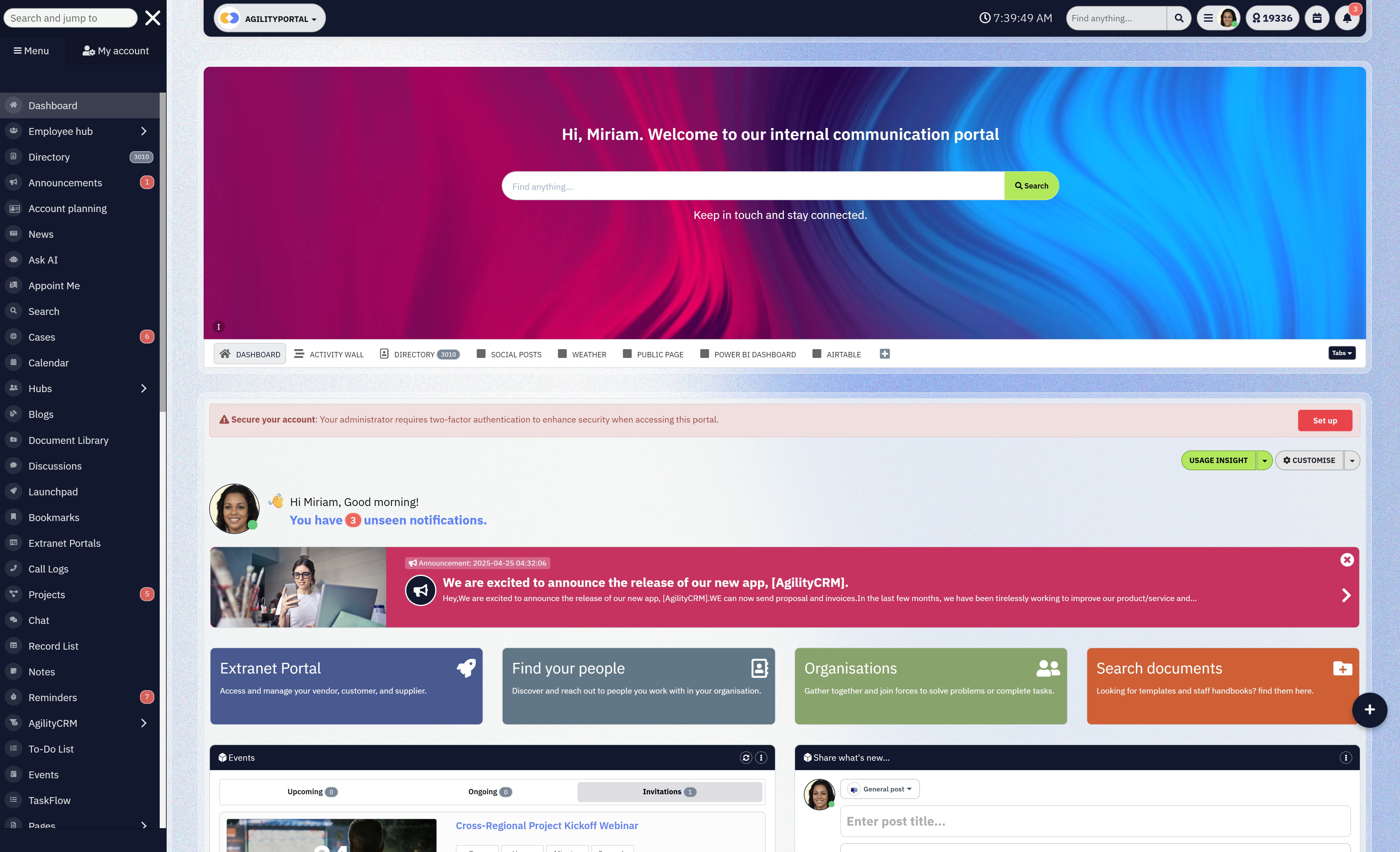
Platforms like AgilityPortal follow this model. Instead of forcing a full HR suite upfront, teams can enable core people management first, then layer on performance, engagement, document management, communication, or analytics when the business is ready.
That flexibility matters, especially for scaling organisations with limited change capacity.
Modular systems also reduce risk. You're not betting everything on a massive rollout. You're evolving the platform alongside real needs, not assumptions made during procurement.
The end result is higher adoption, lower resistance, and an HR system that grows with the organisation instead of getting in its way.
Modular HR software programs like AgilityPortal help organisations avoid bloated systems, improve adoption, and scale HR capabilities at the pace the business can actually support.
HRMS Management for Different Organisation Types (What Actually Works in Practice)
Different organisations fail with HRMS for different reasons.
The mistake is assuming one setup fits everyone.
Industry standards in 2026 are clear: HRMS management must match organisational complexity, not company ego. Here's how it breaks down in real terms.
Small and Growing Businesses
For small teams, the priority is control and consistency.
Industry best practice is a single source of truth for employee data, documents, and basic performance tracking.
At this stage, HRMS management should reduce admin load, not introduce complexity.
Growing companies need systems that are simple to adopt, quick to configure, and able to scale without forcing a migration at 100+ employees. Overengineering early is a known failure pattern.
Mid-Sized Organisations
This is where most HRMS setups break.
Industry standards here focus on process standardisation and visibility.
HRMS management must support managers, not just HR.
Performance consistency, workforce visibility, and clean integrations become non-negotiable. At this size, HRMS is no longer an HR tool — it's operational infrastructure.
Enterprise HRMS Management: With Governance, Scale, and Control
Enterprise HRMS Management: With Governance, Scale, and Control
At enterprise level, HRMS management shifts from efficiency to control, governance, and risk management.
Industry standards are clear: enterprise HR systems must handle complexity without fragmenting data.
When systems break at scale, it's usually because different regions, departments, or business units operate their own versions of "HR truth."
Strong enterprise HRMS management starts with role-based access control.
Not everyone should see or edit the same data, but everyone should rely on the same system.
This is paired with audit trails, which track every change to employee records, approvals, and documents. Without this, compliance audits become painful and risky.
Regional compliance handling is another baseline requirement. Enterprises operate across countries with different labour laws, data retention rules, and reporting obligations. The HRMS must support this natively, not through workarounds.
Finally, cross-functional reporting is critical. Leadership, finance, HR, and operations need aligned workforce data. Enterprises fail when HRMS becomes siloed by region or department instead of unified by design.
Enterprise-grade HRMS management prioritises governance, role-based access, auditability, regional compliance, and unified data visibility at scale.
Frontline and Deskless Workforces
For frontline-heavy organisations, industry standards demand mobile-first access and simplicity.
HRMS management must work for people without desks, emails, or daily system access.
If employees can't check schedules, access documents, or understand expectations easily, adoption collapses. Successful systems prioritise usability over features.
Effective HRMS management aligns with organisation size and workforce type, following industry standards that prioritise simplicity for small teams, structure for mid-sized companies, governance for enterprises, and usability for frontline workers
The Future of HRMS Management Beyond 2026
The future of HRMS management is being shaped by data, not opinions. The shift is already measurable.
AI-driven workforce insights are becoming standard.
According to Gartner, over 75% of large organisations will use AI-driven HR analytics by 2027, up from less than 30% just a few years ago. These systems don't just report headcount — they surface burnout risk, capacity strain, and role fragility while there's still time to act.
Predictive people analytics is moving HR from reactive to preventative. Deloitte reports that organisations using predictive workforce analytics are 2.9× more likely to improve retention and workforce planning accuracy. This allows leaders to model attrition, hiring pressure, and skill shortages before they hit delivery.
At the same time, employee experience platforms are replacing static HR systems.
Research shows companies investing in EX-focused platforms see up to 40% higher engagement and 25% lower voluntary turnover, because systems finally reflect how employees actually work.
As a result, HR is becoming a strategic growth driver. McKinsey data shows organisations with advanced people analytics are 1.7× more likely to outperform peers financially.
Beyond 2026, HRMS management is defined by AI insights, predictive analytics, experience-driven platforms, and HR's direct impact on growth, retention, and performance
Wrapping up....HRMS Management Is No Longer Optional
HRMS management is no longer a background HR activity — it's a business-critical capability.
In 2026, organisations that struggle with retention, productivity, and execution are rarely short on talent.
They're short on clarity, structure, and reliable people data. When HR systems are fragmented, those gaps show up fast in missed targets, employee frustration, and leadership blind spots.
The right approach to HRMS management reduces chaos.
It replaces disconnected tools and manual work with a single, consistent way of managing people. That consistency is what allows organisations to scale without losing control.
As headcount grows, processes stay clear, data stays accurate, and decisions stay grounded in reality instead of assumptions.
The final takeaway is simple.
Choose platforms that unify people, data, and workflows rather than adding another layer of complexity. When HRMS management is done well, HR stops reacting to problems and starts enabling growth — quietly, reliably, and at scale.
FAQ: HRMS, HRIS, and HCM Explained (2026)
What is HRMS management?
HRMS management is how an organisation runs its people operations using a central hrm human resource management system.
It covers employee records, payroll, performance, compliance, and reporting in one structured environment.
A modern hr management information system replaces fragmented tools with a single source of truth, improving accuracy and decision-making across the business.
Is HRMS the same as HRIS?
Not exactly. HRIS HR software (or human resources in information system / hris human resource information system) focuses on core employee data, records, and compliance.
HRMS builds on this by adding performance, payroll, workflows, and broader workforce capabilities.
In short, HRIS is the foundation; HRMS is the operational system built on top of it.
What are HCM platforms?
Human capital management platforms go beyond HR operations and focus on long-term workforce strategy.
They include talent management, learning, succession planning, analytics, and workforce forecasting.
An example is Oracle Cloud Human Capital Management, which is designed for large, complex organisations with advanced planning needs.
What are the top 5 HCM systems?
While rankings vary by region and use case, commonly recognised HCM systems include platforms from large human resource software companies such as Oracle, SAP, Workday, UKG, and ADP.
The "top" system depends on organisation size, complexity, and industry requirements.
Which HRMS tool is best?
There is no single best tool.
The right choice depends on workforce size, compliance needs, and growth plans.
Some organisations need enterprise platforms like Oracle, while others prefer more flexible or modular solutions.
Tools such as Ultimate Software (often referenced as ultimate HR software) are strong in specific areas like payroll and workforce management.
What's the difference between HCM and ERP?
ERP systems manage finance, supply chain, and operations.
HCM focuses specifically on people. While ERP may include basic HR features, HCM platforms provide deeper workforce planning, talent, and performance capabilities.
Many organisations integrate both rather than choosing one over the other.
Who should use human capital management software?
Large and fast-scaling organisations benefit most from HCM, especially when workforce planning, skills visibility, and leadership development are strategic priorities.
How does HRMS improve workforce management?
HRMS improves workforce management by centralising data, reducing errors, and connecting payroll HRMS software, performance, and records into one system.
This reduces manual work and improves visibility.
What should an HRMS include in 2026?
A modern HRMS should include employee records, hr information systems, payroll integration, performance tracking, compliance controls, and scalability.
For smaller teams, human resource management software for small business should prioritise simplicity, clarity, and room to grow.
Most Popular Posts

Effective communication among team members is vital for the productivity and success of any organization. Surprisingly, 60% of companies lack a long-term internal communication strategy, which p...


Businesses thrive on communication for efficiency, productivity and accomplishment. When the right information is passed from the right designation in the organization, it promotes positivity an...

Categories
Blog
(3196)
Business Management
(395)
Employee Engagement
(235)
Digital Transformation
(218)
Growth
(150)
Intranets
(141)
Internal communications
(106)
Remote Work
(68)
Sales
(53)
Collaboration
(52)
Customer Experience
(32)
Culture
(30)
Knowledge Management
(29)
Project management
(29)
Leadership
(20)
Comparisons
(9)
News
(1)

Related Posts

Could AI produce your next workplace video faster—and still deliver a message your employees can trust? As more businesses use video for onboarding, training and leadership updates, one question keeps coming up: will AI replace video editors in...

Could the best machine learning systems help your employees spend less time sorting requests, updating spreadsheets and chasing information—and more time doing useful work? That's the opportunity, but finding the right system starts with knowin...

What would happen to your team's work and customer information if an employee's MacBook disappeared today? If you're wondering how to protect your Mac physically, the answer goes beyond buying a case. A MacBook used at home, on a train or in a ...

Welcome to AgilityPortal's guide to the best VPN for Remote teams. How do you give employees secure access to company systems when they work from home, the office and everywhere in between? It's a question more businesses need to answer: 28% of worki...

Have you ever left a meeting thinking everyone agreed on the next step, only to discover a week later that each person remembered something different? Open source meeting transcription can help teams keep a searchable record of the conversation...


Jill Romford
I am a digital nomad, lover of exploring new places and making friends.
I love to travel and I love the internet. I take pictures of my travels and share them on the internet using Instagram.
Traveler, entrepreneur, and community builder. I share my insights on digital marketing and social media while inspiring you to live your fullest life.
Ready to learn more? 👍
One platform to optimize, manage and track all of your teams. Your new digital workplace is a click away. 🚀
Free for 14 days, no credit card required.