
Insight Blog
Agility’s perspectives on transforming the employee's experience throughout remote transformation using connected enterprise tools.
42 minutes reading time
(8487 words)
How Modern Enterprise Collaboration Platforms Scale Cost-Effectively

How Modern Enterprise Collaboration Platforms Scale Cost-Effectively
Learn how modern enterprise collaboration platforms scale cost-effectively with practical strategies to improve performance, reduce IT costs, and support business growth.
How Modern Enterprise Collaboration Platforms Scale Cost-Effectively

As your business grows, your enterprise collaboration platform should help your team work faster—not become another problem to manage. But for many organisations, the opposite happens.
Pages take longer to load, employees struggle to find information, storage costs increase, and IT teams spend more time fixing issues than improving the workplace.
In fact, research from McKinsey found that employees spend nearly 20% of their workweek searching for internal information or tracking down colleagues, showing how quickly poor collaboration can affect productivity across a growing business.
Instead of adding more servers or paying for bigger cloud plans, many organisations can improve performance simply by fixing the way their platform is organised and managed.
20%
of the workweek
According to McKinsey, employees spend nearly 20% of their workweek searching for internal information or tracking down colleagues, highlighting how poor collaboration can quickly reduce productivity as organisations grow.
Source: McKinsey Global Institute
Imagine opening your collaboration platform on a busy Monday morning and having to wait for pages to load or search results to appear. Those few extra seconds may not seem like much, but across hundreds or thousands of employees, they quickly turn into hours of lost productivity every week.
In this guide, you'll learn how to scale an enterprise collaboration platform the smart way.
We'll show you how to improve performance, reduce unnecessary costs, avoid common scaling mistakes, and build a digital workplace that continues to perform well as your business grows.
Whether you're replacing an outdated intranet or planning for future growth, you'll leave with practical strategies you can apply immediately.
Ask AI About Enterprise Collaboration Platforms
Use these AI tools to compare enterprise collaboration platforms, improve employee communication, build a scalable digital workplace, automate business workflows, and discover practical ways to improve collaboration, knowledge sharing, and productivity across your organisation.


What Is an Enterprise Collaboration Platform?

What Is an Enterprise Collaboration Platform?
An enterprise collaboration platform is a central workspace where employees can communicate, share information, work together on projects, and access the tools they need to do their jobs.
Instead of switching between multiple apps for chat, documents, tasks, company news, and knowledge, everything is brought together in one secure place.
Think of it as your company's digital headquarters. Whether someone works in the office, from home, or out in the field, they can log in to find company updates, collaborate with colleagues, share files, manage tasks, join discussions, and quickly find the information they need.
Most modern enterprise collaboration platforms include features such as:
- Team chat and instant messaging
- Document and file sharing
- Knowledge bases and company wikis
- Task and project management
- Company news and announcements
- Employee directories and organisational charts
- Video meetings and integrations with tools like Microsoft Teams or Zoom
- Workflow automation and approvals
- Search that helps employees quickly find people, files, and information
The biggest advantage is that employees spend less time searching across different systems and more time getting work done.
By bringing communication, collaboration, and knowledge together, an enterprise collaboration platform helps organisations improve productivity, reduce information silos, and make better decisions as they grow.
Key Takeaways
- Scaling workplace collaboration successfully starts with good governance, organised content, and employee adoption—not simply adding more server resources.
- Regularly reviewing inactive accounts, duplicate documents, search performance, and system integrations helps maintain speed while reducing long-term IT costs.
- A scalable digital workplace should combine employee communication, knowledge management, workflow automation, document management, and secure access in one central platform.
- Choosing collaboration software with cloud scalability, mobile access, enterprise search, API integrations, and automation prepares your organisation for future growth.
- Businesses that continuously optimise their collaboration environment improve productivity, strengthen internal communication, and avoid costly infrastructure upgrades.
The Four Layers Every Scalable Collaboration System Needs
Many companies assume that scaling a collaboration system is simply a matter of adding more CPU, memory, or cloud resources.
In reality, most performance issues come from poor planning, disorganised data, and low employee adoption—not a lack of server capacity.
If you want your digital workplace to grow with your business, focus on these four areas before spending more on infrastructure.
1. Infrastructure: Build for Growth, Not Today's Users
Your infrastructure determines how well your system handles more employees, documents, searches, and daily activity.
If the foundation is weak, no amount of software optimisation will solve long-term performance problems.
When reviewing your hosting environment, ask yourself:
- Can it support double the number of users?
- Will storage grow without affecting speed?
- Is there redundancy if a server fails?
- Can resources be upgraded without major downtime?
For businesses planning to expand, choosing the right hosting from the start can save both time and money.
Whether that's a rent dedicated server USA solution or another scalable hosting environment, planning ahead avoids expensive migrations later.
Organisations that need predictable performance, low latency, and dedicated resources often choose a dedicated server Dallas deployment to support business-critical applications and growing teams.
Action: Review your CPU, RAM, storage usage, and average response times every quarter instead of waiting until users start complaining.
2. Data: Keep Information Organised Before It Becomes a Mess
As your company grows, so does the amount of information employees create. Without clear rules, your document library quickly fills with duplicate files, outdated policies, and folders nobody understands.
A well-organised knowledge base should include:
- Standard folder structures across departments
- Document version control
- Archive policies for old content
- Metadata and tagging
- Fast enterprise search
Good information management means employees spend less time searching and more time working.
Action: Schedule a content audit every six months. Remove outdated documents, merge duplicates, and archive files that are no longer needed.
3. User Experience: Give Employees Access to What They Actually Need
One of the biggest mistakes organisations make is showing every employee the same information.
Modern collaboration software should personalise the experience based on role, department, office location, or team. This reduces clutter and helps employees find what matters much faster.
Focus on:
- Role-based permissions
- Department workspaces
- Personalised dashboards
- Employee directories
- Targeted announcements
A cleaner interface improves adoption because employees don't have to dig through irrelevant content.
Action: Ask new employees to complete three everyday tasks during onboarding. If they struggle to find information, your navigation probably needs improving.
4. Adoption and Governance: The Layer Most Businesses Ignore
Even the fastest system won't deliver results if employees avoid using it.
Successful organisations create simple rules around how information is shared, who owns content, and when outdated information should be removed. They also monitor usage so they can improve the employee experience over time.
Good governance includes:
- Clear content ownership
- Employee onboarding and training
- Workflow automation
- Usage reporting
- Regular platform reviews
Many businesses upgrade infrastructure when the real problem is inconsistent usage. Better governance often delivers bigger performance improvements than buying more hardware.
Review analytics every month. Look for pages with low engagement, broken workflows, and features nobody uses, then simplify or remove them.
So bascailly a scalable digital workplace isn't built by adding bigger servers every year. It's built by combining reliable infrastructure, organised information, a simple user experience, and strong governance.
Get these four layers right, and your collaboration software will remain fast, easier to manage, and far more cost-effective as your organisation continues to grow.
The Hidden Performance Killers Nobody Talks About
When a collaboration platform starts slowing down, the first reaction is often to blame the server.
In reality, hardware is rarely the main problem. More often, performance suffers because the platform has been poorly managed over time.
According to IDC, knowledge workers spend up to 2.5 hours every day searching for information, much of it because content is duplicated, outdated, or difficult to find. For an organisation with 500 employees, that's the equivalent of more than 1,200 hours of productivity lost every single day.
The impact isn't just slower systems—it leads to delayed decisions, frustrated employees, increased support requests, and higher operating costs.
Here are some of the biggest performance killers that quietly reduce the effectiveness of your digital workplace.
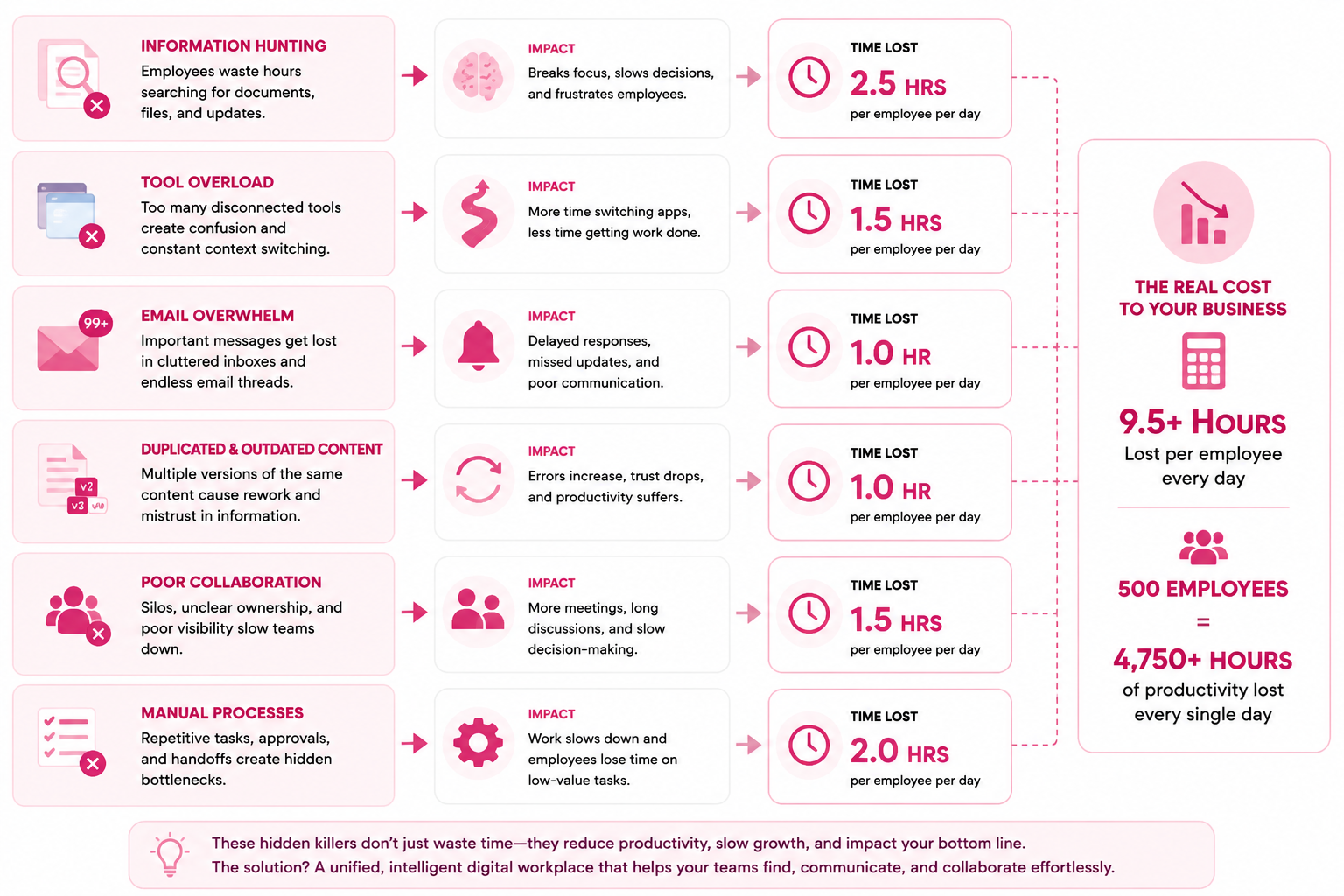
The Hidden Performance Killers Nobody Talks About
2.5 Hrs
lost every day
According to IDC, knowledge workers spend up to 2.5 hours every day searching for information because content is duplicated, outdated, or difficult to find. In an organisation with 500 employees, that's more than 1,200 hours of productivity lost every single day.
Source: IDC – The High Cost of Not Finding Information
Inactive User Accounts Create More Than Directory Clutter
Former employees, contractors, test users, duplicate profiles, and abandoned accounts often remain inside company systems long after they are needed.
An inactive account may not be logging in, but it can still remain connected to departments, project spaces, mailing groups, permissions, documents, workflows, and integrations. As these accounts accumulate, administrators have more records to manage and more permission relationships to review.
The impact becomes more serious as the organisation grows.
A large number of unmanaged accounts can lead to:
- Slower employee directory searches
- Larger authentication and user-sync workloads
- More complicated permission checks
- Incorrect staff counts and adoption reports
- Confusion over who owns documents or workspaces
- Security risks from accounts that should have been disabled
- Continued licence costs for people who no longer need access
For example, an employee may leave the business while still owning several shared folders, approval workflows, or project spaces. If their account is deleted without transferring ownership, important content may become inaccessible. If the account is left active, it becomes a security and governance risk.
This is why offboarding should be treated as a structured process rather than a simple account deletion.
What organisations should doCreate an automated offboarding workflow that:
- Disables access as soon as employment ends.
- Transfers ownership of documents, groups, and workflows.
- Removes the user from active mailing and permission groups.
- Archives relevant records according to company policy.
- Deletes the account only after retention requirements have been met.
Administrators should also run a quarterly inactive-user review. Look for accounts that have not logged in for 60, 90, or 180 days, then confirm whether they are still required.
Where possible, connect the collaboration software to an HR platform or identity provider. This allows accounts to be created, updated, suspended, and removed automatically when an employee joins, changes role, moves department, or leaves the organisation.
The goal is not simply to reduce the number of users. It is to keep the directory accurate, permissions secure, and reporting reliable.
Uncontrolled File Uploads Increase Cost and Reduce Findability
Document storage grows quickly inside large organisations.
Employees upload presentations, policies, training videos, spreadsheets, images, contracts, and project files every day. Without clear rules, the same document may be uploaded several times under slightly different filenames.
You may end up with files such as:
- Employee-Handbook-Final.pdf
- Employee-Handbook-Final-v2.pdf
- Employee-Handbook-Updated.pdf
- Employee-Handbook-New-Final.pdf
This creates more than a storage problem. Employees no longer know which version is correct, search results become cluttered, and outdated information can continue circulating.
Uncontrolled content growth can lead to:
- Higher cloud storage charges
- Longer backup and recovery times
- Slower search indexing
- More duplicate search results
- Increased legal and compliance exposure
- Employees acting on outdated information
- More time spent locating the approved document
- Difficult and expensive data migrations
The business impact is easy to underestimate. If employees regularly spend ten minutes deciding which document is current, that time is repeated across departments, offices, and hundreds of users.
It also creates risk. An employee could download an outdated health and safety policy, pricing sheet, onboarding checklist, or customer contract because the platform contains several versions with no clear owner.
What organisations should doStart by assigning an owner to every important content area. The owner should be responsible for accuracy, review dates, archiving, and deletion.
Then introduce practical controls:
- Use version history instead of uploading a new file for every edit.
- Set file-size limits for common document types.
- Create approved locations for policies, procedures, and templates.
- Add expiry or review dates to important content.
- Archive documents that have not been accessed for a defined period.
- Block unnecessary file types where appropriate.
- Use duplicate detection during upload where the platform supports it.
- Move large video libraries to a suitable video-hosting service.
A useful first step is to analyse the largest files and fastest-growing folders. This often reveals that a small number of teams or file types are responsible for most storage growth.
Content should not be kept forever simply because storage is available. Retention should be based on business, legal, and operational requirements.
Poor Search Indexing Turns a Knowledge Base Into a Filing Cabinet
A collaboration system may contain all the information employees need and still fail if search does not help them find it.
Search performance depends on more than server speed. It relies on how content is named, structured, tagged, indexed, and maintained.
Poor search results are often caused by:
- Inconsistent document titles
- Missing metadata
- Scanned files with no searchable text
- Duplicate documents
- Broken permissions
- Outdated content ranking above current information
- Too many folders with unclear names
- Search indexes that are not updated regularly
Imagine an employee searching for "annual leave policy." The system returns 40 results, including old drafts, meeting notes, archived PDFs, and documents from departments they cannot access. The employee may still fail to find the approved policy.
That is not just a search problem. It is a productivity and governance problem.
Poor enterprise search can result in:
- Repeated questions to HR and IT
- Employees recreating documents that already exist
- Slower onboarding
- Delayed customer responses
- Inconsistent decisions
- Reduced trust in the platform
- Employees returning to email or local folders
Once employees stop trusting search, they stop using the system as the central source of truth.
What organisations should doBegin by reviewing actual search behaviour rather than guessing what employees need.
Track:
- The most common search terms
- Searches that return no results
- Searches with low click-through rates
- Frequently selected documents
- Searches employees repeat several times
- Content that should rank highly but does not
Then improve search quality by:
- Creating clear naming standards for documents and pages.
- Adding useful metadata such as department, content type, owner, and review date.
- Removing duplicate and outdated content.
- Ensuring PDFs and scanned documents are searchable.
- Promoting authoritative policies and key resources.
- Testing permissions to confirm employees can access expected results.
- Rebuilding or optimising indexes when necessary.
Search should also support the language employees naturally use. Staff may search for "holiday request," while HR calls the document "annual leave procedure." Both terms should lead to the same answer.
A good knowledge management system makes information easier to retrieve, not just easier to store.
Notification Overload Causes Employees to Ignore Important Updates
Notifications are meant to attract attention, but too many notifications have the opposite effect.
When employees receive constant emails, mobile alerts, chat messages, mentions, announcements, and task reminders, they begin filtering them out mentally. Important communications are then treated the same as low-priority updates.
This is especially damaging in large or distributed organisations where employees already receive messages from multiple departments and systems.
Notification overload can cause:
- Important announcements being missed
- Lower engagement with company news
- Employees muting the platform
- Reduced trust in internal communications
- Constant interruption during focused work
- Slower responses to genuinely urgent requests
- Higher email volume
- Increased workplace frustration
The issue is usually poor targeting rather than the number of messages alone.
A policy update for one region should not be sent to the entire organisation. A department event should not interrupt employees in unrelated teams. A routine content update should not use the same alert level as an emergency message.
What organisations should doCreate a clear communication hierarchy.
For example:
- Critical: emergencies, security incidents, urgent operational changes
- Important: policy changes, deadlines, mandatory training
- Routine: team updates, general news, social content
Then define which channels should be used for each type.
Organisations should also:
- Target messages by role, location, department, or team.
- Allow employees to control non-essential preferences.
- Combine low-priority updates into daily or weekly summaries.
- Avoid duplicating the same message across every channel.
- Limit push notifications to content that requires prompt attention.
- Review open rates, clicks, acknowledgements, and opt-outs.
- Set communication rules for content publishers.
A useful test is simple: before sending a company-wide alert, ask whether every employee needs to act on it. If the answer is no, target the audience more carefully.
Better targeting reduces noise while improving the visibility of important messages.
Legacy Integrations Can Quietly Consume Resources and IT Time
Integrations connect the platform with HR systems, file storage, calendars, CRM tools, identity providers, communication apps, and other business software.
They can deliver enormous value, but every integration creates an ongoing dependency.
Even an integration that employees no longer use may continue:
- Sending API requests
- Synchronising user records
- Importing duplicate data
- Generating error logs
- Running scheduled background tasks
- Consuming server resources
- Creating security exposure
- Requiring maintenance after software updates
The problem is rarely visible to employees. They simply notice slower pages, failed synchronisations, incorrect data, or recurring system errors.
For IT teams, outdated integrations increase support workload. Every connector must be monitored, patched, tested, and reviewed when either system changes.
An integration may have been installed for a short-term project and then forgotten. Years later, it may still be running several thousand unnecessary requests every day.
What organisations should doMaintain an integration register containing:
- The connected system
- The integration owner
- Its business purpose
- Data being exchanged
- Synchronisation frequency
- Security credentials
- Last review date
- Number of active users
- Failure and error rates
Review high-impact integrations quarterly and lower-risk connections at least annually.
During the review, ask:
- Is the integration still being used?
- Does it still support a current business process?
- Are employees using the connected feature?
- Could synchronisation run less frequently?
- Is duplicate data being created?
- Are credentials and permissions still appropriate?
- Is there a more efficient API or native connector available?
Remove connectors that no longer deliver measurable value.
For integrations that remain essential, reduce unnecessary synchronisation. A system that updates employee data once per day may not need to run every five minutes.
Oversized Media Libraries Increase Bandwidth and Backup Pressure
Images and videos are often the largest files stored inside a digital workplace.
High-resolution photography, recorded meetings, training videos, marketing assets, event footage, and uncompressed graphics can consume storage much faster than normal documents.
A single uncompressed video may use more space than thousands of text pages.
Large media libraries affect more than storage costs. They can increase:
- Page-loading times
- Mobile data usage
- Backup duration
- Disaster-recovery time
- Content-delivery costs
- Search-indexing workloads
- Migration complexity
- Server bandwidth requirements
The impact is greater for remote and frontline workers using mobile devices or slower internet connections. A homepage filled with large, unoptimised images may load quickly at head office but perform poorly for field employees.
What organisations should doIntroduce clear media-management standards.
These should include:
- Recommended image dimensions
- Maximum upload sizes
- Automatic image compression
- Approved video formats
- Thumbnail generation
- Retention periods for recordings
- Dedicated storage for long-form video
- Content delivery networks for distributed teams
Review whether videos need to be downloaded or could be streamed. Streaming is usually more practical for large files and prevents employees from downloading full copies unnecessarily.
Teams should also remove repeated exports of the same image in different sizes. A central brand asset library helps employees use approved files without uploading their own duplicates.
Measure media growth by department and file type. If storage is rising rapidly, identify the cause before simply buying more capacity.
Optimise the Platform Before Upgrading Infrastructure
Infrastructure still matters, particularly when the organisation has genuinely outgrown its existing environment.
However, buying more CPU, memory, or storage before addressing poor governance usually delays the problem rather than solving it.
Before upgrading, measure:
- Page response times
- CPU and memory usage
- Database performance
- Storage growth
- Search-index size
- Backup duration
- Active versus inactive users
- Integration workloads
- Media bandwidth
- Peak concurrent usage
If utilisation remains high after the platform has been cleaned up and optimised, then additional infrastructure may be justified.
For organisations planning sustained growth, a rent dedicated server USA solution may provide dedicated resources, greater control, and more predictable performance than shared hosting.
Businesses serving users across the southern United States may also consider a dedicated server Dallas deployment where location, latency, and regional connectivity support their wider hosting strategy.
The hosting decision should be based on measured demand, user location, security requirements, recovery objectives, and expected growth—not simply on the assumption that a larger server will fix every issue.
The strongest approach is to combine scalable hosting with clean data, controlled content, automated user management, focused communications, and well-governed integrations.
That keeps the system responsive while helping the organisation avoid unnecessary infrastructure and support costs.
The Hidden System Bottlenecks That Quietly Damage Performance
When internal software starts feeling slow, the immediate assumption is usually that the organisation needs more server capacity. In many cases, that is not the real problem.
The bigger issue is often operational clutter built up over time. Old accounts remain active, duplicate files pile up, search results become unreliable, alerts are sent too widely, and unused connectors continue running in the background.
These problems place constant pressure on the system and create a poor employee experience, even when the underlying hardware is still capable.
Dormant Accounts and Outdated Access Rights
Former employees, temporary workers, test profiles, and duplicate records can remain inside the system for months or even years.
These accounts may still be linked to shared folders, approval routes, project areas, and group permissions. That creates unnecessary processing work and makes access control harder to manage.
The main risks include:
- Incorrect permission assignments
- Higher licence costs
- Confusing staff directories
- Inaccurate usage reports
- Increased security exposure
- Documents with no current owner
A practical fix is to connect account management with your HR or identity system. When someone leaves, changes role, or moves department, their access should be updated automatically.
Organisations should also review dormant profiles every quarter and investigate any account that has not been used within a defined period.
Unmanaged Content Growth
Every team creates files, but without clear rules, storage quickly fills with old drafts, duplicate presentations, large attachments, and several versions of the same document.
This creates pressure on backup processes, storage capacity, search databases, and migration planning. It also makes it harder for employees to know which file is approved.
The business impact can include:
- Slower recovery processes
- Higher hosting bills
- Increased legal exposure
- Employees using outdated information
- More time spent checking document versions
- Larger and more complex data transfers
The answer is not simply to buy more storage. Each department should have a named content owner, defined retention rules, and a clear archive process.
Use built-in version history rather than uploading a new copy every time a file changes. Review the largest folders regularly and remove material that no longer serves a business purpose.
Weak Information Retrieval
A company can store thousands of useful resources and still fail employees if the retrieval experience is poor.
Bad results are often caused by unclear file names, missing tags, unreadable scanned documents, duplicated pages, inconsistent terminology, and outdated material appearing above current guidance.
When staff cannot locate reliable answers, they usually do one of three things: ask a colleague, recreate the material, or stop using the system altogether.
That leads to:
- Repeated questions to support teams
- Slower onboarding
- Duplicated work
- Delayed decisions
- Lower confidence in company information
- More reliance on email and local folders
A useful first step is to review failed queries and repeated phrases. Look at what people are typing, which results they select, and where they give up.
Then improve titles, tags, categories, and document descriptions using the language employees naturally use. Important policies and frequently accessed resources should be clearly marked as authoritative.
Alert Fatigue
Too many alerts reduce attention rather than improving it.
When employees receive constant messages from every department, low-priority updates begin to compete with urgent announcements. Over time, staff mute notifications, ignore emails, or stop opening company updates altogether.
This can lead to missed deadlines, lower engagement, slower responses, and frustration across distributed teams.
The solution is better audience targeting.
Classify messages by urgency, then send them only to the people who need them. Regional notices should go to the relevant location. Team updates should stay within the team. Company-wide alerts should be reserved for information that genuinely affects everyone.
Weekly summaries are also useful for low-priority updates that do not require immediate action.
Unnecessary System Connections
Business applications are often connected for short-term projects and then forgotten.
Even when nobody actively uses them, these connections may continue transferring records, generating logs, refreshing access tokens, and running scheduled jobs. Over time, they add background load and increase maintenance work for IT teams.
They can also introduce outdated data or security weaknesses if ownership is unclear.
Every connection should have:
- A named business owner
- A clear operational purpose
- A review date
- Documented data flows
- Measured usage
- Defined security permissions
- A removal process
Review high-impact connections every quarter. Remove anything that no longer supports an active process, and reduce refresh frequency where real-time updates are not necessary.
Large Image and Video Collections
Media files consume storage and bandwidth much faster than standard documents.
Training recordings, event footage, marketing images, meeting videos, and uncompressed graphics can quietly become the largest part of the company's content footprint.
This can affect:
- Page speed
- Mobile access
- Backup windows
- Recovery times
- Bandwidth charges
- Remote employee access
- Future migrations
Set clear upload limits and recommended image sizes. Compress images automatically and use suitable streaming services for long-form video.
Teams should also delete duplicate media exports and archive recordings that no longer have training, legal, or operational value.
Why These Issues Matter More Than Hardware
A larger server may make the system feel faster for a while, but it does not fix poor access control, duplicate content, weak organisation, or unnecessary background activity.
Without proper housekeeping, the same problems return at a larger scale and at a higher cost.
Before approving an infrastructure upgrade, organisations should first measure:
- Active and dormant account totals
- Monthly storage growth
- Failed searches
- Backup duration
- Background job volume
- Connector error rates
- Page response times
- Media bandwidth
- Peak user activity
This gives decision-makers a clear view of whether the real problem is technical capacity or operational waste.
In many cases, better information governance, automated account controls, cleaner content, and tighter communication rules can deliver a noticeable improvement without a major infrastructure investment.
Scale Usage Before You Scale Infrastructure
When an internal work platform becomes slow or expensive to run, many organisations assume they need more server capacity. That may help in some cases, but it should not be the first move.
Before increasing storage, memory, or processing power, look at how employees are using the system. Poor adoption, duplicate work, inconsistent communication, and manual processes can create unnecessary activity and make the software harder to manage.
A larger server will not fix confusing workflows or disorganised content. It simply gives those problems more room to grow.
Improve Employee Adoption
Low adoption creates waste because teams continue using email, spreadsheets, private chat groups, and local folders alongside the main system. Information becomes scattered across several applications, making it difficult to find the latest version of a document or understand where work should happen.
Start by identifying why employees are not using the software consistently. Common reasons include difficult navigation, irrelevant content, weak onboarding, and unclear responsibilities.
To improve adoption:
- Give each department a clear workspace with relevant tools and information.
- Remove unused menu items and unnecessary features.
- Provide short, role-based training instead of long general sessions.
- Include the system in new employee onboarding.
- Make important policies, forms, and documents easy to find.
- Ask employees which daily tasks are difficult or confusing.
- Track active users, repeat visits, and feature usage each month.
- Assign local champions who can answer questions and encourage participation.
Do not measure success by the number of registered accounts. Focus on whether people can complete everyday tasks faster and with less support.
Reduce Duplicate Work
Duplicate work often happens when employees cannot see what colleagues have already created. Teams produce similar documents, repeat research, build separate trackers, or answer the same questions several times.
This increases storage use, creates conflicting information, and makes employees less confident about which resource they should trust.
To reduce duplication:
- Create one approved location for policies, templates, and procedures.
- Use document version history rather than uploading separate copies.
- Add owners and review dates to important resources.
- Archive outdated material instead of leaving it beside current files.
- Use a shared knowledge base for common questions.
- Make project information visible to the relevant departments.
- Review frequently duplicated documents and merge them.
- Introduce naming standards for files, pages, and folders.
For example, rather than allowing every manager to create a different onboarding checklist, HR can maintain one approved process that departments adapt through permissions or assigned tasks.
This approach reduces repeated work while improving consistency across the organisation.
Standardise Internal Communication
Communication becomes difficult to manage when different departments use different channels for the same type of message. One team may use email, another may post in group chat, and another may publish an announcement.
Employees then have to check several places to avoid missing important information.
Create simple rules that define where each type of communication belongs.
For example:
- Company-wide announcements should appear in the main news area.
- Urgent operational updates should use targeted alerts.
- Department discussions should remain in team workspaces.
- Policies and procedures should be stored in the knowledge centre.
- Project updates should be added to the relevant project area.
- Low-priority news can be included in weekly summaries.
- Tasks requiring action should be assigned rather than mentioned in a general message.
Targeting is equally important. A notice affecting one office should not be sent to the entire company. Messages should be delivered based on department, role, location, or team whenever possible.
This reduces noise and makes important communications more likely to be read.
Automate Repetitive Processes
Manual processes create unnecessary work and increase the chance of mistakes. They also generate additional emails, reminders, files, and support requests.
Look for tasks that employees repeat in the same way each week or month. These are usually good candidates for workflow automation.
Common examples include:
- Creating employee accounts when someone joins.
- Removing or changing access when someone leaves or changes role.
- Sending onboarding tasks to new starters.
- Routing forms to the correct manager for approval.
- Reminding employees about mandatory training.
- Requesting document reviews before policies expire.
- Sending notifications when tasks become overdue.
- Collecting acknowledgement for important announcements.
- Escalating requests that remain unanswered.
- Producing regular activity and compliance reports.
Start with a simple process that is performed frequently and has clear rules. Map each step, remove anything unnecessary, and then automate the remaining actions.
Avoid automating a broken process. That only allows poor working practices to happen faster.
Use Data to Decide When an Upgrade Is Needed
After improving usage, measure the system again. This will help you determine whether the organisation genuinely needs additional capacity.
Monitor areas such as:
- Average page response time
- Peak concurrent users
- CPU and memory consumption
- Monthly storage growth
- Database query performance
- Search response speed
- Backup and recovery duration
- Background processing jobs
- Integration error rates
- Network and media bandwidth
Compare these figures over several months rather than reacting to one busy day.
If performance remains poor after content has been cleaned up, inactive accounts have been removed, and processes have been improved, an infrastructure upgrade may be justified. You will also have better data to decide exactly which resources need to increase.
Why This Approach Saves Money
Efficient usage reduces the pressure placed on hosting, storage, support teams, and connected applications. It can delay expensive upgrades and prevent the organisation from paying for capacity that is being consumed by avoidable waste.
It can also produce wider benefits, including:
- Faster access to reliable information
- Fewer support requests
- Lower storage and licence costs
- More consistent employee communication
- Shorter approval times
- Reduced administrative work
- Better security and access control
- Higher confidence in company information
The goal is not to avoid infrastructure investment forever. It is to make sure you are scaling because the organisation has genuinely grown, not because the existing system is poorly organised.
Improve how people work first.
Then increase technical capacity based on real demand.
Cost-Effective Scaling Checklist
Scaling your workplace software doesn't always require a bigger budget or new infrastructure.
In many cases, small maintenance tasks performed regularly can improve performance, strengthen security, and reduce operating costs. Use this checklist as a simple guide to keep your platform running efficiently as your organisation grows.
| Scalability Checklist | Why It Matters | Recommended Frequency |
| Archive unused content | Reduces storage costs, improves search accuracy, and removes outdated information that can confuse employees. | Every 6–12 months |
| Review user permissions | Prevents unauthorised access, improves security, and ensures employees only see information relevant to their role. | Quarterly |
| Monitor storage growth | Identifies unusual storage increases before they affect performance or increase hosting costs. | Monthly |
| Optimise search indexes | Improves search speed and helps employees find the right documents faster, reducing wasted time. | Quarterly or after major content updates |
| Remove inactive integrations | Eliminates unnecessary background processes, reduces API usage, and lowers maintenance overhead. | Every 6 months |
| Track employee adoption | Shows which features are being used, highlights training needs, and measures return on investment. | Monthly |
| Automate repetitive workflows | Reduces manual work, improves consistency, and frees employees to focus on higher-value tasks. | Review quarterly |
| Audit inactive user accounts | Removes dormant accounts, improves security, and keeps user directories accurate. | Quarterly |
| Review notification settings | Prevents notification fatigue and ensures important updates reach the right audience. | Quarterly |
| Clean up duplicate documents | Improves knowledge management, reduces confusion, and keeps the document library organised. | Every 6 months |
| Test page load and response times | Identifies performance bottlenecks before employees begin reporting issues. | Monthly |
| Review backup and disaster recovery | Ensures business-critical data can be restored quickly during an outage or cyber incident. | Quarterly |
| Analyse search analytics | Reveals what employees struggle to find so content can be reorganised or improved. | Monthly |
| Compress large media files | Reduces storage usage, improves page loading times, and lowers bandwidth consumption. | Before uploading and during annual reviews |
| Review workflow performance | Identifies slow approval processes and opportunities to automate repetitive business tasks. | Quarterly |
The most scalable organisations don't wait until their collaboration software slows down before taking action. They monitor performance, review governance, and optimise content on a regular schedule.
Small improvements made consistently help avoid expensive infrastructure upgrades while delivering a faster, more reliable employee experience.
Choosing a Collaboration Solution That Can Grow With Your Business
Selecting the right collaboration software isn't just about the features you need today—it's about choosing a solution that will still meet your needs three, five, or even ten years from now.
Many organisations outgrow their first platform because it wasn't designed to support more users, larger amounts of content, or changing business processes.
The result is expensive migrations, frustrated employees, and months of disruption.
Before making a decision, look beyond the marketing claims and evaluate how well the platform can support your long-term growth.
1. A Flexible Cloud Architecture
The platform should be built on modern cloud infrastructure that can handle increasing numbers of employees, files, and daily activity without affecting performance.
Ask vendors:
- Can resources be increased without downtime?
- How does the platform handle traffic spikes?
- What happens when storage requirements double?
- Is high availability included?
A modern cloud architecture should grow with your organisation rather than requiring a complete rebuild every few years.
2. Strong Integration Capabilities
Your collaboration software shouldn't operate in isolation.
Most organisations already use HR systems, Microsoft 365, Google Workspace, CRM platforms, payroll software, and business applications. A good solution should connect with these systems through APIs and ready-made integrations.
Look for support for:
- Microsoft 365
- Google Workspace
- Microsoft Entra ID or Active Directory
- HR information systems
- CRM platforms
- Document storage providers
- Automation platforms such as Zapier or Make
The easier it is to integrate with your existing technology stack, the less manual work your teams will have.
3. Enterprise-Grade Security
As more business information moves into one place, security becomes even more important.
The platform should provide security features such as:
- Single Sign-On (SSO)
- Multi-factor authentication (MFA)
- Role-based permissions
- Audit logs
- Data encryption
- Backup and disaster recovery
- Compliance with standards such as GDPR or SOC 2
Security should be built into the platform—not added later as an afterthought.
4. A Mobile Experience Employees Will Actually Use
Today's workforce isn't always sitting behind a desk.
Remote employees, frontline workers, field engineers, healthcare staff, and warehouse teams all need fast access from their mobile devices.
Look for software that offers:
- Native iOS and Android apps
- Push notifications
- Mobile-friendly navigation
- Offline access where appropriate
- Secure mobile authentication
If employees can only work effectively from a desktop computer, adoption will suffer.
5. Built-In Performance Monitoring
You shouldn't have to wait for employees to tell you the system is slow.
Good collaboration software provides reporting that helps administrators monitor:
- System health
- Storage usage
- User activity
- Search performance
- Adoption trends
- Login statistics
- Resource consumption
Having access to this information allows IT teams to identify problems before they affect productivity.
6. Intelligent Search and Knowledge Discovery
As your organisation grows, employees need to find information quickly.
Look for search features that include:
- Full-text document search
- Filters and categories
- Metadata support
- Document previews
- AI-powered search suggestions
- Knowledge recommendations
The easier it is for employees to locate information, the less time they spend asking colleagues for help or recreating existing work.
7. Workflow Automation
Manual processes become increasingly difficult to manage as the business expands.
Choose a platform that can automate everyday tasks such as:
- Employee onboarding
- Approval workflows
- Leave requests
- Policy acknowledgements
- Task assignments
- Reminder notifications
- Document reviews
Automation saves time, reduces errors, and ensures processes remain consistent across the organisation.
8. Designed for Long-Term Growth
Finally, ask yourself one simple question:
Will this platform still meet our needs when our workforce doubles?
A scalable solution should continue performing well as you add more employees, offices, departments, content, and business processes.
Look for evidence that the vendor regularly invests in product development, releases new features, supports modern integrations, and has experience serving organisations of different sizes.
Why AgilityPortal Is Built for Growth

Why AgilityPortal Is Built for Growth
AgilityPortal was designed with long-term scalability in mind, making it suitable for organisations that want more than a simple intranet or messaging tool.
It combines employee communication, document management, knowledge sharing, collaboration, workflow automation, and employee engagement in one central digital workplace.
Because everything is managed from a single platform, organisations can reduce the number of disconnected applications employees use every day. This creates a more consistent experience, improves governance, and makes it easier to manage information as the business grows.
Whether your organisation has 100 employees or several thousand, AgilityPortal provides the flexibility to expand without forcing teams to constantly switch between different systems.
Combined with modern security, mobile access, integration capabilities, workflow automation, and powerful search, it gives organisations a platform that can support growth without sacrificing performance.
The right collaboration software isn't simply the one with the longest feature list. It's the one that helps your people communicate better, work more efficiently, and continues to deliver value as your organisation evolves.
AgilityPortal
Scale Collaboration. Simplify Work. Connect Every Employee.
Choosing the right enterprise collaboration platform is about more than giving employees another place to chat. Growing organisations need a solution that centralises communication, knowledge, documents, and business processes while remaining fast, secure, and easy to manage as the business expands.
AgilityPortal combines employee communication, document management, knowledge sharing, workflow automation, AI-powered search, task management, and collaboration into one modern digital workplace. Instead of juggling multiple disconnected tools, employees can access everything they need from a single secure platform—whether they're in the office, working remotely, or supporting frontline operations.
✔ Centralise communication, documents, knowledge, and business processes in one platform
✔ Support office, hybrid, remote, and frontline employees from anywhere
✔ AI-powered enterprise search to find information in seconds
✔ 14-day free trial available — No credit card required
Discover how AgilityPortal helps organisations improve collaboration, simplify knowledge sharing, streamline workflows, and build a scalable digital workplace from one secure platform.
✔ Support office, hybrid, remote, and frontline employees from anywhere
✔ AI-powered enterprise search to find information in seconds
✔ 14-day free trial available — No credit card required
Final Thoughts
Scaling your business isn't just about hiring more people or investing in bigger servers.
It's about building a digital workplace that can support growth without becoming slower, more expensive, or harder to manage.
The organisations that scale successfully don't wait until performance becomes a problem. They put the right foundations in place early by organising information, automating repetitive work, improving employee adoption, and regularly reviewing how their workplace technology is being used.
While reliable infrastructure is important, it should support a well-managed system—not compensate for poor governance or inefficient processes. Clean data, clear communication, effective search, and streamlined workflows will often have a greater impact on productivity than simply increasing server resources.
If you're evaluating new enterprise collaboration software, don't focus only on today's requirements. Choose a solution that can grow alongside your organisation, integrate with the tools you already use, and continue delivering a fast, consistent employee experience as your workforce expands.
Platforms like AgilityPortal are designed to bring employee communication, document management, workflow automation, knowledge sharing, and collaboration together in one place. By reducing disconnected systems and giving employees a single source of truth, organisations can improve productivity, strengthen internal communication, and scale confidently without unnecessary complexity.
The best time to prepare for growth is before you need it.
Build the right foundation today, and your business will be ready to support tomorrow's employees, processes, and opportunities.
Frequently Asked Questions
What is an enterprise collaboration platform?
An enterprise collaboration platform is a central digital workspace that helps employees communicate, share documents, manage projects, and access company information from one place.
Instead of switching between multiple applications, teams can collaborate through a single platform that combines communication, knowledge management, document sharing, task management, and workflow automation.
This improves productivity while reducing information silos across the organisation.
What are the benefits of enterprise collaboration software?
Modern enterprise collaboration software helps businesses improve communication, reduce duplicated work, and make information easier to find.
Some of the biggest benefits include:
- Better communication across departments
- Faster decision-making
- Improved knowledge sharing
- Reduced email dependency
- Higher employee engagement
- Better support for remote and hybrid teams
- Increased productivity
- Improved document management
- Centralised company information
- Easier employee onboarding
As organisations grow, these benefits become even more valuable because employees spend less time searching for information and more time completing meaningful work.
What features should collaboration software include?
When comparing workplace collaboration tools, look beyond chat and file sharing.
A modern solution should include:
- Employee communication
- Team workspaces
- Document management
- Knowledge base
- Enterprise search
- Workflow automation
- Task management
- Company news and announcements
- Employee directory
- Mobile applications
- Single Sign-On (SSO)
- Reporting and analytics
- Third-party integrations
- Role-based permissions
Choosing software with these capabilities helps avoid purchasing multiple separate applications later.
Why do collaboration platforms become slow over time?
Performance issues are usually caused by poor information management rather than weak hardware.
Common causes include:
- Duplicate documents
- Inactive user accounts
- Poor content organisation
- Outdated permissions
- Large media libraries
- Unused integrations
- Weak search indexing
- Too many notifications
- Background processes that are no longer required
Regular maintenance and governance are often more effective than simply upgrading infrastructure.
How can organisations improve workplace collaboration?
Improving workplace collaboration starts with making it easier for employees to communicate and find information.
Best practices include:
- Create one central source of truth for company information.
- Standardise communication channels.
- Reduce duplicate documents.
- Automate repetitive business processes.
- Improve enterprise search.
- Organise content by department and business function.
- Encourage knowledge sharing.
- Review employee adoption regularly.
The goal is to remove barriers that slow employees down rather than introducing more technology.
What's the difference between collaboration software and an intranet?
An employee intranet mainly focuses on sharing company news, policies, and internal information.
Collaboration software goes much further by helping employees communicate, manage projects, work together on documents, automate workflows, and complete everyday tasks.
Many modern digital workplace platforms combine both functions into a single solution, giving employees one place to communicate, collaborate, and access business information.
How do collaboration tools improve employee productivity?
Collaboration tools reduce the amount of time employees spend switching between different applications or searching for information.
Instead of relying on email and disconnected systems, employees can:
- Access documents faster
- Communicate with colleagues instantly
- Complete approval workflows
- Share knowledge
- Track projects
- Find company resources quickly
This creates a smoother employee experience and allows teams to focus on productive work instead of administrative tasks.
How do you choose the best collaboration platform for your business?
When evaluating different collaboration platforms, consider more than just price.
Look at:
- Ease of use
- Scalability
- Mobile experience
- Security features
- Workflow automation
- Integration capabilities
- Search functionality
- Reporting and analytics
- Customer support
- Long-term product roadmap
The best solution should support your organisation today while remaining flexible enough to grow with your business over the next several years.
Can collaboration software replace multiple business applications?
Yes. Many modern digital workplace solutions combine communication, document management, knowledge sharing, employee engagement, workflow automation, and project collaboration into one platform.
Replacing multiple disconnected tools can help organisations:
- Reduce software costs
- Improve employee adoption
- Simplify IT management
- Strengthen security
- Improve data governance
- Deliver a more consistent employee experience
For many organisations, consolidating several workplace tools into one platform reduces complexity while making everyday work easier for employees.
AI Summary
- Scaling an enterprise collaboration platform is not only about adding more server power. Long-term performance depends on strong infrastructure, organised content, efficient workflows, clear permissions, and consistent employee adoption.
- Common performance problems often come from inactive accounts, duplicate files, oversized media libraries, poor search indexing, excessive notifications, and outdated integrations running in the background.
- Organisations should optimise how employees use the system before investing in larger infrastructure. Cleaning up content, automating repetitive tasks, and improving information governance can reduce costs and delay unnecessary upgrades.
- A scalable digital workplace should include flexible hosting, role-based access, enterprise search, mobile access, workflow automation, third-party integrations, security controls, and reliable performance monitoring.
- Regularly reviewing storage growth, active users, search behaviour, page response times, integration errors, and employee adoption helps IT teams identify problems before they affect productivity.
- Choosing collaboration software that can grow with the organisation helps reduce application sprawl, improve internal communication, strengthen knowledge sharing, and support remote, hybrid, and distributed teams.
Most Popular Posts

Effective communication among team members is vital for the productivity and success of any organization. Surprisingly, 60% of companies lack a long-term internal communication strategy, which p...


Businesses thrive on communication for efficiency, productivity and accomplishment. When the right information is passed from the right designation in the organization, it promotes positivity an...

Categories
Blog
(3248)
Business Management
(399)
Employee Engagement
(237)
Digital Transformation
(224)
Growth
(151)
Intranets
(142)
Internal communications
(110)
Remote Work
(68)
Sales
(53)
Collaboration
(53)
Customer Experience
(33)
Culture
(30)
Project management
(30)
Knowledge Management
(29)
Leadership
(20)
Comparisons
(9)
News
(1)

Related Posts

Searching for "communal work spaces near me" but unsure which option will actually suit your growing business? By the end of this guide, you'll know how to compare offices to rent, spot extra costs and ask the right questions before committing....

Do you know what happens to your information after you share it with an AI assistant? That question sits at the heart of AI privacy—and it's easy to overlook when you're trying to finish a task. You paste in a customer email, upload a spr...

What would happen if your website moved successfully, but your customers and employees suddenly couldn't reach you by email? Email migration tools can help transfer your messages, but keeping business communication running takes more than copyi...

Does your team still message HR to ask where the holiday policy is? Employee self service should make everyday tasks easier, giving people a straightforward way to find answers, access documents and submit requests. But when policies are buried...

How quickly can a new partner go from signing an agreement to confidently working with your business? If the answer involves chasing documents, forwarding training links and answering the same questions repeatedly, your onboarding process may n...


Jill Romford
I am a digital nomad, lover of exploring new places and making friends.
I love to travel and I love the internet. I take pictures of my travels and share them on the internet using Instagram.
Traveler, entrepreneur, and community builder. I share my insights on digital marketing and social media while inspiring you to live your fullest life.
Ready to learn more? 👍
One platform to optimize, manage and track all of your teams. Your new digital workplace is a click away. 🚀
Free for 14 days, no credit card required.