
Insight Blog
Agility’s perspectives on transforming the employee's experience throughout remote transformation using connected enterprise tools.
30 minutes reading time
(6072 words)
How to Organize and Store Company Photos in Your Intranet for Workplace Memories

How to Organize and Store Company Photos in Your Intranet for Workplace Memories
Learn how to organize company photos using a digital workplace. Discover tools, best practices, and intranet strategies to manage workplace photos efficiently.
How to Organize and Store Company Photos in Your Intranet for Workplace Memories

Company photos capture some of the most meaningful moments in an organization's journey—from team celebrations and milestone achievements to product launches, volunteer events, and leadership announcements.
These images do more than document events; they help tell the story of a company's culture, growth, and people.
When organizations take the time to properly archive and share these moments, they can effectively bring photo to life, turning simple images into valuable knowledge assets that inspire employees and strengthen company identity.
However, many businesses struggle to organize company photos.
Over time, images become scattered across email attachments, shared drives, cloud folders, and even personal devices.
Without a clear structure, employees waste time searching for photos from past events, internal communications teams struggle to find visuals for announcements, and important pieces of company history can easily be lost.
A modern digital workplace media management system solves this problem by giving organizations a central place to store, categorize, and search workplace photos.
Instead of disappearing into forgotten folders, company images become part of a searchable internal archive—making it easier for teams to rediscover memories, celebrate achievements, and truly bring photo to life inside the workplace.
28%
of workweek lost searching
Research from McKinsey Global Institute shows employees can spend up to 28% of their workweek searching for information across disconnected systems. When company photos and workplace media are scattered across shared drives, emails, and messaging tools, teams waste valuable time trying to locate the content they need.
Source: McKinsey Global Institute
Key Takeaways
- Company photos are valuable workplace assets that capture team milestones, company events, and organizational history that help strengthen employee culture and engagement.
- Many organizations struggle to organize workplace photos because images are often scattered across shared drives, emails, messaging platforms, and personal devices.
- Research from McKinsey shows employees can spend up to 28% of their workweek searching for information across disconnected systems, which also affects how quickly teams can find workplace photos and media files.
- Modern digital workplaces and intranet platforms provide centralized media libraries where companies can store, categorize, and search company photos efficiently.
- Using categories, tags, and consistent naming conventions helps transform a disorganized collection of images into a structured company photo archive.
- Organizations that manage workplace photos through a digital workplace platform can preserve company history, improve internal storytelling, and make visual assets easier for employees to discover and reuse.
Why Companies Struggle to Manage Workplace Photos
For many organizations, managing workplace photos seems simple at first.
Teams take pictures during company events, conferences, product launches, employee recognition moments, and team-building activities. Over time, however, these images begin to accumulate across multiple systems, making them difficult to locate, organize, or reuse when they are needed.
One of the most common problems is that company media files are stored in too many places.
Some photos live in Google Drive folders, others are buried in Dropbox archives, and many remain trapped inside email attachments or messaging platforms.
In many cases, employees also store workplace photos on their own laptops or mobile devices after events. While these platforms are useful for basic file storage, they rarely provide a structured way to manage internal visual assets across an entire organization.
As a result, employees frequently struggle to locate the photos they need.
Internal communications teams may spend hours searching for images from a company event, marketing teams might need visuals for internal announcements, and HR teams often look for photos to include in onboarding materials or employee recognition posts.
Without a centralized system, locating these assets becomes frustrating and time-consuming.

The problem is compounded by the lack of governance around internal media.
Many organizations do not have clear naming conventions, tagging systems, or ownership rules for workplace photos.
This means files are uploaded with inconsistent names such as "IMG_2043.jpg" or "eventpic-final-final2.png," making them nearly impossible to find later. Over time, this lack of structure creates a messy and unreliable archive of company media.
Another significant risk is the loss of valuable historical company content.
Photos documenting major milestones, early team members, office openings, or community initiatives often disappear when employees leave the organization or when files are accidentally deleted from shared drives. Without a proper internal asset management system, years of company history can quietly vanish.
This challenge reflects a broader workplace problem.
Research from McKinsey shows employees can spend up to 28% of their workweek searching for information across disconnected systems. When company photos and other media assets are scattered across multiple tools, the same inefficiency applies.
Instead of supporting communication and culture, workplace photos become another piece of information that employees struggle to locate when they need it most.
28%
workweek spent searching
Research from McKinsey shows employees can spend up to 28% of their workweek searching for information across disconnected systems. When company photos and media assets are scattered across multiple tools and shared drives, the same inefficiency applies—making it harder for teams to locate important workplace content.
Source: McKinsey Global Institute
Why Company Photos Are Valuable Knowledge Assets
Many organizations treat company photos as simple event images used for marketing or social media.
In reality, workplace photos serve a much deeper purpose.
They capture moments that reflect the culture, achievements, and growth of an organization over time.
When stored properly in a company photo archive, these images become valuable knowledge assets that help employees understand the organization's story and identity.
A well-organized library of workplace photos allows teams to easily revisit important milestones and share meaningful moments internally.
Instead of being forgotten in random folders or lost across shared drives, photos become part of a searchable internal record that strengthens company culture and communication.

Preserving Visual Company History
Every organization has a story, and photos help tell it in a powerful way. Images from past events, leadership announcements, and office openings provide a visual timeline of how a company has evolved.
Over time, a structured company photo archive can help preserve moments such as:
- early team photos when the company was founded
- major product launch events
- office openings and expansions
- company conferences and retreats
These visual records allow employees—especially new hires—to see how the organization has grown and developed over the years.
Supporting Employee Onboarding
Photos also play an important role in onboarding new employees.
Visual content helps new hires quickly understand the culture, traditions, and people within the organization.
For example, workplace photos can be used in onboarding materials to showcase:
- company events and celebrations
- leadership introductions
- team collaboration moments
- workplace environments across different offices
When new employees see these images during onboarding, they gain a clearer sense of the company's values and community.
Strengthening Internal Storytelling
Internal communication teams often rely on photos to support company news and updates.
A strong workplace image management system allows teams to quickly access visuals that support internal storytelling.
Photos can be used to highlight:
- project milestones
- company achievements
- community initiatives
- innovation and teamwork
Instead of long text-heavy updates, photos allow internal communications to tell richer and more engaging stories.
Supporting Employer Branding
Workplace photos also influence how employees and potential recruits perceive a company. Authentic images of real teams, events, and workplaces help demonstrate what it is actually like to work within the organization.
Companies often use photos internally and externally to show:
- team-building activities
- volunteering initiatives
- workplace celebrations
- employee achievements
These visuals reinforce the organization's identity and help build trust with both employees and future candidates.
Recognizing Employees and Celebrating Culture
One of the most effective uses of workplace photos is employee recognition. Celebrating achievements through visual content helps create a culture of appreciation and engagement.
Examples include:
- Employee of the Month photos featured on the intranet
- team recognition posts for successful projects
- event photos celebrating company milestones
- leadership announcements highlighting employee contributions
When these images are stored and organized properly within a workplace image management system, they remain accessible for future communications and help build a lasting visual record of company culture.
By treating workplace photos as part of a structured company knowledge resource, organizations can transform simple images into meaningful assets that support communication, engagement, and institutional memory.
Key Takeaways
- Enterprise collaboration software must reduce security, compliance, and operational risk as teams scale, not introduce new blind spots.
- Disconnected tools create hidden productivity loss, with employees spending significant time searching for information across systems.
- A true business collaboration platform connects communication, documents, tasks, and context in one governed environment.
- Advanced capabilities like contextual search, analytics, mobile access, and role-based permissions separate platforms from basic tools.
- Enterprises outgrow standalone collaboration tools quickly; long-term success depends on governance, adoption, and scalability.
The Risks of Poor Photo Management
When workplace photos are not managed properly, organizations often underestimate the problems it can create.
What may start as a few scattered folders quickly turns into a disorganized collection of images stored across drives, emails, messaging apps, and personal devices.
Without a structured enterprise photo management approach, companies lose control over their visual assets, making it difficult to protect, access, and preserve important content.
Over time, poor company media governance can lead to operational inefficiencies, lost historical records, and even security risks.
Below are some of the most common issues organizations face when workplace photos are not properly managed.
Lost Organizational Memory
Photos often capture key moments in a company's journey, such as product launches, leadership announcements, team milestones, and office expansions.
When these images are scattered across multiple systems or stored on individual devices, they can easily disappear over time.
Employees may leave the organization with important photos saved on their laptops, or files may be accidentally deleted from shared folders without anyone realizing their value.
This can lead to the loss of important historical content such as:
- early team photos from the company's founding years
- images from major company milestones or product launches
- photos documenting office openings or company events
- visual records of important projects and achievements
Without a centralized enterprise photo management system, companies risk losing valuable pieces of their institutional memory.
Compliance and Security Risks
Poorly managed photo storage can also create security and compliance challenges.
In many organizations, employees store workplace photos on personal devices, messaging apps, or unsecured cloud services.
This makes it difficult to control who has access to sensitive images or ensure they are handled appropriately.
Potential risks include:
- photos containing confidential information accidentally shared outside the company
- images stored on personal devices that are not protected by company security policies
- lack of visibility over who has downloaded or shared internal media files
- difficulty enforcing retention policies for sensitive workplace content
Strong company media governance ensures that photos are stored securely, with proper permissions and access controls in place.
Poor Employee Engagement
Workplace photos play a powerful role in internal storytelling, recognition, and culture building.
However, when images are difficult to locate, employees miss out on these opportunities to connect with company events and milestones.
Internal communications teams may struggle to find photos for announcements, while employees may never see highlights from important events that took place across the organization.
This can lead to several engagement challenges:
- employees missing out on recognition moments or company celebrations
- internal news posts lacking visual content that makes stories more engaging
- new hires unable to explore past company milestones and culture
- reduced participation in internal initiatives and events
A structured enterprise photo management system allows organizations to make workplace photos easily searchable and accessible, helping employees stay connected to the company's story and culture.
How a Digital Workplace Solves Photo Management
As organizations grow, managing workplace photos across multiple tools becomes increasingly difficult. Files end up scattered across shared drives, email attachments, messaging platforms, and personal devices. Without structure, employees struggle to locate images, and valuable company memories slowly disappear into forgotten folders.
A digital workplace media management system solves this challenge by providing a central environment where photos, documents, and other assets can be organized and accessed in one place.
Instead of relying on disconnected storage tools, companies can build a structured internal asset library that allows teams to store, manage, and retrieve workplace photos quickly and securely.
A modern digital workplace helps organizations manage company photos more effectively through several key capabilities.
Centralized Photo Libraries
One of the biggest advantages of a digital workplace is the ability to create a centralized photo library.
Rather than storing images across multiple drives or folders, all company photos can be uploaded into one structured environment.
This centralized approach helps organizations:
- store all workplace photos in a single trusted location
- prevent duplicate files from appearing across multiple systems
- preserve historical company images in a secure archive
- give employees easy access to approved media assets
With a centralized library, employees no longer waste time searching across multiple platforms to locate event photos or internal media.
Tagging and Categorization
Another major benefit of digital workplace media management is the ability to organize images using tags and categories.
Instead of relying on confusing file names such as "IMG_4821.jpg," photos can be structured around meaningful metadata.
For example, organizations can categorize images by:
- department or team
- company events or conferences
- office locations
- product launches or milestones
- employee recognition programs
This structure makes it far easier for employees to locate specific images when preparing internal communications or presentations.
Searchable Media Archives
Modern digital workplaces allow employees to quickly find photos using built-in search functionality.
When images are tagged and categorized properly, they become part of a searchable internal asset library.
This allows employees to:
- search for photos by event name or department
- locate images from previous company initiatives
- quickly retrieve visuals for internal announcements
- rediscover historical company photos
Instead of manually browsing through folders, employees can find the exact images they need within seconds.
Role-Based Access and Permissions
Not every employee should have the same level of access to internal media. A digital workplace allows organizations to control permissions and ensure photos are shared appropriately.
Role-based access helps organizations:
- restrict sensitive images to specific teams or departments
- allow communications teams to manage uploads and editing
- ensure employees can view approved media without altering files
- protect confidential or internal-only photos
This level of control improves company media governance and ensures workplace photos are managed responsibly.
Integration With Documents and News Posts
Another advantage of a digital workplace is that photos are not stored in isolation.
Images can be integrated directly into internal communications, company updates, and knowledge resources.
For example, organizations can easily use workplace photos within:
- internal news announcements
- employee recognition posts
- onboarding pages for new hires
- company knowledge articles and documentation
By connecting images with everyday workplace communication, photos become more than just stored files—they become active storytelling tools that help bring photo to life inside the digital workplace.
Best Practices for Organizing Company Photos
Organizing company photos effectively requires more than simply uploading files into a shared folder.
Without structure, workplace images quickly become difficult to find, duplicate files appear across systems, and important visual records can disappear over time.
A clear framework for managing a workplace photo archive ensures that employees can easily store, locate, and reuse photos whenever they need them.
The following best practices can help organizations organize company photos in a way that supports internal communication, knowledge management, and long-term company history.
1. Create a Central Photo Library
The first step in organizing workplace photos is ensuring that all images are stored in a single centralized location.
When photos are spread across email attachments, messaging platforms, shared drives, and personal devices, they quickly become impossible to track.
A centralized photo library helps organizations:
- store workplace photos in one trusted environment
- reduce duplicate files across multiple systems
- maintain a consistent company photo archive
- make it easier for employees to access approved images
Digital workplaces and intranet platforms are ideal for this because they allow companies to build a structured internal media library accessible to the entire organization.
2. Use Categories and Tags
Once photos are stored in a central library, they should be organized using categories and tags. This helps employees quickly locate images without manually browsing through hundreds of folders.
Common tagging structures include:
- Events – conferences, company celebrations, team-building activities
- Office locations – headquarters, regional offices, remote sites
- Departments – HR, marketing, engineering, operations
- Projects – product launches, campaigns, internal initiatives
Using categories ensures that workplace photos become part of a structured workplace photo archive, rather than a collection of random files.
3. Apply Consistent Naming Standards
File names play an important role in photo organization. When images are uploaded with generic names such as IMG_1023.jpg, it becomes extremely difficult to identify them later.
A simple naming format can dramatically improve search and organization.
Example structure:
event-location-date-department
For example:
annual-conference-london-2025-marketing.jpg
This approach helps employees immediately understand what a photo represents while also improving searchability within a company photo archive.
4. Assign Ownership and Governance
Every photo library should have clear ownership.
Without someone responsible for maintaining the archive, images may be uploaded inconsistently or without proper categorization.
Many organizations assign this responsibility to:
- internal communications teams managing company announcements
- HR departments handling culture and recognition content
- marketing teams overseeing visual brand assets
Clear governance ensures that workplace photos are uploaded consistently and maintained as part of a reliable internal resource.
5. Enable Smart Search
The final step in organizing company photos is making them easy to find.
A well-designed enterprise photo management system should allow employees to search for images using keywords, tags, or categories.
Smart search capabilities allow employees to:
- quickly find photos from specific events
- locate images related to a department or project
- retrieve visuals for internal announcements or presentations
- explore historical company photos from previous years
When employees can instantly find the images they need, the workplace photo archive becomes a valuable knowledge resource rather than a forgotten storage folder.
By following these best practices, organizations can transform scattered images into a structured company photo archive that supports communication, preserves company history, and helps teams easily organize company photos for future use.
How Modern Intranets Turn Photos Into Engagement Tools
In many organizations, workplace photos sit quietly inside storage folders and are rarely used after the event they were taken at.
However, when photos are managed through a modern intranet or digital workplace, they become powerful tools for communication, storytelling, and employee engagement.
Instead of being treated as static files, images can be integrated into everyday workplace communication.
When employees regularly see photos from events, milestones, and achievements, it helps them feel more connected to the organization and its culture.
Modern intranet platforms allow companies to use photos in several meaningful ways:
1. News Posts and Internal Updates
Photos can make internal news posts far more engaging and easier to understand.
Instead of long text-only updates, organizations can include images from events, announcements, and project milestones.
This helps employees:
- quickly understand company updates
- see what is happening across different teams
- feel more connected to company activities
For example, internal announcements about conferences, office events, or product launches become much more engaging when supported with real workplace photos.
2. Employee Recognition Galleries
Recognizing employees visually is one of the most effective ways to build a strong workplace culture.
Many organizations create employee recognition galleries on their intranet where photos highlight team achievements and individual accomplishments.
These galleries often include:
- Employee of the Month announcements
- project team celebrations
- milestone achievements such as work anniversaries
- leadership recognition for outstanding contributions
When employees see their achievements shared visually, it reinforces appreciation and strengthens engagement.
3. Onboarding Culture Pages
Workplace photos also play a valuable role during the onboarding process.
New employees often want to understand what the company culture looks like in practice, not just in written policies.
Photos can be used within onboarding pages to show:
- team-building activities
- company events and celebrations
- leadership introductions
- collaborative working environments
This visual storytelling helps new hires quickly feel connected to the company and understand its values.
4. Company Timeline and History Pages
Organizations with strong internal communication strategies often create company timeline pages that showcase their history through photos and milestones.
These pages may include:
- founding team photos
- major company achievements
- product launch milestones
- expansion into new locations
Over time, these visual timelines become a valuable resource that preserves institutional knowledge and celebrates company growth.
When workplace photos are integrated into these types of intranet experiences, they evolve from simple files into meaningful communication assets.
A well-organized intranet media gallery allows employees to rediscover company moments, celebrate achievements, and connect more deeply with the organization's story.
This is why modern organizations increasingly use their intranet as an employee engagement platform, where photos help bring company culture to life rather than remaining hidden inside storage folders.
Other Tools That Can Assist With Bringing Photos to Life
"Bring photo to life" apps are digital tools that use artificial intelligence (AI) and image-processing technology to transform static images into more dynamic visual content.
Instead of remaining a flat, still picture, these apps enhance or animate photos to make them feel more vivid, realistic, or engaging.
Over the past few years, these tools have become increasingly popular as organizations look for ways to modernize old visual archives and create more compelling content.
In simple terms, a bring photo to life app takes an existing image—often an old or low-quality photo—and applies AI techniques to improve or animate it.
This may include sharpening details, restoring colors, increasing resolution, or even adding subtle movement such as blinking, smiling, or facial expressions.
The goal is to make older images feel more natural and engaging, especially when used in digital storytelling or internal communication.
These applications typically rely on several technologies working together:
- AI image enhancement that sharpens blurry or low-resolution photos
- Color restoration tools that restore faded or black-and-white images
- Facial animation technology that simulates movement in portraits
- Image upscaling that increases photo resolution without losing detail
While many people use these apps for personal photo restoration, businesses are also beginning to adopt them for workplace content.
For example, companies may use these tools to restore historical company photos, improve images for internal communications, or modernize older visuals for presentations and knowledge archives.
In a workplace setting, bringing photos to life can help transform forgotten images into engaging assets that support storytelling and culture.
Old event photos, early team pictures, and historical company moments can be enhanced and shared again with employees through internal platforms such as an intranet or digital workplace.
When combined with a structured media library, these tools help organizations preserve visual history while making it easier to rediscover and share meaningful company moments.
As a result, bring photo to life apps are becoming valuable tools for both personal and professional visual storytelling.
Free Template: Company Photo Organization Framework
One of the biggest reasons companies struggle to manage workplace images is the lack of a clear structure for storing and categorizing them.
Without a consistent framework, photos quickly become scattered across shared drives, cloud folders, and personal devices.
Over time this creates confusion, duplicate files, and lost visual history.
Research highlights how common this challenge has become.
According to McKinsey Global Institute, employees spend up to 28% of their workweek searching for information across disconnected systems.
When workplace photos are stored in unstructured folders, the same inefficiency applies—teams waste valuable time trying to locate images from past events or internal announcements.
Creating a simple company photo organization framework can dramatically improve how images are stored and discovered across an organization.
Instead of random folders or inconsistent naming conventions, companies can structure their workplace photo archive using clearly defined categories that employees understand.
Below is a simple template organizations can use to organize company photos in a consistent and searchable way.
| Category | Example Photos |
| Company Events | Annual conferences, retreats, town halls |
| Employee Recognition | Awards, work anniversaries, employee of the month |
| Office Locations | Workplace environments, team spaces, office openings |
| Leadership Updates | Executive announcements, leadership meetings |
| Product & Project Milestones | Launch events, innovation showcases |
| Community & CSR Activities | Volunteer days, charity events |
Using structured categories like these helps organizations turn scattered images into a well-organized company photo archive that employees can easily navigate.
A structured framework also provides several operational benefits:
- employees can locate workplace photos faster
- communications teams can reuse visuals for internal announcements
- HR teams can access images for onboarding and culture pages
- organizations preserve visual records of company history
When combined with a centralized digital workplace or intranet media library, this framework helps transform photos from simple files into a valuable knowledge resource that supports storytelling, culture, and internal communication.
Over time, organizations that adopt structured media frameworks often see improvements in content reuse and engagement.
In fact, studies from IDC estimate that knowledge workers spend nearly 2.5 hours per day searching for information, reinforcing the importance of well-organized digital assets—including workplace photos.
By implementing a clear photo organization framework, companies not only reduce search time but also create a sustainable system for preserving and sharing their visual history.
Why Digital Workplaces Are Replacing Shared Drives
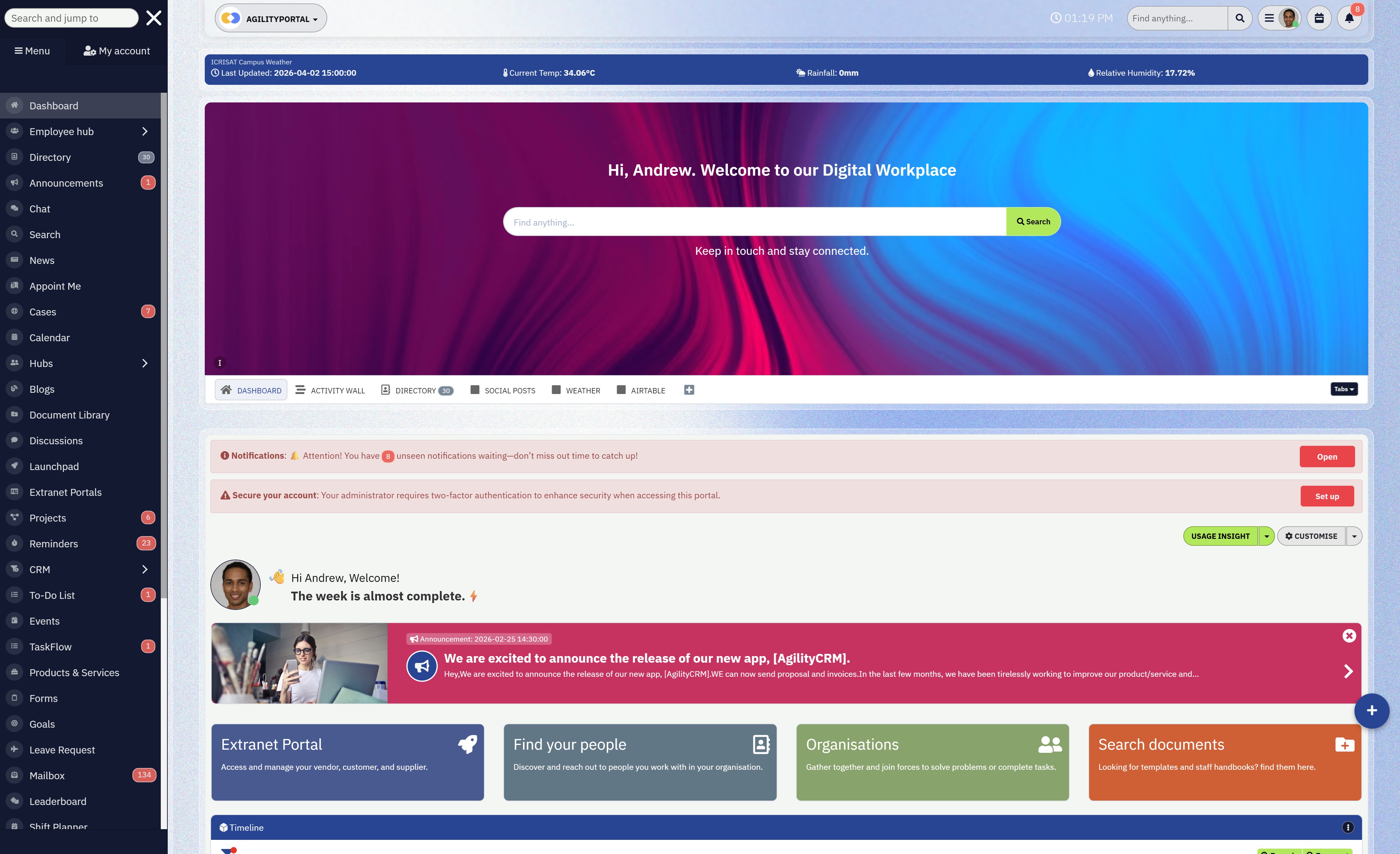
For many years, organizations relied on shared drives to store files, documents, and workplace photos.
While these systems provided basic storage capabilities, they were never designed to manage modern workplace knowledge or media assets.
As companies grow and produce more digital content, shared drives quickly become cluttered, difficult to navigate, and inefficient for teams trying to locate important information.
Today, many organizations are moving toward a digital workplace platform or intranet document library that provides structure, searchability, and context for workplace content.
Instead of acting as simple storage systems, digital workplaces transform files—including company photos—into organized knowledge resources that employees can easily access and use.
The Limitations of Shared Drives
Shared drives often appear convenient at first because they allow teams to upload and store files in folders.
However, as the volume of content grows, these systems begin to reveal several major limitations.
Common problems with shared drives include:
- Difficult search capabilities, making it hard to locate specific photos or files
- Poor governance, with no clear ownership or structure for content
- Lack of context, where files exist without explanations or related information
- Duplicate files, which often appear across multiple folders and departments
These issues often lead to employees spending unnecessary time searching through folders or asking colleagues to resend files that already exist somewhere in the system.
The Advantages of a Digital Workplace Platform
A modern digital workplace platform addresses these challenges by organizing files within a structured environment that supports collaboration, communication, and knowledge management.
Unlike traditional shared drives, digital workplaces provide:
- Searchable knowledge systems that allow employees to quickly find photos, documents, or internal resources
- Structured media libraries where company photos are organized by categories, tags, and metadata
- Integrated communication tools that connect images with news posts, updates, and company announcements
- Permission controls that ensure files are shared securely with the right teams
This structured approach turns files from simple storage items into meaningful organizational knowledge.
From Storage to Knowledge
The key difference between shared drives and a modern intranet document library is how information is presented and accessed.
In a digital workplace, photos and documents are not isolated files buried in folders—they are connected to company news, employee recognition posts, onboarding materials, and project updates.
This shift transforms digital storage into a knowledge ecosystem where employees can easily discover information and understand the context behind it.
As organizations continue to generate more content, the limitations of shared drives become more apparent.
By adopting a structured digital workplace platform, companies can organize their media assets, improve internal communication, and ensure workplace photos remain accessible as part of their long-term company knowledge archive.
Struggling to Organize Company Photos Across Your Workplace?
Many organizations store company photos across shared drives, emails, and messaging platforms. Over time, these images become difficult to find, duplicate files appear across departments, and valuable pieces of company history get lost.
AgilityPortal provides a modern digital workplace and intranet media library where companies can store, organize, and search workplace photos in one centralized platform. Instead of digging through folders or asking colleagues for files, employees can instantly locate images from events, projects, and company milestones.
- Centralized media library to organize company photos and digital assets
- Smart search that helps employees quickly find workplace images
- Tags, categories, and metadata to structure your company photo archive
- Employee engagement tools including news feeds and recognition posts
- Secure access controls to manage who can upload, edit, or download media
- Mobile access so teams can upload and share photos from anywhere
If your organization wants to preserve its visual history and make workplace media easier to discover, AgilityPortal helps transform scattered photos into a structured digital workplace media archive.
Try AgilityPortal Free for 14 Days
No credit card required
Wrapping up
Company photos are far more than simple images captured at events—they represent moments that reflect the people, culture, and milestones that shape an organization.
When properly stored and organized, these photos become valuable knowledge assets that help employees connect with the company's history and achievements.
However, when workplace images are scattered across shared drives, emails, and personal devices, they quickly lose their value.
Employees struggle to locate photos when they are needed, internal communications teams waste time searching for visuals, and important pieces of company history can disappear entirely.
Disorganized media doesn't just create inconvenience—it also reduces the impact photos can have on storytelling and engagement.
By moving photo storage into a centralized digital workplace, organizations can transform how visual content is managed and shared.
A structured intranet or digital workplace platform allows teams to store workplace photos in searchable media libraries, categorize them using tags and metadata, connect them with company announcements, onboarding materials, and employee recognition posts, and embed photo gallery on website pages for easier access to visual content.
When photos are organized properly, organizations gain several important benefits:
- company photos become accessible knowledge assets rather than forgotten files
- employees can quickly locate visuals from events, projects, and milestones
- communications teams can create richer internal storytelling
- organizations preserve their visual history for future employees
Over time, a structured workplace photo archive becomes a living record of the organization's journey—showcasing achievements, celebrating employees, and strengthening company culture.
If your organization wants to better organize workplace content, a modern digital workplace platform like AgilityPortal can help centralize company photos, documents, and internal communication in one place.
By transforming scattered media into a searchable knowledge resource, businesses can preserve their history while making it easier for employees to stay connected to the story of the company.
AI Summary
- Company photos capture important workplace moments such as team events, leadership announcements, and major milestones that help document an organization’s culture and history.
- Many organizations struggle to organize workplace photos because images are scattered across shared drives, email attachments, messaging platforms, and personal devices.
- Research from McKinsey shows employees can spend up to 28% of their workweek searching for information across disconnected systems, making it harder to locate workplace photos and media assets.
- Bring photo to life apps and AI enhancement tools can restore, improve, and modernize older company photos so they can be reused for internal storytelling and communication.
- Using categories, tags, and consistent naming conventions helps transform scattered images into a structured company photo archive that employees can easily search.
- Digital workplace platforms with centralized media libraries allow organizations to store, manage, and share workplace photos while preserving their visual company history.
Most Popular Posts

Effective communication among team members is vital for the productivity and success of any organization. Surprisingly, 60% of companies lack a long-term internal communication strategy, which p...


Businesses thrive on communication for efficiency, productivity and accomplishment. When the right information is passed from the right designation in the organization, it promotes positivity an...

Categories
Blog
(3196)
Business Management
(395)
Employee Engagement
(235)
Digital Transformation
(218)
Growth
(150)
Intranets
(141)
Internal communications
(106)
Remote Work
(68)
Sales
(53)
Collaboration
(52)
Customer Experience
(32)
Culture
(30)
Knowledge Management
(29)
Project management
(29)
Leadership
(20)
Comparisons
(9)
News
(1)

Related Posts

Could AI produce your next workplace video faster—and still deliver a message your employees can trust? As more businesses use video for onboarding, training and leadership updates, one question keeps coming up: will AI replace video editors in...

Could the best machine learning systems help your employees spend less time sorting requests, updating spreadsheets and chasing information—and more time doing useful work? That's the opportunity, but finding the right system starts with knowin...

What would happen to your team's work and customer information if an employee's MacBook disappeared today? If you're wondering how to protect your Mac physically, the answer goes beyond buying a case. A MacBook used at home, on a train or in a ...

Welcome to AgilityPortal's guide to the best VPN for Remote teams. How do you give employees secure access to company systems when they work from home, the office and everywhere in between? It's a question more businesses need to answer: 28% of worki...

Have you ever left a meeting thinking everyone agreed on the next step, only to discover a week later that each person remembered something different? Open source meeting transcription can help teams keep a searchable record of the conversation...


Jill Romford
I am a digital nomad, lover of exploring new places and making friends.
I love to travel and I love the internet. I take pictures of my travels and share them on the internet using Instagram.
Traveler, entrepreneur, and community builder. I share my insights on digital marketing and social media while inspiring you to live your fullest life.
Ready to learn more? 👍
One platform to optimize, manage and track all of your teams. Your new digital workplace is a click away. 🚀
Free for 14 days, no credit card required.