
Insight Blog
Agility’s perspectives on transforming the employee's experience throughout remote transformation using connected enterprise tools.
39 minutes reading time
(7743 words)
Portal Software Explained: Types, Benefits & Business Use Cases

Portal Software Explained: Types, Benefits & Business Use Cases
Discover what portal software is, how businesses use it, the different types of portals available, key features, benefits, and modern portal software examples.
Portal Software Explained: Types, Benefits & Business Use Cases

What Is Portal Software?
Have you ever wondered why so many businesses struggle with disconnected systems, scattered documents, outdated intranets, and poor communication between teams?
Most organisations today rely on dozens of different tools just to manage daily operations, which often creates information silos, slows productivity, and frustrates employees trying to find what they need.
According to AgilityPortal, employees can spend up to 20% of their workweek searching for information across disconnected systems and internal tools.
That is a huge operational problem for businesses trying to improve collaboration, communication, and efficiency in modern workplaces.
20%
of the workweek
According to McKinsey, employees can spend up to 20% of their workweek searching for information across disconnected systems and internal workplace tools.
Source: McKinsey Global Institute
This is where portal software has become increasingly important.
Modern businesses are now using web portal software, business portals, and enterprise portal platforms to centralise communication, knowledge sharing, workflows, and collaboration into one connected digital experience.
Instead of switching between multiple apps, systems, and communication channels, users can access everything they need from a single secure portal.
In this guide, we will explain what portal software actually is, how it works, the different types of portals businesses use, and the core features organisations should look for when choosing a modern portal platform.
We will also explore how companies use online portal software, collaboration portals, and company portal systems to improve productivity, simplify access to information, and support hybrid and remote work environments more effectively.
Key Takeaways
- Portal software helps businesses centralise communication, collaboration, documents, workflows, and knowledge into one connected digital environment.
- Disconnected workplace systems create operational inefficiencies, with employees often wasting valuable time searching for information across multiple tools.
- Modern workplace environments support employees, customers, suppliers, and external partners through secure access, collaboration, and shared resources.
- Features such as intelligent search, workflow automation, mobile accessibility, integrations, and role-based permissions improve productivity and user experience.
- Businesses increasingly replace outdated intranets and fragmented systems with connected workplace platforms built for hybrid work and modern collaboration.
How Portal Software Works
At its core, portal software acts as a central digital hub where users can securely access information, tools, communication, and workflows from one place.
Instead of forcing employees, customers, suppliers, or teams to jump between disconnected applications, a modern portal platform brings everything together into a single, organised experience.
Most businesses use web portal software to simplify access to company resources, improve collaboration, and reduce the time people spend searching for information across different systems.
Here is a simple breakdown of how modern portal software typically works behind the scenes.
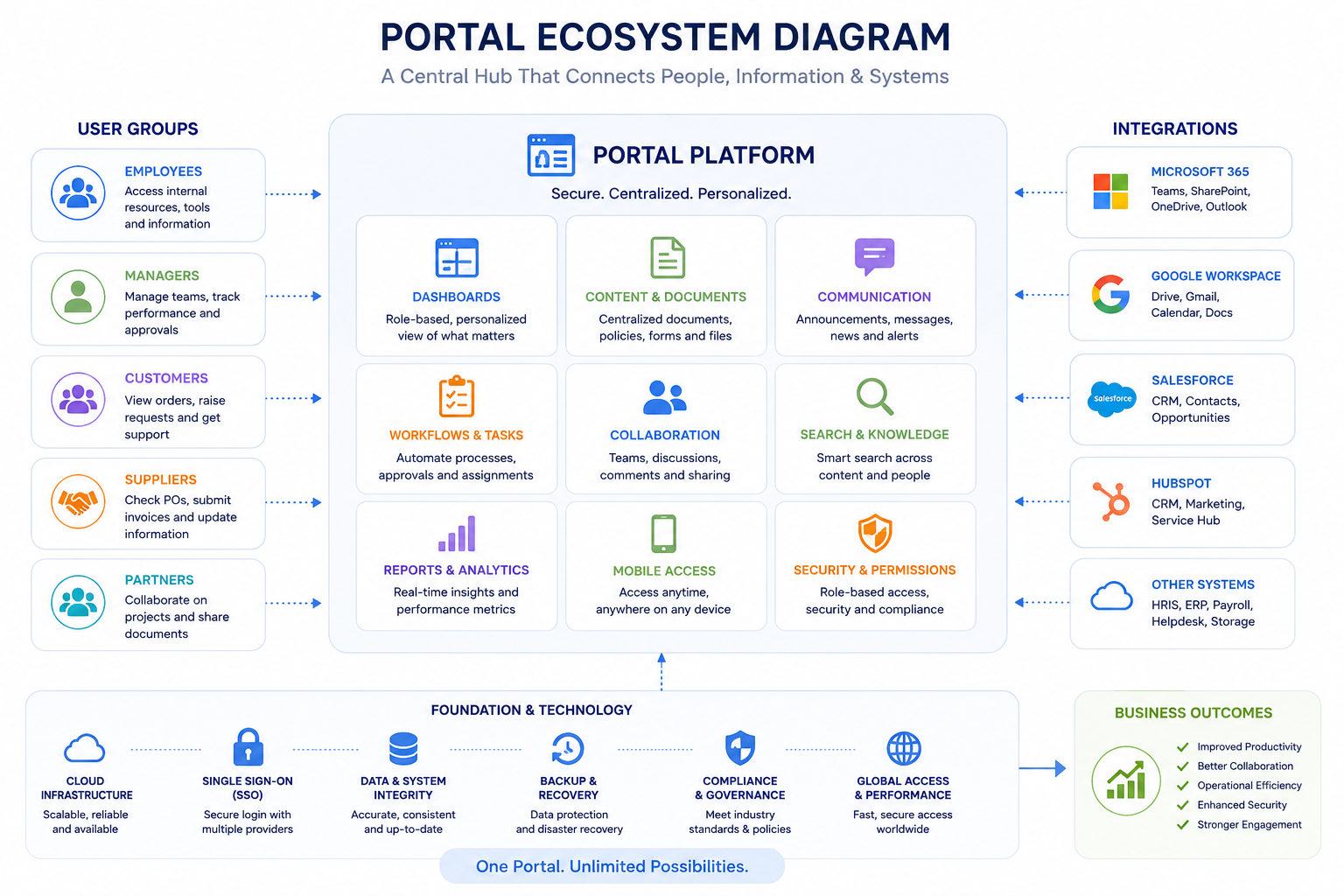
How Portal Software Works
User Authentication
Most portal systems begin with secure login access.
Users authenticate using usernames, passwords, Single Sign-On (SSO), Microsoft 365, Google Workspace, or other identity providers.
Once logged in, the system recognises the user and displays content based on their role, department, or permissions.
This is important because not every user should have access to the same information.
For example:
- Employees may access HR documents and internal news
- Managers may access reports and dashboards
- Suppliers may only view procurement updates
- Customers may access support tickets or invoices
Role-based access helps businesses maintain security while keeping the user experience simple.
Personalised Dashboards
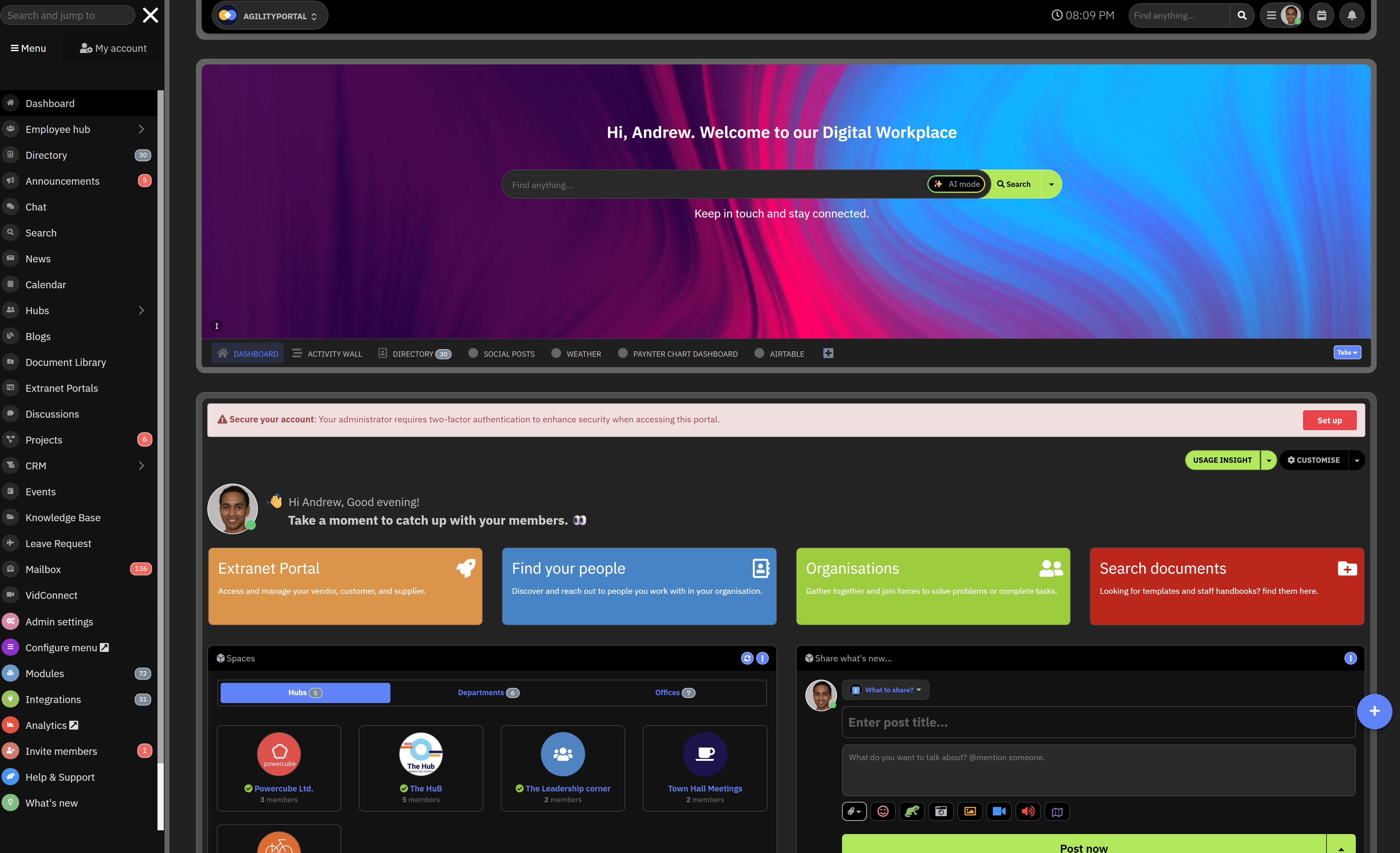
One of the most valuable parts of modern portal software is the dashboard experience.
Dashboards act as a personalised homepage where users can quickly see the information most relevant to them.
A typical dashboard may include:
- Company announcements
- Tasks and approvals
- Notifications
- Documents
- Calendars
- Team activity
- Knowledge base articles
- Reports and analytics
Modern enterprise portal software often allows dashboards to be customised by role, department, or user preferences, making the experience far more useful than traditional static intranets.
Permissions & Access Control
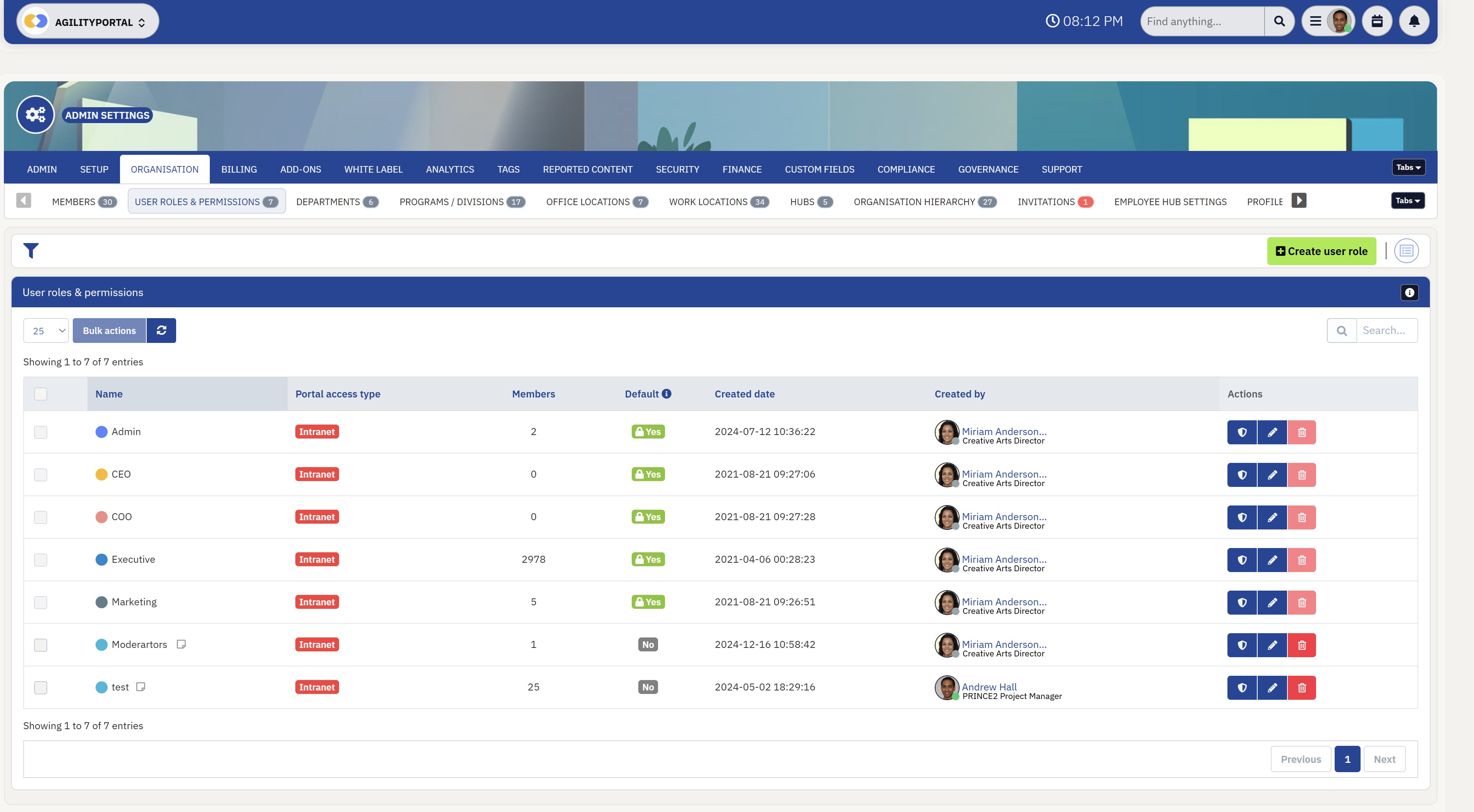
Permissions & Access Control
Permissions are a major component of any business portal.
Administrators can control who has access to specific pages, folders, tools, workflows, or communication channels.
This helps businesses:
- Protect sensitive information
- Control document visibility
- Manage compliance requirements
- Reduce security risks
- Separate internal and external users
For example, a company may allow HR teams to manage employee records while limiting access for general staff members.
Integrations With Business Tools
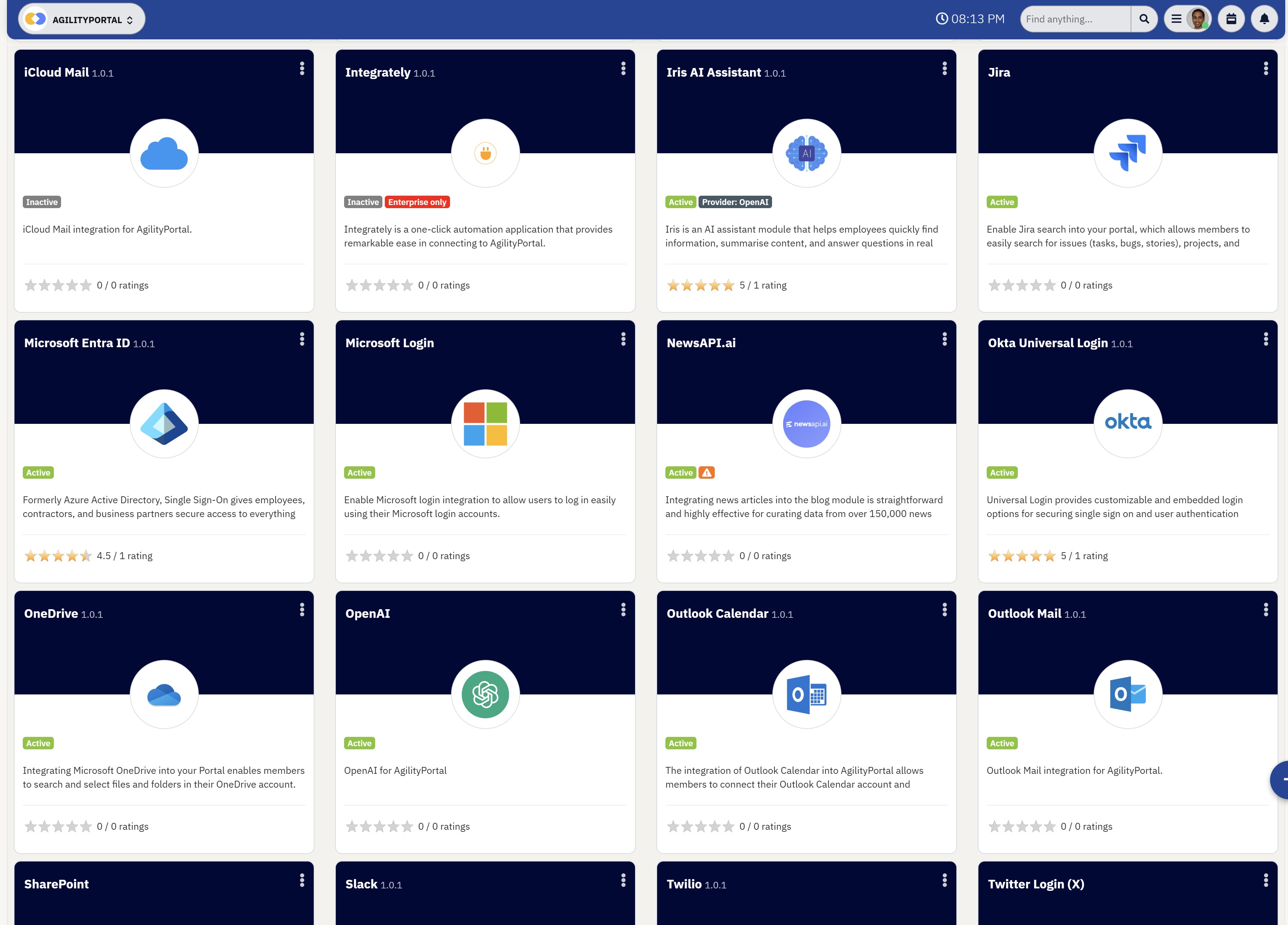
Integrations With Business Tools
Most modern organisations already use multiple platforms such as Microsoft 365, Google Workspace, Slack, CRM systems, HR software, project management tools, and cloud storage applications.
Instead of replacing every system, modern portal platforms integrate with existing business tools to create one connected workspace.
Common integrations include:
- Microsoft Teams
- SharePoint
- Google Drive
- Salesforce
- Dropbox
- HRIS systems
- Payroll platforms
- Project management tools
This creates a more connected digital workplace while reducing fragmentation across the business.
Notifications & Communication
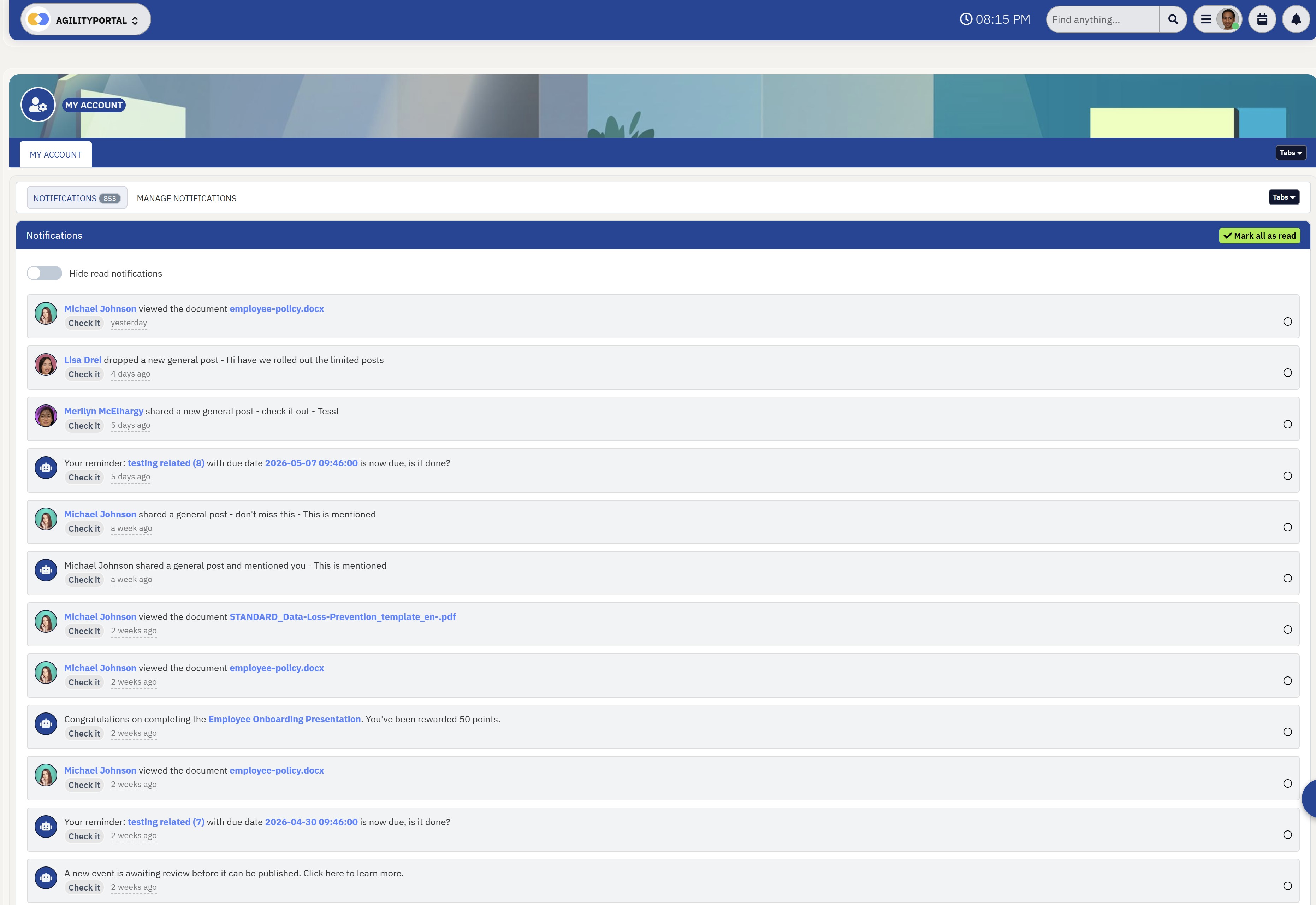
Notifications & Communication
Another key part of portal software is real-time communication and notifications. Users receive alerts when:
- New documents are uploaded
- Tasks are assigned
- Company announcements are published
- Workflows require approval
- Comments or mentions are added
- Policies are updated
Many portals also include:
- Internal messaging
- Social feeds
- Team discussions
- Push notifications
- Mobile alerts
This helps businesses improve visibility and employee engagement across remote and hybrid teams.
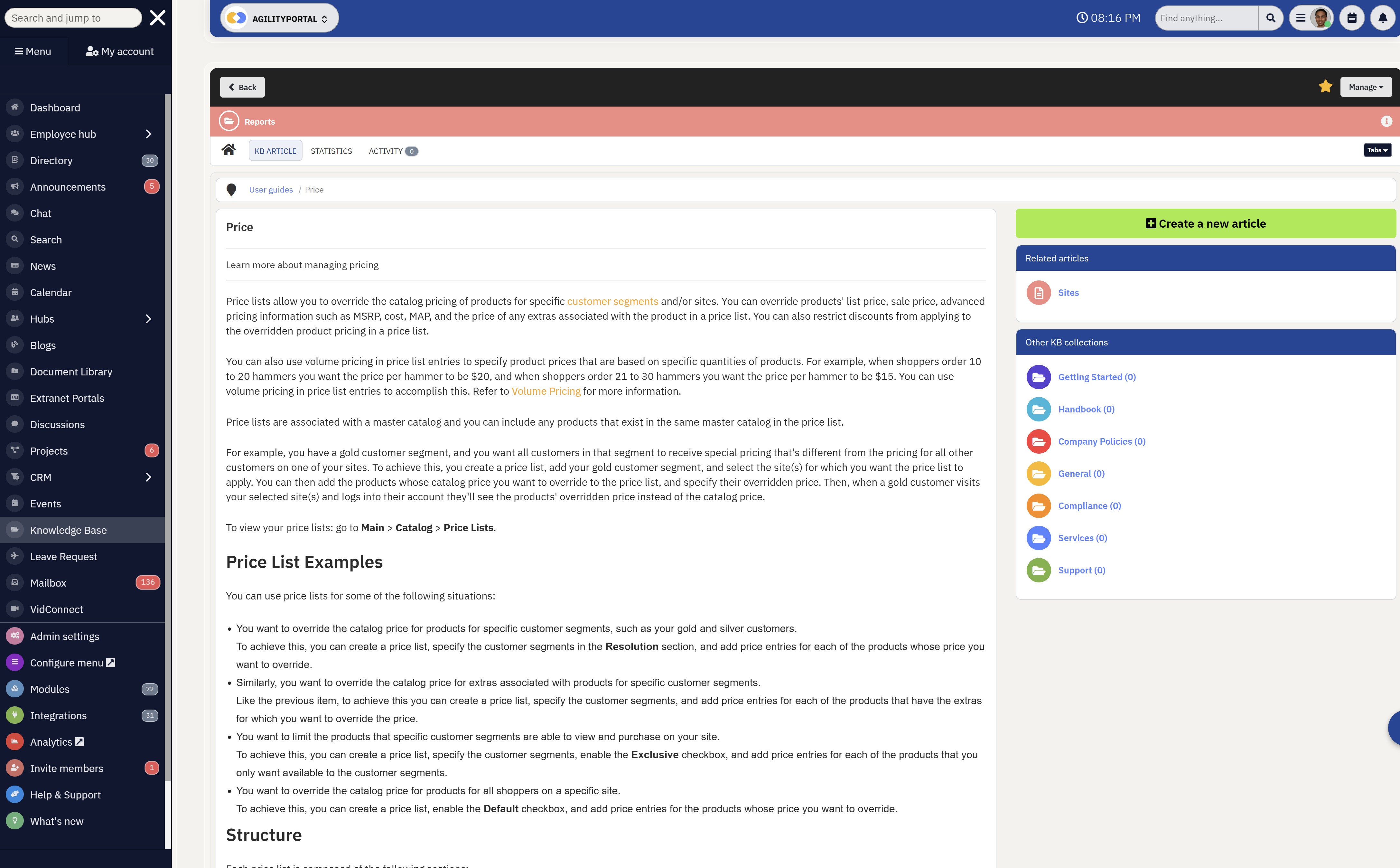
Content Delivery & Knowledge Sharing
Content Delivery & Knowledge Sharing
Most online portal software platforms are designed to centralise company knowledge and make information easier to find.
This may include:
- Policies and procedures
- Training materials
- FAQs
- Internal news
- Project documentation
- Video libraries
- Employee resources
Advanced portals often include enterprise search functionality, allowing users to quickly locate documents, people, or information without wasting time searching through disconnected systems.
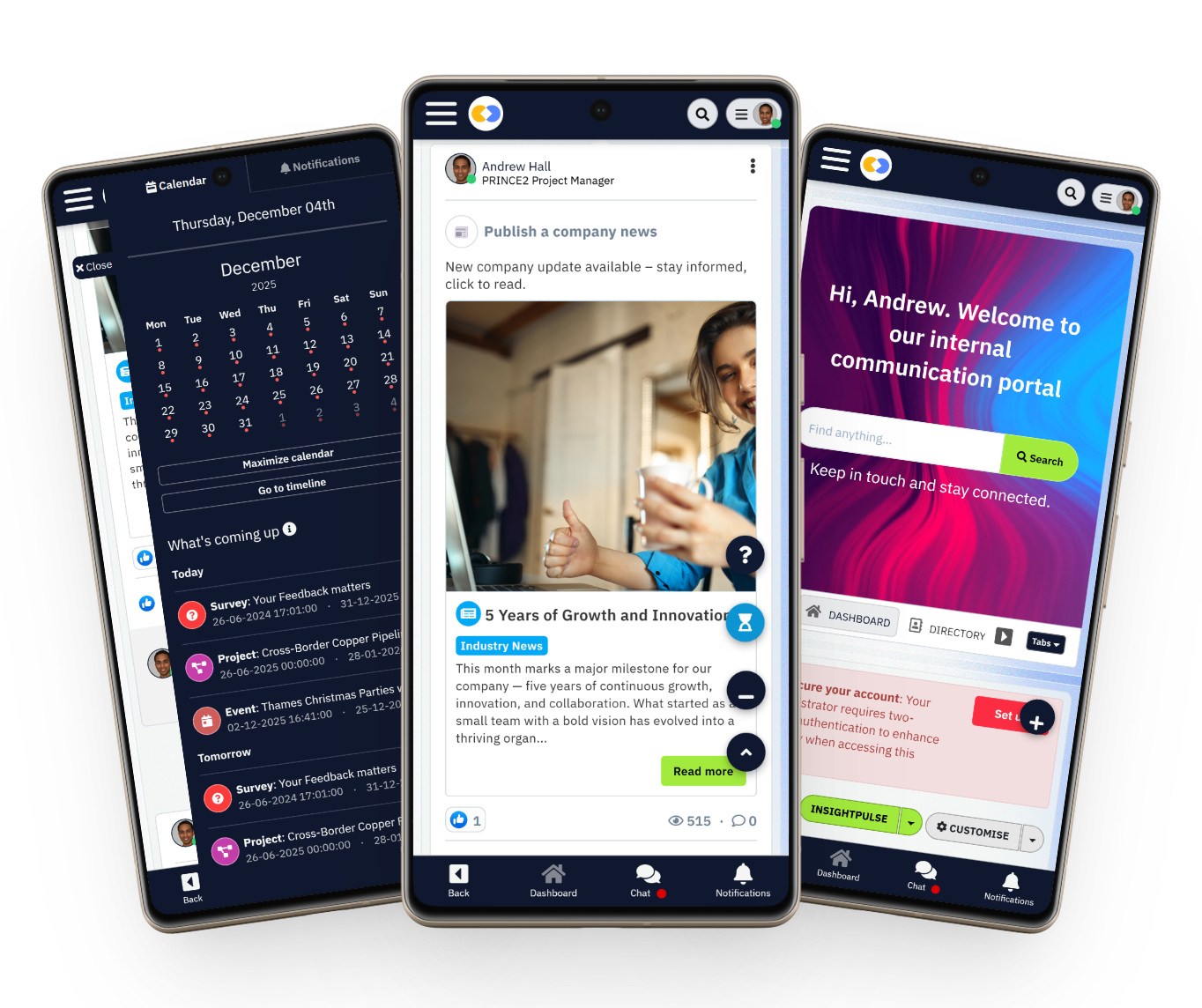
Mobile Accessibility
Mobile Accessibility
Modern businesses are no longer tied to office desktops.
Employees, suppliers, and customers now expect access from mobile devices, tablets, and remote environments.
That is why modern portal software is typically cloud-based and mobile-friendly, allowing users to:
- Access information remotely
- Receive notifications on mobile devices
- Collaborate from anywhere
- Complete workflows while travelling
- Stay connected outside the office
This has become especially important for hybrid workforces, frontline employees, and global teams that need real-time access to company systems and communication.
The Different Types of Portal Software
Not all portal software is designed for the same purpose.
Some portals are built for employees and internal communication, while others focus on customer support, supplier collaboration, or secure client access.
Understanding the different types of portal platforms is important because every business has different operational needs, users, and workflows.
Choosing the wrong type of portal can create confusion, poor adoption, and disconnected user experiences.
Below are the most common types of business portal software organisations use today.
The Different Types of Portal Software
Employee Portals
An employee portal is designed to help staff access company resources, communication, HR services, and internal tools from one central location.
These portals are commonly used to improve employee experience, simplify internal communication, and support hybrid or remote work environments.
Modern employee portals often replace outdated intranets and disconnected HR systems by giving employees a single place to access important information and complete everyday tasks.
Common features of employee portals include:
- HR access and payroll information
- Employee onboarding
- Internal announcements and company news
- Leave requests and approvals
- Employee self-service tools
- Team communication and collaboration
- Training materials and policies
- Mobile workforce access
Many businesses now use employee portal software to improve engagement, reduce administrative workload, and make internal communication more accessible across the organisation.
Intranet Portals
An intranet portal is primarily focused on internal company communication, collaboration, and knowledge sharing.
These portals act as a central digital workplace where employees can access documents, company updates, procedures, and team resources.
Unlike traditional static intranets, modern intranet portal software is designed to be interactive, searchable, and collaboration-driven.
Businesses often use intranet portals to:
- Centralise company knowledge
- Improve internal communication
- Share policies and procedures
- Support remote collaboration
- Publish company-wide announcements
- Organise team workspaces
- Reduce information silos
Modern intranet portals are especially valuable for large organisations managing distributed teams, hybrid workplaces, and multiple departments.
Client Portals
These portals provide customers with secure access to files, project updates, messages, invoices, and shared resources.
Many professional service firms, agencies, consultants, and legal businesses use client portal software to create a more organised and professional customer experience.
Common client portal capabilities include:
- Secure file sharing
- Project collaboration
- Client communication
- Shared task management
- Invoice and document access
- Real-time updates
- Account visibility
- Secure messaging
Instead of relying heavily on email chains and disconnected communication, client portals centralise everything into one secure environment.
Supplier Portals
A supplier portal helps businesses manage communication and collaboration with suppliers, vendors, and procurement partners. These portals are commonly used in manufacturing, logistics, retail, and enterprise supply chain operations.
Modern supplier portal software helps businesses streamline procurement workflows while improving supplier visibility and communication.
Supplier portals are commonly used for:
- Procurement management
- Supplier onboarding
- Purchase order updates
- Invoice submissions
- Vendor communication
- Compliance documentation
- Contract management
- Supply chain collaboration
Many organisations use supplier portals to reduce manual administrative processes and improve operational efficiency across external vendor networks.
Customer Portals
A customer portal is built to help customers manage their accounts, access support, and interact with a business independently without always needing direct assistance from support teams.
These portals are commonly used by SaaS companies, telecom providers, financial services, healthcare businesses, and customer service teams.
Typical customer portal features include:
- Support ticket management
- Account management
- Billing and invoice access
- Knowledge base access
- Service requests
- Product documentation
- FAQs and self-service support
- Customer communication tools
Modern customer portal software helps businesses improve customer experience while reducing pressure on support teams through self-service functionality and centralised support resources.
Looking for a modern portal platform?
AgilityPortal brings communication, collaboration, knowledge sharing, documents, and employee engagement into one connected portal platform.
Instead of relying on scattered tools, teams can access company updates, resources, conversations, workflows, and workplace knowledge from one secure digital environment.
14-day free trial available — no credit card required.
Key Features Businesses Should Look for in Modern Portal Platforms
Choosing the right digital workspace solution is not simply about having a login page or a document area.
The best platforms are designed to improve collaboration, simplify daily operations, centralise company resources, and create a better user experience across the organisation.
Many businesses invest in systems that look impressive initially but later struggle with low adoption, poor usability, weak integrations, or limited scalability.
That is why understanding the core capabilities of a modern workplace platform is critical before making a long-term investment.
Below are some of the most important features organisations should prioritise when evaluating modern portal solutions.
Role-Based User Permissions
One of the most important capabilities is the ability to control who can access specific information, tools, and resources.
Different users within a business require different levels of visibility depending on their department, role, or responsibilities.
For example:
- HR teams may require access to sensitive employee records
- Finance teams may need approval workflows and reporting access
- External contractors may only need limited document visibility
- Managers may require department dashboards and analytics
Granular access control helps businesses improve governance while reducing the risk of accidental data exposure.
Centralised File & Content Organisation
Businesses generate enormous amounts of information every day, including policies, forms, contracts, onboarding materials, procedures, and operational documents. Without proper organisation, finding accurate information quickly becomes difficult.
Modern workplace systems should make it easy to:
- Store business documentation
- Organise folders and resources
- Manage versions and updates
- Share files securely
- Create structured knowledge libraries
- Reduce duplicate information
Centralised information management also helps reduce confusion caused by disconnected drives, email attachments, and scattered storage locations.
Process Automation & Task Management
Manual processes slow businesses down. Modern digital platforms should help automate repetitive tasks and simplify operational workflows across departments.
Automation capabilities often include:
- Approval requests
- Form submissions
- Notifications and reminders
- Task assignments
- Employee onboarding sequences
- Procurement workflows
- Escalation processes
By reducing manual administration, businesses can improve efficiency while allowing teams to focus on higher-value work.
Communication & Engagement Tools
Strong communication functionality is essential for keeping teams aligned, especially in hybrid and remote work environments. Employees today expect more than static intranet pages and outdated company announcements.
Modern collaboration environments should support:
- Company-wide announcements
- Social feeds and updates
- Group discussions
- Team messaging
- Polls and surveys
- Recognition features
- Event notifications
These features help improve visibility, engagement, and organisational transparency across the business.
Intelligent Search & Knowledge Discovery
One of the biggest frustrations employees face is not being able to find information quickly. Poor search experiences often lead to duplicated work, repeated questions, and wasted productivity.
Advanced platforms should provide:
- Fast enterprise search
- Document indexing
- Knowledge discovery
- Smart filtering
- Searchable people directories
- Tagging and categorisation
- AI-assisted recommendations
The easier information is to find, the more effective the overall workplace experience becomes.
Mobile-Friendly User Experience
Modern workforces are no longer tied to office desks. Employees, contractors, and external users increasingly expect access from smartphones and tablets.
A responsive mobile experience allows users to:
- Access resources remotely
- Receive alerts instantly
- Review documents on the move
- Participate in discussions
- Complete approvals from anywhere
- Stay connected while travelling
This is particularly important for frontline workers, field teams, retail businesses, healthcare organisations, and global operations.
Connectivity With Existing Business Tools
Most organisations already rely on multiple systems for communication, HR, storage, CRM, finance, and project management. A disconnected workplace creates unnecessary friction and operational inefficiencies.
Strong integration capabilities help connect existing business applications into one unified experience.
Common integrations may include:
- Microsoft 365
- Google Workspace
- CRM platforms
- Payroll systems
- Helpdesk software
- Cloud storage providers
- ERP solutions
- Project management applications
Integrated ecosystems help reduce context switching while improving productivity across departments.
Reporting & Performance Insights
Modern workplace solutions should provide visibility into how the platform is being used and where improvements may be needed.
Analytics features can help organisations measure:
- Employee engagement
- Content usage
- Search activity
- Communication performance
- Adoption rates
- Workflow completion
- User activity trends
These insights help businesses optimise internal operations and improve user adoption over time.
Security, Governance & Compliance
As organisations manage more sensitive information digitally, security becomes increasingly important. Businesses need confidence that company data, employee information, and external collaboration remain protected.
Key security capabilities may include:
- Multi-factor authentication
- Access auditing
- Compliance controls
- Encryption
- Data retention policies
- Activity monitoring
- Permission management
- Secure external sharing
Industries such as healthcare, finance, government, and legal services often require stricter governance and compliance standards.
Custom Branding & White-Label Flexibility
Some organisations prefer platforms that can be customised to match their company identity, especially when external users, clients, or partners access the system.
Customisation options may include:
- Company logos
- Brand colours
- Custom domains
- Personalised dashboards
- Department-specific experiences
- Branded login pages
- White-label environments
This helps businesses create a more professional and consistent user experience while reinforcing their brand identity across the platform.
Benefits of Portal Software
Centralised Information Access
One of the biggest operational problems modern businesses face is information fragmentation. Important documents, conversations, policies, and updates are often spread across email inboxes, cloud drives, chat applications, spreadsheets, and outdated systems.
As organisations grow, finding accurate information quickly becomes increasingly difficult, especially for remote and hybrid teams working across multiple locations.
A connected digital workspace helps centralise business resources into one searchable environment, making it easier for users to access the information they need without wasting valuable time.
According to McKinsey, employees can spend nearly 20% of their workweek searching for internal information or trying to locate colleagues with the right knowledge.
That level of inefficiency creates major productivity losses over time.
Centralised access helps businesses:
- Reduce duplicated documents and outdated resources
- Improve visibility across departments
- Simplify onboarding for new employees
- Create a more organised knowledge-sharing environment
- Minimise confusion caused by disconnected systems
Instead of relying on scattered communication channels and multiple storage locations, businesses can create a single source of truth where employees, managers, and teams access trusted information more efficiently.
20%
of the workweek
According to McKinsey, employees can spend nearly 20% of their workweek searching for internal information or trying to locate colleagues with the right knowledge.
Source: McKinsey Global Institute
Better Employee & Team Communication
Communication breakdowns are one of the fastest ways for productivity, engagement, and collaboration to decline inside an organisation.
Many businesses still rely heavily on emails, disconnected messaging tools, and inconsistent communication processes that make it difficult for employees to stay informed.
Modern workplace platforms help create more transparent and structured communication environments where updates, announcements, conversations, and discussions are easier to manage.
This becomes especially important for businesses with hybrid teams, frontline workers, multiple office locations, or distributed global operations.
Strong communication capabilities can support:
- Company-wide announcements
- Department-specific updates
- Internal messaging and collaboration
- Employee engagement initiatives
- Social interaction between teams
- Event notifications and reminders
- Leadership communication visibility
When employees have easier access to relevant updates and conversations, businesses often experience higher engagement, fewer communication gaps, and improved alignment across departments.
A more connected communication experience also helps reduce the risk of important information being lost in long email chains or scattered messaging platforms.
Improved Collaboration Across Departments
Many organisations struggle with departmental silos where teams operate independently with limited visibility into what other departments are doing. This often creates duplicated work, slower decision-making, and communication bottlenecks that impact operational efficiency.
Connected workplace environments help bring departments together by creating shared spaces for collaboration, project visibility, document sharing, and cross-functional communication.
Instead of working in isolation, teams can collaborate more effectively across projects, workflows, and organisational initiatives.
Cross-department collaboration often improves:
- Project coordination
- Knowledge sharing
- Workflow transparency
- Team accountability
- Decision-making speed
For example, HR, finance, operations, and IT teams may all need access to the same onboarding processes or compliance documentation. Having a connected environment reduces friction between departments and makes collaboration significantly easier.
Modern collaboration environments are particularly valuable for growing organisations where communication complexity increases as more teams, locations, and systems are introduced into the business.
Reduced Operational Bottlenecks
Manual processes and disconnected workflows are common causes of operational inefficiency.
Many organisations still rely on spreadsheets, email approvals, paper-based processes, or outdated systems that slow down everyday business activities.
By centralising workflows and automating repetitive tasks, businesses can significantly reduce administrative overhead while improving consistency across operations.
This helps employees spend less time chasing approvals, searching for updates, or manually moving information between systems.
Operational improvements often include:
- Faster approval processes
- Reduced manual data entry
- Improved workflow visibility
- Better task tracking
- Fewer communication delays
- More consistent operational procedures
Automation also helps businesses scale more effectively because teams can manage larger workloads without increasing operational complexity at the same pace.
For organisations dealing with onboarding, procurement, compliance, HR requests, or project coordination, reducing workflow friction can create measurable improvements in productivity and response times.
Better User Experience
Poor user experience is one of the biggest reasons employees avoid using internal systems.
Complicated navigation, outdated interfaces, inconsistent tools, and slow access to information often lead to low adoption rates and frustration across the workforce.
Modern workplace environments focus heavily on usability, accessibility, and personalised experiences. The goal is to make it as simple as possible for users to access tools, resources, and communication without unnecessary complexity.
A strong user experience may include:
- Mobile-friendly access
- Personalised dashboards
- Fast navigation
- Modern interface design
- Simplified search functionality
- Role-based content visibility
- Easy document access
When systems are easier to use, employees are more likely to engage with the platform regularly rather than bypassing it entirely. Better usability also reduces training requirements and improves adoption across departments.
For hybrid and remote teams, accessibility becomes even more important because users expect fast and consistent access regardless of location or device.
Stronger Security & Governance
As businesses manage larger volumes of digital information, security and governance have become critical priorities.
Organisations need confidence that sensitive business data, employee records, financial information, and operational resources remain protected while still being accessible to authorised users.
Centralised digital environments provide businesses with greater control over permissions, access levels, document visibility, and user activity.
Instead of relying on scattered systems with inconsistent security practices, organisations can apply more structured governance policies across the entire environment.
Important governance capabilities often include:
- Role-based access control
- Audit tracking and activity logs
- Secure external sharing
- Compliance management
- Authentication controls
- Data protection policies
- Permission management systems
These controls are particularly important for industries such as healthcare, finance, legal services, manufacturing, and government sectors where compliance and data protection standards are stricter.
A well-governed digital environment not only improves security posture but also helps businesses reduce operational risks associated with unmanaged information and fragmented systems.
Common Business Problems Modern Portal Platforms Solve
Many businesses do not initially realise how much operational inefficiency is caused by disconnected systems and fragmented communication. As organisations grow, employees often end up working across multiple applications, shared drives, email chains, spreadsheets, and outdated internal systems just to complete basic tasks.
Over time, this creates confusion, duplicated work, slower collaboration, and poor visibility across the business.
One of the most common problems organisations face is scattered information. Important documents, policies, procedures, and updates are frequently stored across different tools and locations, making it difficult for employees to find accurate information quickly.
This not only wastes time but also increases the risk of outdated or inconsistent information being shared internally.
Email overload is another major issue.
Many companies still rely heavily on email for approvals, file sharing, announcements, and project coordination.
As inboxes become crowded, important updates are often missed, delayed, or buried in long conversation threads. This creates communication bottlenecks that slow decision-making and reduce productivity across teams.
Poor communication between departments also becomes a serious challenge as businesses scale.
Teams may use different tools, processes, and communication methods, leading to silos that reduce collaboration and visibility. Without a central environment for communication and knowledge sharing, employees often struggle to stay aligned on projects, priorities, and operational updates.
Onboarding new employees can also become inconsistent and difficult to manage when resources are spread across multiple systems. New hires may struggle to locate training materials, policies, forms, or key contacts during their first few weeks. This often leads to slower onboarding experiences and increased pressure on HR and management teams.
External collaboration creates additional complexity for many organisations.
Businesses working with suppliers, contractors, vendors, or external partners frequently struggle with fragmented communication, delayed updates, and limited visibility into shared workflows. Without a structured collaboration environment, procurement and operational processes can quickly become inefficient.
Remote and hybrid work environments have amplified many of these problems. Employees now expect secure access to company information, communication tools, and operational resources from anywhere.
Businesses relying on outdated systems often struggle to support distributed teams effectively, especially when mobile accessibility, real-time collaboration, and centralised communication are limited.
By creating a more connected digital environment, businesses can reduce operational friction, simplify collaboration, improve visibility, and provide users with easier access to the information and tools they need every day.
Portal Software vs Traditional Websites
Many businesses still confuse modern digital workplace platforms with traditional websites or older intranet systems.
While these technologies may appear similar on the surface, they are designed for very different purposes and user experiences.
A traditional website is typically built to de
liver public-facing information to visitors. Its main goal is often marketing, branding, lead generation, or sharing general company information. Most websites are static, meaning users simply consume content rather than actively collaborate or interact with business processes.
Modern workplace environments are very different.
Instead of functioning as simple information pages, they are designed to create connected experiences where employees, customers, suppliers, or teams can communicate, collaborate, access resources, complete tasks, and interact with business systems in real time.
| Feature | Traditional Website | Intranet System | Modern Portal Environment | Collaboration Platform |
| Primary Audience | Public visitors | Internal employees | Internal & external users | Teams and departments |
| Main Purpose | Marketing & information | Internal information sharing | Centralised access & operations | Team collaboration |
| User Login Access | Usually not required | Required | Required | Required |
| Personalised Experience | Limited | Basic | Advanced | Advanced |
| Document Management | Minimal | Moderate | Strong | Moderate |
| Communication Features | Very limited | Basic announcements | Integrated communication | Real-time collaboration |
| Workflow Automation | Rare | Limited | Advanced | Moderate |
| Mobile Accessibility | Standard responsive design | Often limited | Mobile-first access | Strong mobile support |
| Integrations | Marketing-focused | Limited integrations | Business system integrations | Productivity integrations |
| Search Functionality | Website search | Basic internal search | Enterprise-grade search | Shared workspace search |
| External Collaboration | Rare | Limited | Strong support | Moderate |
| Employee Engagement Tools | No | Minimal | Advanced | Team-focused |
| Scalability | Content-focused | Often restrictive | Highly scalable | Team scalable |
| Best For | Public company presence | Internal company resources | Connected digital operations | Project and team coordination |
As businesses continue moving toward hybrid work, distributed teams, and digital operations, many organisations are replacing outdated intranet systems and disconnected tools with more connected workplace environments that combine communication, collaboration, automation, and knowledge sharing into one central experience.
Industries That Use Modern Portal Platforms
Modern digital workplace environments are no longer limited to large enterprises or technology companies.
Businesses across almost every industry now rely on connected collaboration environments to improve communication, simplify workflows, centralise knowledge, and support employees, customers, suppliers, and external partners more effectively.
Different industries use these systems in different ways depending on their operational challenges, compliance requirements, workforce structure, and communication needs.
Below are some of the most common industries using modern workplace environments today and why they have become increasingly important.
Healthcare
Healthcare organisations manage large volumes of sensitive information, strict compliance requirements, and highly distributed workforces.
Hospitals, healthcare providers, and medical groups often rely on connected workplace environments to centralise policies, staff communication, onboarding, training materials, and operational updates across multiple departments and locations.
Companies and organisations such as Kaiser Permanente, Mayo Clinic, and Cleveland Clinic have invested heavily in digital employee experiences and internal collaboration systems to support communication across clinical and administrative teams.
Healthcare environments commonly use these systems to:
- Distribute compliance updates
- Manage employee resources
- Support frontline communication
- Deliver training materials
- Centralise operational procedures
With thousands of employees often working across multiple facilities, mobile accessibility and real-time communication have become essential for modern healthcare operations.
Manufacturing
Manufacturing businesses often operate across factories, warehouses, supply chains, and global production facilities where communication gaps can create operational delays and costly inefficiencies.
Many manufacturing companies use connected workplace systems to improve collaboration between operations, procurement, logistics, engineering, and frontline workers.
Organisations such as Siemens, General Electric, and Toyota have invested heavily in digital workplace transformation to improve operational visibility and workforce communication.
Manufacturing organisations often use these environments to:
- Share production updates
- Centralise safety documentation
- Manage supplier communication
- Improve operational visibility
- Support frontline workforce engagement
- Reduce paper-based processes
For manufacturing businesses, having one connected environment helps reduce communication silos between office teams and frontline operations.
Nonprofits
Nonprofit organisations often operate with distributed teams, limited budgets, volunteers, remote workers, and multiple community initiatives happening simultaneously.
Communication and coordination can quickly become difficult without a central environment for collaboration and information sharing.
Nonprofits such as UNICEF, Red Cross, and Save the Children rely heavily on digital collaboration tools to coordinate teams, campaigns, volunteers, and operational updates across multiple regions.
These organisations often use workplace environments to:
- Improve internal communication
- Coordinate volunteers and teams
- Share campaign resources
- Manage remote collaboration
- Centralise operational documents
- Improve organisational transparency
For nonprofits, simplifying communication while reducing operational complexity is often critical because resources and staffing may be limited.
Education
Educational institutions manage large communities of students, teachers, administrators, and support staff who all require access to information, schedules, communication, and learning resources.
Schools, colleges, and universities increasingly use connected environments to centralise communication and improve digital learning experiences.
Institutions such as Harvard University, Stanford University, and University of Oxford have invested heavily in digital collaboration and communication technologies to support hybrid education models and operational efficiency.
Educational environments commonly use these systems to:
- Share announcements and updates
- Manage student resources
- Improve communication between departments
- Support remote learning
- Centralise academic documentation
- Coordinate administrative workflows
As hybrid and online learning continue to grow, digital collaboration environments have become increasingly important across education sectors worldwide.
Financial Services
Financial organisations operate in highly regulated environments where security, compliance, and controlled access to information are essential.
Banks, insurance companies, and financial institutions use connected digital environments to improve communication, secure document sharing, and operational visibility while maintaining strict governance standards.
Companies such as JPMorgan Chase, HSBC, and Goldman Sachs have all invested in digital workplace technologies to modernise collaboration across large enterprise operations.
Financial organisations often rely on these systems for:
- Secure internal communication
- Compliance management
- Controlled document sharing
- Operational reporting
- Workflow approvals
- Knowledge management
- Employee resource access
Security, governance, and audit tracking are especially important within financial environments due to regulatory requirements and data sensitivity.
Government
Government agencies often manage large workforces, complex operational structures, and extensive documentation requirements across multiple departments and public services.
Traditional communication methods and outdated systems can create inefficiencies that impact both employees and public-facing operations.
Government organisations around the world, including agencies connected to National Health Service and NASA, use connected collaboration environments to improve communication, operational coordination, and information access across distributed teams.
Government environments commonly use these systems to:
- Share internal policies
- Improve departmental communication
- Manage secure documentation
- Coordinate operational workflows
- Support remote government workers
- Improve information accessibility
Many public sector organisations are modernising outdated systems to better support hybrid work and digital service delivery.
Construction
Construction companies manage highly mobile workforces operating across multiple project sites, contractors, suppliers, and operational teams.
Communication delays and disconnected documentation can quickly create project risks, delays, and compliance issues.
Construction firms such as Bechtel and Skanska increasingly rely on connected collaboration systems to improve coordination between field teams and office operations.
Construction businesses often use these environments to:
- Share project documentation
- Coordinate contractors
- Manage safety procedures
- Deliver site updates
- Improve communication across locations
- Centralise compliance resources
Mobile access is particularly important because many users work directly from construction sites rather than traditional office environments.
Logistics
Logistics and supply chain organisations depend heavily on real-time communication, operational visibility, and coordination across warehouses, transportation networks, suppliers, and distributed teams.
Delays in communication can directly impact delivery schedules and customer satisfaction.
Companies such as DHL, FedEx, and UPS use digital workplace technologies to improve workforce communication and streamline operational collaboration across global networks.
Logistics organisations commonly use connected workplace environments to:
- Share operational updates
- Improve warehouse communication
- Coordinate suppliers and drivers
- Manage documentation
- Track workflow progress
- Support distributed workforce operations
As supply chains become more complex and globally distributed, centralised communication and collaboration environments have become increasingly important for maintaining operational efficiency.
How to Choose the Right Portal Software
Choosing the right digital workplace solution is not simply about selecting the platform with the longest feature list.
Businesses need a system that aligns with their operational goals, workforce structure, communication needs, and long-term growth plans.
Many organisations invest in systems that look impressive during demonstrations but later struggle with poor adoption, limited flexibility, or integration challenges.
The best platforms are usually the ones employees actually enjoy using because they simplify work rather than add more complexity.
Before investing in any solution, businesses should evaluate how well the platform supports collaboration, communication, accessibility, security, and scalability across the organisation.
When comparing different solutions, businesses should carefully consider the following areas:
- The platform should be scalable enough to support future business growth, additional users, and expanding operational requirements without forcing the company to migrate systems later.
- Strong integration capabilities are important because most organisations already rely on existing tools such as Microsoft 365, Google Workspace, HR systems, CRMs, and project management platforms.
- Security and governance controls should be evaluated carefully, especially for businesses handling sensitive employee data, financial information, customer records, or compliance requirements.
- User adoption is critical because even powerful systems fail when employees avoid using them due to poor usability, complicated navigation, or outdated interfaces.
- Mobile accessibility has become increasingly important for hybrid workforces, remote employees, frontline staff, and distributed teams that need access outside traditional office environments.
- Customisation options help businesses create experiences that align with their workflows, departments, branding, and operational structure rather than forcing users into rigid environments.
- AI-powered search and intelligent knowledge discovery tools can significantly improve productivity by helping users find information, resources, and documents much faster across the organisation.
The right solution should ultimately reduce operational friction, improve communication, centralise knowledge, and create a more connected workplace experience that employees and teams can rely on daily.
Why Legacy Portal Systems Are Failing Modern Businesses
Many older workplace systems were built for a different era when employees worked primarily from office desktops and collaboration needs were far simpler.
Today, these outdated environments often struggle with poor user experience, weak mobile accessibility, disconnected workflows, and overly complicated navigation that frustrates employees rather than helping them.
Many organisations also experience "SharePoint fatigue," where teams stop using the platform consistently because finding information becomes difficult and time-consuming.
Modern employees now expect fast search, mobile access, real-time communication, and simpler digital experiences. Businesses relying on outdated systems often face lower engagement, slower collaboration, and reduced productivity across teams.
Modern Portal Software Trends
The way businesses use digital workplace environments is changing rapidly.
Traditional intranets and static communication systems are being replaced by smarter, more connected platforms designed to support hybrid work, mobile users, automation, and real-time collaboration.
Modern organisations now expect workplace technology to improve productivity, simplify communication, and create better employee experiences rather than simply acting as a document repository.
As businesses continue to modernise operations, several major trends are shaping the future of workplace collaboration environments and connected digital ecosystems.
Businesses should pay close attention to the following trends when evaluating modern workplace platforms:
- AI-powered search is becoming increasingly important because employees expect faster access to documents, policies, people, and internal knowledge without manually searching through multiple systems.
- Employee experience has become a major priority as businesses focus more heavily on engagement, usability, communication, and creating digital environments employees actually enjoy using daily.
- Hybrid work support is now essential because organisations need systems that allow employees to collaborate effectively whether they are working remotely, in the office, or across multiple locations.
- Mobile-first experiences are becoming standard as frontline workers, remote employees, and distributed teams increasingly rely on smartphones and tablets for communication and operational access.
- Integrated collaboration tools help reduce platform switching by bringing communication, file sharing, tasks, announcements, and workflows into one connected environment.
- Personalised dashboards are helping businesses deliver more relevant experiences by showing users information, tasks, updates, and resources based on their role or department.
- Workflow automation continues to grow because organisations want to reduce repetitive administrative tasks, improve operational efficiency, and simplify approvals and internal processes.
Modern workplace technology is evolving beyond traditional intranets into more intelligent, connected, and employee-focused environments designed to support the way businesses operate today.
Portal Software Examples
Businesses use different types of workplace platforms depending on their operational goals, workforce structure, and communication needs.
Some systems focus heavily on internal communication, while others are designed for external collaboration, document sharing, or employee engagement.
Below are some common examples of modern workplace environments used across different industries.
Intranet Platforms
Modern intranet environments help businesses centralise internal communication, company resources, and knowledge sharing into one connected space.
Platforms such as Microsoft SharePoint and Atlassian Confluence are commonly used by organisations looking to improve internal collaboration and document management across departments.
These environments are often used for:
- Company news and announcements
- Internal documentation
- Team workspaces
- Knowledge management
- Employee communication
Client Collaboration Environments
Many businesses use secure client-facing systems to improve communication, file sharing, and project collaboration with external customers.
Professional service firms, agencies, and consultants often rely on platforms such as Salesforce Experience Cloud or Monday.com client workspaces to create more organised customer experiences.
These systems commonly support:
- Secure file sharing
- Project updates
- Client communication
- Shared resources
- External collaboration
Team Collaboration Systems
Collaboration-focused environments are designed to improve communication, productivity, and coordination across teams.
Companies such as Slack and Microsoft Teams have become widely adopted because they help businesses centralise messaging, meetings, notifications, and workflow collaboration into one environment.
These systems are commonly used for:
- Team messaging
- Real-time collaboration
- Video meetings
- Project coordination
- Cross-department communication
Employee Experience Platforms
Employee-focused digital workplace environments are designed to improve engagement, communication, onboarding, and company culture.
Platforms such as Workvivo and Staffbase are commonly used by organisations looking to create more connected employee experiences across hybrid and frontline workforces.
These environments often support:
- Employee engagement
- Internal communication
- Mobile workforce access
- Recognition programs
- Company culture initiatives
Why Businesses Are Replacing Disconnected Workplace Tools With Modern Portal Software
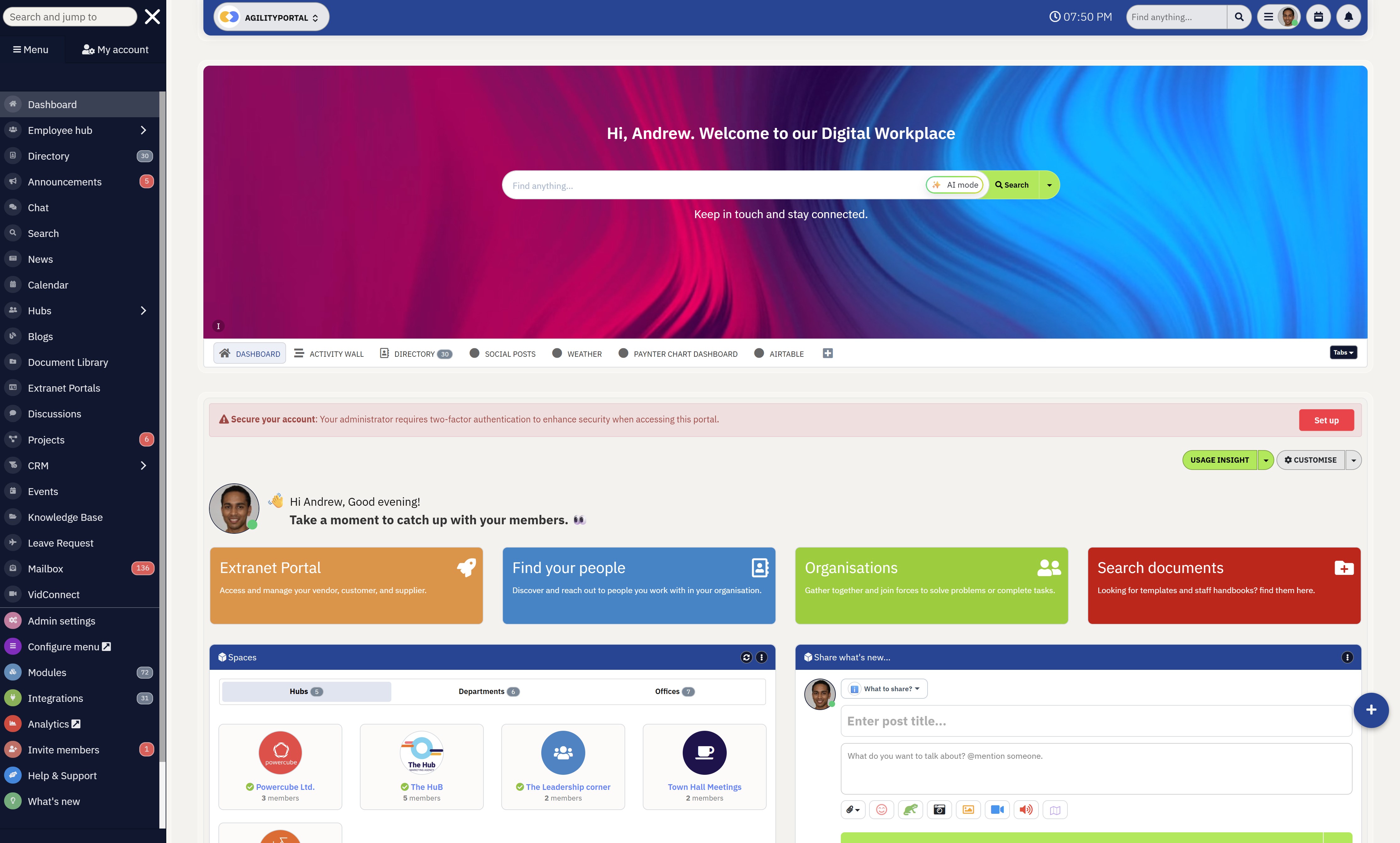
Many organisations are overwhelmed by scattered communication tools, outdated intranets, disconnected file storage, and poor collaboration between teams.
Modern portal platforms help centralise communication, knowledge sharing, workflows, and company resources into one connected digital environment, making it easier for employees to stay informed, productive, and aligned across the business.
AgilityPortal
The Modern Portal Platform Built for Communication, Collaboration & Knowledge Sharing
AgilityPortal helps businesses centralise employee communication, company knowledge, documents, collaboration, workflows, and operational updates into one connected portal software platform.
Instead of relying on disconnected intranets, email chains, shared drives, and multiple workplace apps, AgilityPortal creates a single digital environment where teams can communicate, collaborate, access resources, and stay aligned from anywhere.
40% less internal email
after moving communication into one connected employee portal environment
Frequently Asked Questions About Portal Software
What is portal software?
Portal software is a digital platform that helps businesses centralise communication, collaboration, documents, workflows, and company resources into one connected environment.
Modern portal platforms are commonly used to support employees, customers, suppliers, and external partners through secure access, knowledge sharing, workflow management, and team collaboration.
Businesses often use portal systems to reduce operational complexity and improve workplace productivity.
What is the difference between a portal and a website?
A traditional website is mainly designed to provide public-facing information such as company details, products, services, or marketing content.
A portal environment is far more interactive and typically requires secure login access.
Modern workplace environments provide personalised dashboards, collaboration tools, document access, communication features, workflow automation, and integrations with business systems that traditional websites usually do not support.
What are the benefits of portal software?
Modern workplace platforms help businesses improve communication, centralise information, reduce operational bottlenecks, and simplify collaboration across teams.
They also help reduce information silos, improve employee engagement, support hybrid work environments, and create better visibility across departments.
Many organisations use these environments to replace disconnected tools and outdated intranet systems with one more connected digital experience.
What types of portals do businesses use?
Businesses use many different types of workplace environments depending on their operational goals and users.
Common examples include employee workspaces, customer self-service systems, supplier collaboration environments, client communication hubs, intranet systems, knowledge-sharing platforms, and team collaboration environments.
Each type is designed to support different workflows, communication needs, and business processes.
Is portal software the same as an intranet?
Not exactly. Traditional intranet systems are usually focused on internal company communication and document sharing for employees.
Modern workplace environments often go much further by including workflow automation, collaboration tools, mobile access, integrations, analytics, employee engagement features, and support for external users such as suppliers, customers, or clients.
Many businesses now replace outdated intranets with more advanced digital workplace platforms.
What features should portal software include?
The best digital workplace environments typically include document management, enterprise search, workflow automation, employee communication tools, mobile accessibility, role-based permissions, integrations, analytics, and collaboration features.
Businesses should also prioritise usability, security, scalability, and user adoption when comparing workplace solutions for long-term operational success.
Can portal software support remote teams?
Yes. Modern workplace environments are designed specifically to support remote and hybrid workforces by centralising communication, knowledge sharing, collaboration, workflows, and mobile access into one platform.
Employees can securely access company resources, participate in discussions, complete approvals, and collaborate with teams regardless of location or device.
What industries use portal software?
Connected workplace environments are widely used across healthcare, manufacturing, education, nonprofits, financial services, logistics, government, retail, construction, and technology sectors.
Different industries use these systems to improve communication, centralise information, manage workflows, support distributed teams, and simplify operational collaboration across departments and locations.
Is portal software secure?
Most modern workplace platforms include strong security features such as role-based permissions, secure authentication, encryption, audit tracking, access controls, and compliance management tools.
Security capabilities are especially important for organisations handling sensitive employee data, customer records, financial information, or regulated operational processes.
How much does portal software cost?
Pricing varies depending on the platform, number of users, required features, integrations, storage, and deployment model.
Some providers offer simple monthly subscription pricing, while enterprise platforms may use custom pricing based on operational requirements and scalability needs.
Businesses should evaluate long-term usability, support, security, and scalability rather than focusing only on initial pricing.
AI Summary
- Portal software helps businesses centralise communication, documents, workflows, knowledge sharing, and collaboration into one connected digital environment.
- Many organisations struggle with disconnected systems, scattered information, outdated intranets, and communication silos that reduce productivity and operational visibility.
- Modern workplace platforms combine employee communication, document management, workflow automation, collaboration tools, and mobile accessibility into a single experience.
- Businesses use different types of digital environments including employee workspaces, intranet systems, customer access hubs, supplier collaboration systems, and external client platforms.
- Important features to prioritise include enterprise search, integrations, security controls, mobile access, workflow automation, personalised dashboards, and user-friendly experiences.
- Successful digital workplace strategies focus heavily on usability, employee adoption, reducing workplace complexity, and creating a more connected operational experience.
Most Popular Posts

Effective communication among team members is vital for the productivity and success of any organization. Surprisingly, 60% of companies lack a long-term internal communication strategy, which p...


Businesses thrive on communication for efficiency, productivity and accomplishment. When the right information is passed from the right designation in the organization, it promotes positivity an...
Categories
Blog
(3012)
Business Management
(380)
Employee Engagement
(225)
Digital Transformation
(194)
Growth
(143)
Intranets
(137)
Remote Work
(63)
Sales
(53)
Collaboration
(48)
Customer Experience
(30)
Culture
(30)
Project management
(29)
Knowledge Management
(28)
Leadership
(20)
Comparisons
(9)
News
(1)

Related Posts

Generative AI has rapidly moved from trend to transformative force, reshaping industries across the board. But perhaps its most visible impact has been in the marketing world—streamlining everything from ad creation to email copywriting in seco...

Many businesses still rely on software that was built 10, 15, or even 20 years ago. At first glance, these systems may seem cost-effective because they are already paid for and deeply embedded into daily operations. However, beneath the s...

Artificial intelligence is everywhere right now. From employee communication platforms and HR software to project management tools and company knowledge bases, businesses are racing to add AI to their workplace technology stack. The promise is ...

Launching a startup is exciting, but it can also be expensive if you build the wrong product. That's why many founders choose to start with a Minimum Viable Product (MVP) before committing significant time and money to full-scale development. A...

Walk into almost any workplace today and you'll find employees juggling a growing number of tools. One platform for chat, another for project management, a separate HR system, multiple document repositories, and countless email chains just to g...


Jill Romford
I am a digital nomad, lover of exploring new places and making friends.
I love to travel and I love the internet. I take pictures of my travels and share them on the internet using Instagram.
Traveler, entrepreneur, and community builder. I share my insights on digital marketing and social media while inspiring you to live your fullest life.
Ready to learn more? 👍
One platform to optimize, manage and track all of your teams. Your new digital workplace is a click away. 🚀
Free for 14 days, no credit card required.