
Insight Blog
Agility’s perspectives on transforming the employee's experience throughout remote transformation using connected enterprise tools.
27 minutes reading time
(5361 words)
Why Employees Stop Using Internal Collaboration Tools for Business With Poor UX

Why Employees Stop Using Internal Collaboration Tools for Business With Poor UX
Discover why employees stop using internal collaboration tools for business when UX is poor. Learn how better design improves adoption, productivity, communication, and employee engagement.
Why Employees Stop Using Internal Collaboration Tools for Business With Poor UX

Companies continue investing in internal collaboration tools for business, yet many employees still avoid using them consistently.
The problem usually is not the lack of features — it is poor user experience.
When collaboration platforms feel slow, confusing, cluttered, or difficult to navigate, employees naturally return to email, spreadsheets, WhatsApp groups, or disconnected tools that feel easier to use.
Research from Forrester shows that well-designed user experiences can improve employee productivity, reduce training time, and significantly increase software adoption inside organisations.
This is why many growing companies are now working closely with a IDEO-style startup ui/ux design agency to simplify workplace software and create digital experiences employees actually enjoy using.
400%
higher adoption potential
According to Forrester Research, well-designed user experiences can improve employee adoption rates by up to 400%, helping businesses reduce friction, improve workplace productivity, and increase engagement across internal collaboration tools for business.
Source: Forrester Research
According to research from McKinsey & Company, employees can spend nearly 20% of their workweek searching for internal information across disconnected systems.
At the same time, studies from Nielsen Norman Group consistently show that usability problems reduce engagement, increase frustration, and lower adoption rates across enterprise software platforms.
In this article, we will explore why employees stop using internal collaboration tools for business when the UX is poor, the hidden productivity costs businesses often overlook, and how better design can dramatically improve employee engagement, communication, and collaboration.
We will also examine how startups and growing companies can benefit from working with a startup UI/UX design agency to create simpler, faster, and more intuitive workplace experiences employees actually want to use.
Key Takeaways
- Poor UX is one of the main reasons employees stop using internal collaboration tools for business, even when platforms offer powerful features.
- Cluttered dashboards, difficult navigation, poor mobile usability, and slow search experiences reduce collaboration platform adoption across growing teams.
- Modern employee experience platforms focus heavily on sleek UI, simple workflows, AI-powered discovery, and fast access to workplace information.
- Businesses improve digital employee experience and workplace productivity when collaboration software prioritises usability instead of feature overload.
- Successful enterprise collaboration platforms combine employee communication software, knowledge sharing tools, and hybrid workplace communication into one intuitive experience.
Why Most Internal Collaboration Tools Fail Employee Adoption

Fail Employee Adoption
Many businesses invest heavily in internal collaboration tools for business expecting employees to instantly improve communication, teamwork, and productivity.
However, adoption often declines within months because the software creates more friction than value. Employees do not avoid collaboration platforms because they dislike collaboration — they avoid tools that feel frustrating, slow, or unnecessarily complicated.
Modern employees now expect workplace software to deliver the same smooth experience they get from consumer apps they already use every day.
When collaboration platforms fail to meet those expectations, engagement drops quickly, and employees return to familiar tools like email, messaging apps, or spreadsheets.
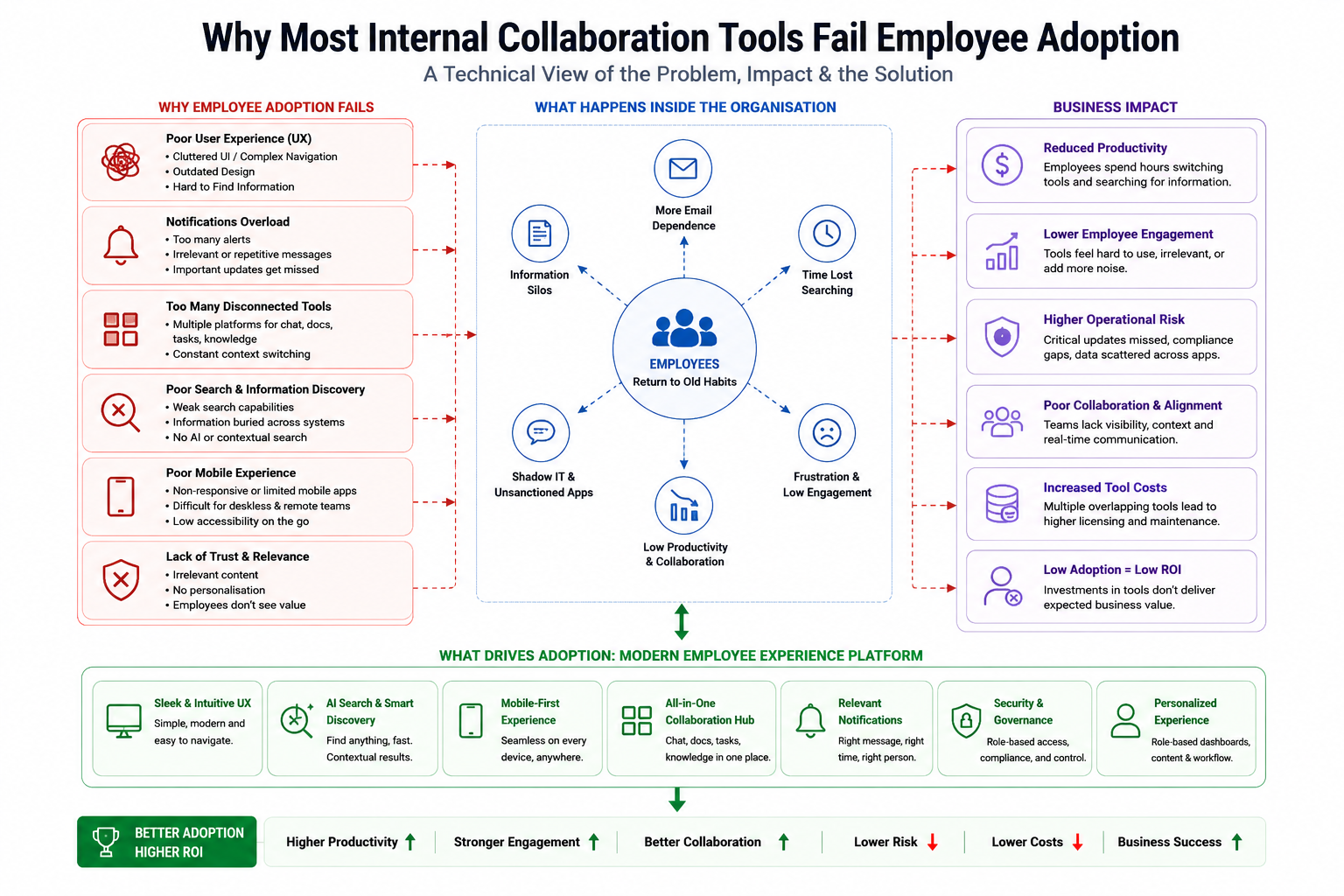
Why Most Internal Collaboration Tools Fail Employee Adoption
Employees Expect Workplace Software to Feel Consumer-Friendly
Today's workforce is heavily influenced by the user experiences provided by platforms like Slack, Notion, LinkedIn, and WhatsApp. These platforms are fast, intuitive, mobile-friendly, and easy to navigate without extensive training.
Employees now expect the same level of simplicity from workplace collaboration software.
They want to quickly find documents, communicate with teams, complete tasks, and access information without needing multiple tutorials or complicated onboarding sessions.
Unfortunately, many traditional internal collaboration tools for business were built around enterprise functionality rather than user experience. While they may contain powerful features, they often feel outdated, cluttered, and difficult to use.
This creates immediate friction, especially for younger employees and remote teams who expect seamless digital experiences across every device.
Businesses working with a startup UI/UX design agency often discover that simplifying the user experience dramatically improves software adoption because employees naturally engage with tools that feel effortless to use.
Complicated Interfaces Create Daily Frustration
One of the biggest reasons employees stop using workplace collaboration tools is interface complexity.
Many enterprise platforms try to include every possible feature, menu, workflow, and dashboard into one environment. Instead of improving productivity, this often overwhelms employees.
Common UX frustrations include:
- Too many navigation menus and nested pages
- Confusing layouts that make information difficult to find
- Poor mobile usability for remote and frontline employees
- Hidden documents buried inside disconnected folders
- Inconsistent user experiences across desktop and mobile devices
- Too many clicks required to complete simple actions
When employees repeatedly struggle to locate resources or communicate efficiently, frustration builds over time.
Instead of relying on the collaboration platform, they begin using unofficial workarounds such as email chains, personal messaging apps, or duplicate file storage systems.
This creates a dangerous cycle where the platform becomes less valuable because fewer employees actively participate or trust the system as a reliable source of information.
Feature Overload Often Makes Collaboration Worse
Many software vendors assume adding more features automatically creates a better collaboration platform. In reality, feature overload is one of the biggest reasons employee adoption fails.
Modern collaboration software frequently includes:
- Multiple widgets and dashboards
- Duplicate communication channels
- Excessive notifications
- Overlapping project management features
- Unused social features
- Complicated workflow builders
- Too many integrations competing for attention
While these capabilities may sound impressive during product demos, employees rarely use most of them in daily work. Instead, the platform becomes cluttered and distracting.
Information overload creates cognitive fatigue, especially when employees constantly switch between channels, notifications, tasks, and updates.
Over time, users disengage because the system feels noisy rather than helpful.
The most successful internal collaboration tools for business focus on clarity, simplicity, and usability instead of trying to become an all-in-one feature warehouse.
This is why many businesses now prioritise UX strategy and work with a startup UI/UX design agency to streamline workflows and improve employee experiences before adding additional functionality.
Related Reading
Looking to improve internal collaboration tools for business, employee communication, and workplace productivity? These guides explore collaboration strategies, hybrid workplace communication, knowledge sharing, and modern employee experience platforms.
- Collaboration in the Workplace: Why It Matters for Modern Teams
- 7 Reasons Why Collaboration Is Important in the Workplace
- 5 Tips to Boost Remote Work Productivity With Collaboration Tools
- How Unified Communications Improve Workplace Collaboration
- How to Improve Knowledge Sharing and Collaboration in Your Company
- Best Tools for Effective Team Collaboration
- Breaking Down Silos at Work to Improve Collaboration
- Top Remote Collaboration Tools for Modern Hybrid Teams
- What Is Collaboration in the Workplace? Complete Guide
- Collaboration vs Teamwork: Understanding the Difference
- Best Hybrid Work Collaboration Tools for Distributed Teams
The Hidden Cost of Poor UX in Internal Collaboration Tools for Business
Many organisations underestimate how much poor user experience impacts productivity, communication, and employee engagement.
On the surface, internal collaboration tools for business may appear functional because employees technically have access to messaging, documents, and workflows.
However, when the platform is difficult to use, the hidden operational costs grow quickly across the organisation.
Poor UX creates friction in everyday tasks, slows communication, increases frustration, and pushes employees toward disconnected workarounds. Over time, businesses lose visibility, collaboration weakens, and productivity declines without leadership fully understanding the root cause.
Productivity Drops When Employees Cannot Find Information Quickly
One of the biggest problems with poorly designed collaboration software is the amount of time employees waste searching for information.
Many businesses operate across multiple disconnected systems, including chat tools, document libraries, project management apps, emails, shared drives, and intranet platforms.
When employees cannot quickly locate information, daily workflows become significantly slower.
Common productivity issues include:
- Searching across disconnected systems for files or conversations
- Wasting time switching between multiple workplace applications
- Duplicate work caused by missing information or outdated documents
- Repeatedly asking colleagues for resources that should be easy to find
- Delays in decision-making because information is fragmented
According to McKinsey & Company, employees can spend nearly 20% of their workweek searching for internal information or tracking down colleagues for help. This becomes even more damaging in remote and hybrid work environments where teams rely heavily on digital communication.
Businesses that invest in better UX and partner with a startup UI/UX design agency often discover that simplifying navigation, improving enterprise search, and reducing interface clutter can dramatically improve employee efficiency.
Poor UX Reduces Employee Engagement
Employee engagement is heavily influenced by how easy workplace software feels to use.
When collaboration platforms feel confusing or frustrating, employees gradually disengage from the system altogether.
Instead of actively participating in discussions or sharing knowledge, users begin avoiding the platform whenever possible.
This often leads to:
- Employees stopping participation in company discussions
- Lower levels of knowledge sharing across teams
- Reduced collaboration between departments
- Fewer employee updates, comments, and interactions
- Lower adoption of internal communication initiatives
The problem becomes especially serious when businesses depend on collaboration tools to support culture, onboarding, training, and company-wide communication.
Employees are far more likely to engage with platforms that feel simple, fast, and intuitive. Modern workplace users expect consumer-grade experiences, especially younger employees who are used to highly polished mobile and social applications.
This is why user experience design is becoming a major competitive advantage for modern digital workplace platforms.
Internal Communication Becomes Fragmented
When employees lose trust in collaboration software, communication naturally becomes fragmented.
Instead of using approved workplace systems, employees start creating their own unofficial communication channels to avoid friction.
This usually results in:
- Teams returning to email for important communication
- Employees using unofficial messaging apps like WhatsApp or Telegram
- Important conversations happening outside approved systems
- Shadow IT increasing across departments
- Loss of visibility for leadership and IT teams
Fragmented communication creates serious operational and security risks because information becomes scattered across disconnected platforms.
Critical updates may never reach the right employees, files become duplicated across systems, and businesses lose the ability to maintain a single source of truth.
For growing organisations, this problem becomes increasingly difficult to manage as teams scale.
Many businesses now work with a startup UI/UX design agency to redesign collaboration experiences that employees genuinely want to use, helping reduce tool sprawl and improve long-term platform adoption.
6 Common UX Problems Employees Hate in Collaboration Software
Many internal collaboration tools for business fail because they create unnecessary friction during everyday work.
Employees do not want to spend extra time navigating complicated systems just to complete simple tasks, locate documents, or communicate with colleagues.
While businesses often focus heavily on features and integrations, employees care more about usability, speed, and convenience.
When workplace software feels frustrating, adoption drops quickly, and teams begin relying on alternative tools outside the approved platform.
Below are some of the most common UX problems employees consistently complain about in workplace collaboration software.
1. Too Many Clicks to Complete Simple Tasks
One of the fastest ways to frustrate employees is forcing them through multiple unnecessary steps to complete basic actions.
In many collaboration platforms, users must navigate through several menus, subpages, or modules simply to:
- Upload a document
- Find a conversation
- Access a team workspace
- Request approval
- Update a task
- Locate company policies
These extra clicks may seem minor individually, but over time they create significant productivity loss and employee frustration.
Modern employees expect workplace software to feel fast and responsive. If users constantly struggle with slow navigation or repetitive workflows, they naturally avoid the system whenever possible.
This is why many companies now work with a startup UI/UX design agency to streamline user journeys and remove unnecessary complexity from workplace platforms.
2. Poor Search Functionality
Search is one of the most important features inside any internal collaboration tool for business, yet it is often poorly designed.
Employees rely heavily on search to quickly locate:
- Documents
- Policies
- Conversations
- Training materials
- Employee directories
- Project updates
- Shared resources
When enterprise search delivers inaccurate results, lacks filters, or cannot search across integrated systems, employees lose confidence in the platform.
Instead of using the collaboration tool as a central knowledge hub, users begin saving files locally, creating duplicate documents, or repeatedly asking colleagues for information.
Poor search experiences also increase onboarding time because new employees struggle to locate important resources independently.
Modern collaboration platforms increasingly use AI-powered search and contextual recommendations to reduce friction and improve employee experiences.
3. Notification Overload and Distractions
Many workplace collaboration tools overwhelm employees with constant notifications, alerts, pop-ups, emails, and activity updates.
While notifications are designed to improve communication, excessive alerts often create the opposite effect.
Employees quickly become overwhelmed by:
- Constant message notifications
- Multiple channel updates
- Duplicate email alerts
- Excessive task reminders
- Non-priority activity notifications
Over time, users begin ignoring notifications entirely, causing important updates to get missed alongside less relevant information.
This creates communication fatigue and reduces engagement across the platform.
The best collaboration platforms prioritise smarter notification management by allowing employees to personalise alerts, reduce distractions, and focus only on relevant information.
4. Inconsistent Mobile Experience
Today's workforce is increasingly mobile, especially in remote, hybrid, healthcare, retail, hospitality, and frontline industries. Employees expect internal collaboration tools for business to work seamlessly across smartphones, tablets, and desktop devices.
Unfortunately, many enterprise platforms still offer poor mobile experiences.
Common mobile UX problems include:
- Slow-loading interfaces
- Broken layouts on smaller screens
- Limited mobile functionality
- Difficult navigation
- Poor readability
- Missing features compared to desktop versions
When mobile experiences feel incomplete or frustrating, employees stop engaging with the platform outside desktop environments.
This is especially damaging for frontline and remote workers who rely heavily on mobile communication throughout the day.
Businesses focused on employee engagement increasingly invest in mobile-first UX strategies to improve accessibility and adoption across all workforce types.
5. Cluttered Dashboards and Outdated Layouts
Many collaboration platforms try to display too much information at once. Dashboards become overloaded with widgets, menus, feeds, charts, shortcuts, and notifications competing for employee attention.
Instead of helping employees stay productive, cluttered interfaces create confusion and cognitive overload.
Employees often struggle to determine:
- What information is important
- Which actions require attention
- Where resources are located
- How to prioritise tasks
Outdated visual design also negatively impacts employee perception of the platform itself. If workplace software looks old or difficult to use, employees often assume the experience will also be frustrating.
Modern UX design focuses heavily on simplicity, clean layouts, clear hierarchy, and personalised dashboards that surface only relevant information to each employee.
This is another area where a startup UI/UX design agency can significantly improve workplace software adoption through cleaner and more intuitive interface design.
6. Difficult Onboarding for New Employees
Poor UX becomes even more noticeable during employee onboarding. New hires already face information overload during their first weeks, and confusing workplace software only increases the challenge.
When collaboration platforms are difficult to navigate, new employees struggle to:
- Find training materials
- Access policies
- Join team spaces
- Locate colleagues
- Understand workflows
- Complete onboarding tasks
This slows productivity and creates unnecessary dependence on managers or coworkers for support.
A well-designed onboarding experience should help employees quickly understand how the collaboration platform works without extensive training.
Companies with strong UX often achieve faster employee onboarding, higher engagement, and reduced support requests because the software feels intuitive from day one.
6. Things Your Employees Actually Want From Internal Collaboration Tools
Employees want more features, more dashboards, and more advanced functionality from workplace software.
In reality, most employees simply want internal collaboration tools for business that help them complete work faster, communicate easier, and reduce daily frustration.
Modern employees expect workplace software to feel intuitive, accessible, and efficient. If the platform creates confusion or slows people down, adoption drops quickly regardless of how powerful the software may be behind the scenes.
The most successful collaboration platforms focus heavily on usability, employee experience, and simplicity rather than overwhelming users with excessive complexity.

Things Your Employees Actually Want From Internal Collaboration Tools
1. Simple and Intuitive Navigation
Employees want workplace software that feels easy to use from the moment they log in. Navigation should feel natural without requiring extensive onboarding sessions or technical training.
One of the biggest complaints users have about traditional collaboration platforms is that information is buried behind too many menus, modules, or complicated workflows.
Employees expect to quickly:
- Access their workspace
- Find team conversations
- Open important documents
- View tasks and updates
- Locate company resources
- Contact colleagues
Modern UX design focuses on reducing friction by simplifying navigation structures and removing unnecessary steps. Businesses that invest in user-centered design often see much higher adoption because employees can immediately understand how the platform works.
This is one reason many growing companies partner with a startup UI/UX design agency to improve the usability of their internal systems and employee platforms.
2. Fast Access to Documents and Conversations
Employees do not want to waste time searching across disconnected systems just to find a file, message, or project update.
Modern internal collaboration tools for business must provide quick access to information without forcing users to jump between multiple applications.
Employees expect:
- Fast-loading workspaces
- Centralised document storage
- Unified communication channels
- Real-time updates
- Easy file sharing
- Clear conversation history
When information is easy to locate, employees work more efficiently and collaborate more effectively across departments.
Fast access becomes even more important in remote and hybrid work environments where teams rely heavily on digital communication throughout the day.
Platforms that reduce search time and simplify information retrieval often experience much higher employee satisfaction and engagement.
3. Personalized Dashboards and Relevant Content
Employees do not want cluttered dashboards filled with irrelevant updates, widgets, or notifications.
They want personalised experiences that surface only the information relevant to their role, department, and responsibilities.
Modern collaboration platforms increasingly provide:
- Personalised news feeds
- Role-based dashboards
- Department-specific updates
- Relevant task visibility
- Custom shortcuts
- Individual notification preferences
This improves focus while reducing information overload.
For example, HR employees may need quick access to onboarding workflows and employee policies, while project managers may prioritise team updates, approvals, and project timelines.
Personalisation helps employees feel the platform is useful rather than distracting.
Businesses working with a startup UI/UX design agency often redesign dashboards around employee behaviour and workflow priorities rather than simply displaying everything at once.
4. Mobile-First Employee Experience
Today's employees expect workplace collaboration tools to work seamlessly across every device, especially mobile phones.
This is particularly important for:
- Frontline employees
- Hybrid workers
- Remote teams
- Healthcare staff
- Hospitality workers
- Field service employees
Many workers rely on mobile devices as their primary method of communication during the workday.
Employees expect mobile collaboration platforms to provide:
- Fast mobile performance
- Responsive layouts
- Easy navigation
- Push notifications
- Mobile document access
- Quick messaging and approvals
Poor mobile experiences quickly reduce engagement because employees cannot efficiently access information while away from their desks.
Modern digital workplace platforms increasingly prioritise mobile-first UX strategies because accessibility directly impacts employee adoption and communication effectiveness.
5. Integrated Communication and Knowledge Sharing
Employees want communication, documents, knowledge sharing, and collaboration connected within one unified experience.
One of the biggest frustrations in many workplaces is constantly switching between disconnected tools for messaging, file sharing, meetings, tasks, and company updates.
Modern employees prefer platforms where they can:
- Chat with colleagues
- Access documents
- View company announcements
- Share knowledge
- Manage tasks
- Collaborate on projects
—all inside one connected environment.
Integrated collaboration reduces context switching and improves productivity because employees no longer waste time jumping between multiple systems.
This is why many businesses are replacing fragmented workplace tools with modern employee experience platforms designed around centralised communication and collaboration.
6. Smart Search and AI-Powered Recommendations
Search functionality has become one of the most important features inside modern workplace software.
Employees expect collaboration platforms to help them quickly locate:
- Files
- Conversations
- Policies
- Team updates
- Employee directories
- Training resources
- Project information
Traditional enterprise search systems often fail because results feel slow, outdated, or irrelevant.
Modern collaboration platforms increasingly use AI-powered search and contextual recommendations to improve the employee experience.
These systems can:
- Suggest relevant documents automatically
- Surface recent conversations
- Recommend helpful resources
- Prioritise personalised search results
- Reduce time spent searching manually
AI-powered experiences help employees work faster while reducing frustration caused by disconnected information systems.
As internal collaboration tools for business continue evolving, businesses that focus on usability, intelligent design, and employee-centered experiences will achieve significantly higher platform adoption and long-term engagement.
How Better UX Improves Employee Adoption and Productivity
The user experience inside internal collaboration tools for business directly impacts how employees communicate, collaborate, and engage with workplace systems every day.
When workplace software feels intuitive, fast, and easy to use, employees naturally adopt the platform because it helps simplify their work rather than complicate it.
Many organisations focus heavily on adding features, integrations, and advanced functionality, but usability is often the deciding factor that determines whether employees consistently use the platform long term.
Better UX reduces friction across daily workflows, improves communication, and helps employees work more efficiently without unnecessary frustration.
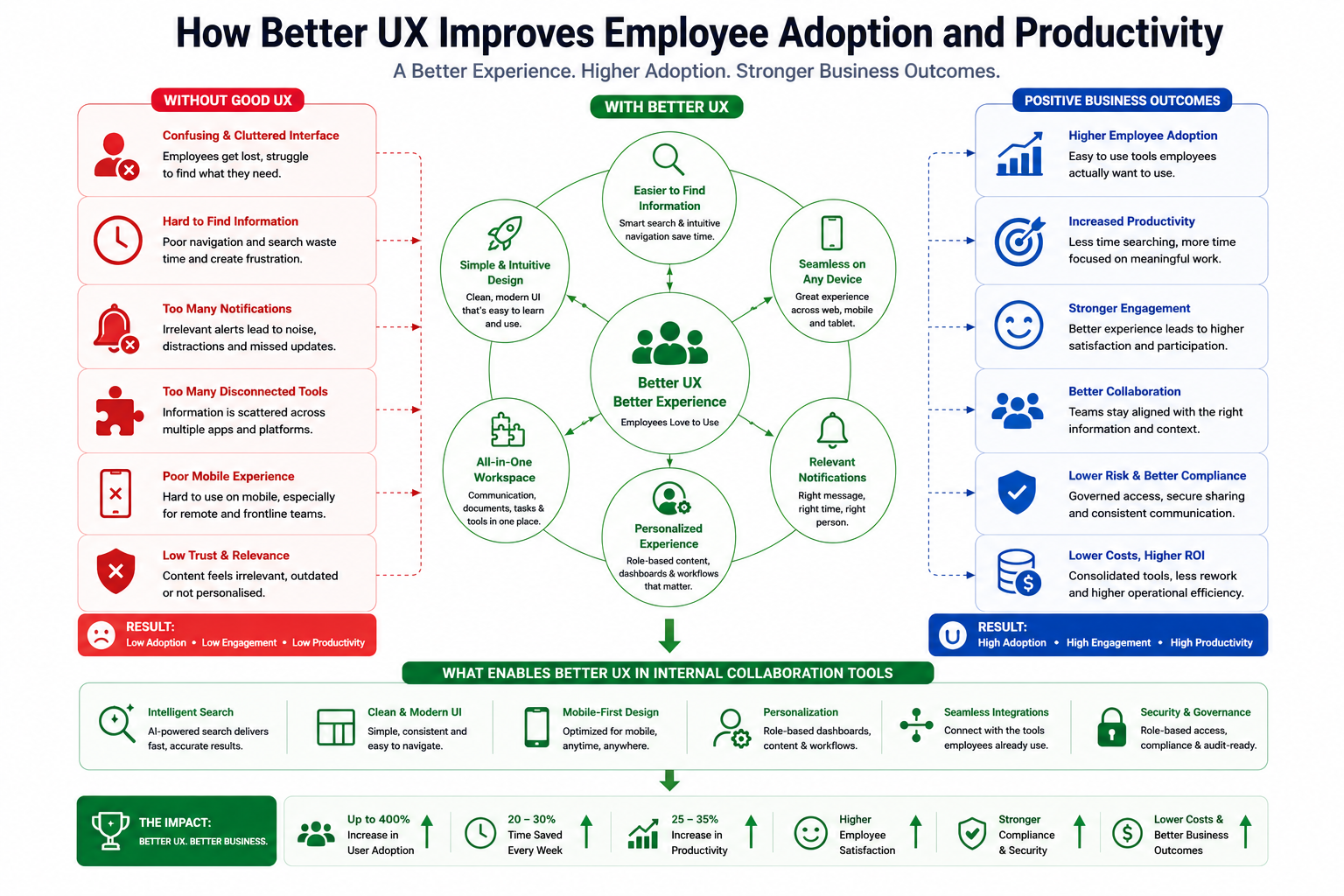
How Better UX Improves Employee Adoption and Productivity
One of the biggest benefits of better UX is faster onboarding for new employees. Starting a new role already involves learning new processes, systems, policies, and team structures.
When workplace collaboration tools are confusing or difficult to navigate, onboarding becomes slower and more stressful for new hires.
Employees struggle to locate documents, understand workflows, or access training resources independently. A well-designed user experience allows new employees to quickly understand how the platform works, reducing dependence on managers and IT support teams while helping new hires become productive much faster.
Better UX also improves communication between teams by reducing complexity and making collaboration more accessible. Employees are more likely to actively participate in discussions, share updates, and engage with company-wide communication when the platform feels simple and intuitive.
Clear navigation, unified communication channels, and easy access to conversations help eliminate communication silos that often appear in growing businesses. This becomes especially important for remote and hybrid teams that rely heavily on digital communication to stay aligned throughout the workday.
Employee engagement and participation also improve significantly when workplace software feels enjoyable to use. Employees naturally avoid systems that feel cluttered, outdated, or overwhelming.
However, modern collaboration platforms designed with employee experience in mind encourage higher levels of interaction, knowledge sharing, and participation across departments. Features such as personalised dashboards, simplified workflows, mobile accessibility, and intelligent notifications help employees stay connected without feeling overloaded by unnecessary information.
Another major advantage of better UX is the reduction in training and support requests. Many businesses underestimate how much time managers, HR teams, and IT departments spend helping employees navigate poorly designed workplace systems. Complicated interfaces often require extensive onboarding sessions, repeated training, and constant troubleshooting support.
When internal collaboration tools for business are designed around simplicity and usability, employees can complete tasks more independently with minimal guidance.
This reduces support costs while improving overall operational efficiency.
Better UX also strengthens knowledge management across the organisation. Employees are far more likely to store, share, and access information inside a platform they trust and understand.
Improved navigation, smart search functionality, and centralised access to documents help businesses create a stronger single source of truth across departments. Instead of wasting time searching through disconnected systems or duplicate files, employees can quickly locate the information they need to complete work efficiently.
This is one reason many organisations now work with a startup UI/UX design agency to improve employee-facing platforms.
Businesses increasingly recognise that successful collaboration software is not defined by how many features it includes, but by how easily employees can use it every day.
Why Startups and Growing Businesses Feel UX Problems Faster
Startups and growing businesses often experience UX problems faster because their teams rely heavily on speed, collaboration, and efficient communication.
When internal collaboration tools for business feel confusing or difficult to use, employees quickly abandon the platform and return to email, spreadsheets, or unofficial messaging apps.
As companies scale, communication becomes more complex, especially across remote and hybrid teams. Poor UX creates friction that slows workflows, increases onboarding time, and reduces employee engagement.
Small usability issues that seem minor in a small team can quickly become major operational bottlenecks as the business grows.
Modern employees also expect workplace software to feel as simple and intuitive as consumer apps like Slack or Notion. Outdated interfaces, cluttered dashboards, and poor mobile experiences no longer meet employee expectations.
This is why many startups now work with a startup UI/UX design agency to create cleaner, faster, and more user-friendly digital workplace experiences.
How AgilityPortal Helps Businesses Improve Employee Collaboration
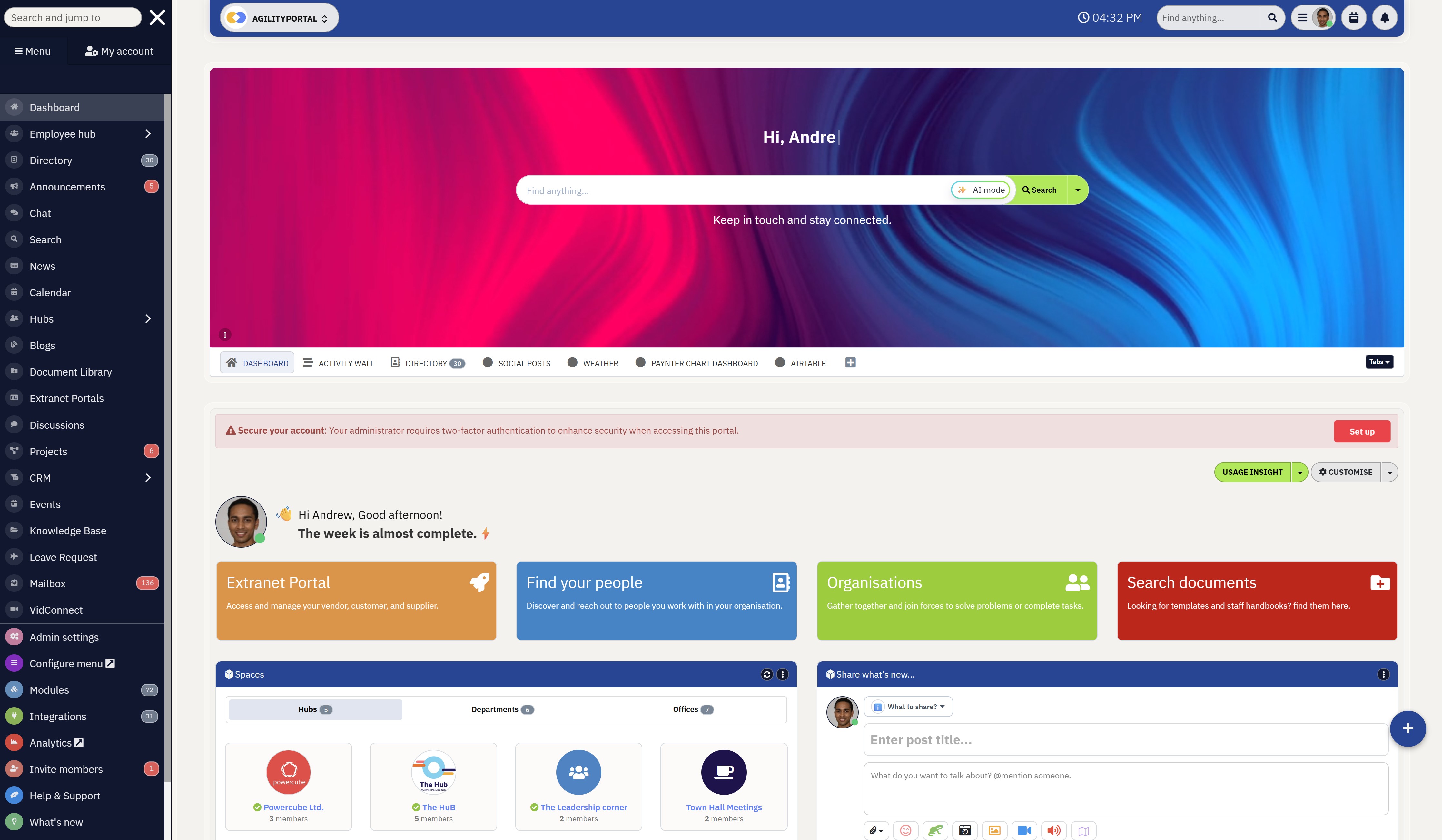
How AgilityPortal Helps Businesses Improve Employee Collaboration
AgilityPortal helps businesses simplify communication, collaboration, and knowledge sharing by creating a sleek, modern digital workplace experience employees actually enjoy using.
Unlike many traditional internal collaboration tools for business that feel cluttered and overwhelming, AgilityPortal focuses heavily on clean UI, usability, and fast access to information.
The platform is designed around simplicity, ensuring employees can complete most actions in three clicks or less.
Whether users need to find a document, message a colleague, access a workflow, or review company updates, the experience feels intuitive and easy to navigate across both desktop and mobile devices.
AgilityPortal also helps speed up information discovery through AI-powered search, allowing employees to quickly locate documents, conversations, policies, tasks, and workplace resources from one centralised platform.
Instead of wasting time searching across disconnected systems, employees can find what they need faster while reducing frustration and productivity loss.
The platform combines communication, chat, employee engagement, documents, workflows, calendars, and collaboration tools into one connected environment.
Personalized dashboards by role and department ensure employees only see relevant information, helping reduce clutter and improve focus throughout the workday.
With its mobile-first design, streamlined UX, and integrated collaboration experience, AgilityPortal helps businesses improve employee adoption, engagement, and productivity without overwhelming users with unnecessary complexity.
AgilityPortal
A Sleek Internal Collaboration Platform Designed for Employee Adoption
AgilityPortal helps businesses replace clunky, hard-to-use workplace systems with a clean, modern, and intuitive experience for internal collaboration tools for business.
Instead of forcing employees through cluttered dashboards, confusing menus, and disconnected apps, AgilityPortal brings communication, documents, knowledge sharing, workflows, and team updates into one sleek digital workplace built around simple UX and faster adoption.
3 clicks or less
to help employees find information, complete actions, and move through daily workflows faster
AI-powered discovery
helps employees quickly find documents, conversations, policies, updates, and resources from one central place
Final Thoughts
Poor UX is one of the biggest reasons employees stop using internal collaboration tools for business.
When workplace software feels cluttered, slow, or difficult to navigate, employees naturally return to email, spreadsheets, and disconnected communication apps.
Modern teams expect collaboration platforms to feel simple, sleek, and easy to use across every device.
Businesses that prioritise usability, employee experience, and fast access to information often achieve far higher adoption and engagement rates. Features alone no longer guarantee success. Employees adopt tools that genuinely help them work faster with less friction.
Before choosing collaboration software, businesses should evaluate the overall user experience, simplicity, mobile usability, and search functionality — not just the feature list.
AI Summary
- Many employees stop using internal collaboration tools for business because poor UX creates frustration, slows productivity, and makes workplace communication harder than necessary.
- Outdated intranet user experience, cluttered dashboards, poor mobile usability, and difficult navigation often reduce collaboration platform adoption across growing teams.
- Modern employee experience platforms focus heavily on sleek UI, simple workflows, mobile-first design, and fast access to information to improve the overall digital employee experience.
- Businesses increasingly invest in employee communication software, team communication platforms, and enterprise collaboration platforms that prioritise usability over excessive feature complexity.
- Features such as AI-powered enterprise search, personalised dashboards, knowledge sharing tools, and simplified navigation help improve workplace productivity and employee engagement.
- Successful business collaboration software reduces communication silos, improves hybrid workplace communication, and creates a more connected internal communication platform employees genuinely want to use.
Most Popular Posts

Effective communication among team members is vital for the productivity and success of any organization. Surprisingly, 60% of companies lack a long-term internal communication strategy, which p...


Businesses thrive on communication for efficiency, productivity and accomplishment. When the right information is passed from the right designation in the organization, it promotes positivity an...

Categories
Blog
(3186)
Business Management
(393)
Employee Engagement
(235)
Digital Transformation
(216)
Growth
(150)
Intranets
(141)
Internal communications
(106)
Remote Work
(68)
Sales
(53)
Collaboration
(52)
Customer Experience
(32)
Culture
(30)
Knowledge Management
(29)
Project management
(29)
Leadership
(20)
Comparisons
(9)
News
(1)

Related Posts

The best ai image editors can save a team hours of repetitive work. A marketing manager can remove a distracting background, an HR team can improve a staff event photo, and an online shop can turn a basic product shot into something ready to pu...

Ever opened a PDF just before a meeting and realised you need to edit a page, pull figures from a scanned report, or gather everyone's comments? What should be a quick task can turn into a frustrating search for the right tool. That lost time a...

Looking for a New Job Remotely can feel like a simple next step: update your CV, turn on job alerts and start applying. In reality, the strongest remote job searches start much earlier. You need to be clear about the work you want, the kind of ...

Hiring globally is easier than employing globally Have you found the right person for a role, only to realise they live in a country where your business has no legal entity? That's where EOR international hiring can be useful. An Employer of Re...

Sales operations and planning are essential to harmonizing sales objectives with operational capabilities, ensuring seamless coordination between departments like sales, marketing, production, and finance. This alignment enables businesses to forecas...


Jill Romford
I am a digital nomad, lover of exploring new places and making friends.
I love to travel and I love the internet. I take pictures of my travels and share them on the internet using Instagram.
Traveler, entrepreneur, and community builder. I share my insights on digital marketing and social media while inspiring you to live your fullest life.
Ready to learn more? 👍
One platform to optimize, manage and track all of your teams. Your new digital workplace is a click away. 🚀
Free for 14 days, no credit card required.