Insight Blog
Agility’s perspectives on transforming the employee's experience throughout remote transformation using connected enterprise tools.
42 minutes reading time
(8330 words)
How to Check My Spelling and Grammar: Best Tools for Professional Writing

How to Check My Spelling and Grammar: Best Tools for Professional Writing
Learn how to check my spelling and grammar with free and AI-powered grammar checkers. Improve professional writing, accuracy and workplace communication.
How to Check My Spelling and Grammar: Best Tools for Professional Writing

Have you ever wondered, "How can I check my spelling and grammar before sending an important email or publishing a company-wide announcement?"
You're not alone.
Whether you're writing an employee newsletter, sharing a business update or creating internal training materials, even a small grammatical error can make your message confusing, undermine your credibility or lead to unnecessary misunderstandings.
The challenge becomes even greater when you're communicating with employees across different departments, locations and languages. What makes perfect sense to you might not be as clear to someone else.
41%:
of surveyed knowledge workers reported reduced
productivity due to poor communication
Grammarly and The Harris Poll's 2024 State of Business Communication report found that 41% of surveyed knowledge workers experienced lower productivity associated with ineffective communication. Although this statistic is not specific to spelling and grammar mistakes, it highlights why clear, accurate and easily understood workplace writing matters. Grammar checkers and human proofreading can help teams improve the quality of their written communications.
Source: Grammarly and The Harris Poll, 2024 State of Business Communication
In fact, according to Grammarly and The Harris Poll's 2024 State of Business Communication Report, 41% of knowledge workers reported reduced productivity as a result of poor communication.
This highlights why clear and accurate writing is a business necessity rather than simply a matter of good grammar.
Fortunately, modern grammar checker tools make it easier to identify spelling mistakes, correct punctuation, improve sentence structure and maintain a consistent tone.
However, not every tool is designed to meet the needs of a professional workplace.
In this guide, we'll explore the best tools for checking spelling and grammar, compare free and AI-powered writing assistants, examine their strengths and limitations, and share practical tips to help you produce clearer, more professional and effective workplace communications.
By the end, you'll know how to choose the right grammar checker for your needs and improve the quality of your writing without spending hours proofreading every message.
Key Takeaways
- If you're wondering how to check my spelling and grammar, online grammar checkers can help identify spelling mistakes, punctuation errors and unclear sentences.
- Free grammar checkers such as QuillBot are useful for everyday proofreading, while enterprise writing assistants may offer advanced terminology management, brand consistency and team governance.
- Internal communications teams can combine grammar checkers, readability tools and intranet publishing features to improve employee announcements, newsletters, HR policies and knowledge base articles.
- AI grammar checkers can improve writing clarity but may misunderstand context, introduce inaccuracies or change the original meaning. Human proofreading and data protection remain essential.
- The best approach to professional writing combines appropriate grammar checker tools, organisational writing guidelines and a structured content review and publishing process.
How Can I Check My Spelling and Grammar Online?
If you've ever typed "check my spelling and grammar" into Google, you're probably looking for a quick and reliable way to improve your writing without having to proofread every sentence manually.
The good news is that online grammar checker tools make this process relatively straightforward.
Simply type or paste your text into a grammar checker, and the software analyses your writing, highlights potential errors and suggests corrections.
Many modern grammar checkers use artificial intelligence (AI) and natural language processing (NLP) to understand the context of your sentences rather than simply checking individual words against a dictionary.
Depending on the tool you choose, an online grammar checker can help you with:
- Spelling correction: Identifies misspelled words, typing errors and incorrectly used words.
- Grammar correction: Detects incorrect verb tenses, subject-verb agreement and grammatical errors.
- Punctuation: Identifies missing commas, misplaced apostrophes and unnecessary punctuation.
- Sentence structure: Suggests improvements to awkward, lengthy or poorly structured sentences.
- Contextual writing suggestions: Identifies words that may be grammatically correct but inappropriate within the context of a sentence.
- Tone and readability: Helps make your writing clearer, more professional and easier to understand.
Some tools, such as the QuillBot Grammar Checker, allow you to check your writing directly through a web browser without installing additional software.
How to Check Your Spelling and Grammar Online in Five Simple Steps
| Step | What to do |
| 1. Choose a grammar checker | Select a free or paid online grammar checker that suits your writing requirements. |
| 2. Enter your text | Type or paste your email, announcement or document into the editor, provided it contains no restricted information. |
| 3. Review suggested corrections | Examine highlighted spelling, grammar and punctuation errors. |
| 4. Improve clarity and tone | Consider suggestions that make your message easier to understand. |
| 5. Complete a final review | Read through the corrected text to ensure it retains your intended meaning. |
Spelling and Grammar Correction: A Practical Example
Imagine you're an internal communications manager preparing an announcement about an upcoming employee training session.
Before using a grammar checker:
All employee's is required to complete there training before Friday, please make sure you has submitted the completion form to your line manager.
After using a grammar checker and reviewing the message:
All employees are required to complete their training before Friday.
Please ensure you have submitted the completion form to your line manager.
| Original error | Correction | Explanation |
| Employee's | Employees | Removes an unnecessary apostrophe. |
| Is required | Are required | Corrects subject-verb agreement. |
| There training | Their training | Uses the correct possessive pronoun. |
| Friday, please | Friday. Please | Corrects a comma splice. |
| You has | You have | Corrects the verb form. |
The corrected version is clearer, more professional and easier for employees to understand.
However, checking spelling and grammar is only one part of effective workplace communication.
A grammar checker might identify an incorrect verb or missing comma, but it may not recognise an internal company acronym, understand your organisational culture or determine whether a message is appropriate for a particular audience.
That's why the best approach is to combine online grammar checker tools with human judgement.
Use technology to catch errors and improve readability, but always review important communications yourself before sharing them with employees.
Why Spelling and Grammar Matter in Workplace Communication
Have you ever received a workplace email that you had to read two or three times just to understand what the sender was trying to say?
Poor spelling, incorrect grammar and confusing sentence structures can make even the simplest messages difficult to understand. In the workplace, this can lead to misunderstandings, unnecessary follow-up conversations, missed deadlines and avoidable mistakes.
When employees regularly ask, "How can I check my spelling and grammar before sharing important information?", they're not necessarily concerned about making their writing perfect. They want to communicate confidently and ensure their messages are understood correctly.
For internal communications teams, accurate and consistent writing offers several important benefits.
1. Builds Professional Credibility and Trust
Employees expect information from leadership, HR and management to be accurate, reliable and professional.
An internal announcement filled with spelling mistakes or grammatical errors can distract readers from the actual message. Repeated errors may also create doubts about the accuracy of the information being shared.
Using grammar checker tools alongside a structured editorial process helps organisations maintain professional communication standards and build trust with employees.
2. Reduces Workplace Misunderstandings
A misplaced comma, incorrect word or poorly structured sentence can change how a message is interpreted.
Consider an HR policy explaining employee leave entitlements or a manager communicating a project deadline. Ambiguous wording could result in employees misunderstanding their responsibilities or taking incorrect actions.
Checking spelling and grammar before publishing helps reduce these risks, although the accuracy of the underlying information must also be reviewed.
3. Supports Multilingual and Distributed Teams
Not every employee speaks English as their first language. Complex sentences, unfamiliar expressions and inconsistent terminology can create additional communication barriers.
Modern AI grammar checker tools can help simplify sentences, identify awkward wording and improve readability.
This is particularly valuable for organisations operating across multiple countries, where employees may have different language abilities and cultural backgrounds.
4. Improves Employee Engagement
Employees are more likely to understand and act on information when it is clear, relevant and easy to read.
Lengthy announcements, complicated instructions and poorly written newsletters can discourage employees from engaging with important company updates.
Combining grammar correction with effective writing practices helps internal communications teams create content that employees can understand and use.
5. Maintains a Consistent Organisational Voice
When multiple departments contribute to internal communications, writing styles can vary significantly.
HR might use formal language, while marketing adopts a conversational tone and IT relies heavily on technical terminology.
Enterprise writing assistants and shared editorial guidelines can help maintain consistency across employee announcements, policies, newsletters and knowledge base articles without removing the individuality of each department.
6. Saves Time and Reduces Unnecessary Rework
Manually proofreading every email, announcement and internal document can be time-consuming, particularly in larger organisations.
Online spelling and grammar checkers can help identify common errors before content reaches the approval or publishing stage, reducing avoidable revisions and allowing communications teams to focus on the quality and relevance of their messages.
The Impact of Good Grammar on Workplace Communication
| Communication area | Common writing problem | Potential business impact | How grammar checkers help |
| Employee announcements | Unclear wording | Employee confusion | Improves sentence clarity |
| HR policies | Ambiguous instructions | Policy misunderstandings | Highlights grammatical issues |
| Internal newsletters | Inconsistent writing style | Reduced reader engagement | Supports tone and readability |
| Business emails | Spelling and punctuation errors | Miscommunication | Identifies common writing mistakes |
| Training materials | Complex sentences | Difficulty understanding instructions | Suggests simpler wording |
| Knowledge base articles | Inconsistent terminology | Difficulty interpreting information | Supports clearer, more consistent writing |
| Leadership messages | Inappropriate tone | Reduced confidence in communication | Provides tone and clarity suggestions |
Ultimately, good workplace communication isn't about using sophisticated vocabulary or writing grammatically perfect sentences.
It's about making information accessible, understandable and actionable.
By combining the best grammar checker tools with clear editorial guidelines and a centralised internal communication platform, organisations can create a more consistent communication experience that helps employees stay informed, connected and aligned.
Best Tools to Check My Spelling and Grammar
With so many grammar checker tools available, choosing the right one isn't always straightforward.
Some focus on correcting spelling and punctuation, while others use artificial intelligence to improve sentence structure, readability and tone.
If you're searching for the best tools to check my spelling and grammar, it's worth considering what you're trying to achieve beyond correcting everyday writing mistakes.
For example, an internal communications manager preparing a company-wide announcement may need more advanced writing support than an employee proofreading a short email.
Similarly, an HR department handling confidential documents may prioritise data security over AI-powered writing suggestions.
Understanding the principles of plain language can also help you produce content that employees can understand, regardless of their role, location or language proficiency.
How to Compare Grammar Checker Tools
When evaluating grammar checkers for professional writing and internal communications, consider the following criteria:
- Grammar accuracy: How effectively does the tool identify spelling, punctuation and grammatical errors?
- Internal terminology: Can it recognise company names, industry-specific terminology and internal acronyms?
- Writing consistency: Does it help maintain consistent language and terminology across multiple documents?
- Tone and clarity: Can it improve readability without changing the intended meaning?
- Integration capabilities: Does it work within email applications, document editors and employee intranet platforms?
- Team governance: Can administrators manage writing standards, permissions and organisational guidelines?
- Data privacy: How does the provider process, store and protect business information?
- Cost: Is the tool free, included in existing software or available through a paid subscription?
These criteria provide a more practical way to compare writing tools than simply looking at the number of features they offer.
A Comparison of the Best Grammar Checker Tools
| Tool category | Grammar accuracy | Internal terminology | Consistency across documents | Tone and clarity | Email and intranet support |
| QuillBot Grammar Checker | High potential | Dictionary support varies | Within a document | Some | Limited |
| Enterprise writing assistants | High potential | Shared dictionaries available | Yes, depending on product | Advanced | Yes |
| Email and document built-ins | Basic to advanced | Varies | Limited | Varies | Varies |
| Intranet built-ins | Varies | Varies | Limited | Varies | Platform-dependent |
| Readability tools | Not their primary purpose | Limited | Limited | Strong | Some |
| General AI assistants | Variable | Requires context | Requires configuration | Advanced but variable | Plan-dependent |
The comparison provides a general overview of each tool category rather than independently tested performance scores.
Features, accuracy and pricing vary between providers and subscription plans.
Detailed Review of the Best Workplace Operations Platforms
1. QuillBot Grammar Checker
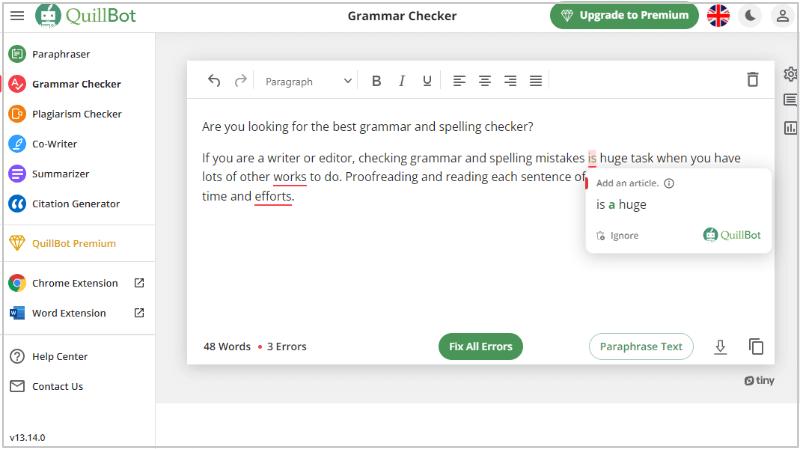
QuillBot Grammar Checker
Quillbot's grammar checker caught the planted and natural errors across the test set, including the article and preposition patterns in the non-native newsletter section.
It's particularly useful for professionals who want a straightforward way to proofread their writing without investing in expensive enterprise software.
QuillBot also offers paraphrasing and other writing assistance features that can help users restructure sentences and improve clarity.
For internal communications teams, it can be useful when preparing employee announcements, newsletters, training materials and everyday business emails.
Key features:
- Online spelling and grammar correction.
- Punctuation and sentence structure improvements.
- AI-powered writing assistance.
- Browser extension availability.
- Free and premium writing tools.
Best for: Individual professionals, small businesses and communications teams looking for an accessible grammar checker.
Limitations: Organisations requiring centralised writing guidelines, shared terminology management and advanced administrative controls should evaluate whether the available features meet their requirements.
2. Enterprise Writing Assistants
Enterprise Writing Assistants
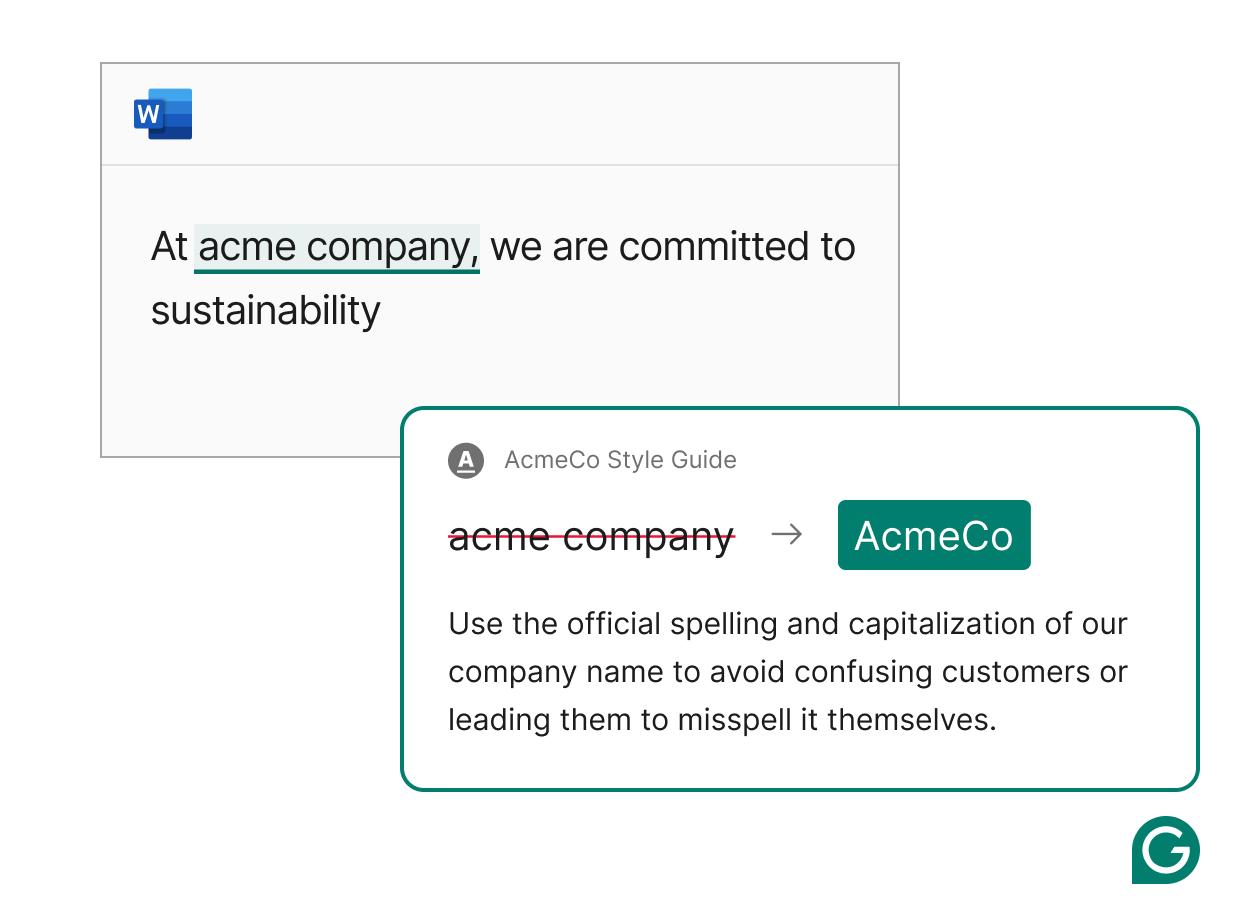
Enterprise writing assistants go beyond traditional spelling and grammar correction by helping organisations establish consistent writing standards across departments.
Depending on the provider, these tools can support shared dictionaries, approved terminology, brand voice guidelines and administrative controls.
For example, a company might prefer the term "team members" instead of "staff" across all employee communications. An enterprise writing assistant with configurable style rules can help reinforce this preference.
Organisations can also use resources such as the Microsoft Writing Style Guide to develop their own internal editorial standards.
Key features:
- Organisation-wide writing guidelines.
- Custom terminology and shared dictionaries.
- Tone and brand voice management.
- Administrative controls and reporting.
- Integration with workplace applications.
Best for: Medium-sized and large organisations, HR departments and dedicated internal communications teams.
Limitations: Subscription costs, implementation requirements and ongoing management may make these tools less suitable for smaller businesses.
3. Built-in Email and Document Grammar Checkers
Built-in Email and Document Grammar Checkers
Many employees already have access to grammar checker tools through the software they use every day.
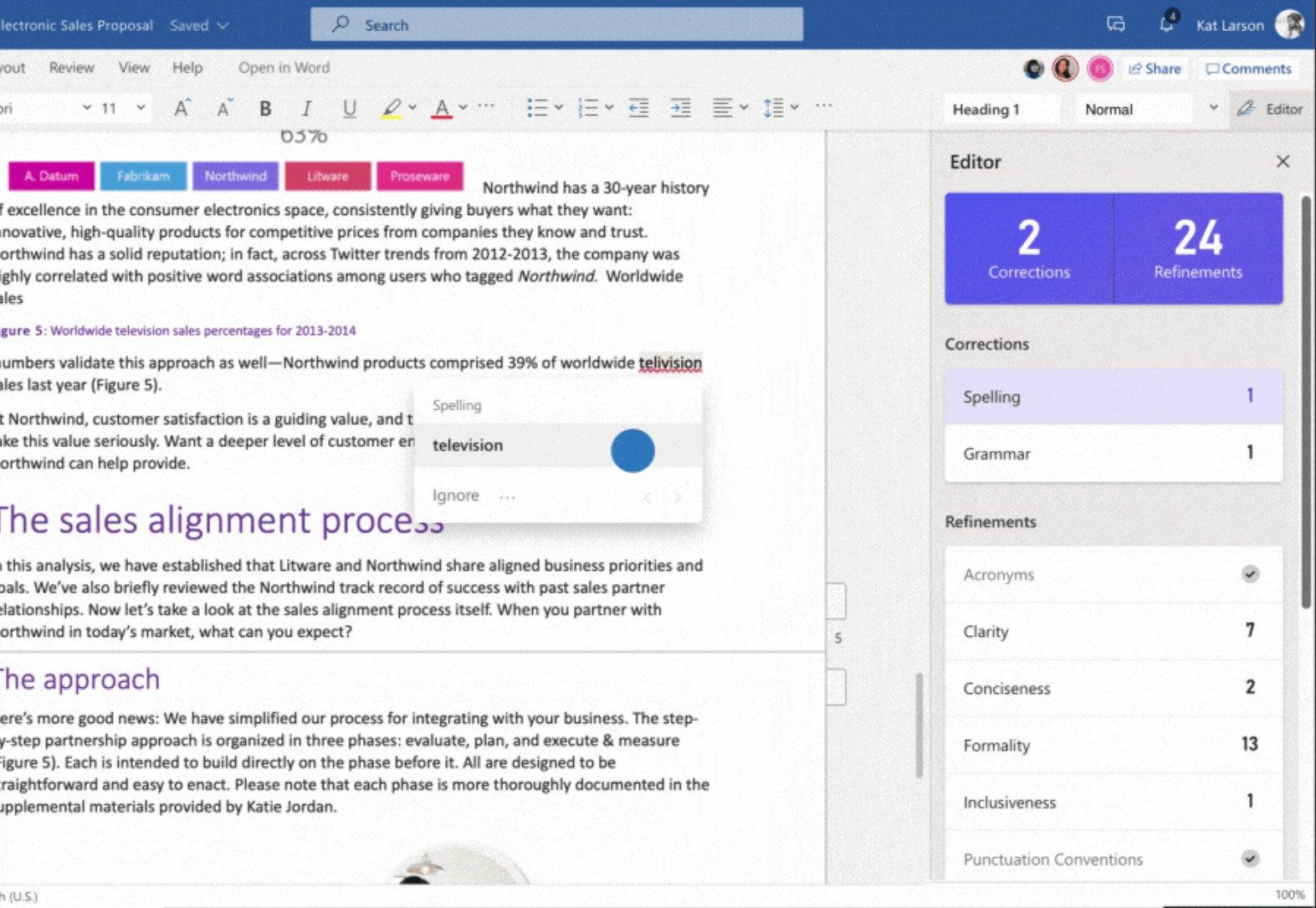
Email applications, word processors and cloud-based document editors often include built-in spelling and grammar correction, making it easy to identify common writing mistakes without switching between applications.
For example, Microsoft Editor provides writing assistance within supported Microsoft applications, while Google Docs offers spelling and grammar checking.
These tools are particularly convenient for employees who want to check spelling and grammar while drafting emails, reports or internal documents.
Key features:
- Real-time spelling and grammar suggestions.
- Native integration with document and email applications.
- Automatic correction options.
- Minimal additional setup.
- Features included in many existing software subscriptions.
Best for: Employees who need everyday proofreading support within their existing digital workplace.
Limitations: Writing consistency, custom terminology and advanced governance capabilities depend on the application and subscription.
4. Built-in Intranet Writing Tools
Built-in Intranet Writing Tools
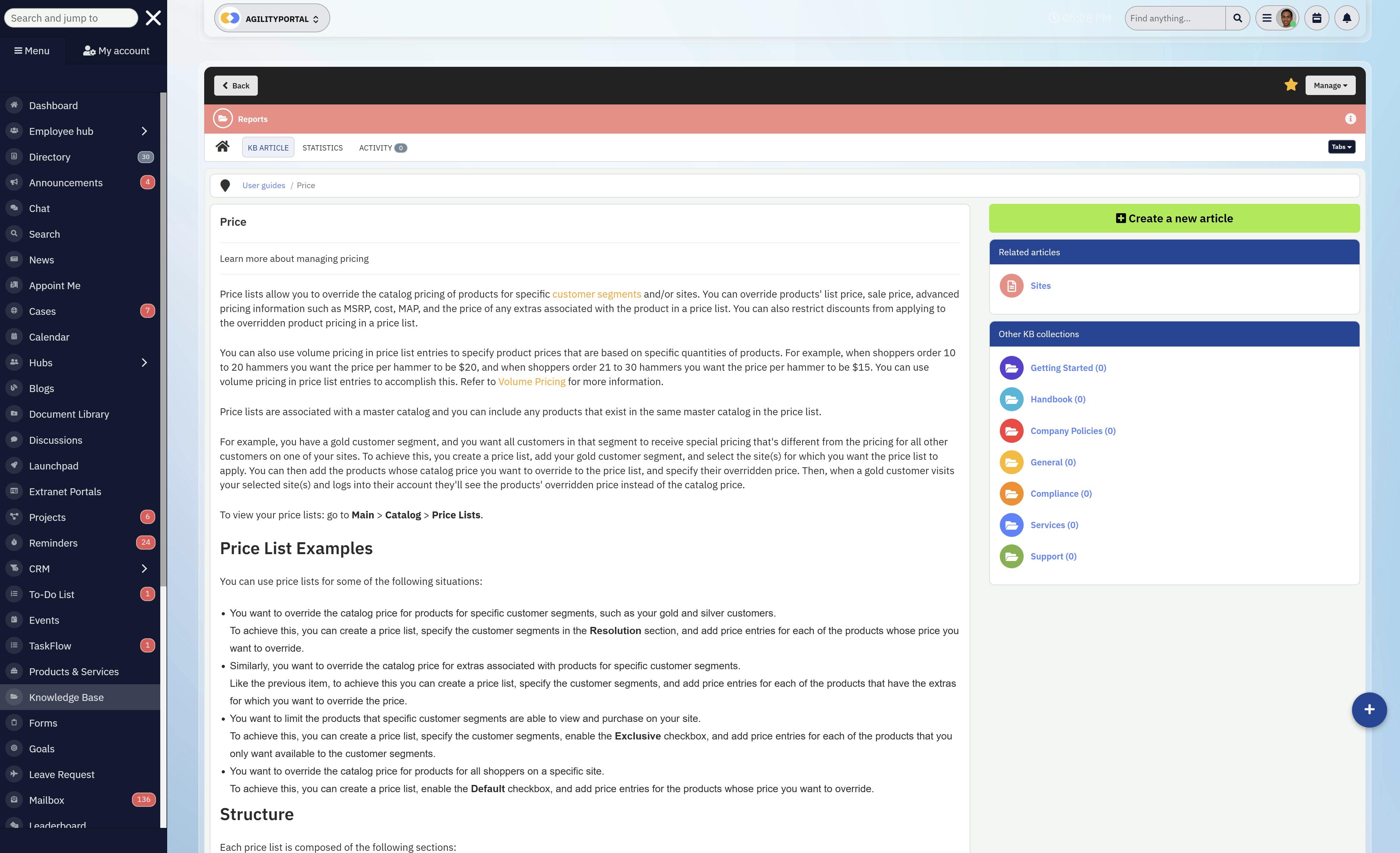
An employee intranet is often the central location for publishing company news, HR policies, leadership messages, training resources and knowledge base articles.
Depending on the platform, built-in writing tools may include spellchecking, content formatting, AI-assisted writing, readability suggestions and editorial approval workflows.
Unlike standalone grammar checkers, these capabilities allow employees to prepare and review content within the environment where it will eventually be published.
For example, organisations using an employee intranet platform like AgilityPortal can centralise workplace content, establish publishing processes and give employees access to consistent company information.
Combining an intranet with an appropriate grammar checker can help communications teams maintain higher editorial standards.
Key features to look for:
- Content editing and formatting.
- Browser-based spelling correction.
- Content approval and publishing workflows.
- Centralised knowledge management.
- Role-based publishing permissions.
Best for: Internal communications teams, HR departments and organisations publishing employee-facing content regularly.
Limitations: Not every intranet includes advanced grammar correction or AI proofreading. Additional writing tools may still be required.
5. Readability and Writing Clarity Tools
Readability and Writing Clarity Tools
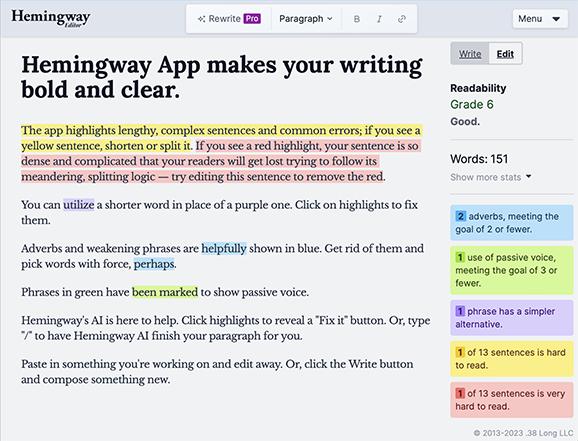
A sentence can be grammatically correct and still be difficult to understand.
Readability tools focus on making written content easier to read by identifying lengthy sentences, complicated vocabulary, excessive passive voice and unnecessarily complex expressions.
Many readability tools use established measurements such as the Flesch Reading Ease and Flesch-Kincaid Grade Level to estimate how difficult a piece of writing is to understand.
Consider the following workplace example:
| Complex writing | Improved readability |
| Employees are hereby advised to ensure the completion of all mandatory compliance-related training activities. | All employees must complete their mandatory compliance training. |
| Please facilitate the submission of the required documentation at your earliest convenience. | Please submit the required documents as soon as possible. |
| The implementation of the revised operational procedures will commence on Monday. | The new procedures will start on Monday. |
Readability is also an important consideration when creating accessible digital content.
The Web Content Accessibility Guidelines (WCAG) provide useful guidance for making online information more accessible.
Key features:
- Readability scoring.
- Complex sentence identification.
- Passive voice detection.
- Vocabulary simplification.
- Writing clarity recommendations.
Best for: Employee newsletters, HR policies, training materials and communications intended for diverse audiences.
Limitations: Readability scores do not necessarily measure factual accuracy, grammar quality or whether employees genuinely understand the message.
6. General AI Writing Assistants
General AI Writing Assistants
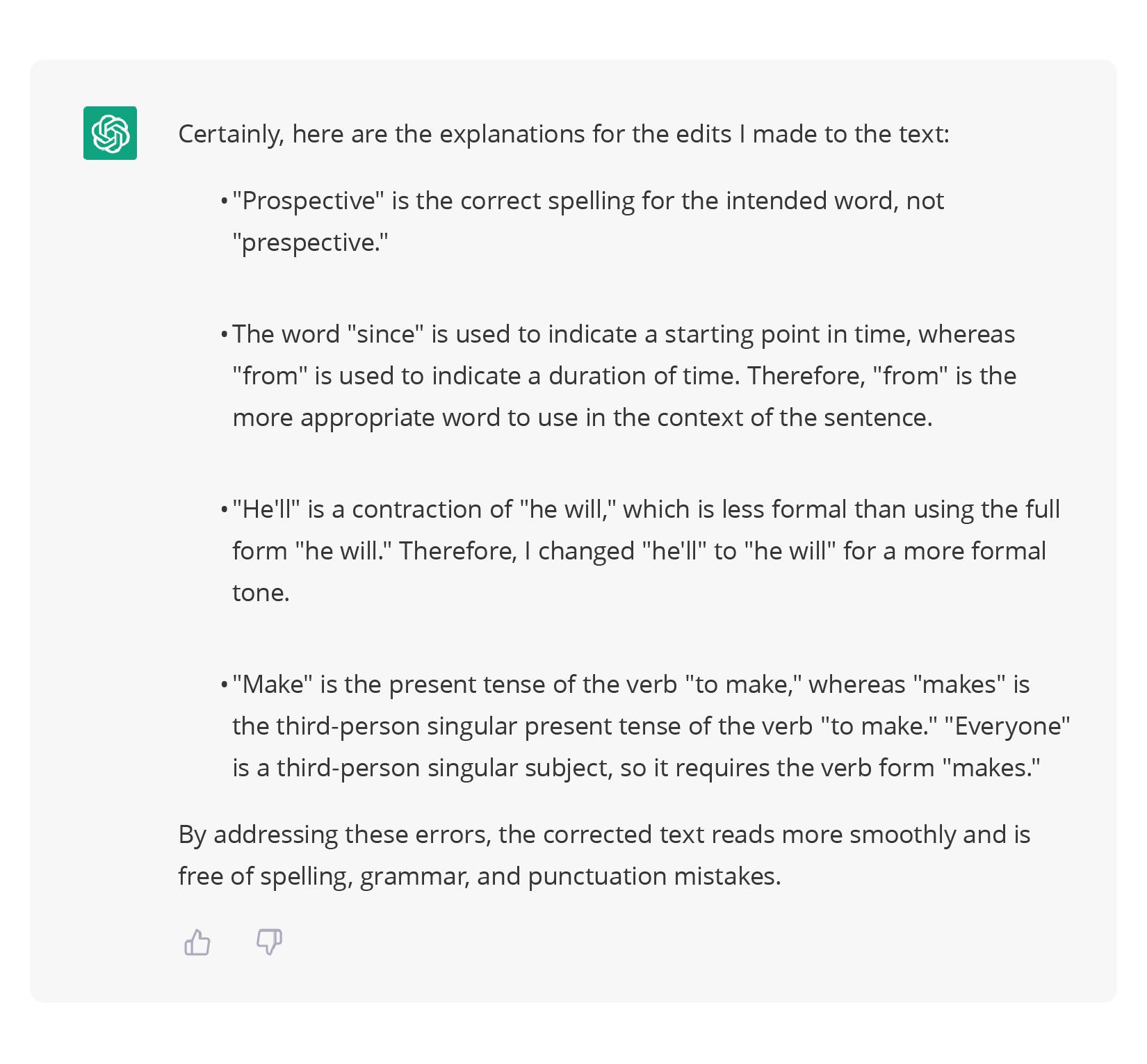
General AI writing assistants have changed how professionals approach proofreading, content creation and workplace communication.
Unlike traditional grammar checkers, generative AI tools can rewrite entire paragraphs, adjust tone, simplify technical information and adapt messages for different audiences.
For example, an internal communications manager could use the following prompt:
Check my spelling and grammar, improve sentence clarity and maintain a professional but friendly tone. Do not change company names, internal terminology, dates or the original meaning of the message.
However, AI-generated suggestions are not always accurate. An AI assistant may unintentionally change important information, introduce incorrect statements or replace approved organisational terminology.
The NIST AI Risk Management Framework provides useful guidance for organisations looking to understand and manage the risks associated with artificial intelligence.
Businesses should also consider the Information Commissioner's Office guidance on artificial intelligence and data protection before processing confidential employee or customer information through AI writing tools.
Key features:
- Contextual spelling and grammar correction.
- Sentence and paragraph rewriting.
- Tone adjustment.
- Content summarisation.
- Language simplification and translation assistance.
Best for: Professionals who need flexible writing assistance beyond basic grammar correction.
Limitations: Potential inaccuracies, inconsistent terminology, privacy concerns and unintended changes to the original meaning. Human oversight remains essential.
Which Grammar Checker Tool Is Right for Your Workplace?
The best grammar checker isn't necessarily the one with the most advanced AI features or the highest subscription price.
It's the one that fits your organisation's writing requirements, existing technology and communication standards.
A free grammar checker may be perfectly adequate for proofreading everyday emails, while enterprise writing assistants may be more appropriate for organisations managing hundreds of employee-facing documents.
For many internal communications teams, combining grammar checking, readability tools and a centralised employee communication platform offers a practical approach to producing clear, consistent and professional workplace content.
Free vs Paid Grammar Checkers: What Is the Difference?
Do you really need to pay for a grammar checker, or can a free tool do everything you need?
If you're searching for a way to check my spelling and grammar without spending money, a free online grammar checker is a good starting point.
Most free tools can identify common spelling mistakes, grammatical errors and punctuation issues, making them suitable for everyday writing.
However, the requirements become more complex when you're responsible for communications across an entire organisation.
Internal communications teams often need to maintain a consistent tone of voice, follow company writing guidelines, manage industry-specific terminology and ensure confidential information remains protected.
These are areas where paid and enterprise grammar checker tools may offer additional value.
What Do Free Grammar Checkers Offer?
Free grammar checkers are particularly useful for individuals, small businesses and employees who need occasional proofreading assistance.
Typical features include:
- Basic spelling and grammar correction.
- Punctuation and typing error detection.
- Limited sentence restructuring suggestions.
- Basic AI-powered writing assistance.
- Browser-based access without installing software.
- Limited readability and tone recommendations.
For example, an employee preparing a short announcement or responding to a colleague's email may find that a free tool provides all the functionality they need.
However, free tools may have limitations relating to text length, advanced writing suggestions, custom dictionaries and administrative controls.
What Do Paid Grammar Checkers Offer?
Paid grammar checker tools generally provide more comprehensive writing assistance, although features vary considerably between providers and subscription plans.
Enterprise writing assistants may also support organisational style guides, helping employees maintain consistent language and terminology across different communication channels.
Depending on the subscription, additional features may include advanced grammar correction, contextual writing suggestions, brand voice management, shared dictionaries, multilingual writing assistance and centralised administrative controls.
These capabilities can be particularly valuable for organisations where multiple departments regularly produce employee-facing content.
Free vs Paid Grammar Checker Comparison
| Feature | Free grammar checker | Paid grammar checker | Enterprise writing assistant |
| Spelling correction | Yes | Yes | Yes |
| Grammar correction | Basic | Advanced | Advanced |
| Punctuation checking | Yes | Yes | Yes |
| AI-powered writing suggestions | Limited | Advanced | Advanced |
| Tone adjustment | Limited | Often included | Customisable |
| Custom dictionaries | Limited or unavailable | Product-dependent | Shared dictionaries may be available |
| Brand voice consistency | Limited | Product-dependent | Often supported |
| Team collaboration | Limited | Product-dependent | Often supported |
| Administrative controls | Rare | Limited or plan-dependent | Often supported |
| Data protection controls | Provider-dependent | Provider-dependent | Additional controls may be available |
| Cost | Free | Monthly or annual subscription | Typically per user |
| Best suited for | Individuals and occasional writing | Professionals and small teams | Larger organisations and communications teams |
Don't Overlook Data Privacy When Choosing a Grammar Checker
One of the most important considerations when choosing between free and paid grammar checker tools is how your information is handled.
When employees paste company announcements, HR documents, financial reports or confidential business information into an online writing tool, that information may be processed by an external service provider.
Before introducing an AI grammar checker across your organisation, review its privacy policy, data retention practices, security controls and whether submitted content can be used to train AI models.
The Information Commissioner's Office guidance on AI and data protection provides a useful starting point for businesses handling personal information through AI-powered applications.
Paying for a grammar checker does not automatically guarantee better data protection. Always evaluate the provider's actual contractual terms and security practices.
Which Grammar Checker Should Your Business Choose?
The right choice depends on how frequently your employees produce written content, the complexity of your communication requirements and the level of control your organisation needs.
| Business requirement | Recommended option |
| Checking everyday emails | Free grammar checker |
| Proofreading occasional documents | Free or built-in grammar checker |
| Producing regular employee newsletters | Paid grammar checker |
| Maintaining consistent company terminology | Enterprise writing assistant |
| Simplifying HR policies and procedures | Readability and grammar checker tools |
| Managing company-wide announcements | Intranet platform combined with an approved grammar checker |
| Handling confidential employee information | Organisation-approved writing tool with verified data protection controls |
For many businesses, the most effective approach is to combine an appropriate grammar checker with a centralised internal communication platform where employees can create, review, publish and access company information.
Ultimately, you don't necessarily need the most expensive grammar checker to improve workplace communication.
You need a tool that fits your writing requirements, protects your information and helps employees communicate clearly and consistently.
Editorial note: The comparison reflects typical capabilities across tool categories rather than guaranteed features. Individual subscription plans and data protection policies should be verified before publication.
How to Check Spelling and Grammar in Workplace Documents
Checking spelling and grammar in workplace documents involves more than correcting a few typing mistakes.
Different types of business communication require different writing styles, levels of detail and editorial standards.
When you ask, "How can I check my spelling and grammar before publishing?", it's important to consider who will read your message, what they need to understand and what action you expect them to take.
Here are six practical ways to use grammar checker tools to improve everyday workplace communication.
1. Employee Announcements
Employee announcements should be clear, concise and easy to act on. Use a grammar checker to identify errors, remove unnecessary words and simplify lengthy sentences.
Pay particular attention to deadlines, dates and instructions. Employees should understand what is happening, why it matters and what they need to do next.
2. Internal Newsletters
Internal newsletters should feel engaging rather than overly formal or robotic.
AI grammar checker tools can help maintain a consistent tone, improve sentence structure and identify repetitive language. However, avoid accepting every AI-generated suggestion, as this can remove the personality from your communications.
3. Business Emails
Emails are one of the most common forms of written workplace communication. Unfortunately, rushed responses can result in spelling mistakes, unclear instructions and unintended tones.
Before clicking send, check your grammar, punctuation and sentence clarity. Read your message from the recipient's perspective to ensure it cannot easily be misinterpreted.
4. HR Policies and Procedures
HR documents require particular attention because unclear wording can lead to misunderstandings about employee rights, responsibilities and company procedures.
Follow established plain English writing principles to simplify complicated language without changing the meaning of a policy.
Always have sensitive policy changes reviewed by an appropriate HR or legal professional.
5. Knowledge Base Articles
Knowledge base articles should provide accurate, consistent and easy-to-follow information.
Use professional writing tools to identify inconsistent terminology, simplify technical instructions and improve readability.
Break complicated processes into manageable steps and use descriptive headings to help employees find answers quickly.
6. Leadership Communications
Messages from senior leaders should balance professionalism with authenticity.
Employees want to hear from their leadership team, not read something that sounds entirely AI-generated.
Use grammar checkers to improve accuracy and clarity while preserving the leader's natural voice, personality and intended message.
Workplace Document Proofreading Checklist
| Document type | Common writing mistakes | Recommended proofreading approach |
| Employee announcements | Unclear instructions and missing details | Grammar, clarity and accuracy checks |
| Internal newsletters | Repetitive language and inconsistent tone | Grammar and readability checks |
| Business emails | Typing errors and inappropriate tone | Spelling, punctuation and tone checks |
| HR policies | Ambiguous wording and complex terminology | Grammar checking and professional review |
| Knowledge base articles | Inconsistent terminology and lengthy instructions | Readability and terminology checks |
| Leadership communications | Overly formal or impersonal language | Grammar and tone checks with human review |
| Employee training materials | Complicated instructions and technical jargon | Readability and comprehension checks |
| Business reports | Grammatical errors and inconsistent formatting | Grammar, formatting and factual accuracy checks |
Create a Consistent Workplace Proofreading Process
Rather than relying on employees to check their writing individually, organisations can introduce a simple editorial workflow:
- Draft the content using approved company terminology.
- Run a spelling and grammar check using an organisation-approved tool.
- Review readability, tone and sentence structure.
- Verify names, dates, statistics and instructions.
- Obtain approval where necessary.
- Publish and distribute the final content.
Using a centralised employee intranet platform like AgilityPortal alongside approved grammar checker tools can help organisations manage employee announcements, business documents, knowledge base articles and internal communications from one accessible location.
Businesses can also refer to the Microsoft Writing Style Guide when developing internal writing standards and the W3C guidance on writing accessible content to make workplace information more accessible to employees.
Remember, the goal isn't simply to produce grammatically correct documents. It's to create workplace communications that employees can understand, trust and act on without needing additional clarification.
Common Mistakes When Using AI Grammar Checkers
AI grammar checkers can save time, improve writing accuracy and help employees communicate more effectively. But what happens when we rely on them too much?
When you ask an AI writing assistant to "check my spelling and grammar", it may do more than simply correct mistakes. It might restructure sentences, replace words or adjust the tone in ways that unintentionally change your original message.
For internal communications teams, this can create problems ranging from inconsistent terminology to inaccurate employee instructions.
Here are six common mistakes to avoid when using AI grammar checker tools in the workplace.
1. Accepting Every AI-Generated Suggestion
Just because an AI grammar checker recommends a change doesn't mean it's the right one.
AI tools can misunderstand context, technical terminology, industry-specific language and company expressions. Automatically accepting every suggestion can introduce new errors or change the intended meaning of a message.
Always review suggested corrections individually, particularly when working with important business documents.
2. Ignoring Your Organisation's Tone of Voice
AI writing assistants often favour standardised language. While this can improve grammatical accuracy, it can also make employee communications sound generic, overly formal or impersonal.
Establishing a consistent organisational writing style guide helps employees maintain an authentic brand voice while benefiting from AI-powered writing suggestions.
3. Sharing Confidential Business Information
Copying confidential HR documents, employee records, financial information or unpublished business announcements into an unapproved online grammar checker can create data protection risks.
Before using an external AI writing tool, understand how the provider collects, processes, stores and uses submitted information.
The Information Commissioner's Office guidance on AI and data protection offers useful information for organisations processing personal data through AI systems.
4. Confusing Grammar Accuracy With Factual Accuracy
A grammatically correct sentence isn't necessarily a factually correct one.
An AI grammar checker might improve the wording of an employee announcement without recognising that it contains an incorrect deadline, outdated policy or misleading statistic.
Always verify important information independently, including names, dates, figures, policies and instructions, before publishing.
5. Overlooking Internal Terminology and Company Names
Every organisation has its own vocabulary, including department names, product names, abbreviations and internal processes.
A general AI grammar checker may incorrectly flag these terms as spelling mistakes or replace them with more commonly used alternatives.
Where available, use custom dictionaries, approved terminology lists and shared writing guidelines to maintain consistency across workplace communications.
6. Relying on AI Instead of Human Proofreading
AI-powered writing tools are designed to assist people, not replace their judgement.
Sensitive communications involving organisational changes, employee wellbeing, performance management or leadership decisions require empathy, contextual understanding and careful consideration.
The NIST AI Risk Management Framework provides guidance on managing AI-related risks, including the importance of appropriate oversight.
Common AI Grammar Checker Mistakes and How to Avoid Them
| Common mistake | Potential workplace impact | Recommended solution |
| Accepting every AI suggestion | Changes to the original meaning | Review corrections individually |
| Ignoring brand voice | Generic and impersonal communication | Establish internal writing guidelines |
| Sharing confidential information | Privacy and security risks | Use approved writing tools |
| Assuming grammatical accuracy means factual accuracy | Misleading employee information | Independently verify facts and figures |
| Replacing internal terminology | Inconsistent company language | Maintain an approved terminology list |
| Removing human oversight | Inappropriate or inaccurate messages | Introduce editorial approval workflows |
| Overcomplicating simple messages | Reduced readability | Prioritise plain language |
| Relying on AI-generated tone | Loss of authenticity | Preserve the author's natural voice |
A Better Way to Use AI Grammar Checkers
Instead of asking an AI assistant to rewrite an entire document without instructions, provide clear boundaries around what it should and shouldn't change.
For example, try the following prompt:
AI Spelling and Grammar Checker Prompt
Ready-to-use AI writing promptCopy and paste this prompt into your preferred AI writing assistant to improve your workplace communication.
Check my spelling and grammar using British English. Improve sentence clarity, punctuation and readability while maintaining a professional and approachable tone.
Do not change the original meaning, company names, internal terminology, dates, statistics or policy requirements.
Highlight any significant changes and explain why they are recommended. Do not introduce new information.
This approach gives the AI assistant clearer instructions while allowing you to maintain greater control over the final content.
Ultimately, the most effective way to use AI grammar checker tools is to combine automated proofreading with human expertise, established writing standards and appropriate content approval processes.
Technology can help you write better, but people remain responsible for ensuring workplace communications are accurate, authentic and trustworthy.
Final Thoughtson Choosing the Right Grammar Checker for Your Workplace
The next time you find yourself asking, "How can I check my spelling and grammar?", remember that effective writing is about much more than correcting spelling mistakes and punctuation errors. It's about communicating your ideas clearly, building trust and ensuring your audience understands exactly what you're trying to say.
Whether you choose a free grammar checker like QuillBot, an enterprise writing assistant or an AI-powered proofreading tool, the right solution depends on your organisation's communication needs, budget and data protection requirements.
For internal communications teams, combining grammar checker tools with established writing guidelines and human editorial oversight can help maintain consistency across employee announcements, newsletters, HR policies and business documents.
However, creating well-written content is only half the challenge. You also need an effective way to share that information with the right people.
An internal communication platform like AgilityPortal helps organisations centralise employee communications, manage company knowledge, streamline content approval and keep distributed teams informed and connected.
By combining the right writing tools with a centralised digital workplace, businesses can create a communication culture where clarity, consistency and accessibility become part of everyday working practices.
Ultimately, technology should enhance your writing, not replace your judgement. The most effective workplace communications combine grammatical accuracy, human understanding and an authentic organisational voice.
Ready to improve your workplace communication?
Discover how AgilityPortal can help your organisation connect employees, simplify information sharing and deliver a more consistent internal communication experience.
Frequently Asked Questions About Checking Spelling and Grammar
How can I check my spelling and grammar for free?
You can use a free online grammar checker such as QuillBot Grammar Checker to identify spelling mistakes, grammatical errors and punctuation issues.
Simply paste your text into the editor, review the suggested corrections and make any necessary changes. Many email applications and document editors also include built-in proofreading features at no additional cost.
Can AI check my spelling and grammar?
Yes, AI-powered writing assistants can check spelling, grammar, punctuation, sentence structure and readability.
Unlike traditional spellcheckers, AI grammar checkers can analyse the context of a sentence and suggest improvements to tone and clarity. However, you should always review AI-generated suggestions to ensure they preserve your original meaning.
What is the best free online grammar checker?
QuillBot is a useful option for individuals looking for free spelling and grammar correction. However, the best grammar checker depends on your writing requirements, preferred applications and privacy needs.
Business users may benefit from enterprise writing assistants that offer additional terminology management and administrative controls.
How can I check my spelling and grammar in Microsoft Word?
Microsoft Word includes built-in spelling and grammar checking through Microsoft Editor. Open your document, navigate to the Review tab and select Editor or Spelling & Grammar, depending on your version.
You can then review suggested corrections and writing improvements. Visit Microsoft's official spelling and grammar guidance for further instructions.
Can I check my spelling and grammar without downloading software?
Yes, many online grammar checker tools work directly within your web browser.
You can paste your text into an online editor and receive spelling, grammar and punctuation suggestions without installing additional software.
Some providers also offer browser extensions for proofreading emails, documents and other online content.
Are online grammar checkers safe for confidential business documents?
Not all online grammar checkers provide the same level of data protection. Before submitting confidential business documents, review the provider's privacy policy, data retention practices, security controls and AI training policies.
Organisations should establish approved writing tools and follow relevant data protection principles when handling sensitive employee information.
What is the difference between a spellchecker and a grammar checker?
A spellchecker primarily identifies incorrectly spelled words and typing mistakes.
A grammar checker goes further by analysing sentence structure, punctuation, verb tenses and grammatical relationships.
Advanced AI grammar checkers may also provide contextual writing suggestions, tone adjustments and readability improvements.
Can a grammar checker improve internal communications?
Yes, grammar checker tools can help internal communications teams produce clearer, more consistent and professional employee announcements, newsletters, HR policies and knowledge base articles.
When combined with an employee communication platform, these tools can support a more structured content creation, review and publishing process.
AI Summary
- Online grammar checker tools help identify spelling mistakes, grammatical errors, punctuation issues and unclear sentences, improving the quality of professional writing.
- Professionals searching for ways to check my spelling and grammar can choose from QuillBot, enterprise writing assistants, built-in email and document checkers, intranet writing tools, readability tools and general AI assistants.
- Free grammar checkers are suitable for everyday proofreading, while paid and enterprise tools may offer advanced writing suggestions, shared dictionaries, brand voice management and administrative controls.
- Accurate spelling, grammar and consistent terminology help internal communications teams produce clearer employee announcements, newsletters, HR policies and knowledge base articles.
- AI grammar checkers can misunderstand context, introduce inaccuracies or change the original meaning. Employees should review suggestions and avoid submitting confidential information to unapproved tools.
- Combining grammar checker tools with human proofreading, organisational writing guidelines and a centralised employee intranet supports clearer, more consistent and trustworthy workplace communication.
Most Popular Posts

Effective communication among team members is vital for the productivity and success of any organization. Surprisingly, 60% of companies lack a long-term internal communication strategy, which p...


Businesses thrive on communication for efficiency, productivity and accomplishment. When the right information is passed from the right designation in the organization, it promotes positivity an...

Categories
Blog
(3302)
Business Management
(405)
Employee Engagement
(241)
Digital Transformation
(228)
Growth
(159)
Intranets
(142)
Internal communications
(111)
Remote Work
(68)
Sales
(53)
Collaboration
(53)
Customer Experience
(34)
Culture
(30)
Project management
(30)
Knowledge Management
(29)
Leadership
(20)
Comparisons
(9)
News
(1)

Related Posts

Have you ever wondered, "How can I check my spelling and grammar before sending an important email or publishing a company-wide announcement?" You're not alone. Whether you're writing an employee newsletter, sharing a business update or creatin...

Have you ever created an AI-generated illustration that looked absolutely perfect, only to struggle to recreate the same style for your next project? That's where image-to-image AI can make a real difference, helping you create consistent, prof...

A few years ago, we tried managing Amazon PPC campaigns ourselves and quickly realised that it was far more complicated than we had initially expected. From keyword targeting and bid management to understanding advertising costs and profitabili...

If you'd asked me a few years ago what AI could actually do, I'd probably have said, "Answer questions and write a few paragraphs." That was impressive at the time, but it didn't take long before everything changed. Then AI stopped being just a...

How do you deliver effective employee training when your workforce is spread across different locations, departments, and time zones? According to Gallup's workplace research, nearly four in five US employees in remote-capable roles work remotely or ...


Annet Herges
I am a digital nomad, lover of exploring new places and making friends.
I love to travel and I love the internet. I take pictures of my travels and share them on the internet using Instagram.
Traveler, entrepreneur, and community builder. I share my insights on digital marketing and social media while inspiring you to live your fullest life.
Ready to learn more? 👍
One platform to optimize, manage and track all of your teams. Your new digital workplace is a click away. 🚀
Free for 14 days, no credit card required.