Insight Blog
Agility’s perspectives on transforming the employee's experience throughout remote transformation using connected enterprise tools.
1 hour and 16 minutes reading time
(15244 words)
How to Use Image-to-Image AI to Create Consistent Illustrations Without a Designer

How to Use Image-to-Image AI to Create Consistent Illustrations Without a Designer
Learn how to use image-to-image AI to create consistent illustrations, maintain your brand style and generate professional visuals with a simple workflow.
How to Use Image-to-Image AI to Create Consistent Illustrations Without a Designer

Have you ever created an AI-generated illustration that looked absolutely perfect, only to struggle to recreate the same style for your next project?
That's where image-to-image AI can make a real difference, helping you create consistent, professional-looking illustrations without starting from scratch every time or relying on a dedicated designer.
Imagine creating a series of illustrations for your website, social media campaigns or employee training materials. You want the same colours, characters and visual style, but every time you generate a new image, something changes.
Before you know it, you're spending more time correcting images than creating content.
You're certainly not alone.
According to Adobe's 2025 Creators' Toolkit Report, which surveyed 16,000 creators globally, 86% use creative generative AI, while 76% say it has helped grow their business or personal brand.
86 percent
of surveyed creators actively use creative
generative AI in their content creation workflows.
AI-powered creative tools are becoming an established part of digital content production. Adobe's research also found that 76% of creators reported faster business or audience growth with creative AI. Image-to-image AI offers a practical way to adapt existing visual assets and create consistent illustrations without starting from scratch.
The findings are based on a September 2025 survey of more than 16,000 creators across eight countries, conducted by Adobe in partnership with The Harris Poll. The research covers creative generative AI broadly, rather than image-to-image AI exclusively. Reported business growth reflects respondents' experiences rather than independently measured financial performance.
More recent research from Adobe and Advanis, published in April 2026, found that creative professionals use AI in over 40% of their projects on average, with nearly nine in ten reporting improvements in the quality of their work.
But here's the thing: generating a great image and creating a consistent collection of illustrations are two very different challenges.
With an image-to-image AI generator, you can use an existing illustration as your visual starting point, helping you maintain a recognisable style while introducing new scenes, activities and compositions.
In this guide, we'll walk you through how to use image-to-image AI, choose the right tools, write effective prompts and avoid common design mistakes.
You'll also discover practical examples and reusable prompt templates.
By the end, you'll have a repeatable, seven-step workflow for creating consistent, on-brand illustrations, even if you've never used professional design software before.
Key Takeaways
- Image-to-image AI uses existing reference images to create new illustrations while preserving selected visual characteristics, such as character appearance, brand colours and artistic style.
- Creating a master reference image, documenting visual guidelines and using reusable prompts can improve consistency across AI-generated illustrations.
- Choosing the right image-to-image AI generator and appropriate transformation settings helps balance creative flexibility with visual consistency.
- Businesses can use AI-generated illustrations for digital marketing, employee onboarding, internal communications, training and knowledge management.
- Human quality control remains essential for correcting visual defects, maintaining brand standards and reviewing copyright and commercial usage rights.
- A reusable AI illustration workflow and central library of approved visual assets can reduce repetitive design work without completely replacing professional designers.
What Is Image-to-Image AI and How Does It Work?
Image-to-image AI is a generative artificial intelligence technique that uses an existing image as a reference to create new or modified visuals.
Unlike text-to-image AI, which generates images from written descriptions alone, image-to-image AI combines visual references with text instructions to give you greater control over the final result.
Think of it as giving someone an example of exactly what you want rather than trying to describe everything from memory.
An image to image AI generator allows you to upload an existing illustration, describe the changes you want to make and generate a new version while retaining selected elements of the original design.
For example, you could take an illustration of an employee working at a desk and create another version showing the same character presenting at a team meeting.
How does image-to-image AI work?
The generation process typically relies on six key inputs:
- Reference image: The original visual that guides the new illustration.
- Text prompt: Written instructions describing what to preserve and what to change.
- Reference or denoising strength: Controls how closely the output follows the original image, depending on the tool.
- AI model: Influences the quality, style and accuracy of the generated image.
- Output dimensions: Determines the image size and aspect ratio.
- Style and composition instructions: Helps maintain consistent colours, lighting, proportions and visual arrangements.

Illustrative example: using a single reference image to maintain character appearance, colours and illustration style across different activities.
The beauty of this approach is that you're no longer asking AI to reinvent your visual identity every time you need a new image.
However, reference images don't guarantee pixel-perfect consistency.
You may still need to refine your prompts, adjust settings or correct individual details. The more structured your workflow becomes, the easier it is to produce illustrations that look like they belong together.
Image-to-Image AI vs Text-to-Image AI: What's the Difference?
Have you ever wondered why two AI-generated images can look completely different, even when you use almost identical prompts? It often comes down to how the images are generated.
Text-to-image AI starts with a written description.
You tell the AI what you want, and it interprets your instructions to create an entirely new image.
It's great for exploring creative ideas, but maintaining the same character, colours and illustration style across multiple generations can be challenging.
Image-to-image AI takes a different approach.
Instead of relying solely on written instructions, it uses an existing image as a visual reference, giving you greater control over which elements remain consistent and which ones change.
As we explored in our article on the trends shaping the AI image generator industry, understanding how image generation technology is evolving can help you make better creative decisions.
Text-to-image AI vs image-to-image AI comparison
| Feature | Text-to-image AI | Image-to-image AI |
| Starting point | Written text prompt | Existing reference image |
| Visual consistency | Can vary between generations | Greater potential for consistency |
| Character preservation | Often challenging | Guided by a reference image |
| Brand style control | Depends on prompt accuracy | Guided by references and prompts |
| Creative freedom | High | Adjustable |
| Editing control | Generally less direct | More targeted modifications |
| Best use case | Exploring new creative concepts | Creating controlled variations |
| Practical example | Designing a new character | Showing the same character in different scenes |
Which AI image generation method should you use?
If you're developing a completely new visual concept, text-to-image AI is a great place to start.
However, if you've already created an illustration you're happy with, image-to-image AI is generally a better choice for producing consistent variations.
As explained in Hugging Face's image-to-image generation guide, adjusting generation strength in supported models allows you to control how much the new image differs from the original.
You can also explore Adobe's Firefly prompt guide to learn how style and composition references help maintain visual consistency.
You don't necessarily have to choose between the two methods. Start with text-to-image AI to develop your original illustration, then switch to image-to-image AI to create additional versions.
By combining both approaches, you can enjoy the creative freedom of AI image generation while building a recognisable visual identity without repeatedly redesigning everything from scratch.
Just remember that reference images improve consistency but don't guarantee identical results.
Why Your AI-Generated Illustrations Keep Looking Different
Have you ever spent 20 minutes perfecting an AI-generated illustration, only to spend another hour trying to recreate the same look?
It's frustrating, especially when you're trying to build a consistent visual identity for your business.
The problem is that AI image generators don't necessarily remember your previous designs.
Even when you reuse the same prompt, the model can interpret your instructions differently, introducing subtle changes to facial features, colours, backgrounds and proportions.
Imagine you're creating illustrations for five blog articles.
Individually, each image looks great.
But when you place them side by side, they look like they were created by five different designers.
Seven reasons your AI illustrations look inconsistent
| Common mistake | Why it causes inconsistency | What you should do instead |
| Starting from scratch every time | The AI reinterprets your instructions | Reuse an approved reference image |
| Changing your prompts | Visual details become inconsistent | Create a reusable master prompt |
| Switching between AI models | Models interpret styles differently | Stick with the same model where possible |
| Using poor-quality references | Important visual details may be lost | Choose a clear, high-quality master image |
| Applying excessive transformation | Original characteristics may disappear | Adjust generation strength gradually |
| Changing image dimensions | Composition and proportions can shift | Maintain a consistent aspect ratio |
| Ignoring brand guidelines | Colours and design styles can drift | Define your visual style before generating |
As explained in the Hugging Face image-to-image documentation, generation strength can influence how closely an output resembles its original reference in supported diffusion models.
The good news is that you don't necessarily need a more expensive AI tool to solve these problems. What you need is a structured, repeatable workflow.
To make things easier, we've prepared a free image to image workflows download that you can use to plan your illustrations, maintain visual consistency, organise your prompts and review your generated images before publishing.
Keep it handy whenever you're creating a new collection of illustrations.
It will help you establish a consistent process instead of relying on trial and error every time.
Free Download: Image-to-Image AI Workflow Checklist
- Seven-step image generation workflow
- Visual style planning worksheet
- Reusable master prompt template
- Image generation settings checklist
- Final quality control checklist
Free Resource · AgilityPortal
Image-to-Image AI Workflow Checklist
Want to create consistent AI-generated illustrations without starting from scratch every time? Use this free, practical checklist to prepare your reference images, organise your prompts, maintain your visual style and review your illustrations before publishing.
Scroll through the document to preview all three pages. If the preview is unavailable on your device, open the PDF directly .
Ready to create more consistent AI illustrations?
Keep this checklist handy whenever you start a new creative project. Follow the seven-step workflow, reuse your master prompts and keep your illustrations aligned with your brand's visual identity.
Download free checklist (PDF) Free to download. No registration required.What You Need Before Starting an Image-to-Image AI Workflow
So before you start generating illustrations, it's worth spending a little time preparing your creative assets.
Think of it like putting together a brand style guide. Once you've established the foundations, creating new illustrations becomes much easier.
You don't need expensive design software or professional graphic design experience. However, you do need to give your image-to-image AI generator enough visual information to understand what you want to achieve.
Here are seven essentials to prepare before getting started.
Example AI Illustration Style Guide
Reusable visual identity for business and workplace illustrations.
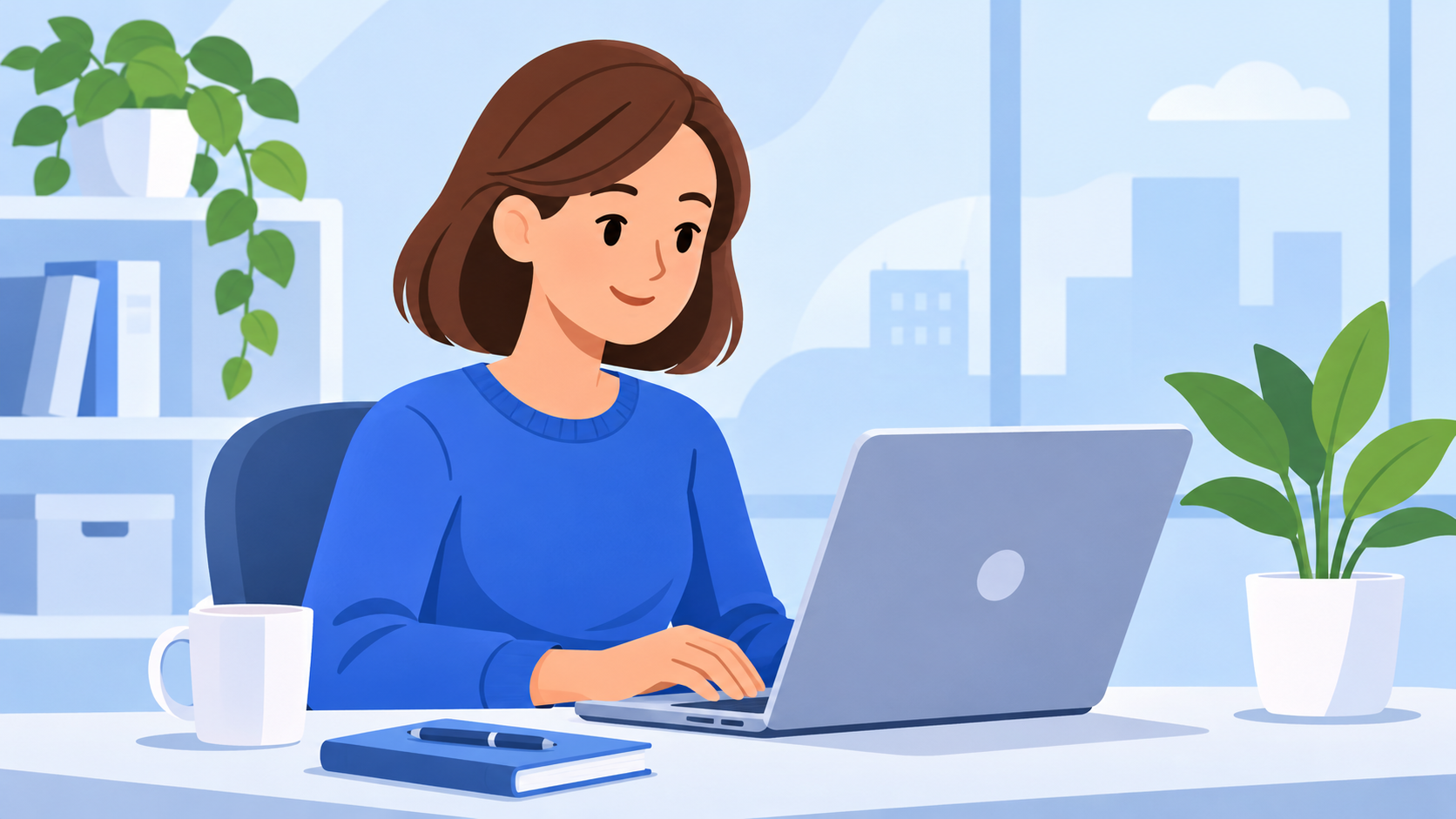
Example reference illustration for maintaining visual consistency across AI-generated images.
Brand colour palette
Select any colour to copy its HEX code.
Illustration specifications
- Illustration style
- Modern flat corporate illustration
- Character appearance
- Brown bob haircut, blue sweater
- Design elements
- Rounded shapes and clean outlines
- Lighting
- Soft, consistent shadows
- Background
- Minimal and uncluttered
- Image dimensions
- 1600 × 900 pixels
- Aspect ratio
- 16:9
- Export format
- PNG or WebP
Keep these visual specifications consistent across your image-to-image AI prompts. Change the activity, environment or composition while preserving the character appearance, colour palette and illustration style.
Create a simple visual style guide
One of the most effective ways to maintain consistency is to establish a visual style guide before generating your first collection of images.
For example, if you're creating illustrations for a business blog, your visual style guide might look like this:
Employee engagement and feedback tool
You can also explore Adobe Firefly's image generation tools to understand how visual references can guide illustration style and composition.
If you're working with multiple content creators, consider storing your approved reference images, brand guidelines and reusable prompts in a central digital workplace. This helps everyone follow the same creative standards rather than developing their own interpretation of your brand.
Remember, the objective isn't to restrict your creativity. It's to establish a recognisable visual identity that gives you the freedom to create new illustrations without losing the characteristics that make them yours.
Once you've prepared these assets, you're ready to start building your repeatable image-to-image AI workflow.
Editorial recommendation: Turn the example AI Illustration Style Guide above into a branded HTML widget for the article. The example colours and character specifications are illustrative rather than AgilityPortal's official brand guidelines.
How to Use Image-to-Image AI to Create Consistent Illustrations in 7 Steps
Creating a consistent collection of illustrations with image-to-image AI is less about finding the perfect prompt and more about developing a repeatable process.
Instead of generating every image from scratch, you can use an existing illustration as your visual foundation.
This gives the AI a reference for character appearance, colours, proportions, lighting and artistic style.
Whether you're creating illustrations for blog articles, marketing campaigns, employee training materials or product documentation, the following seven-step workflow can help you achieve more consistent results.
Step 1: Create a master reference image
Start by creating or selecting a high-quality illustration that represents the visual identity you want to maintain.
Think of this as your master image. Every subsequent illustration should use it as a visual reference.
Your master reference image should include:
- Clearly defined character features and proportions.
- Consistent clothing and accessories.
- Your preferred colour palette.
- A recognisable illustration style.
- Clean lighting and shadows.
- High-resolution output with minimal visual defects.

Example master reference image featuring a consistent character, blue colour palette and modern corporate illustration style.
For example, if your reference image features a woman with brown bob hair wearing a blue sweater, these characteristics should remain consistent when generating new workplace scenarios.
Avoid using an illustration with noticeable defects as your master reference. These imperfections may carry over into future generations.
Step 2: Choose the right image-to-image AI generator
Not all AI image generators offer the same level of control over existing images. Some are designed primarily for creative exploration, while others provide more advanced reference-based editing capabilities.
When choosing an image-to-image AI generator, look for the following features:
| Feature | Why it matters |
| Reference image support | Allows you to generate new illustrations based on existing visuals. |
| Character consistency | Helps preserve recognisable character features. |
| Reference strength controls | Determines how closely the output follows the original image, where supported. |
| Selective image editing | Allows you to modify specific areas without intentionally changing the entire illustration. |
| Style reference support | Helps maintain a consistent artistic appearance. |
| High-resolution exports | Produces images suitable for websites and marketing materials. |
| Commercial usage rights | Helps establish whether generated assets can be used for business purposes. |
Tools such as Adobe Firefly, Midjourney, ChatGPT and Leonardo AI offer different approaches to reference-based image generation.
The best tool is the one that provides sufficient control for your particular workflow, rather than simply producing the most visually impressive individual image.
Step 3: Define your illustration style and visual rules
Before generating additional images, establish which visual elements must remain unchanged and which elements can vary.
This distinction is particularly important when creating illustrations for a recognisable brand.
AI Illustration Visual Consistency Rules
Understand which visual elements to preserve and which you can change when generating new illustrations.
Keep consistent
- Character facial features
- Hairstyle and clothing
- Body proportions
- Brand colour palette
- Illustration style
- Lighting and shadows
- Image aspect ratio
Allow to change
- Character activity
- Body position and gestures
- Workplace environment
- Supporting objects
- Camera perspective
- Scene composition
- Background details
Document these rules in your visual style guide and reuse them whenever you create a new illustration.
This approach is particularly useful for marketing teams that need to produce large volumes of content without compromising their brand identity.
Step 4: Create a reusable master prompt
One of the biggest mistakes people make when using AI image generators is writing a completely different prompt every time they need a new image.
Even small differences in wording can influence the final result.
Instead, create a reusable master prompt that defines your visual requirements and includes a section where you can describe the new scene.
Reusable Image-to-Image AI Master Prompt
Copy, customise and reuse
Using the attached reference image, create a new illustration featuring the same character.
Preserve the original facial features, hairstyle, clothing, body proportions, illustration style, colour palette, line thickness and lighting.
Change only the activity and environment to show [DESCRIBE NEW SCENE].
Maintain a clean, professional composition and consistent visual identity.
Do not introduce unnecessary objects, additional characters or changes to the original character design.
Output in a 16:9 aspect ratio, targeting 1600 × 900 pixels where supported.
Replace [DESCRIBE NEW SCENE] with your desired activity before submitting the prompt to your AI image generator.
You can then replace the scene description with different activities, such as presenting a report, reviewing documents, attending a virtual meeting or collaborating with colleagues.
The remaining instructions stay the same, helping the AI understand which characteristics it should preserve.
Step 5: Adjust image strength and generation settings
Some image-to-image AI generators allow you to control how much the original image influences the generated output.
In diffusion-based tools, this is often referred to as denoising strength. Other platforms may use reference weight, image guidance or similar controls, which do not necessarily behave in the same way.
Understanding Image Transformation Strength
Illustrative denoising strength ranges for diffusion-based image-to-image workflows.
Low transformation
0.20–0.35
Preserves more of the original image. Suitable for subtle changes and minor corrections.
Moderate transformation
0.40–0.60
Balances the original reference with new creative instructions.
High transformation
0.70–0.90
Allows substantial visual changes but increases the risk of losing original characteristics.
These are suggested starting ranges, not universal settings. Results vary depending on the model, reference image and generation platform.
If your goal is character consistency, start with conservative transformation settings and gradually increase them until you achieve the desired result.
The Hugging Face image-to-image documentation provides further technical guidance on how strength parameters influence diffusion-based image generation.
Step 6: Generate multiple variations from the same reference
Once your reference image, style guide and master prompt are ready, you can begin generating a collection of illustrations.
The objective is to create different scenes while maintaining a recognisable visual identity.


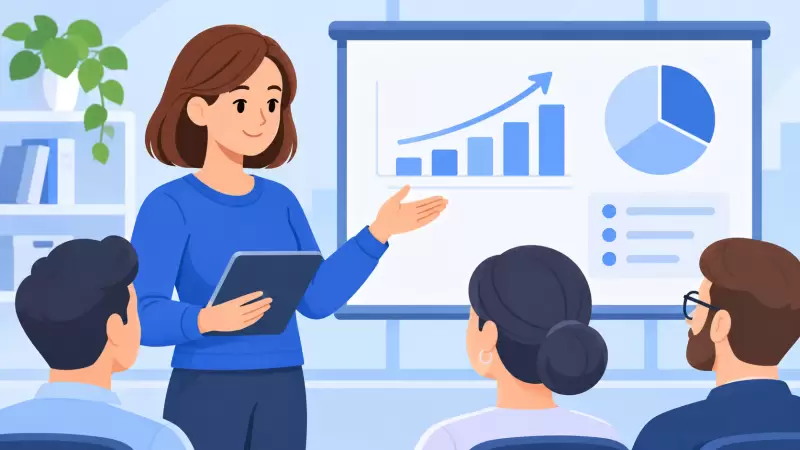


Generate several variations of each scene rather than accepting the first result.
Compare them against your master reference and select the version that most closely follows your visual guidelines.
Where possible, return to the original master reference for each new scene instead of repeatedly editing previously generated images. This can help reduce gradual visual drift.
Step 7: Review, refine and organise your illustrations
AI-generated images should go through a quality review before being published.
Even with carefully structured prompts, inconsistencies can appear in facial features, colours, proportions and background elements.
Use the following checklist to review each illustration.
AI Illustration Quality Control Checklist
Review your illustration before approving it for publication.
0 of 9 checks completed
0%
Once approved, organise your illustrations alongside their reference images, prompts, generation settings and version history.
Using a central intranet platform or digital asset library can help teams access approved creative materials, avoid duplicating work and maintain consistent visual standards across departments.
Over time, this creates a reusable collection of brand-aligned illustrations that your team can expand without having to reinvent its visual identity for every new project.
Best Image-to-Image AI Generators for Consistent Illustrations
Choosing the best image-to-image AI generator depends on how much creative control you need, your technical experience and the type of illustrations you want to produce.
Some platforms allow you to upload a reference image and describe your desired changes using natural language, while others provide advanced controls for character consistency, image transformation strength, composition and artistic style.
For businesses creating marketing materials, employee training content, website graphics or branded illustrations, consistency is often more important than generating a visually impressive image from scratch.
Here are six image-to-image AI tools worth exploring.
1. ChatGPT – Best for conversational image editing
ChatGPT is a practical starting point for business owners, marketers and content creators who have limited design experience.
You can upload a master reference image and describe the changes you want using everyday language.
This makes it particularly useful for generating workplace illustrations, modifying backgrounds and refining existing visual assets without learning complex technical settings.
The workplace illustrations used in the previous section of this article were created using ChatGPT to demonstrate how a recognisable character can be adapted across different business scenarios.
2. Midjourney – Best for distinctive artistic styles
Midjourney is worth exploring if your priority is creating visually distinctive illustrations with a recognisable artistic direction.
Its reference-based features allow creators to influence character appearance, composition, colours, textures and lighting. Its newer Edit Model also supports combining multiple reference images.
However, maintaining precise character details can still require several attempts.
Read the official Midjourney Style Reference guide and Edit Model documentation to understand how these controls work.
3. Adobe Firefly – Best for branded marketing content
Adobe Firefly is particularly useful for marketing teams creating illustrations, advertisements, website graphics and other branded content.
Its style reference capabilities help users maintain a consistent visual appearance across different assets, while composition references can influence the arrangement and positioning of visual elements.
Adobe provides a useful guide to using reference images for styling, including examples of branding and content creation.
For commercial projects, check the applicable usage terms for the specific image model you select.
4. Leonardo AI – Best for character consistency and creative control
Leonardo AI offers image guidance tools that give users greater control over the appearance of generated illustrations.
Depending on the selected model, users can access character references, style references, content references and adjustable guidance settings.
This makes it a useful option for creating recurring characters for employee training materials, illustrated guides, educational content and brand storytelling.
Its official Image Guidance documentation explains how different reference settings influence character resemblance and artistic flexibility.
5. Stable Diffusion – Best for advanced customisation
Stable Diffusion is a suitable option for users who want greater technical control over their image-to-image AI workflow.
It offers adjustable generation parameters, including denoising strength, guidance scale and inference steps. Additional tools and compatible models can provide more control over character poses, composition and visual appearance.
However, it generally requires more experimentation and technical knowledge than conversational image generators.
Developers and advanced users can explore the Stable Diffusion image-to-image documentation on Hugging Face for practical implementation examples.
6. FLUX Kontext – Best for contextual image editing
FLUX Kontext is an image generation and editing model designed to interpret visual references alongside written instructions.
It is particularly useful when you want to modify existing illustrations, introduce new objects or change specific elements while retaining recognisable characteristics from the original image.
For businesses producing collections of related visual assets, this approach can reduce the need to recreate illustrations from scratch.
FLUX Kontext is also available through Adobe Firefly, which provides a step-by-step guide to generating and editing images using FLUX models.
Image-to-image AI generators comparison table
| AI image generator | Best for | Technical difficulty | Key consistency feature |
| ChatGPT | Beginners and business users | Low | Conversational reference-based editing |
| Midjourney | Creative professionals | Medium | Style and character references |
| Adobe Firefly | Marketing and branding teams | Low–medium | Style and composition references |
| Leonardo AI | Recurring characters and illustrations | Medium | Character and image guidance |
| Stable Diffusion | Developers and advanced creators | High | Custom generation parameters |
| FLUX Kontext | Contextual image editing | Low–medium | Instruction-based image transformation |
Which image-to-image AI generator should you choose?
If you're creating illustrations without a dedicated designer, start with ChatGPT or Adobe Firefly.
Both provide accessible ways to experiment with reference-based image generation without requiring extensive technical knowledge.
If you need more control over recurring characters, explore Leonardo AI or Midjourney. For advanced production workflows and custom integrations, Stable Diffusion and FLUX are worth considering.
As AI image generation technology continues to evolve, businesses should focus on developing repeatable creative workflows rather than relying entirely on one platform.
Our related guide on the top five trends shaping the image generator industry explores how these technologies are changing digital content creation.
Whichever platform you choose, the combination of a high-quality reference image, documented visual guidelines, reusable prompts and human quality control remains essential for producing consistent, professional illustrations.
5 Image-to-Image AI Prompts You Can Copy and Use Today
Writing effective image-to-image AI prompts doesn't have to be complicated. The key is to clearly explain what the AI should preserve, what it should change and what the finished illustration should look like.
Rather than writing a new prompt every time, you can build a collection of reusable prompt templates for different creative tasks. This can save time, reduce unnecessary revisions and help maintain visual consistency across multiple projects.
Here are five practical image-to-image AI prompts you can adapt to your own creative workflow.
Image-to-Image AI Prompt Library
Five reusable prompts for creating consistent, professional illustrations.
01 Character consistency prompt Recurring characters, employee training materials and illustrated guides.
Using the attached reference image, create a new
illustration of the same character performing
[NEW ACTIVITY].
Preserve the original facial features, hairstyle,
clothing, body proportions, colour palette and
illustration style. Change only the character's
pose, activity and relevant surroundings.
Maintain consistent lighting and shading.
Output in a 16:9 aspect ratio.
Example use case
Create a series of employee onboarding illustrations featuring the same character.
02 Brand consistency prompt Marketing campaigns, blog illustrations and branded website graphics.
Create a new illustration based on the attached
reference image. Maintain the original brand colours,
visual identity, line thickness, shapes, shading and
artistic style. Adapt the composition to represent
[NEW TOPIC].
Use the approved brand colour palette
[INSERT HEX CODES].
Avoid introducing unrelated colours or design elements.
Example use case
Generate a collection of blog illustrations that follow the same brand guidelines.
03 Background replacement prompt Adapting existing illustrations to different workplace scenarios.
Replace the background of the attached illustration
with
[DESCRIBE NEW ENVIRONMENT].
Preserve the original character's appearance,
clothing, facial features, proportions and
illustration style. Adjust the lighting and shadows
naturally to match the new environment.
Keep the character recognisable and avoid
unnecessary modifications.
Example use case
Move a character from a traditional office into a remote working environment.
04 Illustration style matching prompt Bringing existing visual assets into a consistent design system.
Transform the attached image into a
[DESCRIBE TARGET ILLUSTRATION STYLE]
illustration using the supplied style reference.
Preserve the main subject, composition and important
visual details. Match the reference image's colour
palette, line thickness, shading, textures and overall
artistic direction. Produce a clean, professional
result suitable for business use.
Example use case
Convert a collection of inconsistent graphics into a unified corporate illustration style.
05 Image correction and refinement prompt Correcting visual defects without intentionally redesigning the entire image.
Review the attached illustration and correct the
following issues:
[DESCRIBE SPECIFIC ISSUES].
Preserve all other visual elements, including
character appearance, clothing, background,
composition, colour palette and illustration style.
Make only the requested corrections and maintain
the original image dimensions and aspect ratio
where supported.
Example use case
Correct distorted hands, inconsistent clothing colours or unwanted background objects.
Replace the instructions inside square brackets with your own requirements before generating an illustration.
How to write better image-to-image AI prompts
The most effective prompts generally contain four essential components: a reference, preservation instructions, modification instructions and output requirements.
The Anatomy of an Effective Image-to-Image AI Prompt
A simple four-part framework for creating reusable illustration prompts.
Reference
Identify the original image the AI should follow.
Using the attached reference image...
Preserve
Define the visual elements that should remain unchanged.
Maintain the same character, colours
and illustration style...
Modify
Explain exactly what needs to change.
Change the activity to presenting
a business report...
Output
Specify the required dimensions, composition and format.
Output in a 16:9 aspect ratio...
The reusable prompt formula
Reference
+
Preserve
+
Modify
+
Output
Avoid vague instructions such as "make this image better" or "create something similar."
These leave too many creative decisions to the AI and can result in unexpected changes.
Instead, be specific about the visual elements you want to preserve and modify.
You can also explore Adobe Firefly's prompt-writing resources, Midjourney's official documentation and the Hugging Face image-to-image generation guide to understand how different platforms interpret visual references and written instructions.
Remember that no prompt guarantees perfect visual consistency. Always review generated illustrations against your original reference before approving them for publication.
Build a reusable AI prompt library
If multiple employees are responsible for creating business content, consider storing approved prompts, reference images, brand guidelines and finished illustrations in a central digital workplace.
This gives everyone access to the same creative instructions, reduces duplicated work and helps maintain a recognisable visual identity across departments.
Over time, your prompt library becomes a valuable business resource that allows employees to create professional illustrations without starting from scratch every time.
How Businesses Can Use Image-to-Image AI in Their Everyday Work
Image-to-image AI isn't just a tool for graphic designers and creative professionals.
It can also help businesses produce everyday visual content without commissioning a new design for every project.
From marketing departments to HR and internal communications teams, employees can use existing illustrations as reference images to create new, brand-aligned content for different audiences and business activities.
Here are seven practical ways businesses can incorporate image-to-image AI into their daily workflows.
1. Blog content and digital marketing
Marketing teams can create consistent blog illustrations, campaign graphics, website banners and promotional materials using an approved master reference.
Rather than relying on generic stock photography, businesses can develop a recognisable visual identity that complements their wider digital marketing strategy.
2. Internal communications
Internal communications teams can generate illustrations for company announcements, employee newsletters, leadership updates and workplace initiatives.
For example, an existing illustration could be adapted to communicate a new company policy, an upcoming event or an employee wellbeing campaign.
These visuals can be distributed through an internal communications platform, helping employees engage with important company information.
3. Employee onboarding
HR teams can create a collection of illustrations featuring the same character throughout the employee onboarding journey.
From completing induction training to meeting colleagues and learning company procedures, consistent illustrations can make onboarding materials feel more connected and approachable.
4. Employee training and development
Learning and development teams can use image-to-image AI to illustrate workplace scenarios, training instructions, safety procedures and educational materials.
For example, a recurring character could demonstrate different stages of a workplace process, helping learners follow a visual narrative.
However, technical and safety-related illustrations should always be reviewed by a qualified subject matter expert before publication.
5. Social media content
Businesses can adapt existing illustrations for LinkedIn posts, social media campaigns, seasonal promotions and company announcements.
Using a consistent reference image and brand colour palette helps maintain a recognisable appearance across multiple channels without creating every visual from scratch.
6. Knowledge management and documentation
Illustrations can make complex instructions easier to understand, particularly within employee handbooks, knowledge base articles, standard operating procedures and help centres.
Teams can use AI-generated illustrations to support written explanations while maintaining consistent visual standards across their documentation.
7. Product marketing and sales enablement
Sales and product marketing teams can create supporting illustrations for presentations, product guides, sales proposals and customer education materials.
These illustrations can help explain abstract concepts and customer use cases without requiring a new design for every presentation.
However, AI-generated product illustrations should not misrepresent actual software functionality or product capabilities.
Practical image-to-image AI use cases by department

Practical image-to-image AI use cases by department
Create a central library of approved AI-generated illustrations
As more departments begin using AI image generators, managing visual assets becomes increasingly important.
Without centralised guidelines, employees may generate inconsistent illustrations, duplicate existing work or use assets that have not been approved for commercial publication.
A shared illustration library should contain:
- Approved master reference images.
- Brand colour palettes and visual style guidelines.
- Reusable image-to-image AI prompts.
- Approved illustrations organised by department and use case.
- Image generation settings and version history.
- Licensing information and publication permissions.
- Quality control and approval guidelines.
Using a central digital workplace solution such as AgilityPortal allows organisations to bring their creative resources, documentation and team collaboration into one accessible environment.
For businesses, the long-term value of image-to-image AI isn't simply generating images faster. It's establishing a repeatable creative process that allows employees to produce consistent, recognisable and useful visual content at scale.
Organisations can also refer to the NIST AI Risk Management Framework for broader guidance on responsible AI adoption and governance.
Common Image-to-Image AI Problems and How to Fix Them
While image-to-image AI can simplify the illustration creation process, it doesn't always produce the results you expect. Characters may look slightly different, brand colours can change, and unwanted objects may appear even when you've provided a clear reference image.
These problems occur because AI image generators interpret visual references and written instructions rather than following them as exact design specifications.
Understanding these limitations can help you improve your prompts, reduce unnecessary revisions and develop a more reliable illustration workflow.

Common Image-to-Image AI Problems and How to Fix Them
1. Character appearance keeps changing
One of the most common challenges with image-to-image AI is maintaining consistent character appearance across multiple illustrations.
Facial features, hairstyles, clothing and body proportions may gradually change between generations.
How to fix it: Return to your original master reference image for each new illustration. Use detailed preservation instructions and character reference controls where your chosen platform supports them. Avoid repeatedly using newly generated variations as reference images, as small inconsistencies can accumulate.
2. Brand colours become inconsistent
Even when you provide a reference image, an AI generator may introduce slightly different shades or additional colours that don't align with your brand guidelines.
How to fix it: Include your approved HEX colour codes in the prompt alongside a visual colour palette. For assets that require exact brand colours, make final adjustments using a dedicated image editing tool.
3. Illustration styles become inconsistent
Switching between AI models, changing prompt descriptions or adjusting generation settings can produce noticeable differences in illustration style.
How to fix it: Use the same AI model, master prompt, style reference and generation settings wherever possible. Document these settings so other employees can reproduce the workflow.
4. Unwanted objects appear in illustrations
AI image generators sometimes introduce additional people, furniture, accessories or background elements that were not requested.
How to fix it: Clearly specify what should change and what should remain untouched. Use selective image editing or masking tools to remove unwanted elements without regenerating the entire illustration.
5. Hands, faces and body proportions look unnatural
Although AI image generation has improved considerably, anatomical inaccuracies can still occur, particularly in complex scenes involving multiple characters or unusual poses.
How to fix it: Simplify complex compositions, use clearer reference images and correct individual areas using selective editing. Always inspect illustrations at full resolution before approving them.
6. Text and brand logos appear distorted
AI-generated text may contain spelling mistakes, inconsistent typography or incorrect lettering. Similarly, attempting to recreate a company logo can introduce subtle inaccuracies.
How to fix it: Generate the illustration without embedded text or logos where possible. Add approved typography and original brand assets afterwards using tools such as Canva or Adobe Photoshop.
7. Image quality deteriorates after repeated edits
Repeatedly modifying an AI-generated illustration can introduce visual inconsistencies, reduce detail and gradually move the image away from its original artistic direction.
How to fix it: Maintain an untouched master reference image and save approved versions separately. When significant changes are required, return to the original reference rather than continuing to modify an already heavily edited illustration.
When should you regenerate an illustration instead of editing it?
Not every AI-generated illustration is worth correcting.
Sometimes, starting again from the master reference image is more efficient than attempting to fix multiple visual problems.
| Edit the existing illustration when... | Regenerate the illustration when... |
| A small background object needs removing. | The character looks completely different. |
| Minor colour adjustments are required. | The overall colour palette is incorrect. |
| A small anatomical defect needs correcting. | Multiple characters have distorted proportions. |
| Text or a logo needs replacing. | The illustration style no longer matches the reference. |
| The overall composition is correct. | The composition fails to communicate the intended message. |
| Only one specific area requires attention. | Several major visual elements require correction. |
For more advanced troubleshooting, the Hugging Face image-to-image generation guide explains how generation parameters can influence the relationship between source images and generated outputs.
You can also explore Adobe Firefly for reference-based generation and selective editing capabilities.
Make human quality control part of your AI workflow
The objective of using an image-to-image AI generator should not be to eliminate human involvement entirely.
Instead, it should reduce repetitive creative work while allowing employees to maintain control over the quality and accuracy of published content.
Businesses should establish a consistent approval process and store approved illustrations, reference images and brand guidelines within a shared digital workplace.
This helps prevent unapproved or outdated visual assets from being reused across marketing campaigns, employee communications and training materials.
A reliable AI illustration workflow combines automation with human judgement, rather than replacing one with the other.
Image-to-Image AI, Copyright and Commercial Use: What You Need to Know
Before using image-to-image AI for business purposes, it's important to understand the legal and ethical responsibilities that come with generating and publishing illustrations.
Although many AI image generators allow commercial use, this doesn't automatically mean that every generated image is protected by copyright or free from third-party intellectual property claims.
Businesses need to consider where their reference images come from, how the AI-generated content will be used and whether the finished illustrations comply with applicable laws and platform licensing agreements.
Who owns AI-generated illustrations?
Copyright ownership of AI-generated images is a complex issue that varies between jurisdictions.
In the United States, copyright protection generally requires human authorship. An illustration generated entirely by AI may not qualify for copyright protection, although sufficiently creative human contributions to an AI-assisted work may be protected.
The United Kingdom has specific copyright provisions relating to computer-generated works, although how these provisions apply to modern generative AI remains an area of legal debate.
Businesses should understand that having permission to use an AI-generated image commercially is not necessarily the same as owning an enforceable copyright over that image.
For further guidance, refer to the US Copyright Office's report on AI copyrightability and the UK government's 2026 Report on Copyright and Artificial Intelligence.
Both provide useful explanations of how human creativity influences copyright protection
Can you use image-to-image AI for commercial purposes?
Many image-to-image AI generators permit commercial use, including illustrations for websites, marketing campaigns, training materials and digital publications.
However, usage rights can vary depending on the platform, subscription plan, selected AI model and applicable licensing terms.
For example, Adobe Firefly's commercial usage guidelines generally permit commercial use of generated outputs, subject to applicable restrictions.
Before publishing an AI-generated illustration, check whether:
- Your subscription permits commercial use.
- You have permission to modify the original reference image.
- Attribution or licensing restrictions apply.
- The generated image contains protected third-party intellectual property.
- The platform imposes restrictions on redistribution or resale.
- Any disclosure requirements apply to your intended publication.
Avoid copyright infringement when using reference images
Just because an image is publicly available on the internet doesn't mean you have permission to upload, modify or commercially reuse it.
Whenever possible, use original company illustrations, appropriately licensed stock images, public domain assets or images for which you have explicit permission.
The Creative Commons licensing guide is a useful resource for understanding different permissions and restrictions associated with openly licensed content.
Pay particular attention to licences that restrict commercial use or the creation of derivative works.
Consider privacy, consent and brand protection
Businesses should exercise additional caution when reference images contain identifiable employees, customers, public figures or confidential company information.
Uploading photographs to an external AI platform may involve privacy and data protection obligations. Organisations should establish appropriate permissions, a lawful basis for processing personal information and clear internal guidelines before using these images.
Similarly, company logos, trademarks and proprietary product designs should be protected from unauthorised modification or misuse.
Organisations can consult the Information Commissioner's Office for UK data protection guidance and the Intellectual Property Office for information about protecting business intellectual property.
The safest approach is to treat AI-generated illustrations with the same level of care as any other business asset. Document where they came from, understand how they can be used and establish an approval process before publication.
When Should You Use AI Instead of Hiring a Designer?
Image-to-image AI has made professional-looking visual content more accessible to businesses that lack dedicated design resources. However, this doesn't mean that graphic designers are becoming unnecessary.
AI is particularly effective at supporting repetitive creative tasks, generating variations and adapting existing illustrations. Professional designers bring strategic thinking, originality, technical expertise and a deeper understanding of brand identity.
The decision should depend on the complexity, importance and purpose of the creative project.
AI image generation vs hiring a professional designer
Combining AI with professional design
For many businesses, the most practical approach is a combination of AI-assisted image generation and professional design expertise.
A graphic designer could establish the original visual identity, create master illustrations and define the brand guidelines. Employees could then use an image-to-image AI generator to produce approved variations for routine content.
This hybrid approach allows organisations to retain professional creative direction while reducing repetitive design work.
For example, a designer could create a collection of five approved workplace characters. Marketing, HR and communications teams could subsequently adapt those characters to different business scenarios using documented prompts and visual style guides.
Rather than replacing designers, AI can help businesses extend the value of the original creative work.
Create Your Own Reusable AI Illustration Workflow
Creating one impressive AI-generated illustration is relatively straightforward. Creating dozens of illustrations that consistently follow the same visual identity requires a more structured approach.
A reusable AI illustration workflow helps businesses move away from one-off image generation and towards a repeatable creative production process.
The objective is to ensure that anyone within the organisation can follow the same guidelines, use approved reference materials and produce illustrations that complement existing business content.
Establish a central AI illustration library
Once your workflow is established, organise your approved visual assets in a central location where employees can easily find and reuse them.
| Folder | Content |
| 01 – Master References | Original approved characters and illustrations. |
| 02 – Brand Guidelines | Colour palettes, typography and visual style rules. |
| 03 – AI Prompt Templates | Approved prompts for different business scenarios. |
| 04 – Draft Illustrations | Generated images awaiting review. |
| 05 – Approved Illustrations | Final images ready for publication. |
| 06 – Licensing and Permissions | Source information, usage rights and approval records. |
| 07 – Archived Versions | Previous versions and discontinued visual assets. |
A centralised knowledge management and intranet platform can help businesses organise these resources, share approved content and provide employees with consistent creative guidelines.
Measure the effectiveness of your AI illustration workflow
Businesses should also track whether AI image generation is genuinely improving their creative production process.
AI Illustration Productivity Calculator
Estimate the potential time and labour cost impact of introducing an AI illustration workflow.
Monthly hours saved
30 hrs
Monthly labour cost saving
$900
Annual hours saved
360 hrs
Annual labour cost saving
$10,800
Based on your estimates, an AI-assisted workflow
could reduce illustration production time by 75%.
Illustrative estimates only. Include prompting, revisions, editing and quality control in your time estimates. Software subscriptions and other implementation costs are excluded.
Other useful performance indicators include the average number of generation attempts per approved image, brand consistency scores, approval rates, revision requirements and the percentage of existing illustrations successfully reused.
By monitoring these metrics, businesses can identify which AI workflows deliver genuine value and which still require significant human intervention.
Wrapping up - Create Better Illustrations With a Consistent AI Workflow
Image-to-image AI is changing how businesses approach visual content creation. Instead of generating every illustration from scratch or commissioning a designer for every routine creative task, organisations can use existing visual references to produce new, related illustrations.
However, the real value of this technology comes from consistency rather than simply generating images faster.
By creating a master reference image, establishing clear visual guidelines, developing reusable prompts and introducing human quality control, businesses can build a repeatable illustration workflow that supports marketing, employee communications, training and knowledge management.
AI-generated illustrations still require careful review, particularly when dealing with brand identity, copyright, commercial usage and visual accuracy.
The goal isn't necessarily to replace professional designers. It's to give employees the resources and creative guidance they need to produce useful, recognisable visual content while reducing unnecessary design work.
As organisations continue to adopt AI-powered creative tools, managing approved assets and sharing creative knowledge will become increasingly important.
With AgilityPortal's digital workplace platform, businesses can bring together brand guidelines, approved illustrations, reusable prompts, employee resources and collaborative workflows within one central environment.
AI Summary
- Image-to-image AI uses existing reference images to generate new illustrations while helping preserve character appearance, brand colours, composition and artistic style.
- Creating consistent AI-generated illustrations requires a master reference image, documented visual guidelines, reusable prompts and appropriate image transformation settings.
- Image-to-image AI generators such as ChatGPT, Adobe Firefly, Midjourney, Leonardo AI, Stable Diffusion and FLUX offer different capabilities for reference-based generation, image editing and creative control.
- Businesses can use AI-generated illustrations for digital marketing, employee onboarding, internal communications, training materials, knowledge management and sales enablement.
- Common challenges include inconsistent characters, inaccurate brand colours, distorted anatomy, unwanted objects and declining visual quality after repeated transformations.
- Commercial use requires businesses to review platform licensing, reference image permissions, copyright, privacy and trademark requirements before publication.
- Combining AI-assisted image generation with human quality control, professional design expertise and a central library of approved visual assets can reduce repetitive creative work and improve visual consistency.
Most Popular Posts

Effective communication among team members is vital for the productivity and success of any organization. Surprisingly, 60% of companies lack a long-term internal communication strategy, which p...


Businesses thrive on communication for efficiency, productivity and accomplishment. When the right information is passed from the right designation in the organization, it promotes positivity an...

Categories
Blog
(3300)
Business Management
(404)
Employee Engagement
(241)
Digital Transformation
(228)
Growth
(159)
Intranets
(142)
Internal communications
(111)
Remote Work
(68)
Sales
(53)
Collaboration
(53)
Customer Experience
(34)
Culture
(30)
Project management
(30)
Knowledge Management
(29)
Leadership
(20)
Comparisons
(9)
News
(1)

Related Posts

Have you ever created an AI-generated illustration that looked absolutely perfect, only to struggle to recreate the same style for your next project? That's where image-to-image AI can make a real difference, helping you create consistent, prof...

A few years ago, we tried managing Amazon PPC campaigns ourselves and quickly realised that it was far more complicated than we had initially expected. From keyword targeting and bid management to understanding advertising costs and profitabili...

If you'd asked me a few years ago what AI could actually do, I'd probably have said, "Answer questions and write a few paragraphs." That was impressive at the time, but it didn't take long before everything changed. Then AI stopped being just a...

How do you deliver effective employee training when your workforce is spread across different locations, departments, and time zones? According to Gallup's workplace research, nearly four in five US employees in remote-capable roles work remotely or ...

In today's digital-first legal landscape, protecting client data is more important than ever. Law firms handle highly confidential information — from contracts and case files to evidence and billing details — making them prime targets for cyber...


Jill Romford
I am a digital nomad, lover of exploring new places and making friends.
I love to travel and I love the internet. I take pictures of my travels and share them on the internet using Instagram.
Traveler, entrepreneur, and community builder. I share my insights on digital marketing and social media while inspiring you to live your fullest life.
Ready to learn more? 👍
One platform to optimize, manage and track all of your teams. Your new digital workplace is a click away. 🚀
Free for 14 days, no credit card required.