
Insight Blog
Agility’s perspectives on transforming the employee's experience throughout remote transformation using connected enterprise tools.
34 minutes reading time
(6738 words)
Top 8 Clock-In Clock-Out Apps for Small Business Teams in 2026

Top 7 Clock-In Clock-Top 8 Clock-In Clock-Out Apps for Small Business Teams in 2026Apps for Small Business Teams in 2026
Discover the 8 Top Clock-In Clock-Out Apps for Small Business in 2026 to save time, reduce payroll errors, and boost productivity. Compare features, pricing, and integrations to find the perfect time-tracking solution for your growing team.
Top 7 Clock-In Clock-Top 8 Clock-In Clock-Out Apps for Small Business Teams in 2026Apps for Small Business Teams in 2026

If you're running a small business, you already know that managing employee hours can be a headache — from tracking who's on shift to running accurate payroll.
That's where the best clock-in clock-out apps for small teams come in. They're built to simplify online time attendance, prevent time theft, and make sure payroll runs smoothly without those dreaded end-of-month surprises.
According to a 2025 Small Business Workforce Report, companies using digital time tracking tools see a 22% reduction in payroll errors and save an average of five hours per week on admin work — time you could be spending growing your business instead.
Today's top tools don't just record hours.
They go further — offering shift scheduling software, payroll integration time app capabilities, and even biometric time clock app options to ensure accuracy and security.
Whether your team works in an office, on-site, or remotely, these solutions make time management seamless.
In this article, I've rounded up the Top Clock-In Clock-Out Apps for Small Business in 2026, comparing their key features, pricing, and best-fit scenarios so you can find the one that keeps your team on track and your operations running like clockwork.
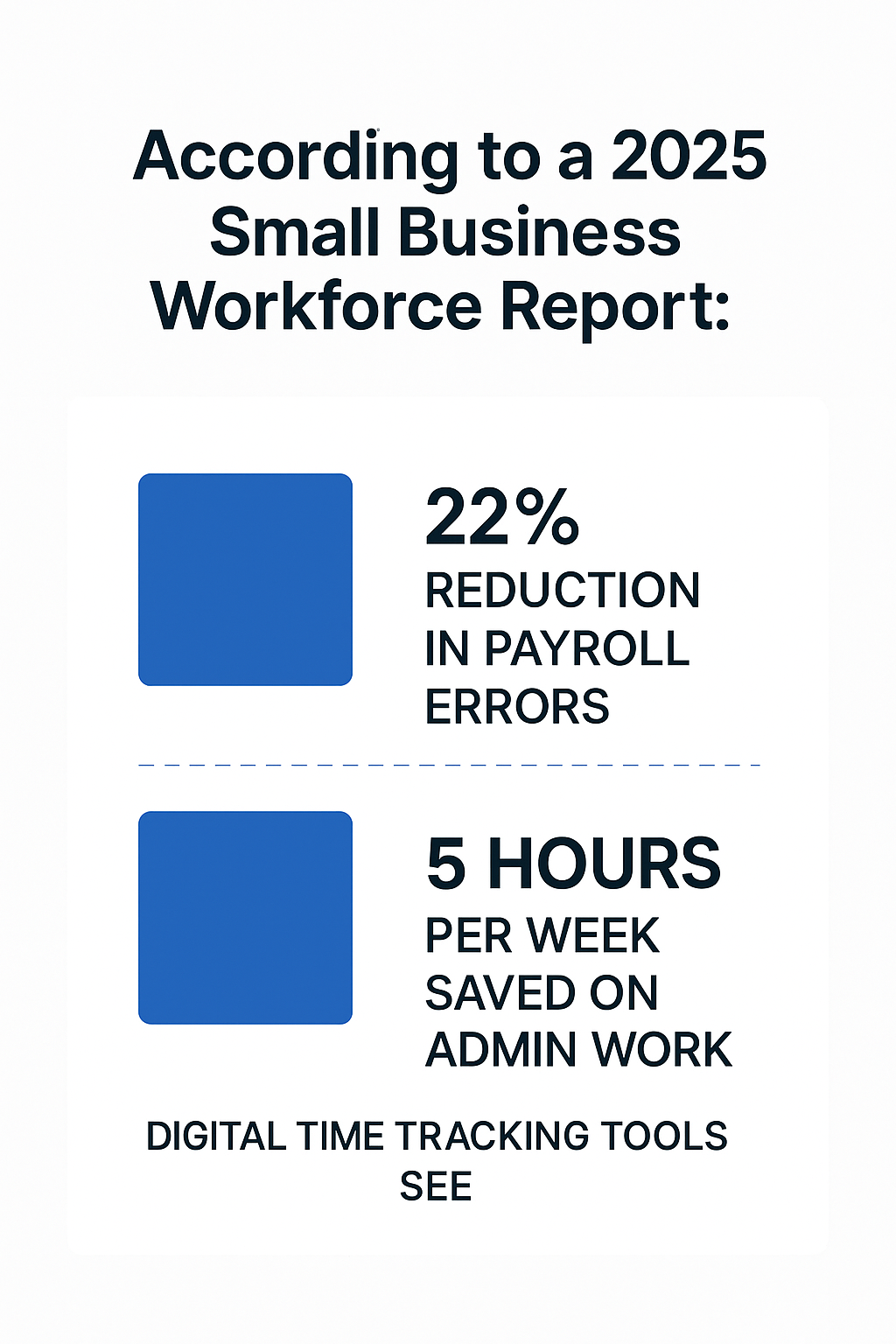
22% reduction in payroll errors
What is a Clock-In Clock-Out App?
So in case your unsure what a clock-in and out app is here is short description.
A clock-in clock-out app is a modern, digital alternative to old-school punch cards — giving you an accurate, automated way to record work hours and calculate pay for every pay cycle.
Instead of relying on manual logs or spreadsheets, employees can clock in and out instantly from wherever they are — whether that's the office, a job site, or their home workspace.
Beyond simple time tracking, these apps capture employee locations, project details, and client assignments, helping you understand exactly where your team's time is going.
They're built to handle every type of worker — from hourly staff who need precise payroll tracking, to salaried employees whose time must be allocated to the right projects or clients.
They're equally valuable for freelancers, contractors, and remote or field-based teams, offering the flexibility and accuracy today's dynamic workplaces demand.
How Does a Clock-In Clock-Out App Actually Work?
Forget the old punch cards or paper logs — a clock-in clock-out app brings all that tracking into the digital age.
Employees simply log in through their phone, tablet, or computer and tap a button to start or end their shift.
Some advanced systems even run quietly in the background, automatically tracking time spent in work apps, documents, or project tools — no manual entry needed.
Behind the scenes, the app records every punch and compiles the data into easy-to-read timesheets for each pay period. You'll instantly know how many hours were worked, what tasks were completed, and when breaks occurred — all without chasing down paper records.
Most apps are mobile-friendly but can also run on desktop browsers or POS systems, giving teams the flexibility to clock in from anywhere — the office, home, or on-site.
The data syncs instantly to the cloud, allowing managers to see who's currently working, their real-time locations, and total hours worked with just a quick glance.
Read this article: : Top 6 AI-Powered Project Management Tools To Use In 2023
Why Your Small Business Really Needs a Time-Tracking Solution

Why Your Small Business Really Needs a Time-Tracking Solution
Managing employee hours manually might seem simple—until it isn't. Spreadsheets, paper timesheets, and punch cards are prone to errors, time theft, and missed entries.
As your business grows, these mistakes can snowball into compliance headaches, inaccurate pay runs, and frustrated staff.
Automated attendance systems give you real-time visibility into when and where your employees are working. With digital timekeeping tools, you can monitor attendance, prevent "buddy punching," and generate instant reports that simplify everything from billing to labor cost tracking.
Think about it: if five employees clock in just five minutes late every day, that's over 20 hours of paid time lost every month.
Modern time-tracking apps help you eliminate that waste by offering cloud-based records, GPS validation, and smart overtime alerts—so you can focus on running your business, not chasing timesheets.
From remote workforce management to compliance tracking, a well-chosen employee attendance system ensures accuracy, accountability, and peace of mind for both you and your team.
Here's why your small business needs one:
- Cuts down on payroll and administrative errors
- Reduces time theft and unapproved overtime
- Enables remote and field team tracking with GPS verification
- Generates detailed labor cost and productivity reports
- Helps you comply with labor laws and recordkeeping regulations
- Integrates seamlessly with HR and accounting systems
- Improves transparency and trust between managers and employees
What to Look for in a Clock In Clock Out App for Small Business
Before jumping into the comparison table, it's important to understand what actually makes one time-tracking app better than another.
Every business has different needs—some want a simple way to log hours, while others need advanced tools like GPS tracking, geofencing, or payroll automation. The right solution depends on your team size, budget, and how your employees work day to day.
Whether you're managing a small in-office crew, field technicians, or a hybrid team scattered across locations, the ideal tool should do more than just record time.
It should simplify your admin tasks, reduce manual data entry, and give you insights you can actually use to make smarter staffing and budgeting decisions.
Think of this next section as your selection checklist—a set of must-have criteria to evaluate before committing to any platform.
These are the core factors that determine how efficient, accurate, and scalable your time-tracking system will be as your business grows.
Here are the key criteria (and why they matter):
| Criterion | Why it matters | What to test / ask |
| Ease of use / onboarding | Small teams can't afford a steep learning curve | Try trial, record time to roll out |
| Multi-platform support (web, mobile, kiosk) | Your team might clock in from phones, tablets, or a shared terminal | See if app offers kiosk mode |
| Offline / weak signal functionality | Field teams might be in areas with poor connectivity | Test clocking when offline |
| Geolocation / geofencing / GPS | Prevents clock-ins from the wrong place (for field work) | Check accuracy, battery drain |
| Anti-fraud features | Selfies, PINs, biometric, edit-trails | See whether employees can change timestamps |
| Integrations / Export / Payroll sync | Saves manual export/import | Check compatibility with your payroll/accounting |
| Reporting & analytics | To spot overtime, absenteeism, job costs | Sample reports the app provides |
| Pricing & scalability | A "small business" might have tight budgets | Check base fees, per-user pricing, future growth costs |
| Compliance support | Especially if you have to comply with labor laws, break rules, overtime | Does the app flag break violations, automatic alerts |
| Support & company reputation | Better support = fewer headaches | Look for user reviews, case studies, support channels |
7 Top Clock-In Clock-Out Apps for Small Business (with pros, cons, pricing, best fit)
When it comes to managing employee time efficiently, not all tools are created equal.
Below, you'll find a curated list of the best apps designed to simplify attendance, boost accuracy, and streamline payroll for small businesses in 2026.
| App | Highlights & Strengths | Best For / Use Case |
| AgilityPortal – Shift Planner Module | Combines time tracking, scheduling, and real-time shift visibility in one unified platform. Built for hybrid and frontline teams, it integrates attendance, leave management, and workforce analytics under one roof. | Businesses wanting an all-in-one digital workplace with built-in scheduling, collaboration, and attendance tracking. |
| Buddy Punch | Offers strong anti-fraud protection through photo verification and geofencing. Managers can monitor real-time attendance and export detailed timesheets easily. | Small businesses focused on accountability and time-theft prevention. |
| Timeero | Excellent for mobile and field-based teams; includes GPS tracking, mileage logging, and location-based reporting. | Service providers, contractors, and distributed field teams. |
| Clockify | Simple, clean interface with a generous free tier. Great for tracking billable hours and time across projects. | Startups or small teams wanting a no-fuss entry-level time tracker. |
| TimeTrex | Complete workforce management system that combines time tracking, HR, and payroll functions. Highly configurable and open-source-friendly. | Businesses that want a scalable, all-in-one HR and time management system. |
| QuickBooks Time (formerly TSheets) | Seamless integration with QuickBooks payroll and accounting. GPS tracking, scheduling, and customizable alerts. | Businesses already using QuickBooks for payroll and accounting. |
| When I Work / Deputy | Strong focus on shift scheduling and employee communication. Allows managers to forecast labor costs and manage attendance efficiently. | Businesses with rotating shifts or hourly workers. |
| Time Clock Wizard | Offers a free plan with essential time-tracking and scheduling tools. Ideal for startups on a tight budget. | Very small businesses needing a straightforward, low-cost option. |
#1. AgilityPortal — Best All-in-One Digital Workplace with Built-in Shift Planner
#1. AgilityPortal — Best All-in-One Digital Workplace with Built-in Shift Planner
AgilityPortal goes beyond a standard employee time tracking app — it's a complete workforce management platform designed to connect, engage, and manage employees in one central place. With its built-in Shift Planner module, it simplifies time tracking, scheduling, and collaboration for both in-office and remote teams.
Why it stands out:
AgilityPortal unifies communication, scheduling, and time management under one roof. Unlike standalone time clock apps, it integrates attendance tracking with team chat, file sharing, project management, and HR tools — making it an ideal choice for organizations that want to manage their people and operations within a single, secure environment.
Shift planning and attendance tracking:
The Shift Planner allows managers to assign, edit, and publish shifts instantly, while employees can view schedules, mark availability, and clock in/out directly through the portal or mobile app. Its online time attendance system captures real-time data and automatically logs hours worked, breaks taken, and overtime.
Seamless collaboration and automation:
AgilityPortal connects time tracking with other workplace tools like announcements, chat, and document sharing — ensuring teams can communicate and collaborate efficiently. The platform also integrates with HR and payroll systems through its payroll integration time app, reducing administrative overhead and improving data accuracy.
Security and accessibility:
AgilityPortal includes geolocation and audit tracking for enhanced accountability, while its responsive design ensures accessibility from desktop, tablet, or mobile. Whether managing office employees or deskless field workers, everyone stays in sync.
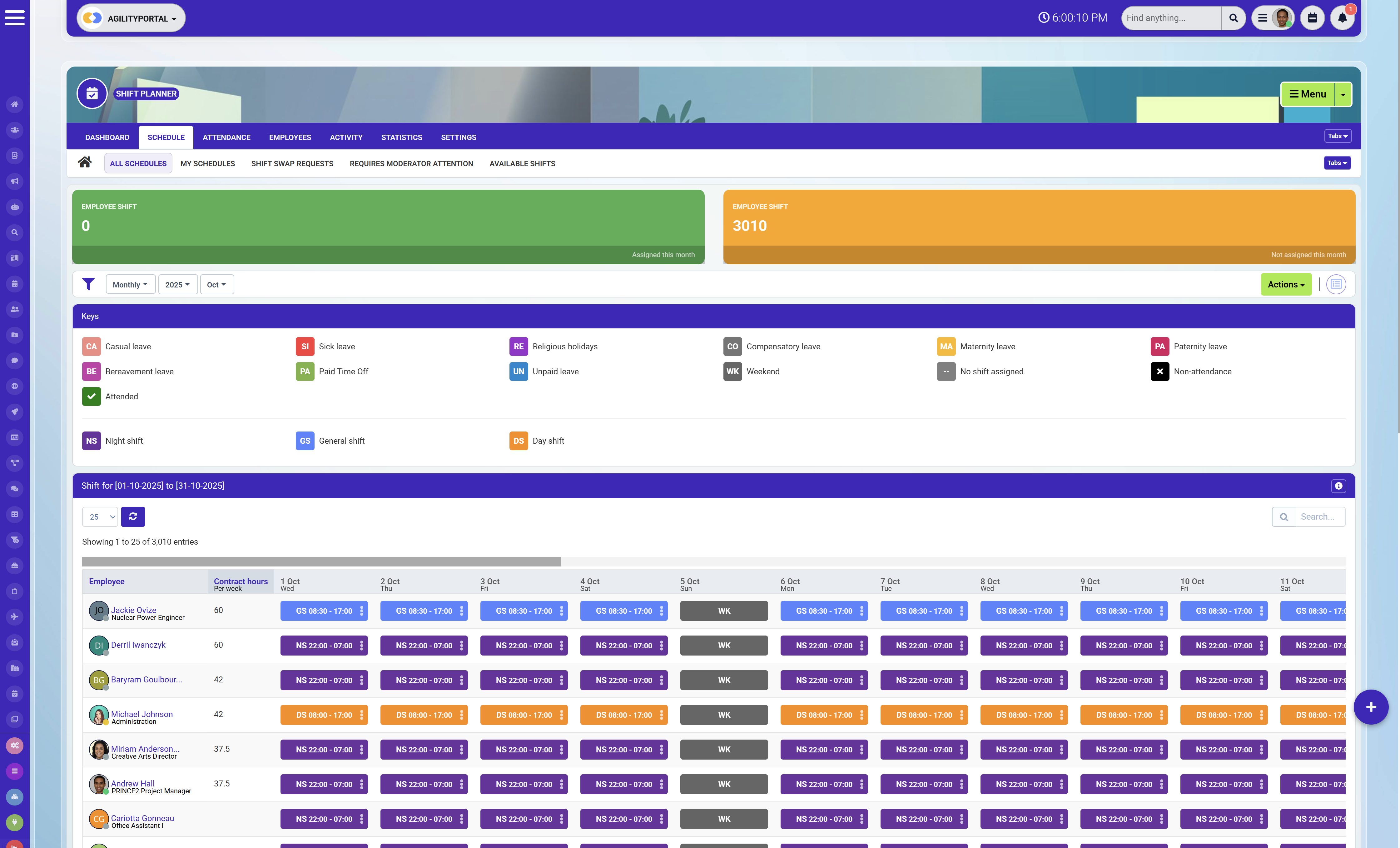
Built-in Shift Planner for scheduling and attendance
Key features
Pricing / free plan info (as of 2026)
- Starts at $99/month (for up to 25 users) | Trial: Yes — 14 days | Free Plan: No
Pros
Cons
Best-fit use case / when it might not suit
- Ideal for organizations that want an all-in-one workforce management app that connects time tracking, scheduling, communication, and employee engagement. Perfect for remote, hybrid, or multi-location teams.
- May not be the best fit for small businesses seeking a basic standalone time clock app without collaboration or HR management features.
Agility Portal – A Smart, User-Friendly Intranet for Collaboration and Engagement
by Ramya Sree N. via g2.com
#2. Buddy Punch — Excellent for managing breaks and overtime tracking
#2. Buddy Punch — Excellent for managing breaks and overtime tracking
Buddy Punch makes it incredibly easy for employees to clock in and out directly from their phones using its intuitive mobile interface.
Why it stands out:
I selected Buddy Punch for its clean, user-friendly design and robust security features, including GPS tracking, facial recognition, and QR code scanning — all of which help prevent time theft while keeping attendance accurate.
Flexible clock-in options:
One of Buddy Punch's biggest strengths is the variety of ways employees can clock in. They can use a custom 4-digit PIN, facial recognition, a QR code, or the classic username and password method. These multiple access options enhance both convenience and security, making it adaptable for different workplace setups.
Breaks and overtime management:
I really appreciate how Buddy Punch allows businesses to customize break policies in line with local labor regulations. You can create manual or automatic breaks for employees, though the app only supports one automatic break per shift. Still, it's flexible enough to allow unlimited manual breaks.
Its overtime tracking feature is also a standout. The system automatically calculates and monitors overtime based on your configured rules and even alerts employees when they're nearing their regular hour limits. This proactive approach helps prevent burnout and keeps payroll under control.
Location tracking and geofencing:
The Locations feature is another big plus. It uses GPS to log where employees clock in and out, giving you transparency and control — especially valuable for remote, hybrid, or field-based teams. You can also set up geofenced areas that restrict clock-ins to approved work zones, ensuring attendance accuracy.
Overall, Buddy Punch delivers a balanced mix of simplicity, security, and automation that makes managing employee time effortless for small businesses and distributed teams alike.

Mobile and web clock-in/out options
Key features
Pricing / free plan info (as of 2026)
- Starts at $4.49/user/month + $19 base fee/month | Trial: Yes — 14 days | Free Plan: No
Pros
Cons
Best-fit use case / when it might not suit
- Ideal for small to medium-sized businesses that need a straightforward, reliable employee time tracking app with GPS verification and customizable overtime rules. Perfect for teams with remote or field staff who require accurate, location-based clock-ins.
- May not be the best fit for large enterprises needing deep workforce management app integrations, advanced analytics, or a free plan to test long-term before committing.
At the moment, there are no pending issues that body punch is trying to resolve for me.
by Alex O via g2.com
#3. Timeero — Perfect for Mobile, Remote, and Field-Based Teams
#3. Timeero — Perfect for Mobile, Remote, and Field-Based Teams
Timeero is designed with flexibility in mind, making it a great choice for businesses with on-the-go employees. It allows team members to clock in and out from anywhere while giving managers real-time visibility into attendance, routes, and time spent on specific jobs.
Why it stands out:
Timeero combines GPS time tracking, mileage logging, and geofencing in a single, easy-to-use platform. It's ideal for field teams, contractors, and service-based businesses that need accurate time and location data without the administrative hassle.
Location and mileage tracking:
One of Timeero's most valuable features is its built-in GPS tracking system, which records employee locations throughout the workday. Managers can see where team members are in real time and verify that job sites are being covered. Its automatic mileage tracking feature also helps reduce expense reporting errors and simplifies reimbursements.
Scheduling and compliance:
Timeero includes basic shift scheduling software tools and helps you stay compliant with local labor laws by accurately recording breaks, overtime, and travel time. Managers can set alerts to remind employees to take breaks or clock out, reducing time theft and unnecessary overtime.
Ease of use:
The mobile app is intuitive and works offline — perfect for teams that operate in low-connectivity areas. Employees can log hours, notes, and job codes without worrying about lost data.
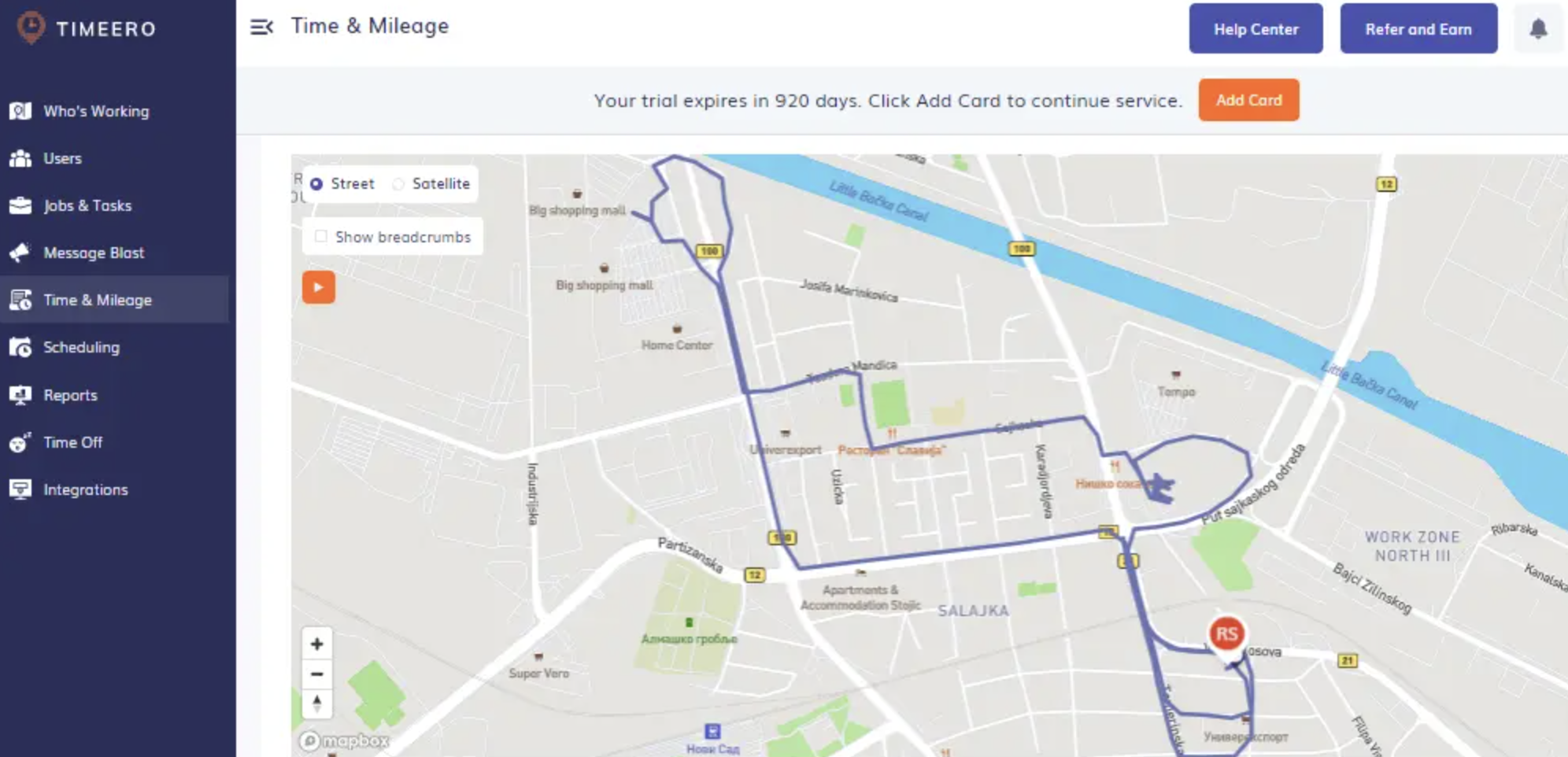
GPS time and location tracking
Key features
Pricing
- Starts at $4/user/month + $10 base fee/month | Trial: Yes — 14 days | Free Plan: No
Pros
Cons
Best-fit use case / when it might not suit
- Perfect for service, construction, and field teams that need location-based tracking, mileage reimbursement, and compliance with labor rules — all in one app.
- May not be ideal for desk-based or large corporate teams that need detailed workforce management or advanced analytics dashboards.
Support from Tyler! Very supportive and great knowledge of the system, a pleasure to meet.
by Mark L. via g2.com
#4. Clockify — Best Free Time Tracker for Small Teams and Freelancers
#4. Clockify — Best Free Time Tracker for Small Teams and Freelancers
Clockify stands out as one of the most accessible and user-friendly time-tracking tools on the market. It's especially popular among startups, freelancers, and small teams looking for a reliable solution without the heavy price tag.
Why it stands out:
Clockify offers a generous free plan that covers unlimited users — a rare feature in this space. It's a simple yet powerful online time attendance and employee time tracking app that helps teams log hours, monitor productivity, and manage projects effortlessly.
Simple and intuitive tracking:
Clockify makes time tracking easy. Users can start and stop timers, log time manually, or categorize hours by project, client, or task. The dashboard provides a clear overview of total hours worked, billable vs. non-billable time, and team performance.
Reports and integrations:
Its detailed reporting tools make it easy to generate timesheets, track project costs, and analyze productivity trends. Clockify also integrates with popular apps like Trello, Asana, Slack, and Google Calendar — making it a great companion for agile teams.
Scheduling and project management:
While not a full workforce management app, Clockify includes lightweight shift scheduling software features like workload tracking and project timelines, ideal for planning ahead and preventing burnout.
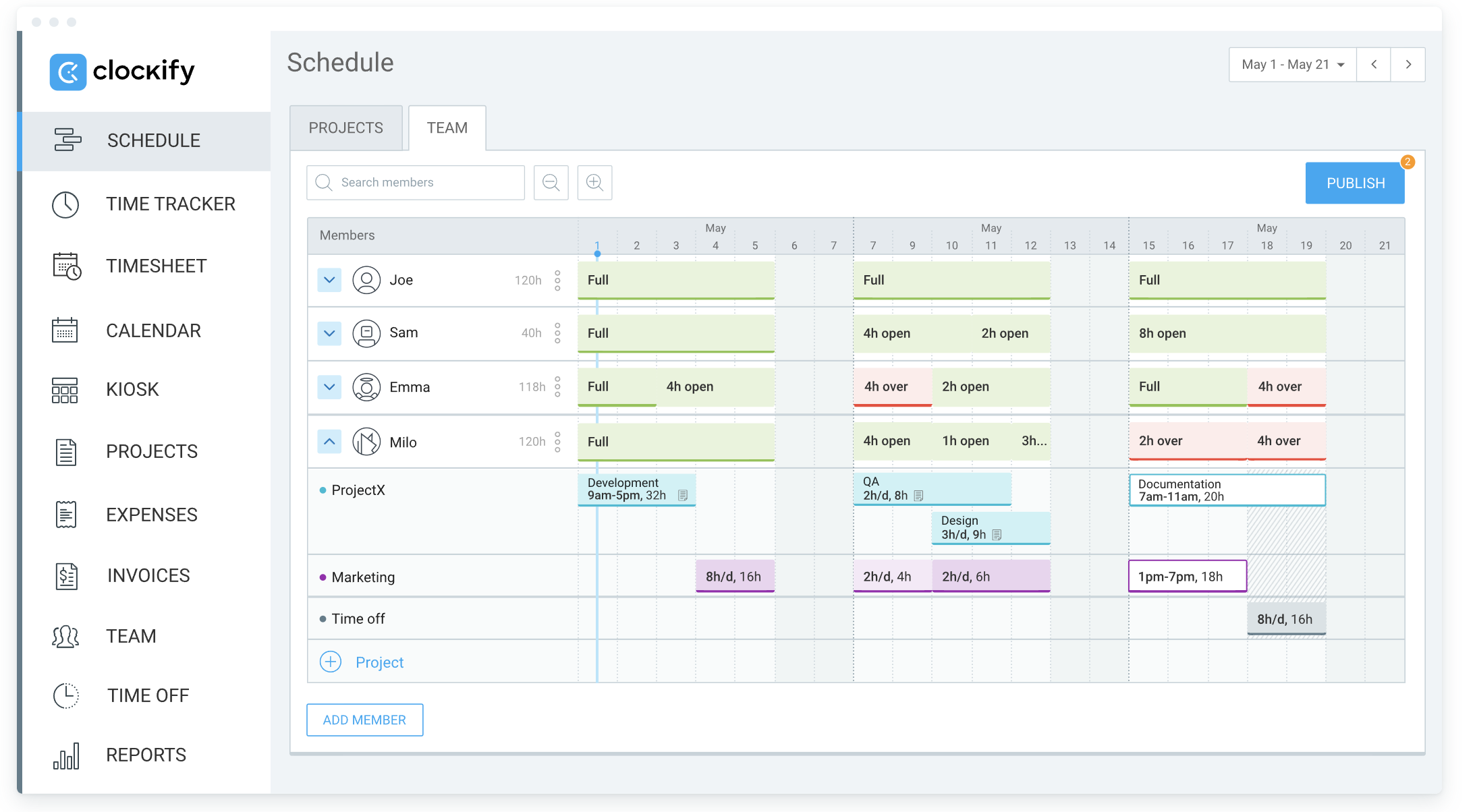
Billable and non-billable hour tracking
Key features
Pricing
- Starts at $3.99/user/month | Trial: Yes — 7 days for paid plans | Free Plan: Yes (Unlimited users)
Pros
Cons
Best Fit Use Case:
- Perfect for freelancers, startups, and small teams that need a simple time clock app for tracking hours, managing projects, and generating client-ready reports — all at minimal cost.
- May not be ideal for businesses that need GPS verification, biometric authentication, or deep payroll integration time app capabilities found in more advanced tools.
Clockify Makes Reporting and Calendar Integration Effortless
Oskar B. via g2.com
#5. TimeTrex — Best All-in-One Workforce Management Solution
#5. TimeTrex — Best All-in-One Workforce Management Solution
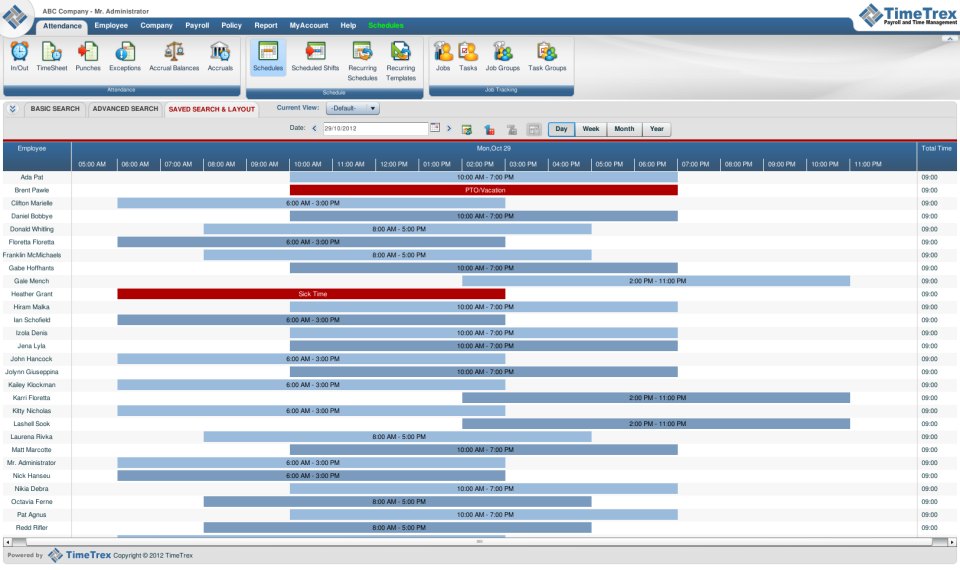
TimeTrex is more than just a time clock app — it's a full-featured workforce management app that combines time tracking, scheduling, payroll, and HR functions into one cohesive platform. Designed for growing teams and enterprises, it provides the flexibility and scalability small businesses can grow into without switching systems later.
Why it stands out:
TimeTrex offers an impressive range of features for the price, including everything from online time attendance to payroll processing and performance management. It's open-source-friendly, highly configurable, and available both as a cloud and on-premise solution — giving businesses complete control over how they manage data.
Comprehensive time and attendance tracking:
Employees can clock in and out using PINs, RFID cards, or biometric devices. The system automatically calculates hours, overtime, and breaks according to your company's policies and regional labor laws. Its biometric time clock app option ensures accurate attendance while preventing buddy punching.
Payroll and compliance automation:
TimeTrex integrates directly with payroll, tax, and compliance systems, allowing for automated pay runs and record-keeping. Its payroll integration time app ensures accurate, on-time payments while maintaining compliance with wage and hour laws.
Scheduling and workforce planning:
Built-in shift scheduling software lets managers assign shifts, forecast workloads, and balance labor costs with real-time insights. Employees can view schedules, request time off, or swap shifts directly through the app.
Labor law compliance automation
Key features
Pricing
- Starts at $3.00/user/month | Trial: Yes — 14 days | Free Plan: Yes (Community Edition)
Pros
Cons
Best Fit Use Case:
- Perfect for medium to large businesses that need an end-to-end employee time tracking app with integrated HR, payroll, and compliance tools — especially those requiring biometric or on-premise control.
- May be too advanced for very small teams that only need simple time tracking or basic attendance monitoring without the added HR or payroll modules.
#6. QuickBooks Time (formerly TSheets) — Best for Seamless Payroll and Accounting Integration
#6. QuickBooks Time (formerly TSheets) — Best for Seamless Payroll and Accounting Integration
QuickBooks Time, previously known as TSheets, is a powerful employee time tracking app that stands out for its smooth integration with QuickBooks accounting and payroll systems. It's built for accuracy, compliance, and efficiency — making it a top pick for small to mid-sized businesses that want to automate time and payroll management in one ecosystem.
Why it stands out:
If your business already uses QuickBooks, this app is a natural fit. QuickBooks Time eliminates manual data entry by syncing tracked hours directly to payroll and invoices. It's a dependable time clock app that simplifies tracking for remote, in-office, and field teams.
Accurate time tracking and payroll integration:
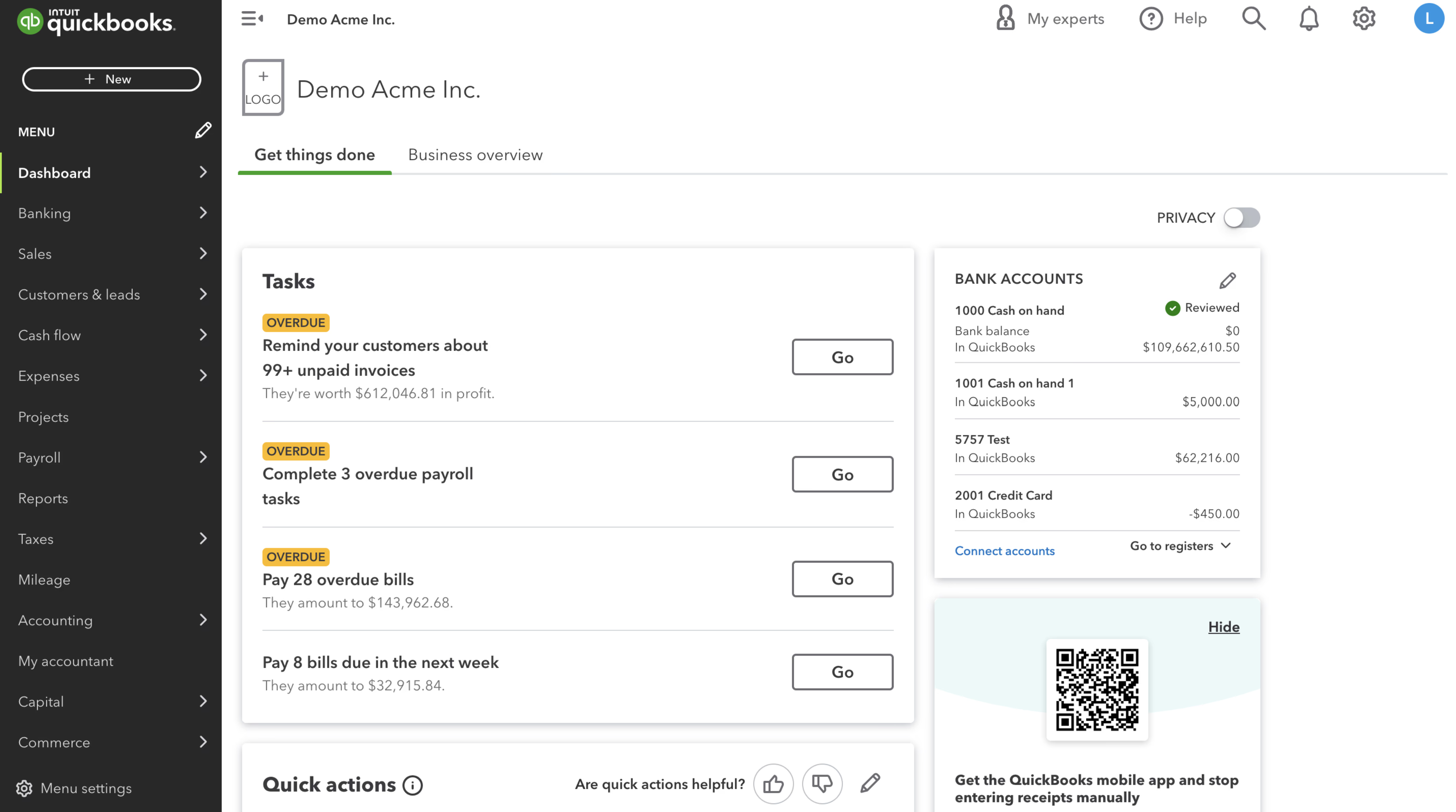
Employees can clock in via web, mobile, or kiosk, with location tracking through its GPS time clock feature. Managers can review and approve timesheets with one click, and the built-in payroll integration time app ensures error-free payments and automatic updates to QuickBooks Payroll.
Scheduling and productivity tools:
QuickBooks Time includes flexible shift scheduling software that helps managers assign shifts, monitor attendance, and get alerts when employees are nearing overtime. The app also provides real-time project tracking and cost reporting — ideal for service-based industries that bill clients by the hour.
Ease of use and mobile accessibility:
The app's interface is clean and intuitive, making it easy for employees to log time, track jobs, or request leave. Its mobile app works perfectly for field workers who need to clock in on-site, ensuring that attendance data remains consistent and accurate across devices.
Online time attendance and scheduling tools
Key features
Pricing
- Starts at $8/user/month + $20 base fee/month | Trial: Yes — 30 days | Free Plan: No
Pros
Cons
Best Fit Use Case:
- Ideal for businesses already using QuickBooks that want to connect time tracking, payroll, and invoicing into one automated workflow. Great for service-based teams that bill clients by project hours or field jobs.
- May not be the most cost-effective solution for small teams that don't use QuickBooks or require a standalone workforce management app without accounting integrations.
#7. When I Work / Deputy — Best for Shift-Based Teams and Workforce Scheduling
#7. When I Work / Deputy — Best for Shift-Based Teams and Workforce Scheduling
When I Work and Deputy are two of the leading workforce management apps built specifically for businesses that rely on hourly and shift-based employees. Both platforms excel at making scheduling, attendance, and communication effortless — helping managers keep operations running smoothly and staff organized.
Why it stands out:
When I Work and Deputy simplify team management by combining attendance tracking software, shift scheduling, and team messaging in one platform. Managers can create and publish schedules in minutes, while employees can swap shifts, request time off, or clock in from their mobile devices using the time clock app.
Scheduling and shift management:
These apps are designed for flexibility. With shift scheduling software, managers can assign shifts, track coverage, and receive alerts for conflicts or no-shows. Employees receive instant notifications when new schedules or updates are published.
Deputy adds advanced labor forecasting tools, using AI-driven insights to optimize staffing based on demand, budgets, and compliance rules. This ensures your business maintains productivity while controlling labor costs.
Attendance and payroll integration:
Both platforms include real-time online time attendance tracking with GPS verification and photo capture to prevent buddy punching. They also integrate with popular payroll systems like ADP, Gusto, and QuickBooks, ensuring that attendance data flows seamlessly to payroll through built-in payroll integration time app features.
Ease of communication and usability:
When I Work and Deputy both feature built-in chat and announcements tools, making it easy to keep your team updated about shift changes or company news. Their intuitive mobile apps make scheduling, clock-ins, and shift swaps simple even for less tech-savvy users.
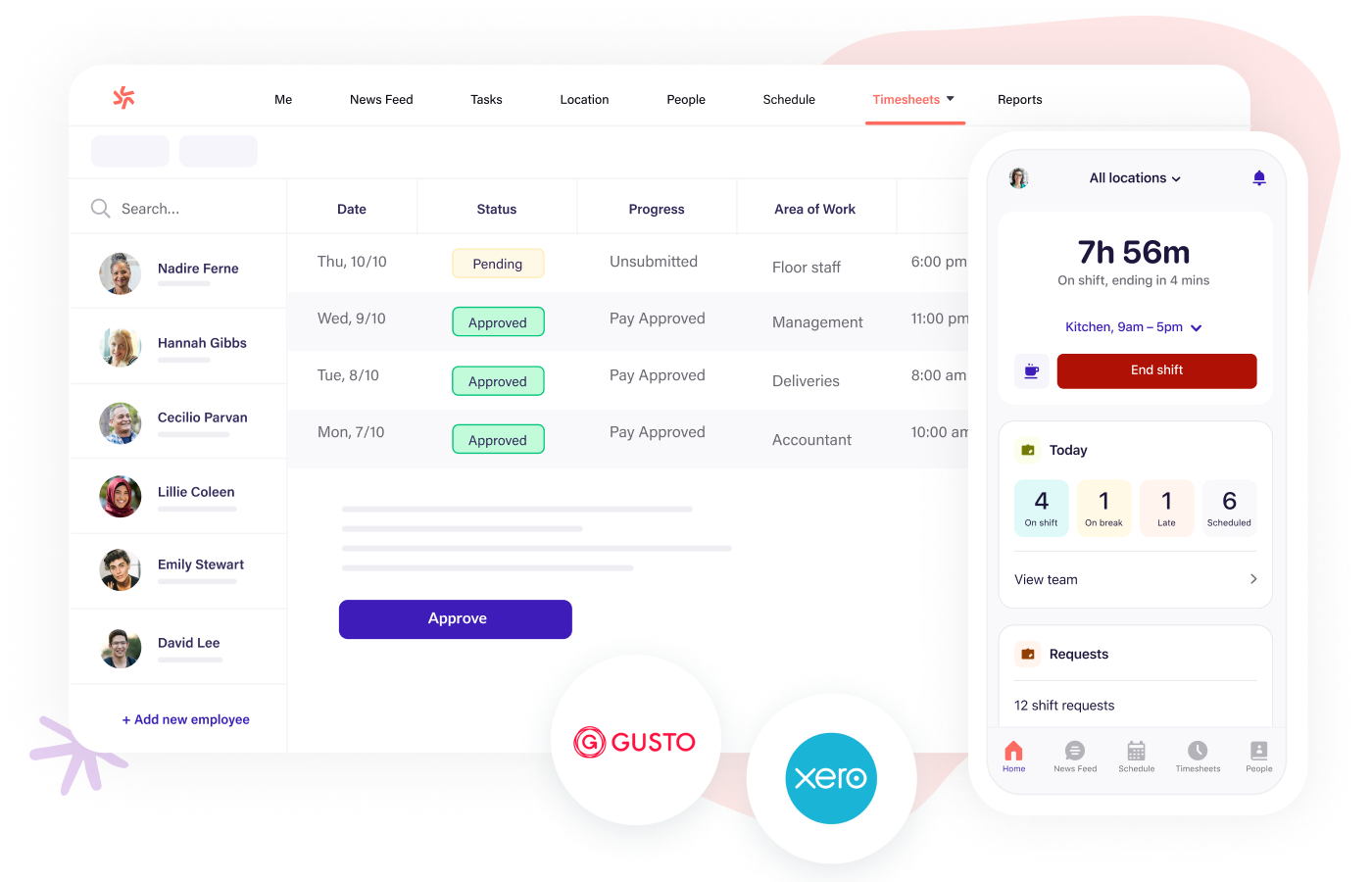
Integration with leading payroll systems
Key Features:
Pricing
- When I Work: Starts at $2.50/user/month | Trial: Yes — 14 days | Free Plan: No
- Deputy: Starts at $3.50/user/month | Trial: Yes — 31 days | Free Plan: No
Pros
Cons
Best Fit Use Case:
- Perfect for restaurants, retail, healthcare, hospitality, and other industries with rotating shifts or hourly staff. Ideal for managers who need a centralized tool to handle scheduling, time tracking, and team communication.
- May not be ideal for remote or project-based teams that don't operate on fixed shifts or require advanced biometric time clock app or mileage-tracking capabilities.
#8. Time Clock Wizard — Best for Small Teams Needing a Simple, Affordable Solution
#8. Time Clock Wizard — Best for Small Teams Needing a Simple, Affordable Solution
Time Clock Wizard is a straightforward employee time tracking app designed for small businesses that want to simplify attendance and scheduling without a steep learning curve or high monthly costs. It delivers all the core essentials — time tracking, scheduling, and payroll summaries — in a clean, easy-to-use interface.
Why it stands out:
Unlike many competitors, Time Clock Wizard offers a free plan that's actually functional for small teams. It provides reliable online time attendance tracking, helping business owners monitor hours worked, manage breaks, and approve time-off requests all in one dashboard.
Time tracking and scheduling:
Employees can clock in and out via web or mobile app, with built-in tools to prevent early clock-ins or missed punches. Managers can create and adjust schedules using its drag-and-drop shift scheduling software, ensuring everyone knows exactly when and where they're expected to work.
Payroll and reporting:
The app automatically calculates total hours worked, overtime, and PTO, generating reports that can easily be exported or integrated with accounting software through its payroll integration time app. This helps streamline payroll prep and ensures accuracy every pay cycle.
Accessibility and ease of use:
Time Clock Wizard was built with simplicity in mind — no complex setup or training needed. It's ideal for owners who want to get up and running quickly while still maintaining accurate and compliant records.
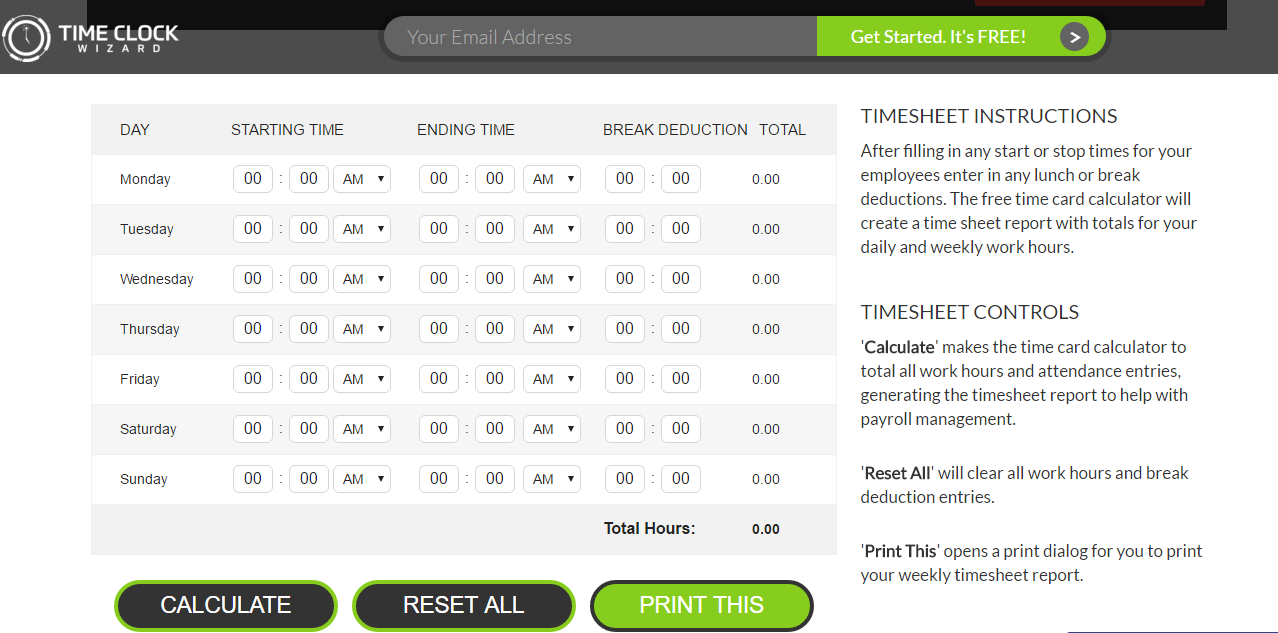
Web and mobile clock-in/out options
Key Features
Pricing
- Starts at $0/user/month (Free Plan) | Paid Plans from $24.95/month | Trial: Yes — 14 days
Pros
Cons
Best Fit Use Case:
- Perfect for startups and small businesses looking for a no-frills time clock app that covers basic scheduling, attendance, and payroll reporting — all at minimal or no cost.
- May not be ideal for larger organizations or those requiring advanced workforce management app capabilities like GPS tracking, advanced analytics, or mobile geofencing.
Read this article: : Top 6 AI-Powered Project Management Tools To Use In 2023
The Key Benefits of Using a Clock-In Clock-Out App
Implementing a digital time-tracking system does more than just record employee hours — it transforms how your business manages people, payroll, and productivity.
Here's how these tools make a real difference:
- Precise time tracking - Modern apps capture every clock-in and clock-out accurately, ensuring employees are paid fairly for the time they've actually worked and reducing costly payroll errors.
- Less admin, more efficiency - Automated tracking and reporting eliminate tedious manual calculations, freeing up your HR or management team to focus on higher-value tasks.
- Real cost control - By tracking exact working hours and preventing time inflation, businesses avoid paying for unworked time — directly improving profitability.
- Boosted employee productivity - When time tracking is transparent, employees become more mindful of how they use their work hours, often leading to noticeable performance improvements.
- Overtime and compliance management - Built-in alerts and reporting help you stay compliant with labor laws, ensuring overtime is properly recorded and managed.
- Simplified time tracking - Clear, digital records of shifts, breaks, and overtime make it easier for both employers and staff to stay organized and aligned.
- Seamless remote workforce management - Whether employees are on-site, working from home, or in the field, these systems keep everyone connected and accountable in real time.
- Fraud and time theft prevention - GPS tracking, geofencing, and biometric verification make "buddy punching" and fake clock-ins virtually impossible.
- Faster, more accurate payroll - Integration with payroll software ensures wages are calculated automatically and paid promptly — no more spreadsheet headaches.
- Actionable workforce insights - Custom dashboards and analytics reveal trends in attendance, overtime, and labor costs, helping leaders make data-driven decisions.
- Compliance peace of mind - Automated time logs make it easier to meet labor law requirements and produce audit-ready records when needed.
- Smarter scheduling decisions - Insights into attendance patterns allow managers to optimize staffing levels, avoiding both under- and over-scheduling.
- Easy access to secure records - Cloud storage means you can pull up attendance or payroll history anytime — ideal for audits, performance reviews, or disputes.
- Smooth system integration - Most leading apps connect easily with your HR, project management, and accounting tools, creating a single, streamlined workflow across your business.
How to Match the Right Time-Tracking App to Your Business Needs
Choosing the perfect time-tracking solution isn't about finding the most popular app — it's about finding one that fits your specific workflow, team structure, and goals. Before you commit, take a step back and assess how your business actually operates.
Every company is different — what works for a construction crew might not suit a marketing agency or a small retail shop.
Think about your day-to-day challenges, your team's size, and how flexible your scheduling needs to be.
Here's a quick breakdown to help you narrow down your options:
- Office or Remote Teams – If your staff works primarily from desks or home offices, choose a solution that focuses on easy login options, desktop tracking, and project-based reporting rather than GPS features.
- Field or Service Teams – Teams constantly on the move will benefit from apps with GPS tracking, geofencing, and real-time check-ins to confirm attendance at job sites.
- Shift-Based Workforces – For teams with rotating schedules, look for built-in shift planners, automatic reminders, and easy swapping or rescheduling features.
- Payroll-Focused Businesses – If you process frequent pay runs, prioritize apps that integrate directly with your payroll or accounting software for seamless data syncing.
- Startups on a Budget – Go for a solution that offers an affordable or free plan but still scales as your team grows — you'll avoid paying for features you don't yet need.
Once you've mapped your business type and pain points, create a simple decision matrix comparing each tool's features, pricing, and integrations.
- Green Flags: Transparent pricing, easy onboarding, real-time sync, mobile access, and responsive customer support.
- Red Flags: Complicated setup, hidden fees, limited device compatibility, or missing compliance tools (especially for overtime and labor tracking).
By matching your needs to the right tool, you'll avoid overpaying for unnecessary features — and set your team up for smoother, more accurate time management from day one.
Implementation Tips & Common Pitfalls to Avoid
Rolling out a new clock-in clock-out app for small business doesn't have to be complicated — but it does require planning and communication.
The goal is to make the transition smooth, transparent, and effective for everyone on your team.
Here's how to do it right:
- Start small with a pilot group - Test the online time attendance system with a few departments or teams first. This helps you identify integration issues and ensure accuracy before launching company-wide.
- Provide clear training and guidance - Walk employees through how to clock in and out, manage breaks, and verify their hours. When using a biometric time clock app or GPS-based tool, proper onboarding prevents confusion and privacy concerns later.
- Be transparent about data and privacy - Let employees know what's being tracked and why. A clear data policy builds trust and encourages consistent app usage.
- Plan for missed punches and errors - Even with automation, mistakes happen. Use the shift scheduling software or built-in approval workflow to correct missed entries quickly without disrupting payroll.
- Monitor early usage and feedback - Keep an eye on adoption rates, accuracy, and overtime reports in the first few weeks. If your payroll integration time app isn't syncing correctly, address it immediately to avoid payout issues.
- Schedule regular audits and reviews - Review attendance logs and system reports regularly. This not only maintains compliance but also reveals productivity trends and areas for schedule optimization.
By implementing your new employee time-tracking system gradually and communicating openly, you'll minimize resistance, ensure accuracy, and get the full long-term benefits of a streamlined, automated time-management process.
Frequently Asked Questions (FAQ)
1. What is the best time clock app for small teams?
The best time clock app for small teams depends on your needs — some prioritize affordability, while others focus on features like GPS tracking or payroll integration.
Tools such as AgilityPortal's Shift Planner, Buddy Punch, or Clockify are great starting points because they combine simplicity with scalability.
2. How does an employee time tracking app work?
An employee time tracking app digitally records when team members start and finish work. It replaces paper timesheets and automatically logs hours, breaks, and overtime, giving managers instant visibility through dashboards and reports.
3. Can employees edit their own time entries?
Yes, most attendance tracking software allows employees to request edits if they forget to clock in or out — but changes typically need manager approval to maintain data accuracy.
4. What happens if someone forgets to clock out?
Modern time clock apps often send automated reminders or apply default end-of-shift times. Managers can review and adjust entries using built-in approval workflows to keep payroll accurate.
5. Does a GPS time clock track employees all the time?
No. A GPS time clock only records a worker's location when they clock in or out (or during working hours if the employer enables it). This feature ensures accountability without constant monitoring.
6. What is a biometric time clock app?
A biometric time clock app uses fingerprints, facial recognition, or PIN verification to confirm an employee's identity when clocking in. This prevents "buddy punching" and enhances overall security.
7. How does a shift scheduling software help manage teams?
Shift scheduling software lets managers create, assign, and update employee schedules in real time. Employees can swap or request shifts easily, while managers can balance workloads and prevent overtime.
8. Can these tools integrate with payroll systems?
Yes! Many modern tools include payroll integration time app features that sync time logs directly with payroll software, saving hours of manual processing and reducing human error.
9. Can I use these apps for remote or hybrid teams?
Absolutely. Online time attendance tools are cloud-based, meaning employees can clock in from anywhere — whether they're in the office, on-site, or working remotely.
10. What is a workforce management app, and how is it different?
A workforce management app takes things further by combining scheduling, attendance, communication, and HR tools into one platform.
It's ideal for businesses that want a single solution for team coordination, compliance, and productivity tracking.
These modern tools — from attendance tracking software to biometric time clock apps — make it easier than ever to maintain transparency, accuracy, and trust within your growing team.
Final Verdict & Next Steps
Choosing the right employee time tracking app isn't just about ticking a box — it's about finding a tool that fits your company's culture, workflow, and growth goals.
Whether you need an all-in-one workforce management app, a simple time clock app, or a more advanced biometric time clock app, the key is to balance features, usability, and cost.
Every small business operates differently.
Some teams thrive with lightweight attendance tracking software, while others benefit from advanced tools with shift scheduling software and payroll integration time app capabilities. The smart move is to test two or three options before committing long-term.
During your first 90 days, pay attention to:
- Employee adoption rates — are people using it consistently?
- Data accuracy — are hours, breaks, and overtime being recorded correctly?
- Integration results — is your online time attendance syncing smoothly with payroll or HR systems?
Once you find the best time clock app for small teams, you'll immediately see the difference — smoother payroll runs, fewer disputes, better accountability, and real insights into how your business operates.
Ready to get started?
Explore one of the tools on our list — including AgilityPortal's Shift Planner module — and see how digital time tracking can save hours every week while making your workplace more efficient, transparent, and compliant.
Most Popular Posts

Effective communication among team members is vital for the productivity and success of any organization. Surprisingly, 60% of companies lack a long-term internal communication strategy, which p...


Businesses thrive on communication for efficiency, productivity and accomplishment. When the right information is passed from the right designation in the organization, it promotes positivity an...
Categories
Blog
(2873)
Business Management
(355)
Employee Engagement
(219)
Digital Transformation
(189)
Growth
(138)
Intranets
(130)
Remote Work
(63)
Sales
(51)
Collaboration
(44)
Culture
(29)
Project management
(29)
Customer Experience
(28)
Knowledge Management
(25)
Leadership
(20)
Comparisons
(9)
News
(1)

Related Posts

The benefits of collaboration to businesses and employees are manifold. Collaborative workers and managers may boost workplace output, and firms may see less employee churn. Working effectively with others is essential for long-term professiona...

What's the real cost of poor communication in professional services firms? It's rarely obvious at first. Deadlines slip. Knowledge gets lost. Teams duplicate work. Clients notice inconsistencies. Over time, these small i...

Distributed Team Management Software Does It Solve Payroll, Compliance & Payments Issues at a Scale?
Why is managing distributed teams still so complicated, even as remote work becomes the norm? As more organisations expand globally, remote workforce management and international hiring have accelerated—but so have the risks. Payroll, com...

Are they truly getting value from their AI consultancy—or quietly burning through budget without real results? It's a question many leadership teams avoid asking, because the answer often reveals an uncomfortable truth. Most organisations don't...

Let's be honest—most restaurant owners try to handle their own marketing at some point. It feels like the smart move. Save money, stay in control, post a few photos, maybe run some ads… job done, right? But here's the uncomfortable truth: what ...


Jill Romford
I am a digital nomad, lover of exploring new places and making friends.
I love to travel and I love the internet. I take pictures of my travels and share them on the internet using Instagram.
Traveler, entrepreneur, and community builder. I share my insights on digital marketing and social media while inspiring you to live your fullest life.
Ready to learn more? 👍
One platform to optimize, manage and track all of your teams. Your new digital workplace is a click away. 🚀
Free for 14 days, no credit card required.