
Insight Blog
Agility’s perspectives on transforming the employee's experience throughout remote transformation using connected enterprise tools.
26 minutes reading time
(5139 words)
SaaS Explainer Videos for Complex Product Features & Examples That Work in 2026

SaaS Explainer Videos for Complex Product Features & Examples That Work in 2026
Struggling to explain complex SaaS features? See real SaaS explainer videos, examples, and strategies that improve onboarding and conversions.
SaaS Explainer Videos for Complex Product Features & Examples That Work in 2026

Let's be honest—most SaaS explainer videos fall apart the moment they try to explain complex product features.
You either get a polished animation that looks nice but says nothing… or a long, clunky demo that nobody actually finishes.
And the data backs this up.
According to Wyzowl, 83% of people say they've been convinced to buy a product after watching a video, but attention drops fast—most viewers stop watching after 60–90 seconds if the content isn't clear.
83%
of buyers
According to Wyzowl, 83% of people say video has convinced them to buy a product, but most viewers drop off within 60–90 seconds if the message isn’t clear.
Source: Wyzowl Video Marketing Statistics
On top of that, research from HubSpot shows that over 70% of users prefer learning about a product through video, yet poorly structured videos still fail to drive conversions.
That's the gap.
If you're trying to create SaaS explainer videos for complex product features, the real problem isn't production quality—it's clarity.
Most teams try to explain everything at once instead of focusing on one real use case that actually matters to the user.
This guide cuts through that.
You'll see what actually works, backed by real examples, proven formats, and practical strategies you can use straight away—whether you're improving onboarding, reducing support tickets, or trying to get more people to actually understand your product.
Key Takeaways
- SaaS explainer videos are essential for simplifying complex product features and helping users quickly understand real-world value.
- High-performing videos focus on one clear use case rather than trying to explain every feature at once.
- Structuring videos around problem, solution, and outcome improves clarity, engagement, and conversions.
- Different video formats—such as product demos, feature spotlights, and onboarding clips—should be used across the user journey.
- Placing videos on landing pages, onboarding flows, and help centres increases adoption and reduces support friction.
What Is a SaaS Explainer Video?
A SaaS explainer video is a short, focused video that shows what your software does, who it's for, and how it solves a real problem.
Instead of dumping features on the viewer, it uses simple visuals, quick demos, and a clear story to make complex functionality easy to understand.
Think of it as a fast-track introduction to your product.
Rather than forcing someone to read through pages of documentation or sit through a long demo, they get the core value in under a minute.
That's why it works. Research from Wyzowl shows people are far more likely to engage with video than text—and when done right, it speeds up understanding and decision-making.
Most SaaS companies use explainer videos to:
- Break down complex features
- Improve onboarding
- Support sales and marketing
Put simply, it's your product doing the selling for you—explaining, demonstrating, and building interest even when your team isn't there.
Why SaaS Companies Need Explainer Videos
aaS companies struggle with one core problem—most users don't fully understand the product, especially when it involves complex features, workflows, or integrations. That lack of clarity is what kills conversions.
According to Wyzowl, over 80% of businesses say video has helped increase sales, while HubSpot reports that more than 70% of users prefer learning about a product through video.
80%+
business impact
According to Wyzowl, over 80% of businesses say video has helped increase sales, while HubSpot reports that more than 70% of users prefer learning about a product through video.
Source: Wyzowl & HubSpot Research
That tells you everything—you're not just competing on features, you're competing on how quickly people "get it."
Explainer videos solve this by breaking down complexity into something simple and visual.
Instead of overwhelming users with feature lists or long product descriptions, they focus on a single use case and show exactly how the product works in a real scenario.
This makes it easier for potential customers to connect the dots between your software and their problem, which directly impacts whether they sign up, book a demo, or leave your site.
They also play a big role in building trust.
If your product feels confusing, people assume it's difficult to use or not worth the effort.
A clear, well-structured explainer video shows that you understand your product and your audience, which instantly makes your brand feel more credible and professional.
At the same time, video keeps people engaged far better than text, increasing time on page and giving you more chances to communicate your value.
What makes explainer videos even more powerful is how versatile they are.
They're not just for your homepage—they support your entire funnel, from ads and landing pages to onboarding and customer education.
Done right, they don't just explain your product—they improve understanding, drive conversions, and help users adopt your software faster.
Why Complex SaaS Features Are So Hard to Explain

Why Complex SaaS Features Are So Hard to Explain
Explaining complex SaaS features is where most products fall apart—not because the product is bad, but because the messaging is all over the place.
When you try to communicate too many features at once, there's no clear story for the user to follow. Instead of understanding the value, they're left trying to piece things together themselves.
This is exactly where a well-structured SaaS explainer video should step in—but most of them fail because they try to cover everything instead of focusing on one meaningful use case.
Another issue is that SaaS products are often built for multiple personas. What matters to HR is completely different from what matters to IT or Operations, yet many explainer videos treat them the same.
The result is generic messaging that doesn't resonate with anyone. On top of that, many companies rely too heavily on UI walkthroughs, assuming that showing the dashboard is enough. It's not. Without context, a screen recording is just noise.
The biggest mistake, though, is assuming users already understand the problem your product solves.
If that foundation isn't clear, even the best feature explanation won't land.
This is why poorly executed videos lead to low engagement, confused users, and ultimately lost conversions—making it harder for users to see the value and move forward.
What Makes a SaaS Explainer Video Actually Work?
When you're dealing with complex software, the difference between a video that converts and one that gets ignored comes down to structure.
The best-performing videos aren't flashy—they're clear, focused, and built around how people actually learn.
And that matters, because every user absorbs information differently, so your approach needs to account for that.
1. Focus on One Problem, Not the Whole Product
Most SaaS videos fail because they try to show everything at once.
That overwhelms users and kills clarity.
High-converting videos zoom in on a single problem and solve it well.
- Avoid dumping every feature into one video
- Focus on one real use case your audience actually cares about
- Make the outcome obvious and easy to understand
- Tie the feature directly to a measurable benefit (time saved, fewer errors, etc.)
- Speak to a specific persona (HR, Ops, IT—not everyone at once)
- Remove anything that doesn't support the core message
- End with a clear next step (demo, signup, or learn more)
2. Show Before You Tell
Users don't care about features until they understand the context.
If you jump straight into the product, you lose them.
The best videos start with a situation the viewer recognises.
- Start with a relatable problem or scenario
- Introduce the feature as the solution, not the starting point
- Use real workflows instead of abstract explanations
3. Keep It Short and Focused
Attention is limited, especially in B2B SaaS.
If your video drags, people drop off before they understand anything meaningful.
- Aim for 60–90 seconds for a single topic
- Break longer content into smaller, targeted videos
- Cut anything that doesn't directly support the core message
4. Use Layered Explanation
Since every user absorbs information differently, a single video won't work for everyone.
Some want a quick overview, others want depth. That's why layered content performs better.
- Start with a simple, high-level overview
- Offer deeper walkthroughs for users who want more detail
- Use multiple videos instead of one long explanation
Bottom line: the videos that actually work aren't the most polished—they're the ones that make complex features feel simple, relevant, and easy to act on.
SaaS Explainer Video Formats That Work for Complex Features
When you're dealing with complex functionality, the format of your video matters just as much as the content itself.
Different formats serve different stages of the journey—and remembering that every user absorbs information differently is key to getting this right.
1. Problem → Solution Narrative
Best for marketing pages
This is the classic format and still one of the most effective when done properly. Instead of leading with features, you start with a relatable problem and then position your product as the solution.
- It opens by highlighting a real-world pain point your audience instantly recognises.
- It builds tension around the problem before introducing your product as the solution.
- It keeps the messaging simple and focused on outcomes rather than features.
- It works especially well on homepages and landing pages where clarity is critical.
- It helps users quickly understand the value and why your product matters to them.
2. Feature Spotlight Videos
Best for product releases
When you have specific features that need explaining, this format isolates them and gives each one the attention it deserves.
- It focuses on one feature at a time instead of overwhelming users with everything.
- It shows exactly how the feature works within a real context or workflow.
- It's ideal for announcing product updates and new releases.
- It makes complex functionality easier to digest compared to full product demos.
- It works well in email campaigns and feature announcements where attention is limited.
3. Interactive Product Demos
Best for sales and deeper engagement
Instead of passive watching, this format gives users a more personalised and practical walkthrough of your product.
- It feels more human and conversational compared to scripted videos.
- It allows you to tailor the explanation based on the viewer's needs or role.
- It works particularly well in sales conversations and demo follow-ups.
- It's commonly created using tools like Loom or Vidyard.
- It helps bridge the gap between initial interest and the final decision to buy.
4. In-App Micro Videos
Best for onboarding and support
These are short, contextual videos embedded directly inside your product to guide users in real time.
- They are typically short, usually between 30 and 60 seconds.
- They are triggered at key moments in the user journey when help is needed most.
- They reduce confusion and cut down on support tickets.
- They allow users to learn while actively using the product.
- They are especially effective for onboarding complex workflows step by step.
The key takeaway here is simple: there's no single format that works for everyone. The best SaaS companies combine these approaches to match different learning styles and stages of the user journey.
Real Examples of SaaS Explainer Videos That Get It Right
Seeing real examples is where this clicks. It's one thing to talk about "clear messaging" and "good structure"—it's another to see how top SaaS companies actually do it.
The key thing to notice across all of these is this: they don't try to explain everything. Each one focuses on a specific use case, audience, and outcome, which is why they work.
Example 1: Loom
Loom is a great example of keeping things simple without losing impact. Instead of diving into technical features, their videos focus on a very clear scenario—sending quick video messages instead of long emails or meetings.
What makes this effective is how human it feels. The product is shown in action straight away, with minimal friction between explanation and demonstration. You're not being told what Loom does—you're seeing exactly how it fits into your daily workflow.
- Starts with a relatable problem (too many meetings, slow communication)
- Shows the product in use within seconds
- Keeps the tone conversational and easy to follow
- Focuses on outcomes (faster communication, better clarity)
- Avoids technical jargon completely
- Uses real UI instead of overproduced animation
- Makes adoption feel effortless
👉 Why it works: It reduces complexity by anchoring everything around a single, everyday use case.
Example 2: Vidyard
Vidyard takes a slightly different approach by leaning more into storytelling and business impact. Their videos are designed for decision-makers, so the messaging is less about "how it works" and more about "why it matters."
You'll notice they connect features directly to ROI, which is critical in B2B SaaS. Instead of listing capabilities, they show how video improves sales performance and engagement.
- Opens with a clear business challenge (low engagement, missed opportunities)
- Connects product features directly to revenue impact
- Uses storytelling to guide the viewer through the journey
- Balances visuals with concise messaging
- Includes a strong, clear call to action
- Speaks directly to sales and marketing teams
- Positions the product as a competitive advantage
👉 Why it works: It translates product functionality into business value, which is what decision-makers actually care about.
Example 3: Intercom
Intercom excels at breaking down complex systems into manageable steps. Their videos are structured in a way that mirrors onboarding—guiding users through the product in a logical, easy-to-follow sequence.
Instead of overwhelming the viewer, they introduce features gradually, each tied to a specific task or outcome. This makes even advanced functionality feel approachable.
- Breaks complex features into step-by-step flows
- Uses clear transitions between sections
- Focuses on real use cases like customer support and automation
- Keeps visuals clean and uncluttered
- Reinforces key points without repetition
- Designed to support onboarding, not just marketing
- Helps users understand "what to do next"
👉 Why it works: It reduces friction by guiding users through complexity instead of dumping it on them.
Example 4: Notion
Notion takes a more visual-first approach. Their videos rely heavily on the interface itself, with minimal narration. This works because the product is inherently visual, and the UI tells the story.
Rather than over-explaining, they let users explore the possibilities through movement, layout, and structure. It's a subtle but powerful way to communicate flexibility without overwhelming the viewer.
- Uses the product UI as the main storytelling tool
- Keeps narration minimal and focused
- Highlights flexibility and multiple use cases
- Smooth transitions make workflows easy to follow
- Appeals to visually driven users
- Avoids clutter and unnecessary detail
- Encourages exploration rather than instruction
👉 Why it works: It shows rather than tells, making complex functionality feel intuitive.
What You Should Take From These Examples
Across all four, the pattern is clear:
- They focus on one core message, not everything
- They align with a specific audience or use case
- They prioritise clarity over creativity
- They guide the viewer instead of overwhelming them
Most importantly, they recognise that every user absorbs information differently, so they structure content in a way that makes it easy to follow, no matter the viewer's experience level.
That's the difference between a video that looks good—and one that actually drives understanding and conversions.
Key Elements of a High-Converting SaaS Explainer Video
A high-converting SaaS explainer video starts with clarity, not creativity. The goal isn't to impress people with visuals—it's to help them quickly understand what your product does and why it matters.
The strongest videos focus on a single use case, clearly define the problem, and then position the software as the solution.
This is where many SaaS product demo videos go wrong—they try to cover too many features instead of delivering one clear message. If a viewer can't explain your product back to someone else after watching, the video hasn't done its job.
Structure is what turns a simple video into something that actually drives results.
The best software explainer videos follow a logical flow: problem, solution, demonstration, and outcome. Instead of jumping straight into a dashboard walkthrough, they build context first, then show the feature in action within a real scenario.
This approach makes even complex functionality easier to follow and keeps users engaged from start to finish. Strong messaging, concise scripting, and clear visuals all play a role in making the video feel effortless to watch.
Finally, distribution and placement are just as important as the video itself.
A well-produced product explainer video won't perform if it's buried or used in the wrong place. High-performing SaaS companies embed videos across key touchpoints—landing pages, onboarding flows, help centres, and email campaigns—so users encounter them exactly when they need clarity.
When done right, this doesn't just improve engagement; it accelerates understanding, reduces friction, and ultimately drives more conversions.
Common Mistakes That Kill SaaS Explainer Videos
Even well-produced videos fail when the fundamentals are wrong.
Most issues come down to poor focus, unclear messaging, or trying to do too much at once.
- Trying to explain everything in one video overwhelms the viewer and makes it harder to understand the core value.
- Not defining a clear audience (HR, IT, Ops) leads to generic messaging that doesn't resonate with anyone.
- Using overly technical language confuses users who just want to understand how the product helps them.
- Skipping a clear call to action means viewers don't know what to do next after watching.
- Treating the video like a feature tour instead of a story removes any sense of context or relevance.
- Starting with the product instead of the problem makes it harder for users to connect with the message.
- Making videos too long causes drop-off before the key points are even delivered.
- Focusing too much on design and animation instead of clarity reduces the overall effectiveness.
How to Create SaaS Explainer Videos for Complex Features (Step-by-Step)
Creating an effective video isn't about having a big budget or fancy animation—it's about structure and clarity.
If you follow a simple process, you can turn even the most complex feature into something users instantly understand.
Step 1: Define One Core Use Case
Before anything else, get clear on what you're actually explaining. Trying to cover too much is where most videos fail.
- Focus on one specific problem your user is trying to solve
- Tie the feature to a real-world scenario
- Define the outcome the user should achieve
- Keep the scope tight so the message stays clear
Step 2: Write a Simple Script (Problem → Outcome)
A strong script keeps everything structured and easy to follow. You don't need anything fancy—just clear logic.
- Start with a relatable problem or frustration
- Introduce your product as the solution
- Show how the feature works in context
- Highlight the outcome or benefit clearly
- Keep the tone natural and conversational
- Remove any unnecessary detail that slows things down
Step 3: Choose the Right Format (Animation, Demo, or Hybrid)
The format should match both the complexity of the feature and how you want users to experience it.
- Use animation for abstract or hard-to-visualise concepts
- Use screen recordings for real product walkthroughs
- Combine formats for a more engaging hybrid approach
Step 4: Record or Produce the Video
This is where everything comes together, but clarity should always come before production quality.
- Keep the video concise (ideally under 90 seconds)
- Use clean visuals so users know where to focus
- Highlight key actions and important steps
- Use a clear voiceover or simple captions to guide viewers
- Cut anything that doesn't directly support the core message
Step 5: Embed Across Key Touchpoints
Even the best video won't perform if it's not placed where users actually need it.
- Add videos to landing pages to improve conversions
- Use them in onboarding flows to guide new users
- Embed them in your knowledge base for ongoing support
- Include them in email campaigns and product updates
- Place them exactly where users are likely to get stuck
- Reuse clips across multiple channels to maximise value
- Track performance to see what actually drives engagement
This structure not only reads better, it also feels more natural—and that's exactly what you want for both users and SEO.
Where SaaS Explainer Videos Drive the Most Impact
SaaS explainer videos aren't just for your homepage—they deliver the most value when placed at key moments in the user journey.
When used strategically, they don't just explain features; they remove friction, answer questions before they're asked, and help users move forward faster.
One of the biggest impact areas is product onboarding.
New users often struggle to understand how everything fits together, especially with complex platforms.
Short, focused videos can guide them through key actions, helping them get value quickly without needing to dig through documentation.
The same applies to sales demos, where a well-crafted video can simplify conversations, reinforce messaging, and make it easier for prospects to see how the product fits their needs.
They also play a strong role in feature launches, where new functionality needs to be introduced clearly and quickly.
Instead of long release notes, a short video can show exactly what's changed and why it matters. Finally, embedding videos in help centres and knowledge bases gives users instant answers in a format that's faster and easier to consume than written guides.
The real benefit across all of these is simple—less confusion, fewer support tickets, and faster product adoption.
When users understand what to do and how to do it, they don't need to ask for help, and they're far more likely to stick with your product.
Where to Use SaaS Explainer Videos Across Your Marketing Funnel
A SaaS explainer video isn't just a nice-to-have asset—it's something that should be working across your entire funnel.
The real impact comes from placing it exactly where users need clarity, whether they're discovering your product or deciding to buy.
- On your homepage, placing a video above the fold helps visitors quickly understand what your product does without having to scroll or read long sections.
- On landing pages, especially from paid ads, videos give users an instant explanation and reduce the chances of them bouncing.
- In email campaigns, adding a video (or even just a thumbnail with a play button) can significantly improve click-through rates and engagement.
- On social media platforms like LinkedIn or YouTube, short clips help you reach a wider audience and drive traffic back to your site.
- On demo or pricing pages, videos reinforce your value and help users justify the decision before committing.
- During customer onboarding, videos guide new users through key features and reduce the need for support.
Used properly, videos create a consistent experience across every touchpoint, making your product easier to understand and far more likely to convert.
See How AgilityPortal Simplifies Complex Workflows
While you're here, it's worth seeing this in action.
Most platforms talk about features—but AgilityPortal focuses on making complex internal communication, knowledge management, and workflows actually easy to understand and use.
Instead of jumping between multiple tools, everything is brought into one structured, user-friendly digital workplace.
- It brings communication, documents, and workflows into one central place
- It reduces time wasted searching across disconnected tools
- It improves onboarding with structured content and in-app guidance
- It's built for both office and frontline teams
- It integrates with tools like Slack, Google Workspace, and Microsoft 365
Instead of trying to explain everything, the platform is designed to show users exactly what they need, when they need it—which is exactly what great SaaS products (and videos) should do.
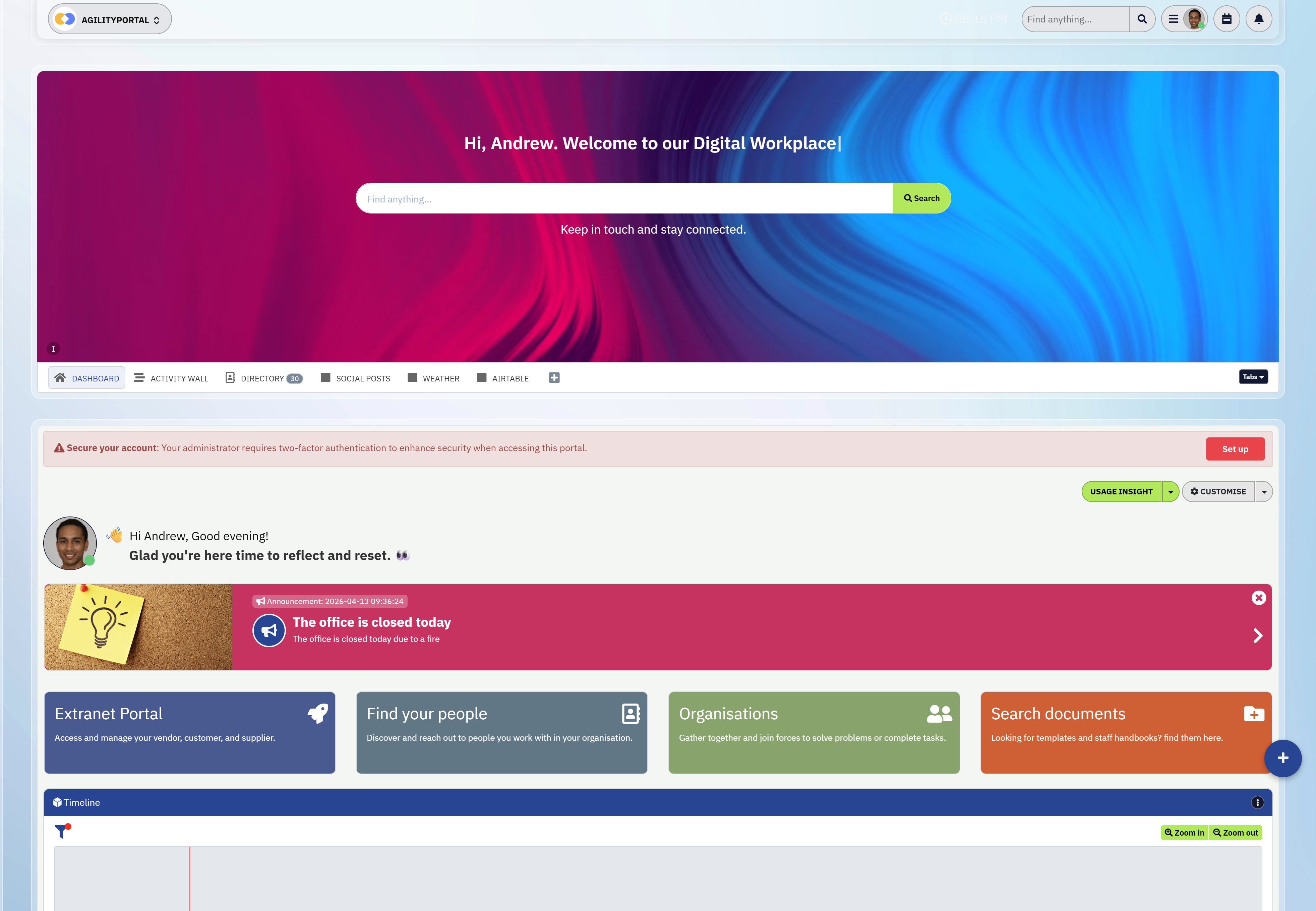
See How AgilityPortal Simplifies Complex Workflows
🚀 Want to See How This Could Work for Your Team?
If you're dealing with scattered communication, low adoption, or complex processes, it's worth taking a closer look.
No credit card required • Quick setup • See real use cases tailored to your team.
This isn't just another tool—it's a simpler way to connect your people, processes, and knowledge in one place.
AgilityPortal
The Best Slack Alternative for Teams That Need More Than Chat
If Slack is starting to feel limiting, AgilityPortal gives you everything in one place. Instead of juggling chat, documents, intranet tools, and engagement platforms, this brings it all together into a single, structured digital workplace. It’s built for internal communication at scale, helping teams stay aligned, informed, and engaged without switching between multiple tools.
Starts from $99 per 100 users per month
14-day free trial available
No credit card required to get started
Try it free for 14 days – no credit card required
14-day free trial available
No credit card required to get started
Wrapping up
If your product has any level of complexity—and let's be honest, most SaaS tools do—then how you explain it matters just as much as what it actually does.
The difference between a confused visitor and a converted user often comes down to how quickly they understand the value.
That's exactly where a strong SaaS explainer video makes the impact.
The companies that get this right don't try to show everything.
They focus on clarity, real use cases, and guiding users step by step. They use video not just as a marketing asset, but as part of the entire experience—from first touchpoint to onboarding and beyond.
At the end of the day, it's simple: if users can't understand your product, they won't use it. But if you can make complex features feel simple, relevant, and easy to act on, you remove friction, increase adoption, and drive real growth.
AI Summary
- SaaS explainer videos help simplify complex product features, making it easier for users to understand value quickly and increasing engagement across marketing and onboarding.
- Video content is one of the most effective formats for conversion, with studies showing that over 80% of users are more likely to purchase after watching a product video.
- Short, focused explainer videos (typically 60–90 seconds) perform best, as attention drops quickly when messaging is unclear or too long.
- Effective SaaS videos focus on customer pain points first, then demonstrate how the product solves those problems using clear visuals and simple messaging.
- Explainer videos improve onboarding and product adoption by helping users quickly understand key features without needing lengthy documentation.
- Businesses that integrate video into their SaaS marketing strategy often see higher conversion rates, better retention, and improved user experience.
Most Popular Posts

Effective communication among team members is vital for the productivity and success of any organization. Surprisingly, 60% of companies lack a long-term internal communication strategy, which p...


Businesses thrive on communication for efficiency, productivity and accomplishment. When the right information is passed from the right designation in the organization, it promotes positivity an...

Categories
Blog
(3234)
Business Management
(396)
Employee Engagement
(235)
Digital Transformation
(222)
Growth
(151)
Intranets
(142)
Internal communications
(110)
Remote Work
(68)
Sales
(53)
Collaboration
(53)
Customer Experience
(33)
Culture
(30)
Project management
(30)
Knowledge Management
(29)
Leadership
(20)
Comparisons
(9)
News
(1)

Related Posts

Why does your internet connection seem fast until everyone joins a video call or starts uploading files? Understanding the factors to consider when choosing an internet service provider can help you avoid a package that looks good on paper but ...

Is your vendor invoice management process keeping client projects moving, or leaving your team chasing approvals and questioning what's ready to pay? When several suppliers work on the same project, small gaps can quickly become expensive problems.&n...

What is virtual office software, and could it help your remote team feel more connected? Working from home has its perks, but having plenty of calls and messages doesn't always mean feeling part of a team. Gallup's 2026 State of the Global Work...

In today's competitive talent landscape, learning and development (L&D) has become a non-negotiable priority for enterprises. Organizations that invest in employee growth not only boost engagement and retention but also build agile, future-ready ...

Employee engagement is increasingly crucial in the fast-paced work world of today. Remote work is becoming the norm, hence companies have to use creative ideas to keep good morale and promote a friendly workplace. Feedback, sentiment analysis, ...


Jill Romford
I am a digital nomad, lover of exploring new places and making friends.
I love to travel and I love the internet. I take pictures of my travels and share them on the internet using Instagram.
Traveler, entrepreneur, and community builder. I share my insights on digital marketing and social media while inspiring you to live your fullest life.
Ready to learn more? 👍
One platform to optimize, manage and track all of your teams. Your new digital workplace is a click away. 🚀
Free for 14 days, no credit card required.