
Insight Blog
Agility’s perspectives on transforming the employee's experience throughout remote transformation using connected enterprise tools.
23 minutes reading time
(4649 words)
Shopify SEO for Beginners Use This Simple Shopify SEO Checklist to Help You Get Started

Shopify SEO for Beginners Use This Simple Shopify SEO Checklist to Help You Get Started
Learn Shopify SEO for beginners with this simple Shopify SEO checklist. Improve rankings, boost traffic, and optimise your store with easy, step-by-step tips.
Shopify SEO for Beginners Use This Simple Shopify SEO Checklist to Help You Get Started

If you're running a Shopify store and mostly relying on ads or hoping people magically find you, you're leaving money on the table.
The truth is, organic search is where long-term, sustainable traffic actually comes from.
In fact, more than 40% of all eCommerce traffic comes from organic search, which means if you're not visible on Google, your competitors happily are.
That's why understanding Shopify SEO for beginners matters.
You don't need to be an expert or spend hours buried in technical jargon—you just need a simple, practical approach that moves the needle. And that's exactly what this guide gives you.
Think of it as your quick-start Shopify SEO checklist: clear steps, beginner-friendly explanations, and real actions you can implement today to start boosting your store's visibility.
Let's break it all down in a way that actually makes sense.
Read this article: : Top 6 AI-Powered Project Management Tools To Use In 2023
What Is Shopify SEO (and Why It Matters?)
Before you start crossing things off your Shopify SEO checklist, it helps to actually understand what Shopify SEO is—and why it's such a game-changer for your store.
Put simply, SEO (Search Engine Optimisation) is the process of improving your site so Google can find it, understand it, and rank it. Without SEO, your products are basically invisible unless you pay for ads.
For Shopify SEO for beginners, here's the simplest way to think about it:
SEO tells Google, "Hey, here's what my store sells—show it to people actively searching for it." And once Google trusts your site, you start getting consistent, free traffic around the clock.
Shopify makes this easier than many other eCommerce platforms. It's beginner-friendly, has clean code, generates your sitemap automatically, and handles things like SSL security without you lifting a finger.
But it's not perfect. Shopify still needs optimisation because Google wants more than just a working website—it wants relevance, structure, speed, and high-quality content.
To keep this EEAT-friendly and accurate, Google's own guidance (Search Essentials) makes it clear: Google ranks pages that are helpful, secure, well-structured, and easy to crawl.
Shopify gives you a solid foundation, but you still need to optimise your content, fix technical issues, and build authority.
Here's how Shopify and search engines actually interact behind the scenes.
How Search Engines Crawl Shopify Stores
Search engines use bots (also called "crawlers") to scan your store.
They follow links, read your content, interpret your product pages, and decide whether your site deserves to rank.
Shopify helps with this because:
- Every store automatically gets a sitemap.xml file
- Pages follow a clean URL structure
- Site speed is decent out of the box
- SSL certificates are included
But crawlers don't magically understand your products—you must give them the right signals.
What Shopify Handles Automatically
Shopify does a few things to make SEO easier for beginners:
- Automatic canonical tags to help avoid duplicate content
- Automatically generated sitemap submitted to Google
- Basic metadata fields (titles, image alt-text, descriptions)
- Clean URL structure
- Responsive themes to keep things mobile-friendly
These are helpful, but they don't complete the job.
What Shopify Does NOT Fix for You
This is where most new store owners get stuck. Shopify doesn't fix:
- Thin product descriptions
- Duplicate content copied from suppliers
- Slow, bloated themes
- App overload affecting performance
- Missing or unoptimised meta tags
- Poor internal linking
- Lack of keyword targeting
- Weak content strategy (blogs, guides, FAQs)
That's why SEO requires a bit of manual work. The good news? Once you understand the basics, your store becomes easier for Google to trust—and your rankings start climbing.
The Big SEO Mistakes Beginners Make on Shopify
Before you dive into improving Shopify search visibility, it's worth calling out the mistakes almost every new store owner makes.
Seriously—if you've done any of these, you're not the exception.
This is the stuff that slows down rankings, confuses Google, and makes your store harder to find in competitive search results.
And if you're just starting with beginner-friendly eCommerce SEO tactics, understanding these common errors now will save you months of trial and error.
#1. Skipping Keyword Research Entirely
One of the main reasons new Shopify stores struggle to get traffic is simple: they don't know what customers are actually searching for.
If you're not researching phrases buyers type into Google, your products won't appear in the results.
Learning how to choose long-tail keywords for Shopify products helps you connect your listings with real buying intent.
For example, shoppers search "organic baby romper UK" or "women's ribbed loungewear set," not vague product names like "The Luna Set."
Using tools like Keyword Planner or Etsy suggestions gives you easy ideas you can plug straight into your titles, descriptions, and URLs.
When your store matches genuine search behaviour, you build visibility faster and attract free, high-quality traffic without relying on ads.
#2. Writing Short, Generic Product Descriptions
Short, vague product descriptions make it hard for customers—and Google—to understand what you're selling.
A one-line description gives no detail, no value, and no reason to trust your store. This is why following clear product description guidelines for Shopify sellers makes a massive difference.
Strong descriptions naturally include long-tail search terms like "breathable gym leggings for women," "hypoallergenic dog grooming brush," or "handmade ceramic mug with UK delivery."
These phrases help Google understand your page while giving shoppers the information they need to feel confident.
The more useful your content is, the higher your chances of converting the click once they land on your page.
#3. Copying Supplier Content Word-for-Word
Copying supplier descriptions might feel convenient, but it's one of the biggest ranking killers for small stores.
Suppliers give the same text to hundreds of retailers, and Google only ranks one version—usually from larger websites with stronger authority.
Creating unique product copy for Shopify listings gives you an instant edge. It helps search engines recognise your page as original and more relevant.
It also makes your store sound more trustworthy and customer-focused.
Use long-tail phrases like "soft cotton polo shirt for men UK," "vegan leather handbag with adjustable strap," or "portable blender for travel and gym use."
These natural, buyer-focused terms help Google understand your page and give customers a better shopping experience.
#4. Using Heavy Themes and Installing Too Many Apps
Shopify is fast by default, but bulky themes + unnecessary apps slow everything down.
A slow website drops your chances of ranking well and frustrates mobile shoppers.
#5. Forgetting to Build Internal Links
A lot of new store owners overlook internal linking, but it's one of the easiest ways to boost visibility.
When your product pages, collections, and blogs don't connect, Google struggles to understand your site structure.
Adding links between related items helps crawlers move through your store and strengthens the pages you want to rank. Think of it as creating a clear path for search engines.
A simple internal linking strategy for Shopify stores can improve crawl efficiency, increase relevance, and keep shoppers exploring longer—boosting both SEO and conversions.
#6. Relying Only on Paid Ads
When ads stop, traffic stops.
Organic traffic through consistent Shopify optimisation for new store owners builds long-term growth and reduces acquisition costs.
#7. Ignoring Metadata and Image Alt Text
One of the easiest wins for new Shopify sellers is optimising metadata, yet most beginners skip it completely.
Shopify gives you simple fields for meta titles, meta descriptions, and image alt text, but many store owners leave them blank or fill them with generic wording.
That hurts your visibility because Google relies on this information to understand what your page is actually about.
Adding clear, descriptive copy—like SEO-friendly meta titles for Shopify products or keyword-rich alt text for eCommerce images—helps search engines match your pages to relevant searches.
It also improves click-through rates because shoppers see more compelling, accurate previews of your pages in search results.
Image alt text is equally important.
It tells Google what your visuals represent and supports accessibility for customers using screen readers. Think of metadata as your storefront sign: if it's missing or unclear, fewer people will find you, and even fewer will click.
#8. Using Bad URLs and Confusing Link Structure
A surprisingly common mistake for new store owners is leaving URLs long, messy, or full of random characters.
Search engines rely on clear structure to understand your pages, and shoppers trust URLs that look clean and intentional.
That's why following Shopify URL best practices is so important. Instead of using autogenerated links like www.store.com/product?id=1234, aim for descriptive, SEO-friendly URLs such as www.store.com/products/red-winter-jacket.
Clean URLs help Google understand category relevance and make your store look more professional.
They also increase click-through rates because shoppers feel more confident when they can see exactly what the page is about. Using SEO-friendly URLs for eCommerce product pages improves crawl efficiency and reduces indexation errors.
If you're dealing with older or imported listings, take time to tidy them up.
Learning how to fix messy Shopify URLs early creates a clearer site structure and gives every page a better chance of ranking.
#9. Not Building Backlinks to Your Store
Many new Shopify sellers focus entirely on on-page tweaks and forget one of the strongest ranking signals Google uses: backlinks.
When credible websites link to your store, Google sees it as a vote of confidence. That's why building high-quality backlinks is essential for increasing search visibility for Shopify-built storefronts. These links show search engines that your content is trustworthy, relevant, and worth ranking above competitors.
You don't need complicated campaigns to get started.
Simple outreach works: connect with bloggers in your niche, ask industry publications to feature your products, or encourage customers to share reviews on their own sites. Even brand directories, supplier links, and guest posts can make a noticeable difference.
High-authority links strengthen your entire domain, helping product pages and collections rank faster with less effort.
If you want to grow organic traffic long-term, backlink building shouldn't be optional—it should be part of your regular marketing routine and content strategy.
These mistakes are common, but fixing them early puts you ahead of most competitors and makes your Shopify optimisation efforts actually produce results.
Read this article: : Top 6 AI-Powered Project Management Tools To Use In 2023
The Simple Shopify SEO Checklist
Shopify_SEO_Checklis_20251201-115022_1
4 kb
#1. Keyword Research Basics
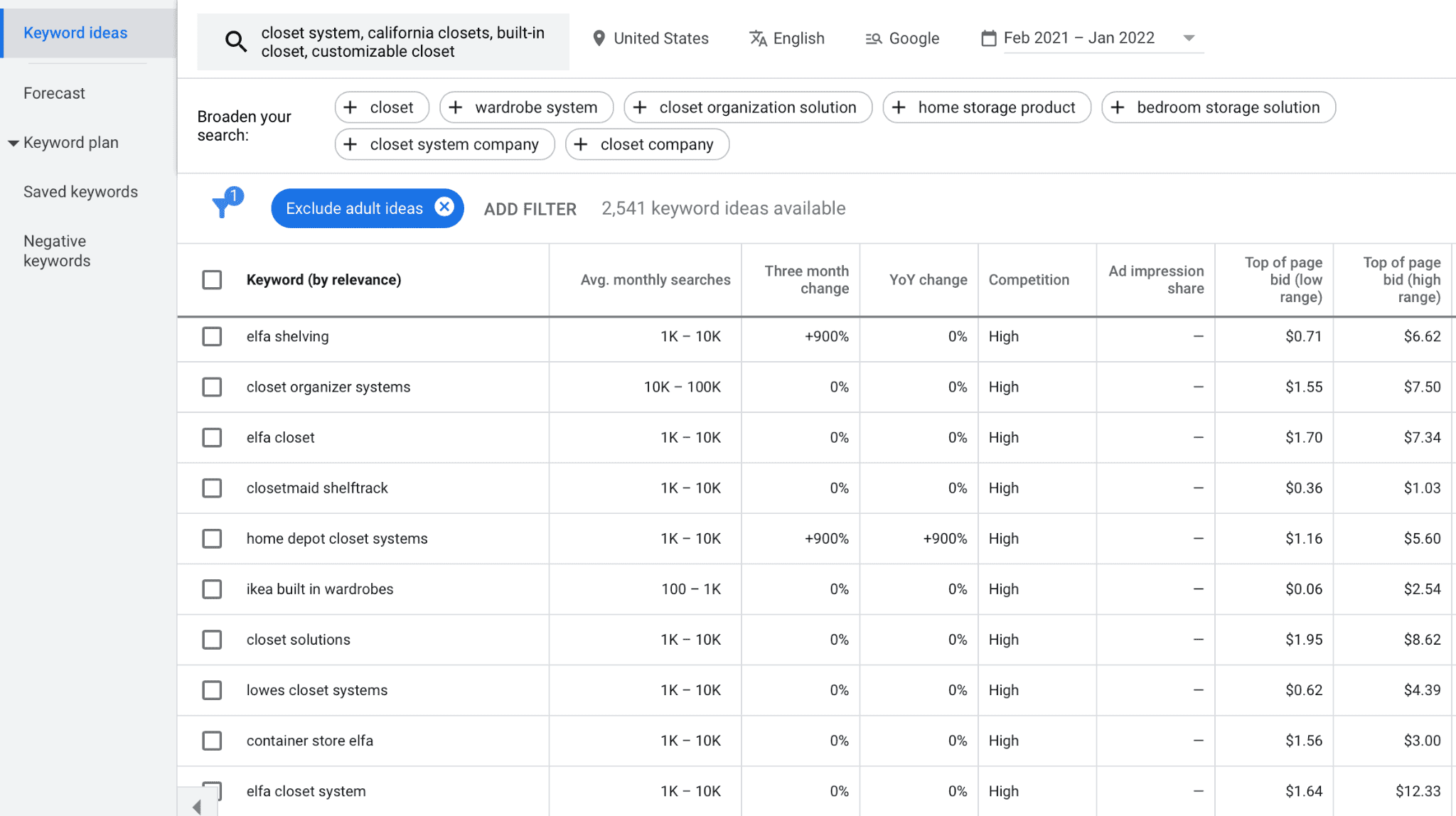
Keyword Research Basics
Keyword research is where every good SEO strategy starts.
You need to understand what customers actually type into Google before they find products like yours.
Look for long-tail phrases such as "best running shoes for flat feet women UK" or "vegan leather handbags with adjustable straps." These terms show buying intent and are easier to rank for.
Tools like Google Keyword Planner, Ubersuggest, and SEO Minion help you uncover search intent for Shopify product pages, collection pages, and blog posts.
Aim to map one main keyword and a few supporting LSI terms to every page so your content stays relevant and easy for Google to understand.
#2. On-Page SEO Essentials
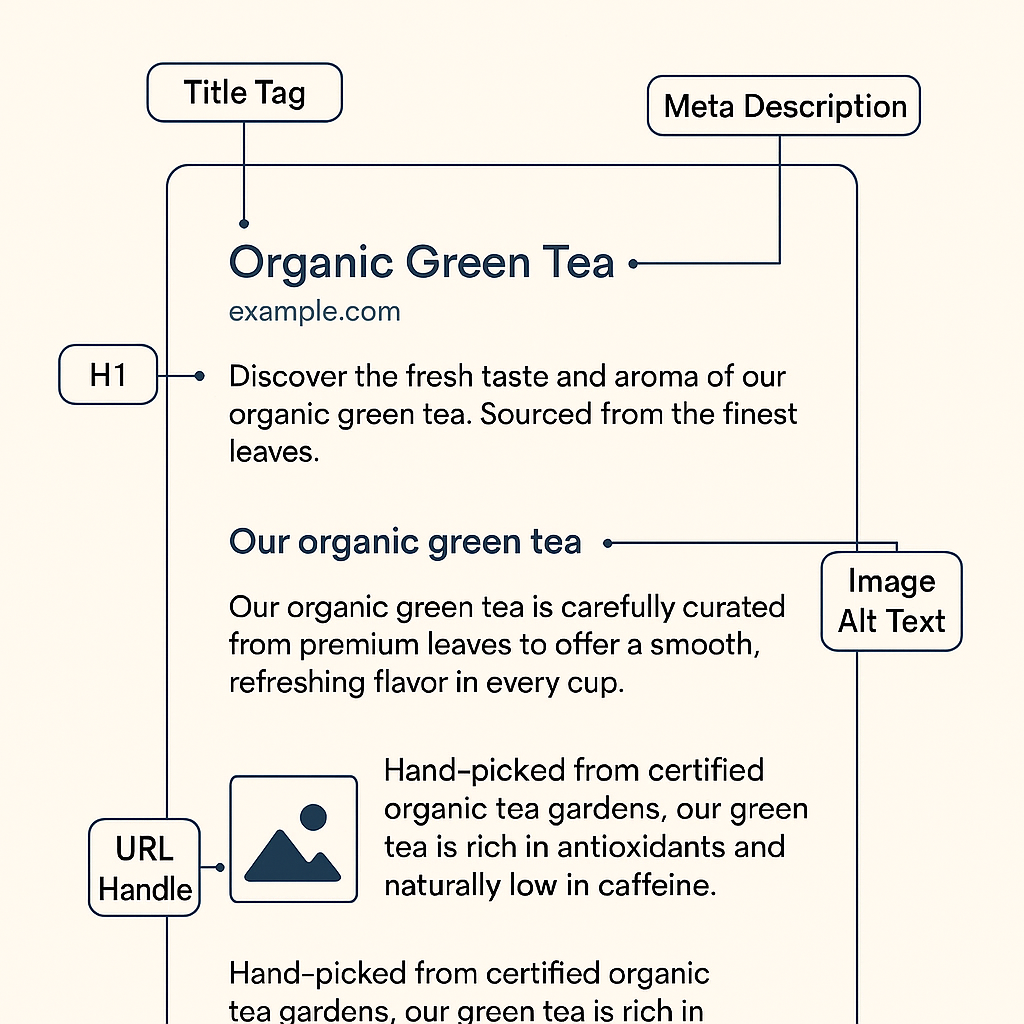
On-Page SEO Essentials
On-page SEO is the part you control directly.
Start by placing your main keyword naturally in your title tag, meta description, H1, the first paragraph, image alt text, and URL handle.
This helps Google instantly understand the focus of your page.
Follow SEO-friendly product page optimisation for Shopify, making sure you write unique descriptions rather than using supplier text. Add benefits, materials, sizing, and usage details.
Use clear wording that matches how real customers search, such as "breathable gym leggings for women" or "handmade ceramic coffee mug UK delivery."
#3. Shopify Technical SEO
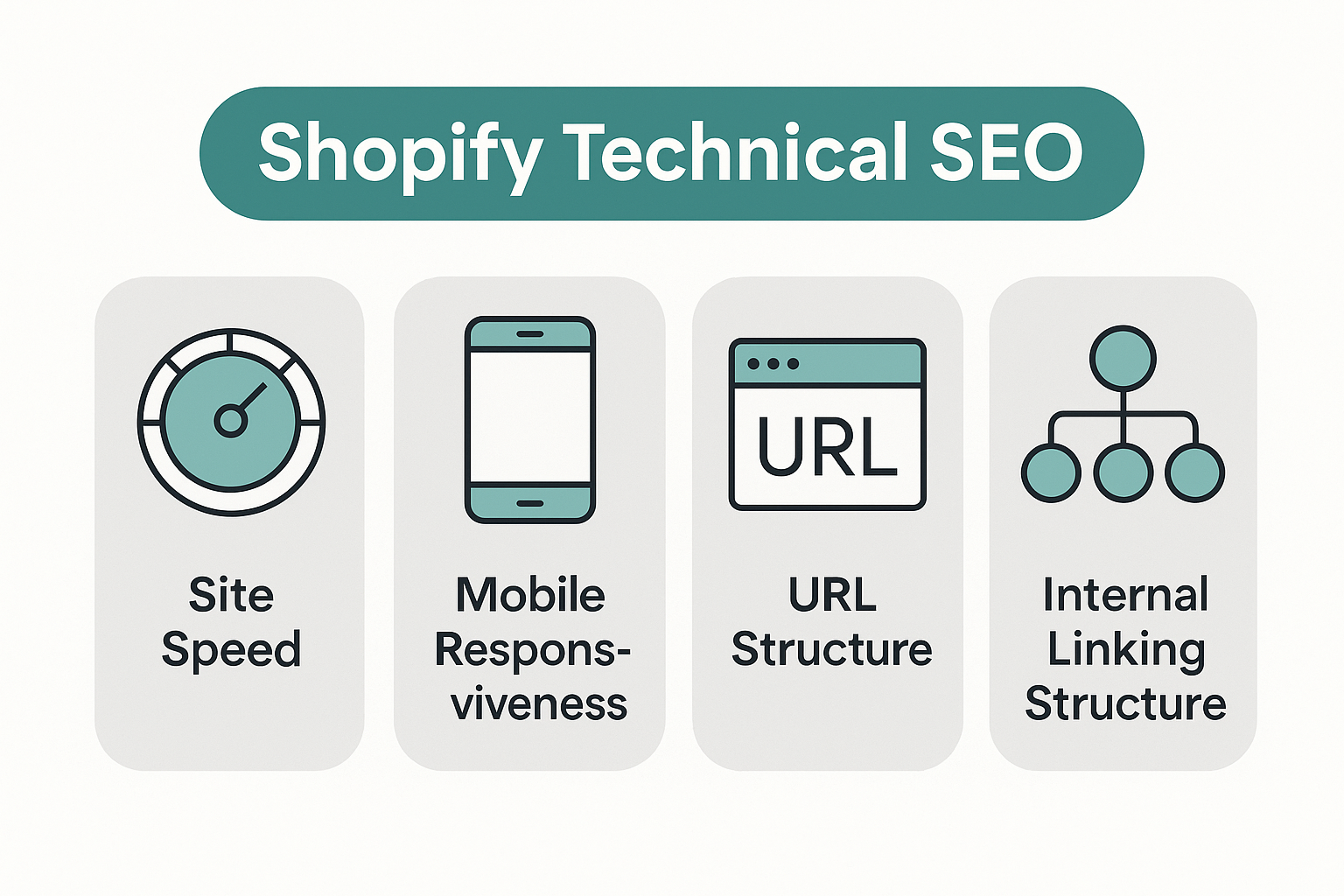
Shopify Technical SEO
Technical SEO keeps your store fast, clean, and easy for search engines to crawl.
Start by fixing any broken links and removing unused apps that slow down your site.
Follow Shopify site speed improvement tips: compress images, reduce theme bloat, and keep your homepage lightweight.
Make sure your store is fully responsive—most customers browse on mobile. Shopify includes structured data automatically, but adding a schema app can enhance your rich results.
Lastly, build a logical internal linking structure so Google can map your pages without confusion.
#4. Content Marketing for Shopify SEO
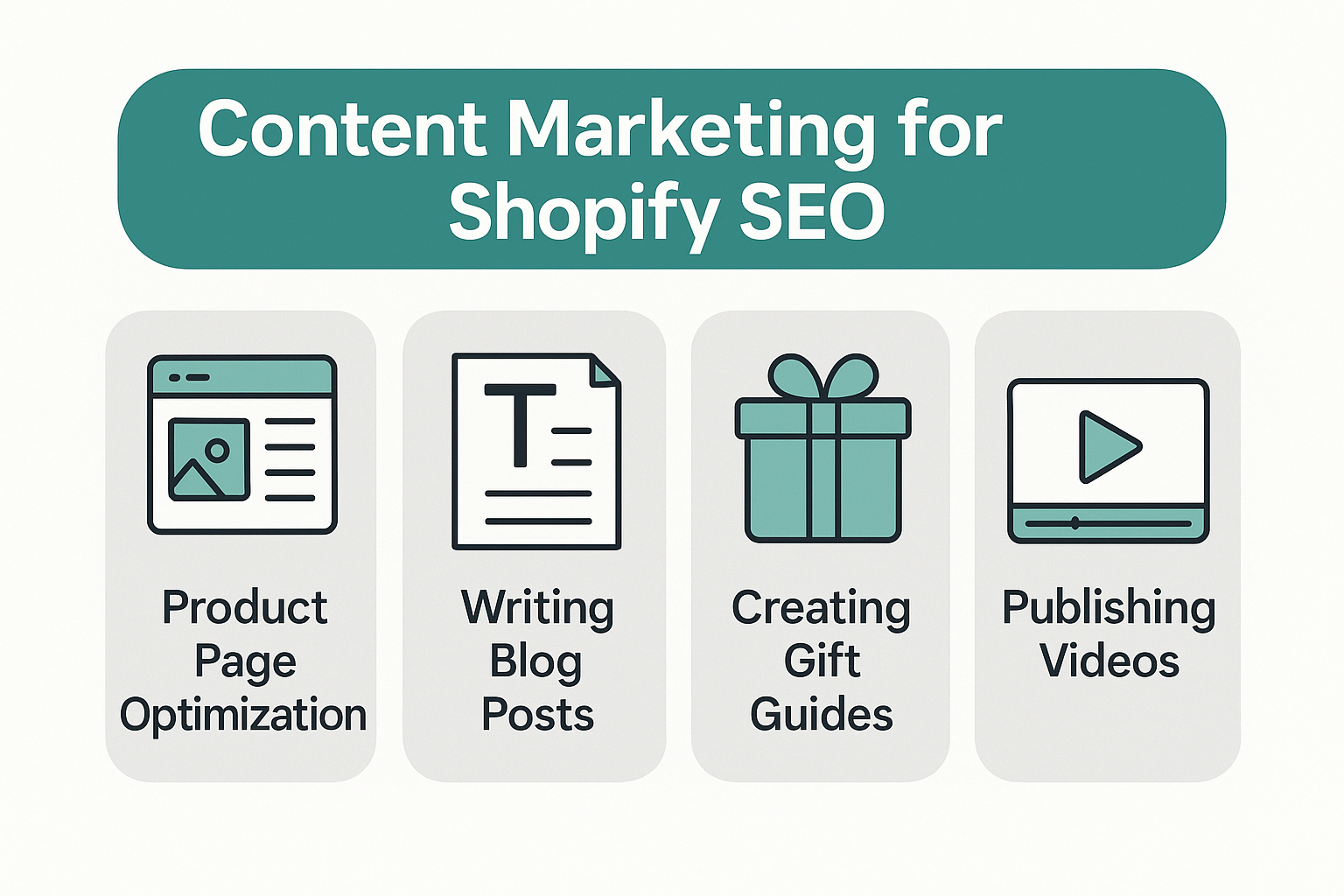
Content Marketing for Shopify SEO
Content is how you attract traffic beyond just product searches.
Create supporting blogs that answer customer questions, highlight benefits, or guide buying decisions.
Strong long-tail topics include "how to choose the right moisturiser for sensitive skin," "winter gift ideas for new mums," or "best travel backpacks for digital nomads."
Use content clusters—groups of related articles—so Google sees you as an authority.
This is one of the most effective Shopify content marketing strategies because it connects informational searches to transactional pages, helping shoppers discover your products naturally.
#5. Off-Page SEO (Beginner-Friendly)
Off-page SEO helps boost your authority beyond your website.
Start with easy backlinks: supplier links, brand directories, and partnerships. Blogger reviews, guest posts, and niche PR publications can also help build trust signals.
Encourage customers to leave reviews—these build credibility and support Shopify brand authority building strategies. Even social media mentions contribute to your overall visibility.
The more trusted websites talk about your store, the easier it becomes to climb higher in search results.
#6. Use Google Search Console
Use Google Search Console
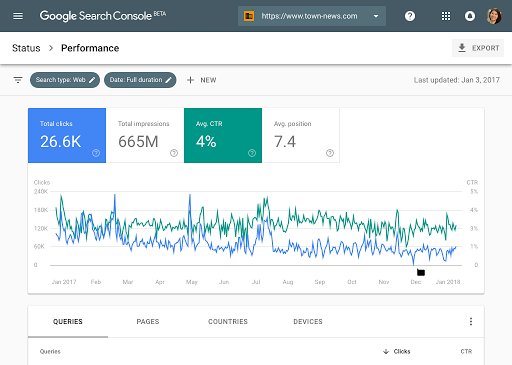
A powerful way to understand how shoppers discover your store is by checking real search queries inside Google Search Console.
Google no longer shows this data in Analytics due to privacy changes, but Search Console still gives you full access to the keywords people use before landing on your site.
You'll see which terms trigger impressions, which pages get clicks, and where you rank across Google search results.
It's one of the simplest ways to spot new opportunities, fix underperforming pages, and refine your SEO strategy based on real customer behaviour—not guesses.
#7. Add ALT Text to Every Image
Alt text (alternative text) is the written description behind an image that helps search engines understand what the picture represents.
Shopify automatically uses your product name as the alt text for product images, which is a decent fallback—but far from ideal.
You'll get much better results by writing unique, detailed descriptions for each image, especially when you have multiple variants.
To update alt text in Shopify, go to Products → All Products, open the product you want to edit, click on an image, and select "Add alt text."
If your image file names are already descriptive, you can also update alt text in bulk using Shopify's export/import feature to speed things up.
#8. Compress and Optimise Your Images

Compress and Optimise Your Images
Large, uncompressed images are one of the biggest reasons Shopify product pages load slowly.
Since page speed is a major ranking factor, keeping your visuals lightweight is essential for strong SEO performance. Most of your page size will come from media files—especially product photos—so optimising them has an immediate impact.
Shopify doesn't automatically compress images, which means whatever you upload is exactly what gets served.
Many themes now include lazy loading (where images load only when needed), but that alone isn't enough. Always compress your images before uploading them to your store.
For example, if your original photo is 300 KB, a quick optimisation can bring it down to around 60 KB without any noticeable loss in quality. That reduction makes your pages load significantly faster while keeping everything looking sharp.
#9. Page Speed Is the New King
Page Speed Is the New King
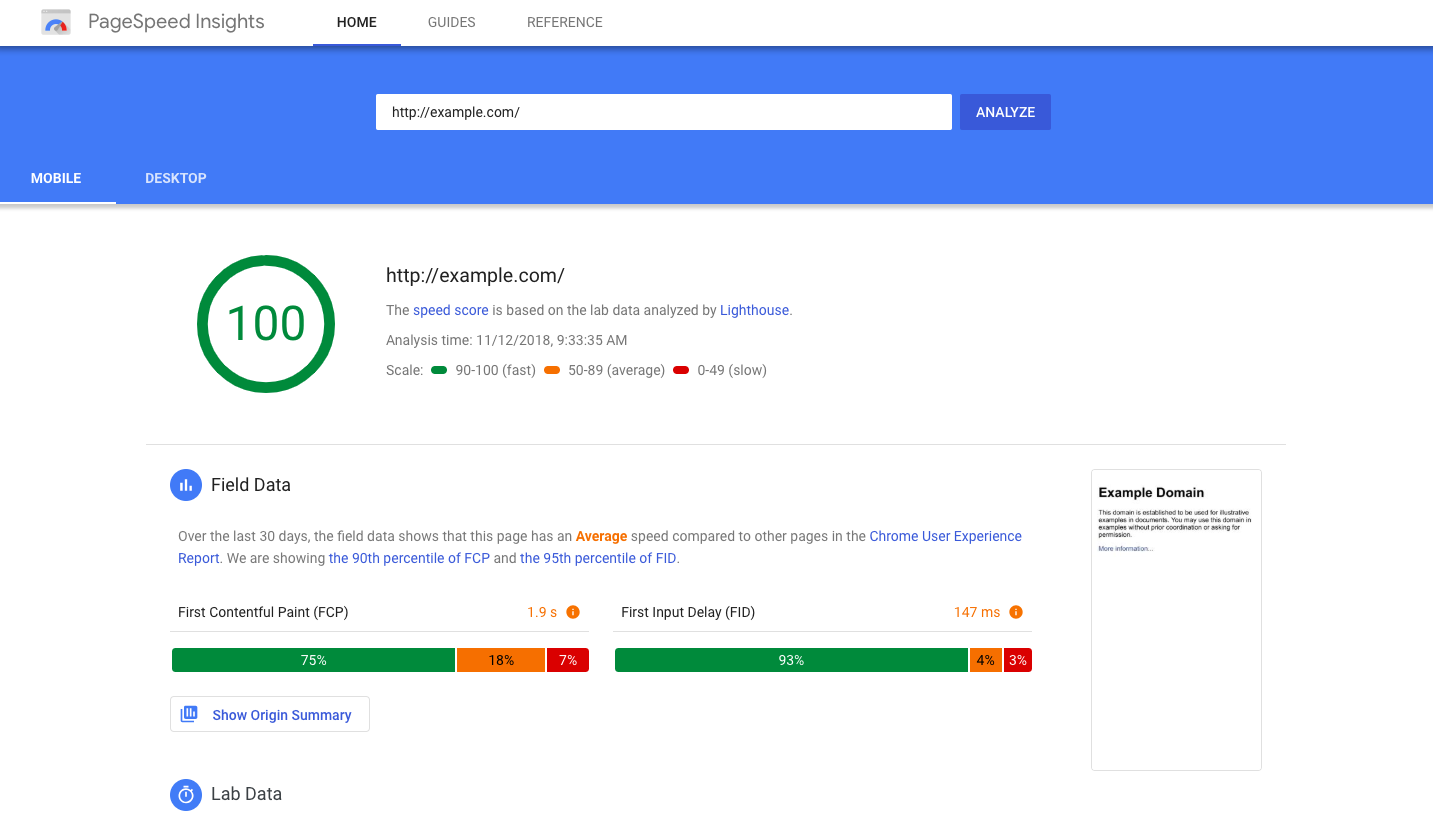
There used to be a saying that "content is king," but today, speed has taken the crown—especially for mobile users. In eCommerce, every second counts. Slow pages lose shoppers, increase bounce rates, and hurt your rankings.
As a rule of thumb, your product pages should load within 0–4 seconds to stay competitive.
The best way to measure and improve your performance is with Google Lighthouse. It replaces the old PageSpeed Insights by combining performance, accessibility, best-practice checks, and SEO audits into one tool.
You can run Lighthouse directly inside Chrome by opening Developer Tools → Lighthouse.
Always run your tests in Incognito Mode to avoid skewed results caused by cached files, extensions, or open tabs. This gives you a clean, accurate picture of how fast your store really loads.
#10. Maintain a Blog to Support Your SEO
A blog isn't required to run an online store, but it's one of the most effective long-term strategies for driving consistent organic traffic.
Creating helpful, search-focused articles takes time and resources, but when done well, it can build authority, attract new shoppers, and boost your overall SEO performance.
Many merchants don't realise Shopify includes a simple built-in blogging platform.
You can access it by going to Online Store → Blog Posts and creating your first article.
The editor is straightforward—similar to WordPress—and even supports customer comments. Comments are turned off by default, but you can enable them under Blog Posts → Manage Blogs, then choose "Comments are allowed, pending moderation."
Using your blog to answer common questions, share buying guides, or provide product education helps search engines understand your expertise and gives customers more reasons to trust your brand.
#11. Increase Your DR and DA Through High-Authority Guest Posts
If you want your Shopify store to rank faster and more consistently, boosting your Domain Rating (DR) and Domain Authority (DA) should be part of your strategy.
One of the most effective ways to do this is by publishing guest posts on reputable, high-authority websites. When established sites link back to your store, Google sees those links as trust signals—essentially a vote of confidence that your content is credible and worth ranking.
Look for websites in your niche with strong metrics and engaged audiences.
Offer valuable, well-written content that genuinely helps their readers. In return, include a natural link back to your store or a relevant resource page.
Over time, these high-quality backlinks strengthen your domain, improve your overall search visibility, and help your product pages climb the rankings much faster.
Guest posting isn't a quick fix, but as part of a consistent SEO plan, it's one of the most reliable ways to build long-term authority.
Real Examples: How Shopify Stores Grow With Simple SEO
Sometimes the biggest SEO wins come from small, consistent improvements.
Here are two real-world examples (anonymised) showing how everyday Shopify stores saw meaningful growth just by following a few basic optimisation steps.
Example 1: A Skincare Brand Boosted Organic Traffic by 64% in 90 Days
A small UK skincare brand was struggling with slow traffic and heavy reliance on Instagram ads.
Their pages took nearly 7 seconds to load, product descriptions were thin, and none of their images had alt text.
After making a few changes—compressing images, rewriting product descriptions with long-tail keywords like "moisturiser for sensitive dry skin," and cleaning up their URL structure—their average load time dropped to 2.8 seconds.
Google Search Console showed impressions jump by 52%, and organic traffic increased by 64% within three months, even though the business didn't publish any new products.
These improvements also lowered their ad spend because they were finally attracting "free" search traffic.
Example 2: An Apparel Store Saw Revenue Grow 32% After Adding a Blog Strategy
A mid-size apparel brand had strong products but weak search visibility.
They relied heavily on paid ads and word of mouth. They added a simple content strategy: weekly blog posts targeting long-tail terms like "how to style oversized hoodies" and "best streetwear outfits for winter."
Each post linked back to collections and bestsellers, creating a clean internal linking structure.
Within four months, blog pages started ranking for over 180 new keywords. Organic traffic increased by 40%, and revenue from organic users grew by 32%.
The biggest surprise?
Their bounce rate dropped because customers spent more time engaging with helpful content.
Tools Every Shopify Beginner Should Use
The right tools make Shopify SEO a whole lot easier.
You don't need anything complicated or expensive — just a handful of essentials that help you understand your customers, fix issues faster, and optimise your store with confidence.
Here are the must-have tools for anyone starting out:
Shopify Search & Discovery
Shopify's Search & Discovery app helps customers find products faster by improving how search, filtering, and recommendations work inside your store.
Once installed, you can customise product filters, add synonyms for common search terms, and boost or bury specific items to control what shoppers see first.
This is especially important for stores with large catalogues.
How to use it: Go to the app dashboard, create custom filters for collections, set up product recommendations, and adjust search rules so relevant items appear at the top.
Why it matters: A smoother on-site search experience reduces friction, increases conversions, and keeps users engaged — which indirectly supports SEO by improving user behaviour signals.
Google Search Console
Google Search Console shows how your store performs in Google search.
It reveals the keywords customers use, your rankings, indexing issues, mobile usability problems, and click-through rates.
How to use it: Verify your Shopify domain (Shopify makes this easy), submit your sitemap, then check the "Performance" tab to see real search queries. Use the "Pages" report to identify which URLs need improvement.
Why it matters: This is the only accurate source of your organic visibility. Search Console helps you find quick wins, fix issues fast, and understand which pages are gaining or losing traction. Every SEO decision becomes data-driven instead of guesswork.
Google Analytics (GA4)
Google Analytics helps you understand how visitors behave once they land on your site — which products they view, how long they stay, what traffic sources convert, and where you lose potential customers.
How to use it: Connect GA4 through Shopify's Sales Channels settings. Then monitor reports for user retention, top-selling pages, landing pages with high bounce rates, and conversion paths.
Why it matters: SEO doesn't end with ranking. You need to know whether your traffic converts. GA4 helps you spot weak points in your shopping journey, optimise pages that underperform, and double down on traffic sources that bring high-intent buyers.
PageSpeed Insights
PageSpeed Insights measures your store's loading speed and shows exactly what's slowing it down on both mobile and desktop.
It's powered by Google Lighthouse, making it the most reliable performance testing tool.
How to use it: Enter any Shopify URL (homepage, product, or collection). Review the "Opportunities" and "Diagnostics" sections for issues like uncompressed images, large scripts, unused apps, or render-blocking resources.
Why it matters: Faster sites rank better and convert better. Shopify stores should aim for 0–4 second load times.
Fixing performance issues boosts SEO, improves user experience, and directly increases sales — especially on mobile.
TinyPNG (or TinyJPG)
TinyPNG is a simple image compression tool that reduces image file size without hurting visual quality.
Since product photos often make up most of a Shopify page's weight, compression is one of the fastest ways to improve speed.
How to use it: Drag and drop your images into TinyPNG before uploading them to Shopify, or export product batches from your store, compress them, and re-upload.
Why it matters: Large images slow down mobile performance and hurt conversions.
Compressing images from 300 KB down to 60–120 KB reduces load times dramatically — improving SEO, user experience, and overall store performance.
SEO Apps (Yoast SEO, Smart SEO, Tapita SEO)
SEO apps help beginners handle metadata, schema markup, redirects, broken links, and content optimisation without touching code.
How to use it: Install one app, run the setup wizard, and let it scan your store. Update title tags, meta descriptions, and broken links. Add product schema and structured data automatically.
Why it matters: These tools simplify complex SEO tasks and ensure your store communicates clearly with search engines. They also save hours of manual optimisation work and reduce the chance of technical errors.
🔗 Yoast SEO: https://apps.shopify.com/yoast-seo
🔗 Smart SEO: https://apps.shopify.com/smart-seo
🔗 Tapita SEO: https://apps.shopify.com/tapita-seo-and-speed
How Long Does Shopify SEO Take?
Shopify SEO isn't instant, and anyone promising overnight results is lying to you.
Organic growth takes time because Google needs to crawl your store, understand your content, assess your authority, and compare you to competitors.
On average, most stores start seeing early movement within 3–6 months, especially if they're fixing technical issues, improving content, and building a healthier internal link structure. Strong, stable rankings usually take 6–12 months, depending on how competitive your niche is.
Your timeline can speed up if you consistently publish helpful content, build high-quality backlinks, optimise product pages properly, and improve site performance.
On the other hand, thin descriptions, slow page speed, duplicate content, poor internal linking, or relying only on paid ads can slow down your results significantly.
SEO works, but it's a long game.
If you treat it as a consistent part of your marketing strategy — not a one-time task — you'll see steady, compounding growth that becomes more valuable over time.
Shopify SEO FAQs
What is Shopify SEO for beginners?
Shopify SEO for beginners simply means optimising your store so Google can understand your pages, rank your products, and send you free organic traffic.
It includes improving your titles, descriptions, URLs, loading speed, internal links, and content.
You don't need to be technical — you just need a clear strategy and consistency.
Do I need a Shopify SEO checklist?
Yes.
A Shopify SEO checklist helps you stay organised and ensures you don't miss important tasks like keyword research, alt text, metadata, improving page speed, and fixing broken links.
SEO isn't one task — it's a set of small improvements that add up over time.
How do I improve SEO on Shopify?
Start by targeting long-tail keywords, optimising product descriptions, compressing images, speeding up your theme, fixing bad URLs, building internal links, and adding helpful content.
Tools like Google Search Console and PageSpeed Insights make it easy to see what's working and what needs improvement.
Is Shopify good for SEO?
Yes. Shopify has clean URLs, automatic sitemaps, SSL, mobile-friendly themes, and built-in features that help beginners optimise their store.
The platform isn't perfect — themes can get slow, and apps can bloat your site — but with proper optimisation, Shopify can perform extremely well in search.
How long does Shopify SEO take?
Most Shopify stores start seeing early improvements in 3–6 months and stronger, more stable rankings in 6–12 months.
Your results depend on competition, content quality, backlinks, and site performance. SEO is long-term, but the payoff is consistent organic traffic that doesn't depend on ads.
What apps help with Shopify SEO?
Popular options include Yoast SEO, Smart SEO, and Tapita SEO, which help with metadata, schema, redirects, and site audits.
Image-focused tools like TinyPNG and optimisation tools like Plug in Speed or Booster SEO can also improve performance.
Wrapping up
SEO doesn't have to be overwhelming. You don't need technical skills, fancy tools, or a huge budget — just steady, consistent action.
When you focus on the basics, improve your product pages, speed up your site, publish useful content, and build a few quality backlinks, your Shopify store becomes easier for Google to trust and easier for customers to find.
The checklist you've just read gives you a clear path forward. You don't have to do everything at once.
Pick one section today, make the improvement, and build momentum from there. Every small fix compounds over time, and before you know it, your store will be attracting more organic traffic, more customers, and more sales — without relying on ads.
Start simple. Stay consistent. Keep going.
Most Popular Posts

Effective communication among team members is vital for the productivity and success of any organization. Surprisingly, 60% of companies lack a long-term internal communication strategy, which p...


Businesses thrive on communication for efficiency, productivity and accomplishment. When the right information is passed from the right designation in the organization, it promotes positivity an...

Categories
Blog
(3220)
Business Management
(396)
Employee Engagement
(235)
Digital Transformation
(220)
Growth
(150)
Intranets
(142)
Internal communications
(108)
Remote Work
(68)
Sales
(53)
Collaboration
(53)
Customer Experience
(33)
Culture
(30)
Knowledge Management
(29)
Project management
(29)
Leadership
(20)
Comparisons
(9)
News
(1)

Related Posts

Where can I send a fax from in my area when a document needs to go out today? The answer might be a nearby print or shipping shop, a library or an online fax service, but what's available depends on your location. The UPS Store lists a ne...

AI in internal communications can help a small team turn one important update into useful messages, answers and resources for employees—but only when the information is accurate and a person checks the result. Comms teams are expected to keep p...

How is Edge AI changing business operations in 2026, and when does it make sense to process data near where it is created instead of sending it all to the cloud? The investment forecasts point to growing interest: Capgemini Research Institute's...

Choosing the best ERP for Shopify often starts when the workarounds stop working. Your store shows stock that the warehouse can't find. Wholesale orders live in spreadsheets. Finance spends days reconciling payouts, while customer service...

Could choosing the wrong proxy disrupt your team's work or increase costs without improving results? When comparing rotating proxies vs static proxies, the answer depends on what your business needs: a consistent IP address for an ongoing sessi...


Jill Romford
I am a digital nomad, lover of exploring new places and making friends.
I love to travel and I love the internet. I take pictures of my travels and share them on the internet using Instagram.
Traveler, entrepreneur, and community builder. I share my insights on digital marketing and social media while inspiring you to live your fullest life.
Ready to learn more? 👍
One platform to optimize, manage and track all of your teams. Your new digital workplace is a click away. 🚀
Free for 14 days, no credit card required.