
Insight Blog
Agility’s perspectives on transforming the employee's experience throughout remote transformation using connected enterprise tools.
19 minutes reading time
(3713 words)
Directory Service Failures - How to Reduce Downtime and Keep Teams Connected

Directory Service Failures - How to Reduce Downtime and Keep Teams Connected
Learn how to reduce downtime caused by directory service failures using IT disaster recovery planning, Active Directory resilience, employee communication tools, and business continuity strategies.
Directory Service Failures - How to Reduce Downtime and Keep Teams Connected

Most businesses don't really think about directory service failures until everything suddenly stops working.
One minute your employees are logging into apps, accessing files, joining meetings, and sending messages normally — then out of nowhere, nobody can sign in, authentication starts failing, and the entire business slows to a crawl.
The reality is that modern companies rely heavily on platforms like Microsoft, Okta, and Active Directory to manage employee access, authentication, security permissions, and communication across the workplace.
When these systems experience a directory service outage, employees can lose access to email, collaboration tools, HR systems, documents, VPNs, and even customer-facing platforms.
And the scary part?
Even short periods of downtime can become incredibly expensive.
According to research from IBM, the average cost of IT downtime can reach thousands of pounds per minute for growing businesses and enterprises, especially when productivity, customer service, and internal operations are disrupted.
$9,000
per minute
According to IBM, the average cost of IT downtime can reach up to $9,000 per minute for businesses experiencing critical directory service failures, authentication outages, and operational disruptions.
Source: IBM IT Infrastructure & Disaster Recovery Research
That's why business continuity planning and IT disaster recovery strategies are no longer optional.
Companies need reliable communication systems, backup access procedures, and centralized digital workplace platforms that help teams stay informed during authentication failures or system outages.
Because when directory services fail, the businesses that recover fastest are usually the ones that already planned for it before it happened.
Key Takeaways
- Directory service failures can quickly disrupt employee access, communication, authentication systems, and daily business operations across remote and hybrid workplaces.
- Businesses relying on a single authentication environment increase operational risk, making Active Directory disaster recovery and identity redundancy critical for business continuity.
- Strong IT disaster recovery planning helps organizations reduce downtime through backup identity systems, proactive monitoring, communication workflows, and recovery testing.
- Solutions such as Semperis disaster recovery for Active Directory help businesses recover identity systems faster while reducing security risks during authentication outages.
- Centralized employee communication platforms help organizations maintain operational resilience, coordinate teams, and keep employees informed during service disruptions and IT outages.
What Are Directory Service Failures?
Most businesses don't realize how much they depend on directory services until something breaks.
A directory service failure happens when systems like Active Directory, cloud identity providers, or authentication platforms stop working properly, preventing employees from accessing the tools and systems they need to do their jobs.
In modern workplaces, directory services control everything from employee logins and file access to email authentication, VPN access, Single Sign-On (SSO), and collaboration platforms.
So when a failure happens, it can quickly create widespread operational disruption across the business.
Common Causes of Directory Service Outages
There are several reasons why a directory service outage can happen, and many of them are more common than most IT teams expect.
Misconfigured security settings, expired certificates, DNS failures, cloud authentication issues, overloaded servers, and ransomware attacks can all bring authentication systems offline.
Cybersecurity threats are becoming one of the biggest causes of downtime. Attackers increasingly target identity systems because compromising Active Directory often gives them access to the entire network.
That's why many businesses now invest in solutions like Semperis and use strategies such as Semperis disaster recovery for Active Directory to strengthen resilience and speed up recovery after attacks or system corruption.
Signs Your Business Is Experiencing a Directory Service Issue
Usually, the first warning signs appear fast. Employees suddenly can't log in to systems, passwords stop syncing, SSO fails, or users lose access to email and internal applications.
Collaboration tools may disconnect, VPN access may fail, and support tickets often spike within minutes.
For hybrid and remote teams, these outages become even more damaging because employees rely entirely on cloud authentication and centralized identity management to access daily business systems.
Without a proper IT disaster recovery plan and clear communication process, even a short outage can lead to major productivity loss across the organization.
How Directory Service Failures Impact Business Operations
A directory service failure can affect far more than just employee logins.
In many businesses, directory services sit at the center of daily operations, controlling access to communication tools, cloud applications, shared documents, HR systems, and internal platforms.
When these systems go down, the disruption spreads quickly across departments, especially in remote and hybrid work environments.
For many companies, even a short authentication outage can create operational chaos, delay projects, interrupt customer support, and reduce employee productivity across the entire organization.
Productivity Loss Across Remote and Hybrid Teams
When employees cannot access the systems they rely on, work often comes to a complete stop.
Modern teams depend heavily on cloud-based authentication and identity management systems to connect with business applications throughout the day.
Common productivity issues during a directory service outage include:
- Employees unable to access business apps, shared drives, or internal systems
- Login failures preventing teams from starting work
- Delayed approvals and interrupted workflows
- Staff unable to join meetings or access communication tools
- Increased downtime across remote and hybrid teams
- Lost productivity due to repeated password or authentication failures
For businesses with distributed workforces, these issues become even more damaging because employees may have no alternative way to access company resources during the outage.
Communication Breakdowns During Outages
One of the biggest problems during directory service failures is communication disruption. Many businesses rely on centralized collaboration platforms tied directly to authentication systems.
If those systems fail, employees may suddenly lose access to internal announcements, messaging platforms, project tools, and shared workspaces.
This often creates confusion across the organization, especially if there is no business continuity communication plan in place.
Common communication challenges include:
- Teams losing access to collaboration and messaging platforms
- Employees missing important operational updates
- IT departments overwhelmed with support tickets and login requests
- Managers struggling to coordinate remote teams
- Delays in responding to customers or external partners
- Reduced visibility into ongoing projects and workflows
Without a backup communication process, even small outages can quickly escalate into larger operational problems.
Security and Compliance Risks
Directory service failures can also create serious security and compliance concerns.
During outages, businesses sometimes rush to apply temporary fixes or bypass security controls to restore access quickly. While this may solve short-term operational problems, it can introduce major cybersecurity risks.
Organizations operating in regulated industries face even greater pressure during authentication outages because access logs, permissions, and identity verification systems may become unreliable.
Potential security and compliance risks include:
- Unauthorized access caused by broken authentication controls
- Temporary security workarounds increasing vulnerability exposure
- Incomplete audit logs during outages
- Compliance failures related to identity access management
- Increased risk of ransomware or credential-based attacks
- Difficulty tracking employee access activity during recovery
Best Practices to Minimize Downtime During Directory Service Failures

Best Practices to Minimize Downtime During Directory Service Failures
Most companies already know they need backup systems and disaster recovery plans.
The problem is that many businesses never properly test them until a real directory service outage happens. By then, employees are locked out, communication breaks down, and IT teams are scrambling to restore access.
If you want to reduce downtime caused by directory service failures, you need practical systems that work under pressure — not just documentation sitting in a folder nobody reads.
1. Build Redundancy Into Authentication Systems
One of the biggest mistakes businesses make is relying on a single identity provider or authentication server.
If that system fails, the entire business can stop functioning within minutes.
Here are practical ways to improve identity resilience:
- Deploy secondary domain controllers in separate geographic regions
- Use cloud failover authentication systems instead of relying on a single on-premise server
- Configure backup DNS servers to reduce authentication routing failures
- Regularly test failover login procedures across departments
- Keep offline administrator accounts available for emergency access
- Use conditional access policies carefully to avoid accidental lockouts
- Replicate Active Directory backups daily and verify restore integrity weekly
- Separate privileged admin accounts from employee accounts
- Document recovery runbooks for authentication failures step-by-step
2. Create a Business Continuity Communication Plan
During a directory service failure, communication becomes just as important as recovery.
Employees need updates fast, especially remote and frontline workers who may suddenly lose access to collaboration platforms.
Do not rely on the same system that just failed.
Instead, businesses should:
- Create emergency communication channels outside the main authentication environment
- Maintain offline employee contact lists securely
- Use mobile-first employee communication tools for outage notifications
- Prepare prewritten outage communication templates
- Assign specific communication responsibilities to managers and IT leads
- Set up external status pages employees can access without company login credentials
- Create fallback collaboration channels separate from SSO systems
- Test emergency communication workflows quarterly
Many businesses discover too late that their entire internal communication platform depends on the same identity system that failed.
3. Monitor Systems Proactively
A lot of directory service outages show warning signs before a complete failure happens.
The issue is that many companies simply are not monitoring the right metrics.
Instead of waiting for employees to report login failures, IT teams should monitor identity systems continuously.
Practical monitoring steps include:
- Configure real-time alerts for failed authentication spikes
- Monitor replication health between domain controllers
- Track abnormal privilege escalation activity
- Set alerts for expired certificates and DNS issues
- Monitor SSO response times continuously
- Review failed login trends daily
- Use identity threat detection tools to spot suspicious authentication behavior
- Audit service account permissions regularly
- Run automated health checks against critical authentication services
Businesses using hybrid cloud environments should also monitor synchronization between on-premise Active Directory and cloud identity providers like Microsoft.
4. Train Employees for Outage Scenarios
Even strong IT infrastructure fails sometimes. What separates resilient companies from chaotic ones is whether employees know what to do when systems stop working.
Most employees panic during authentication outages because nobody trained them for the situation beforehand.
Businesses should provide simple, practical training covering:
- How to report authentication failures quickly
- Alternative communication methods during outages
- Emergency password reset procedures
- Offline access processes for critical documents
- Security risks during outage recovery
- How to identify phishing attempts during service disruptions
- Escalation contacts for urgent operational issues
- Business continuity procedures for remote employees
Keep the training simple. Nobody wants a 40-page disaster recovery manual during a real outage.
Short recovery checklists, internal knowledge base articles, and mobile-accessible emergency guides are usually far more effective.
Why Internal Communication Matters During IT Outages
When a directory service failure happens, most businesses focus entirely on restoring systems as quickly as possible.
But one of the biggest operational mistakes companies make during an IT outage is failing to communicate properly with employees while recovery is happening.
The reality is that people handle outages far better when they understand what is happening, what systems are affected, and what steps the business is taking to resolve the issue.
Without communication, confusion spreads fast, productivity drops, and support teams become overwhelmed with repeated questions and login complaints.
Strong internal communication becomes a critical part of business continuity planning because it helps organizations stay coordinated during high-pressure situations.

Why Internal Communication Matters During IT Outages
Keeping Employees Informed Reduces Panic
One of the fastest ways to create chaos during a directory service outage is silence.
If employees suddenly lose access to systems and hear nothing from leadership or IT teams, they often assume the worst. Productivity slows down immediately as people stop working and begin searching for answers.
This is why businesses need centralized communication systems that can continue operating even when authentication services fail. Employees should always know where to find updates, who is handling the issue, and what actions they should take while systems are being restored.
Practical communication strategies include:
- Sending real-time outage notifications through mobile communication tools
- Creating centralized status update pages employees can access externally
- Providing estimated recovery timelines whenever possible
- Assigning leadership representatives to communicate major updates
- Sharing fallback procedures for critical workflows
- Updating employees regularly instead of waiting for full recovery
Businesses that communicate clearly during outages often recover faster operationally because employees remain informed, coordinated, and less dependent on IT support tickets for updates.
How Digital Workplace Platforms Help Maintain Operations
Modern digital workplace platforms play a major role in reducing disruption during directory service failures because they give businesses alternative ways to communicate, coordinate work, and share information outside traditional authentication systems.
For remote and hybrid organizations, this becomes especially important because employees may not have access to office-based fallback systems during an outage.
Mobile-first communication platforms and cloud collaboration tools help businesses continue operating while IT teams work on recovery.
A strong digital workplace platform can help organizations:
- Deliver emergency announcements to all employees quickly
- Maintain access to critical company documents and knowledge bases
- Coordinate tasks and operational updates during downtime
- Reduce confusion across departments and remote teams
- Keep frontline workers informed through mobile notifications
- Provide managers with visibility into ongoing operational issues
This is one reason many businesses now invest in centralized employee communication platforms like AgilityPortal. When authentication systems fail, companies still need a reliable way to keep employees connected, informed, and operational.
How AgilityPortal Helps Teams Stay Connected During Service Failures
When a directory service failure happens, the biggest challenge for most businesses is not just restoring systems — it is keeping employees informed and operational while recovery is taking place.
Many organizations quickly discover that their communication tools, file access systems, and workflows all depend on the same authentication environment that just failed.
That is where a centralized digital workplace platform becomes critical.
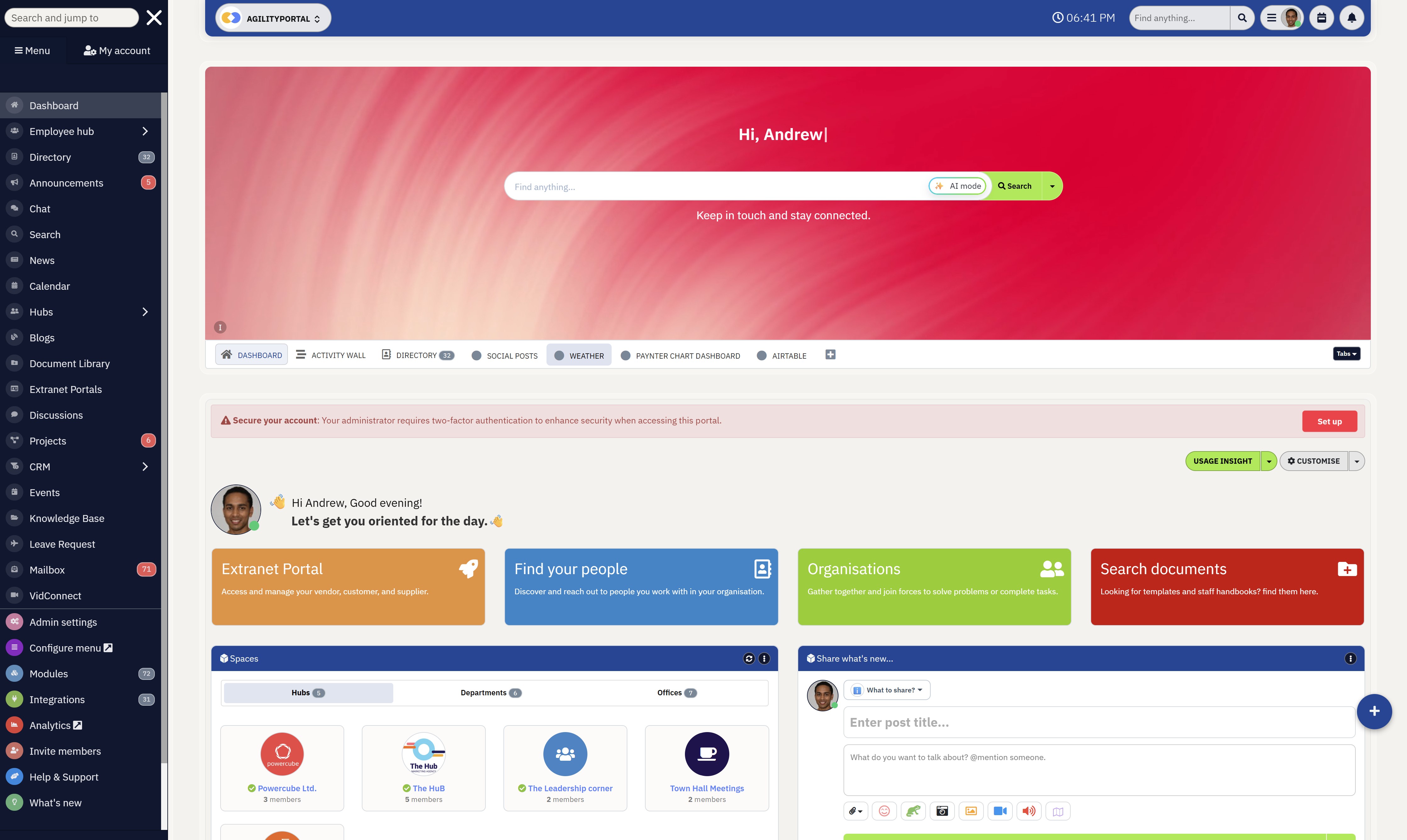
AgilityPortal helps businesses maintain communication, visibility, and operational continuity during IT outages, authentication failures, and unexpected service disruptions.
Instead of relying on disconnected systems, teams can use one centralized employee communication platform to share updates, access knowledge, and coordinate work across departments.
How AgilityPortal Helps Teams Stay Connected During Service Failures
Centralized Communication During Outages
One of the biggest problems during directory service outages is fragmented communication.
Employees often do not know where to go for updates, managers struggle to coordinate teams, and IT departments become overwhelmed with repeated support requests.
AgilityPortal provides businesses with a centralized communication hub where organizations can:
- Publish company-wide outage updates
- Share emergency announcements instantly
- Notify specific departments or locations
- Reduce confusion across remote and hybrid teams
- Keep employees aligned during operational disruptions
This becomes especially important for businesses managing distributed workforces or frontline employees who may not have access to traditional office communication systems during an outage.
Mobile Employee Communication and Emergency Alerts
When employees cannot access laptops, VPNs, or internal systems, mobile communication becomes essential.
AgilityPortal's mobile-first employee communication tools help businesses continue reaching employees regardless of where they are working from.
Organizations can:
- Send emergency notifications directly to mobile devices
- Deliver real-time operational updates
- Share recovery instructions during authentication failures
- Keep remote teams informed outside traditional login systems
- Maintain communication with frontline workers during outages
For many businesses, having a backup communication channel independent from Active Directory or Single Sign-On systems becomes a critical part of business continuity planning.
Access to Knowledge and Operational Information
During service failures, employees still need access to procedures, recovery instructions, company policies, and operational documentation.
Without centralized knowledge management, employees waste valuable time searching for information or waiting for IT support responses.
AgilityPortal helps businesses maintain access to:
- Internal knowledge bases
- Company policies and procedures
- Disaster recovery documentation
- Department-specific operational resources
- Employee onboarding and training materials
This reduces downtime significantly because employees can continue finding critical information even while core authentication systems are being restored.
Supporting Business Continuity for Hybrid Teams
Hybrid and remote workplaces are especially vulnerable during directory service failures because employees depend heavily on cloud authentication and digital collaboration platforms to perform daily work.
AgilityPortal helps organizations improve operational resilience by giving teams a secure, centralized environment for communication, collaboration, and knowledge sharing during disruptions. Managers can continue coordinating departments, leadership can communicate clearly with employees, and teams remain connected while IT recovery efforts are underway.
Directory service failures are no longer rare IT problems that only affect large enterprises. Modern businesses rely heavily on identity systems, cloud authentication, and centralized communication tools to keep operations running every day. When those systems fail, even short outages can disrupt productivity, communication, and customer operations across the organization.
The businesses that recover fastest are usually the ones that already invested in operational resilience, business continuity planning, and reliable employee communication systems before an outage happens.
If your organization wants to reduce downtime, improve communication during outages, and keep hybrid teams connected during service disruptions, AgilityPortal can help.
Start your 14-day free trial today — no credit card required.
AgilityPortal
Keep Employees Connected, Informed & Operational During Directory Service Failures
AgilityPortal helps businesses maintain communication, operational visibility, and employee coordination during directory service failures, authentication outages, and unexpected IT disruptions.
Instead of relying on disconnected communication tools and systems tied directly to Active Directory or Single Sign-On environments, AgilityPortal provides one centralized digital workplace platform where teams can access updates, share information, communicate during outages, and continue operating during recovery scenarios.
Reduce downtime and communication breakdowns
by giving employees, managers, IT teams, and leadership one centralized platform for emergency updates, internal communication, knowledge sharing, and operational coordination during IT outages.
AI Summary
- Modern businesses rely heavily on directory services, identity management systems, and cloud authentication platforms to control employee access, communication, collaboration tools, and daily business operations.
- Directory service failures can quickly disrupt productivity by preventing employees from accessing business applications, email systems, VPNs, shared documents, and internal communication platforms.
- Many organizations underestimate the operational impact of authentication outages until login failures, communication breakdowns, and workflow disruptions begin affecting remote and hybrid teams.
- Strong IT disaster recovery planning helps businesses reduce downtime by improving authentication redundancy, backup access procedures, identity monitoring, and business continuity communication processes.
- Solutions such as Semperis disaster recovery for Active Directory help organizations recover identity systems faster while reducing operational disruption, cybersecurity risks, and recovery complexity during outages.
- Businesses using centralized employee communication platforms and digital workplace tools often maintain better operational resilience, improve outage coordination, and keep teams informed during service disruptions.
Most Popular Posts

Effective communication among team members is vital for the productivity and success of any organization. Surprisingly, 60% of companies lack a long-term internal communication strategy, which p...


Businesses thrive on communication for efficiency, productivity and accomplishment. When the right information is passed from the right designation in the organization, it promotes positivity an...
Categories
Blog
(2932)
Business Management
(365)
Employee Engagement
(221)
Digital Transformation
(190)
Growth
(140)
Intranets
(133)
Remote Work
(63)
Sales
(53)
Collaboration
(47)
Customer Experience
(30)
Culture
(29)
Knowledge Management
(28)
Project management
(28)
Leadership
(20)
Comparisons
(9)
News
(1)

Related Posts

Most businesses don't really think about directory service failures until everything suddenly stops working. One minute your employees are logging into apps, accessing files, joining meetings, and sending messages normally — then out of nowhere...

Many businesses still rely on spreadsheets, outdated systems, and disconnected tools to manage company assets, but this approach creates more problems than most leaders realize. From missing equipment and duplicate software purchases to delayed...

Starting a business in 2026 is both exciting and challenging. The good news? You don't need a huge team or a big budget to make it work. The best tools for startups & small businesses 2026 can help you save time, cut costs, and grow fas...

What's the best small business tool for getting more done without burning out your team or budget? With thousands of options on the market, finding the right solution can feel overwhelming—especially when every tool claims to be "the best." Fro...

It's time to reduce the frequency of your meetings and emails. It's time to simplify communication and enhance work efficiency. Perhaps it's time to consider implementing an intranet. Intranets are powerful tools, yet they often go unnoticed as...


Jill Romford
I am a digital nomad, lover of exploring new places and making friends.
I love to travel and I love the internet. I take pictures of my travels and share them on the internet using Instagram.
Traveler, entrepreneur, and community builder. I share my insights on digital marketing and social media while inspiring you to live your fullest life.
Ready to learn more? 👍
One platform to optimize, manage and track all of your teams. Your new digital workplace is a click away. 🚀
Free for 14 days, no credit card required.