
Insight Blog
Agility’s perspectives on transforming the employee's experience throughout remote transformation using connected enterprise tools.
38 minutes reading time
(7669 words)
Internal Communications Strategy Examples: How Ops & IT Leaders Fix Broken Remote Communication Tools (2026 Guide)

Internal Communications Strategy Examples: How Ops & IT Leaders Fix Broken Remote Communication Tools (2026 Guide)
Internal communications strategy examples for Ops & IT teams. Learn how to fix broken tools, improve execution, and reduce noise at scale.
Internal Communications Strategy Examples: How Ops & IT Leaders Fix Broken Remote Communication Tools (2026 Guide)

If you're leading Ops or IT right now, this probably feels familiar: your team has more ways to communicate than ever, yet getting the right message to the right people at the right time feels harder than it did five years ago.
You've got chat tools, email, project systems, ticketing platforms, shared drives, video calls, and "that one tool a team adopted without telling anyone." The result isn't clarity — it's noise.
Here's what Ops and IT teams are actually dealing with day to day:
- Too many tools doing overlapping jobs
- Low adoption of "official" platforms
- Shadow IT creeping in because teams just want to get work done
- Little to no visibility into who saw what, who acted, and who owns the next step
And the data backs this up. Industry research consistently shows that over 60% of digital workplace and internal communication initiatives underperform, not because the tools are bad, but because employees don't use them consistently or correctly.
Another widely cited stat: more than 70% of features in enterprise software go unused. That's wasted spend, wasted effort, and unnecessary risk.
⚠ Industry Data Backs This Up
Industry research consistently shows that over 60% of digital workplace and internal communication initiatives underperform — not because the tools are poor, but because employees don’t use them consistently or correctly.
Another widely cited statistic reinforces the problem: more than 70% of features in enterprise software go completely unused. That translates directly into wasted spend, wasted effort, and unnecessary operational risk.
This is where most conversations go wrong.
When remote communication tools don't deliver results, the instinct is to blame the platform. Maybe it needs more features. Maybe the UI isn't polished enough. Maybe users need more training.
In reality, that's rarely the root problem.
Most remote communication tools fail because they're dropped into organisations without a clear internal communications strategy. No defined rules. No ownership. No connection to how work actually flows. Tools end up floating alongside operations instead of supporting them.
That's why this guide is different.
You won't find abstract theory or fluffy advice here. This is built around real internal communications strategy examples that reflect how Ops and IT teams actually work — environments where uptime matters, compliance isn't optional, and productivity has to be measurable.
If you're responsible for keeping systems running, teams aligned, and risk under control, this guide is for you.
We're going to look at what breaks internal communication at scale, why strategy matters more than tooling, and how to design communication systems that actually hold up in the real world.
● Key Takeaways
- Internal communication breaks down when it is treated as messaging instead of an operational system.
- High-performing Ops and IT teams design communication around workflows, ownership, and execution.
- Messages tied to tasks, decisions, and incidents outperform broadcast updates and announcements.
- Measuring outcomes like decision speed and response time is more meaningful than tracking engagement.
- Reducing tool sprawl and enforcing clear communication rules improves clarity, adoption, and control.
- A strategy-first approach ensures remote communication tools support real work instead of creating noise.
Read this article: : Top 6 AI-Powered Project Management Tools To Use In 2023
What "Broken" Internal Communication Actually Looks Like in Ops & IT
Most Ops and IT leaders don't need a sample corporate communications plan to tell them something's wrong — they feel it every day. Broken internal communication in the workplace isn't dramatic. It's quiet, expensive, and cumulative.
Things don't explode. They slip.
Here's how it usually shows up.
Messages are scattered everywhere. A decision starts in email, gets debated in chat, half-documented in a shared doc, and then quietly acted on in a ticketing system.
No single place tells the full story. When something goes wrong, everyone remembers talking about it, but no one can prove what was agreed.
Important updates get missed — not because people don't care, but because they're overloaded.

When every tool is marked "important," nothing really is.
Ops teams scroll past messages they should read because most of what they see isn't relevant to the task they're trying to complete in that moment. This is one of the most common internal communication barriers: signal drowned out by noise.
Ownership is fuzzy at best. Messages are broadcast, not assigned. Decisions are announced, not tracked. There's no clear audit trail showing who was responsible for acting, who acknowledged it, or whether it was completed.
From an IT perspective, this creates real internal communications risks — especially in regulated or high-availability environments where accountability matters.
Then there's the human side that rarely gets discussed. Internal issues of a person — stress, uncertainty, fear of asking "stupid" questions — get amplified when communication is unclear.
People hesitate. They wait. They assume someone else is handling it. Over time, this leads to disengagement, quiet errors, and avoidable friction between teams.
One of the biggest misconceptions is how success is measured.
Many organisations rely on surface-level engagement metrics:
- Logins in Online Platform for Communication
- Messages sent
- Posts viewed
These numbers look reassuring in reports, but they're misleading. High activity doesn't mean effective communication.
In fact, research consistently shows that organisations with high message volume often experience slower decision-making, not faster.
When teams are flooded with updates that aren't tied to actions, productivity drops — even though "engagement" appears high.
Related Guides You May Want to Read Next
This pillar guide focuses on strategy and execution. The articles below go deeper into internal communication tools, frameworks, challenges, and real-world applications across teams and industries.
- Best Practices to Make Your Internal Communication Strategy a Success
- Internal Communications Solutions for Distributed Teams That Bypass Email
- What Is Organizational Communication and Key Strategies Explained
- The Importance of Internal Communication for Employee Productivity
- What Is Employee Communication? A Complete Updated Guide
- What Are the Biggest Hurdles in Improving Internal Communications?
- HR Communication Plan Template: Strategies, Templates & Examples
- Communication Software: How It’s Transforming Healthcare Teams
- 10 Best Communication Tools Every Business Needs
- Top Internal Communication Tools to Enhance Employee Engagement
This is where the disadvantages of internal communication done poorly really show up:
- Work gets duplicated because teams don't realise it's already been done
- Decisions are delayed because context is missing
- Incidents take longer to resolve because information lives in the wrong place
- Tool sprawl increases as teams adopt workarounds
Another overlooked issue is that many internal communications strategies exist only on paper.
A polished sample corporate communications plan might outline channels, tone, and cadence — but it often ignores how work actually flows through Ops and IT teams.
Communication isn't embedded into processes; it runs alongside them. When pressure hits, process wins and communication gets skipped.
The hidden cost of broken internal communication in the workplace isn't just frustration. It's risk. It's rework. It's delays that compound quietly until leadership starts asking why delivery feels slower despite more tools than ever.
And this is the key point: none of this is caused by bad people or lazy teams.
It's caused by systems that weren't designed for real operational environments. Before fixing tools or rolling out new platforms, you have to clearly see where communication is breaking — and why.
That diagnosis is what separates organisations that scale cleanly from those that slowly grind themselves down with complexity.
Why Most Internal Communications Strategy Examples Don't Work in Real Organisations

Why Most Internal Communications Strategy Examples Don't Work in Real Organisations
Here's the uncomfortable truth most Ops and IT leaders already suspect: many internal communications strategy examples look great in slides but collapse under real operational pressure.
On paper, they're clean. Structured. Confident.
Usually wrapped up in a polished internal communications presentation with neat diagrams, channel maps, and colour-coded flows. In reality, they fail because they're built for how organisations wish people behaved, not how work actually gets done.
Let's break down where things go wrong.
First, most frameworks are designed by communications teams, not operators. That's not a knock — it's a mismatch. Comms teams think in terms of messaging, tone, cadence, and reach.
Ops and IT think in terms of execution, risk, handoffs, and accountability.
When a strategy isn't grounded in workflows, it turns communication into a broadcast exercise instead of an operational one.
Second, these strategies assume ideal user behaviour.
They assume people:
- Read every update
- Know which channel to use
- Have time to interpret context
- Will follow guidelines consistently
In the real world, none of that holds. Industry studies consistently show that employees ignore or miss up to 40% of internal communications simply due to overload and poor timing.
When messages aren't tied directly to tasks or decisions, they're treated as optional — even when they're critical.
Why Internal Communications Ctrategy Frameworks Quietly Fail.
This is where many internal communications strategy frameworks quietly fail.
They define where messages should live, but not when or why they should appear. Communication becomes something people are expected to remember, rather than something the system enforces.
Another major issue is the overreliance on content.
⚠ Research Confirms the Real Problem
Research consistently shows that over 70% of change initiatives fail due to lack of execution alignment — not because organisations fail to communicate enough, but because communication isn’t tied to ownership, actions, and real workflows.
A strong internal communications content strategy is important — but content alone doesn't drive action.
Many organisations invest heavily in announcements, updates, and leadership posts, yet struggle to turn those messages into behaviour.
Research backs this up: over 70% of change initiatives fail due to lack of execution alignment, not lack of communication volume.
Then there's the vendor reality gap.
Vendors demo remote communication tools in perfect conditions:
- Clean dashboards
- Linear workflows
- Fully engaged users
But Ops and IT environments are messy.
Priorities shift. Incidents interrupt plans. Decisions happen mid-stream.
When tools aren't designed to support communication inside these moments, teams revert to whatever's fastest — usually chat, email, or informal side channels. That's when governance disappears and risk creeps in.
The result? Leaders keep commissioning new internal communications presentations, tweaking frameworks, and refreshing content strategies — without fixing the underlying system design.
Communication remains something people consume, not something that actively supports execution.
This is why effective internal communication isn't about better slides or more polished frameworks.
It's about designing communication that:
- Appears in the flow of work
- Has clear ownership
- Is tied to action, not awareness
- Can be measured by outcomes, not activity
Until internal communications strategies are built with Ops and IT realities at the core, they'll continue to look impressive in theory — and disappoint in practice.
And that's exactly what the next section fixes.
The Core Principles Behind Effective Internal Communications Strategies
This is the part most internal communication guides skip — the mechanics.
Not slogans. Not culture talk. The actual principles that make communication work inside Ops and IT environments where things break, priorities shift, and decisions have consequences.
These principles show up consistently across high-performing organisations, regardless of industry or size.

The Core Principles Behind Effective Internal Communications Strategies
Communication Must Follow Work, Not Channels
Most internal communication fails because it's organised around channels instead of workflows.
Teams are told:
- "Use this channel for updates"
- "Post announcements here"
- "Discuss issues there"
But work doesn't happen by channel.
It happens through tasks, decisions, incidents, approvals, and handoffs. When communication isn't attached to those moments, it gets ignored.
⚠ Hidden Productivity Drain
Research shows that employees spend up to 20–25% of their workweek searching for information or clarifying context. This isn’t lost to laziness or poor performance — it’s the direct result of fragmented tools, unclear ownership, and communication that lives outside real workflows.
Why this matters
- Research shows employees spend up to 20–25% of their workweek searching for information or clarifying context.
- Messages delivered outside the flow of work are far more likely to be missed or forgotten — especially in remote or hybrid teams.
How effective teams handle this
- Messages appear when something changes: a task status, a deadline, a risk level.
- Communication is triggered by events, not broadcasts.
- Context is built in — users don't have to hunt for background.
The result is fewer messages, but higher impact.
Ownership Beats Visibility
Visibility feels good. Ownership gets results.
A common mistake in internal communication strategies is assuming that seeing information is enough. It isn't. When everyone can see a message, no one feels responsible for acting on it.
Why this matters
- Studies on operational failures consistently show that unclear ownership is a leading cause of delays and missed actions, even when information was technically shared.
- Teams often assume "someone else is handling it" — especially under pressure.
How effective teams handle this
Every meaningful message answers three questions immediately:
- Who owns this?
- What happens next?
- Where is this tracked?
If a message doesn't result in an action, decision, or acknowledgement, it's noise.
Fewer Tools, Stronger Rules
More tools don't create better communication — they create fragmentation.
Ops and IT teams often inherit bloated stacks: chat tools, email, ticketing systems, docs, wikis, task managers — all partially overlapping. Each new tool promises clarity, but without rules, it adds another place to miss something important.
Why this matters
- Industry data shows organisations using too many collaboration tools experience slower decision-making, despite higher message volume.
- Tool sprawl increases security risk, shadow IT, and compliance gaps.
How effective teams handle this
- They consolidate around fewer platforms.
- They define clear rules for what belongs where.
- Governance is built into workflows, not enforced manually.
This isn't about control — it's about reducing cognitive load so people can focus on execution.
Here is a Evidence-Based Breakdown - What Actually Works
| Principle | Evidence (Industry Data) | Why It Works | Tangible Benefits |
| Communication follows work | Employees waste up to 25% of time searching for context | Messages arrive when action is required | Faster decisions, fewer missed updates |
| Ownership over visibility | Lack of clear ownership is a top cause of operational delays | Accountability removes ambiguity | Higher follow-through, clearer audit trails |
| Fewer tools, stronger rules | Tool overload correlates with slower response times | Reduced fragmentation and context switching | Improved productivity, lower risk |
| Event-driven communication | High-performing teams send fewer but more targeted messages | Less noise, higher relevance | Better adoption, less burnout |
Effective internal communication isn't about talking more — it's about designing systems that make the right action unavoidable.
When communication:
- Follows real work
- Has clear ownership
- Lives in fewer, well-governed tools
…it stops being a soft problem and starts becoming a competitive advantage.
In the next section, we'll look at real internal communications strategy examples that apply these principles in practice — not hypotheticals, but scenarios Ops and IT leaders will recognise immediately.
Read this article: : Top 6 AI-Powered Project Management Tools To Use In 2023
Internal Communications Strategy Example #1: Reducing Tool Chaos Across Remote Teams
Let's start with a situation most Ops and IT leaders will instantly recognise.
A distributed operations team is using multiple remote communication tools at the same time. Email for leadership updates. Chat for "quick questions." A project tool for tasks.
Tickets for incidents. Docs for decisions. On paper, this looks organised. In reality, it's chaos.
This is one of the most common examples of internal communication within a business that quietly breaks down as teams scale.
The problem they were facing- Teams weren't sure where to post updates
- Decisions were discussed in chat but never documented
- Important messages were buried under low-priority chatter
- Managers assumed information had been shared — employees assumed it hadn't
From the outside, communication looked busy. Internally, it was unreliable. This is a classic failure point in many communication strategy examples: activity without clarity.
To understand why this happens, it helps to step back and look at the 4 types of internal communication most organisations rely on:
- Top-down (leadership updates, policy changes)
- Bottom-up (feedback, reporting issues)
- Horizontal (team-to-team collaboration)
- Diagonal (cross-functional coordination)
In this team, all four types existed — but they were mixed across tools with no clear rules. Horizontal and diagonal communication happened in chat. Top-down updates landed in email.
Bottom-up reporting showed up late, or not at all. Nothing connected cleanly.
The strategy they appliedInstead of adding another tool or redesigning everything, the team simplified.
They centralised critical internal communication into one system of record and clearly defined:
- Where work conversations live (decisions, tasks, incidents)
- Where noise lives (quick questions, social chatter, non-blocking discussion)
This didn't eliminate chat or email — it gave them boundaries. Communication tied to execution had to live where work was tracked. Everything else was treated as supporting context, not the source of truth.
They also made a deliberate distinction between internal and external communication examples.
External communication (clients, vendors, partners) stayed outside operational systems. Internal communication that affected delivery, risk, or accountability stayed inside.
Why this workedIndustry data consistently shows that teams using fewer, well-governed tools make decisions faster than teams using many loosely managed ones.
By reducing fragmentation, this team cut down context switching and removed ambiguity around "where things go."
More importantly, employees stopped guessing. They knew:
- Where to post updates
- Where to look for decisions
- Which messages required action
- Decision cycles shortened noticeably
- Missed updates dropped
- Escalation paths became clear and predictable
This is what real internal communications strategy examples for employees look like in practice. Not more messaging. Not more platforms. Just clearer rules that match how work actually happens.
The takeaway here is simple: when internal communication has a home, employees don't waste energy searching for it — they use it. And that's the difference between communication that looks active and communication that actually works.
Internal Communications Strategy Example #2: Making Communication Actionable, Not Noisy
This example shows up most often in IT and service-heavy Ops teams.
On the surface, communication looks active. Messages are flying. Channels are busy. Notifications never stop. Yet incidents are still missed, tasks stall, and people claim they "didn't realise action was needed."
This is where many communication strategy examples quietly fail — they optimise for awareness, not execution.
The problem they were facingThe IT team relied heavily on chat for updates:
- Incident notices posted in group channels
- Follow-ups buried under replies
- Decisions discussed but never converted into tasks
- Critical messages mixed with FYIs
From leadership's point of view, communication was happening. From employees' point of view, it was overwhelming. This is a textbook case of broken internal communication in the workplace caused by noise, not silence.
Industry data supports this pattern. Studies consistently show that high message volume correlates with slower response times, not faster ones. When everything feels urgent, people stop treating anything as urgent.
The strategy they appliedInstead of sending more reminders or running another internal communications presentation, the team redesigned how messages worked.
They introduced one simple rule:
If a message requires action, it must be tied to a task, decision, or owner.
Practically, this meant:
- Announcements stayed as announcements
- Actionable updates created tasks automatically
- Incident messages were linked to live records
- Owners were assigned at the point of communication
This reframed their internal communications content strategy. Content wasn't just informative — it was operational.
Why this workedPeople didn't have to interpret messages anymore.
They didn't need to guess:
- "Is this for me?"
- "Do I need to act?"
- "Where do I track this?"
The system answered those questions immediately.
Research backs this approach. Organisations that explicitly link communication to execution see measurable improvements in task completion speed and accountability, even without increasing message volume.
The outcome- Fewer messages, higher follow-through
- Faster incident response
- Less stress and fewer internal issues caused by ambiguity
This is one of the most overlooked real internal communications strategy examples for employees: communication that removes thinking, not adds to it.
Internal Communications Strategy Example #3: Governance Without Slowing Teams Down
This example is especially relevant for Ops and IT teams operating in regulated, high-risk, or compliance-heavy environments.
The challenge isn't lack of communication — it's fear of losing control.
The problem they were facing
Leadership wanted:
- Clear audit trails
- Consistent processes
- Reduced risk
Teams wanted:
- Speed
- Flexibility
- Fewer approvals
The result was friction. Governance lived in documents. Communication lived in chat. When audits or incidents happened, reconstructing decisions was painful and time-consuming. This exposed serious internal communications risks, even though "everything had been communicated."
This is where the disadvantages of internal communication done informally become obvious:
- No traceability
- No accountability
- No defensible record of decisions
The strategy they applied
Instead of adding layers of approval or locking tools down, the team embedded governance directly into communication workflows.
They:
- Standardised how decisions were communicated
- Required certain updates to be logged, not just posted
- Applied role-based visibility instead of blanket access
- Ensured critical communication automatically created records
This approach respected how employees actually work while still satisfying compliance and risk requirements.
Why this worked
Governance didn't feel like overhead anymore — it felt invisible.
Industry research consistently shows that compliance failures are rarely caused by lack of rules, but by processes that are too hard to follow under pressure. By reducing friction, teams complied naturally instead of bypassing systems.
Communication became:
- Traceable without extra effort
- Auditable without manual work
- Structured without killing speed
The outcome
- Faster audits
- Fewer compliance gaps
- Higher trust between Ops, IT, and leadership
This is a powerful reminder that strong governance doesn't require heavier controls — it requires smarter communication design.
How Ops & IT Teams Should Evaluate Remote Communication Tools
If you're buying or reviewing remote communication tools from an Ops or IT seat, here's the blunt truth: most tools look good in demos and underperform in real life. Not because they're badly built — but because they're evaluated on the wrong criteria.
Shiny features, slick UIs, and long feature lists don't tell you whether a tool will survive contact with real workflows. What matters is whether it actually changes how work gets done when pressure is on.
Let's break this down properly.
What Actually Matters (and What Doesn't)
1. Workflow Integration (this is non-negotiable)
If a communication tool doesn't integrate directly into how work flows, it becomes background noise.
Ask yourself:
- Can communication attach to tasks, incidents, approvals, or projects?
- Does it surface updates when something changes, or does it rely on people remembering to post?
Studies consistently show employees spend 20–30% of their time searching for information or context. Tools that don't live inside workflows actively increase that waste.
What doesn't matter as much as vendors claim:
- Custom emojis
- Endless channel types
- Social-style engagement gimmicks
Nice to have. Not mission-critical.
2. Adoption Inside Real Processes (not logins)
High login numbers mean nothing if people still bypass the tool when things get urgent.
What you actually want to see:
- Is the tool used during incidents?
- Is it where decisions get recorded?
- Do people rely on it when stakes are high?
Reality check:
Industry data shows over 70% of enterprise software features go unused. Adoption only counts when it happens inside core processes, not around the edges.
If a tool is only used for announcements or general chat, it's not an operational communication platform — it's a broadcast channel.
3. Visibility and Reporting That Answers Real Questions
Most reporting dashboards look impressive and answer the wrong questions.
Vanity metrics to ignore:
- Message volume
- Likes or reactions
- Raw activity counts
What Ops & IT actually need:
- Who saw this?
- Who acknowledged it?
- Who owns the next step?
- What's stuck, delayed, or ignored?
Organisations that track outcomes instead of activity consistently outperform those that don't. This is where many internal communication initiatives quietly fail — leadership can't prove value because nothing meaningful is measured.
4. Security and Access Control (without killing speed)
Security that slows teams down gets bypassed. Every time.
What to look for:
- Role-based access tied to real responsibilities
- Clear separation between internal and external communication
- Audit trails that don't require manual effort
Why this matters:
Security incidents and compliance failures are rarely caused by lack of tools — they're caused by tools that are too hard to use correctly under pressure.
If governance lives outside daily workflows, it will be ignored when it matters most.
The Questions Ops & IT Buyers Should Ask Vendors (Practical Checklist)
Use this checklist in demos and procurement calls. If a vendor struggles to answer these clearly, that's your signal.
Workflow & Execution
- Where does communication live when a task or incident is active?
- How does this tool reduce context switching?
- What happens when a decision is made — is it tracked automatically?
Adoption & Reality
- Show me how teams use this during incidents, not onboarding
- What happens when people ignore messages?
- How does this tool enforce consistency without training-heavy processes?
Visibility & Accountability
- Can I see who acknowledged a critical update?
- Can I track unresolved communications?
- How do managers know when communication failed?
Security & Control
- How is access managed across roles and teams?
- How do you separate internal vs external communication?
- What audit trail exists without manual logging?
Scalability
- What breaks first as teams grow?
- How does this handle tool sprawl?
- What governance features activate as complexity increases?
Remote communication tools shouldn't just help people talk — they should help organisations execute, reduce risk, and move faster with less friction.
If a tool:
- Doesn't live inside workflows
- Can't prove adoption where it matters
- Lacks real accountability and visibility
…it will eventually become just another tab people ignore.
Evaluate tools the way Ops and IT teams actually work — not the way vendors wish they did. That mindset alone will save you time, money, and a lot of quiet frustration.
Measuring Success: What to Track Instead of Vanity Metrics
This is where most internal communication initiatives quietly fall apart.
Leadership asks, "Is the platform being used?"
Someone pulls a dashboard showing logins, messages sent, and posts viewed.
Everyone nods. On paper, engagement looks healthy.
Meanwhile, decisions are still slow, incidents still drag on, and Ops teams are still chasing updates.
That's because engagement is not the same thing as effectiveness.
Why "engagement" is a weak signal on its own
Metrics like logins, page views, or message volume only tell you that people touched the system — not whether it helped them do their jobs.
In fact, multiple workplace studies show that higher message volume often correlates with slower execution, not faster. When teams are flooded with updates that aren't tied to action, they skim, mute, or ignore them. Engagement goes up. Outcomes don't.
If internal communication is working, you should see changes in how fast and reliably work moves — not just how busy the platform looks.
Metrics That Actually Matter to Ops & IT
Task Completion Speed
If communication is clear and well-timed, tasks move faster. Full stop.
What to look at:
- Time from task creation to completion
- Delays caused by missing context or unclear ownership
Why it matters:
Research consistently shows that teams lose 20–25% of productive time searching for information or clarifying responsibilities. Good communication removes that drag.
If task speed isn't improving, communication isn't helping — no matter how "engaged" users appear.
Decision Latency
This is one of the most revealing metrics — and one of the least tracked.
Decision latency measures:
- How long it takes to move from discussion to decision
- How often decisions stall because information is scattered
In broken communication environments, decisions live across chat threads, emails, and meetings. Nobody's quite sure when a decision is final, or who signed off.
When communication works:
- Decisions are visible
- Ownership is clear
- Next steps are obvious
Shorter decision latency is a strong signal that communication is supporting execution, not slowing it down.
Incident Response Time
For IT and Ops teams, this one's non-negotiable.
Track:
- Time to acknowledge an incident
- Time to assign ownership
- Time to resolution
Industry benchmarks consistently show that faster incident response is tied to clear, contextual communication, not just better tooling. When updates, ownership, and actions live in one place, teams don't waste time asking, "Who's on this?"
If incidents are still bouncing between people or channels, communication is part of the problem.
Adoption Inside Workflows (Not Just Logins)
This is the metric most platforms don't highlight — because it's harder to fake.
The real question isn't:
"Are people logging in?"
It's:
"Are they using the tool when work is actually happening?"
Look for:
- Communication happening inside tasks, incidents, approvals
- Decisions recorded where work is tracked
- Updates tied to real operational events
Reality check: over 70% of enterprise software features go unused. Adoption only counts when it shows up inside core workflows — especially under pressure.
High-performing organisations flip the measurement model:
- From messages sent → actions completed
- From posts viewed → decisions made
- From engagement → execution
This shift changes how leaders think about internal communication. It stops being a "soft" initiative and becomes an operational system you can evaluate, improve, and defend.
If your metrics don't tell you whether work is moving faster, safer, or more reliably, they're not helping you make better decisions.
And that's the point: internal communication should be judged by what it enables — not how busy it looks.
Common Mistakes Ops & IT Leaders Should Avoid — and the Real Impact
Most internal communication failures don't come from bad intentions.
They come from reasonable decisions made without a system behind them. Over time, those decisions stack up — and suddenly communication feels fragile, slow, and risky.
Here are the four mistakes that show up again and again in Ops and IT environments, along with the real-world impact they create.
1. Rolling Out Tools Without a Strategy
This is the most common — and the most expensive — mistake.
A new remote communication tool gets introduced to "fix" fragmentation. It's rolled out with a kickoff meeting, some training docs, maybe an internal communications presentation… and then teams are expected to figure out the rest.
What actually happens
- Teams use the tool differently (or not at all)
- Critical communication continues in old channels
- The new platform becomes yet another place to check
The impact
- Low adoption where it matters most
- Confusion about where decisions live
- Wasted licence costs and sunk implementation time
Industry data shows that over 60% of digital workplace initiatives underperform because tools are deployed without being embedded into real workflows.
Without strategy, tools don't replace behaviour — they sit beside it.
2. Letting Teams Self-Select Communication Channels
On the surface, this feels empowering. Let teams choose what works for them, right?
In reality, it creates fragmentation fast.
What actually happens
- One team posts updates in chat
- Another relies on email
- A third documents decisions in a shared doc
- Cross-team work becomes guesswork
This introduces serious internal communication barriers, especially for Ops and IT teams that rely on coordination across functions.
The impact
- Missed updates during handoffs
- Slower decision-making
- Increased rework and escalation
Studies consistently show that organisations with loosely governed communication channels experience slower response times, even though message volume is higher.
Freedom without structure doesn't scale.
3. Measuring Activity Instead of Outcomes
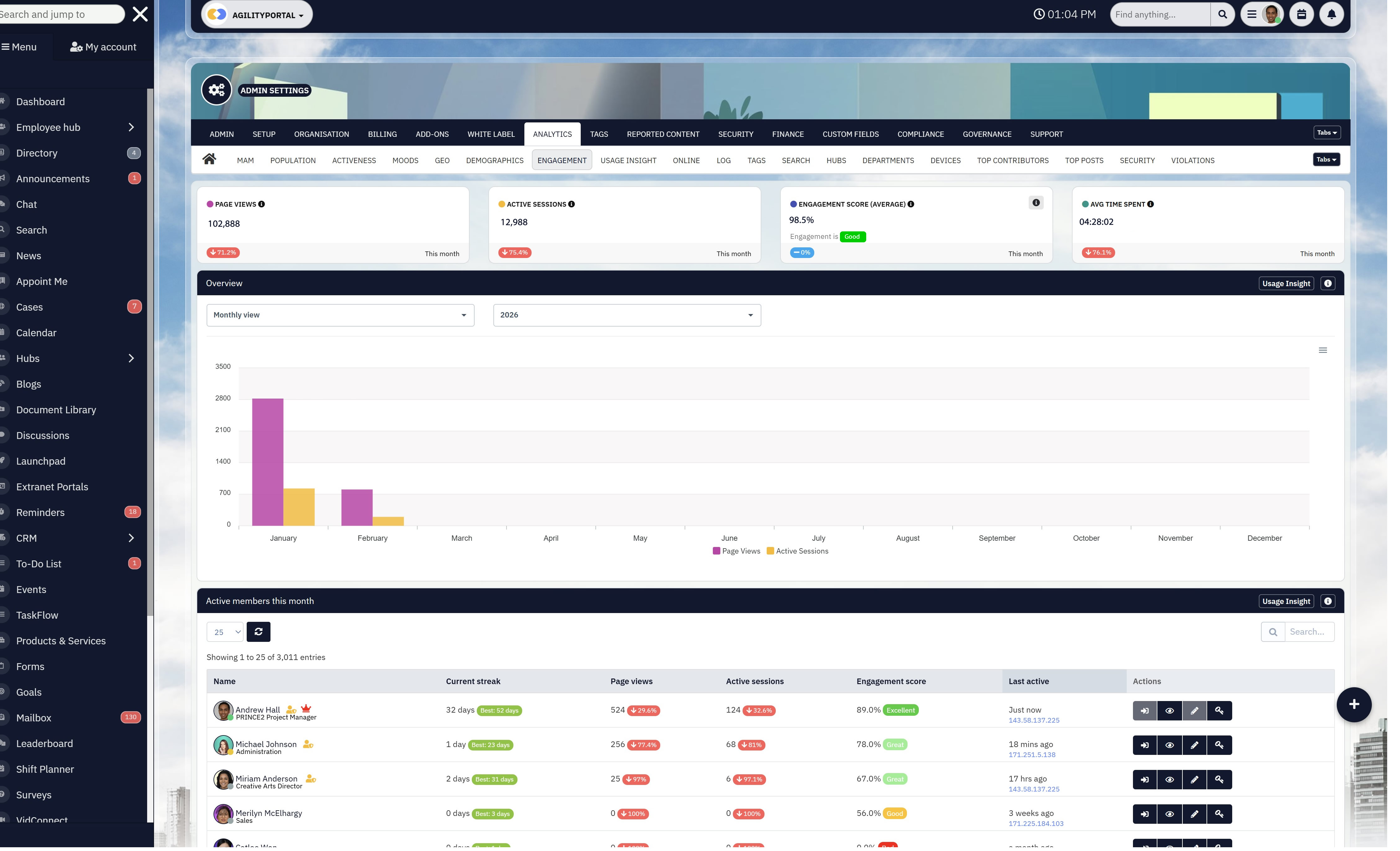
Measuring Activity Instead of Outcomes
This mistake is subtle — and dangerous.
Dashboards show:
- Logins
- Messages sent
- Posts viewed
Leadership assumes things are working. Meanwhile, incidents drag on and delivery timelines slip.
What actually happens
- Teams optimise for visibility, not execution
- More messages get sent to "look active"
- Noise increases, clarity drops
The impact
- Decision latency increases
- Employee fatigue grows
- Real problems stay hidden behind healthy-looking metrics
Research shows that high message volume often correlates with lower productivity, not higher. Activity is easy to measure. Outcomes require intention.
4. Treating Communication as a "Soft" Problem
This is the mindset issue behind all the others.
Communication is often viewed as:
- A culture issue
- An HR concern
- A training problem
So it's addressed with guidelines, reminders, and workshops — not systems.
What actually happens
- Communication depends on memory and goodwill
- Under pressure, rules get ignored
- Risk increases exactly when stakes are highest
The impact
- No audit trail when something goes wrong
- Unclear accountability during incidents
- Repeated failures that feel "mysterious" but aren't
In reality, communication is an operational system, just like incident management or change control. When it's treated as soft, it becomes fragile. When it's engineered, it becomes reliable.
All four mistakes share the same root cause:
communication is added on top of work instead of being designed into it.
High-performing Ops and IT teams don't rely on reminders, best-practice docs, or hope. They build communication into workflows, ownership models, and measurement frameworks.
Avoid these mistakes, and internal communication stops being a recurring pain point — and starts becoming a quiet advantage that leadership notices only when it's gone.
How to Turn These Strategy Examples Into a Repeatable Framework
No theory. This is a step-by-step playbook you can implement this week.
The biggest mistake teams make is treating internal communication as a one-off fix. What actually works is a repeatable system you can apply to every team, project, and incident — and scale as you grow or go fully remote.
Here's how Ops & IT teams do it in practice
Step 1: Map Critical Workflows (start small, not everywhere)
Don't try to "fix communication" across the whole organisation. That fails every time.
What to do
- Pick 2–3 workflows that hurt the most:
- Incident response
- Change management
- Project delivery
- Customer escalations
- Write them out end-to-end:
- Trigger → decision → action → completion
Practical tip
If a workflow already causes delays, escalations, or blame-shifting, it's the right place to start.
Outcome
You stop guessing where communication matters — you see it clearly.
Step 2: Define Communication Moments (when messages must exist)
Most teams communicate randomly. High-performing teams communicate at specific moments.
For each workflow, answer this:
- When must someone be informed?
- When must someone acknowledge?
- When must someone decide?
- When must something be logged?
Example
For an incident:
- Incident detected → notify + assign owner
- Status changes → update stakeholders
- Resolution → document decision + actions
Rule to enforce
If there's no action, ownership, or decision tied to the message — don't send it.
Outcome
Communication becomes predictable, not noisy.
Step 3: Assign Ownership (no owners = guaranteed failure)
This is where most internal communication breaks.
For every critical message, define:
- Owner – one person, not a group
- Next action – explicit, not implied
- Tracking location – where progress lives
Practical rule
If you can't answer "Who owns this?" in 3 seconds, the message is broken.
Why this matters
Studies consistently show unclear ownership is one of the top causes of operational delays — even when information was shared.
Outcome
No more "I thought someone else was handling it."
Step 4: Enforce Consistency (with rules, not reminders)
Guidelines don't scale. Systems do.
What to standardise
- Where decisions are recorded
- Where task-related communication lives
- What cannot live in chat or email
Simple enforcement rules
- Decisions must be logged, not just discussed
- Actionable messages must create a task
- Critical updates must be acknowledged
Don't rely on training people to remember this. Build it into how tools are used.
Outcome
Communication works even when people are busy, stressed, or under pressure.
Step 5: Measure What Actually Matters (weekly, not quarterly)
If you don't measure outcomes, communication will drift back into noise.
Track these every week
- Time to decision
- Time to task completion
- Incident response time
- Unacknowledged critical messages
Stop tracking
- Raw message volume
- Logins
- "Engagement" without action
Reality check: organisations that measure outcomes instead of activity consistently show 20–25% productivity improvements, while others struggle to prove any ROI at all.
Outcome
You can prove communication is working — or fix it fast when it isn't.
How This Scales as Teams Grow or Go Remote
This framework holds up because:
- It's workflow-based, not people-dependent
- It doesn't rely on perfect behaviour
- It works under pressure, not just in calm periods
When teams grow:
- You add workflows, not chaos
- Rules stay the same, volume increases safely
When teams go remote:
- Communication doesn't rely on hallway conversations
- Ownership and context don't disappear
Implementation Checklist (use this as-is)
- Identify 2–3 painful workflows
- Define communication moments for each
- Assign owners to every critical message
- Set non-negotiable communication rules
- Track decision speed and follow-through weekly
If you do just this — nothing more — internal communication stops being a recurring problem and starts becoming infrastructure your Ops and IT teams can rely on.
That's the difference between "we communicate a lot" and "communication actually works."
Build an Internal Communications Strategy That Actually Works with AgilityPortal
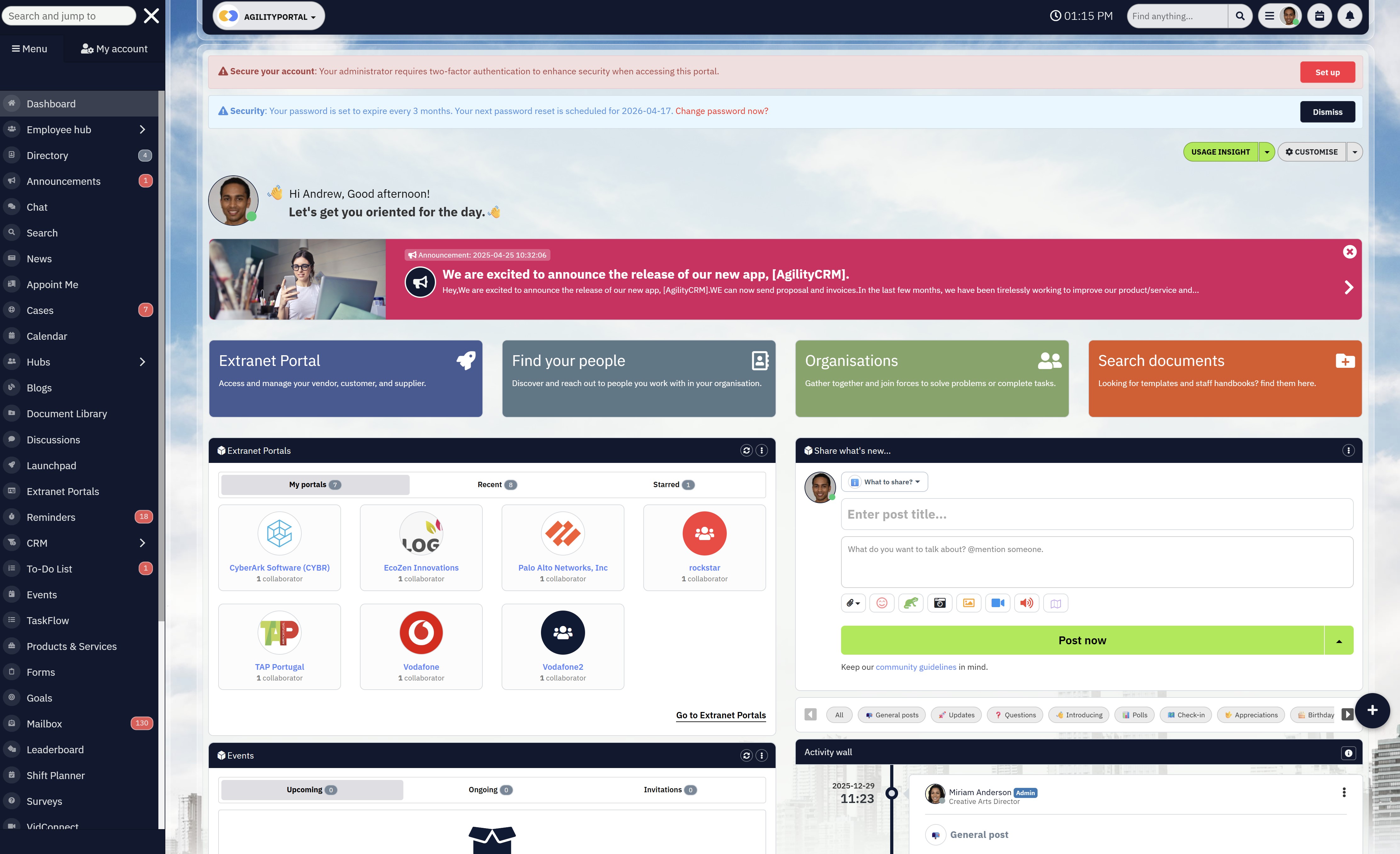
Build an Internal Communications Strategy That Actually Works with AgilityPortal
An effective internal communications strategy doesn't start with posts, reactions, or vanity engagement. It starts with a platform that fits how work actually happens — especially for Ops and IT teams.
AgilityPortal is built to support internal communication inside workflows, not alongside them.
It's designed so communication isn't just easy to consume, but impossible to ignore when action is required.
Instead of scattering updates across chat, email, and disconnected tools, AgilityPortal brings:
- Communication, tasks, documents, and decisions into one system of record
- Clear ownership and accountability for critical messages
- Visibility into what's been acknowledged, acted on, or missed
Yes, you can still run announcements, leadership updates, and company news.
But where AgilityPortal stands apart is how it handles operational communication — the updates tied to incidents, projects, approvals, and day-to-day execution.
Teams can:
- Communicate directly within tasks and activities
- Capture decisions with context and audit trails
- Reduce noise without losing transparency
- Support both structured governance and fast-moving teams
Whether you're a growing organisation trying to reduce tool sprawl, or a large enterprise struggling with fragmented internal communication, AgilityPortal helps turn strategy into something teams actually use — under pressure, not just in theory.
If you're serious about fixing broken internal communication in the workplace, the goal isn't more messages. It's better-designed systems.
AgilityPortal gives Ops and IT leaders the foundation to make internal communication reliable, measurable, and scalable — without slowing teams down.
Wrapping up and Final Takeaway
If there's one thing Ops and IT leaders should take away from this guide, it's this:
Remote communication tools don't fail — poor strategies do.
Most organisations don't struggle because they picked the "wrong" platform. They struggle because they expected tools to fix problems that were never designed out in the first place. No ownership. No rules. No connection to real work. Just more features layered on top of broken habits.
That's why chasing features rarely pays off.
New dashboards don't fix missed handoffs.
More channels don't reduce confusion.
Extra integrations don't create accountability.
What actually works is designing communication as an operational system, not a side activity.
For Ops and IT buyers, that means making a mindset shift:
- Stop asking "What can this tool do?"
- Start asking "How does this support the way our work actually flows?"
When communication is:
- Embedded into workflows
- Triggered by real events
- Owned by specific people
- Measured by outcomes
…it becomes reliable. Quiet. Boring, even.
And that's exactly what you want in environments where speed, risk, and scale matter.
Tools should enforce clarity, not rely on memory.
They should reduce thinking, not add to it.
They should support execution, not just visibility.
Platforms like AgilityPortal are designed around this exact principle — treating internal communication as infrastructure that supports real work, not another place to post updates. The technology matters, but only after the strategy is clear.
Get the strategy right first.
Design communication around how work actually happens.
Then choose tools that reinforce that system instead of fighting it.
Do that, and internal communication stops being a recurring problem — and starts becoming one of the most dependable parts of your operation.
FAQs About Internal Communications Strategies
What are some internal communication strategies?
Internal communication strategies are structured approaches organisations use to ensure employees receive the right information at the right time — and act on it.
In practice, this means combining a clear internal communications strategy framework with defined ownership, workflow-based messaging, and measurable outcomes.
Strong strategies move beyond announcements and include:
- Communication tied directly to tasks and decisions
- Clear ownership and accountability
- Defined rules for where different types of communication live
Many teams start with an internal communications strategy template or an internal communication strategy and action plan PDF, but the most effective strategies adapt these frameworks to real operational workflows.
What are examples of internal communications?
Common internal communication examples include:
- Incident updates shared with clear owners and next steps
- Leadership announcements linked to actions or policy changes
- Project decisions documented where work is tracked
- Feedback loops built into daily workflows
The most effective examples of internal communication within a business are those that reduce ambiguity and help employees act — not just stay informed.
That's why real internal communications strategy examples for employees focus on execution, not broadcast messaging.
What is Apple's internal communication strategy?
Apple has never published a formal internal communications plan examples PDF, but it's widely understood that their approach emphasises:
- Strict need-to-know access
- Clear ownership of decisions
- Strong alignment between communication and execution
Rather than open, high-volume messaging, Apple's internal communication prioritises clarity, confidentiality, and accountability — reinforcing the idea that fewer, well-structured messages often outperform constant updates.
What are some examples of effective communication strategies?
Effective strategies share a few common traits:
- Communication is embedded into workflows
- Messages have clear owners and outcomes
- Success is measured by execution, not engagement
For example, teams that replace generic updates with task-linked communication consistently outperform those relying on standalone messages.
These communication strategy examples work because they remove guesswork for employees.
It's also important to distinguish internal from external communication examples. External communication focuses on brand, clarity, and consistency.
Internal communication must prioritise action, timing, and accountabilit
What are the key components of an internal communications strategy?
A practical internal communications strategy includes:
- A clear internal communications strategy framework
- Defined communication moments within workflows
- Ownership rules for critical messages
- Agreed channels for different communication types
- Measurement tied to outcomes (decisions, task completion, response times)
While many organisations rely on internal communication examples PDF resources or templates, success depends on how well the strategy fits real work — not how polished the document looks.
What tactics actually improve internal communication?
The most effective tactics are operational, not cosmetic:
- Embedding communication into tasks and processes
- Reducing channel sprawl
- Assigning ownership at the point of communication
- Using data to identify delays and breakdowns
Teams that rely purely on content volume or newsletters often struggle, even if they follow traditional internal communications plan examples PDF guides.
How often should an internal communications plan be updated?
At a minimum:
- Review performance monthly
- Adjust workflows quarterly
- Revisit the full strategy annually
However, operational teams should treat communication as a living system. If decision latency or incident response times increase, that's a signal your communication model needs immediate adjustment — not a scheduled refresh.
What tools support effective internal communications?
Effective internal communication tools should:
- Integrate with workflows
- Support ownership and accountability
- Provide visibility into outcomes, not just activity
Platforms like AgilityPortal go beyond basic messaging by embedding communication into work itself — connecting updates, tasks, documents, and accountability in one place.
This approach helps teams move from static templates to real execution.
How does AgilityPortal support internal communications strategies?
AgilityPortal supports internal communication by:
- Turning communication into part of daily workflows
- Reducing reliance on disconnected tools
- Providing visibility into who owns what and what's stuck
- Helping teams apply real internal communications strategy examples for employees at scale
Instead of managing communication through scattered documents or standalone PDFs, teams use AgilityPortal to operationalise their strategy — so communication supports work, rather than competing with it.
Most Popular Posts

Effective communication among team members is vital for the productivity and success of any organization. Surprisingly, 60% of companies lack a long-term internal communication strategy, which p...


Businesses thrive on communication for efficiency, productivity and accomplishment. When the right information is passed from the right designation in the organization, it promotes positivity an...
Categories
Blog
(2918)
Business Management
(363)
Employee Engagement
(221)
Digital Transformation
(189)
Growth
(139)
Intranets
(133)
Remote Work
(63)
Sales
(52)
Collaboration
(46)
Customer Experience
(29)
Culture
(29)
Knowledge Management
(28)
Project management
(28)
Leadership
(20)
Comparisons
(9)
News
(1)

Related Posts

What Is Portal Software? Have you ever wondered why so many businesses struggle with disconnected systems, scattered documents, outdated intranets, and poor communication between teams? Most organisations today rely on dozens of different tools...

What happens when your systems suddenly stop working in the middle of a busy workday? For growing businesses, downtime is no longer just a technical problem — it is a direct threat to productivity, customer trust, revenue, and daily operations. ...

Despite organisations investing heavily in collaboration platforms, employee apps, and hybrid work technology, many businesses still struggle with disconnected communication, low employee engagement, and poor workforce visibility. According to ...

The communication champion role is a valuable addition to any business. In a large organization, communication champions should be numerous, forming a communication network. They keep track of information and assist others in better collaborating, wo...

Featured
In today's fast-paced hybrid work environment, staying connected isn't just nice—it's necessary. With more than 80% of employees now working remotely at least part of the time, the demand for intuitive, powerful collaboration tools has never be...


Jill Romford
I am a digital nomad, lover of exploring new places and making friends.
I love to travel and I love the internet. I take pictures of my travels and share them on the internet using Instagram.
Traveler, entrepreneur, and community builder. I share my insights on digital marketing and social media while inspiring you to live your fullest life.
Ready to learn more? 👍
One platform to optimize, manage and track all of your teams. Your new digital workplace is a click away. 🚀
Free for 14 days, no credit card required.