
Insight Blog
Agility’s perspectives on transforming the employee's experience throughout remote transformation using connected enterprise tools.
40 minutes reading time
(7956 words)
What Is an Extranet Used For? A 2026 Ultimate Guide to Building Partner Success

What Is an Extranet Used For? A 2026 Ultimate Guide to Building Partner Success
Discover what an extranet is used for in 2026, how extranet portals work, and how to build a secure extranet app for staff and partners.
What Is an Extranet Used For? A 2026 Ultimate Guide to Building Partner Success

Let's call this out plainly.
Most organisations still confuse an extranet with an intranet — and that confusion quietly bleeds time, money, and partner trust. In 2026, an extranet is no longer a "nice-to-have" file dump for external users.
A modern extranet portal is a core operating system for partners, suppliers, clients, and distributed teams who sit outside your firewall but still need structured, secure access to your business.
Think about platforms like Booking.com.
Their success depends on thousands of hotels, property managers, and partners logging into an extranet every day to update availability, pricing, documents, and policies.
That's not optional.
That's business-critical. In fact, studies show that companies using structured partner portals reduce operational support requests by up to 40% and speed up partner response times by 30% or more compared to email-driven workflows.
Impact of Structured Partner Portals vs Email
Organisations using structured partner portals report up to 40% fewer support requests and 30%+ faster partner response times compared to email-driven workflows.
Support requests reduced
Faster partner response time
Data reflects reported outcomes comparing structured partner portals to email-based collaboration.
This is where extranet apps and staff extranets come in.
Instead of relying on shared drives and inboxes, modern extranet software solutions give external users role-based access, real-time updates, and a single source of truth — on desktop and mobile.
For healthcare organisations, nonprofits, professional services firms, and regulated industries, this isn't about convenience; it's about control, compliance, and adoption.
When partners can log into one secure extranet portal, find what they need in seconds, and actually understand what's expected of them, collaboration stops being chaotic and starts delivering real results.
In short: if your ideal customer relies on partners, vendors, contractors, or external staff to get work done, an extranet isn't a feature anymore — it's infrastructure.
Key Takeaways From This Extranet Guide
- An extranet provides secure, role-based access for partners, clients, suppliers, and extended teams—without exposing confidential intranet data.
- Modern extranets replace email and shared drives with structured collaboration, reducing errors, duplication, and operational friction.
- The most effective extranets enable two-way interaction, allowing partners to share updates, upload documents, and manage offers or promotions.
- Security and governance are foundational: inactive account deactivation, sensitive data controls, audit logs, and compliance visibility are essential.
- Success should be measured by engagement, content usage, reduced support requests, and time saved—not just logins.
Read this article: : Top 6 AI-Powered Project Management Tools To Use In 2023
What is an Extranet?
An extranet is a secure digital space that lets people outside your organisation access selected information, tools, and workflows — without giving them full internal access.
Think partners, suppliers, contractors, clients, or distributed teams. They don't need your entire system; they need the right parts, at the right time.
In practice, this usually takes the form of an extranet portal or extranet app where external users log in to view documents, collaborate, submit information, or track progress.
Access is controlled, permissions are role-based, and everything lives in one place instead of being scattered across emails, shared drives, and chat threads.

What is an Extranet
Extranet vs Intranet
Here's the simple distinction:
- An intranet is for internal employees only.
- An extranet extends controlled access to external users.
A staff extranet sits somewhere in the middle — useful for contractors, temporary staff, field workers, or teams that shouldn't see everything but still need structured access.
This model is increasingly common in healthcare, nonprofits, and professional services, where mixed internal and external teams are the norm.
Why "Portal" Matters in 2026
Calling it just an "extranet" undersells what modern extranet software solutions actually do. In 2026, the word portal matters because it implies:
- A single entry point (not scattered links)
- Personalised dashboards
- Clear ownership and accountability
- Better adoption across non-technical users
The businesses that get this right don't just give partners access — they give them clarity. And that's the difference between an extranet that exists and one that actually gets used.
Related Guides You May Want to Read Next
If you’re building or improving an extranet, these guides go deeper into software choices, security, and the differences between intranets and extranets.
- Extranet Portal Software: What to Choose and Why It Matters
- Extranet Software for Secure Client Collaboration (Best Practices)
- Types of Intranet Security: What to Lock Down and How
- Internet vs Intranet vs Extranet: Simple Breakdown With Examples
- Intranets vs Extranets: Key Differences, Use Cases, and Mistakes to Avoid
Real-World Extranet Examples (You've Definitely Used One)
An extranet isn't some abstract enterprise concept — you're probably interacting with them all the time.
Here are clear, real examples that show how extranets work when done properly.
Booking.com Partner Extranet
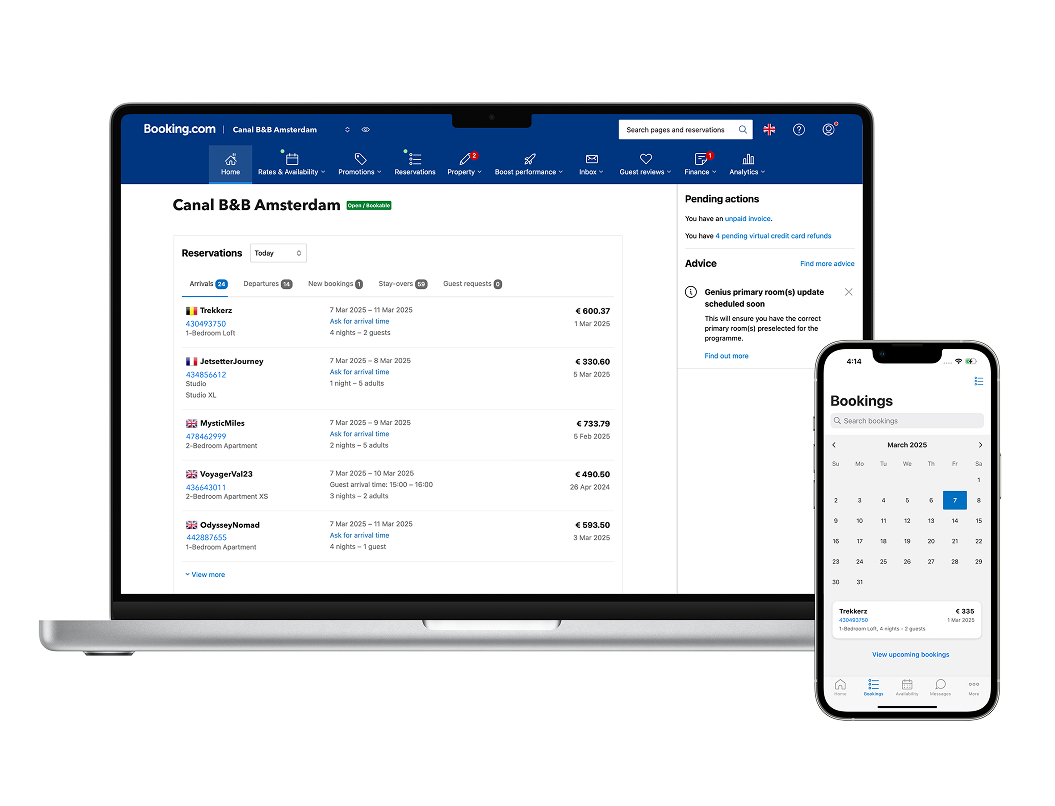
This is one of the most well-known extranet examples.
Hotels and property managers log into Booking.com's partner extranet to:
- Update room availability and pricing
- Manage promotions and special offers
- Upload property details and policies
- View performance and booking analytics
It's not just read-only access.
Partners actively update data, manage offers, and respond to changes in real time. Without this extranet, Booking.com simply wouldn't scale.
Salesforce Partner Community

Salesforce runs a large-scale partner extranet for resellers, consultants, and integration partners.
Partners use it to:
- Access sales enablement content
- Register deals
- Share updates with Salesforce teams
- Track certifications and performance
Clear role-based access and structured workflows. Partners see what matters to them — nothing else.
Microsoft Partner Center
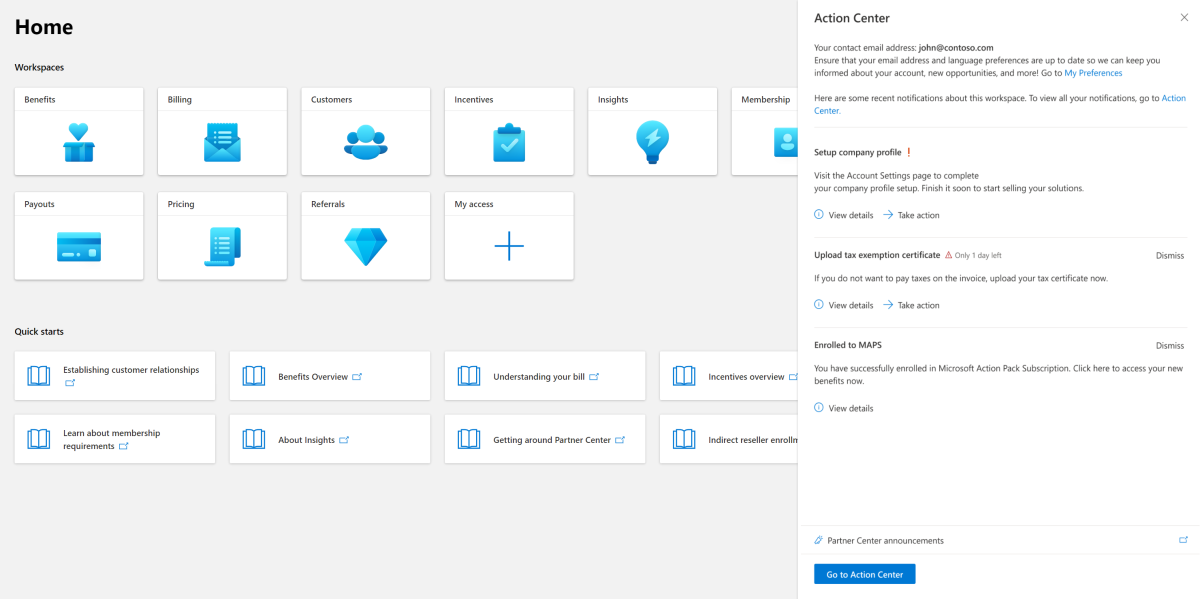
Microsoft's Partner Center is a classic enterprise extranet.
It allows partners to:
- Manage licenses and subscriptions
- Access technical documentation
- Submit support requests
- Monitor partner performance
Strong governance and visibility. Microsoft controls access tightly while still enabling large-scale external collaboration.
HubSpot Partner Portal
HubSpot's partner extranet supports agencies and solution partners.
Used for:
- Onboarding new partners
- Sharing marketing assets
- Training and certifications
- Partner announcements
It doubles as a learning and enablement hub, not just a document repository.
Amazon Vendor Central
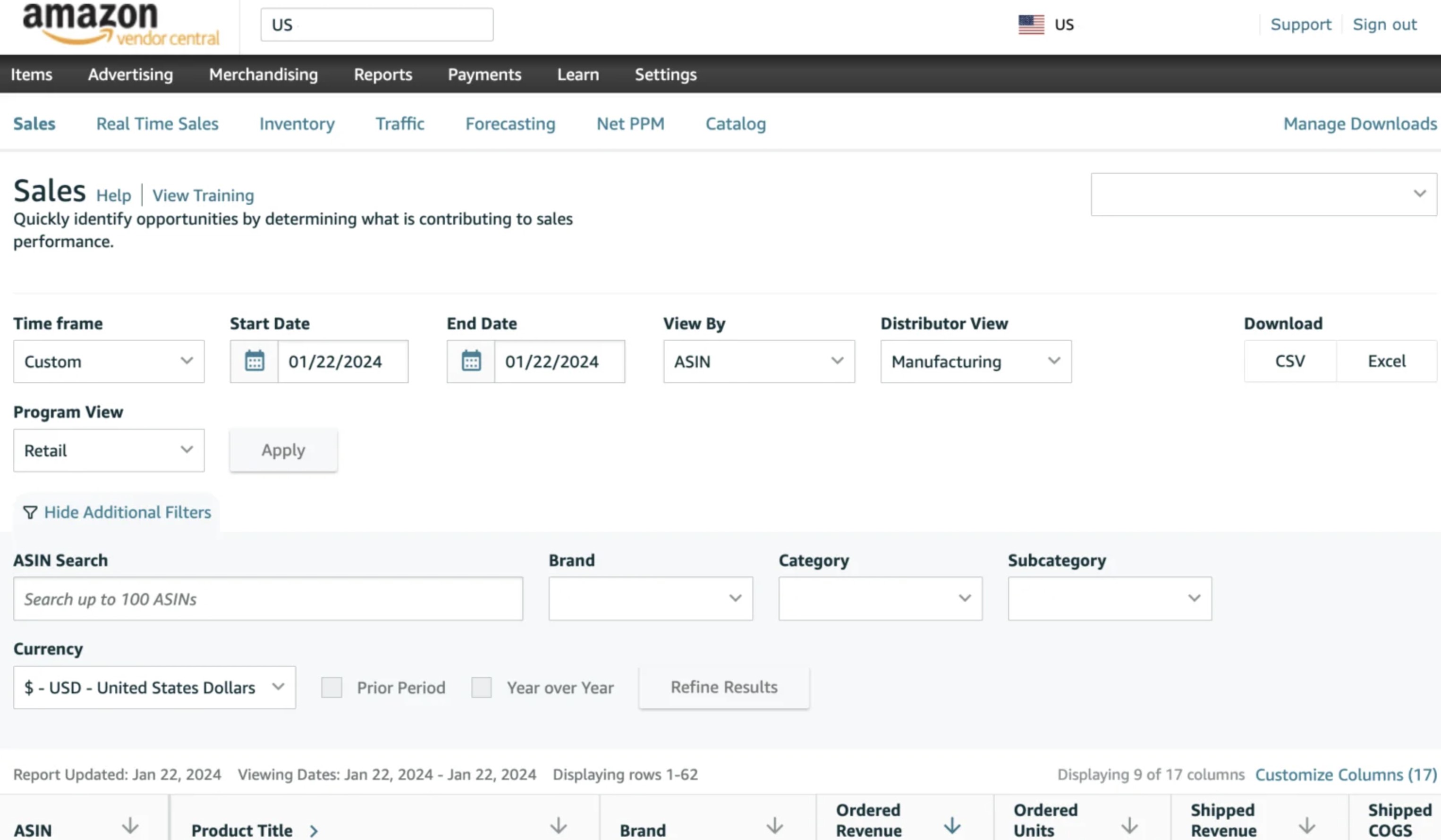
Amazon Vendor Central is an extranet for manufacturers and suppliers.
Vendors can:
- Upload product data
- Manage compliance documents
- Track orders and forecasts
- Respond to operational changes
Suppliers actively maintain their own data, reducing internal admin overhead for Amazon.
AgilityPortal Partner Extranet

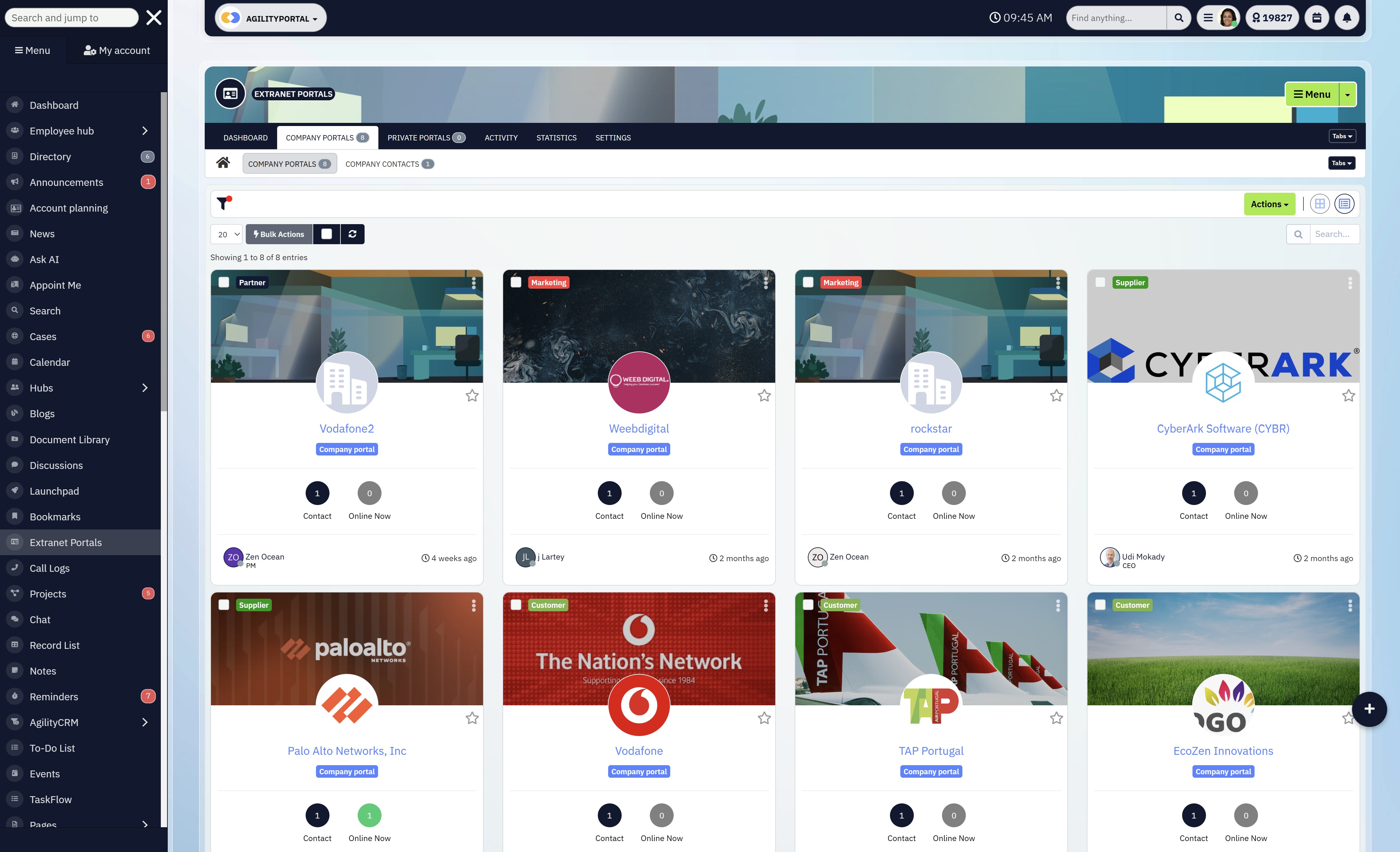
AgilityPortal provides a secure partner extranet where external partners, suppliers, and extended teams log in to collaborate without touching your internal intranet.
Partners use AgilityPortal to:
- Share updates and announcements with internal teams
- Upload and manage documents, contracts, and resources
- Publish new offers, promotional materials, or campaign assets
- Track activity, engagement, and next actions in one place
AgilityPortal isn't read-only.
This supplier portal, allows partners to actively contribute, update content, and collaborate in real time, while organisations keep full control over access, security, and sensitive data.
This two-way model is what allows AgilityPortal to scale partner collaboration without email chaos, security risks, or operational bottlenecks.
What Is an Extranet Used For?
At its core, an extranet exists to make working with people outside your organisation faster, safer, and far less painful.
Instead of juggling emails, shared drives, and one-off tools, a modern extranet portal gives external users a single, controlled place to get work done.
This is exactly why businesses adopt extranet software solutions in 2026 — not for features, but for clarity, accountability, and scale.
Partner Collaboration
For partners, an extranet becomes the main collaboration hub.
A well-designed partner portal allows partners to access shared documents, product updates, roadmaps, and announcements without endless email threads.
Everyone sees the latest version, permissions are managed centrally, and updates don't get buried in inboxes.
This is where an extranet app really shines. Partners can log in from anywhere, get notified when something changes, and stay aligned without constant follow-ups.
- Every partner sees only what's relevant to them. Permissions are locked down by role, company, or project inside the extranet portal, reducing risk and confusion.
- Track who accessed, viewed, edited, or downloaded content. This is critical for governance and trust in any serious extranet software solution.
- Assign tasks directly to partners inside the extranet app, with clear owners, deadlines, and status tracking — no follow-up emails needed.
- FAQs, guides, policies, and updates live in one searchable space, turning the extranet into a self-service hub instead of a support bottleneck.
- See which partners are active, what content is used, and where adoption drops — especially valuable for optimising a staff extranet and partner onboarding.
Supplier & Vendor Management
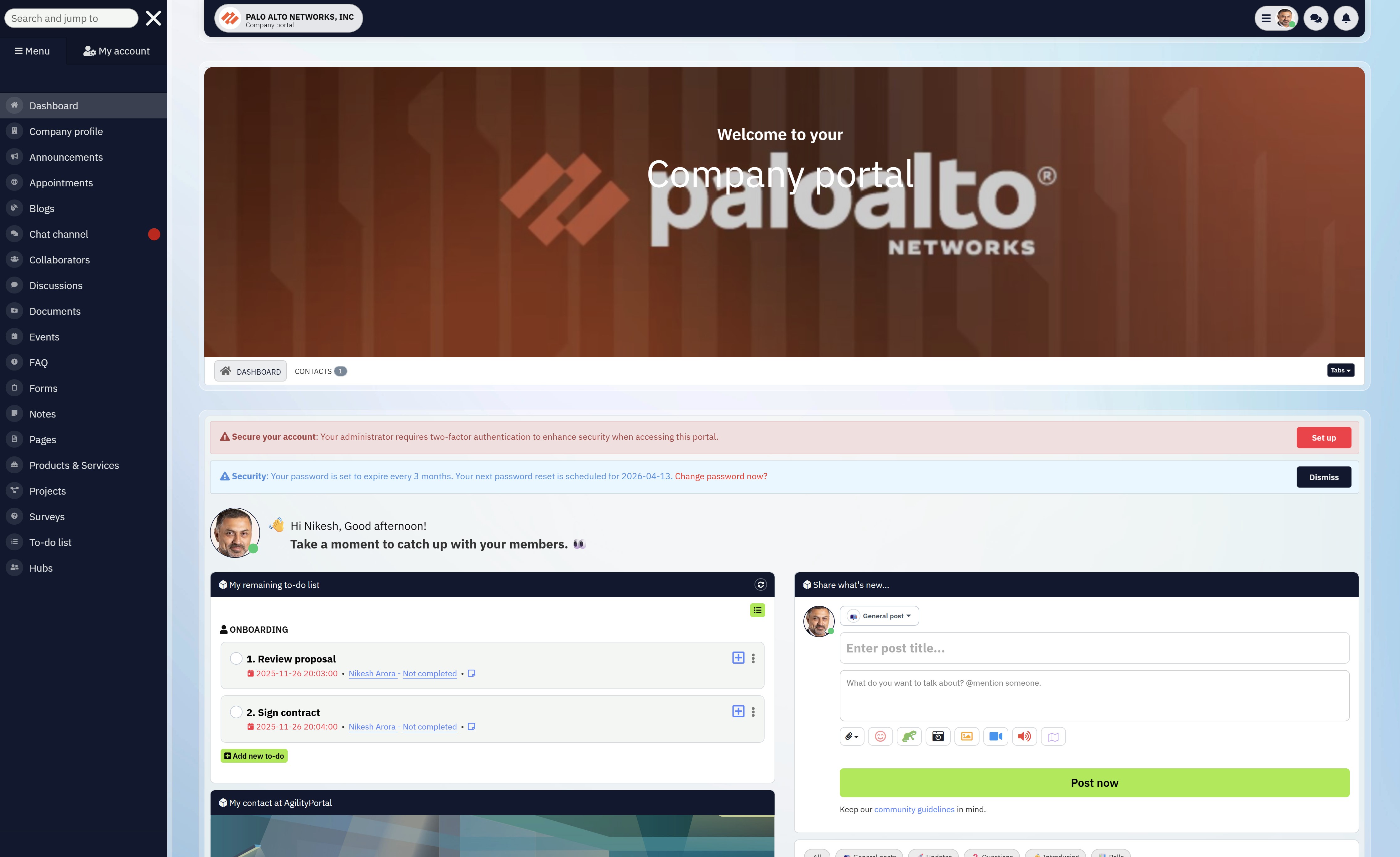
Suppliers and vendors need structure, not noise.
Using an extranet for supplier management lets organisations securely share contracts, compliance documents, policies, and operational updates — all in one place.
Instead of repeatedly requesting the same files, vendors upload and manage their information directly inside the extranet portal.
With the right extranet software solution, access can be restricted by role, supplier type, or contract status.
- Suppliers upload contracts, compliance certificates, and required documents directly into the extranet portal. No email attachments, no version confusion, and no repeated requests from your team.
- The extranet software solution automatically limits what vendors can see based on role, supplier type, or contract status. Active vendors see operational content; expired or onboarding vendors don't. Simple, controlled, and auditable.
- Policies, operational changes, and important updates are published once and visible to all relevant suppliers via the extranet app. This eliminates miscommunication and ensures everyone is working from the same information.
That means vendors only see what's relevant to them, while your internal teams maintain full control and audit visibility.
Client & Customer Access
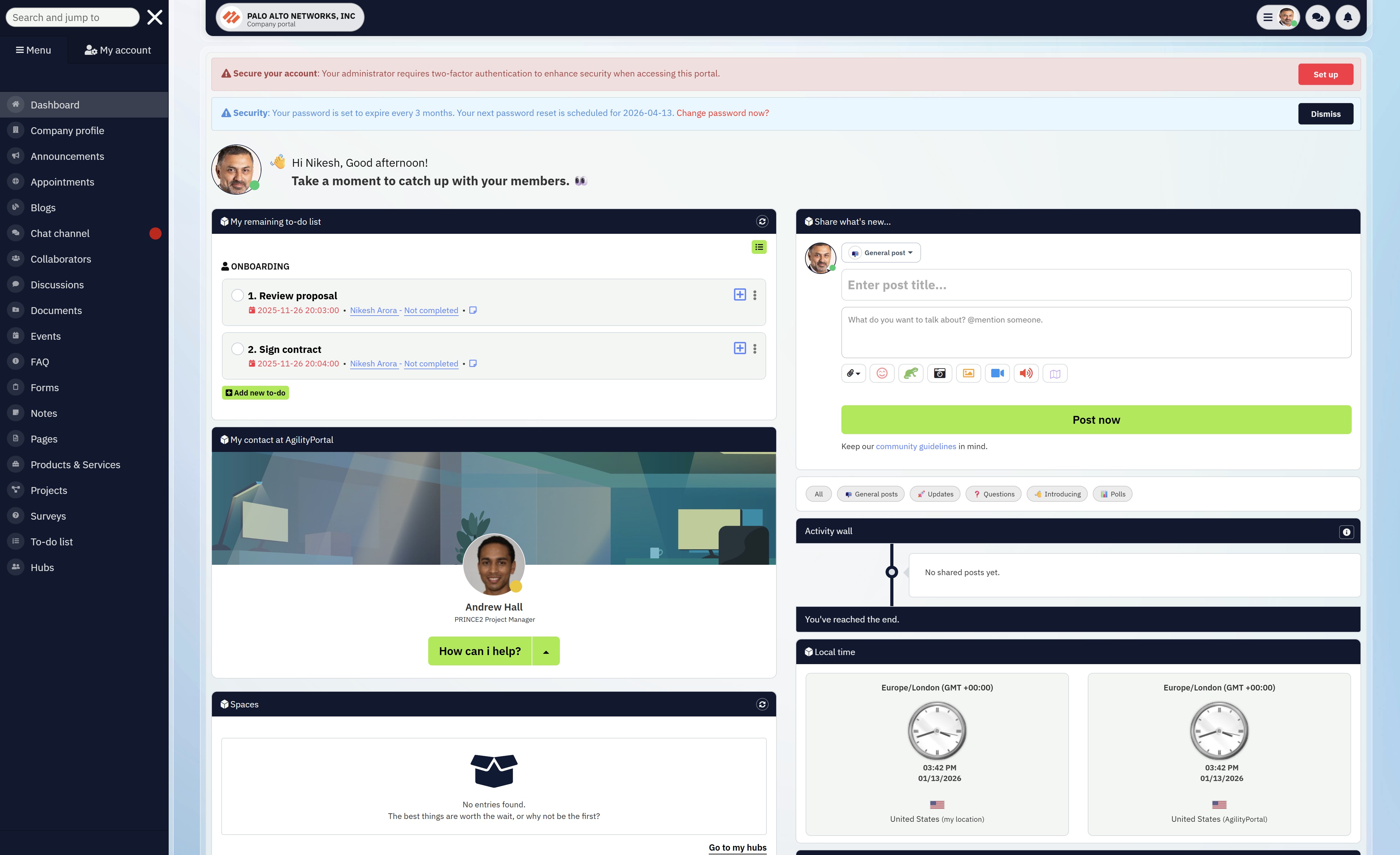
Clients don't want more meetings — they want visibility.
A client-facing extranet portal gives customers real-time access to project files, timelines, and status updates without chasing emails or scheduling calls. Secure file exchange replaces risky email attachments, and everything stays documented in one place.
When delivered through an intuitive extranet app, clients engage more consistently because it feels simple, familiar, and purposeful — not like another tool they're forced to learn.
The provider launches a client-facing extranet portal as the single source of truth. Each client gets secure, role-based access to their own workspace inside the extranet, where they can view project timelines, download the latest files, and check status updates in real time.
Instead of emailing documents back and forth, all files are shared through the portal using secure permissions. Every update is logged, so there's no confusion about what's current or who's seen what.
Clients stop chasing updates because the information is already there.
To improve adoption, the same experience is delivered through a simple extranet app. Clients receive notifications when milestones change or new documents are uploaded, making engagement feel natural — not forced.
- Fewer meetings
- Less email back-and-forth
- Better transparency and trust
- Higher client satisfaction
Staff Extranet Use Cases
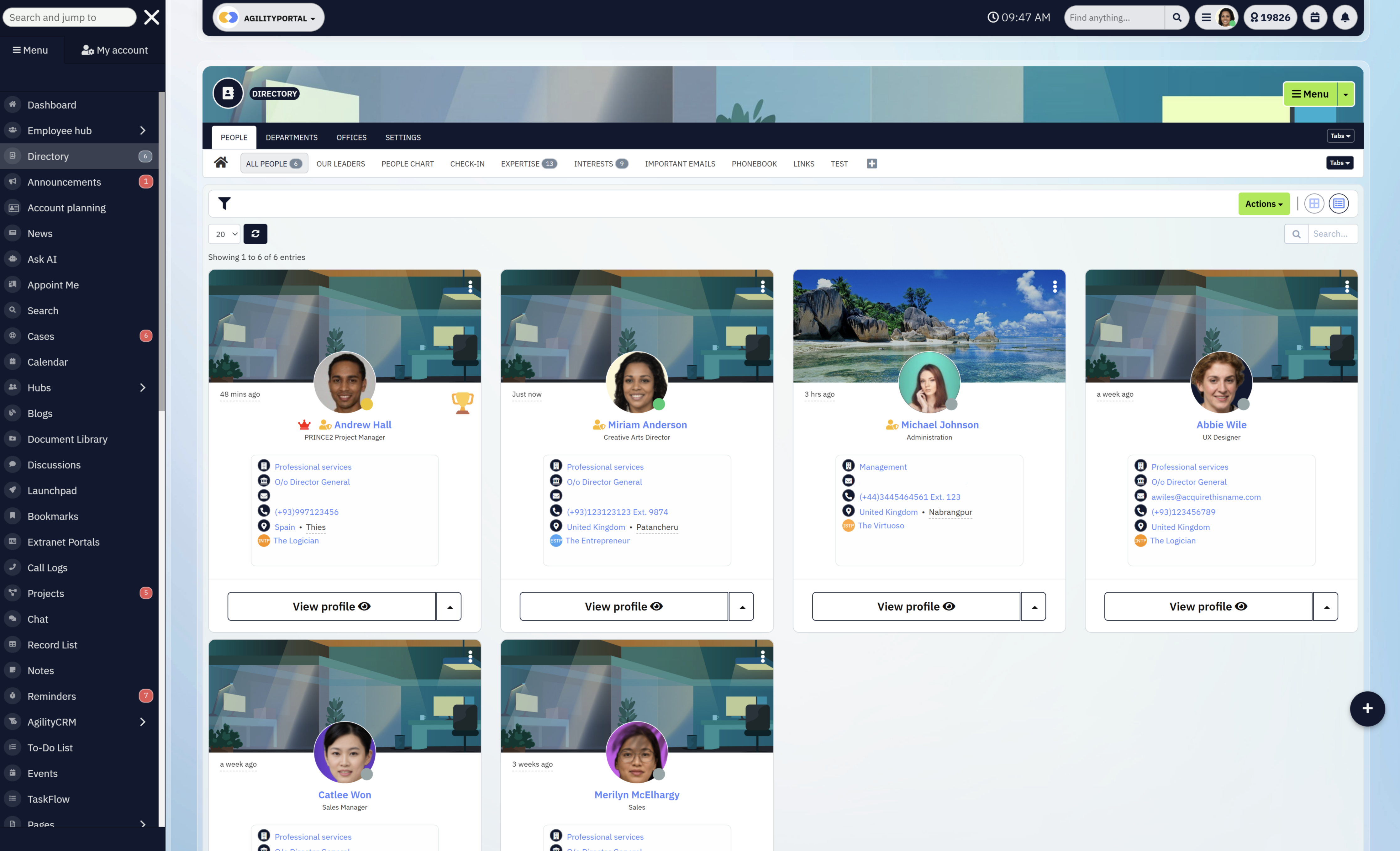
Not everyone who works with you should have full intranet access — and that's exactly why a staff extranet exists.
With a staff extranet, you can add freelancers, contractors, agency partners, and extended staff without exposing your internal intranet or confidential files.
External users get access only to what they need — specific documents, spaces, tasks, or communications — while sensitive HR records, internal policies, and private company files remain locked down.
This is critical for organisations handling confidential information, especially in healthcare, nonprofits, and professional services.
Instead of granting risky intranet access or sharing files by email, teams use an extranet portal to control visibility, permissions, and accountability from one place.
The result is simple: extended staff can do their jobs effectively, while your internal intranet stays protected. No shortcuts, no security gaps, and no confusion about who should see what.
Extranet vs Intranet vs Client Portal (Quick Reality Check)
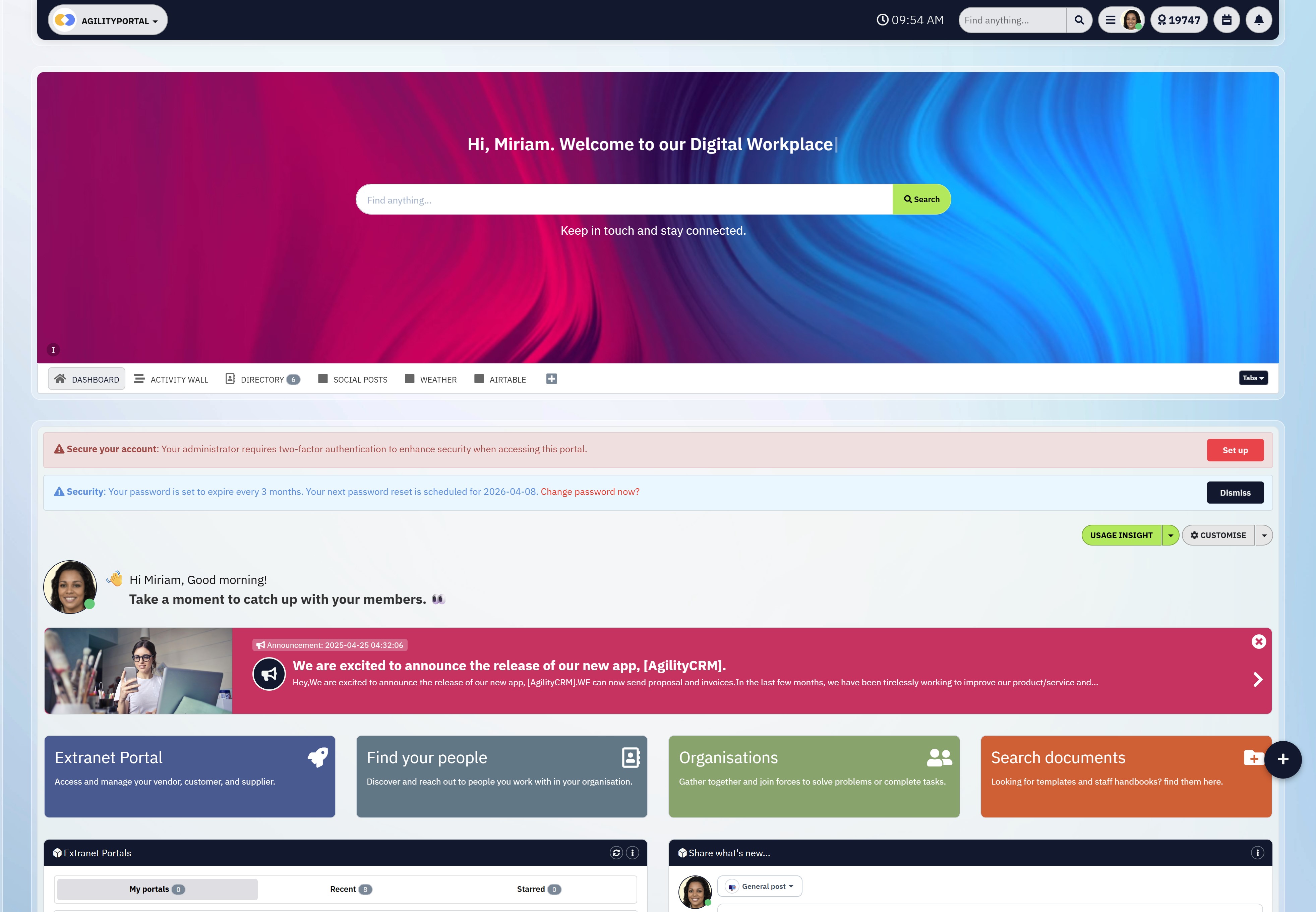
Extranet vs Intranet vs Client Portal
These three terms are often used interchangeably — and that's a mistake.
Each serves a different audience, a different security model, and a different business purpose.
Picking the wrong one (or forcing one tool to do all three jobs) is where most organisations go wrong.
Intranet - Used for secure internal hub for employees only and must protect confidential data from external access.
An intranet is a private, internal digital workspace built exclusively for employees.
It's where sensitive and confidential company information lives — HR records, internal policies, leadership announcements, internal communications, payroll resources, and restricted documents.
Access is usually broad across employees but completely closed to external users.
Intranets are designed to support internal culture, employee engagement, and operational alignment.
They are not built for collaboration with third parties and should never be exposed to contractors, partners, or clients due to security and compliance risks.
Extranet - External users need secure, structured access to systems or documents — but full intranet access would be risky or inappropriate.
An extranet is a secure extension of your digital workplace that gives controlled, role-based access to people outside your organisation.
This includes partners, suppliers, freelancers, contractors, agencies, and extended staff.
A modern extranet portal or staff extranet allows external users to collaborate, access documents, and complete tasks without touching your internal intranet.
With today's extranet software solutions, organisations can tightly manage permissions, track activity, and ensure external users only see what's relevant to them.
Delivered via a web or extranet app, this model is essential for organisations working with mixed internal and external teams — especially in healthcare, nonprofits, professional services, and regulated industries.
Client Portal - Clients need visibility, self-service access, and secure document sharing — not internal collaboration tools.
A client portal is a focused, customer-facing type of extranet designed specifically for clients and customers.
It typically provides access to project files, reports, invoices, service updates, and shared documents.
Compared to a full extranet portal, client portals are narrower in scope and simpler in functionality.
While a client portal is technically an extranet, it usually lacks broader collaboration features needed for partners or extended staff. Many organisations run client portals on top of their core extranet platform.
Comparison Table
| Feature / Purpose | Intranet | Extranet | Client Portal |
| Primary Users | Internal employees | Partners, contractors, suppliers, extended staff | Clients / customers |
| Access Level | Internal-only | Restricted, role-based | Very limited, client-specific |
| Handles Confidential HR Data | ✅ Yes | ❌ No | ❌ No |
| External Collaboration | ❌ No | ✅ Yes | ⚠️ Limited |
| Typical Use Cases | HR, internal comms, policies | Partner workspaces, staff extranet, vendor access | Projects, documents, status updates |
| Security Model | Broad internal access | Granular permissions | Highly restricted |
| Replaces Email Chaos | ⚠️ Partially | ✅ Yes | ✅ Yes |
Why Most Businesses Need Both Intranet + Extranet
Here's the blunt truth:
Trying to give external users access to your intranet is a security risk.
Trying to run partner collaboration via email is operational chaos.
That's why mature organisations use both:
- The intranet protects internal knowledge and confidential data
- The extranet software solution enables safe, structured collaboration with the outside world
When these are clearly separated, adoption improves, risk drops, and everyone knows exactly where they belong.
If your organisation works with partners, contractors, or external staff, an extranet isn't optional — it's the buffer that keeps your intranet secure while work keeps moving.
Read this article: : Top 6 AI-Powered Project Management Tools To Use In 2023
What Is an Extranet Portal?
An extranet portal is a secure, structured gateway that gives external users access to the right information, tools, and workflows — without exposing your internal intranet or sensitive data.
Unlike shared drives or scattered links, an extranet portal is designed for controlled collaboration at scale.
What Makes an Extranet Portal Different from Shared Drives?
Shared drives were never built for external collaboration.
They rely on folder structures, manual permissions, and tribal knowledge ("ask John where the file is"). That breaks fast once you add partners, contractors, or external teams.
An extranet portal replaces folders with clear workspaces, ownership, and context. Users don't just see files — they see what those files relate to, who owns them, and what action is required.
This is why modern extranet software solutions outperform shared drives every time.
Role-Based Access (No Guesswork)
A proper extranet portal uses role-based access control. Partners, suppliers, freelancers, and extended staff only see what's relevant to their role, company, or project.
Nothing more, nothing less.
This is especially important for a staff extranet, where external workers need access to specific documents or updates but must never see confidential HR data, internal policies, or leadership communications.
Centralised Dashboards for External Users
Instead of dumping users into folders, an extranet portal gives them a centralised dashboard. From one screen, users can:
- See recent updates
- Access key documents
- Track tasks or requests
- View announcements relevant to them
Delivered via web or an extranet app, this approach dramatically improves adoption because users instantly understand where to go and what to do.
Why Extranet Portals Scale Better Than Folders
Folders don't scale.
Permissions become unmanageable, files get duplicated, and no one trusts what's current.
An extranet portal scales because it's built around people and roles, not file paths.
As you add more partners, contractors, or clients, the structure holds. Governance improves, security tightens, and collaboration stays organised.
If you're still using shared drives for external collaboration, you don't have an extranet — you have risk.
A modern extranet portal brings structure, security, and clarity to how work actually gets done with people outside your organisation.
What Is an Extranet App?
A modern extranet app is best understood as a mobile-first partner workspace — built for people who don't sit at desks, don't live in email, and won't tolerate clunky logins or complex systems.
In 2026, external collaboration happens on phones first, desktops second.
Any platform that ignores that reality gets ignored by users.
Why Mobile-First External Access Matters
Partners, contractors, and field-based teams don't work like internal employees.
They're moving between sites, clients, and locations.
A mobile collaboration platform lets them quickly check updates, access shared resources, or complete actions without logging into a laptop or hunting through messages.
This is especially critical for industries like healthcare, nonprofits, logistics, and professional services, where response time and clarity matter more than feature depth.
Real-Time Notifications Replace Follow-Ups
Instead of chasing people with emails, a mobile partner workspace uses real-time alerts to notify users when something actually matters — a document update, a task request, or a policy change.
This cuts response delays and reduces the need for manual follow-ups that drain internal teams.
The result is faster decisions, fewer misunderstandings, and far less noise.
Offline Access (When Connectivity Isn't Guaranteed)
In many real-world scenarios, reliable internet isn't a given.
A well-designed external collaboration app supports offline access, allowing users to view key content or updates even when connectivity drops.
Once back online, changes sync automatically.
This is a practical requirement for frontline workers, field contractors, and regional partners — not a "nice extra."
Adoption Beats Feature Lists
Here's the hard truth: the best system is the one people actually use.
A lightweight, intuitive mobile experience drives adoption far more than packed feature sets.
Clear navigation, fast load times, and simple actions matter more than complexity.
That's why successful external collaboration tools prioritise usability, speed, and clarity over bloated functionality.
If external users can't access information easily from their phone, they won't engage. A mobile-first collaboration experience turns access into action — and action into results.
Common Extranet Portal Use Cases by Industry (Real Problems, Real Fixes)
Below are real-world scenarios, the kind customers actually complain about — and how an extranet setup fixes them. No theory, just practical use.
Healthcare & Nonprofits
"We keep emailing updated documents, but partners are still using the old versions."
"External clinicians and volunteers don't know where to find the latest guidance."
Healthcare providers and nonprofits work with external clinicians, partner organisations, volunteers, and agencies — but sensitive internal systems can't be opened up.
Email creates version chaos, and shared links quickly turn into compliance risks.
A controlled external workspace is created for each partner group. Policies, care protocols, training materials, and updates are published once and always stay current.
Access is limited by role, so external users never see internal HR files or confidential internal records.
- Fewer compliance issues
- Less confusion over "latest versions"
- Reduced admin workload
- Partners trust the system instead of emailing for clarification
Professional Services (Legal, Consulting, Accounting)
"Clients keep asking for updates we already sent."
"We're spending too much time answering 'status check' emails."
Professional services firms live in email. Clients want transparency, but constant back-and-forth kills billable time and increases the risk of sending the wrong file to the wrong person.
Each client gets a secure external workspace with access to relevant documents, timelines, and updates.
Clients log in to see progress themselves instead of chasing consultants. Everything is tracked, and nothing gets lost in inboxes.
- Fewer interruptions
- Better client trust
- Clear audit trail
- More time spent on real work
Manufacturing & Supply Chain
"Suppliers are using outdated specs."
"We're constantly chasing compliance documents."
Manufacturers rely on multiple suppliers and distributors. Specs change, compliance documents expire, and email simply doesn't scale. One missed update can cause delays or costly errors.
Suppliers access a central external workspace where specifications, certifications, and operational updates are always current.
Uploads are structured, deadlines are visible, and access changes automatically based on supplier status.
- Fewer production errors
- Faster supplier response times
- Reduced operational risk
- Clear accountability
Technology & SaaS Partnerships
Each partner is given a dedicated workspace where communication flows both ways, not just top-down.
The organisation publishes onboarding resources, sales enablement materials, product updates, and announcements in one central place, so partners always know what's current.
At the same time, partners can actively contribute.
They can post status updates, upload new offers, share promotional documents, submit campaign plans, and notify internal teams about upcoming initiatives. Instead of emailing PDFs or chasing approvals, everything is shared transparently inside the partner workspace.
This turns the partner portal into a live collaboration hub rather than a static document library.
Everyone stays aligned, updates don't get missed, and partner-led opportunities surface faster — without cluttering inboxes or risking outdated information.
- Faster, more coordinated partner updates
- Consistent use of approved promotional materials
- Better visibility into partner-led offers and campaigns
- Stronger, more engaged partner relationships
The Pattern You Should Notice
Across every industry, the issue is the same:
- Too much email
- Too many files in too many places
- Too little clarity about what's current
The fix isn't "more tools."
It's structured external access — where the right people see the right information, without touching what they shouldn't.
That's what a well-designed extranet experience actually solves.
Key Features Every Modern Extranet Software Solution Needs
If an extranet doesn't have these, it's not modern — it's just a gated file dump.
These features are what separate a usable extranet from one partners quietly abandon and security teams quietly worry about.
- Secure Authentication (SSO, MFA) - External access should never weaken security. Single Sign-On reduces login friction for partners, while multi-factor authentication protects sensitive data without relying on weak passwords or shared credentials.
- Granular Permissions & Role Control - Not all users are equal. Access should be controlled by role, organisation, project, or status. Partners, contractors, and extended staff only see what they're meant to — nothing accidental, nothing risky.
- Automatic Account Deactivation (Inactivity Rules) - Dormant accounts are a security risk. A modern extranet automatically deactivates or flags accounts that haven't been used for a defined period, reducing exposure from forgotten partner or contractor access.
- Sensitive Data Governance & Classification - Not all content should be treated the same. Advanced platforms allow governance over sensitive data types (e.g. HR, financial, legal, healthcare-related content), ensuring stricter access rules, visibility controls, and audit coverage where needed.
- Keyword & Phrase Blocking for Security - To reduce risk, organisations can block specific phrases, keywords, or file types from being uploaded or shared externally. This prevents accidental exposure of confidential information before it becomes a problem.
- Document Version Control - One source of truth matters. Version control ensures partners always access the latest files, eliminates duplicates, and prevents costly errors caused by outdated information.
- Activity Tracking & User Behaviour Visibility - Visibility builds accountability. You can see who viewed, downloaded, uploaded, or updated content — essential when working with external users and distributed teams.
- Searchable Knowledge Base - Partners shouldn't need to ask where things are. A searchable knowledge hub lets users find guides, policies, FAQs, and resources instantly, reducing support requests and repetitive questions.
- Mobile-Ready Experience - External users don't sit at desks all day. A responsive, mobile-ready experience ensures access from any device, without compromising usability or security.
- Audit Logs & Compliance Support - Especially in regulated industries, knowing who accessed what — and when — is non-negotiable. Built-in audit trails support governance, compliance, and internal reviews without manual tracking.
- Analytics & Performance Insights - You can't improve what you can't see. Modern extranet platforms include usage analytics, showing partner engagement, content performance, inactive users, and drop-off points.
- Actionable Recommendations - The best systems don't just report data — they recommend next actions, such as:
- Which partners are inactive
- Which content isn't being used
- Where permissions may be too broad
- When security reviews are needed
Security & Compliance in Extranet Software
Security isn't a "feature" in an extranet — it's the entire foundation.
The moment you give external users access to your systems, documents, or workflows, your risk profile changes.
In regulated industries and partner-heavy organisations, getting this wrong doesn't just cause inconvenience — it causes real damage.
Why Security Is Non-Negotiable
An extranet sits at the intersection of external access and internal data. That makes it a prime target for accidental leaks, misuse, and outdated access rights.
Most breaches don't happen because of hackers. They happen because:
- Former contractors still have access
- Partners download files they shouldn't see
- Sensitive documents are shared without governance
- No one knows who accessed what, or when
If your extranet doesn't actively enforce security, it quietly becomes your weakest link.
Common Mistakes Companies Make
Here's where organisations usually slip up:
- Treating external users like internal staff - Giving partners broad access "just to make things easier" exposes confidential information that should never leave the intranet.
- No expiry or inactivity rules - Old partner accounts remain active long after relationships end, creating silent security gaps.
- Relying on folders instead of permissions - Folder-based sharing looks simple but breaks fast. One wrong permission and sensitive data is exposed.
- No visibility or audit trail - If you can't see who accessed or shared content, you can't prove compliance — or fix problems when they happen.
- Security bolted on after launch - Adding controls later is expensive and disruptive. Security has to be built in from day one.
How Modern Extranets Reduce Risk (Instead of Increasing It)
A well-designed extranet doesn't increase risk — it reduces it compared to email, shared drives, and ad-hoc tools.
Modern platforms do this by:
- Enforcing role-based access so users only see what they're meant to
- Automatically disabling inactive accounts to eliminate forgotten access
- Applying governance rules to sensitive content, not just users
- Blocking risky uploads using keyword, phrase, or file-type controls
- Maintaining full audit logs for accountability and compliance
- Providing security analytics and recommendations to spot risks early
Instead of guessing who has access to what, you have clarity. Instead of reacting to incidents, you prevent them.
An extranet should be a security control layer — not a liability. When built properly, it's safer than email, more auditable than shared drives, and far easier to govern than improvised collaboration tools.
How to Build an Extranet Portal (Without Overengineering)
This is where most organisations get it wrong.
They overbuild, over-customise, and overthink — then wonder why partners don't use the system.
A successful extranet isn't complex; it's intentional.
Here's how to do it properly.
Step 1 – Define Who It's For
Start with people, not features.
Be brutally clear about who will use the extranet. Partners, suppliers, freelancers, contractors, agencies, clients, or extended staff all have different needs and risk profiles. Trying to serve everyone with the same setup guarantees confusion.
Ask simple questions:
- Who needs access?
- Who absolutely should not?
- What level of trust and responsibility do they have?
This step sets the security model. If you skip it, you'll either expose too much or cripple usability.
Step 2 – Decide What They Need (Not Everything)
This is where discipline matters.
External users do not need your entire internal world. They need:
- Specific documents
- Clear updates
- Defined actions
- Limited collaboration spaces
Every extra feature you expose increases friction and risk. Strip it down to what helps them do their job — nothing more. A focused experience beats a powerful one every time.
If internal teams say "they might need this later," push back. You can always add access later. You can't undo a data leak.
Step 3 – Choose the Right Extranet Software Solution
Avoid custom builds unless you enjoy maintenance debt.
Modern platforms already handle the hard parts:
- Identity and access management
- Permission logic
- Audit trails
- Security controls
- Analytics
The right solution should let you configure roles, workspaces, and governance without code. If every change requires development time, adoption will stall and security shortcuts will creep in.
Choose a platform that's flexible enough to grow — but structured enough to stay controlled.
Step 4 – Launch, Measure Adoption, Improve
Launch is not the finish line — it's the starting point.
Once live, track:
- Who logs in (and who doesn't)
- What content gets used
- Where users drop off
- Which accounts go inactive
Use this data to refine access, simplify navigation, and remove what isn't working. A good extranet improves continuously, based on real usage — not assumptions.
If partners need training to understand your extranet, it's already too complicated.
The goal isn't to impress — it's to get used. Keep it simple, controlled, and measurable, and your extranet will scale without becoming a mess.
Build vs Buy: Should You Custom-Build an Extranet?
This is a decision many organisations get wrong — usually because they underestimate how complex an extranet really is once real users, security, and scale are involved.
On paper, building sounds flexible. In reality, buying almost always wins in 2026.
Why Custom Extranet Builds Usually Fail
Custom-building an extranet often starts with good intentions: "We'll build exactly what we need."
The problem is that an extranet portal isn't just a UI with logins. It's an ongoing security, governance, and adoption challenge.
Most custom builds fail because:
- Access rules become hard-coded and inflexible
- Permission logic breaks as partner types grow
- Security updates fall behind
- There's no built-in analytics to see what's working
- External users struggle with usability, especially on mobile
What begins as a "simple partner portal" quickly turns into a fragile system no one wants to touch — except the developers who built it.
The Hidden Costs of Maintenance (That No One Plans For)
The real cost of a custom extranet app isn't the build — it's everything that comes after.
Maintenance costs creep in through:
- Ongoing security patches and vulnerability fixes
- Updating authentication standards (SSO, MFA changes)
- Supporting new partner roles and access scenarios
- Building audit trails and compliance reporting retroactively
- Fixing usability issues that block adoption
Over time, internal teams end up supporting the extranet like a product — without the roadmap, tooling, or budget of a real software vendor. That's where costs quietly spiral.
Why Modern Extranet Platforms Win in 2026
Modern extranet software solutions are built specifically for external collaboration at scale.
They already solve the hard problems most custom builds struggle with.
They win because they offer:
- Configurable role-based access without code
- Built-in governance for sensitive content
- Automatic deactivation of inactive external accounts
- Analytics to track usage, engagement, and risk
- Mobile-ready experiences that partners actually use
Most importantly, these platforms evolve. Security standards change, compliance expectations increase, and user behaviour shifts. A maintained platform adapts automatically — a custom build does not.
If your extranet is mission-critical — for partners, suppliers, clients, or extended staff — building from scratch is rarely worth the risk.
Buying a proven extranet portal lets your teams focus on collaboration and outcomes, not infrastructure and fixes. In 2026, speed, security, and adoption matter more than bespoke code.
How to Measure Extranet Success (What Actually Matters)
Launching an extranet is easy. Knowing whether it's working is where most organisations fall short.
Vanity metrics don't help here — what matters is whether the extranet is reducing friction, improving collaboration, and saving time for both internal teams and external users.
Here are the metrics that actually tell you if your extranet is doing its job.
Partner Engagement
Partner engagement shows whether external users find real value in the platform.
This goes beyond "accounts created." You're looking at:
- Are partners actively interacting with content?
- Are they posting updates or uploading documents?
- Are they responding to announcements or requests?
High engagement means the extranet is becoming the default place for collaboration — not a system partners log into once and forget.
Login Frequency
Login frequency is one of the clearest adoption signals.
If partners log in regularly, the extranet is embedded in daily or weekly workflows. If logins are rare, something is wrong — usually relevance, usability, or clarity.
Tracking login patterns also helps identify:
- Inactive or at-risk partner accounts
- Onboarding gaps
- Accounts that should be deactivated for security
Content Usage
Content usage tells you what's actually useful.
Instead of guessing, you can see:
- Which documents are viewed or downloaded most
- Which resources are ignored
- Where users search but don't find answers
This data helps you clean up clutter, prioritise important content, and improve how information is structured inside the extranet.
Support Ticket Reduction
A successful extranet should reduce support load, not add to it.
Track:
- Fewer "Can you resend that?" emails
- Fewer access-related requests
- Fewer questions answered repeatedly
When partners can self-serve through the extranet, support teams spend less time reacting and more time focusing on real issues.
Time Saved vs Email
This is where the real ROI shows up.
Email hides inefficiency. An extranet exposes and removes it.
Measure:
- Fewer internal follow-ups
- Fewer duplicated attachments
- Faster response times to partner updates
When collaboration moves out of inboxes and into a structured extranet portal, teams reclaim hours every week — often without realising how much time email was stealing.
If your extranet isn't:
- Increasing engagement
- Being used consistently
- Reducing support requests
- Replacing email workflows
…it's not failing because of features. It's failing because it isn't aligned with how partners actually work.
The right metrics don't just prove success — they show you exactly where to improve next.
Common Extranet Mistakes to Avoid
Most extranets don't fail because of bad technology — they fail because of bad decisions made early on.
Below are the mistakes we see repeatedly, especially in organisations working with partners, suppliers, and extended teams.
Treating It Like a File Dump
If your extranet is just a place to upload documents, people won't use it.
Dumping files into folders with no structure, context, or ownership turns the platform into a digital junk drawer. External users don't know what's current, what's important, or what action is expected. When that happens, they fall back to email — and your extranet becomes irrelevant.
Fix:
Organise content around use cases, roles, and actions — not folders. Every document should have context and purpose.
Overcomplicated Permissions
Overengineering access rules is one of the fastest ways to kill adoption.
When permissions are too granular or inconsistent, users hit access errors, get confused, or constantly request help. Internal teams then bypass controls "just to get things done," which creates security gaps.
Fix:
Use clear, role-based access models. Simple, predictable permissions beat clever ones every time.
No Onboarding for External Users
External users don't explore systems — they abandon them.
Unlike employees, partners and contractors won't spend time learning how your extranet works. If there's no onboarding, no guidance, and no clear "what to do first," usage drops immediately.
Fix:
Provide lightweight onboarding: welcome messages, clear starting points, and simple instructions. Assume zero patience.
No Analytics or Visibility
If you can't see what's happening, you can't fix it.
Without analytics, teams don't know who's active, what content is used, or where users get stuck. Decisions are made on assumptions instead of data.
Fix:
Track logins, content usage, inactivity, and engagement trends. Use that insight to continuously improve the experience.
No Clear Ownership
When everyone owns the extranet, no one does.
Without a clear owner, content goes stale, permissions aren't reviewed, and security hygiene slips. The platform slowly degrades until people stop trusting it.
Fix:
Assign clear ownership. Someone must be responsible for structure, governance, content quality, and ongoing improvement.
Most extranet problems aren't technical — they're operational.
Avoid these mistakes, and your extranet becomes a trusted workspace. Ignore them, and it quietly turns into another system people work around instead of with.
The Future of Extranets in 2026 and Beyond
Extranets are no longer peripheral systems.
Over the next decade, they will evolve into core operational infrastructure for organisations that rely on partners, suppliers, contractors, and extended teams.
From a professional and strategic standpoint, this shift is already underway — and the data supports it.
By 2035, analysts expect over 70% of B2B collaboration to happen through controlled external platforms rather than email, shared drives, or standalone tools.
The reason is simple: scale, security, and accountability cannot be achieved with fragmented systems.
Below is how modern extranets will evolve — and why organisations that invest early will be structurally ahead.
AI-Powered Search Becomes the Default Interface
Today, users search for documents. Tomorrow, they search for answers.
AI-driven search will move extranets away from folder navigation and toward intent-based discovery. Instead of asking "Where is the file?", partners will ask questions like:
- "What's the latest approved version?"
- "Which promotion is active for this region?"
- "What actions are outstanding for my account?"
Early adopters are already seeing results.
Platforms that implement intelligent search report up to 35% faster information retrieval and a measurable reduction in support queries.
Over the next 10 years, AI search will become table stakes — not a differentiator.
Personalised Dashboards Replace One-Size-Fits-All Portals
eneric dashboards don't scale. Role-based, personalised views do.
The next generation of extranets will automatically tailor dashboards based on:
- Partner type
- Contract status
- Activity history
- Risk and compliance profile
This matters because data shows users are 2–3× more likely to engage with platforms that surface relevant information immediately. Personalisation reduces cognitive load, shortens time-to-action, and increases adoption across non-technical users.
Professionally managed extranets will stop being "places to visit" and become operational workspaces.
Deeper Integrations, Fewer Manual Processes
Extranets are moving from standalone portals to integration hubs.
Over the next decade, we'll see tighter integration with:
- CRM and ERP systems
- Finance and billing platforms
- Identity and access management tools
- Analytics and compliance systems
This eliminates manual re-entry, reduces errors, and provides a single operational view across internal and external workflows. Organisations that integrate external collaboration into core systems typically see 20–30% efficiency gains in partner operations.
The extranet becomes part of the business engine — not a side system.
Fewer Tools, Higher Adoption (The Consolidation Effect)
Tool sprawl is already costing organisations billions in lost productivity.
Studies consistently show employees and partners lose 30–40% of productive time switching between systems, searching for context, or duplicating work.
Over the next 10 years, the winning strategy won't be adding tools — it will be consolidation.
Extranets will absorb functions that currently live across email, file-sharing apps, chat tools, and bespoke portals.
Fewer tools means:
- Higher adoption
- Better governance
- Clearer accountability
- Lower security risk
This is where platforms like AgilityPortal are positioned — unifying external collaboration into a single, governed environment rather than layering on yet another system.
From a professional perspective, extranets are evolving from:
- Access tools → Intelligence platforms
- Document hubs → Action hubs
- Nice-to-have → Operational necessity
Organisations that treat extranets strategically — investing in intelligence, governance, and integration — will operate faster, safer, and with far less friction.
Those that don't will still be "sending the latest version by email" in 2035 — and wondering why partners keep falling behind.
Looking for a Secure B2B Extranet Portal That Partners Will Actually Use?
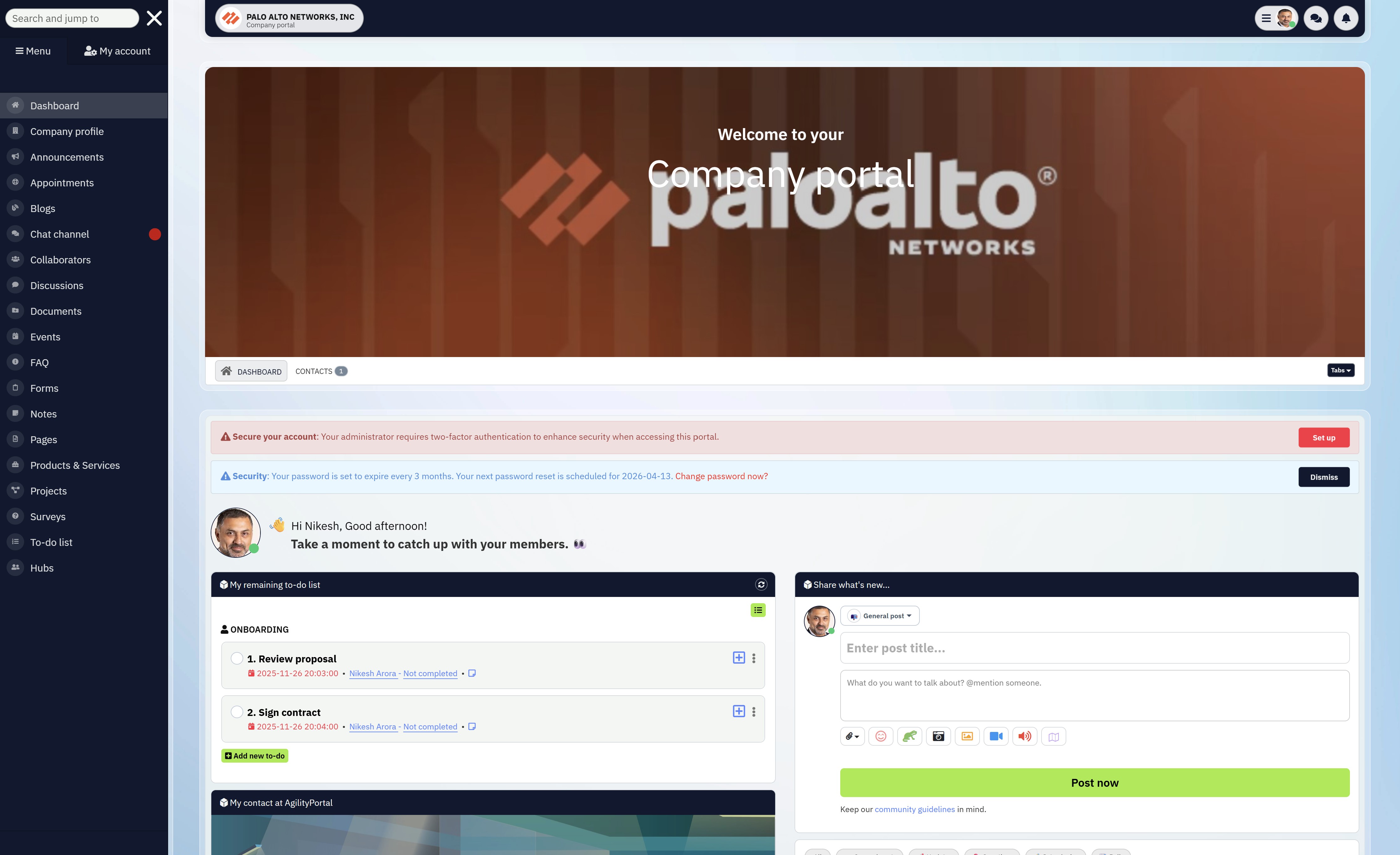
The best B2B Extranet on the market
If your partners, suppliers, or extended teams still rely on email, shared drives, or one-off links, you're already losing time — and control.
AgilityPortal gives you a modern extranet portal built for real-world collaboration:
- Secure, role-based access for partners, clients, and contractors
- Two-way collaboration so partners can share updates, offers, and documents
- Built-in governance to protect sensitive data and deactivate inactive accounts
- Clear analytics to see who's active, what's used, and where to improve
Unlike basic portals, AgilityPortal is designed for adoption first. External users know where to go, what to do, and what's current — without training or constant follow-ups.
If you need an extranet portal that scales securely, reduces support load, and replaces email chaos with clarity, this is the platform built for it.
👉 See how AgilityPortal works for partner collaboration
👉 Start a no-pressure demo — no credit card required
👉 Start a no-pressure demo — no credit card required
Conclusion: Why Extranets Matter More Than Ever
At the end of the day, extranets aren't about adding another system — they're about control and clarity.
Control over who sees what, when, and why.
Clarity for partners, suppliers, clients, and extended teams who need to act without chasing emails or guessing where information lives.
The organisations that succeed with extranets understand one hard truth: adoption matters more than features. The most powerful platform is useless if external users don't log in, don't trust the content, or fall back to email. Simplicity, structure, and governance always outperform complexity.
When done right, an extranet stops being a cost centre and becomes a competitive advantage. It reduces friction, tightens security, speeds up collaboration, and creates consistency across every external relationship your organisation relies on.
If you're working with partners, contractors, or external stakeholders at scale, the question is no longer whether you need an extranet — it's whether yours is actually helping you move faster and safer than the competition.
Platforms like AgilityPortal exist for exactly this reason: to turn external collaboration into a structured, governed, and scalable advantage — without overengineering or unnecessary noise.
Extranet FAQs
What is the function of the extranet?
The primary function of an extranet is to give external users (partners, suppliers, contractors, clients) secure, controlled access to selected systems, documents, and collaboration spaces — without exposing the internal network.
In practical terms, it replaces email chains, shared links, and unmanaged file sharing with a governed external workspace.
What is extranet with example?
An extranet is best understood through real-world examples.
A classic what is extranet with example scenario is Booking.com, where hotels log into a partner system to manage availability, pricing, and promotions.
Another enterprise example is the Human Rights Council extranet, used to securely share documents and submissions with member states and observers.
These platforms allow two-way interaction — not just downloads.
What is the feature of extranet in computer systems?
When people ask what is the feature of extranet in computer environments, they're usually referring to core system capabilities, such as:
- Secure external authentication
- Role-based access control
- Controlled data sharing
- Activity tracking and audit logs
From a computing perspective, an extranet extends internal systems outward — safely.
What is the feature of extranet in networking?
From a networking standpoint, the key feature of an extranet is controlled network access.
When asking what is the feature of extranet in networking, the answer is:
- It operates over the internet
- Uses encryption and authentication
- Sits outside the internal LAN
- Allows limited access to internal resources without exposing the full network
This makes it safer than VPN-based access for most partner scenarios.
What is the feature of extranet and intranet?
The shared features of extranet and intranet include:
- Centralised information access
- Authentication and permissions
- Document management
- Internal communication tools
The difference is who can access them, not how powerful they are.
Difference between intranet and extranet with examples
This is one of the most common questions.
- Intranet example: An internal HR portal where employees access payslips, policies, and company news.
- Extranet example: A partner portal where suppliers upload compliance documents or partners publish promotions.
In short, the difference between intranet and extranet with examples comes down to internal vs external access, not capability.
Extranet vs intranet: what's the real difference?
In the extranet vs intranet debate:
- An intranet is for employees only
- An extranet is for external stakeholders
Trying to use one for the other usually results in security risks or poor adoption.
What are the features of intranet and extranet?
Both platforms share modern capabilities:
- Secure login
- Document sharing
- Search
- Notifications
However, extranets add:
- External user governance
- Stronger access boundaries
- Account expiry and inactivity rules
This is why enterprises run both — not one instead of the other.
What are the key features of a good extranet?
When people ask what are the key features of a good extranet, they're usually looking for:
- Granular access control
- Secure document sharing
- External user management
- Activity and audit logs
- Analytics and engagement tracking
Without these, an extranet won't scale safely.
What is a key characteristic of an extranet?
The defining characteristic of an extranet is selective trust.
It allows collaboration beyond organisational boundaries while maintaining strict control over what is shared, with whom, and for how long.
Advantages of extranet for organisations
The main advantages of extranet platforms include:
- Reduced email dependency
- Faster partner collaboration
- Better security than shared drives
- Improved accountability
- Lower administrative overhead
This is why extranets consistently outperform ad-hoc collaboration tools.
What is the feature of extranet example in regulated environments?
In regulated contexts, extranets like Human Rights Council extranet or mft extranet platforms are used to:
- Control sensitive submissions
- Track access and changes
- Enforce governance rules
- Maintain audit trails
These examples show extranets are trusted where compliance matters most.
Can an extranet replace email with partners?
Yes — and that's one of its biggest advantages.
A well-designed extranet replaces email for:
- File sharing
- Updates and announcements
- Partner submissions
- Offer and promotion management
Email becomes the notification layer — not the system of record.
If you're still asking what is the feature of extranet in 2026, the answer is simple:
A modern extranet is no longer just a network extension — it's a governed collaboration platform that sits between your organisation and the outside world.
That's exactly how platforms like AgilityPortal are designed to be used.
Most Popular Posts

Effective communication among team members is vital for the productivity and success of any organization. Surprisingly, 60% of companies lack a long-term internal communication strategy, which p...


Businesses thrive on communication for efficiency, productivity and accomplishment. When the right information is passed from the right designation in the organization, it promotes positivity an...
Categories
Blog
(2964)
Business Management
(372)
Employee Engagement
(222)
Digital Transformation
(191)
Growth
(142)
Intranets
(135)
Remote Work
(63)
Sales
(53)
Collaboration
(47)
Customer Experience
(30)
Culture
(29)
Knowledge Management
(28)
Project management
(28)
Leadership
(20)
Comparisons
(9)
News
(1)

Related Posts

Partner enablement software has become essential for businesses that rely on distributors, resellers, affiliates, consultants, suppliers, and channel partners to generate revenue. As partner networks grow, many organizations struggle with inconsisten...

Partner enablement is becoming a critical growth strategy for businesses that rely on distributors, resellers, suppliers, franchisees, or strategic partners. As partner networks expand, organizations need a better way to share information, deli...

If your business relies on resellers, distributors, affiliates, consultants, or channel partners, one small communication breakdown can quickly turn into missed revenue, frustrated partners, and lost opportunities. That's exactly why more companies a...

As businesses continue evolving through digital transformation, hybrid work, and AI-powered collaboration, the need for a modern knowledge management framework has become more important than ever. According to IDC, employees spend nearly 30% of...

Remote work is the new thing. With more modern companies moving to work from home, and with telecommuting becoming a more common way for people to work remotely, remote workers are growing in numbers. A Gallup study on the state of remote work ...


Jill Romford
I am a digital nomad, lover of exploring new places and making friends.
I love to travel and I love the internet. I take pictures of my travels and share them on the internet using Instagram.
Traveler, entrepreneur, and community builder. I share my insights on digital marketing and social media while inspiring you to live your fullest life.
Ready to learn more? 👍
One platform to optimize, manage and track all of your teams. Your new digital workplace is a click away. 🚀
Free for 14 days, no credit card required.