
Insight Blog
Agility’s perspectives on transforming the employee's experience throughout remote transformation using connected enterprise tools.
33 minutes reading time
(6511 words)
Shared Team Calendar Tool — From Missed Deadlines to Complete Team Visibility

Shared Team Calendar Tool — From Missed Deadlines to Complete Team Visibility
Struggling with missed deadlines and poor visibility? Discover how a shared team calendar tool improves coordination, accountability, and team productivity.
Shared Team Calendar Tool — From Missed Deadlines to Complete Team Visibility

Let's be honest for a second — if your team keeps missing deadlines, double-booking meetings, or scrambling at the last minute, it's not because people don't care.
It's because they can't see the full picture.
And that's expensive.
Research shows employees spend 20–25% of their workweek searching for information or clarifying next steps.
That's basically one full day every week lost to confusion. Even worse, studies consistently report that over 70% of workplace initiatives underperform due to poor coordination and lack of visibility — not lack of effort. Think about that. The problem usually isn't talent. It's systems.
This is where a proper team calendar tool changes everything.
Not a basic calendar.
Not a private Outlook view.
Not a messy spreadsheet.
I'm talking about a centralized, shared view that shows who's responsible for what, when it's due, and how it connects to everything else happening across the business.
20–25%
of the workweek
Research shows employees spend 20–25% of their workweek searching for information or clarifying next steps — effectively losing nearly one full workday every week to confusion and misalignment.
Source: Industry productivity research & workplace studies
A modern team scheduling app isn't just about booking meetings — it's about protecting your deadlines, reducing last-minute chaos, and eliminating the dreaded "I didn't know" excuse.
When everyone sees the same timeline, accountability increases automatically. Priorities become clear. Bottlenecks become visible. Firefighting becomes optional instead of daily routine.
Here's the uncomfortable truth: if your team doesn't have shared visibility, you're operating on guesswork. And guesswork doesn't scale.
In this guide, I'll show you:
- Why traditional calendars quietly fail growing teams
- What separates a basic scheduler from a real operational system
- The features that actually prevent missed deadlines
- And how to turn a simple calendar into a control center for execution
If you want fewer surprises, smoother launches, and a team that runs ahead of deadlines instead of chasing them — this is what you need to know.
70%+
underperform
Studies consistently show that over 70% of workplace initiatives underperform due to poor coordination and lack of visibility — not because teams lack effort, but because execution systems break down.
Source: Industry change management & workplace performance research
Key Takeaways
- Missed deadlines are usually caused by poor visibility, not poor performance; a structured team calendar tool fixes alignment at the system level.
- Basic shared calendars in Teams handle meetings, but advanced team calendar software is required for milestone tracking and accountability.
- Centralized team project calendar visibility reduces rework, last-minute scrambling, and cross-department confusion.
- Modern calendar tools for teams must integrate communication, documents, tasks, and real-time syncing across devices.
- AI-powered scheduling, automation, and clear ownership tracking separate high-performing teams from reactive ones.
Why Teams Keep Missing Deadlines (And It's Not Laziness)
Let's clear something up right away — most missed deadlines in 2026 aren't caused by lazy teams. They're caused by broken systems.
Work has become more complex than ever. Hybrid setups. Cross-functional projects. Contractors. Different time zones. AI tools layered on top of legacy systems.
Yet many teams are still relying on fragmented calendar tools for teams that were never designed for operational visibility.
Here's what's actually happening inside growing organizations:

Why Teams Keep Missing Deadlines (And It's Not Laziness)
Deadlines Live in Private Calendars
This is one of the biggest hidden operational risks in 2026.
Here's what it actually looks like in real life:
- The Head of Marketing has the campaign launch on her Outlook.
- The Product Manager has the feature release date in Google Calendar.
- The Compliance lead is tracking regulatory approval in a spreadsheet.
- Leadership is reviewing a PowerPoint timeline that hasn't been updated in two weeks.
Everyone thinks the launch is "on track."
Until it isn't.
A client demo gets scheduled before the product feature is fully tested. Marketing sends emails before compliance signs off. Sales promises delivery based on an outdated timeline.
No one is incompetent. The system is fragmented.
A basic calendar is a personal reminder tool. It was never designed to function as a true scheduling tool for teams. It doesn't enforce shared ownership. It doesn't surface cross-dependencies. It doesn't show risk indicators.
So when teams are distributed, remote, and moving fast, private calendars create blind spots. And blind spots create delays.
Information Is Trapped in Email and Chat
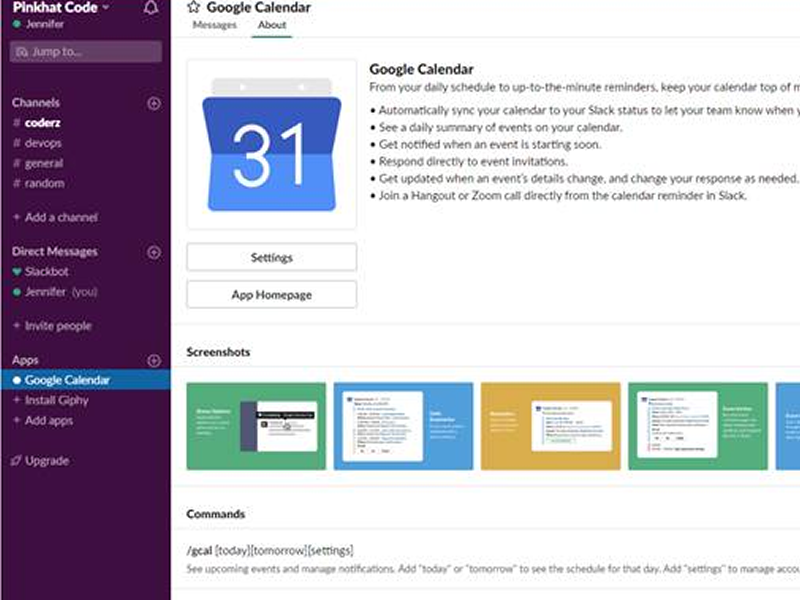
Information Is Trapped in Email and Chat
This one is even more dangerous because it feels productive.
A quick Slack message:
"Let's aim for the 18th."
An email reply:
"Works for me."
That's it. That's the deadline.
But where is it recorded?
- Not in the master timeline.
- Not visible to operations.
- Not flagged in leadership reporting.
- Not connected to dependent tasks.
Three weeks later, someone says:
"Wait, I thought that was the 25th?"
Now you're in reactive mode.
Microsoft's research consistently shows workers face constant digital interruptions, yet still lack clarity on priorities.
That's because conversation is not coordination. Chat tools are great for discussion — they are not structured calendar tools for teams.
When critical dates live inside conversations instead of inside a shared scheduling system, you're relying on memory instead of infrastructure.
And memory doesn't scale.
No Centralized Project Visibility
This is where things break down at a structural level.
Let's take a real-world example in 2026.
You're launching a new product update.
The timeline depends on:
- Engineering completing development
- QA finishing testing
- Legal approving documentation
- Marketing preparing campaign assets
- Sales being trained
- Customer support updating FAQs
Now ask yourself:
Can one person open a single dashboard and see all of those milestones aligned on one shared timeline?
In many companies, the answer is no.
Instead:
- Engineering tracks sprints in Jira.
- Marketing tracks campaigns in Asana.
- Sales uses CRM reminders.
- Leadership reviews monthly slide decks.
There is no unified view.
Without centralized calendar tools for teams, bottlenecks remain invisible until something explodes. QA finishes late. Marketing isn't informed. Campaign dates shift. Customers notice.
The cost isn't just a missed deadline. It's credibility.
In 2026, coordination is the competitive advantage. Speed isn't about working harder — it's about reducing friction between teams. A true scheduling tool for teams doesn't just show dates. It shows dependencies, ownership, and status in one shared operational layer.
Because once visibility becomes shared, accountability becomes automatic.
And that's when deadlines stop slipping.
Spreadsheets Still Run the Business

In 2026, this is still shockingly common.
Manual tracking in Excel means:
- No real-time updates
- No automated reminders
- No integration with workflows
- High risk of version-control errors
And the cost? It's measurable.
Research consistently shows employees spend 20–25% of their workweek searching for information or clarifying context. That's roughly one full day every week lost to misalignment.
Microsoft's Work Trend Index also highlights that employees are interrupted every few minutes by digital noise — yet still lack clarity on priorities. That's not a motivation issue. That's a coordination failure.
Peter Drucker said it best:
"You can't improve what you can't see."
If your team doesn't have shared, structured visibility through proper calendar tools for teams, performance gaps multiply quietly. Deadlines slip. Stress increases. Leaders lose trust in reporting.
Teams start operating in reactive mode instead of proactive mode.
The problem isn't effort. It's architecture.
And that's exactly why a modern scheduling tool for teams isn't just a convenience anymore — it's operational infrastructure.
20–25%
of the workweek
Research consistently shows employees spend 20–25% of their workweek searching for information or clarifying context — roughly one full day every week lost to misalignment and workflow confusion.
Source: Industry workplace productivity research
What Is a Shared Team Calendar Tool (Really)?
Let's strip this back.
Most companies think they already have a shared calendar because everyone can "see" each other's availability in Outlook or Google. But visibility of free/busy time is not the same as operational coordination.
A true shared team calendar tool is far more than a synced diary. It functions as a structured team meeting schedule tool and a centralized planning layer for your business.
In 2026, where hybrid work, cross-functional projects, and remote teams are the norm, you need more than basic availability tracking. You need alignment.
Here's what a real system includes:
- Team-wide event visibility - Everyone sees key deadlines, launches, campaigns, compliance dates, and internal milestones — not just meetings.
- Task and deadline tracking - Important deliverables don't live in chat threads or someone's notebook. They're attached to dates with clear ownership.
- Project milestone alignment - Marketing, product, HR, and operations timelines sit on the same shared view, reducing cross-department blind spots.
- Role-based access - Leadership sees strategic milestones. Managers see team-level deliverables. Individuals see personal responsibilities — all from one structured system.
- Automated notifications and reminders - No more "I forgot." The system prompts action before deadlines slip.
- Integration with communication tools - Discussions connect to calendar entries instead of floating in Slack or email without accountability.
Shared Calendar Tools Comparison + Examples (2026)
| App | Best for… | Key Features | Price |
|---|---|---|---|
| AgilityPortal | Businesses needing more than just a shared calendar | Team project calendar, communication channels, document management, task workflows, role-based dashboards, mobile access, analytics | Custom pricing (Free trial available) |
| Microsoft Teams Calendar | Companies already using Microsoft 365 | Shared calendar view, meeting scheduling, Outlook sync | Included with Microsoft 365 |
| Google Calendar | Small teams needing simple scheduling | Shared calendars, availability view, integrations | Free / Workspace plans |
| Asana Team Calendar | Project-based teams | Task-linked calendar, timeline view, project tracking | Free / Paid plans |
| Trello Team Calendar | Visual project planners | Board calendar view, task deadlines, automation | Free / Paid plans |
| Monday.com Team Calendar | Workflow-heavy teams | Timeline tracking, automation, workload view | Paid plans |
| Notion Team Calendar | Flexible knowledge teams | Database calendar, docs + tasks integration | Free / Paid plans |
| Calendly (Teams) | Meeting coordination | Group scheduling, booking links, availability control | Free / Paid tiers |
| Slack (Calendar Integrations) | Messaging-first teams | Google/Outlook integrations, reminders | Free / Paid plans |
| Jira Team Calendar | Software teams | Sprint scheduling, release tracking | Paid plans |
| HubSpot Team Calendar | Sales teams | CRM-linked scheduling, pipeline visibility | Free / Paid CRM tiers |
| ClickUp Calendar | All-in-one productivity teams | Task + calendar sync, automation, workload | Free / Paid plans |
| Zoho Calendar | SMB teams | Group scheduling, resource booking | Free / Paid |
| Teamup Calendar | Simple shared scheduling | Multiple calendars, color coding | Free / Paid |
| Cozi | Basic shared planning | Shared event tracking | Free / Paid |
| Teamweek | Visual timeline planning | Gantt-style calendar | Paid plans |
| Planyway | Trello/Jira users | Timeline & calendar overlay | Paid add-on |
| Confluence Team Calendar | Documentation-first teams | Shared events, team visibility | Paid plans |
| Outlook Group Calendar | Microsoft-based teams | Group scheduling, shared mailbox view | Included in Microsoft 365 |
| Basecamp Schedule | Simple project teams | Milestones, shared deadlines | Paid plans |
| Feature | Teams Shared Calendar | Dedicated Team Calendar Software |
| Meeting booking | ✔ | ✔ |
| Milestone tracking | Limited | Advanced |
| Workflow integration | Basic | Full |
| Task ownership visibility | Minimal | Clear |
| Reporting | Limited | Structured |
When implemented correctly, it becomes your company's online group calendar scheduling engine — not just for booking meetings, but for managing execution.
Think of it like this:
A basic calendar answers:
"When are you free?"
A real shared team calendar tool answers:
"What is the business committed to delivering — and who is responsible?"
That's a huge difference.
The first is personal productivity.
The second is organizational control.
In a fast-moving environment, especially with distributed teams, that distinction determines whether you're constantly reacting to problems or confidently executing ahead of schedule.
A proper team meeting schedule tool doesn't just help you plan conversations — it protects your commitments.
The Real Business Cost of Poor Team Visibility
Let's stop pretending poor visibility is just an inconvenience.
In 2026, when teams are juggling hybrid schedules, multiple tools, AI integrations, and faster client expectations, poor coordination isn't harmless — it's expensive.
And most businesses don't even realize how much it's costing them until something breaks.
Here's where the damage actually shows up.
Productivity Loss
When teams don't share a clear timeline inside proper calendar tools for teams, handoffs fail quietly.
Example:
- Design finishes assets but doesn't know product pushed the deadline.
- Sales schedules demos without confirming engineering timelines.
- HR launches onboarding before compliance documentation is finalized.
Now you've got:
- Duplicate work
- Revisions that shouldn't exist
- Teams waiting on each other without knowing it
Research consistently shows employees spend up to 20–25% of their workweek searching for information or clarifying context. That's not small. That's one full working day per week lost.
And it's rarely because people aren't working hard. It's because they don't have shared visibility through a structured scheduling tool for teams.
Multiply that across 50 or 100 employees, and you're talking about serious operational waste.
Burnout and Firefighting
Here's what poor coordination feels like on the ground:
- "We need this by end of day."
- "Why wasn't I told?"
- "Can everyone jump on a quick call?"
Last-minute urgency becomes normal.
When there's no structured team meeting schedule tool connected to deadlines and ownership, everything becomes reactive. Teams stop planning ahead and start responding to surprises.
And constant reaction mode leads to:
- Increased stress
- Lower morale
- Higher turnover risk
In 2026, burnout isn't just about workload — it's about unpredictability. When employees can't see what's coming, everything feels urgent.
Predictability reduces stress. Visibility creates predictability.
Accountability Gaps
If something slips, who owns it?
Without a proper online group calendar scheduling system tied to tasks and milestones, accountability becomes fuzzy.
You hear things like:
- "I thought that was marketing's responsibility."
- "I wasn't aware that date changed."
- "I didn't see that update."
When deadlines live in chats, emails, or private calendars, there's no clear audit trail.
A shared system should show:
- Who created the deadline
- Who owns it
- When it was updated
- Who acknowledged it
Without that, leadership can't accurately assess performance. And teams lose trust in the process.
Clarity removes blame culture. Structured visibility replaces assumptions with facts.
Client Impact
This is where it really hurts.
Internal confusion eventually leaks externally.
- Deliverables go out late.
- Campaigns launch before systems are ready.
- Support teams aren't briefed on new features.
- Clients receive inconsistent communication.
And here's the dangerous part — clients don't see "calendar misalignment." They see unreliability.
In competitive markets, especially in 2026 where speed and coordination are expected, reliability is a differentiator.
When internal scheduling isn't unified through proper calendar tools for teams, external trust erodes. Slowly at first. Then suddenly.
Poor team visibility doesn't show up as one dramatic failure. It shows up as friction. Rework. Stress. Missed signals. Delayed launches.
And over time, that friction compounds.
That's why a modern scheduling tool for teams isn't just an admin convenience — it's operational insurance.
What High-Performing Teams Do Differently
Here's the real difference in 2026 between teams that constantly scramble… and teams that consistently deliver.
High-performing teams treat scheduling as infrastructure — not admin work.
They don't see a calendar as something you "update when you have time." They see it as an operational control system. Because they understand something most teams ignore:
If visibility is weak, execution will always be fragile.
Let's break down what they actually do differently.
They Centralize Deadlines
Underperforming teams have deadlines scattered across:
- Private calendars
- Email threads
- Project tools
- Whiteboards
- Spreadsheets
High-performing teams consolidate everything into one shared view using proper calendar tools for teams.
Product launches, compliance dates, campaigns, board meetings, recruitment milestones — all visible in one structured timeline.
This removes guesswork.
Instead of asking,
"When is that due again?"
The answer is already visible.
They Track Milestones, Not Just Meetings
Average teams use a team meeting schedule tool to book calls.
High-performing teams use it to manage delivery.
They don't just schedule conversations — they schedule outcomes.
For example:
- Sprint completion dates
- Approval checkpoints
- Training rollouts
- Client onboarding milestones
Every major commitment has a visible marker. If something slips, the system exposes it early — not at the last minute.
Meetings are coordination. Milestones are execution.
Top teams track both.
They Use Visual Clarity to Reduce Cognitive Load
Complex timelines overwhelm people.
So high-performing organizations simplify.
They use:
- Color-coded project streams
- Department filters
- Role-based visibility
- Timeline grouping
This matters more than it sounds.
In 2026, employees are already dealing with constant digital interruptions. If your online group calendar scheduling system is messy, people stop trusting it. And when they stop trusting it, they stop using it.
Clarity drives adoption. Adoption drives performance.
They Automate Accountability
High-performing teams don't rely on memory.
They rely on systems.
That means:
- Automated reminders before deadlines
- Notifications when dates shift
- Clear ownership tagging
- Escalation triggers for overdue tasks
There's no awkward chasing. No passive-aggressive emails. No "just checking in."
The system nudges action before leadership has to.
This reduces friction and protects relationships inside the team.
They Design for Visibility First, Then Execution
This is the mindset shift.
Most organizations focus on speed:
"Let's move faster."
High-performing teams focus on clarity:
"Let's make everything visible."
Because once visibility is strong:
- Bottlenecks surface early
- Workloads balance naturally
- Dependencies become obvious
- Risk can be managed proactively
Execution becomes smoother not because people work harder — but because the path is clearer.
In 2026, the competitive edge isn't effort.
It's alignment.
And alignment starts with structured visibility through intelligent calendar tools for teams — not scattered reminders and reactive scheduling.
Features to Look for in a Shared Team Calendar Tool
Not all calendar systems are built the same. Some are just digital diaries. Others are actual coordination engines.
If you're evaluating a shared team calendar tool in 2026, the difference comes down to one question:
Does this tool improve visibility across the business — or just help people book meetings?
Here's what actually matters.
1. Drag-and-Drop Scheduling
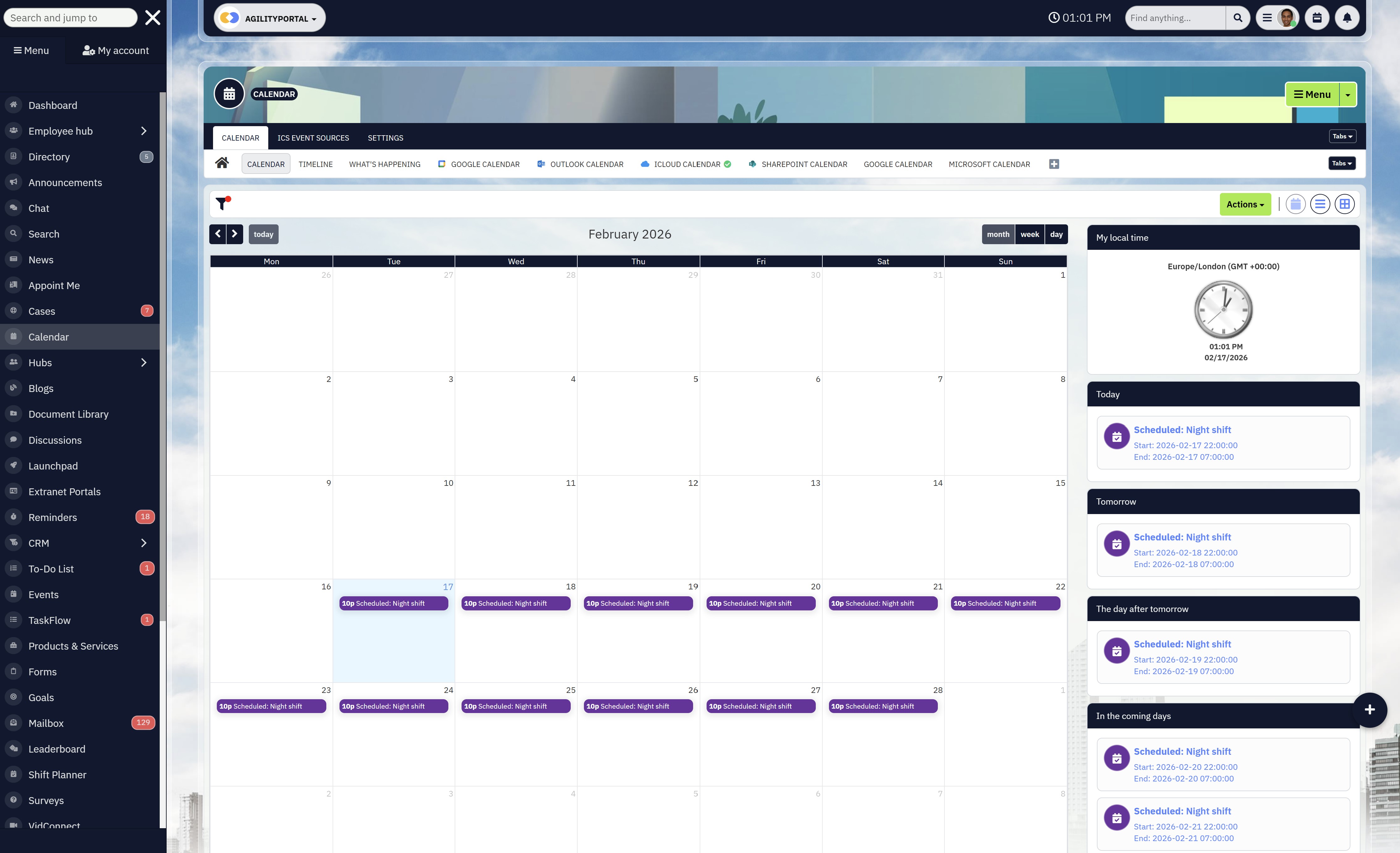
1. Drag-and-Drop Scheduling
Your team shouldn't need training just to move a deadline.
If shifting a milestone requires multiple clicks, manual updates, or separate system changes, people will avoid using it.
A strong tool allows managers to adjust timelines quickly and instantly reflect changes across all views.
In fast-moving environments, flexibility is essential.
2. Collaboration Capabilities for Shared Projects
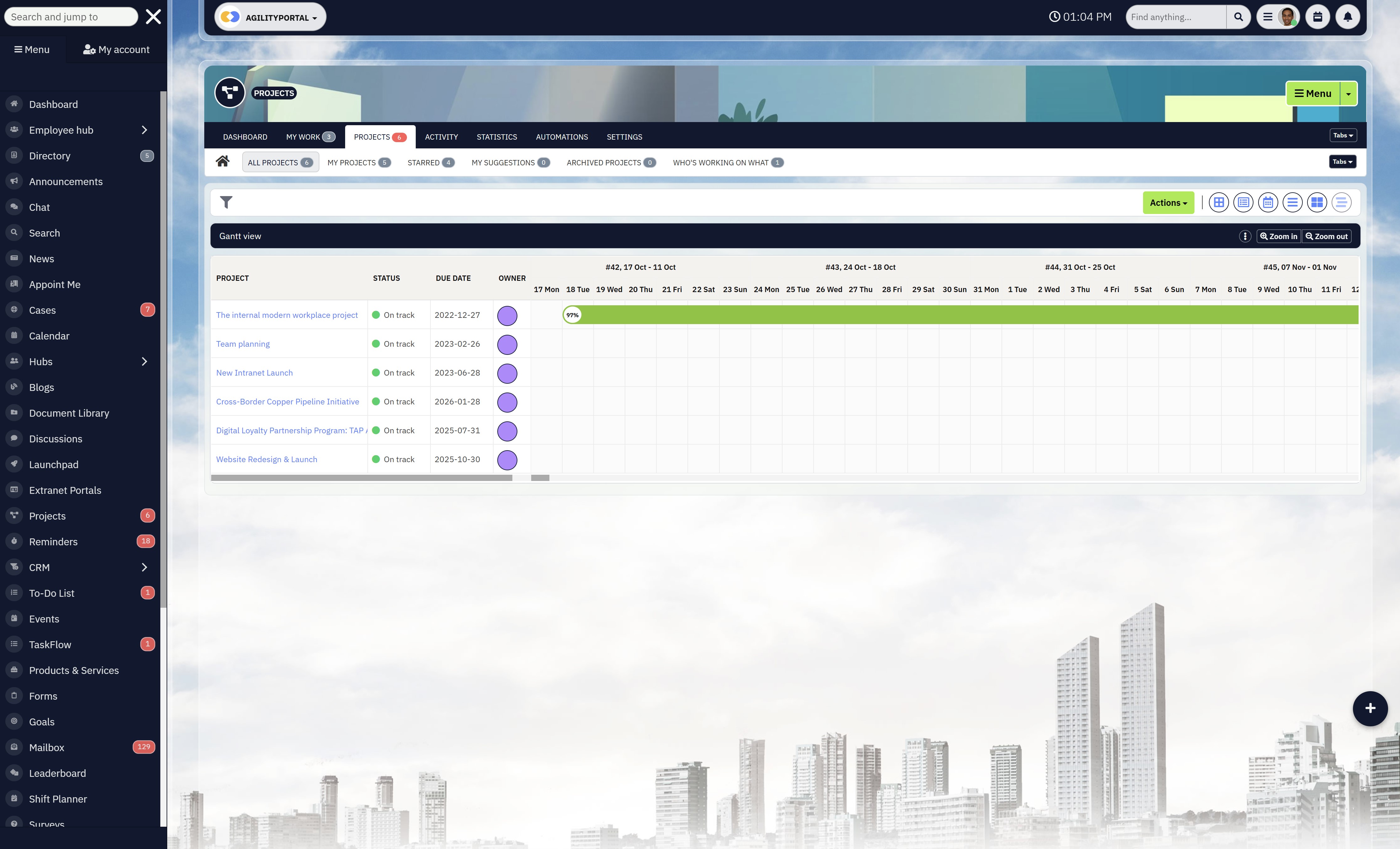
Collaboration Capabilities for Shared Projects
Modern teams don't operate in silos.
Marketing collaborates with product. HR coordinates with operations. Sales aligns with support.
Your shared calendar tool should allow:
- Multiple contributors on projects
- Shared editing permissions
- Cross-team visibility
- Commenting or discussion tied to events
This turns your system from a static calendar into an active coordination layer.
3. Recurring Task Automation
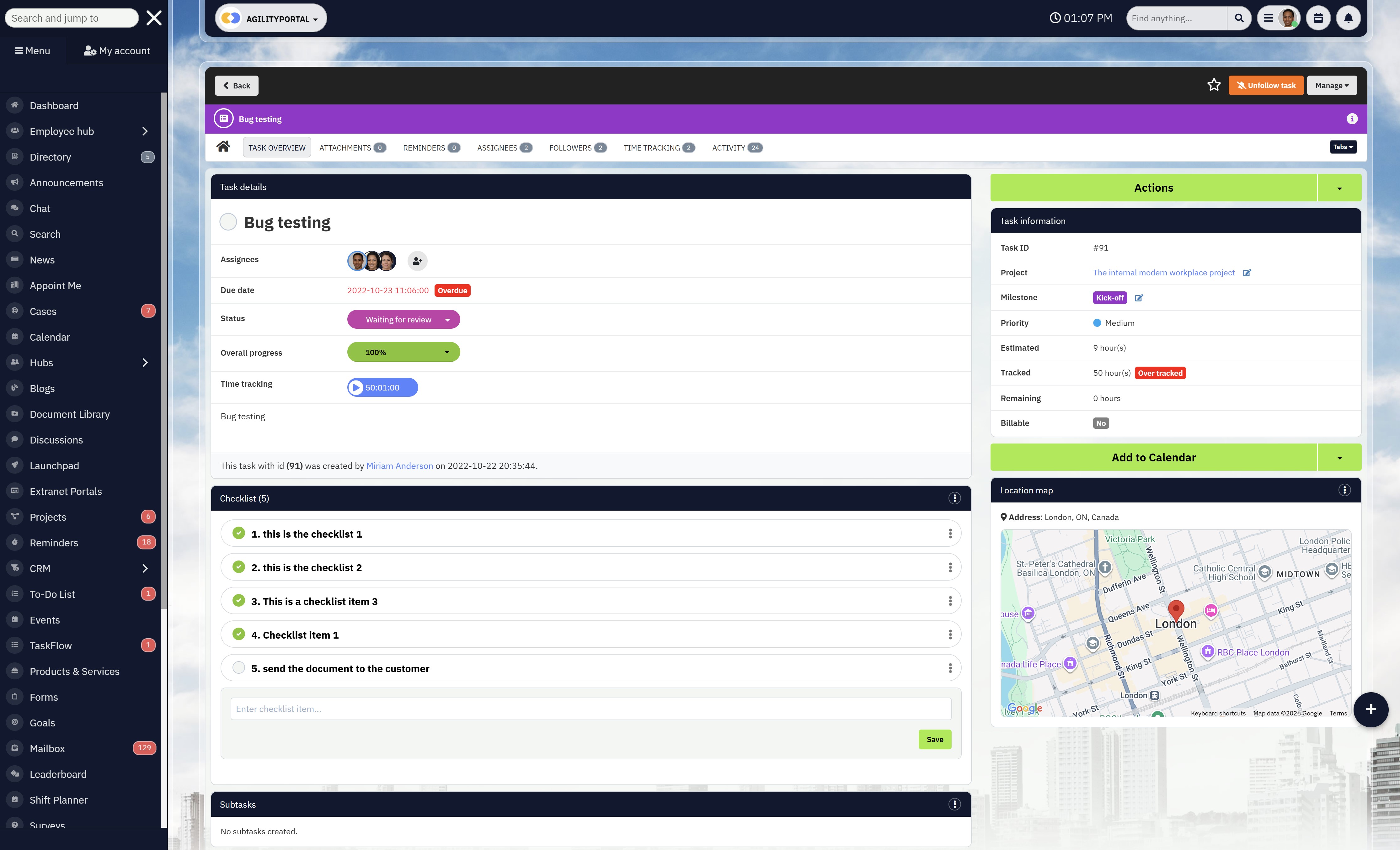
Recurring Task Automation
Some deadlines repeat. Compliance checks. Payroll cycles. Monthly reporting. Safety audits.
Manually recreating these every month increases the risk of forgetting one.
A strong team calendar tool automates recurring milestones so nothing slips through the cracks.
Consistency builds reliability.
4. Integration With Document Management
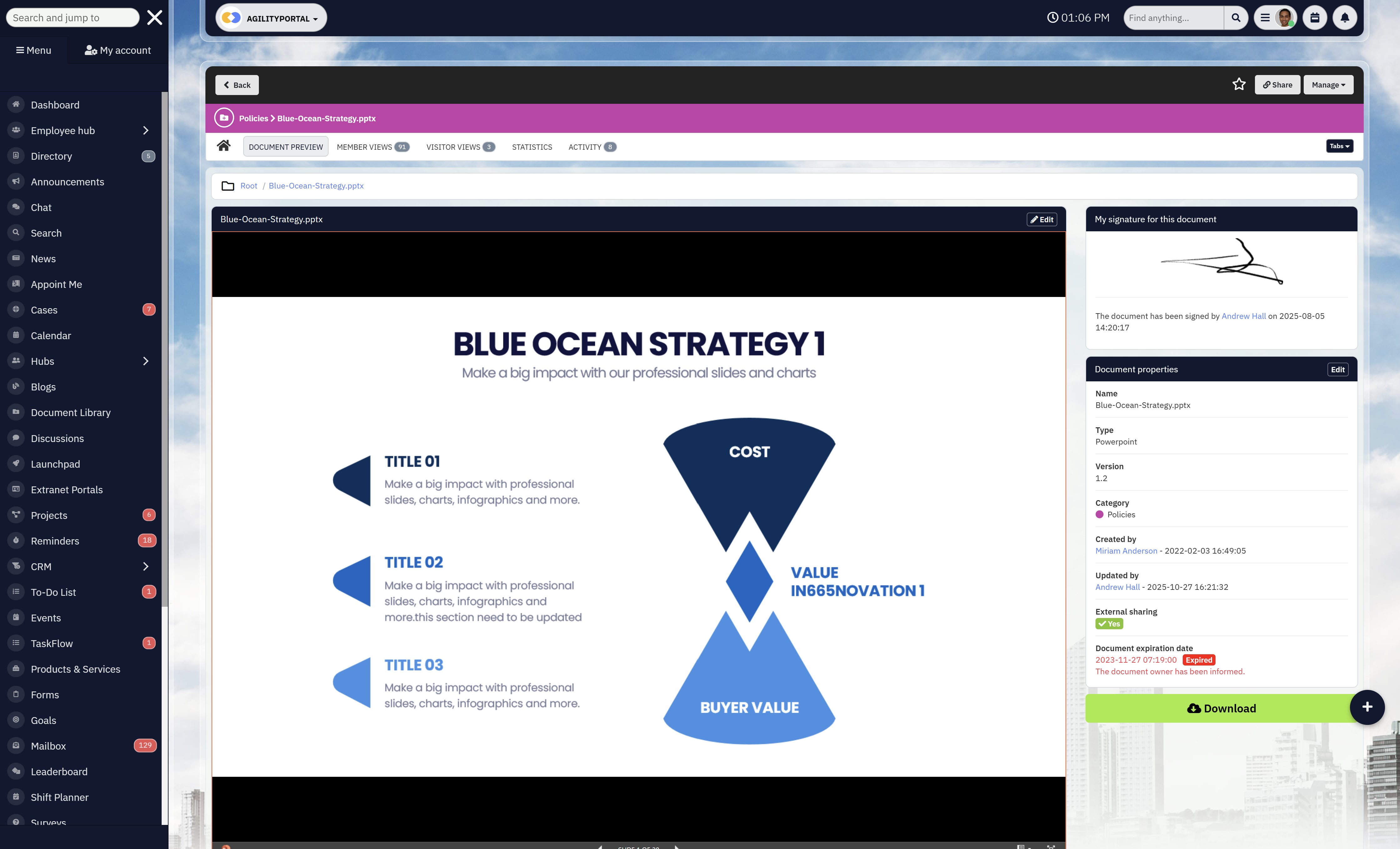
Integration With Document Management
This is where most calendar tools fall short.
A date without context isn't helpful.
If someone clicks a campaign launch date, they should be able to access:
- The campaign brief
- The latest document version
- Approval history
- Supporting materials
When calendars connect with document libraries — like in a broader digital workplace such as AgilityPortal — execution becomes smoother because information lives alongside the deadline, not somewhere else.
5. Mobile Accessibility
In 2026, not everyone works behind a desk.
Field teams, frontline staff, managers on the move — they need access to schedules in real time. A shared calendar that only works properly on desktop limits adoption.
Mobile-first visibility ensures everyone stays aligned, regardless of location.
6. Real-Time Notifications
Deadlines shift. Meetings change. Priorities evolve.
Without real-time alerts, teams operate on outdated information.
A reliable system should notify:
- Owners when dates change
- Teams when milestones are approaching
- Managers when deadlines are at risk
This prevents surprises instead of reacting to them.
7. Searchable Event History
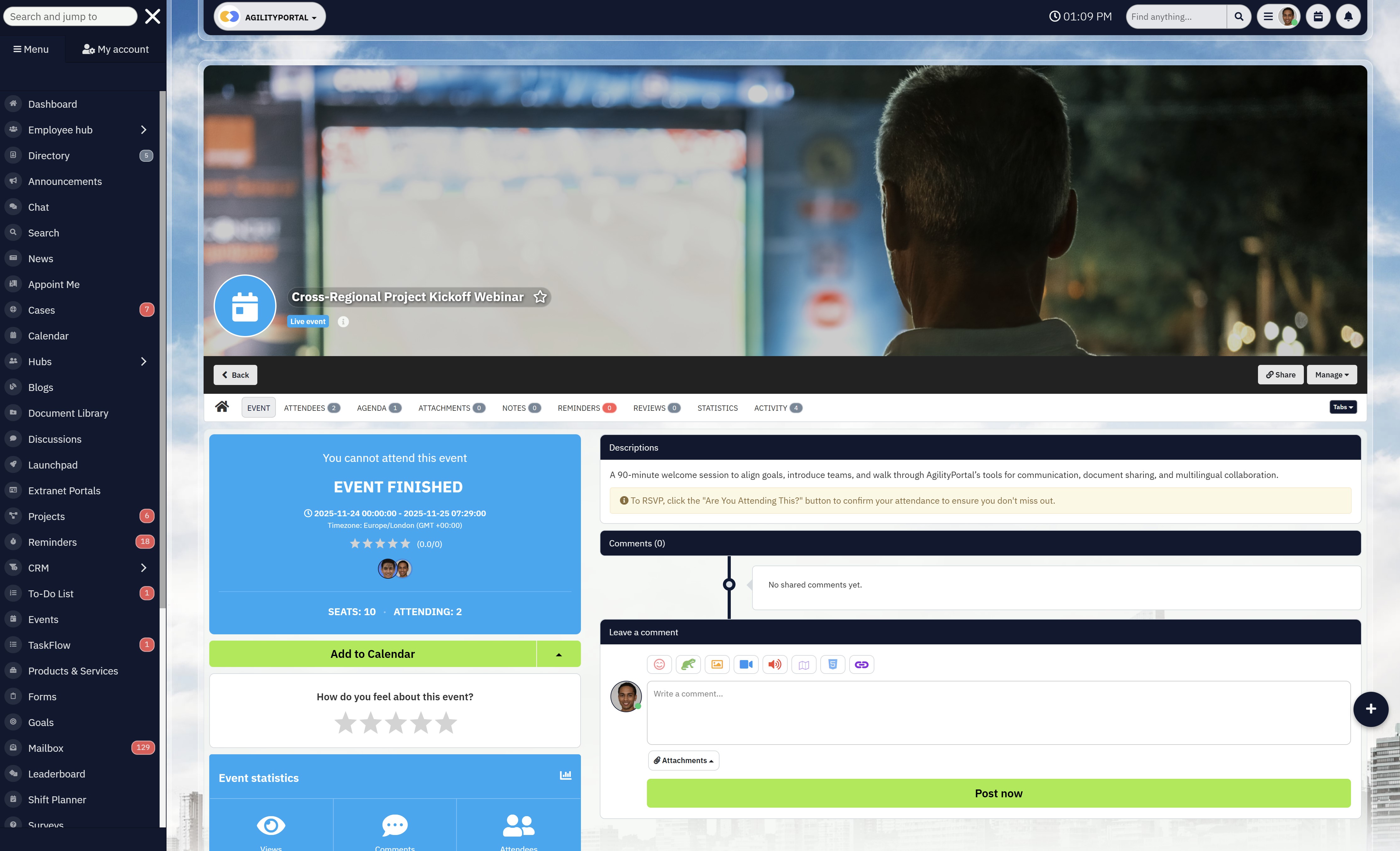
Searchable Event History
When something goes wrong, leadership often asks:
- "When was this updated?"
- "Who changed the date?"
- "Was this communicated?"
A searchable history provides accountability and transparency. It protects both teams and managers by showing a clear timeline of activity.
8. Engagement Analytics
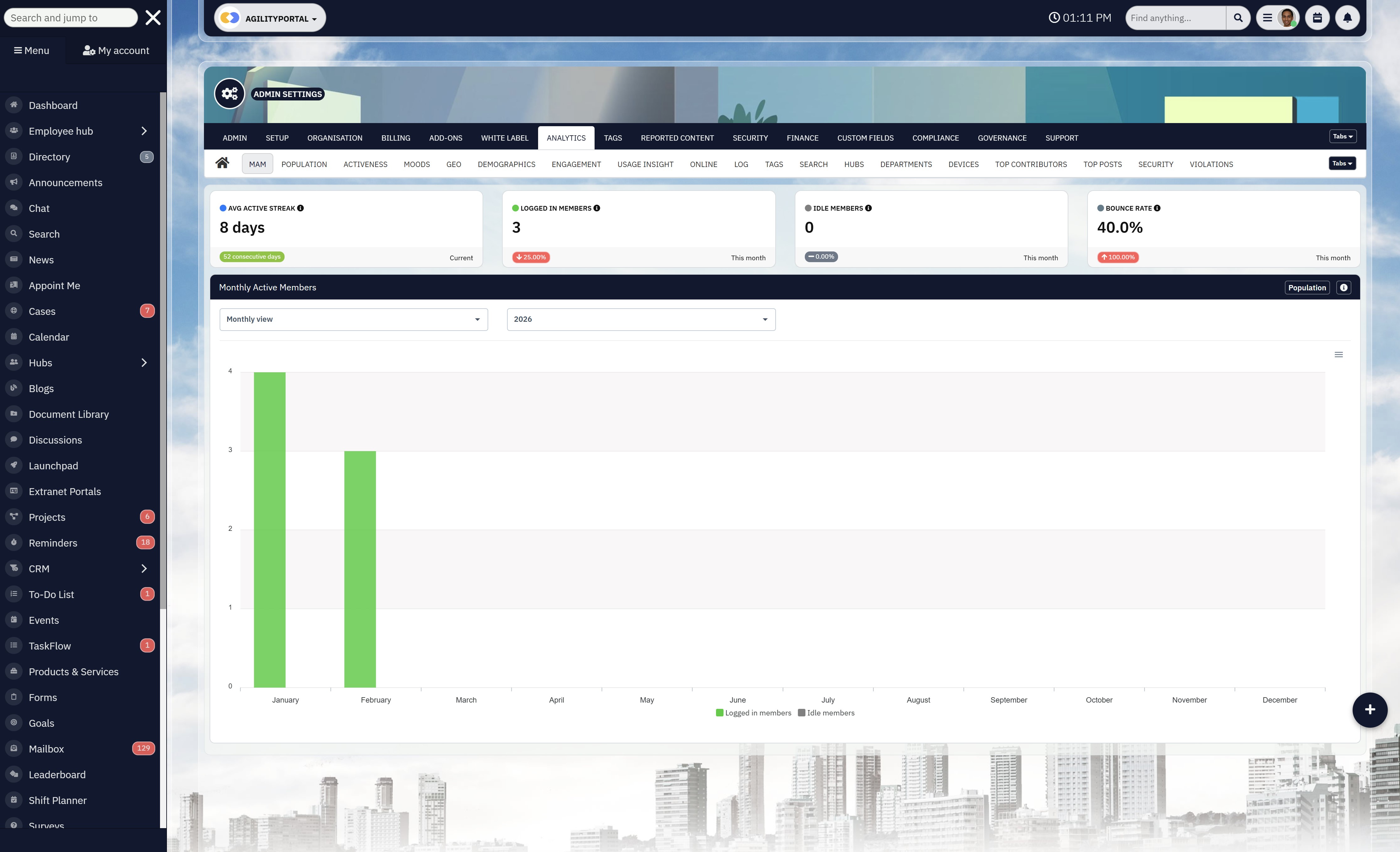
Engagement Analytics
Adoption matters.
If people aren't using the calendar consistently, visibility collapses.
Some modern platforms track interaction metrics to help leaders understand whether scheduling systems are actually being used effectively.
Within a broader digital workplace, engagement insights can show how teams interact with shared tools — helping identify gaps before they become performance issues.
9. Clear, Easy-to-Use Interfaces
This sounds basic, but it's critical.
If your team needs training just to create or edit events, adoption will drop.
Strong calendar tools for teams prioritize:
- Clean layouts
- Simple event creation
- Quick editing
- Visual timeline clarity
Ease of use drives consistency. Consistency drives visibility. Visibility drives performance.
10. Searchable Event History
When something shifts, leadership needs clarity.
A reliable system should show:
- Who created the event
- Who owns it
- When it was updated
- What changed
This protects accountability and removes ambiguity.
How a Shared Team Calendar Tool Improves Frontline Coordination
Frontline teams don't have the luxury of sitting in long planning meetings.
They're on the floor. On-site. In the field. In different time zones. Working rotating shifts. Handling real customers in real time.
So when coordination breaks down, the impact is immediate.
In 2026, distributed and deskless teams are growing fast — yet many still rely on scattered WhatsApp messages, noticeboards, or last-minute calls to manage scheduling. That's not scalable.
A structured shared team calendar tool changes how frontline coordination actually works.
Shift Visibility Reduces Confusion
Shift-based environments live and die by clarity.
Without a centralized view:
- Staff show up for the wrong shift
- Managers scramble to cover absences
- Overtime costs rise unexpectedly
- Coverage gaps appear during peak hours
With proper calendar tools for teams, everyone sees:
- Who's on duty
- Who's off
- Who's covering
- When peak demand hits
That transparency reduces unnecessary back-and-forth and prevents avoidable disruption.
It also lowers stress. People perform better when they know exactly what's expected.
Compliance Deadlines Are Never Missed
Frontline industries — healthcare, manufacturing, logistics, retail, facilities — operate under compliance pressure.
Think about:
- Safety inspections
- Equipment maintenance schedules
- Mandatory training renewals
- Audit checkpoints
When those dates live in spreadsheets or someone's personal reminders, risk increases.
A reliable scheduling tool for teams ensures compliance milestones are visible, recurring, and assigned with ownership. Automated reminders reduce reliance on memory.
Missed compliance deadlines don't just create internal issues — they can result in fines, reputational damage, or operational shutdowns.
That's not a small risk.
Campaign Launches Are Synchronized
Imagine rolling out a new promotion across multiple locations.
Marketing announces it. But:
- Store managers weren't briefed.
- Inventory wasn't aligned.
- Support teams weren't updated.
The launch technically "happened," but execution was inconsistent.
With structured online group calendar scheduling, launches are visible to:
- Operations
- Marketing
- Sales
- Customer support
Everyone sees the same timeline.
Preparation aligns before execution — not after something goes wrong.
Leave Schedules Are Transparent
Nothing causes friction faster than overlapping leave in small teams.
Without a centralized calendar:
- Two key staff members book the same week off
- No one checks workload coverage
- Managers discover conflicts too late
A shared team calendar tool makes leave visibility automatic.
This prevents:
- Coverage gaps
- Last-minute cancellations
- Team resentment
When leave is transparent, planning becomes proactive instead of reactive.
From Reactive to Proactive Coordination
Here's the real shift.
Without structured visibility:
Problems are discovered after they happen.
With a properly implemented team calendar system:
Risks are identified before they escalate.
Frontline teams can't afford ambiguity. They need clarity, predictability, and real-time updates.
When scheduling is centralized and connected — especially within broader digital workplace platforms like AgilityPortal — coordination becomes part of the workflow instead of a separate administrative burden.
And when coordination improves, performance follows.
Not because people suddenly work harder.
But because the system finally supports them.
Practical Example — Before and After Implementation
Let's make this real.
Imagine a growing 80-person company launching a new service update.
Marketing, product, compliance, and sales all need to align. On paper, it's manageable. In reality? It's messy.
Here's what it looked like before implementing a proper shared system.
Before: Fragmented and Reactive
5 Separate Calendars - Marketing used Google Calendar. Product tracked sprints in their project tool. Leadership had a separate executive timeline. HR managed training schedules independently. No single source of truth.
Email Reminders as "Process" - Deadlines were often reinforced with emails like:
"Just a reminder this is due Friday."
If someone missed the email, the reminder effectively didn't exist.
Manual Spreadsheets - Operations maintained a master spreadsheet that required constant updating. Version control became a problem. People referenced outdated files.
Frequent "I Didn't Know" Conversations
This was the biggest symptom.
- "I didn't know the date moved."
- "I wasn't aware marketing needed this earlier."
- "I thought compliance already approved it."
Nobody was intentionally dropping the ball. The system simply didn't provide shared visibility.
The result?
- Launch delays
- Rework
- Last-minute meetings
- Frustrated teams
After: Centralized and Proactive
Central Calendar View - All departments operate from one shared timeline. Campaigns, feature releases, compliance reviews, and internal deadlines are visible in a single environment.
No more guessing which version is correct.
Shared Accountability - Each milestone has a clearly assigned owner. Everyone can see who is responsible. Ownership is transparent, not assumed.
Automated Alerts Instead of chasing updates manually, the system sends:
- Pre-deadline reminders
- Notifications when dates shift
- Alerts for potential conflicts
The tool supports execution instead of relying on memory.
Clear Milestone Tracking
Product, marketing, HR, and operations timelines align visually. Dependencies are obvious. If product shifts a release date, marketing sees the impact immediately.
Within connected environments like AgilityPortal, these milestones can also link directly to discussions and documents — reducing context switching and confusion.
The Result
The difference wasn't dramatic overnight transformation.
It was controlled execution.
- Fewer missed deadlines
- Faster project cycles
- Reduced emergency meetings
- Improved cross-team trust
- Less stress around launches
Most importantly, leadership gained confidence in planning.
The team didn't suddenly become more talented. They became more aligned.
And alignment is what turns busy teams into high-performing ones.
Implementation Checklist (Quick Wins You Can Start This Week)
If you want results fast, don't overcomplicate it. Fix visibility first. Here's a practical rollout plan you can actually execute.
1. Audit Your Current Scheduling Process
Start by mapping reality — not what you think is happening.
Ask:
- Where are deadlines stored?
- Who updates them?
- How are changes communicated?
- What tools are being used (calendar, spreadsheet, chat, project software)?
You'll usually find duplication, outdated timelines, and scattered ownership.
You can't fix what you don't clearly see.
2. Identify Visibility Gaps
Look for blind spots:
- Are deadlines sitting in private calendars?
- Do departments run separate timelines?
- Are frontline teams excluded from planning visibility?
- Do leaders rely on manual reports instead of live views?
These gaps are where missed deadlines are born.
3. Define Ownership Structure
Every milestone needs one accountable owner.
Not:
"Marketing team"
But:
"Sarah – Campaign Lead"
Clear ownership eliminates ambiguity. When responsibility is visible inside your team project calendar, accountability becomes automatic.
4. Centralize All Deadlines
Move everything into one shared system.
- Product releases
- Campaign launches
- Compliance checkpoints
- Internal reviews
- Leave schedules
Whether you're using a structured calendar app teams rely on or a connected platform like the AgilityPortal app, the goal is simple:
One source of truth.
No side spreadsheets. No hidden reminders.
5. Train Teams on Shared Accountability
This isn't just a technical rollout — it's behavioral.
Set expectations:
- All deadlines must live in the shared calendar.
- Date changes must be updated immediately.
- Conversations should link to scheduled milestones.
If it's not in the system, it doesn't exist.
Consistency builds trust in the tool.
6. Monitor Adoption and Adjust
After rollout, check usage.
- Are teams updating events properly?
- Are managers reviewing the shared timeline weekly?
- Are reminders reducing last-minute scrambling?
If adoption drops, investigate friction points — complexity kills consistency.
You don't need a six-month transformation plan.
Fix visibility. Assign ownership. Centralize scheduling.
Do those three things properly, and missed deadlines will start disappearing fast.
How AgilityPortal Supports Shared Team Calendar Visibility
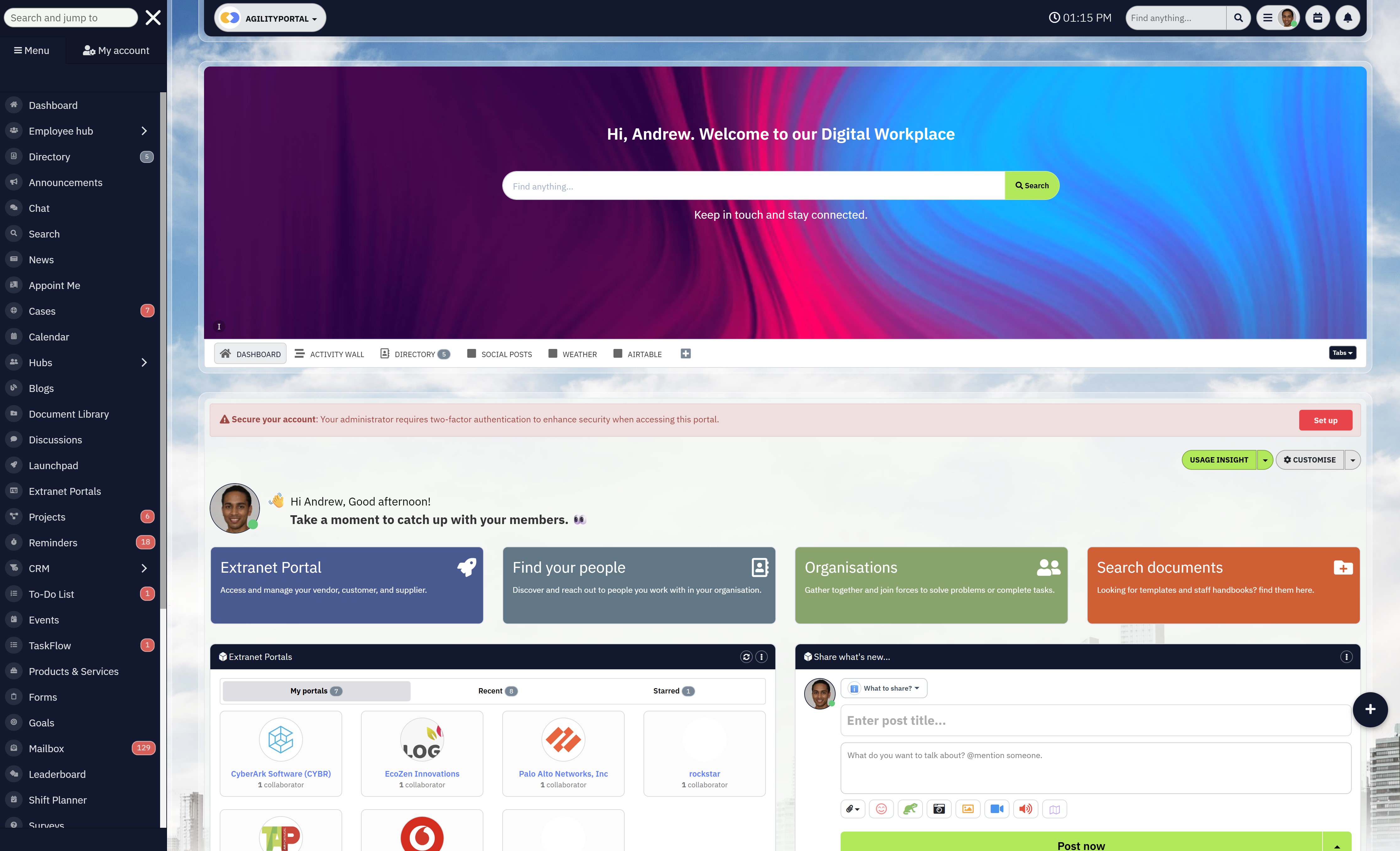
How AgilityPortal Supports Shared Team Calendar Visibility
A calendar only works if it's connected to how your team actually works.
The AgilityPortal app integrates the team project calendar directly into your digital workplace — so scheduling isn't separate from communication, documents, or tasks.
Instead of switching between tools, teams can:
- View milestones and meetings in one shared calendar
- Link events to project files and documents
- Connect discussions directly to deadlines
- Receive real-time updates across devices
This isn't just another calendar app teams use for booking meetings. It's a centralized coordination layer that aligns departments, improves accountability, and reduces missed deadlines.
Because when scheduling, communication, and execution live in one place, visibility becomes automatic — and execution becomes smoother.
AgilityPortal provides a powerful calendar experience built around how your team actually works.
Whether you're managing individual responsibilities or coordinating across departments, the platform gives you the visibility and flexibility to plan your day, schedule meetings, and keep projects aligned — all in one connected workspace.
Final Thoughts
Missed deadlines usually aren't a people problem — they're a visibility problem.
When scheduling lives in private calendars, scattered chats, and outdated spreadsheets, confusion becomes normal. But when you centralize planning with a structured team project calendar, everything changes. Ownership becomes clear. Priorities align. Surprises decrease.
The right calendar app teams rely on shouldn't just book meetings — it should support execution.
If your goal is fewer last-minute scrambles, better cross-team coordination, and predictable delivery, it starts with shared visibility. Fix the system, and performance follows.
AI Summary
- A shared team calendar tool centralizes meetings, project milestones, and deadlines in one visible system.
- Basic shared calendars in Microsoft Teams support availability but lack advanced milestone tracking and workflow coordination.
- Employees spend 20–25% of their workweek searching for information, often due to fragmented scheduling systems.
- Over 70% of workplace initiatives underperform because of poor coordination and limited visibility — not lack of effort.
- Modern calendar tools for teams integrate communication, tasks, documents, automation, and real-time syncing to improve accountability.
- A team scheduling app improves execution by assigning ownership, reducing bottlenecks, and providing cross-department transparency.
Frequently Asked Questions (FAQ)
1. What are the limitations of a shared calendar in Teams?
A basic shared calendar inside Microsoft Teams is useful for visibility, but it has limitations. It typically focuses on meeting availability rather than full project coordination. You may find gaps such as:
- Limited milestone tracking
- Weak dependency mapping
- Minimal reporting or audit history
- Basic team calendar management features
It works for simple scheduling, but if you need a structured team project calendar or deeper workflow alignment, you may require more advanced team calendar software beyond the default setup.
2. How to look at a shared calendar in Teams?
To view a shared calendar in Microsoft Teams, you typically:
- Open Teams
- Go to the Calendar tab
- Add or connect a shared mailbox or group calendar
- Toggle between personal and group views
For broader coordination, some teams integrate a dedicated scheduling app for Microsoft Teams or connect Outlook calendars.
However, if you need full team calendar scheduling with task ownership and project visibility, a purpose-built calendar app for teams may offer better structure.
3. What is the best shared calendar app for Teams?
The answer depends on your needs.
If you just need meeting coordination, basic tools like Outlook integration or lightweight add-ons may work.
But if you're looking for the best shared calendar for teams that supports deadlines, workflows, and cross-department visibility, you'll want a proper team calendar tool.
The best calendar app for teams typically includes:
- Shared milestone tracking
- Task-linked scheduling
- Real-time syncing
- Role-based dashboards
- Integration with communication tools
Some organizations prefer tools like Asana team calendar, Trello team calendar, or integrated platforms that combine communication and scheduling in one environment.
4. What are some shared calendar tools?
There are many calendar tools for teams available in 2026, ranging from simple to advanced.
Common options include:
- Outlook or Google Calendar (for basic team calendar planning)
- Google Calendar team scheduling integrations
- Slack team calendar plugins
- Calendly team scheduling for meeting coordination
- Project-based tools like team calendar Asana or Jira team calendar
- Dedicated shared calendar app for teams platforms
- Broader digital workplace systems that include a built-in team schedule planner
If you're looking for a free team scheduling app or free shared calendars for teams, many entry-level options exist — but they may lack advanced workflow integration or reporting.
5. Is there a free team calendar option available?
Yes, you can find a free team calendar, including tools like Google Calendar, basic Outlook group calendars, or lightweight free group scheduling app solutions.
However, most best free team calendar options focus on availability and meeting booking.
If you need structured team calendar planning tool capabilities with accountability and automation, premium team calendar software may provide stronger long-term value.
6. How does a team scheduling app differ from a team calendar tool?
A team scheduling app often focuses on booking meetings and availability management.
A full team calendar tool, on the other hand, supports:
- Milestone tracking
- Shared project deadlines
- Team task calendar visibility
- Cross-department coordination
- Calendar group scheduling with ownership
If your goal is execution, not just meetings, you need more than availability syncing.
Most Popular Posts

Effective communication among team members is vital for the productivity and success of any organization. Surprisingly, 60% of companies lack a long-term internal communication strategy, which p...


Businesses thrive on communication for efficiency, productivity and accomplishment. When the right information is passed from the right designation in the organization, it promotes positivity an...
Categories
Blog
(2934)
Business Management
(365)
Employee Engagement
(222)
Digital Transformation
(190)
Growth
(140)
Intranets
(134)
Remote Work
(63)
Sales
(53)
Collaboration
(47)
Customer Experience
(30)
Culture
(29)
Knowledge Management
(28)
Project management
(28)
Leadership
(20)
Comparisons
(9)
News
(1)

Related Posts

Many companies invest heavily in salaries, bonuses, and employee perks, yet still struggle with low productivity, disengaged teams, and high staff turnover. The reality is that the workplace environment often has a far greater impact on employe...

Many organizations looking for a SharePoint replacement online are reaching a point where SharePoint no longer matches how modern teams actually work. What started as a document repository has gradually become difficult to manage, expensive to ...

More and more businesses and educational institutions implement LMS software to streamline learning content delivery, with the global LMS market expected to reach $69 billion by 2030, growing with a CAGR of 19.2% since 2022, according to a recent rep...

In today's fast-paced and interconnected business world, effective communication, streamlined workflows, and efficient collaboration are essential for organizational success. That's where intranet apps come in. These powerful tools offer a cent...

Tennis Ball Transfer is an excellent activity for encouraging a group to practice cooperating, coordinating efforts, and learning to operate more effectively. Delegates must assess their performance and devise new problem-solving solutions. This exer...


Jill Romford
I am a digital nomad, lover of exploring new places and making friends.
I love to travel and I love the internet. I take pictures of my travels and share them on the internet using Instagram.
Traveler, entrepreneur, and community builder. I share my insights on digital marketing and social media while inspiring you to live your fullest life.
Ready to learn more? 👍
One platform to optimize, manage and track all of your teams. Your new digital workplace is a click away. 🚀
Free for 14 days, no credit card required.