
Insight Blog
Agility’s perspectives on transforming the employee's experience throughout remote transformation using connected enterprise tools.
26 minutes reading time
(5170 words)
Shift Problems Don’t Fix Themselves — Your Employee Scheduling Software Should

Shift Problems Don’t Fix Themselves — Your Employee Scheduling Software Should
Shift chaos costs more than you think. Discover how employee scheduling software and work scheduler software fix staff scheduling issues fast.
Shift Problems Don’t Fix Themselves — Your Employee Scheduling Software Should

Let's be real — shift chaos isn't rare, it's routine.
Someone calls in sick. Another employee says they can't cover my shift because they're already close to overtime.
You're juggling coverage, labour budgets, and compliance before the day even starts.
In shift-based industries like healthcare, retail, hospitality, and logistics, workforce scheduling isn't admin — it's operational control.
Overtime can cost up to 50% more per hour, and research shows employees lose nearly 20% of their time to confusion and poor coordination. That often starts with one simple issue: unclear shifts.
50%
higher overtime cost
Overtime can cost up to 50% more per hour, while research shows employees lose nearly 20% of their time due to confusion and poor coordination — often starting with unclear shifts.
Source: Industry labour cost & workforce productivity research
This is why employee scheduling software isn't optional anymore. When schedules live in spreadsheets or chat threads, you're reacting instead of managing.
In this blog, we're going to break down why shift problems keep repeating, the real financial and operational cost behind poor scheduling, and how modern employee scheduling software transforms "my shift" confusion into structured, compliant, real-time workforce management.
By the end, you'll understand what good scheduling systems actually do, which industry features matter most, and how to stop treating scheduling like admin — and start treating it like a performance lever.
Shift problems don't fix themselves. The right system fixes them for you.

employee scheduling software
Key Takeaways
- Employee scheduling software reduces overtime exposure, improves shift visibility, and prevents labour cost leakage caused by manual planning.
- Overtime can cost up to 50% more per hour, and employees lose nearly 20% of their time to confusion and poor coordination—often starting with unclear shifts.
- Structured staff scheduling systems provide real-time updates, automated rule enforcement, and documented audit trails to reduce compliance risk.
- Mobile-first scheduling apps improve adoption, reduce missed updates, and allow employees to manage “my shift” with clarity and accountability.
- The best employee schedule management software transforms scheduling from reactive admin into a strategic workforce performance tool.
The Real Cost of "Manual" Scheduling
Let's talk about what manual scheduling is really costing you — because it's more than a bit of admin frustration.
If you're still managing rotas in spreadsheets, sending updates over WhatsApp, or emailing PDF schedules around, you're not just using an old process. You're exposing your operation to financial leakage, compliance risk, and staff burnout.
And the worst part? Most of these losses are invisible until it's too late.

The Real Cost of "Manual" Scheduling
1. Spreadsheet Errors Aren't Small — They're Expensive
Spreadsheets look harmless. But one formula error, one overwritten cell, or one outdated version can trigger:
- Understaffed peak shifts
- Double-booked employees
- Missed skill coverage
- Overtime blowouts
According to research from McKinsey, employees spend nearly 20% of their workweek searching for information or clarifying tasks. In shift-based environments, that confusion often starts with outdated schedules or unclear shift ownership.
Now multiply that across a 50–100 person workforce.
Without structured employee schedule management software, you don't have:
- Automated conflict detection
- Real-time updates
- Skill-based scheduling
- Overtime alerts
You're relying on human memory in a system that needs automation.
That's not lean operations. That's risk exposure.

2. WhatsApp and Email Scheduling Create Operational Blind Spots
It feels quick to send schedule changes through group chat. But here's what really happens:
- Messages get buried
- Not everyone sees updates
- No audit trail exists
- Managers lose visibility
In regulated industries like healthcare and logistics, lack of documented scheduling trails can create compliance problems. Labour law violations — particularly around overtime thresholds and rest periods — can lead to serious penalties.
For example, in the UK, breaches of Working Time Regulations can result in enforcement action and financial penalties. In the US, Department of Labor investigations regularly recover millions in unpaid overtime wages each year.
Without proper staff scheduling software, you can't prove:
- Who approved a shift swap
- Whether overtime limits were monitored
- If mandatory rest periods were respected
And regulators don't accept "it was in the WhatsApp chat" as documentation.
3. Last-Minute Shift Swaps Trigger Domino Effects
When employees can't easily view or manage my shift, panic sets in.
Last-minute swaps cause:
- Coverage gaps
- Supervisor stress
- Customer service drops
- SLA breaches
Gallup data consistently shows low engagement correlates with higher absenteeism and turnover. When scheduling feels unfair or chaotic, absenteeism rises.
That means more reactive scrambling — and more cost.
Modern scheduling app platforms reduce this friction by enabling:
- Controlled shift swap approvals
- Real-time notifications
- Availability tracking
- Automated escalation workflows
When employees can clearly see my shift, request changes transparently, and receive instant approvals, the chaos reduces dramatically.
Without that? You're firefighting daily.
4. Overtime Budget Leaks Add Up Faster Than You Think
Overtime isn't just expensive — it compounds.
In many regions, overtime pay sits at 1.5x standard hourly rate. If poor planning causes just 10 unnecessary overtime hours per week at £20/hour, that's:
£20 x 1.5 x 10 = £300 extra per week
£15,600 per year — from one small scheduling gap
Now scale that across departments.
Without employee scheduling software, you lack:
- Real-time overtime forecasting
- Labour cost dashboards
- Predictive staffing models
- Demand-based scheduling
You're only discovering overtime after payroll runs.
That's not workforce optimisation — that's budget erosion.
5. Burnout and Turnover: The Hidden Multiplier
Here's where it gets serious.
Unpredictable shifts and last-minute changes are major contributors to burnout.
Deloitte research shows that workplace stress is one of the leading drivers of employee turnover. Replacing an employee can cost anywhere from 20% to 200% of their annual salary, depending on the role.
When scheduling feels unfair, inconsistent, or chaotic:
- Morale drops
- Engagement falls
- Absenteeism rises
- Turnover increases
And now your scheduling problem becomes a recruitment problem.
A structured employee scheduling software for multiple locations solution improves workforce visibility, standardises shift planning across sites, reduces overtime risk, enforces compliance controls, balances labour demand with real-time staffing levels, and gives managers centralised oversight without losing local flexibility.
- Fair shift distribution
- Transparent scheduling
- Predictable hours
- Employee trust
That's not just admin efficiency — that's workforce stability.
Here's the uncomfortable truth.
If you're not using proper staff scheduling software or a modern scheduling app, you are already losing money. You just don't see it clearly.
1,000+
cloud apps per enterprise
According to Gartner, the average enterprise now uses over 1,000 cloud applications, with nearly 70% introduced without IT approval.
Source: Gartner
Why Shift Problems Keep Repeating (And Why It's Not Your Team's Fault)
Let's challenge something.
If shift issues keep happening — overtime spikes, last-minute swaps, coverage gaps — the problem probably isn't your people.
It's your system.
Most organisations assume they have a staffing issue.
But in reality, they have a visibility and process failure. Without structured work scheduler software and controlled staff scheduling workflows, chaos becomes cyclical.
Here's how it quietly compounds.
You're Managing Without Real-Time Workforce Visibility
When scheduling isn't powered by modern staff scheduling software, managers operate on outdated information.
You can't instantly see:
- Who is approaching overtime thresholds
- Where labour demand exceeds coverage
- Which departments are underutilised
- Whether certified staff are correctly allocated
That lack of visibility forces reactive decision-making. And reactive workforce management is expensive.
Labour typically represents 30–50% of total operating costs in industries like hospitality and retail. Even small forecasting errors create significant financial impact. If you're not aligning staffing levels with demand curves, you're overspending during low-volume hours and scrambling during peak periods.
Without structured staff scheduling systems, you're guessing — and guessing is costly.
The Communication Gaps Create Operational Anxiety
When schedules live in email threads or shared drives, they become static.
That's when employees start asking:
- "Has my shift changed?"
- "Was I approved for that swap?"
- "Am I still on tomorrow?"
Uncertainty drives disengagement.
Gallup research consistently links unclear expectations with lower engagement scores. And disengaged employees are more likely to be absent, less productive, and more likely to leave.
Modern shift scheduling app supported by mobile-first work scheduler software removes that uncertainty. Everyone sees the same real-time schedule. Updates trigger instant notifications. Approvals are logged.
Clarity reduces stress. And lower stress improves reliability.
Your Manual Scheduling Breaks Under Complexity
Shift environments are not simple.
You're juggling:
- Overtime regulations
- Rest period compliance
- Skill certifications
- Union rules (in some sectors)
- Multi-location coverage
- Peak demand forecasting
Trying to manage all that manually is unrealistic.
The UK Working Time Regulations and similar labour laws globally impose strict rest and hour limits. Without automated rule enforcement inside employee schedule management systems, compliance breaches are almost inevitable over time.
A modern shift planning app enforces those constraints automatically. It flags risks before they become violations.
Without automation, you're relying on memory in a high-pressure environment. That's not sustainable.
There's No Audit Trail — Until There's a Problem
If something goes wrong — a dispute, a compliance review, an overtime investigation — can you confidently answer:
- Who approved the shift change?
- When was the schedule modified?
- Why did labour exceed budget?
If the answer is "I think so" or "It was in the chat," that's exposure.
A structured systems can create digital audit trails. Every edit, swap, and approval is recorded. That protects managers and protects the business.
And in regulated industries, documentation isn't optional — it's survival.
Frontline Workers Need Mobile Control
Frontline teams don't sit at desktops refreshing spreadsheets.
If employees can't instantly check their upcoming shifts from a mobile device, confusion spreads fast. That confusion turns into missed shifts, no-shows, and frustration.
A mobile-first work scheduler software platform gives employees control over:
- Viewing their schedule
- Managing availability
- Requesting swaps
- Receiving real-time updates
When people feel in control of my shift, reliability improves.
When they don't, chaos grows.
This is where the mindset shift matters.
You don't have unreliable staff.
You have fragile systems.
Manual or fragmented staff scheduling processes create recurring instability. Every week, the same fires reappear. Not because your team failed — but because the infrastructure did.
And here's the trigger you can't ignore:
If labour represents nearly half your operating cost, and your scheduling process lacks automation, visibility, and control, you are already bleeding margin.
Quietly.
Shift problems don't repeat because your workforce is weak.
They repeat because your system allows them to.
Modern work scheduler software stops that cycle — not by working harder, but by working smarter.
What a Modern Workforce Planning System Should Actually Deliver
Forget feature lists designed for brochures. If a workforce planning platform doesn't make your operation smoother, faster, and more predictable, it's just digital clutter.
What matters is operational impact.
Here's what a serious shift coordination system should be doing behind the scenes — and why it changes everything.
Visual Roster Builder That Prevents Mistakes
A modern solution should allow managers to build rotas visually, adjusting coverage with intuitive controls instead of complex spreadsheets.
Why this matters:
- Fewer double bookings
- Clear role allocation
- Faster schedule creation
- Immediate visibility into coverage gaps
When schedules are easy to adjust and validate, human error drops significantly. That alone can save hours each week in rework.
Intelligent Labour Cost Monitoring
Your system should flag pay-rate thresholds, excessive hours, and compliance risks automatically — before payroll processes them.
Operational impact:
- Protects margins
- Prevents surprise overtime spikes
- Reduces financial forecasting errors
- Keeps you aligned with labour regulations
Labour is often one of the largest operating expenses in service industries. Real-time cost awareness gives managers control instead of hindsight.
Controlled Shift Exchange Workflows
Employees should be able to request changes through structured approval flows, not informal chat messages.
This improves:
- Accountability
- Documentation
- Fairness
- Audit readiness
A formalised exchange process reduces disputes and protects both management and staff from confusion or favouritism claims.
Instant Update Distribution
When schedules change, notifications should trigger automatically across devices.
That means:
- No missed updates
- No buried emails
- No outdated printed rosters
- Reduced "I didn't see it" excuses
Clear communication directly reduces operational friction and last-minute scrambling.
Time & Presence Visibility
A proper workforce management tool should integrate attendance tracking, clock-in data, and actual hours worked.
This creates:
- Accurate payroll alignment
- Reduced time theft
- Real-time staffing visibility
- Better resource forecasting
When planned hours match actual hours, reporting becomes meaningful — and corrective action becomes faster.
Mobile-First Access for Field and Deskless Teams
Frontline employees need instant access to schedules without logging into complicated systems.
Mobile accessibility allows them to:
- Check upcoming assignments
- Update availability
- Submit requests
- Receive alerts
When staff feel informed and empowered, reliability increases and frustration decreases.
Performance Insights & Operational Reporting
Finally, your workforce coordination platform should provide real data — not just timetables.
Strong reporting gives leadership visibility into:
- Labour utilisation rates
- Coverage efficiency
- Peak demand patterns
- Absenteeism trends
- Cost-per-shift metrics
This is where scheduling moves from admin to strategy.
With accurate data, managers can forecast demand, optimise headcount allocation, and align staffing with business performance goals.
A properly designed workforce planning system reduces errors, saves time, protects budgets, and lowers managerial stress.
More importantly, it transforms shift coordination from a reactive daily task into a structured, data-driven operational advantage.
Because when your scheduling infrastructure works intelligently in the background, managers stop firefighting — and start leading.
The Difference Between Basic Scheduling Tools and Modern Platforms
| Basic Tools | Modern Employee Scheduling Software |
| Static rosters | Real-time dynamic scheduling |
| Manual edits | Automated conflict detection |
| No analytics | Workforce insights |
| Desktop-only | Mobile-first access |
| Reactive planning | Predictive staffing |
How Smarter Shift Planning Reduces Burnout and Staff Turnover
Scheduling isn't just an operational task. It's a psychological one.
When shifts feel unpredictable, unfair, or constantly changing, employees don't just get frustrated — they disengage. And disengagement turns into absenteeism, lower productivity, and eventually resignation.
Gallup research consistently shows that employees who lack clarity and fairness at work are significantly more likely to leave.
Meanwhile, replacing an employee can cost anywhere from 20% to 200% of their annual salary depending on the role. In shift-driven industries, that churn becomes extremely expensive, extremely fast.
And here's what many organisations miss: unstable scheduling is often the silent trigger.
When employees can't confidently check my shift and trust it won't change without notice, stress rises. When the same people repeatedly get undesirable shifts, resentment builds. When overtime is unevenly distributed, burnout accelerates.
This isn't about attitude. It's about structure.
Modern digital workplace platforms are solving this by embedding structured shift planning directly into the wider intranet environment.
For example, platforms like AgilityPortal include built-in shift planner functionality inside the broader digital workspace. That means scheduling doesn't live in isolation — it connects with internal communication, HR updates, workforce analytics, and operational dashboards in one central hub.
The impact is significant.
When shift planning is integrated into the intranet:
- Managers gain visibility into workload distribution across departments and locations.
- Overtime exposure is visible before payroll closes.
- Employees receive real-time notifications instead of discovering changes too late.
- Swap requests follow structured approval workflows, creating accountability and documentation.
That level of transparency builds trust.
And trust reduces turnover.
There's also a control factor. Employees who can view upcoming assignments, update availability, and request changes within a structured system feel more empowered. Autonomy — even within guardrails — improves satisfaction. When people feel they have some control over their schedule, burnout decreases.
This is where shift planning stops being "admin" and starts becoming retention strategy.
Because the real risk isn't one missed shift.
It's the slow erosion of morale that comes from repeated confusion, reactive planning, and inconsistent communication.
Better systems don't just organise time.
They stabilise teams.
And when scheduling is embedded inside a modern intranet platform rather than scattered across spreadsheets and chat threads, the operational and psychological impact is immediate.
Shift chaos doesn't just cost money.
It costs people.
Smarter systems prevent both.
Who Actually Needs a Structured Shift Management System?
If your business runs on shifts, you need structure. It's that simple.
Healthcare, hospitality, retail, logistics, manufacturing, field services — these industries rely on precise labour coordination. When coverage doesn't match demand, the impact is immediate: higher overtime, compliance risk, service delays, and frustrated customers.
Labour often represents 30–50% of operating costs in service-based sectors. That means even small scheduling inefficiencies quietly eat into margins. In regulated environments, errors can also trigger legal exposure.
Multi-location and growing businesses feel this pressure even more. What works for a small team breaks quickly at scale. Without central oversight and clear visibility, complexity multiplies.
If you're experiencing rising overtime, inconsistent coverage, expansion into new sites, or increasing staff turnover, the issue likely isn't your workforce.
It's your structure.
Shift-based organisations don't just benefit from better coordination systems — they depend on them.
How to Choose the Right Employee Scheduling Software
Not all tools are built the same.
If you're searching for the best employee scheduling software, it's easy to get distracted by feature lists that look impressive but don't solve real operational problems.
The right system should protect margins, reduce compliance risk, and simplify frontline coordination — not add another layer of complexity.
Here's what actually matters.
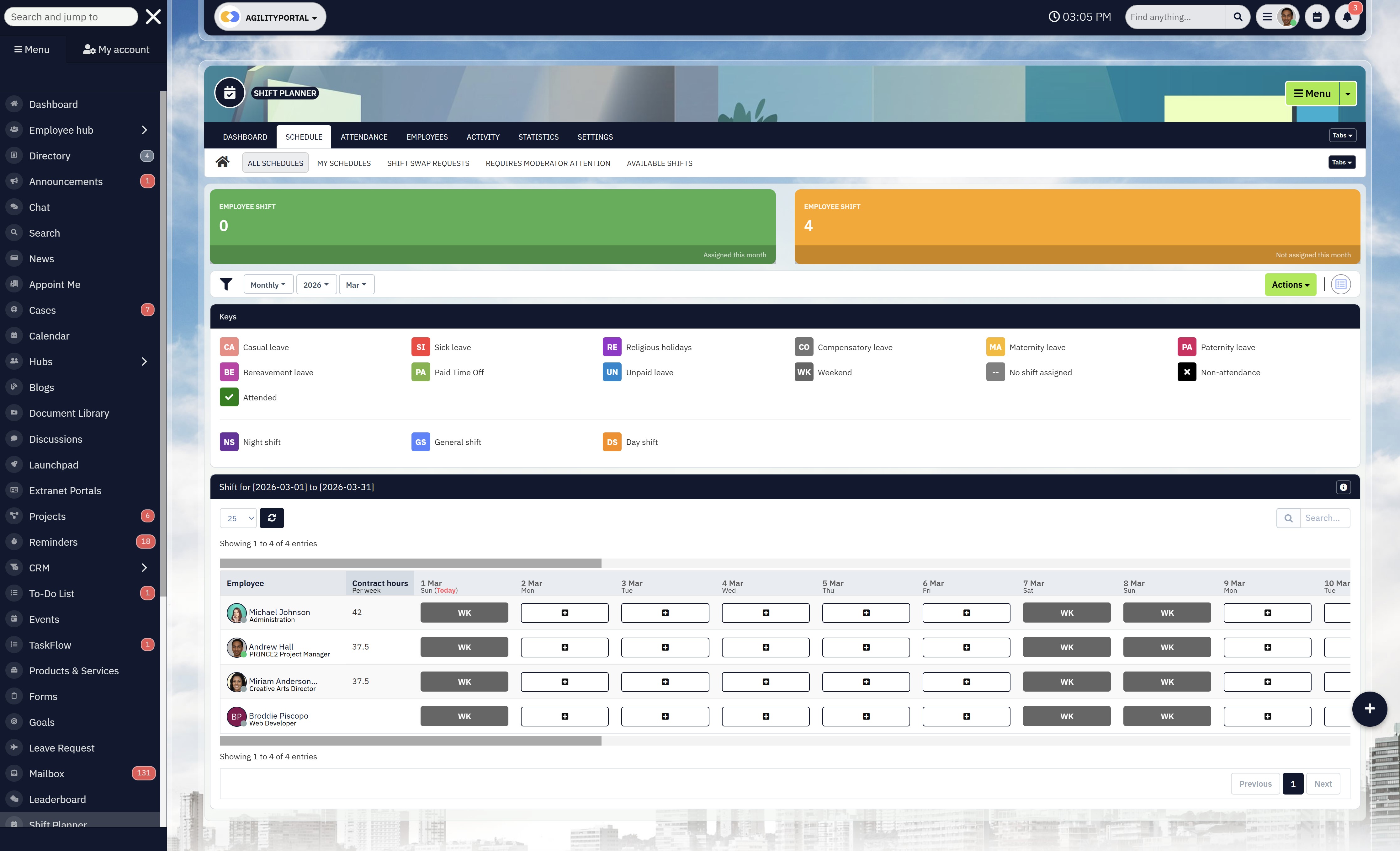
How to Choose the Right Employee Scheduling Software
Mobile-First Access (Not Desktop-Only Thinking)
If your workforce is deskless, your system must be mobile-first.
Frontline employees should be able to:
- View upcoming shifts instantly
- Receive real-time change alerts
- Request swaps or leave
- Update availability
If a tool isn't built around mobile usability, adoption will drop. And software that isn't used doesn't deliver ROI.
When evaluating employee scheduling software for small business or enterprise environments, mobile accessibility should be non-negotiable.
Payroll & System Integrations
Scheduling doesn't live in isolation. It connects directly to payroll, HR, and time tracking.
A strong platform should integrate with:
- Payroll systems
- Time and attendance tools
- HR databases
- Intranet or workforce platforms
Manual data transfer increases errors and wastes admin hours. Integration reduces duplicate entry and improves accuracy.
If you're scaling, disconnected systems become a liability.
Compliance & Labour Law Safeguards
Overtime rules, rest periods, skill certifications, and regional labour regulations create risk.
Look for systems that:
- Flag overtime thresholds automatically
- Prevent rest-period violations
- Track approvals and shift changes
- Maintain audit trails
Compliance isn't optional. It's protection.
Without automated safeguards, you're relying on memory — and memory fails under pressure.
Reporting & Workforce Analytics
Basic tools show who works when.
Advanced systems show:
- Labour cost trends
- Overtime patterns
- Absenteeism rates
- Coverage efficiency
- Demand forecasting
If a platform can't provide reporting, you're managing blindly.
The best employee scheduling software should give you insight — not just a calendar.
Scalability Across Locations
What works for 20 employees often collapses at 200.
If you operate multiple sites or plan to expand, ensure the system supports:
- Multi-location oversight
- Centralised dashboards
- Role-based permissions
- Standardised policy enforcement
Scalability protects you from future operational strain.
Structured Shift Swap Workflows
If you're specifically searching for employee scheduling software with shift swap, don't settle for informal change requests.
Proper swap management should include:
- Structured approval flows
- Automated notifications
- Documentation logs
- Rule-based restrictions
Uncontrolled swaps create confusion. Structured workflows create accountability.
If labour is one of your largest expenses — and it usually is — then your scheduling system directly affects profitability.
Choosing the right platform isn't about features.
It's about control, compliance, cost protection, and workforce stability.
Pick a system that scales, integrates, protects, and actually gets used.
Anything less just delays the next scheduling crisis.
Common Mistakes When Buying Scheduling Software
Buying scheduling software sounds straightforward — until it isn't.
On paper, most tools look similar. Clean dashboards. Drag-and-drop planners. Mobile apps. But once implementation starts, many businesses realise they bought something that doesn't fit how their operation actually runs.
And by then, the damage is already done — wasted budget, frustrated managers, low adoption, and the same scheduling chaos you were trying to fix.
Here are the most common (and costly) mistakes organisations make:
- Choosing based on price alone - The cheapest option often lacks automation, compliance controls, or proper reporting. If labour represents 30–50% of operating costs, saving a small monthly subscription fee while leaking overtime and productivity makes no financial sense.
- Ignoring frontline adoption - If managers and employees don't actually use the system, it fails. Complicated interfaces or poor mobile usability kill engagement. A system only delivers ROI when the workforce embraces it.
- Overcomplicating the tool - Some platforms are overloaded with features that look impressive but slow down daily use. If managers need extensive training just to publish a roster, productivity drops instead of improving.
- Not involving operational managers in selection - Executives often choose software without consulting the people building schedules every week. That disconnect creates friction during rollout and resistance during adoption.
- Failing to define scheduling policies before implementation - Technology cannot fix unclear rules. If overtime thresholds, rest policies, approval flows, and coverage standards aren't defined first, the software simply digitises confusion.
The psychological trap is simple: organisations rush the buying decision because they want the chaos to stop immediately.
But the wrong system doesn't solve the problem. It just hides it temporarily.
Scheduling software should reduce risk, protect margins, and simplify operations. If you don't evaluate it properly, you're not solving shift instability — you're delaying the next crisis.
Wrapping up: Shift Problems Don't Fix Themselves
Shift chaos isn't random. It's predictable.
When schedules are built manually, when updates are scattered across messages, and when overtime isn't monitored in real time, the same problems repeat: coverage gaps, rising labour costs, frustrated managers, and burned-out teams.
But here's the key shift in thinking — overtime spikes are preventable. Burnout is preventable. Compliance breaches are preventable.
They don't happen because teams don't care. They happen because the system isn't structured to support them.
The right employee scheduling software transforms scheduling from reactive admin into a strategic control point. Instead of scrambling to fix problems, you gain:
- Real-time workforce visibility
- Automated overtime safeguards
- Structured approval workflows
- Clear audit trails
- Predictable labour cost management
That changes everything.
Scheduling stops being a weekly headache and starts becoming a performance lever. Managers regain time. Employees gain clarity. Leadership gains control over one of the largest operational expenses in the business.
Shift problems don't fix themselves.
But the right system fixes them before they escalate.
If you're ready to move from reactive scheduling to structured workforce control:
- Book a demo and see it in action
- Start a free trial and test it with your team
- Experience how automated scheduling transforms daily operations
Because stability isn't luck.
It's infrastructure.
Frequently Asked Questions (FAQ)
Below are the most common questions people ask when researching staff scheduling software, shift planning tools, and workforce coordination platforms.
What is the best software for employee scheduling?
The best employee scheduling software depends on your business size, industry, and complexity.
For small teams, a simple scheduling app may work.
For multi-location or compliance-heavy environments, you'll need structured employee schedule management software with automation, reporting, overtime alerts, and audit trails.
If you're managing staff rotas across departments or locations, the best solution is one that combines:
- Real-time visibility
- Mobile access
- Overtime safeguards
- Shift swap workflows
- Labour cost analytics
The "best" tool is the one that protects margins and actually gets used by your team.
What scheduling software is free?
There are options offering employee scheduling software free plans, but most come with limitations such as:
- Restricted number of users
- Limited reporting
- No automation
- Basic rota creation only
Some businesses start with employee scheduling software free Excel templates or even automated employee scheduling Excel sheets. These can work short term but often fail as teams grow.
If you're a startup, you might look for a free employee scheduling app for small business, but be cautious — free tools rarely support compliance controls or multi-location management.
Can ChatGPT make a rota?
Yes, ChatGPT can help draft a rota or provide a structured shift layout. However, it is not a replacement for dedicated employee schedule management software.
AI can generate schedules, but it cannot:
- Track real-time attendance
- Enforce overtime limits
- Manage live shift swaps
- Provide compliance documentation
Think of AI as a planning assistant — not an operational system.
Does Microsoft have a staff scheduling tool?
Microsoft offers basic scheduling features through tools like Microsoft Teams (Shifts). However, these are often limited compared to dedicated staff scheduling software platforms.
If your organisation requires deeper workforce analytics, structured approvals, and labour compliance tracking, a specialised employee scheduling app is typically more robust.
What is the best free scheduling app?
The best scheduling app free version depends on whether you need personal planning or workforce coordination.
For personal use, simple free scheduling app tools may be sufficient.
For business use, especially shift-based operations, free versions often lack:
- Overtime monitoring
- Multi-site visibility
- Structured audit trails
A scheduling app free plan is fine for testing, but growing businesses usually outgrow them quickly.
What is the best app to create a timetable?
For students or personal planning, the best scheduling app for students or best scheduling app for personal use typically focuses on calendar management and reminders.
However, creating staff rotas is different from building a timetable. Businesses need a scheduling app for business that handles shift allocation, coverage forecasting, and labour rules.
Timetable apps manage time.
Workforce systems manage operations.
What is the best employee scheduling app?
The best employee scheduling app or best employee scheduling software should include:
- Mobile-first access
- Shift swap controls
- Real-time updates
- Reporting dashboards
- Multi-location oversight
If you're managing teams across several branches, look specifically for employee scheduling software for multiple locations.
Ease of use is critical — adoption drives ROI.
Which scheduling software is best?
There's no single answer. It depends on your needs:
- For appointments: consider tools like Acuity Scheduling
- For calendar-based coordination: google calendar employee scheduling may work for very small teams
- For shift-based operations: structured employee schedule management software is far more suitable
The key is matching the tool to the complexity of your workforce.
What is the best appointment scheduling app?
If your business focuses on client bookings rather than staff rotas, you'll need an appointment scheduling app or free appointment scheduling app designed for external bookings.
The best appointment scheduling app typically includes:
- Calendar syncing
- Automated reminders
- Payment integration
- Booking confirmations
This differs from internal workforce shift planning tools.
Can I manage "my scheduling" and "my shift" in a single app?
Yes — modern employee scheduling app platforms allow employees to view upcoming assignments, manage availability, and track "my shift" in real time.
The goal of strong staff scheduling software is clarity. When employees can confidently check "my scheduling" at any time, confusion and absenteeism decrease.
Is free scheduling software enough for business growth?
Free tools often work for micro teams. But as complexity increases, so does risk.
Without structured employee schedule management software free features like automation and reporting, businesses face:
- Rising overtime
- Compliance exposure
- Increased turnover
- Administrative overload
If labour is one of your largest expenses, relying solely on a free scheduling app can become costly long term.
What is the best scheduling app for Android?
Many modern workforce platforms offer a scheduling app for Android alongside iOS support. When choosing, ensure the mobile version includes:
- Full shift visibility
- Notifications
- Swap requests
- Approval workflows
A desktop-only system with a limited mobile view won't support frontline teams effectively.
Whether you're searching for the best employee scheduling app, exploring employee scheduling software free, or comparing tools like Google Calendar or Acuity, the real question isn't just "Which tool is best?"
It's:
Does it protect your labour costs, reduce confusion around my shift, and scale as your business grows?
Choose based on structure, not shortcuts.
AI Summary
- Employee scheduling software reduces labour cost leakage by automating rota creation, enforcing overtime thresholds, and providing real-time workforce visibility across departments and locations.
- Overtime can cost up to 50% more per hour, while nearly 20% of employee time is lost to confusion and poor coordination—often caused by unclear shifts and manual scheduling processes.
- Modern staff scheduling software replaces spreadsheets and chat-based updates with structured approval workflows, mobile notifications, and documented audit trails to reduce compliance risk.
- Mobile-first scheduling apps allow employees to manage “my shift,” update availability, and request swaps with transparency, improving reliability and reducing burnout.
- Employee schedule management software transforms scheduling from reactive administration into a strategic workforce optimisation tool that protects margins and improves operational stability.
- The best employee scheduling software supports multi-location oversight, demand forecasting, labour analytics, and scalable governance controls for growing organisations.
Most Popular Posts

Effective communication among team members is vital for the productivity and success of any organization. Surprisingly, 60% of companies lack a long-term internal communication strategy, which p...


Businesses thrive on communication for efficiency, productivity and accomplishment. When the right information is passed from the right designation in the organization, it promotes positivity an...
Categories
Blog
(2972)
Business Management
(373)
Employee Engagement
(223)
Digital Transformation
(191)
Growth
(142)
Intranets
(136)
Remote Work
(63)
Sales
(53)
Collaboration
(48)
Customer Experience
(30)
Culture
(29)
Knowledge Management
(28)
Project management
(28)
Leadership
(20)
Comparisons
(9)
News
(1)

Related Posts

This is why many organizations are investing in a modern client and partner portal to create a centralized, secure environment where external users can access documents, collaborate with teams, complete onboarding tasks, receive updates, and find the...

Partner collaboration has become a critical part of business growth, especially for organizations that rely on distributors, resellers, suppliers, affiliates, consultants, and channel partners to generate revenue. Yet surprisingly, many compani...

Most businesses invest heavily in marketing, advertising, social media, and SEO to attract new customers, but many overlook one of their most valuable marketing assets: their employees. That's where employee engagement comes in. Employee engage...

If you're searching for a SharePoint alternative for partner collaboration, you're certainly not alone. As businesses become increasingly reliant on distributors, suppliers, resellers, consultants, franchisees, and strategic partners, the abili...

Partner enablement software has become essential for businesses that rely on distributors, resellers, affiliates, consultants, suppliers, and channel partners to generate revenue. As partner networks grow, many organizations struggle with inconsisten...


Jill Romford
I am a digital nomad, lover of exploring new places and making friends.
I love to travel and I love the internet. I take pictures of my travels and share them on the internet using Instagram.
Traveler, entrepreneur, and community builder. I share my insights on digital marketing and social media while inspiring you to live your fullest life.
Ready to learn more? 👍
One platform to optimize, manage and track all of your teams. Your new digital workplace is a click away. 🚀
Free for 14 days, no credit card required.