
Insight Blog
Agility’s perspectives on transforming the employee's experience throughout remote transformation using connected enterprise tools.
33 minutes reading time
(6588 words)
Document Management for Small Business That Eliminates Frontline Chaos Before It Costs You

Document Management for Small Business That Eliminates Frontline Chaos Before It Costs You
Learn how document management for small business improves compliance, collaboration, and efficiency—plus features that reduce chaos and lost files.
Document Management for Small Business That Eliminates Frontline Chaos Before It Costs You

For most small businesses, documents end up everywhere.
Your inbox. A shared drive. Someone's desktop. A WhatsApp message. Maybe even a printed binder sitting in the break room.
At first, it feels manageable. Then one day it isn't.
A supervisor uses the wrong SOP. A frontline employee misses a policy update. Someone asks, "Is this the latest version?" — and no one is completely sure.
And here's the hard truth: this isn't just frustrating. It's expensive.
Research from IDC shows employees spend nearly 30% of their workday just searching for information. McKinsey reports that better digital collaboration can increase productivity by 20–25%.
That's not small change — especially for lean teams.
30%
of the workday
Research from IDC shows employees spend nearly 30% of their workday searching for information. Meanwhile, McKinsey reports that better digital collaboration can increase productivity by 20–25%. For small, lean teams, that’s time you simply can’t afford to lose.
Sources: IDC; McKinsey Global Institute
If you manage shift-based or deskless workers, the stakes are even higher.
When updates don't reach the frontline, mistakes happen. Compliance gaps open up. Morale drops because employees feel out of the loop.
This is where structured document management for small business makes a real difference. Not complicated enterprise software. Not another tool no one uses.
Just a practical, centralized system that helps your team find the right document at the right time — every time.
And that's exactly what we're going to break down.
The Real Challenges Small Businesses Face With Documents
Before we talk about what document management is, let's talk about what's probably happening inside your business right now.
Most small teams don't think they have a "document problem." It just feels like a few scattered files.
But those scattered files quietly create operational risk.
Your documents likely live across email threads, shared drives, messaging apps, personal desktops, and even printed binders on-site. It works — until it doesn't. The moment someone asks, "Where's the latest version?" and no one knows for sure, friction creeps in.
If you manage frontline or shift-based teams, the stakes are even higher. Office staff might see updated policies in email, but your frontline workers often don't.
That leads to outdated SOPs being followed, safety updates being missed, inconsistent service delivery, and growing compliance exposure — and you usually don't realize it until something goes wrong.
Add to that the lack of clear ownership.

The Real Challenges Small Businesses Face With Documents
1,000+
cloud apps per enterprise
According to Gartner, the average enterprise now uses over 1,000 cloud applications, with nearly 70% introduced without IT approval.
Source: Gartner
Who approves changes? Who removes outdated versions?
Without structured version control, duplicate files circulate, teams rely on old information, and small errors multiply quietly. Meanwhile, employees spend valuable time hunting for documents instead of doing the work that drives revenue.
Research shows employees can spend nearly 30% of their workday searching for information — a productivity leak that lean small businesses feel immediately. And then there's the compliance pressure.
If you've ever wondered whether you can prove employees saw a policy update or whether you have the correct signed acknowledgment on file, you already understand the anxiety.
Without structure, audits become reactive and stressful.
The real cost isn't just lost files — it's frustrated employees, slower onboarding, repeated mistakes, and declining trust in leadership communication.
When frontline teams can't easily access accurate information, confidence drops.
And when confidence drops, engagement and retention often follow.
This is why structured document management isn't a luxury — it's operational protection.
Related Document Management Guides You May Want to Read Next
If you're improving document control, compliance, and frontline access, these in-depth guides explore intranet repositories, HR file management, and secure document storage best practices.
- Intranet Document Management System – A 2026 Complete Guide
- Benefits of Using a Document Management System
- HR File Management Best Practices: Complete Guide on HR Document Management
- The Benefits of Using Sterling Data Rooms for Secure and Efficient Document Management
- Intranet Document Repository – UPDATED 2026 – A Complete Guide
What Is Document Management for Small Business (And Why It's Different)
Let's make this simple.
As a small business leader, you don't need bloated enterprise systems built for global corporations with IT departments and compliance teams of 20 people.
What you need is clarity. Control. And something your team will actually use.
That's where document control software for small business comes in.
At its core, document management is about creating a single, reliable source of truth for your policies, SOPs, HR documents, training materials, and operational guides.
But for small businesses — especially those with frontline or shift-based teams — it has to be practical. If it's complicated, adoption drops. If adoption drops, the system fails.
The difference between enterprise systems and small business-focused solutions comes down to usability.
You need easy setup without relying on IT support. You need mobile access so frontline workers can pull up the right document during a shift — not wait until they're back at a desk.
You need role-based permissions that protect sensitive files without creating layers of administrative headaches.
And you need pricing that scales with your team, not software that forces you to overcommit before you're ready.
The biggest mistake small businesses make is overbuying complexity. Adoption matters more than features.
Laura Chen, Workplace Systems Consultant
She's right. You don't need dozens of advanced modules.
You need a system your supervisors trust, your frontline employees can navigate easily, and your leadership team can rely on during audits.
If it isn't simple, it won't be used. And if it isn't used, it won't protect your business.
The right document management system — or more specifically, the right document control software for small business — should reduce friction, close communication gaps, and give you confidence that everyone is working from the same, most up-to-date information.
Key Takeaways
- Document management for small business must reduce compliance risk, lost files, and operational confusion — especially for frontline teams.
- Scattered systems create hidden productivity loss, with employees wasting time searching for policies, SOPs, and critical updates.
- A centralized document hub gives frontline workers instant access to accurate, up-to-date information from any device.
- Version control, role-based permissions, and document acknowledgment tracking protect small businesses during audits and disputes.
- Small businesses outgrow shared drives quickly; long-term success depends on simplicity, adoption, and mobile accessibility.
Core Features Small Businesses Should Look For
When you're evaluating document management tools, here's the mistake I'd encourage you to avoid: don't get distracted by feature overload.
Focus on what will actually reduce friction in your day-to-day operations.
The right system should make life easier for your supervisors, safer for your frontline teams, and more controlled for you as a decision-maker.
Here are the core capabilities you should prioritize.
Centralized Cloud Storage
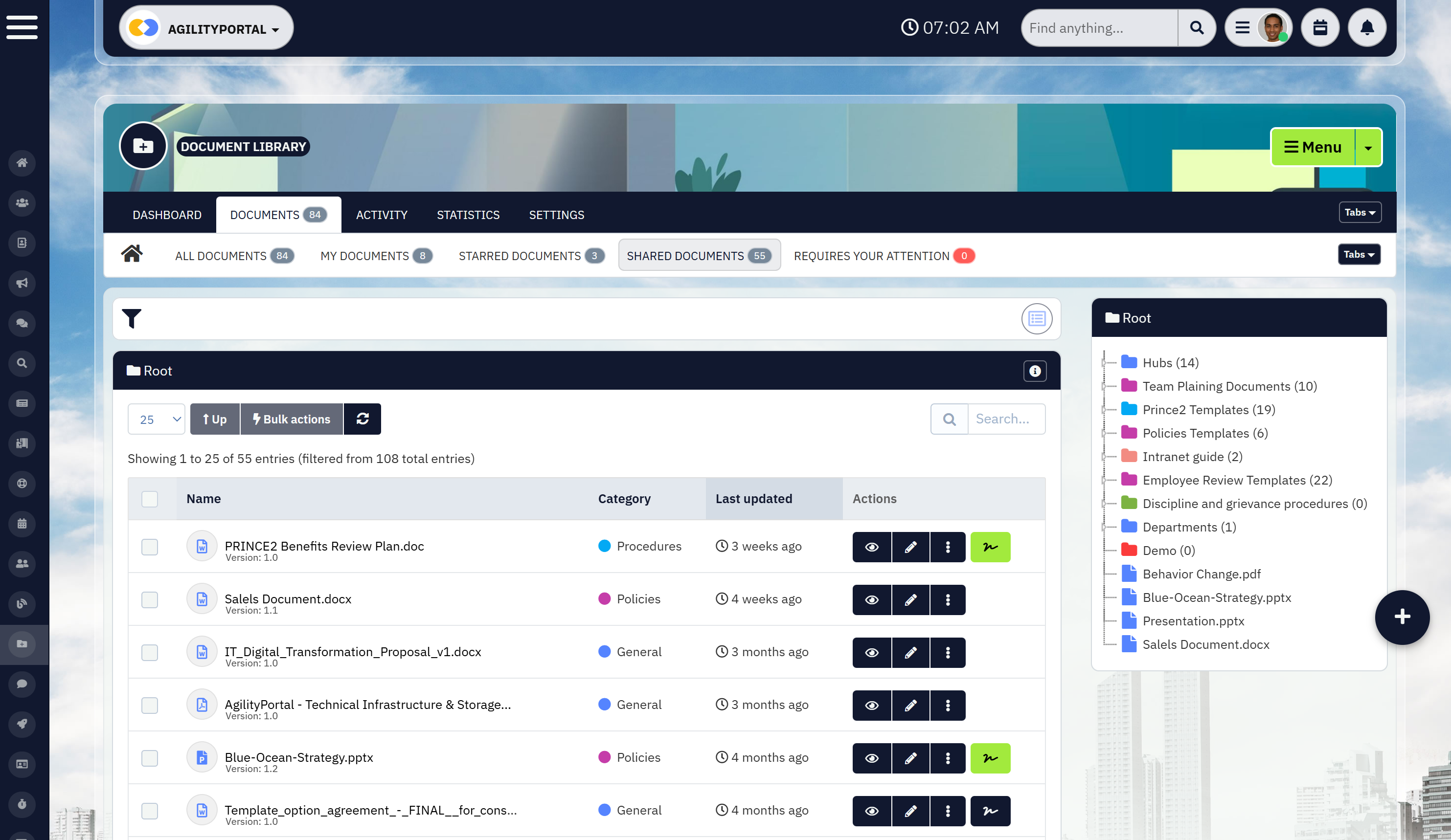
Centralized Cloud Storage
If your documents live in five different places, you don't have a system — you have risk.
You need a single, secure source of truth where policies, SOPs, HR documents, and operational guides are stored in one structured location. That means more than just storage.
It means:
- A secure cloud-based repository
- Clearly organized folders and categories
- Powerful search so employees can find what they need in seconds
- Document expiry alerts so certifications, contracts, and compliance files don't quietly lapse
- eSignatures to capture policy acknowledgments and approvals without chasing paperwork
- Online editing and collaboration so managers can update documents in real time without creating duplicate versions
Because here's what happens otherwise: policies expire unnoticed. Contracts renew automatically. Employees claim they never signed the updated procedure. Multiple versions of the same file circulate with slight differences.
That's operational exposure.
Think about a warehouse supervisor during a shift audit. Instead of calling the office to confirm which safety checklist is current — or wondering whether the latest version was signed and approved — they should be able to pull it up instantly on their device, see the approval history, and know it hasn't expired.
That's not convenience.
That's operational control
Version Control and Document History
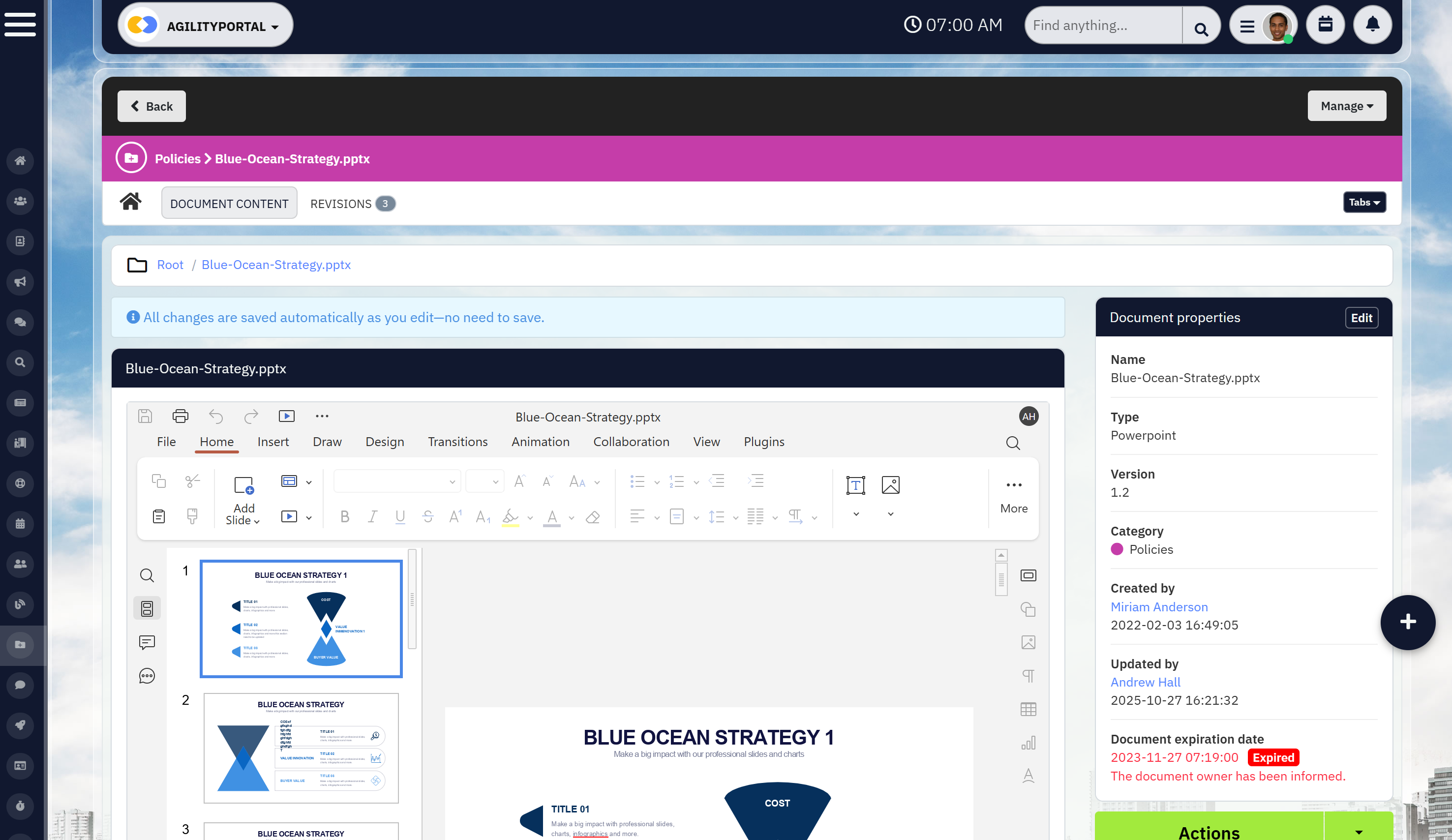
Version Control and Document History
Outdated documents are one of the most common — and preventable — business risks.
Without version control, teams end up using old SOPs, referencing previous policies, or circulating duplicate files. That's how small mistakes turn into compliance issues.
You should expect:
- Automatic version tracking
- Clear visibility into document history
- The ability to revert to previous versions if needed
This is especially important for HR policies, safety procedures, and regulated documentation. If you're ever audited or questioned, you need proof of what was active and when.
Role-Based Access and Permissions
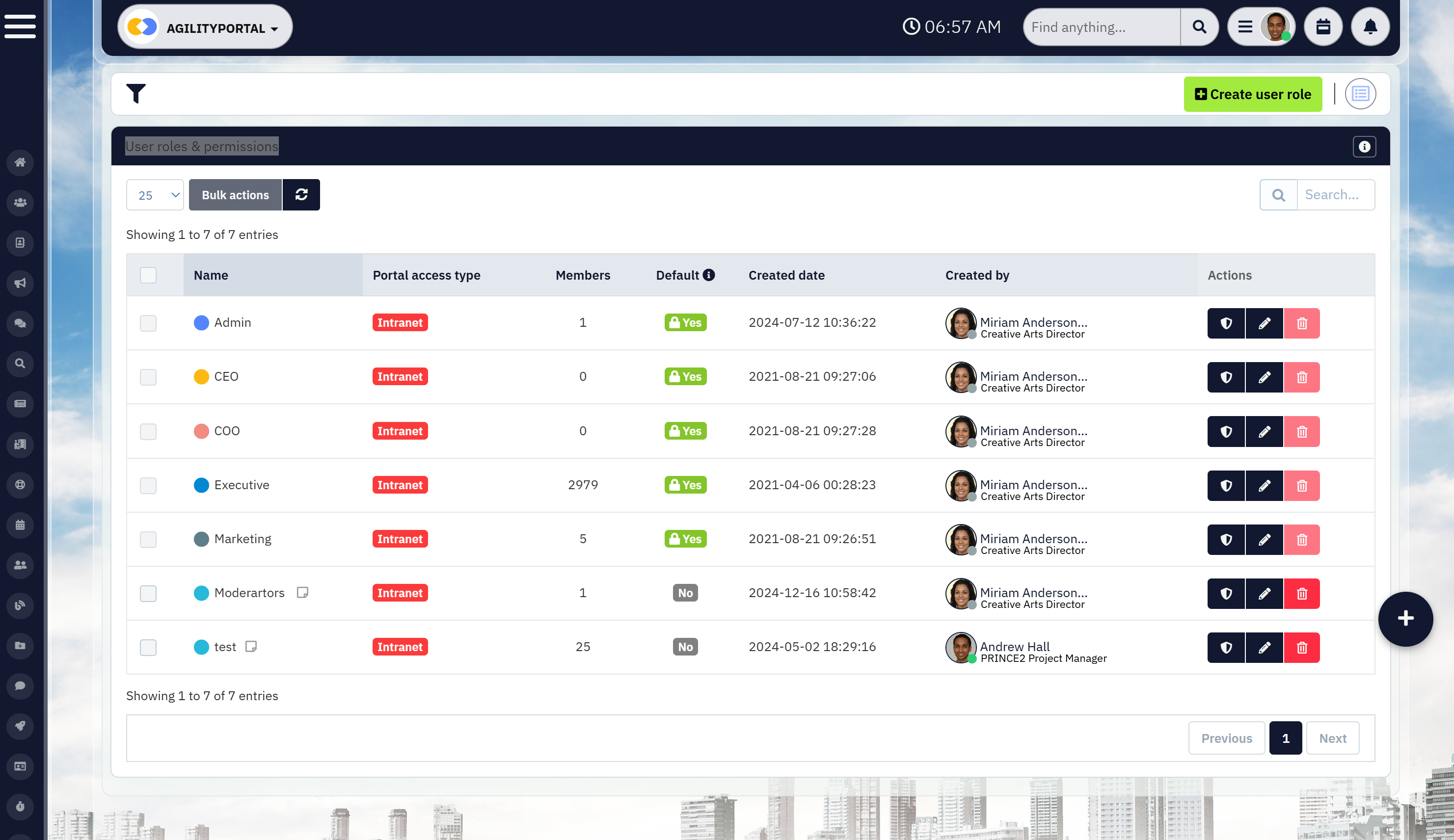
Role-Based Access and Permissions
Not every employee needs access to every document — and giving everyone full access creates unnecessary exposure.
A strong system allows you to control visibility without making things complicated. Look for:
- Department-level permissions
- Admin-only editing controls
- Secure employee document folders for sensitive records
This protects confidential HR files while still making operational documents widely accessible to frontline teams who rely on them daily.
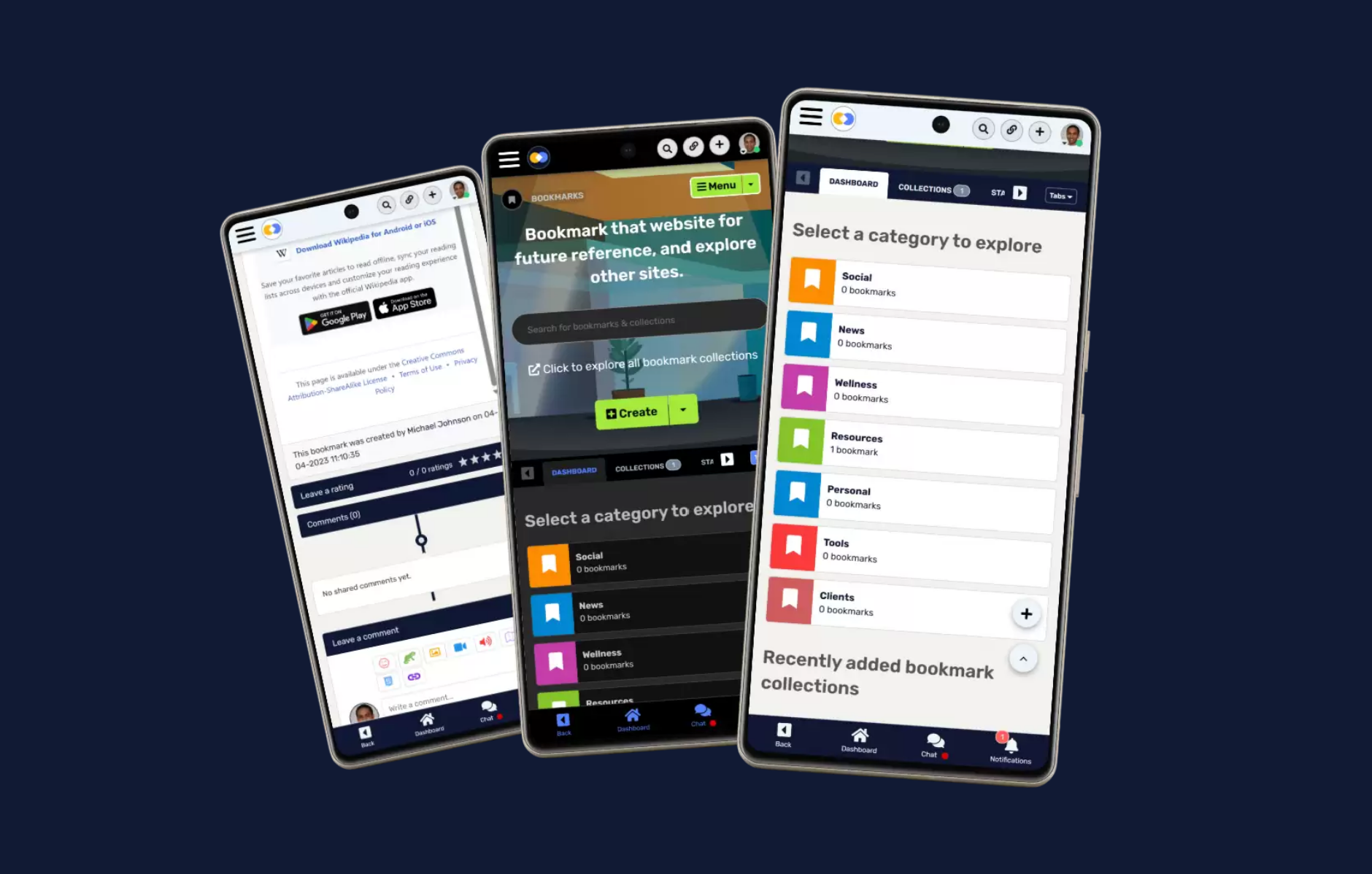
Mobile Access for Deskless Teams
Mobile Access for Deskless Teams
Here's where many systems fall short.
If your team works on the shop floor, in the field, in retail, healthcare, logistics, or manufacturing, they are not sitting at desks checking shared drives all day.
Your document management system must be mobile-first, not desktop-only. That includes:
- Mobile-friendly document access
- Push notifications when critical updates are published
- Offline viewing options where connectivity is limited
If frontline workers can't easily access documents from their phones or tablets, adoption drops. And when adoption drops, your investment stops delivering value.
The bottom line: choose features that remove friction, not add complexity. The best systems aren't the ones with the longest feature lists — they're the ones your team actually uses.
Common Document Management Challenges in Small Businesses
Before you invest in anything new, pause and look at what's happening inside your business right now.
If you find your team constantly asking, "Where's that file?" or "Is this the latest version?" — that's not a small annoyance. That's a warning sign.
Here's what to look for.
Scattered Systems That Create Daily Friction
If your documents live across Google Drive, email threads, WhatsApp messages, shared desktops, and paper folders, you don't have flexibility — you have fragmentation.
Look for signs like:
- Supervisors double-checking which version is correct
- Employees saving their "own copy" just to feel safe
- Time lost digging through inboxes
That subtle tension — the hesitation before using a document — is a physical trigger. It's your team feeling uncertainty. And uncertainty slows decisions.
Low Tool Adoption on the Frontline
If you've rolled out systems before and they quietly faded into the background, pay attention.
If it feels too corporate, too complex, or too disconnected from day-to-day operations, frontline workers won't engage. They'll default back to what feels faster — messaging apps, screenshots, printed copies.
Look for signs like:
- Policies shared in chat instead of the official system
- Employees asking managers directly instead of checking the platform
- Login rates that drop after the first few weeks
When adoption drops, risk rises — quietly.
Compliance Risk You Can Feel
There's a physical reaction that comes with compliance uncertainty — that tight feeling in your chest when someone says, "Do we have proof they signed that?"
If you find your team scrambling before audits or searching for acknowledgment records after an incident, that's exposure.
Look for signs like:
- Expired certifications going unnoticed
- Policies updated but not formally acknowledged
- No clear audit trail of changes
One missed document. One outdated SOP. One unsigned policy. That's all it takes.
Loss aversion is real — the cost of one compliance mistake can far exceed the investment in getting your document structure right.
Onboarding Delays That Drain Momentum
When a new hire joins, momentum matters. Confidence matters.
If you find new employees waiting days for access to policies, procedures, or training materials, you're creating unnecessary friction at the exact moment they should feel clarity.
Look for signs like:
- Managers manually emailing documents
- New hires asking repeatedly for access
- Inconsistent training materials across locations
That early confusion doesn't just slow onboarding — it shapes how professional and organized your business feels.
If you recognize even two or three of these patterns, don't ignore them. They're early warning signals.
Because document challenges rarely explode overnight.
They build slowly — until one mistake makes them impossible to overlook.
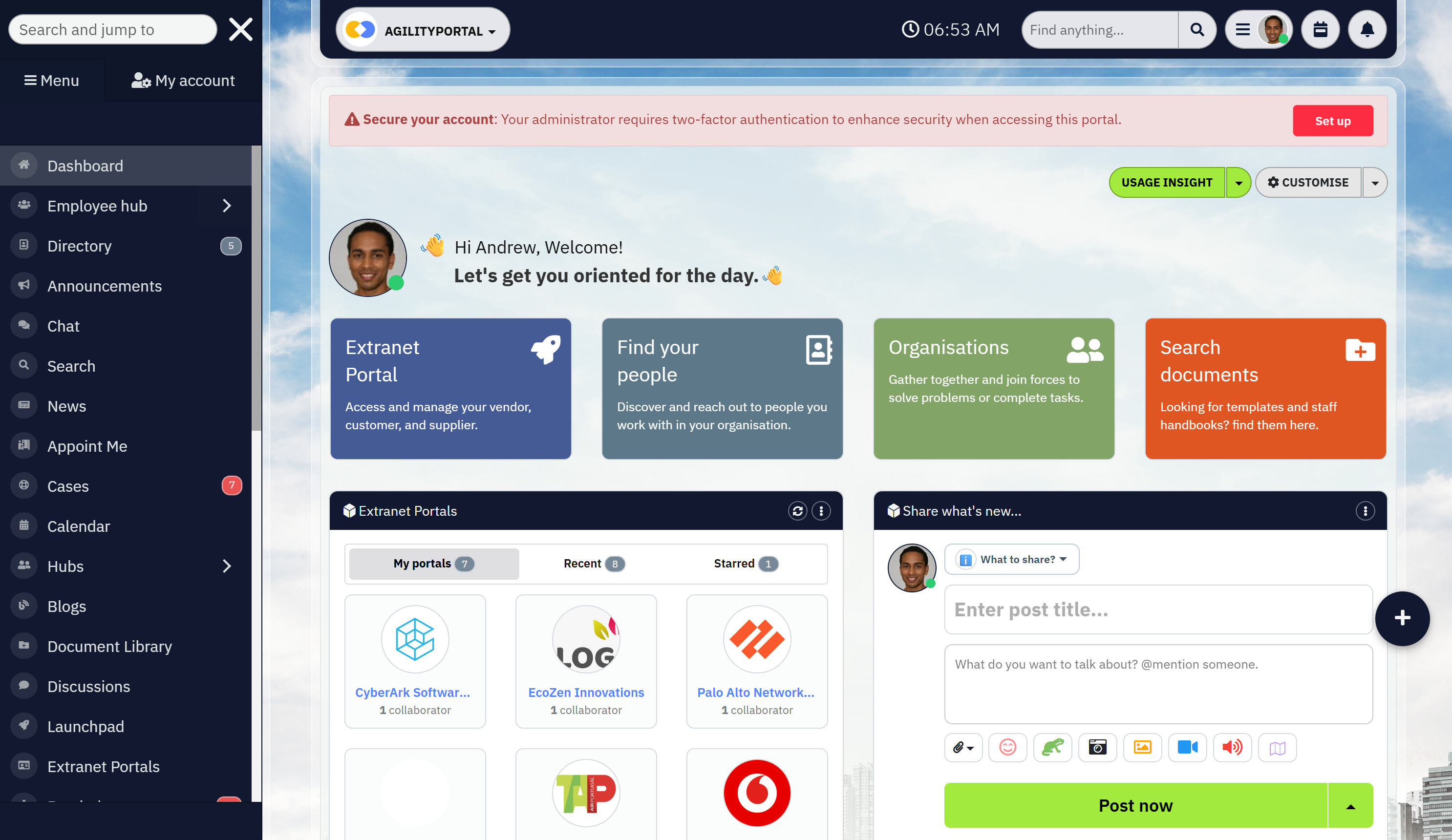
How AgilityPortal Supports Small Business Document Management
How AgilityPortal Supports Small Business Document Management
Let's make this practical.
If you're running a growing business, documents don't just sit in folders.
They move. They expire. They require approvals. They need signatures. They get revised. And when that entire process is manual, things slip.
If you find your team:
- Chasing signatures through email
- Manually reminding managers about expiring contracts
- Copying and pasting old templates to create new agreements
- Tracking renewals in spreadsheets
You're not just losing time. You're increasing risk.
This is where document automation for SMB stops being a convenience and becomes a financial decision.
What Automation Actually Solves
Instead of relying on memory or disconnected systems, automation allows you to:
- Trigger approval workflows automatically when a contract is created
- Send built-in eSign requests without switching platforms
- Set document expiry alerts so renewals never catch you off guard
- Track approval history with a complete audit trail
- Collaborate online in real time without creating duplicate versions
That's not just efficiency.
That's control.
And control protects revenue.
Small Business Contract Management That Prevents Costly Mistakes
Now let's talk about contracts — because this is where small businesses quietly lose money.
If your contracts are stored in shared drives, inboxes, or filing cabinets, you don't have visibility.
You have exposure.
Look for these warning signs:
- Auto-renewals you forgot to cancel
- Vendor agreements buried in someone's email
- No clear record of who approved terms
- Delays because signatures are still "pending"
- Expired documents still being referenced
One missed renewal date.
One unsigned agreement.
One outdated clause.
That's all it takes to create financial impact.
What Structured Contract Management Changes
Organizations that implement structured small business contract management gain something powerful: predictability.
Instead of reacting to problems, they manage proactively.
When contracts are centralized, searchable, and automated:
- Leadership has visibility into obligations and timelines
- Finance tracks renewals with confidence
- Operations avoids last-minute scrambling
- Frontline managers know they're working under current agreements
Approval cycles move faster. Compliance stress decreases. Vendor negotiations improve because you know your terms.
That confidence is measurable. It reduces legal risk, shortens turnaround time, improves cash flow awareness, and protects margin.
Why This Is a Business Safeguard — Not Just Software
AgilityPortal brings document automation and contract management into one governed environment — connected to communication, permissions, and frontline access.
Instead of layering disconnected tools, your documents move through structured workflows with full visibility and built-in accountability.
If you're serious about reducing risk, protecting revenue, and eliminating administrative drag, this is where document management shifts from "nice to have" to essential infrastructure.
Because the real cost isn't the platform.
It's the renewal you forgot.
The contract you can't find.
The signature you never captured.
Implementation Tips for Rolling Out Document Management Successfully
Let me give you some practical advice here.
Technology alone will not fix document chaos. You can invest in the best platform available, but if you don't roll it out with structure and intention, adoption will stall — and your old habits will quietly return.
If you want this to stick, follow these steps.
Step 1 - Audit What You Already Have
Before you upload a single file, stop and assess what's currently in circulation.
If you find duplicate versions of the same SOP, outdated policies still being referenced, or contracts with no clear owner, that's your starting point.
Look for:
- Expired certifications or agreements
- Multiple versions of the same document
- Missing SOPs for critical processes
- Files stored only in someone's inbox
This audit does two things. It cleans up risk immediately, and it shows your team you're serious about creating clarity.
Step 2 - Create a Structure That Makes Sense to Your Team
Don't build folders for how you wish the business worked. Build them around how your teams actually operate.
Organize documents by:
- Department
- Location
- Function
- Compliance category
If a frontline supervisor can't intuitively find a safety checklist within seconds, your structure is too complicated.
Simplicity drives adoption.
Step 3 - Assign Clear Document Ownership
Here's where many small businesses fail.
If everyone can edit something, no one owns it.
Every critical document should have:
- A named owner
- A review schedule
- Clear approval authority
Ownership creates accountability. Accountability prevents drift. And drift is what causes outdated policies to linger unnoticed.
Step 4 - Communicate the "Why" Clearly
If you roll this out as "new software," expect resistance.
Instead, speak to the frustration your team already feels.
Explain that this system will:
- Eliminate time wasted searching
- Prevent version confusion
- Reduce compliance stress
- Make onboarding faster
If your team understands that this protects them — not just the business — adoption rises quickly.
People don't resist tools. They resist unnecessary change.
Step 5 - Track Engagement in the First 30 Days
The first month matters more than the next six.
If you find that acknowledgment rates are low, login frequency is inconsistent, or managers aren't using the platform publicly, address it immediately.
Monitor:
- Document acknowledgment completion rates
- Active user engagement
- Usage by department or location
Social proof is powerful. When supervisors and leadership actively use the system, others follow. When leadership ignores it, adoption collapses.
If you approach implementation deliberately — audit first, structure second, ownership third, communication fourth, tracking fifth — you dramatically reduce the risk of failure.
But let me be practical with you.
If you try to piece this together using shared drives, spreadsheets, separate eSign tools, manual reminders, and messaging apps, you'll spend weeks building structure — and even then, gaps will remain.
A faster way to do this is to use AgilityPortal.
Instead of stitching systems together, you get a single, centralized environment where your documents, approvals, expiry alerts, acknowledgments, permissions, and frontline access all live in one place. That alone can cut 90% of the manual setup and coordination work most small businesses struggle through.
No separate tools.
No disconnected workflows.
No chasing signatures across email.
Just one structured, governed system.
Because document management isn't just about organizing files.
It's about changing behavior — making it easier for your team to do the right thing by default.
And when behavior becomes simple and consistent, operational clarity follows.
How a Growing Nonprofit Centralized Documents and Reduced Compliance Risk by 70%
Client Profile
Industry: Nonprofit (Community Services & Outreach)
Employees & Volunteers: 85 staff, 120 active volunteers
Locations: 4 regional offices + field outreach teams
Primary Challenge: Document chaos, compliance gaps, and disconnected frontline communication
The Challenge - Growth Created Operational Blind Spots
This nonprofit was expanding quickly. New grants. New programs. More volunteers. More compliance requirements.
But their document processes hadn't evolved with them.
Policies were stored across shared drives, email threads, and physical binders. Volunteer agreements were signed on paper. Grant documentation lived in spreadsheets. Field staff relied on messaging apps for updates.
If you had asked leadership at the time, they wouldn't have said they had a "document management problem."
But the warning signs were there:
- Staff spending hours searching for updated policies
- Volunteers unsure which procedures were current
- Grant renewal deadlines tracked manually
- No centralized proof of policy acknowledgment
- Audit preparation taking weeks of manual coordination
During one funding review, leadership realized they could not instantly produce acknowledgment records for updated safeguarding policies. That was the moment the risk became real.
They didn't just need better storage.
They needed structure, visibility, and accountability.
The Solution: A Centralized, Frontline-Accessible Document Hub
The organization implemented AgilityPortal to consolidate document management, communication, and compliance tracking into one platform.
Instead of layering additional tools, they created a single, governed environment for:
- Policies and safeguarding documentation
- Volunteer agreements and contracts
- Grant compliance records
- Operational SOPs
- Internal announcements
The rollout focused on simplicity and adoption — especially for frontline outreach staff and volunteers.
What Changed Immediately
Centralized Access Across All Locations
All policies, procedures, and grant documentation were moved into a structured digital hub.
Field staff could access updated documents from their phones during outreach events. Regional managers no longer relied on email attachments or outdated PDFs.
Search replaced guesswork.
Built-In eSignatures and Acknowledgments
Volunteer agreements and policy updates were distributed digitally with mandatory acknowledgments.
Instead of filing paper forms:
- Volunteers signed electronically
- A digital audit trail was automatically stored
- Leadership could instantly verify compliance
When the next funding audit occurred, documentation was retrieved in minutes — not weeks.
Document Expiry Alerts for Grants and Certifications
One of the nonprofit's biggest risks was missed grant renewals and expiring certifications.
With automated document expiry alerts:
- Grant deadlines triggered reminders
- Certifications were tracked centrally
- Contract renewals were flagged in advance
No more last-minute scrambling.
Online Editing and Version Control
Previously, multiple versions of safeguarding procedures circulated between offices.
With real-time editing and version tracking:
- Updates were controlled
- Changes were documented
- Outdated versions were archived automatically
Frontline teams always accessed the latest approved document.
Measurable Outcomes After 6 Months
Within six months of implementation, the nonprofit reported:
- 70% reduction in time spent preparing for audits
- 40% decrease in internal document search time
- 100% digital acknowledgment tracking for updated policies
- Faster onboarding for volunteers and seasonal staff
- Improved grant reporting confidence
More importantly, leadership regained visibility and control.
Staff felt less frustration. Volunteers received clearer guidance. Compliance anxiety dropped significantly.
Key Lessons for Other Nonprofits
If you're leading a nonprofit organization and recognize similar warning signs — scattered policies, manual tracking, audit stress — here's what this case proves:
- Growth without structure increases risk
- Manual compliance tracking doesn't scale
- Frontline access is critical for consistency
- Automation protects funding and reputation
- Centralization reduces operational friction
The biggest shift wasn't technical.
It was cultural.
When information became easy to access and easy to verify, accountability improved across the organization.
If your nonprofit is juggling grant documentation, volunteer agreements, safeguarding policies, and regional communication — and you're relying on shared drives and spreadsheets — you're operating with hidden exposure.
The longer growth continues without structure, the greater that risk becomes.
AgilityPortal helped this nonprofit consolidate document management, automate compliance tracking, and improve frontline engagement — without adding complexity.
Employees Can't Find Documents? Here's the Fix
If your team regularly asks, "Where is that file?" or "Is this the latest version?" — you don't just have a storage issue.
You have a productivity leak.
When employees can't quickly find what they need, three things happen:
- Work slows down
- Mistakes increase
- Frustration builds
And the longer it continues, the more it becomes cultural. People stop trusting the system. They save documents locally. They create duplicates "just in case." They rely on messaging apps instead of official sources.
That's when chaos compounds.
Why This Keeps Happening
If you look closely, the root cause is usually one (or more) of these:
- Documents stored across multiple platforms
- No enforced version control
- No consistent naming conventions
- Limited search functionality
- No ownership assigned to critical files
Without structure, your team spends more time hunting for information than acting on it.
Research shows employees can spend nearly 30% of their workday searching for information. For small or lean teams, that's not a minor inefficiency — that's operational drag.
The Fix: Centralization + Control + Simplicity
The solution isn't "more folders."
It's structured document management software designed to eliminate guesswork.
Here's what actually fixes the problem:
- One centralized repository, No more wondering which platform holds the correct file.
- Smart search with metadata tagging, Documents should appear in seconds — not minutes.
- Automatic version control, The latest approved version is always front and center.
- Clear document ownership, Someone is accountable for every critical file.
- Mobile access for frontline teams, If your shift workers can't access documents easily, they won't use the system.
When these elements are in place, behavior changes quickly. Employees stop creating workarounds. Managers stop answering repeat questions. Confidence rises because information becomes reliable.
And when your team trusts where documents live, productivity improves almost immediately
What Are the Benefits of a Document Management System?
If you're evaluating a document management system (DMS), you're not just buying software — you're investing in risk reduction, operational clarity, and long-term scalability.
Here's are the Benefits of Using a Document Management System should deliver.
Strengthens Regulatory Compliance and Audit Readiness
If you operate in a regulated environment, compliance isn't optional — it's foundational.
Standards such as ISO 13485, ISO 9001, and FDA 21 CFR Part 11 require structured document control, traceability, approval workflows, and secure electronic signatures.
A purpose-built compliance document management system enforces these controls by design.
Instead of scrambling through spreadsheets and inboxes during an audit, you can:
- Define approval workflows and review hierarchies
- Maintain structured metadata for every document
- Generate audit trails instantly
- Produce evidence of approvals and revisions in seconds
Non-compliance can lead to fines, delays, and reputational damage.
A structured document control software solution reduces that exposure by embedding compliance directly into your processes.
Ensures Strong Document Control and Version Traceability
If you've ever asked, "Is this the latest version?" — you already understand the risk.
A centralized cloud document management system eliminates silos and confusion by creating one controlled source of truth.
Every change is tracked automatically:
- Who edited the document
- What was changed
- When it was updated
- Why the revision occurred
This level of traceability prevents outdated procedures from circulating and ensures you can demonstrate full compliance during inspections.
Version control isn't just about organization.
It's about accountability.
Protects Intellectual Property With Secure Access and eSignatures
In industries like MedTech, SaaS, engineering, and manufacturing, intellectual property is your competitive edge.
A secure document management platform protects sensitive files through:
- Role-based access control
- Secure electronic signatures
- End-to-end encryption
- Granular permissions for partners and suppliers
You can create controlled external portals to share specific documents without exposing your entire system. Even in disaster scenarios — fire, flood, hardware failure — secure cloud document storage ensures your files remain protected, traceable, and recoverable.
Security is no longer optional. It's expected.
Streamlines Workflows and Approval Processes
Manual approvals slow teams down and introduce human error.
A structured document workflow management system automates routing for draft, review, approval, and release — all with full audit trails.
Instead of chasing approvals via email, your system enforces process consistency.
That means:
- Faster turnaround times
- Fewer missed sign-offs
- Reduced administrative burden
- Lower risk of incomplete reviews
Automation doesn't just save time. It increases reliability.
Improves Cross-Functional Collaboration
Disconnected tools create disconnected teams.
A centralized enterprise document management system links departments such as QA, RA, engineering, finance, and suppliers through controlled access to the same approved documentation.
With real-time collaboration, version control, and remote access:
- Teams work from the same file
- Updates are instantly visible
- Duplicate versions are eliminated
- Third parties can collaborate securely
When collaboration improves, productivity rises — without compromising compliance or security.
Supports Change Control and Reduces Quality Risk
Quality failures often stem from undocumented or poorly managed change.
A robust document control system integrates change control processes with approvals, risk assessments, and training records.
When issues arise, you can immediately answer:
- What changed?
- Why was it changed?
- Who approved it?
- Who was trained on the update?
That level of traceability is critical during root cause investigations and regulatory audits.
Structured change management protects product quality and brand reputation
Speeds Up Search and Document Retrieval
Time lost searching for files is more expensive than most organizations realize.
According to TechRepublic, more than 50% of office professionals spend more time searching for files than doing actual work.
Meridian reports it costs approximately $20 to file a document, $120 to find a misfiled one, and $220 to reproduce a lost document.
A modern digital document management system eliminates this waste through:
- Advanced search functionality
- Metadata tagging
- Centralized repositories
- Instant retrieval of approved versions
The result? Faster investigations, quicker responses to regulators, and more productive teams.
Scales With Growth and Integrates With QMS or eQMS
Your documentation processes must evolve as your organization grows.
A scalable cloud-based document management system supports:
- Multi-site expansion
- New product launches
- International regulatory requirements
- Complex file types (CAD drawings, PCB layouts, program files, training videos)
Integration with your broader Quality Management System (QMS) or full electronic Quality Management System (eQMS) ensures end-to-end traceability — from design and development through approval and release.
When documentation integrates seamlessly into your quality infrastructure, it becomes a strategic asset rather than a bottleneck.
The Bottom Line
A well-designed document management system does more than organize files.
It strengthens compliance.
Protects intellectual property.
Automates approvals.
Improves collaboration.
Reduces risk.
And scales with your growth.
If your current system feels fragmented, manual, or reactive, that's a signal — not just an inconvenience.
Because documentation isn't administrative overhead.
It's operational infrastructure.
How to Choose the Right Document Management System
| Feature | Basic File Storage (Drive/Dropbox) | SharePoint | DocuWare | AgilityPortal |
| Centralized Document Repository | ✔️ | ✔️ | ✔️ | ✔️ |
| Built-in Version Control | Limited | Requires configuration | ✔️ | ✔️ |
| Workflow Automation | ❌ | Requires configuration | ✔️ | ✔️ (Pre-configured) |
| Document Expiry Alerts | ❌ | Manual setup | ✔️ | ✔️ |
| Built-in eSignatures | ❌ | Add-ons required | ✔️ | ✔️ |
| Compliance Audit Trails | ❌ | Configurable | ✔️ | ✔️ |
| Frontline Mobile Access | Limited | Moderate | Enterprise-focused | ✔️ Mobile-first |
| Ease of Setup for SMB | ✔️ Simple | Complex setup | Moderate | ✔️ Designed for SMB |
| Designed for Frontline Teams | ❌ | Enterprise-first | Mid-market focus | ✔️ Purpose-built |
Not all document management systems are built the same.
Some are designed for simple file storage.
Others are built for compliance-heavy, product-focused, or highly regulated organizations. The mistake many businesses make is choosing a tool that stores documents — but doesn't truly control them.
If you're evaluating a solution, don't just look at features. Look at risk reduction, scalability, and long-term operational fit.
Here's what you should prioritize.
Built-In Compliance and Audit Controls
If your organization operates under ISO standards, FDA requirements, or internal quality frameworks, your DMS must support structured compliance.
Look for:
- Automated audit trails
- Version control with full traceability
- Secure electronic signatures
- Controlled document release workflows
You should be able to produce audit-ready documentation in minutes — not days. If compliance depends on manual tracking, the system isn't doing its job.
Workflow Automation and Approval Routing
A modern DMS should eliminate approval bottlenecks.
Instead of chasing sign-offs over email, your system should enforce structured workflows for:
- Draft
- Review
- Approval
- Release
- Change control
Automation reduces delays, prevents skipped approvals, and strengthens process consistency across departments.
If approvals are still manual, you're carrying unnecessary risk.
Role-Based Access and Secure Sharing
Security is not just about encryption — it's about control.
You should be able to define who can:
- View documents
- Edit documents
- Approve changes
- Share externally
Granular permissions allow you to collaborate with suppliers, partners, or auditors without exposing sensitive data.
A strong document management system protects intellectual property while still enabling controlled access.
Integration With Your QMS or eQMS
Documentation does not exist in isolation.
Your DMS should integrate seamlessly with your broader Quality Management System (QMS) or electronic Quality Management System (eQMS).
This ensures traceability across:
- Design and development
- Risk assessments
- Change control
- Training records
- Product release
When documentation is disconnected from your quality processes, gaps appear. Integration eliminates those gaps.
Vendor Support for Validation and Growth
As your organization grows, your documentation requirements become more complex.
Choose a vendor that:
- Supports system validation if required
- Scales across multiple sites or teams
- Accommodates complex file types
- Provides responsive technical support
You're not just buying software. You're entering a long-term operational partnership.
Final Advice
If a platform only offers storage, keep looking.
The right document management system should strengthen compliance, automate control, protect intellectual property, and scale with your growth — without adding complexity.
Because choosing the wrong system doesn't just slow you down.
It quietly increases risk.
Wrapping up
A well-designed document management system should feel simple. It should work reliably, whether your team is in one office or spread across multiple locations — and whether your compliance requirements are straightforward or highly regulated.
Because the reality is this: your documents sit at the center of your operations.
They shape how products are developed, how policies are enforced, how audits are passed, and how confidently you scale. In regulated industries especially, documentation isn't administrative overhead — it's the backbone of audit readiness, product integrity, and market credibility.
When managed effectively, your documentation protects you. It reduces compliance exposure, eliminates wasted time, strengthens quality control, and safeguards your reputation.
But while the advantages of a DMS are clear, not every system delivers the same level of control, traceability, and scalability. Choosing the right solution starts with understanding your operational environment, your regulatory obligations, and your long-term growth plans.
Ask practical questions.
Prioritize features that reduce risk.
Invest in capabilities that support your workflows and quality processes.
Don't be distracted by the longest feature list or flashy extras. Focus on the tools that protect your product, reinforce your processes, and support your path to market.
Because the right system won't just store documents.
It will strengthen your entire operation.
Frequently Asked Questions
What are the benefits of a document management system?
The benefits of a document management system include centralized storage, version control, secure access, faster search, automated workflows, and audit-ready compliance tracking.
Instead of relying on scattered drives or email attachments, a structured document management system software solution gives you one controlled source of truth.
For growing teams, this reduces risk, saves time, and improves operational clarity.
What are the benefits of good document management for small businesses?
The benefits of good document management go beyond organization. For small businesses, it means fewer compliance mistakes, faster onboarding, reduced search time, and stronger data protection.
A well-implemented document management system for small business ensures frontline teams always access the latest policies and contracts — not outdated versions that increase risk.
Is there a document management system free option available?
Yes, there are document management system free options and trials available, as well as basic entry-level plans.
However, free systems often lack advanced features like workflow automation, expiry alerts, audit trails, and role-based access controls.
If compliance, version control, or contract management matters to your business, you'll likely need more robust document management tools than a free platform can offer.
Should I choose a document management system open source solution?
A document management system open source option can offer flexibility and lower upfront costs. However, it often requires in-house technical expertise for setup, customization, security configuration, and ongoing maintenance.
If your team lacks IT capacity, a managed cloud-based document management software solution may provide stronger support, security updates, and scalability.
What should I look for in a document management system UK provider?
If you're searching for a document management system UK provider, ensure the platform supports GDPR compliance, secure cloud hosting, audit trails, and data residency transparency.
UK-based organizations should also evaluate vendor support responsiveness, integration capabilities, and scalability as regulations evolve.
How does SharePoint compare to dedicated document management software?
SharePoint is commonly used for file storage and collaboration, but many businesses find it requires significant configuration to function as a full document management system.
Dedicated document management software platforms often provide built-in compliance workflows, version control, automated approvals, and structured document control out of the box — reducing setup complexity and risk.
How does DocuWare compare to other document management systems?
DocuWare is a well-known enterprise-grade document management system software offering workflow automation and secure document storage.
When evaluating platforms like DocuWare, compare usability, frontline accessibility, integration with your existing systems, scalability, and total cost of ownership to ensure the solution fits your operational needs — especially if you're a small or mid-sized organization.
What is the difference between document management tools and a full document management system?
Basic document management tools may offer storage and sharing features.
A full document management system includes structured version control, workflow automation, audit trails, role-based permissions, metadata tagging, and compliance tracking.
If you need governance, traceability, and automation — not just storage — you'll benefit from a complete system rather than standalone tools.
If you're evaluating options, focus on functionality that protects your processes, supports your team, and scales with your growth — not just brand recognition or the longest feature list.
Book a demo of AgilityPortal and start a 14-day free trial — no credit card required.
Most Popular Posts

Effective communication among team members is vital for the productivity and success of any organization. Surprisingly, 60% of companies lack a long-term internal communication strategy, which p...


Businesses thrive on communication for efficiency, productivity and accomplishment. When the right information is passed from the right designation in the organization, it promotes positivity an...
Categories
Blog
(2946)
Business Management
(366)
Employee Engagement
(222)
Digital Transformation
(190)
Growth
(142)
Intranets
(134)
Remote Work
(63)
Sales
(53)
Collaboration
(47)
Customer Experience
(30)
Culture
(29)
Knowledge Management
(28)
Project management
(28)
Leadership
(20)
Comparisons
(9)
News
(1)

Related Posts
![Best Free LMS Platforms for Employee Training + Online Learning in 2026 [Expert Picks]](http://agilityportal.io/images/easyblog_articles/1756/b2ap3_thumbnail_Best-Free-LMS-Platforms-for-Employee-Training--Online-Learning-in-2026-.jpg "Best Free LMS Platforms for Employee Training + Online Learning in 2026 [Expert Picks]")
Employee training has changed a lot over the last few years. More businesses are now managing remote teams, hybrid workers, and distributed employees across different locations, which means traditional classroom training simply doesn't work the...

Most people don't realize it, but businesses use some form of a Schedule of Reinforcements every single day — whether it's employee bonuses, praise from a manager, sales commissions, promotions, or even simple recognition during team meetings. ...

AI-assisted software development is rapidly changing how modern businesses build software, and it's happening much faster than many companies expected. From AI coding tools that generate code suggestions in seconds to intelligent testing automation a...

Healthcare teams are under more pressure than ever right now. Between staff shortages, rising patient expectations, admin overload, and longer wait times, many clinics and healthcare organizations are struggling to keep up. That's exactly...

Remote work has completely changed how businesses operate, but it has also created a growing problem many companies did not fully expect: workforce compliance. As more organizations hire employees across different cities, states, and even count...


Jill Romford
I am a digital nomad, lover of exploring new places and making friends.
I love to travel and I love the internet. I take pictures of my travels and share them on the internet using Instagram.
Traveler, entrepreneur, and community builder. I share my insights on digital marketing and social media while inspiring you to live your fullest life.
Ready to learn more? 👍
One platform to optimize, manage and track all of your teams. Your new digital workplace is a click away. 🚀
Free for 14 days, no credit card required.