
Insight Blog
Agility’s perspectives on transforming the employee's experience throughout remote transformation using connected enterprise tools.
34 minutes reading time
(6710 words)
Here Is How to Choose the Right PSA Software – Cloud-Based vs On-Premise: Which One Actually Works?

Here Is How to Choose the Right PSA Software – Cloud-Based vs On-Premise: Which One Actually Works?
Choosing the right PSA software isn’t about features. Learn how to compare cloud vs on-premise PSA systems and pick what actually works.
Here Is How to Choose the Right PSA Software – Cloud-Based vs On-Premise: Which One Actually Works?

Let's be honest — most companies don't choose PSA software.
They inherit it, copy a competitor, or buy whatever looks "enterprise-ready" in a demo.
And that's exactly why so many PSA implementations quietly fail.
Industry data backs this up.
Studies consistently show that 30–50% of PSA software implementations don't deliver the expected ROI, not because the tools are bad, but because they're poorly matched to how teams actually work.
PSA ROI Reality Check
Research suggests 30–50% of PSA software implementations don’t deliver the expected ROI.
0%10%20%30%40%50%60%70%80%90%100%
Note: This is a range (not a single fixed number). Results vary mainly due to adoption, configuration, and change management.
Even worse, professional services firms lose up to 20% of billable time every year due to inefficient systems, manual workarounds, and low user adoption.
If you're reading this, chances are one of these sounds familiar:
- Your current system is bloated and underused
- Reporting never quite matches reality
- Teams still rely on spreadsheets "just in case"
- Leadership has data, but not clarity
That's not a software problem — it's a decision problem.
Billable Time Leakage
In many professional services teams, inefficiencies can eat up to 20% of billable time.
0%10%20%30%40%50%60%70%80%90%100%
“Up to” means this is a ceiling, not an average. The biggest drivers are missed time entries, delayed approvals, and tool switching.
So let's reset the conversation.
Before comparing cloud vs on-premise, you need to understand what PSA software is actually supposed to do.
At its core, professional service automation exists to connect projects, people, time, and money — without friction.
A PSA system should make it easier to deliver work profitably, not harder to get through the week.
The real decision isn't about features. It's about fit.
- Will this system scale with your team?
- Will people actually use it?
- Will it reflect how your business runs today — not how a vendor thinks it should run?
Too many companies over-engineer the decision, underestimate adoption, and assume "we'll figure it out later." Later never comes.
This guide is here to help you avoid that mistake — and choose PSA software that actually works in the real world, not just in a sales deck.
Read this article: : Top 6 AI-Powered Project Management Tools To Use In 2023
What Is PSA Software (And What It's Supposed to Do)
Let's cut through the noise first, because PSA software gets talked about a lot — and misunderstood even more.
At its simplest, PSA software (professional services automation) is designed to help services-based businesses run projects profitably without chaos.
A proper professional services automation system connects the dots between your people, your projects, your time, and your money — in one place.
And that matters more than ever.
Right now, professional services firms are under pressure from all sides.
Demand for specialised expertise is growing fast, but clients are also expecting lower costs, faster delivery, and total billing transparency.
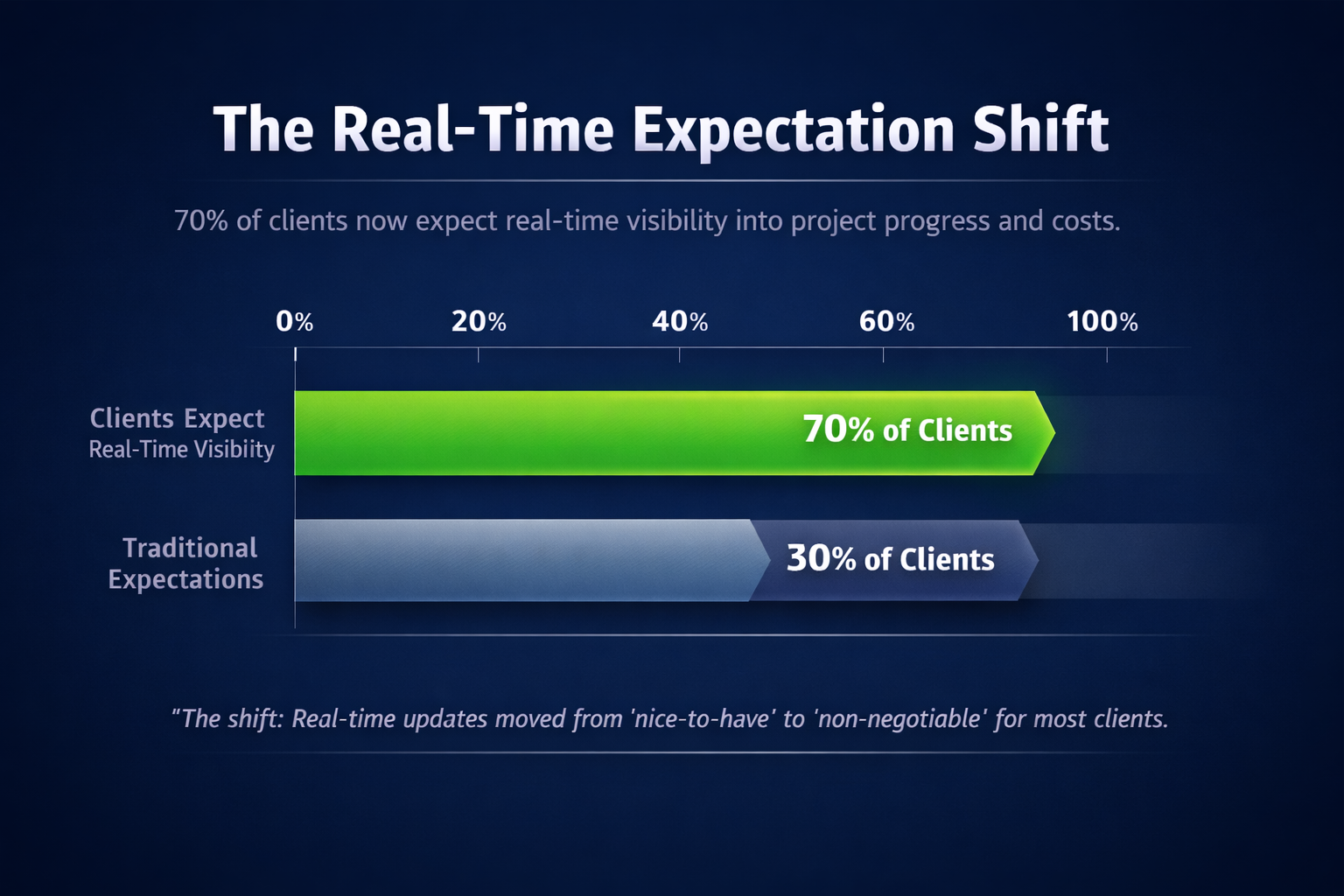
According to industry data, over 70% of clients now expect real-time visibility into project progress and costs, yet many firms still rely on spreadsheets and disconnected tools to deliver it.
At the same time, the way teams work has fundamentally changed.
Remote and hybrid delivery isn't optional anymore — it's normal. In fact, studies show that over 60% of professional services firms now operate with partially or fully remote teams, while access to traditional talent pools continues to shrink in key sectors like IT, engineering, and consulting.
This creates a brutal paradox:
- Your services are in demand
- Your margins are under pressure
- Your teams are stretched
- Your systems aren't keeping up
That's where PSA management software is supposed to step in.
A modern psa system isn't just a project tracker.
When it's doing its job properly, it supports four core areas that directly impact profitability:
- Project delivery – keeping timelines, scope, and budgets aligned
- Resource planning – making sure the right people are on the right work at the right time
- Time & billing – capturing billable hours accurately (where firms lose up to 20% of revenue when this breaks down)
- Reporting & profitability – showing leaders what's actually making money and what isn't
And this isn't just for massive consultancies.
Firms that typically need a professional services automation system include:
- Consulting and advisory firms
- IT and managed service providers
- Digital agencies and system integrators
- Engineering and technical services firms
- Internal PMOs delivering chargeback or shared services
Here's the hard truth most vendors won't say out loud: manual and fragmented systems don't scale. Research shows that services organisations using disconnected tools spend up to 30% more time on administrative work, time that should be billable or value-generating.
This is why PSA software has gained so much attention lately. Not because it's trendy — but because firms can't afford to keep running complex, people-driven businesses on tools that were never built for how services work today.
And this is also where cloud-based PSA software has quietly pulled ahead. Modern cloud professional services automation platforms are no longer "lightweight" options. They integrate cleanly with ERP, finance, HR, and CRM systems, while being designed specifically around the realities of professional services delivery — not generic operations.
In the next section, we'll break down how cloud-based PSA actually works in practice — and why, for most teams, it's become the default choice.
Cloud-Based PSA Software Explained (How It Works in the Real World)

Cloud-Based PSA Software Explained (How It Works in the Real World)
When vendors talk about cloud professional services automation, they usually focus on buzzwords: flexibility, scalability, innovation.
That all sounds nice — but what does it actually mean when you're trying to deliver projects, hit margins, and keep teams productive?
In real terms, cloud-based PSA software means your psa system lives online, updates automatically, and is accessible wherever your team works. No local servers. No painful upgrade cycles. No "IT will look at it next quarter."
And that matters more than most people realise.
According to industry research, organisations using cloud-based PSA tools deploy up to 60% faster than on-premise systems and see 20–25% higher user adoption in the first year.
Why? Because people can actually access the system, understand it, and use it without friction.
This is where App performance becomes a quiet deal-breaker.
If a PSA system is slow, clunky, or painful to use, teams won't log time properly, managers won't trust reports, and leadership ends up flying blind. Cloud PSA platforms tend to outperform here because they're built for frequent iteration, performance optimisation, and real-time usage across distributed teams.
What Cloud PSA Gets RightIn practice, cloud-based PSA software delivers a few clear advantages:
- Faster deployment – weeks, not months
- Lower upfront costs – no hardware or infrastructure spend
- Better app performance – optimised for daily use, not quarterly reporting
- Remote & hybrid ready – built for modern delivery models
- Automatic updates – new features without disruption
A great illustration of a well-balanced cloud PSA solution is Productive.io. It's designed specifically for professional services teams that need visibility across projects, resources, and financials — without sacrificing usability. Tools like this succeed not because they have the longest feature list, but because teams actually use them consistently.
That consistency is critical.
Studies show that firms with high PSA adoption accuracy capture up to 15% more billable revenue, simply because time, scope, and utilisation are tracked properly.
Where Cloud PSA Can Fall ShortCloud isn't magic — and pretending it is leads to bad decisions.
Common trade-offs include:
- Ongoing subscription costs instead of one-off licensing
- Dependency on the vendor's roadmap for feature changes
- Data residency concerns for regulated industries
For most modern professional services firms, these are manageable trade-offs. But they still need to be considered upfront — not discovered six months into implementation.
The bottom line?
Cloud PSA software works best when speed, usability, and app performance matter more than absolute infrastructure control. And for the majority of services businesses today, that's exactly the reality they're operating in.
Next, we'll look at the other side of the equation — why some organisations still choose on-premise PSA systems, and when that decision actually makes sense.
On-Premise PSA Systems Explained (Why Some Companies Still Choose Them)
Even with the rise of cloud PSA software, on-premise systems haven't disappeared — and that's not by accident.
Some organisations still choose them deliberately. But it's important to understand what on-premise really means in 2026, not what it meant ten years ago.
An on-premise psa system is hosted on your own servers (or private infrastructure), fully managed by your internal IT team or a dedicated provider.
You own the environment, control the data, and decide when — or if — upgrades happen. For some businesses, that level of control feels safer and more predictable.
And in very specific cases, they're right.
Why Some Companies Still Go On-PremiseThe biggest reason is control.
On-premise PSA software gives organisations:
- Full infrastructure control – no reliance on vendor hosting or shared environments
- Custom security and compliance – useful for highly regulated industries where data residency, auditability, or internal policies are non-negotiable
This is why on-premise PSA systems still appear in sectors like government, defence, certain financial services, and large enterprises with long-standing internal IT standards.

Trust us on this if your organisation already runs complex ERP, finance, and reporting systems on-premise, keeping PSA in the same environment can feel like the "safer" option — at least on paper.
The Trade-Offs Most Teams Underestimate
Here's where reality kicks in.
On-premise PSA systems come with costs that rarely show up clearly in the sales process:
- Slower rollout - On-premise implementations typically take 2–3× longer than cloud PSA deployments. Hardware provisioning, security approvals, and internal dependencies add friction fast.
- Higher maintenance burden - Your team is responsible for uptime, performance tuning, backups, and security patches. Studies show internal IT teams spend 30–40% more time maintaining on-premise business systems compared to cloud equivalents.
- IT dependency and upgrade friction - Every update becomes a project. New features are delayed. App performance improvements sit in a backlog. Over time, systems fall behind — not because teams don't care, but because upgrades are disruptive and risky.
And this has a direct impact on adoption.
We also found out that research consistently shows that low PSA adoption is the number one reason implementations fail. When systems are slow, outdated, or hard to access remotely, teams quietly work around them — using spreadsheets, side tools, or manual processes instead.
That's how firms end up with a PSA system that technically exists, but operationally doesn't matter.
The Honest Take
On-premise PSA software isn't "wrong." It's just far less forgiving.
It works best when:
- You have strong internal IT resources
- Compliance requirements outweigh speed and flexibility
- Change cycles are slow and predictable
For most modern professional services firms — especially those operating hybrid or remote teams — those conditions simply don't exist anymore.
Which brings us to the real question most buyers should be asking next:
When you put cloud and on-premise PSA side by side, which one actually delivers better results over time?
That's exactly what we'll break down next.
On-Premise PSA Systems Explained (Why Some Companies Still Choose Them)
On-premise PSA software still exists for one reason: control. Not innovation. Not speed. Control.
In 2026, choosing an on-premise professional services automation system means you're running the software on your own servers or private infrastructure, fully managed by your internal IT team (or a contracted provider).
You decide where the data lives, how it's secured, and when updates happen — if they happen at all.
For a small subset of organisations, that's exactly what they want.
What "On-Premise" Really Involves Today
This isn't a simple "install and forget" setup anymore. Modern on-premise PSA systems require:
- Dedicated infrastructure
- Ongoing security patching
- Performance tuning
- Backup and disaster recovery planning
- Integration maintenance with finance, ERP, and reporting tools
In other words, you're not just buying software — you're committing to long-term operational ownership.
The Strengths (Where On-Premise Can Make Sense)
There are legitimate reasons some companies still go this route:
- Full infrastructure control - Everything stays in-house. For organisations with strict internal policies or sovereign data requirements, this can be non-negotiable.
- Custom security and compliance - Highly regulated environments — government, defence, certain financial institutions — may require bespoke security models that cloud vendors can't always accommodate.
If your business already runs most core systems on-premise and has a mature IT function, keeping PSA in the same environment can feel like the safer, more familiar choice.
The Trade-Offs Most Teams Feel Later
Here's the part that usually gets underestimated.
- Slower rollout - On-premise PSA implementations regularly take 2–3 times longer than cloud alternatives. Procurement, security approvals, infrastructure setup — it all adds friction before users even see the system.
- Higher maintenance burden - Updates aren't automatic. Performance issues don't fix themselves. Internal teams end up spending significant time just keeping the system running, not improving how it's used.
- IT dependency and upgrade friction - Every change becomes a project. Feature updates get delayed. App performance improvements sit in a queue. Over time, the system falls behind business needs — even if it technically still "works."
And this is where things quietly break.
When PSA software feels slow, outdated, or hard to access — especially for remote or hybrid teams — people stop using it properly. Time tracking slips. Data quality drops. Reports lose credibility. The system exists, but decisions move elsewhere.
The Bottom LineOn-premise PSA systems aren't obsolete — but they're unforgiving. They demand strong IT capability, long planning cycles, and a tolerance for slower change.
For most modern professional services firms, that trade-off is hard to justify. Speed, usability, and adoption now matter more than absolute control — which is why cloud PSA has become the default choice for the majority of teams.
The real decision isn't about where the software lives.
It's about whether it keeps up with how your business actually operates today.
Read this article: : Top 6 AI-Powered Project Management Tools To Use In 2023
Cloud vs On-Premise PSA Software: Which One Actually Delivers?

Cloud vs On-Premise PSA Software: Which One Actually Delivers?
This is the point where most buyers want a simple answer — but the truth is, the difference isn't philosophical. It's operational.
Both cloud and on-premise PSA software can work. The real question is which one keeps working as your business grows, your teams change, and client expectations increase.
Let's break this down in plain terms, focusing on where companies actually feel the impact.
Cost Over 3–5 Years (Where Budgets Get Surprised)
On-premise PSA often looks cheaper upfront. One licence fee. One project. Done.
But over time, costs quietly stack up — servers, upgrades, IT time, security patches, performance tuning.
Industry benchmarks show that total cost of ownership for on-premise PSA is typically 25–40% higher over five years once maintenance and internal resources are factored in.
Cloud PSA spreads cost over time, which feels more expensive month to month — but it includes hosting, updates, security, and performance improvements by default. Fewer surprises, fewer hidden line items.
Speed of Implementation (Time to Value Matters)
Cloud-based PSA software usually goes live in weeks, not quarters. No infrastructure setup, no waiting on internal approvals, no environment handoffs.
On-premise implementations regularly take 2–3× longer, and delays often push real adoption months beyond "go-live."
If you need results this year, speed matters.
Scalability as Teams Grow (Or Shrink)
Cloud PSA scales with headcount and workload almost instantly. Add users, remove users, adjust capacity — no redesign required.
On-premise systems scale too, but not gracefully. Growth often means:
- Infrastructure upgrades
- Performance tuning
- New licensing negotiations
And when teams shrink?
You're still carrying the fixed cost.
Integration With Finance, HR, and CRM
Modern cloud PSA platforms are built API-first. Integrations with finance, HR, CRM, and ERP systems are usually pre-built or well-documented.
On-premise PSA integrations tend to be:
- Custom-built
- More fragile
- Harder to maintain over time
Every upstream or downstream change becomes a mini project.
Reporting and Visibility (Where Leaders Lose Trust)
This is where many PSA systems quietly fail.
Cloud PSA tools benefit from constant optimisation of reporting layers, dashboards, and real-time data access. Leaders get near-instant visibility into utilisation, margins, and project health.
On-premise systems often rely on:
- Scheduled reports
- Static dashboards
- Manual data validation
When reporting lags reality, trust erodes — and decisions move elsewhere.
User Adoption (The Real Make-or-Break Factor)
This is the biggest difference — and the one most buyers underestimate.
Research consistently shows that low adoption is the #1 reason PSA software fails, regardless of features. Systems that are slow, clunky, or hard to access simply don't get used properly.
Cloud PSA wins here because:
- Better app performance
- Easier access for remote and hybrid teams
- Faster UI improvements based on real usage
On-premise PSA can work — but only if usability doesn't fall behind. When it does, teams revert to spreadsheets and side tools, and the PSA becomes a reporting shell instead of an operational system.
Cloud vs On-Premise PSA Software: Side-by-Side Comparison
| Criteria | Cloud-Based PSA Software | On-Premise PSA Software |
| Cost (3–5 Years) | Predictable subscription, lower total cost over time | Lower upfront, higher long-term maintenance cost |
| Speed of Implementation | Weeks | Months |
| Scalability | Instantly scales up or down | Requires infrastructure and planning |
| Integrations | API-first, easier to maintain | Custom, higher maintenance |
| Reporting & Visibility | Real-time, continuously improved | Often delayed or static |
| User Adoption | Higher due to usability and access | Often lower without constant optimisation |
| Best Fit For | Modern, growing, hybrid teams | Highly regulated, IT-heavy environments |
If you're optimising for speed, visibility, adoption, and long-term flexibility, cloud PSA software is usually the better choice — and that's why it dominates most "best PSA software" shortlists today.
On-premise still has a place, but it demands discipline, resources, and tolerance for slower change.
The right decision isn't about ideology.
It's about choosing the PSA system your people will actually use — consistently, correctly, and confidently.
PSA Software Examples: What the Market Actually Looks Like
By the time most buyers start searching for psa software examples, they're already overwhelmed — and for good reason.
The PSA market isn't unified. It's fragmented, opinionated, and shaped by very different business philosophies.
There is no single "best PSA software" for everyone. What exists instead is a collection of tools built for very specific operating models. Understanding that is critical before making a decision.
Here's a realistic snapshot of how the market breaks down.
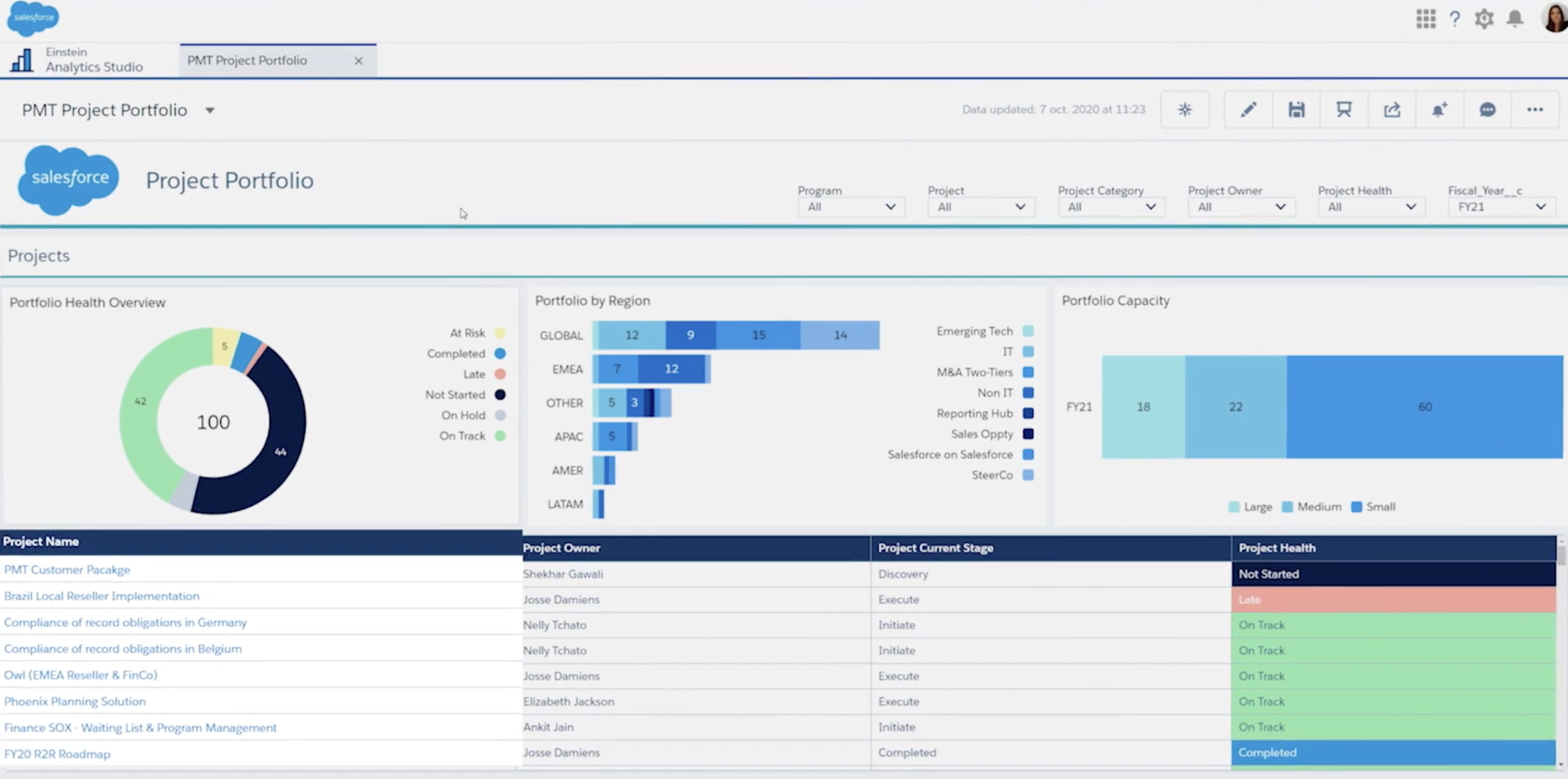
Salesforce PSA tools
Salesforce PSA tools
Salesforce-based PSA solutions benefit from a massive ecosystem and deep CRM integration.
They work best for organisations already heavily invested in Salesforce and willing to commit to configuration-heavy setups.
The trade-off is complexity — implementation and ongoing optimisation usually require specialist support.
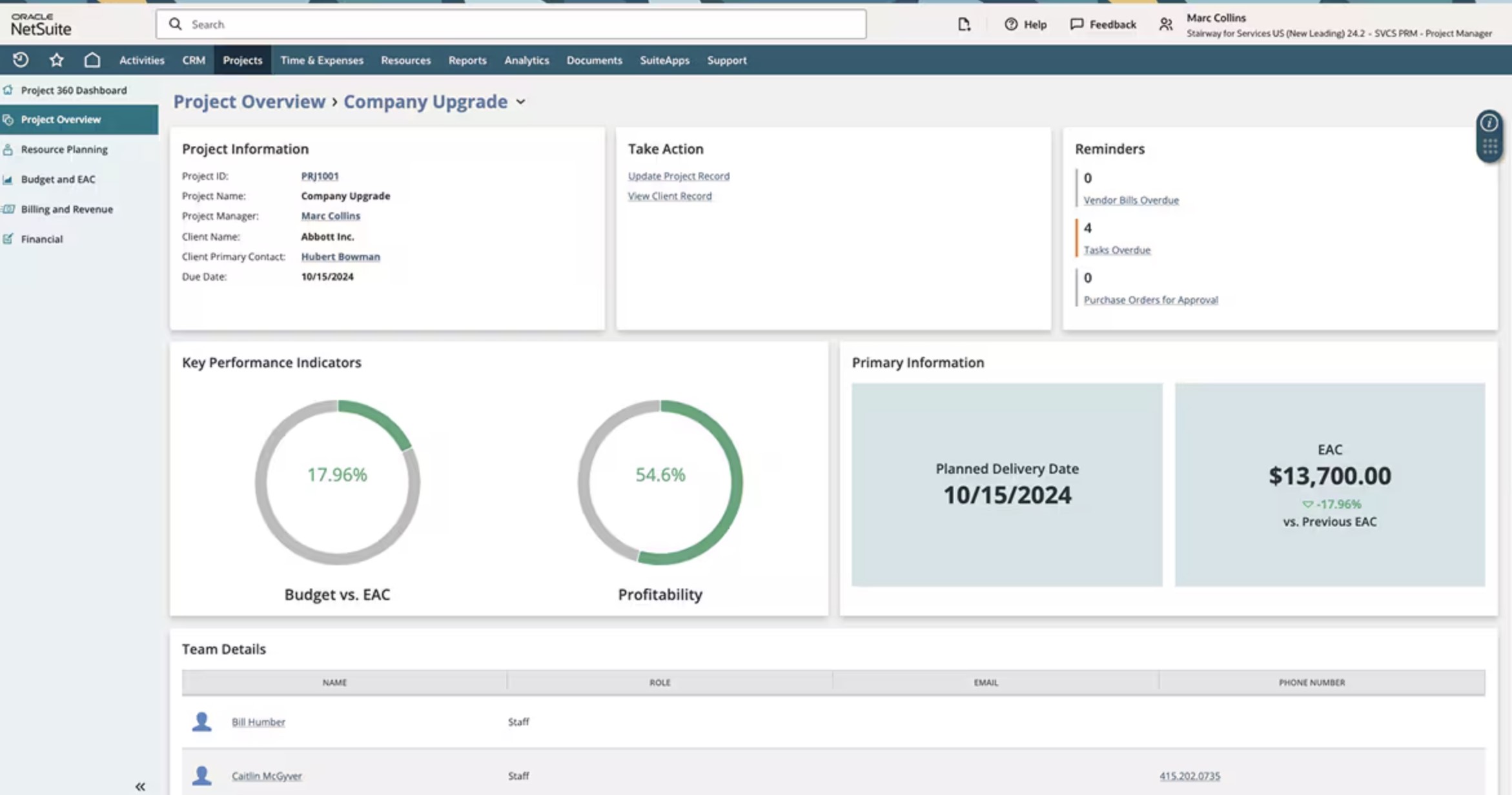
NetSuite PSA
NetSuite PSA
NetSuite approaches PSA from a finance-first perspective.
This makes it appealing to firms where project delivery is tightly tied to accounting, billing, and revenue recognition.
It's powerful, but often less flexible for teams that prioritise delivery speed and user experience over financial structure.
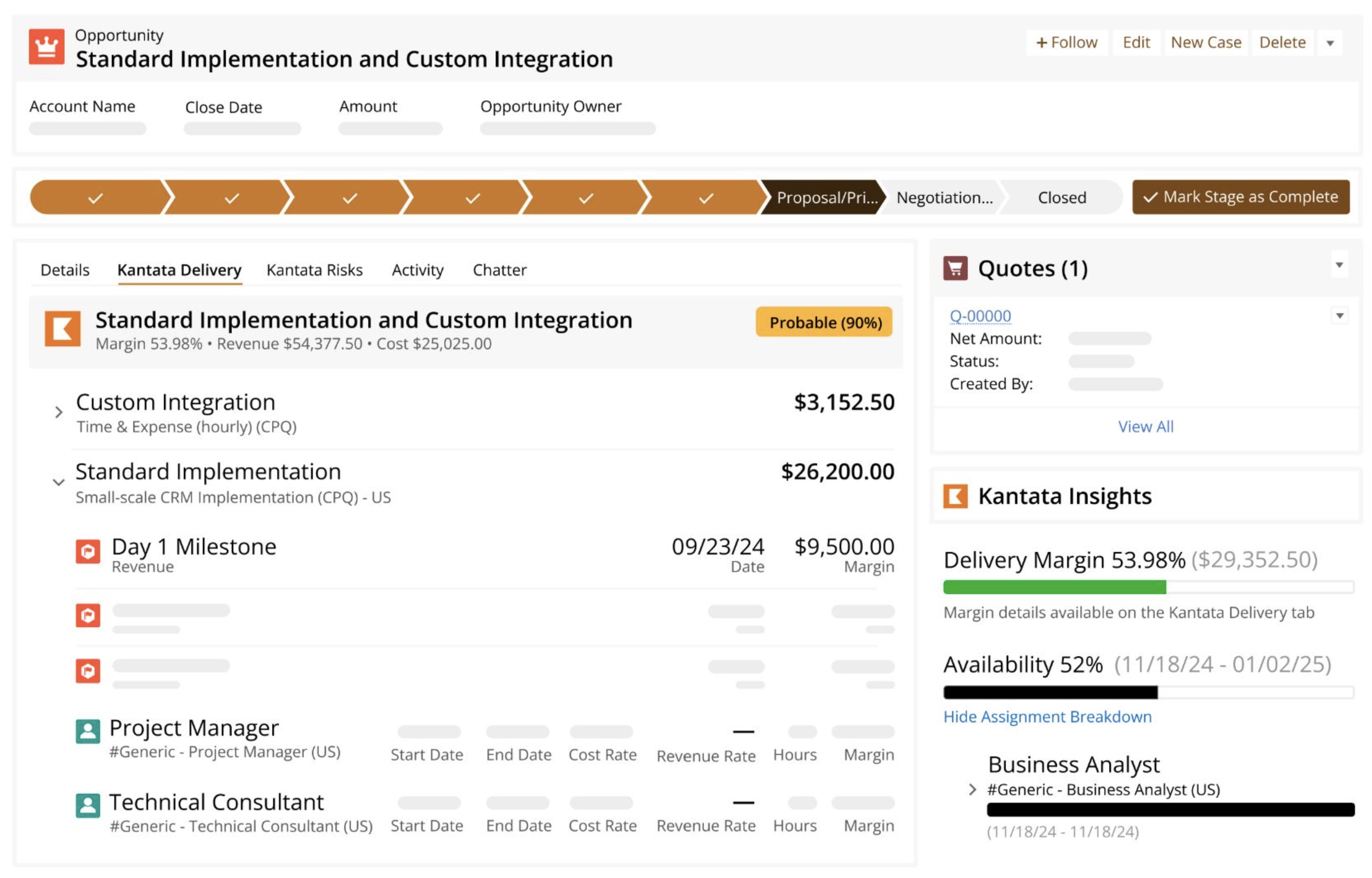
Kantata
Kantata
Kantata is well-established in the professional services space and commonly used by mature consulting and delivery organisations.
It offers strong resource management and project governance but typically suits firms with defined processes and a readiness for change management.
BigTime
BigTime
BigTime focuses on small to mid-sized professional services firms.
It's generally quicker to deploy and easier to adopt, particularly for time tracking and billing.
The limitation is depth — growing firms may outgrow it as complexity increases.
What This Tells You About the PSA Market
Notice the pattern?
Each solution solves a different slice of the problem.
- Some are finance-led.
- Some are CRM-led.
- Some are delivery-led.
And none of them are truly plug-and-play.
This fragmentation is exactly why so many PSA implementations struggle. Buyers choose tools based on brand recognition or feature lists, without fully mapping them to how their teams actually operate day to day.
That's also where most organisations realise — often too late — that PSA software alone isn't the solution.
Configuration, integration, adoption strategy, and ongoing optimisation determine whether a PSA system becomes a competitive advantage or just another underused platform.
Understanding the landscape is the first step. Choosing — and implementing — the right PSA system is where real value is created.
How to Choose the Right PSA Software for Your Business (Without Regretting It Later)
This is where most PSA decisions go wrong — not because teams pick bad software, but because they skip a hard, uncomfortable step: honest self-assessment.
PSA implementations don't fail in demos. They fail in real operations, six to twelve months later, when adoption drops, reports don't match reality, and teams quietly work around the system.
Here's a practical decision framework that actually reflects how PSA software succeeds or fails in the real world.
1. Team Size and Growth Plans (Today vs. 18 Months From Now)
A PSA system must work for the business you're becoming, not just the one you are today.
Small teams often underestimate growth. Larger teams overestimate standardisation. Both create problems.
If you're growing:
- Can the system scale users, projects, and reporting without re-implementation?
- Will performance hold up as usage increases?
Many PSA implementations fail because the software technically scales — but the setup doesn't. What worked for 15 users collapses at 60 when permissions, workflows, and reporting weren't designed for growth.
2. Service Complexity (How Messy Is Your Delivery?)
No two professional services firms deliver work the same way.
Ask yourself:
- Do you run fixed-fee, time-and-materials, retainers, or all three?
- Do projects change scope frequently?
- Are teams cross-functional or siloed?
PSA software struggles when it's forced into rigid delivery models. If your services are complex, you need flexibility in project structure, time capture, and billing logic — not just feature checkboxes.
This is a common failure point: firms buy PSA software built for "ideal" processes, not real ones.
3. Reporting Expectations (What Leadership Actually Needs)
This is where trust is won or lost.
Executives don't want more reports — they want accurate, timely insight:
- Are we profitable by project?
- Are people under- or over-utilised?
- Where are margins leaking?
PSA systems fail when reporting is treated as an afterthought. If dashboards don't reflect how the business actually operates, leaders stop using them — and decisions move elsewhere.
The best PSA implementations design reporting first, not last.
4. Internal IT Capability (Be Brutally Honest)
This one gets ignored far too often.
On-premise PSA systems assume:
- Dedicated IT resources
- Ongoing maintenance
- Comfort with upgrades and integrations
Cloud PSA systems reduce that burden — but they don't remove it entirely.
If your IT team is already stretched, choosing a system that relies heavily on internal support is a fast track to stagnation. Many PSA tools fail simply because nobody owns ongoing optimisation after go-live.
5. Change Management Readiness (The Silent Killer)
This is the real reason PSA implementations fail.
PSA software changes behaviour:
- How time is logged
- How work is prioritised
- How performance is measured
If teams don't understand why the system exists — or don't trust how data will be used — adoption drops fast.
Research shows that over 60% of PSA failures are linked to poor change management, not technology. Training, communication, and gradual rollout matter more than features.
Why the Setup Matters More Than the Software
Here's the uncomfortable truth:
Most PSA tools are capable. Most implementations are not.
PSA systems fail when:
- Growth isn't planned for
- Service complexity is oversimplified
- Reporting is bolted on later
- IT ownership is unclear
- Change is forced instead of managed
Choosing the right PSA software isn't about picking the biggest name or the longest feature list. It's about choosing a system — and a setup — that matches how your business actually runs.
Get that right, and PSA becomes a competitive advantage.
Get it wrong, and it becomes another system people tolerate instead of trust.
When Cloud PSA Works Best (And When It Doesn't)
Cloud PSA software has become the default choice for most professional services firms — but that doesn't mean it's automatically the right fit for everyone.
The real value comes from knowing when cloud PSA works exceptionally well, and when it's likely to create friction instead of clarity.
Let's break this down honestly.
Ideal Use Cases for Cloud PSA Software
Cloud-based professional services automation systems shine in environments where speed, flexibility, and visibility matter more than absolute infrastructure control.
Cloud PSA works best when:
- Teams are hybrid or fully remote - If your people work across locations, time zones, or client sites, cloud PSA removes access barriers. Teams log time, update projects, and review performance without VPNs or workarounds — which directly improves data accuracy.
- You need fast time to value - Firms that can't afford six-month implementations benefit most. Cloud PSA systems typically go live in weeks, helping teams standardise delivery and billing quickly.
- User adoption is a priority - Cloud platforms are continuously optimised for usability and app performance. When the system feels fast and intuitive, people actually use it — and that's where ROI comes from.
- Your business is evolving - New services, new pricing models, changing team structures — cloud PSA adapts faster. Configuration changes don't require infrastructure redesigns or major IT projects.
- IT resources are limited - Cloud PSA offloads hosting, updates, and security maintenance, allowing internal teams to focus on enabling the business instead of maintaining systems.
Red Flags That Suggest Cloud PSA May Not Fit
Cloud isn't the answer to everything. Ignoring its limits leads to frustration later.
Cloud PSA may struggle if:
- You operate in a highly regulated environment - Some industries require strict data residency, custom audit controls, or isolated infrastructure that cloud vendors can't fully guarantee.
- You rely heavily on legacy on-premise systems - If core ERP, finance, or reporting tools are deeply customised and on-premise, integrations may become complex or brittle.
- You require deep, low-level customisation - Cloud PSA systems prioritise configuration over custom code. If your workflows demand heavy modification at the system level, cloud may feel restrictive.
- Your organisation resists ongoing change - Cloud platforms evolve constantly. If frequent updates are seen as disruption rather than improvement, adoption can suffer.
The Overlooked Reality: Hybrid PSA Scenarios
This is the part most vendors gloss over.
In reality, many firms operate in hybrid environments:
- Cloud PSA for delivery, resourcing, and time tracking
- On-premise ERP or finance systems for compliance and reporting
- Cloud BI tools layered on top for analytics
Hybrid setups can work extremely well — if they're designed intentionally.
In hybrid PSA setups, protecting data is just as important as making sure everything works together smoothly. Since PSA platforms often integrate with on-premises ERP systems, finance tools, and cloud services, any failure or data loss can quickly disrupt operations and reporting. To lower this risk, many organizations use a unified backup and recovery solution like NAKIVO Backup & Replication. This approach helps protect PSA data, ERP systems, virtualized environments and other key infrastructure from outages, human error, and ransomware attacks, all without making operations more complicated.
The risk comes when:
- Integrations are treated as afterthoughts
- Data ownership isn't clearly defined
- Reporting logic is duplicated across systems
Done right, hybrid PSA architectures give firms the best of both worlds: cloud agility with on-premise control where it truly matters.
Cloud PSA works best when your priority is speed, adoption, and visibility. It struggles when control and deep customisation outweigh flexibility.
The mistake isn't choosing cloud or on-premise.
The mistake is assuming one size fits all — and discovering the limitations after rollout.
In the next section, we'll flip the lens and look at when on-premise PSA still makes sense, and why some organisations continue to choose it despite the trade-offs.
When On-Premise PSA Still Makes Sense
By now, it should be clear that cloud PSA works for most modern professional services firms.
But most doesn't mean all. There are still situations where an on-premise PSA system is not only justified — it's the smarter choice.
The key is knowing why you're choosing it, not defaulting to it out of habit or fear of change.
Highly Regulated Industries
In sectors like government, defence, critical infrastructure, and certain financial or healthcare environments, regulation isn't flexible — it's absolute.
These organisations often face:
- Strict data residency requirements
- Custom audit and logging standards
- Internal security frameworks that cannot rely on shared cloud environments
In these cases, on-premise professional services automation systems provide the level of control auditors and regulators expect. The trade-off is slower innovation, but for regulated organisations, compliance outweighs convenience.
If failing an audit is existential, on-premise PSA can be the right call.
Legacy Infrastructure Realities
Not every organisation is starting from a clean slate.
Some firms operate with:
- Deeply customised on-premise ERP systems
- Bespoke finance and reporting tools
- Internal data models built over many years
In these environments, forcing a cloud PSA into the ecosystem can introduce more risk than value. Integration complexity, data duplication, and reporting inconsistencies can quickly outweigh the benefits of modern deployment models.
For these firms, on-premise PSA isn't about resisting change — it's about stability. It allows them to evolve gradually rather than attempting a disruptive, high-risk transformation all at once.
Long-Term Cost Modeling Considerations
This is where on-premise PSA still surprises people.
While cloud PSA typically wins on flexibility and speed, some large organisations with stable headcount and predictable workloads can justify on-premise costs over the long term.
On-premise PSA can make sense when:
- User numbers are stable for years
- Infrastructure costs are already sunk
- Internal IT resources are in place
- Licensing models favour long-term ownership
In these scenarios, the total cost over 7–10 years may be competitive — or even lower — than ongoing cloud subscriptions. The catch? This only works when the organisation is disciplined about maintenance, upgrades, and performance optimisation.
Without that discipline, any cost advantage disappears quickly.
On-premise PSA still makes sense when control, compliance, and predictability matter more than speed and flexibility.
But it's a deliberate choice — not a safe default.
For most professional services firms today, the question isn't "Can we run PSA on-premise?"
It's "Can we afford the operational drag that comes with it?"
And that question should be answered before a single contract is signed.
The Hidden Factor: Implementation Matters More Than the Tool
Here's the part most PSA conversations conveniently skip: the software is rarely the problem.
In fact, research across professional services platforms shows that over 60% of PSA failures are caused by poor implementation and adoption, not missing features. Teams buy capable tools — then deploy them in ways that don't match how work actually happens.
This is where outcomes are decided.
Configuration Beats Features (Every Time)
Most PSA platforms are packed with features you'll never use. That's not a weakness — it's a reality.
What separates successful implementations is configuration, not capability. The way projects, roles, workflows, and permissions are set up determines whether the system feels helpful or hostile.
A poorly configured PSA:
- Forces teams into unnatural workflows
- Produces misleading data
- Creates resistance instead of trust
A well-configured one fades into the background and simply supports how people already work.
More features won't fix bad configuration. They usually make it worse.
Adoption Matters More Than Checklists
Vendors love implementation checklists. Businesses love ticking them off.
But adoption doesn't come from completing tasks — it comes from behaviour change.
- If consultants don't log time accurately, utilisation data is fiction.
- If project managers don't trust reports, they won't use them.
- If leaders question the numbers, decisions move elsewhere.
Studies show that PSA systems with high user adoption capture 10–15% more billable revenue, simply because data is timely and accurate. That doesn't happen through training sessions alone — it happens when the system fits naturally into daily work.
Reporting Setup Is More Important Than Dashboards
Dashboards look impressive. Accurate reporting is what actually matters.
Most PSA reporting issues come from decisions made early:
- What counts as billable?
- How is utilisation calculated?
- When is revenue recognised?
If these aren't aligned to how the business truly operates, dashboards become decoration — not decision tools.
The best implementations design reporting logic before dashboards are built. That's how leadership confidence is earned.
Ongoing Optimisation Beats "Set and Forget"
This is where many PSA systems quietly decay.
Teams go live, celebrate, and move on — assuming the system will "just work" indefinitely. But businesses change. Services evolve. Pricing models shift. Teams grow.
PSA systems need continuous optimisation, not constant reinvention:
- Small workflow refinements
- Reporting adjustments
- Performance tuning
- Adoption nudges
Firms that revisit their PSA setup quarterly consistently outperform those that treat go-live as the finish line.
Choosing PSA software is important.
Implementing it properly is decisive.
The difference between a PSA system that drives profitability and one that gets tolerated comes down to:
- Thoughtful configuration
- Real adoption
- Trusted reporting
- Ongoing optimisation
Get those right, and the tool almost becomes secondary.
Get them wrong, and even the "best PSA software" won't save you.
Final Verdict: Which PSA Software Actually Works?
Here's the straight answer most buyers are looking for — without the vendor spin.
For most modern professional services teams, cloud-based PSA software wins.
Not because it's trendy, but because it aligns with how work actually gets done today. Teams are hybrid, timelines are tighter, clients expect transparency, and leadership needs real-time visibility. Cloud PSA delivers faster deployment, better app performance, higher adoption, and fewer operational headaches over time.
On-premise PSA still has a place, but it's a narrow one. It works best in highly regulated environments, organisations with heavy legacy infrastructure, or businesses that require absolute control over data and security — and have the IT resources to support it. Outside of those scenarios, the trade-offs often outweigh the benefits.
But here's the real truth that cuts through the cloud vs on-premise debate:
The right PSA software is the one people actually use.
If teams avoid logging time, managers don't trust the reports, or leadership questions the data, it doesn't matter how powerful the system is. Adoption, usability, and fit matter more than deployment model, feature depth, or brand name.
So when choosing a PSA system, stop asking "Which is better?"
Start asking "Which one will our teams trust, adopt, and rely on every day?"
That answer — more than anything else — is what determines whether your PSA software actually works.
FAQs: PSA Software, Tools, and Real-World Use Cases
What is PSA software used for?
At its core, PSA software (professional services automation) is used to run service-based businesses more efficiently. It brings together project management, resource planning, time tracking, billing, and reporting in one system.
Most professional services automation tools are designed to answer a few critical questions:
- Are projects profitable?
- Are people utilised correctly?
- Are billable hours being captured accurately?
- Where are margins leaking?
For IT services, agencies, consultancies, and MSPs, PSA software replaces fragmented tools with a single operational backbone. That's why many firms now view PSA automation as essential, not optional.
This is also where the PSA software meaning becomes practical — it's not just software, it's how services stay scalable.
Is cloud PSA software secure?
Yes — when implemented correctly.
Most leading cloud PSA platforms meet enterprise-grade standards such as ISO 27001, SOC 2, and GDPR compliance. In many cases, cloud PSA is more secure than on-premise systems, simply because vendors invest far more in security, monitoring, and updates than internal IT teams can.
Security risks usually come from:
- Poor configuration
- Weak access controls
- Lack of role-based permissions
Not from the cloud model itself.
For MSPs and IT firms using msp PSA tools or a PSA ticketing system, cloud security is now the industry norm — especially when paired with identity management and audit logging.
What is the best PSA software for growing teams?
There's no universal answer — and anyone claiming otherwise is selling something.
That said, the best PSA software for growing teams usually shares these traits:
- Strong project and resource planning
- Fast app performance
- Scalable pricing
- High user adoption
- Clean integrations with finance and CRM tools
Popular PSA software examples often seen in shortlists include:
- Kantata – strong for mature professional services organisations
- Accelo – delivery-focused teams
- Zoho PSA – cost-conscious firms
- Autotask – common among MSPs
If you're comparing top PSA software or building a "top 10 PSA software" list, prioritise adoption and reporting accuracy over feature count.
Can PSA software replace project management tools?
In most professional services environments — yes.
Modern PSA project management software includes:
- Task and milestone tracking
- Resource scheduling
- Budget and scope control
- Time tracking tied directly to billing
What traditional project tools lack is financial context. PSA systems connect delivery to revenue, utilisation, and margins — which standalone project tools simply don't do.
That's why many firms replace separate PM tools once PSA is fully adopted, especially when using PSA time tracking and PSA accounting software together.
How long does a PSA system take to implement?
Implementation time depends more on scope and readiness than the tool itself.
Typical timelines:
- Cloud PSA: 4–8 weeks
- On-premise PSA: 3–6 months (sometimes longer)
What slows implementations down isn't software — it's:
- Undefined processes
- Poor data quality
- No ownership after go-live
- Weak change management
Firms that rush implementation often end up with PSA software they tolerate instead of trust — even when using well-known tools like Datto Autotask PSA.
Are there free PSA software options?
Yes — but with limits.
Most free PSA software options are either:
- Very limited in features
- Designed for solo consultants
- Missing billing, forecasting, or reporting depth
They can work as a starting point, but growing firms usually outgrow them quickly. This is why "free" rarely appears on best professional services automation software lists.
What's the difference between PSA tools for MSPs and general PSA software?
MSP PSA tools typically include:
- Ticketing and SLA management
- RMM integrations
- Asset tracking
- Client support workflows
General IT PSA software focuses more on projects, billing, and resourcing. MSPs often need both — which is why platforms like Autotask RMM are popular in managed services environments.
Final takeaway
If you're searching for:
- Top PSA software
- Best PSA tools
- Professional services automation examples
The real differentiator isn't the tool — it's how well it's implemented, adopted, and optimised over time.
That's what separates PSA software that looks good in demos from PSA systems that actually drive profit.
Most Popular Posts

Effective communication among team members is vital for the productivity and success of any organization. Surprisingly, 60% of companies lack a long-term internal communication strategy, which p...


Businesses thrive on communication for efficiency, productivity and accomplishment. When the right information is passed from the right designation in the organization, it promotes positivity an...
Categories
Blog
(2964)
Business Management
(372)
Employee Engagement
(222)
Digital Transformation
(191)
Growth
(142)
Intranets
(135)
Remote Work
(63)
Sales
(53)
Collaboration
(47)
Customer Experience
(30)
Culture
(29)
Knowledge Management
(28)
Project management
(28)
Leadership
(20)
Comparisons
(9)
News
(1)

Related Posts

Partner enablement software has become essential for businesses that rely on distributors, resellers, affiliates, consultants, suppliers, and channel partners to generate revenue. As partner networks grow, many organizations struggle with inconsisten...

Partner enablement is becoming a critical growth strategy for businesses that rely on distributors, resellers, suppliers, franchisees, or strategic partners. As partner networks expand, organizations need a better way to share information, deli...

If your business relies on resellers, distributors, affiliates, consultants, or channel partners, one small communication breakdown can quickly turn into missed revenue, frustrated partners, and lost opportunities. That's exactly why more companies a...

As businesses continue evolving through digital transformation, hybrid work, and AI-powered collaboration, the need for a modern knowledge management framework has become more important than ever. According to IDC, employees spend nearly 30% of...

Remote work is the new thing. With more modern companies moving to work from home, and with telecommuting becoming a more common way for people to work remotely, remote workers are growing in numbers. A Gallup study on the state of remote work ...


Jill Romford
I am a digital nomad, lover of exploring new places and making friends.
I love to travel and I love the internet. I take pictures of my travels and share them on the internet using Instagram.
Traveler, entrepreneur, and community builder. I share my insights on digital marketing and social media while inspiring you to live your fullest life.
Ready to learn more? 👍
One platform to optimize, manage and track all of your teams. Your new digital workplace is a click away. 🚀
Free for 14 days, no credit card required.